

Upwork Jobs Scraper: Pay, Clients & Job Alerts, No Login
Pricing
from $0.63 / 1,000 saved jobs
Upwork Jobs Scraper: Pay, Clients & Job Alerts, No Login
Scrape public Upwork job posts to find clients, track freelance demand and get new job alerts. Filter by skill, budget and client history. Get pay, skills, applicants and client spend. No login.
Pricing
from $0.63 / 1,000 saved jobs
Rating
0.0
(0)
Developer

Cliqto Media
Maintained by CommunityActor stats
0
Bookmarked
1
Total users
1
Monthly active users
6 days ago
Last modified
Categories
Features
Share
Use this Upwork jobs scraper to get public Upwork job posts by search phrase, search link, job link or job ID. Find clients, track freelance demand or get new job alerts. Each row has pay, skills, applicants and public client data such as country, spend and rating. No Upwork account or cookies needed.
Start with queries: ["web scraping"] and maxItems: 10. The new Input form has this example filled in. Pricing is $0.001 per run start + $0.0001 per source request + $0.90 per 1,000 saved jobs on the Free plan (down to $0.63 on Gold). Check RUN_SUMMARY to see why a run saved fewer jobs than you asked for.
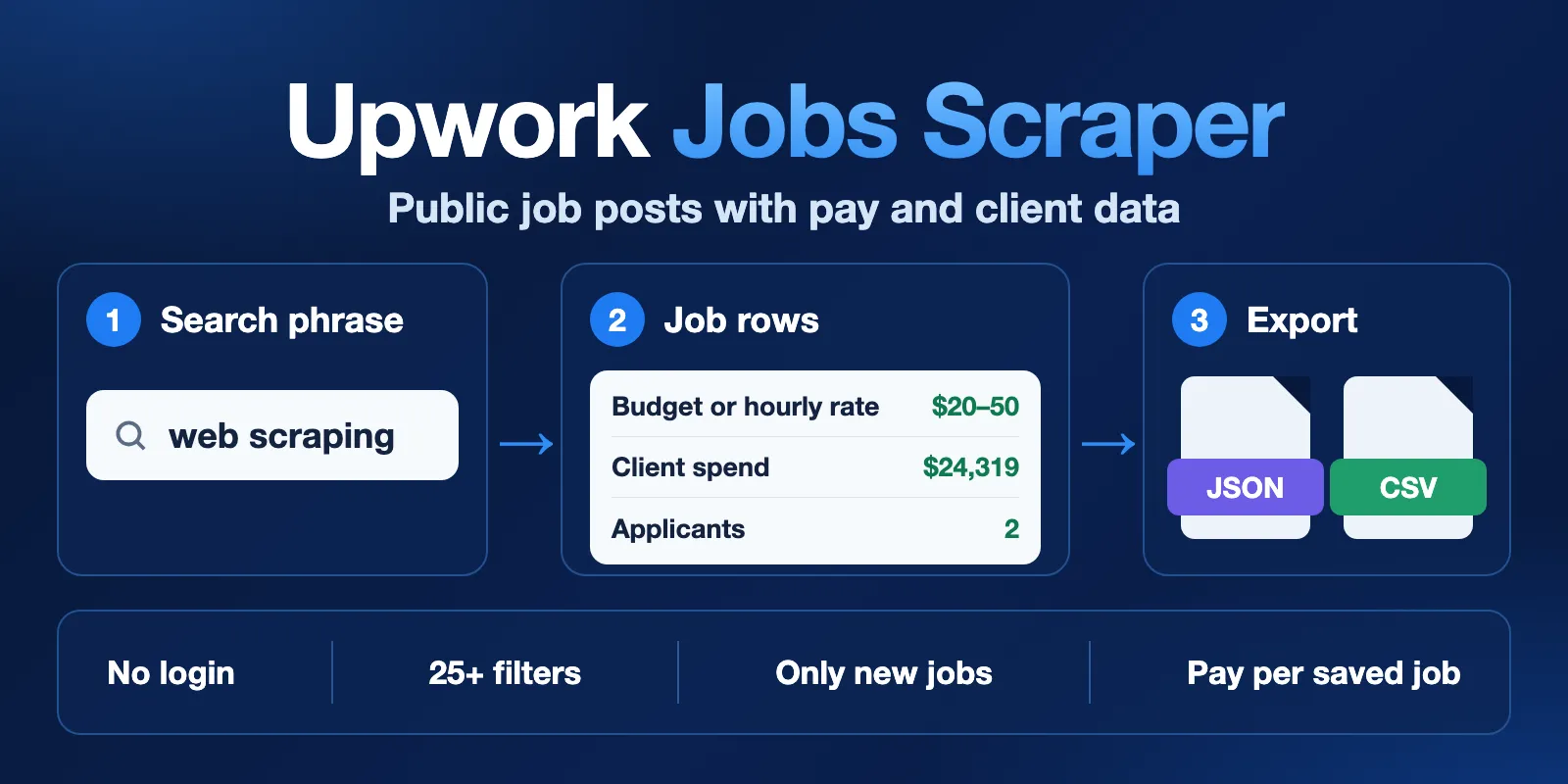
Table of contents
- What it does
- How it works
- Quick start
- Use cases
- Input
- Output
- Pricing
- Limits
- API, export and integrations
- Troubleshooting
- FAQ
- Related Actors
- Support
What it does
The Actor reads public job posts from Upwork. You can search by phrase, paste a search link from Upwork, or read known jobs by link or ID. You do not need an Upwork account, cookies or your own proxy.
Each job is one Dataset row. The row has the title, description, budget or hourly rate, payment type, experience level, skills, duration, workload and post time. With public job details on, it also has the client country, spend, rating, reviews, hires, applicants and freelancer requirements.
Use filters to keep only the jobs you want. Use Only new jobs on a schedule to get new jobs after each run.
Good fit
- Find new clients and leads for a freelance team or agency.
- Track demand, pay and skills in a job category.
- Get an alert when a new job matches your search.
- Feed job rows to a sheet, database, Slack, Notion or an AI agent.
This Actor does not log in, read private or invite-only jobs, send proposals or contact clients. It does not read freelancer profiles. It does not get client names, emails or phone numbers.
How it works
- You give search phrases, Upwork links or job IDs. Bad input stops the run before any source request.
- The Actor reads public search pages. It then reads public details for the jobs it found, unless you turn
includeDetailsoff. It slows down when Upwork asks it to. - It applies your filters and saves one row per unique job. It stops at
maxItemsor at the end of the search. - It writes a
RUN_SUMMARYreport with counts and the reason the run stopped. It can also post a short summary to Slack or Notion.
Quick start
-
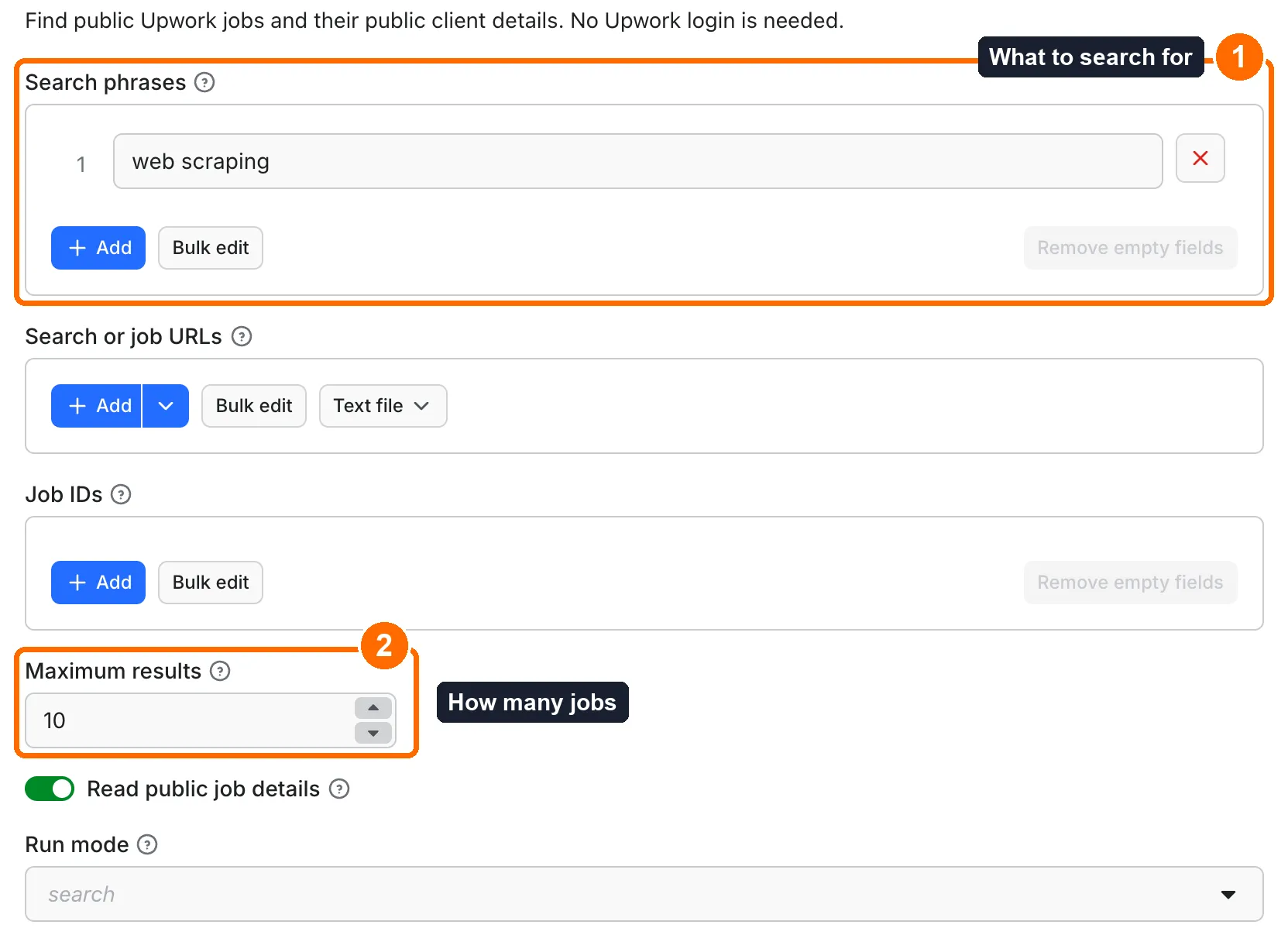
Open the Input tab. Keep
web scrapingin Search phrases, or type your own phrase (box 1). -
Keep
10in Maximum results for a first test (box 2). Filters are optional, see Input. -
Click Start.
-
When the run ends, open the Output tab. Each row is one job (box 4). Check the job title, budget, client spend and applicants.
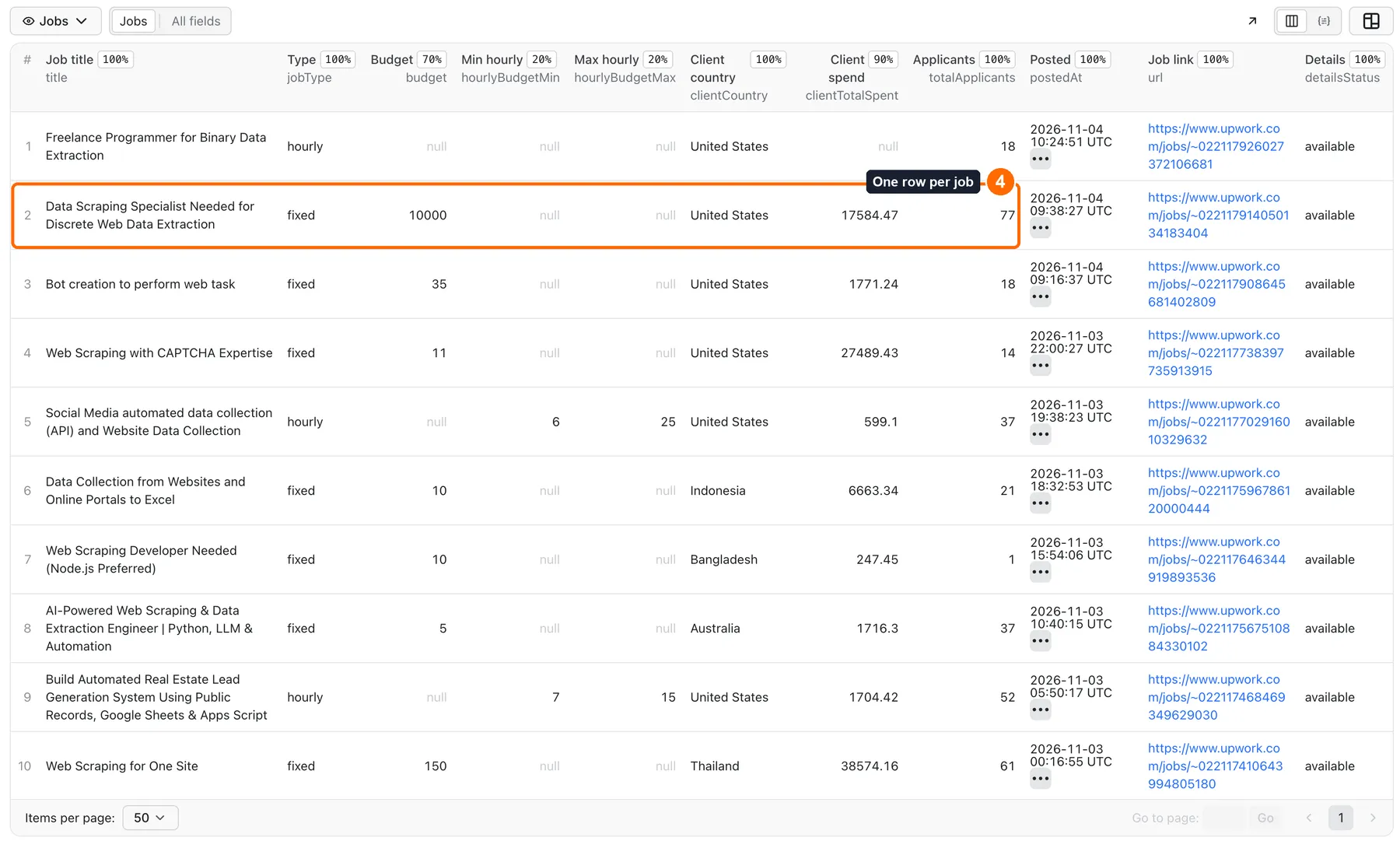
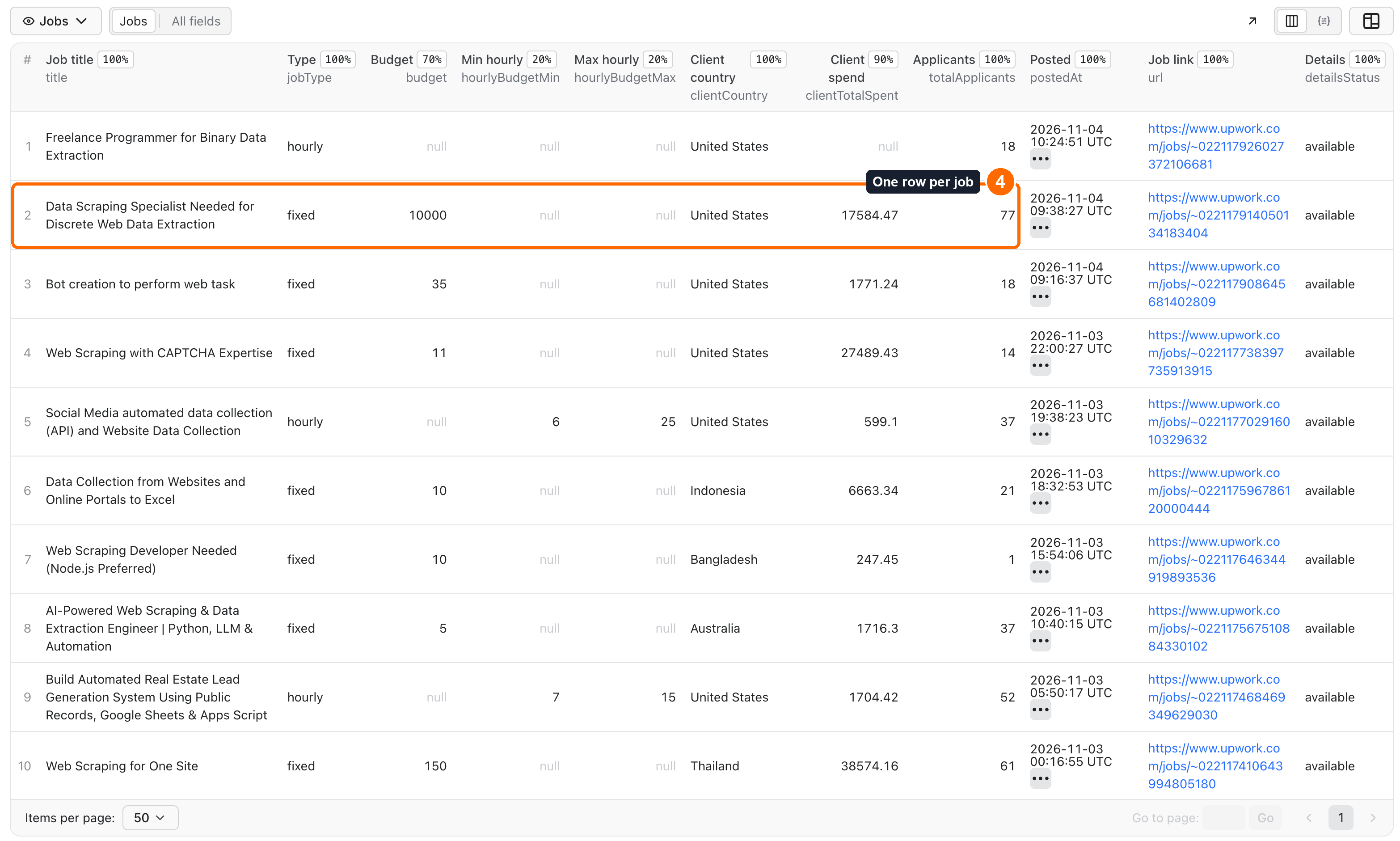
Expected result: up to 10 job rows from the newest public jobs for your phrase. Live jobs change all the time, so your rows will differ. An API call must give its own search phrase, link or job ID. An empty API input stops with EMPTY_INPUT.
Use cases
| Buyer job | Input path | Output entity | Key fields | Next integration |
|---|---|---|---|---|
| Find clients who pay well | queries, minClientTotalSpent, paymentVerified: true | One job per row | title, clientCountry, clientTotalSpent, clientRating, url | CRM or a sheet |
| Get new job alerts | queries, onlyNew: true, Apify Schedule | Only jobs not saved before | title, budget, hourlyRange, postedAt, url | Slack or Notion with deliveryConnector |
| Track market demand and pay | queries or categories, maxItems: 1000 | One job per row | skills, hourlyBudgetMin, hourlyBudgetMax, budget, category | Sheet or BI tool |
| Copy a search you made on Upwork | startUrls with an Upwork search link | One job per row | title, jobType, experienceLevel, postedAt, url | Dataset API |
| Check known jobs | jobIds or job links in startUrls | One row per public job | jobStatus, totalApplicants, hired, clientLastActivity, detailsStatus | Your own job tracker |
Input
Give at least one of queries, query, startUrls, rawUrl or jobIds. An empty input stops with EMPTY_INPUT. All other fields are optional. Filled filters all apply together (AND). Duplicate jobs are saved once. The largest run we tested saved 6,000 jobs; maxItems accepts more, but larger runs are not proven.
Input fields
| Field | Plain name | Type | Required | Default / prefill | Allowed values | Effect | Example | Recommendation |
|---|---|---|---|---|---|---|---|---|
queries | Search phrases | array | One of the source fields | Prefill: ["web scraping"] | Any | Search each phrase. Results from all searches share the result limit. Leave blank when you use URLs or job IDs. | ["web scraping"] | Start here. |
startUrls | Search or job URLs | array | One of the source fields | None | Public upwork.com search and job links | Public Upwork search or job links. Search filters in a link take the place of the same input filters. | [{"url":"https://www.upwork.com/nx/search/jobs/?q=python"}] | Use to copy a search from Upwork. |
jobIds | Job IDs | array | One of the source fields | None | Numeric ID or ID that starts with ~02 | Read public details for these job IDs. Use the numeric ID or the ID that starts with ~02. | ["2117261165716622937"] | Use for known jobs. |
maxItems | Maximum results | integer | No | Default and prefill: 10 | 1–1,000,000 | Stop after saving this many matching jobs across all inputs. The source may have fewer jobs. Pages read before this limit still count as source work. | 100 | Use 10 for a first test. |
includeDetails | Read public job details | boolean | No | Default: true | true, false | Include the public client panel, job activity and requirements. A job that is visible only to members keeps its search fields. | true | Keep on. Turn off for a cheaper list with search fields only. |
mode | Run mode | string | No | Default: search | search, details, monitor | Search finds jobs. Details reads job links or IDs. Monitor keeps a history and returns new or changed jobs. | "monitor" | Keep search unless you read known jobs or need a monitor. |
jobType | Payment types | array | No | None | hourly, fixed, weekly_retainer | Keep hourly, fixed-price or weekly retainer jobs. | ["hourly"] | Use it, as it narrows the search itself. |
experienceLevel | Experience levels | array | No | None | entry, intermediate, expert | Keep the selected experience levels. | ["expert"] | Use it, as it narrows the search itself. |
categories | Categories | array | No | None | 12 Upwork categories | Upwork category IDs. Choose a category by name. Leave blank for all categories. | ["531770282580668418"] | Pick by name in the form. |
minBudget | Minimum fixed budget | number | No | None | 0 or more | Keep jobs with a known fixed budget at or above this amount. | 500 | Use for lead lists. |
maxBudget | Maximum fixed budget | number | No | None | 0 or more | Keep jobs with a known fixed budget at or below this amount. | 5000 | Optional. |
minHourlyRate | Minimum hourly rate | number | No | None | 0 or more | Keep jobs whose known minimum hourly rate is at or above this amount. | 30 | Use for lead lists. |
maxHourlyRate | Maximum hourly rate | number | No | None | 0 or more | Keep jobs whose known maximum hourly rate is at or below this amount. | 100 | Optional. |
workload | Weekly workload | array | No | None | part_time, full_time, as_needed | Filter by the weekly time needed. | ["full_time"] | Optional. |
duration | Project duration | array | No | None | week, month, semester, ongoing | Filter by the source project duration group. | ["month"] | Optional. |
contractToHire | Contract-to-hire only | boolean | No | Off | true, false | Keep jobs marked as contract-to-hire. Needs public job details. | true | Optional. |
includeKeywords | Required words | array | No | None | Any | Each word or phrase must appear in the title, description or skills. | ["python"] | Use for must-have words. |
excludeKeywords | Excluded words | array | No | None | Any | Skip a job if any word or phrase appears in its title, description or skills. | ["wordpress"] | Use to remove noise. |
requiredSkills | Required skills | array | No | None | Any | Each skill name must be in the job skills. Match ignores letter case. | ["Python"] | Use exact skill names. |
titleContains | Words in title | string | No | None | Any | Keep jobs whose title contains this phrase. Match ignores letter case. | "scraper" | Optional. |
maxAgeMinutes | Maximum job age in minutes | number | No | None | 0 or more | Keep jobs published within this many minutes. | 1440 | Use for fresh jobs. |
maxJobAge | Job age | object | No | None | Units: minutes, hours, days, weeks | Alternative age filter with value and unit. Units: minutes, hours, days or weeks. | {"value":2,"unit":"days"} | Same as maxAgeMinutes, but easier to read. |
fromDate | Published from | string | No | None | YYYY-MM-DD or ISO time ending in Z | Keep jobs published on or after this UTC date or time. Use YYYY-MM-DD or an ISO time ending in Z. | "2026-11-01" | Optional. |
toDate | Published through | string | No | None | YYYY-MM-DD or ISO time ending in Z | Keep jobs published through this UTC date or time. A date without a time includes the full day. | "2026-11-04" | Optional. |
proposals | Proposal ranges | array | No | None | 0-4, 5-9, 10-14, 15-19, 20-49, 50- | Keep jobs with an exact applicant count inside these ranges. Needs public job details. | ["0-4"] | Use 0-4 for low competition. |
maxApplicants | Maximum applicants | integer | No | None | 0 or more | Keep jobs with a known applicant count at or below this value. Needs public job details. | 10 | Use for low competition. |
paymentVerified | Payment verified only | boolean | No | Off | true, false | Keep clients with a verified payment method. Needs public job details. | true | Use for lead lists. |
minClientTotalSpent | Minimum client spend | number | No | None | 0 or more | Keep clients with a known public lifetime spend at or above this amount. Needs public job details. | 10000 | Use to find proven buyers. |
minClientRating | Minimum client rating | number | No | None | 0–5 | Keep clients with a known public rating at or above this value. Needs public job details. | 4.5 | Removes clients with no reviews. |
minClientReviewCount | Minimum client reviews | integer | No | None | 0 or more | Keep clients with at least this many public reviews. Needs public job details. | 5 | Optional. |
clientHistory | Client hiring history | array | No | None | 0, 1-9, 10- | Keep clients with no hires, 1–9 hires or 10+ hires. | ["10-"] | Use 10- for repeat buyers. |
clientCountries | Client countries | array | No | None | Any | Client country names, such as United States. Needs public job details. | ["United States"] | Use for a market or language. |
excludeLocations | Exclude client countries | array | No | None | Any | Skip jobs from these client countries. Needs public job details. | ["India"] | Use to drop markets. |
timezones | Client timezones | array | No | None | Any | Upwork timezone filter values from a search link. | Value from a link | Copy from a link. |
onlyNew | Only new jobs | boolean | No | Off | true, false | Keep a history across runs and return jobs not saved before. Use Return changed jobs to include edits. | true | Use on a schedule. |
emitChanged | Return changed jobs | boolean | No | Off | true, false | With Only new jobs, also return jobs whose public fields changed. | true | Use to track edits. |
stateName | History name | string | No | None. History uses upwork-jobs-scraper-state | Letters, digits, hyphens; up to 51 characters | Use the same history name on later runs. Use a different name for a separate monitor. Only needed for Only new jobs. | "python-jobs" | Use one name per monitor. |
resetState | Reset job history | boolean | No | Off | true, false | Ignore the previous history for this run. New history contains only jobs saved by this run. | true | Use once, then turn off. |
skipReposts | Skip repeated job text | boolean | No | Off | true, false | Keep a history and skip a new job ID when its cleaned title and description match a job saved before. | true | Use for alerts. |
deliveryConnector | Send results to (optional) | string | No | None | Any | Your Slack, Notion or other MCP connector. After the run the Actor posts a short summary there. Connect services once in Apify Console → MCP connectors. | Your connector | Optional. |
deliveryTarget | Notion page or channel (optional) | string | No | None | Any | Where to post the summary: a Notion page link (each run is added on top of that page) or a Slack channel ID. Leave empty to let the connector decide. | Slack channel ID | Optional. |
descriptionFormat | Description format | string | No | Default: text | text, markdown, html | Return plain text, basic Markdown, or escaped HTML. Line breaks are kept. The source formatting may be simplified. | "markdown" | Keep text. |
descriptionMaxLength | Description length limit | integer | No | None | 0 or more | Trim the returned description to this many characters. Leave blank for the full public text. | 500 | Use for smaller exports. |
compact | Compact output | boolean | No | Off | true, false | Leave out the nested requirements and skill IDs. Other fields stay the same. | true | Use for smaller exports. |
excludeEmptyFields | Hide empty fields | boolean | No | Off | true, false | Leave out fields whose value is null or an empty string. | true | Keep off for fixed CSV columns. |
query | Single search phrase | string | One of the source fields | None | Any | A single search phrase. When set, it takes the place of Search phrases. | "python" | Use queries in the form. |
rawUrl | Single search URL | string | One of the source fields | None | Public upwork.com search link | A public Upwork job search link. Its filters take the place of the same input filters. | "https://www.upwork.com/nx/search/jobs/?q=python" | Use startUrls for many links. |
sort | Search order | string | No | Default: recency | recency, relevance+desc | Read newest jobs first, or use the source relevance order. Large searches may be split by category. | "recency" | Keep recency for alerts. |
perPage | Jobs per search page | integer | No | Default: 50 | 1–50 | Read this many jobs per page. A smaller page reads less data when you need only a few jobs. | 20 | Keep 50. |
page | First search page | integer | No | Default: 1 | 1–101 | Start from this page. Page 1 starts at the newest matching jobs. | 2 | Keep 1. |
pagesToScrape | Search pages per input | integer | No | None | 1 or more | Optional page limit for each search. Leave blank to keep paging until the result limit or the end. | 3 | Use to cap source requests. |
subcategories | Subcategory IDs | array | No | None | Any | Upwork subcategory IDs from a search link. | ID from a link | Copy from a link. |
skillIds | Skill IDs | array | No | None | Any | Upwork skill IDs from a search link. | ID from a link | Copy from a link. Use requiredSkills for names. |
hourlyRateRange | Hourly range from search link | string | No | None | Any | Use an Upwork hourly range such as 20-50. For a simple minimum or maximum, use the hourly rate fields below. | "20-50" | Use minHourlyRate unless you copy a link. |
fixedPriceRange | Fixed budget ranges from search link | string | No | None | Any | Use Upwork budget ranges such as 100-499,500-999. For a simple minimum or maximum, use the budget fields below. | "100-499,500-999" | Use minBudget unless you copy a link. |
customFilters | Custom field filters | array | No | None | Operators: includes, notIncludes, equals, notEquals | Filter public fields with includes, notIncludes, equals or notEquals. Use objects with key, operator and value. Filters are combined with AND. | [{"key":"jobType","operator":"equals","value":"hourly"}] | Use for rare needs. |
concurrency | Jobs at a time | integer | No | Default: 4 | 1–8 | Read up to this many jobs together. The Actor waits when the source asks it to slow down. | 2 | Lower to 1 or 2 if you see rate limits. |
categories uses Upwork IDs. In the form you pick the name. In the API use the IDs from the form or from an Upwork search link. customFilters[].key accepts title, description, jobType, experienceLevel, budget, tags, skills, absoluteDate, paymentVerified, clientLocation, clientCountry, allowedApplicantCountries, clientRating, clientTotalSpent and proposals.
Interacting settings
| When | Input A | Input B | Effective behavior | Example | Cost/result effect |
|---|---|---|---|---|---|
| Both search fields are filled | query | queries | query takes the place of queries. | query: "python" and queries: ["java"] search only for python. | Fewer searches, fewer source requests. |
| A link has a filter and the same input is filled | startUrls or rawUrl | Same filter, such as jobType | The filter in the link wins for that link. | A link with t=1 keeps fixed jobs even with jobType: ["hourly"]. | Rows follow the link. |
| A client filter is on and details are off | minClientRating, minClientTotalSpent, clientCountries, paymentVerified and similar | includeDetails: false | The run stops with DETAIL_FILTER_NEEDS_DETAILS. | includeDetails: false with paymentVerified: true. | One start event, no rows. |
| You need edits as well as new jobs | onlyNew: true | emitChanged: true | New jobs and changed jobs are saved. changeType tells which. | onlyNew: true, emitChanged: true. | Changed rows are charged as saved jobs. |
| You choose monitor mode | mode: "monitor" | onlyNew, emitChanged | Both turn on. You can set emitChanged: false. | mode: "monitor". | The first run saves all matches. Later runs save only new or changed jobs. |
| You run two separate monitors | stateName | onlyNew or skipReposts | Each name keeps its own history. Without a name, all runs share upwork-jobs-scraper-state. | stateName: "python-jobs". | A new name starts over, so the first run saves all matches. |
| You restart a history | resetState: true | onlyNew | The run ignores the old history. The new one has only this run's jobs. | resetState: true once, then remove it. | Saves all matches again, and they are charged again. |
| Both age filters are filled | maxJobAge | maxAgeMinutes | maxJobAge wins. | maxJobAge: {"value": 2, "unit": "days"}. | Older jobs are filtered and not charged as saved jobs. |
Input examples
Smallest search
Expected behavior: reads the newest jobs for the phrase, with public details. Expected output: up to 10 job rows. Limit or cost note: about $0.0106 on Free, $0.0079 on Gold.
Well-paying clients only
Expected behavior: searches, reads details, then keeps only matching jobs. Expected output: up to 100 rows. A narrow filter may give fewer. Limit or cost note: rows that do not match are free, but the source requests used to check them are paid.
New job alerts on a schedule
Expected behavior: the first run saves up to 50 jobs as a starting point. Later runs save only jobs not saved before. Expected output: new jobs, plus a short summary in Slack or Notion. Limit or cost note: a run with no new jobs still pays for the start and source requests.
Known jobs by link or ID
Expected behavior: reads public details for this job.
Expected output: one row. A job that is hidden from visitors gives no row and adds to membersOnly in RUN_SUMMARY.
Limit or cost note: no row means no job event.
Output
The Dataset has one row per saved job. The default table shows the main columns. All fields are in the JSON, CSV and API exports. RUN_SUMMARY in the default key-value store has the counts and stop reason.
Output fields
| Field | Meaning | Type | Can be empty? | Example / enum | Source / notes |
|---|---|---|---|---|---|
jobId | Upwork job ID. | string | No | "2117926027372106681" | Job post |
id | The same ID as jobId, for imports. | string | No | "2117926027372106681" | Job post |
ciphertext | Upwork ID used in the job link. | string | No | ~022117261165716622937 | Job post |
title | Job title, with contact details removed. | string | No | See example below | Job post |
description | Full public job text, with email addresses and phone-like numbers removed. | string | Yes | Full job text | Job post |
budget | Fixed-price budget. Null for hourly jobs or an undisclosed budget. | number | Yes | 10000 | Job post |
budgetCurrency | Currency code of the fixed budget. | string | Yes | "USD" | Job post |
hourlyRange | Known minimum and maximum hourly rates. Null limits mean undisclosed. | object | Yes | {"min": 6, "max": 25} | Job post |
hourlyBudgetMin | Known minimum hourly rate. | number | Yes | 6 | Job post |
hourlyBudgetMax | Known maximum hourly rate. | number | Yes | 25 | Job post |
weeklyRetainerBudget | Weekly retainer budget, when public. | number | Yes | Null | Job post |
jobType | hourly, fixed or weekly_retainer. | string | Yes | hourly, fixed, weekly_retainer | Job post |
experienceLevel | entry, intermediate or expert. | string | Yes | entry, intermediate, expert | Job post |
skills | Public skill names. | array | Yes | ["Data Extraction Tools", "Software Debugging"] | Job post |
skillIds | Public skill IDs. | array | Yes | ["1253342873018576896", "1031626781403627520"] | Job post |
duration | Project duration label. | string | Yes | "Less than 1 month" | Job post |
durationWeeks | Project duration in weeks. | number | Yes | 3 | Job post |
workload | Weekly work requirement. | string | Yes | "Less than 30 hrs/week" | Job post |
postedAt | Publication time reported by Upwork. | string | Yes | "2026-11-04T10:24:51.983Z" | Job post |
absoluteDate | The same publication time as postedAt. | string | Yes | "2026-11-04T10:24:51.983Z" | Job post |
createdAt | Time the job was created. | string | Yes | "2026-11-04T10:24:49.148Z" | Job post |
renewedAt | Source renewal or sourcing time, if given. | string | Yes | "2026-11-04T09:55:21.845Z" | Job post |
clientCountry | Client country name. Source country codes are converted to country names. Null when hidden. | string | Yes | "United States" | Public job details |
clientCountryCode | Two-letter ISO country code from the public client country name. Null when the name cannot be matched. | string | Yes | "US" | Actor |
clientCity | Public client city, when visible. | string | Yes | City name | Public job details |
clientTimezone | Public client timezone label. | string | Yes | "America/Chicago (UTC-06:00)" | Public job details |
clientPaymentVerified | Whether the public page shows a verified payment method. | boolean | Yes | false | Public job details |
paymentVerified | The same value as clientPaymentVerified. | boolean | Yes | false | Public job details |
clientTotalSpent | Public lifetime client spend. A hidden amount stays null. | number | Yes | 17584.47 | Public job details |
clientSpentCurrency | Currency of the public client spend. | string | Yes | "USD" | Public job details |
clientRating | Public client rating. Null when the client has no reviews. | number | Yes | 5 | Public job details |
clientReviewCount | Public review count. | number | Yes | 0 | Public job details |
clientTotalHires | Public total client assignments. | number | Yes | 10 | Public job details |
clientActiveHires | Public active assignments. | number | Yes | 3 | Public job details |
clientTotalHours | Public hours billed. | number | Yes | 0 | Public job details |
clientMemberSince | Public client account creation date. | string | Yes | "2021-03-17T00:00:00.000Z" | Public job details |
clientIndustry | Public client industry. Null when empty. | string | Yes | "Health & Fitness" | Public job details |
clientCompanySize | Company size group reported by Upwork. The group code is not a staff count. | number | Yes | 10 | Public job details |
clientHireRatePercent | Null when this value is hidden from visitors. | number | Yes | Null | Public job details |
clientAvgHourlyRate | Null when this value is hidden from visitors. | number | Yes | Null | Public job details |
category | Broad job category. | string | Yes | "Data Science & Analytics" | Job post |
subcategory | Job subcategory. | string | Yes | "Data Extraction/ETL" | Job post |
contractToHire | Whether the job is marked contract-to-hire. | boolean | Yes | false | Job post |
totalApplicants | Exact public applicant count. Null means unknown. | number | Yes | 18 | Public job details |
proposals | The same applicant count as totalApplicants. | number | Yes | 18 | Public job details |
interviewing | Public count of invited interviews. | number | Yes | 3 | Public job details |
invitesSent | Public invitations sent. | number | Yes | 5 | Public job details |
unansweredInvites | Public unanswered invitations. | number | Yes | 2 | Public job details |
hired | Public hires on this job. | number | Yes | 0 | Public job details |
positionsToHire | Number of positions on this job. | number | Yes | 0 | Public job details |
clientLastActivity | Last client activity time shown on the job page. | string | Yes | "2026-11-04T10:27:50.616Z" | Public job details |
allowedApplicantCountries | Applicant country preferences from the public job requirements. | array | Yes | ["United States"] | Public job details |
qualifications | Public freelancer requirements. Missing values stay null; ANY or 0 means no requirement. | object | Yes | See note below | Public job details |
jobStatus | open or closed, from the public page. | string | Yes | open, closed | Public job details |
detailsStatus | available, not_requested, members_only, not_found or unavailable (the source gave no usable answer twice, so the row keeps search fields only). | string | No | available, not_requested, members_only, not_found, unavailable | Actor |
source | Source website. | string | No | "https://www.upwork.com" | Actor |
url | Public Upwork job link. | string | No | "https://www.upwork.com/jobs/~022117926027372106681" | Job post |
query | Search phrase that found the job. Null for a direct lookup. | string | Yes | "web scraping" | Actor |
fetchedAt | UTC time when the job was read. | string | No | "2026-11-04T12:08:00.361Z" | Actor |
firstSeenAt | First saved time in this monitor history, or this run. | string | Yes | "2026-11-04T12:08:00.361Z" | Actor |
lastSeenAt | Last time this row was saved. | string | Yes | "2026-11-04T12:08:00.361Z" | Actor |
changeType | new or changed, based on the monitor history. | string | Yes | new | Actor |
tags | The same public skill names as skills. | array | Yes | ["Data Extraction Tools", "Software Debugging"] | Job post |
clientLocation | The same public country as clientCountry. | string | Yes | "United States" | Public job details |
clientCountryRaw | Country text returned by Upwork before conversion. | string | Yes | "United States" | Public job details |
qualifications has countries, regions, englishLevel, freelancerType, minHours, minHoursPerWeek, minJobSuccess, portfolioRequired and risingTalent. ANY or 0 means no requirement.
Output entities and surfaces
| Situation | Dataset/API/KVS/live view | Result shape | User action |
|---|---|---|---|
| Normal run | Dataset rows, RUN_SUMMARY status: "complete" | One row per saved job | Use the rows. |
| No jobs match, or no new jobs | Empty Dataset, RUN_SUMMARY status: "not_found" with filtered or unchanged counts; run SUCCEEDED | No rows | Change the phrase or filters. For a monitor this is normal. |
| Job hidden from visitors | No row for a direct lookup, status: "restricted", membersOnly count. Search rows keep search fields with detailsStatus: "members_only" | Fewer fields | Open the url while logged in on Upwork. |
| Your cost limit is reached | Saved rows stay, partial: true, stopReason: "CHARGE_LIMIT"; run SUCCEEDED | Partial rows | Raise the limit and run again. |
| Upwork gives no usable details for one job | The row keeps search fields with detailsStatus: "unavailable"; a direct lookup lists the job in unprocessed | Fewer fields | Run that job again later. |
| Source block, too long a wait, timeout or stop | Saved rows stay, partial: true, stopReason tells why; run FAILED | Partial rows or none | See Troubleshooting. |
| Bad input | No rows, status: "error", stopReason tells why; run FAILED | No rows | Fix the input. |
Output example
Real row, some fields left out:
Send results to Slack or Notion
Pick your connector in the optional deliveryConnector field. After the run saves its data, the Actor posts a short summary (up to 25 rows and a link to the full dataset) there. Put a Notion page link or a Slack channel ID in deliveryTarget: in Notion every run is added on top of that one page, so your workspace does not fill up with new pages. A delivery error never fails the run and costs nothing extra. Connect a service once in Apify Console → MCP connectors.
Use case → fields
| Use case | Fields to read first |
|---|---|
| Lead list | title, clientCountry, clientTotalSpent, clientRating, clientPaymentVerified, url |
| Job alert | title, budget, hourlyRange, skills, postedAt, changeType, url |
| Market research | category, subcategory, skills, experienceLevel, hourlyBudgetMin, hourlyBudgetMax, budget |
| Competition check | totalApplicants, interviewing, invitesSent, hired, clientLastActivity |
Pricing
Pricing unit
You pay per event. Apify platform usage is included in these prices.
| Event | When | Free | Bronze | Silver | Gold and up |
|---|---|---|---|---|---|
Run start (apify-actor-start) | Once per GB of run memory, at least once. The default 256 MB is one event. | $0.001 | $0.001 | $0.001 | $0.001 |
Source request (source-page) | One search page or one batch of up to 6 job details | $0.0001 | $0.0001 | $0.0001 | $0.0001 |
Saved job (job) | One job row saved to the Dataset | $0.00090 | $0.00081 | $0.00072 | $0.00063 |
- No results: you pay for the start and source requests.
- A saved row with fewer fields (
detailsStatusismembers_onlyorunavailable) is charged as a saved job. - Filtered jobs and unchanged monitor jobs are not charged as saved jobs. The source requests used to read them are paid.
- A partial run pays only for the work it did. A failed request never costs more than a successful one.
- Use Maximum cost per run (
maxTotalChargeUsdin the API) to set a limit. The smallest limit is $0.0022. When the limit is reached, the run keeps its saved rows and ends asSUCCEEDEDwithstopReason: "CHARGE_LIMIT".
Cost examples
Measured source requests. Your count depends on the search and on how many jobs have details.
| Scenario | Input scope | Expected item/event count | Base charge | Optional charge | Stop/cap behavior |
|---|---|---|---|---|---|
| First test | 1 phrase, maxItems: 10 | 1 start, 6 source requests, 10 jobs | $0.0106 Free, $0.0079 Gold | None | Stops at 10 jobs |
| Small list | 1 phrase, maxItems: 100 | 1 start, about 29 source requests, 100 jobs | $0.0939 Free, $0.0669 Gold | None | Stops at 100 jobs |
| Market sample | 1 phrase, maxItems: 1000 | 1 start, about 284 source requests, 1,000 jobs | $0.9294 Free, $0.6594 Gold | None | Stops at 1,000 jobs or your cost limit |
| Large export | Broad phrase, maxItems: 6000 | 1 start, about 1,215 source requests, 6,000 jobs | $5.5225 Free, $3.9025 Gold | None | Needs a longer timeout |
| Monitor with no new jobs | onlyNew: true, 1 job checked | 1 start, 1 source request, 0 jobs | $0.0011 | None | Ends with no rows |
Limits
- Only public data. There is no login, so private and invite-only jobs are not available.
- Some jobs show details only to members. In our 6,000-job test, 1,055 jobs had no public details. These rows keep the search fields and have
detailsStatus: "members_only". clientAvgHourlyRateandclientHireRatePercentare hidden from visitors, so they stay null.- The largest tested run saved 6,000 jobs in about 20 minutes. The default timeout is 300 seconds. Raise it for runs over about 1,000 jobs.
- A big search is split by category, type and experience level to get past the source limit of about 5,000 results per search. So a big result has no single global order.
- If the source still holds back part of a search, the summary says
SOURCE_CAPandsourceCapPartitionscounts the affected parts. skipRepostsskips only exact repeats of the cleaned title and description. Reworded reposts are saved.- A monitor history keeps up to 100,000 jobs. Closed and then the oldest jobs are dropped first.
titleanddescriptionhave email-like and phone-like text replaced with[contact removed].- You are responsible for how you use the data and for following Upwork's Terms and the laws that apply to you.
API, export and integrations
- API: start a run with
POST https://api.apify.com/v2/acts/cliqtomedia~upwork-jobs-scraper/runs, using the same JSON as the form. Read rows fromhttps://api.apify.com/v2/datasets/<defaultDatasetId>/items?view=jobs. Leave outview=jobsto get all fields. Read the report fromRUN_SUMMARYin the default key-value store. - Export: download the Dataset as JSON, CSV, Excel or XML from the Output tab or the API.
- Scheduling: create an Apify Schedule with
onlyNew: true. The next system readsjobId,changeTypeandurl. - Webhooks / no-code: use an Apify webhook on run success, then read the Dataset with Make, Zapier or n8n. Use
jobIdas the unique key. - Slack / Notion: set
deliveryConnector, see Send results to Slack or Notion.
Use with AI agents (MCP)
- MCP server URL with only this Actor:
https://mcp.apify.com?tools=cliqtomedia/upwork-jobs-scraper. - Smallest input:
{"queries": ["web scraping"], "maxItems": 10}. - Key fields:
title(job name),hourlyRangeorbudget(pay),clientTotalSpent(public lifetime client spend),totalApplicants(exact public count),url(job link). - Typical run: 10 jobs in about 6 seconds, up to about a minute if Upwork refuses the first requests, about $0.0106 on the Free plan.
- Limits: public data only, keep
maxItemssmall in agent chats, and readstopReasoninRUN_SUMMARYwhen the Dataset has fewer rows than asked.
Troubleshooting
The run has no rows
Symptom: the run is SUCCEEDED and the Dataset is empty.
Likely reason: no job matched, or a monitor found nothing new.
Check: scanned, filtered and unchanged in RUN_SUMMARY.
Action: use fewer filters or a wider phrase. For a monitor, wait for new jobs.
The search returned jobs that do not match my phrase
Symptom: a very unusual phrase returns a few jobs that look unrelated.
Likely reason: Upwork's own search also returns loosely related posts.
Check: title and description in the rows.
Action: add includeKeywords or titleContains to keep only jobs with your exact words.
The run stops with DETAIL_FILTER_NEEDS_DETAILS
Symptom: the run is FAILED and has no rows.
Likely reason: a client or applicant filter is on, but includeDetails is false.
Check: stopReason in RUN_SUMMARY.
Action: set includeDetails to true, or remove the filter.
The run saved fewer jobs than maxItems
Symptom: fewer rows than maxItems.
Likely reason: the search ended, filters removed jobs, or the run stopped early.
Check: saved, filtered, partial and stopReason in RUN_SUMMARY.
Action: for CHARGE_LIMIT, raise the cost limit. For DEADLINE, raise the timeout. For SOURCE_CAP, narrow the search by category or date.
The run failed with RATE_LIMIT_WINDOW or SOURCE_BLOCKED
Symptom: the run is FAILED. Rows saved before the stop stay in the Dataset.
Likely reason: Upwork asked for a long wait or refused the request with a browser check. The Actor waits, opens a new connection and tries up to twice more. It does not solve these checks.
How often: in our short test runs Upwork refused the first requests in 25 of 68 runs. The Actor recovered in 23 of those 25, and these runs took about 15–50 seconds instead of about 6. The other 2 runs (about 3% of all) ended with SOURCE_BLOCKED and cost about $0.0013. Starting the run again usually works. In our latest runs of 1,000 and 6,000 jobs Upwork refused nothing.
Check: stopReason, rateLimits, retries and sourceRefusals in RUN_SUMMARY.
Action: run again later, and lower concurrency to 1 or 2. This does not mean that there are no jobs.
Fields are empty for some jobs
Symptom: client fields are null and detailsStatus is members_only, not_requested or unavailable.
Likely reason: Upwork shows these details only to members, includeDetails is off, or Upwork gave no usable answer for this job twice.
Check: detailsStatus in the row.
Action: keep includeDetails on. For a members_only job, open url while logged in on Upwork. A monitor remembers a job with empty fields: it sends the job again with full details only when emitChanged is on. To get an unavailable job right away, run it by its link or ID.
The history name is not available
Symptom: warnings in RUN_SUMMARY has STATE_NAME_UNAVAILABLE.
Likely reason: this name is used by a store that this run cannot open.
Check: stateStoreId in RUN_SUMMARY.
Action: nothing is needed, as the Actor uses a similar name. To control the name, set a new stateName.
FAQ
Do I need an Upwork account or cookies?
No. The Actor reads only what Upwork shows to visitors. Do not give it your login.
Can I scrape Upwork jobs by a search link?
Yes. Run your search on Upwork, copy the link and paste it in startUrls. Filters in the link are used.
How do I get only new jobs?
Set onlyNew: true and run the Actor on an Apify Schedule. The first run saves all matches up to maxItems as a starting point. Later runs save only jobs not saved before.
Why do I pay for source requests when no job is saved?
The Actor must read the source to find out if a job matches. So each source request is charged, even if your filters remove all jobs. Make filters part of the search when you can, for example jobType or experienceLevel.
Why is clientRating null?
The client has no public reviews yet. null means that the value is unknown or hidden, and it is not the same as 0.
How fresh is the data?
Each row is read during the run, and fetchedAt shows the time. Rows are not updated later. Run again or use a schedule for fresh data.
Can this Actor apply for jobs or contact clients?
No. It only reads public job posts.
Is this an official Upwork product?
No. This Actor is not affiliated with or endorsed by Upwork.
Related Actors
- Remote Jobs Aggregator - RemoteOK, WWR & Himalayas, No login: add remote jobs from other public boards.
- Wellfound Jobs Scraper: Startup Jobs to CSV & JSON: get startup jobs when you look for full-time roles.
- Google Jobs Scraper - Salary, Apply Links & Dates, No Login: search jobs from many job sites.
Support
Open the Issues tab of this Actor. Include the run ID, your input without private data, and the stopReason from RUN_SUMMARY.
This Actor is not affiliated with or endorsed by Upwork.


