

PDF to Markdown for LLMs & RAG Chunks - No Login
Pricing
from $2.24 / 1,000 document (text pages)s
PDF to Markdown for LLMs & RAG Chunks - No Login
Convert public PDF URLs to clean Markdown for LLMs and RAG: headings, lists, GFM tables and ready-made chunks with page numbers and token estimates. OCR for scanned pages. No login, no API key.
Pricing
from $2.24 / 1,000 document (text pages)s
Rating
0.0
(0)
Developer

Cliqto Media
Maintained by CommunityActor stats
0
Bookmarked
2
Total users
1
Monthly active users
2 days ago
Last modified
Categories
Features
Share
Convert public PDF links into clean Markdown for LLMs and RAG: real headings, lists, GitHub-style tables and ready-made chunks with page numbers and token counts. Scanned pages are read with OCR. No login and no API key: paste a PDF URL, click Start, and a 15-page paper is done in about 3 seconds for $0.0082 (Free plan).
It is for developers who feed PDFs into vector databases, AI agents and knowledge bases and do not want to run their own PDF parser and OCR.
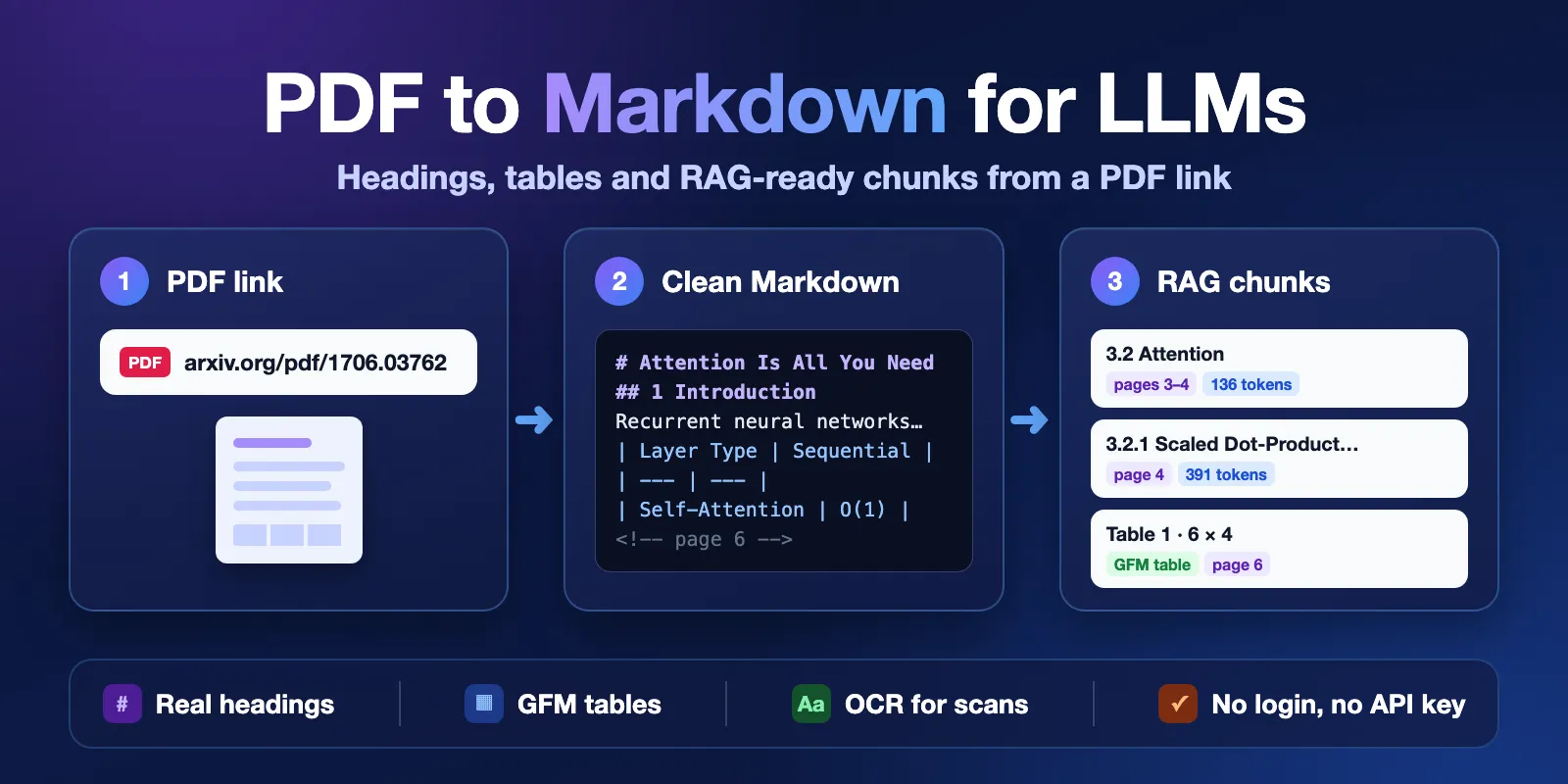
Table of contents
- What it does
- What data you get
- Quick start
- Input
- Output
- Pricing
- Use cases
- Scheduling and monitoring
- API, export and integrations
- Limitations and partial results
- Troubleshooting
- FAQ
- Related Actors
- Support
What it does
You give the Actor one or more links to PDF files. For each file it:
- Downloads the PDF from the public URL.
- Reads the text layer of each page and keeps the layout: big text becomes
#headings, bullets become lists, and grids of words become Markdown tables. - Reads scanned pages (pages without a text layer) with OCR.
- Cuts the Markdown into chunks for embeddings. A new heading always starts a new chunk, and every chunk knows its pages and the headings above it.
- Saves one row per PDF in the Dataset.
Good fit
- Load research papers, reports or manuals into a vector database for RAG.
- Give an AI agent the text of a PDF as Markdown, with tables it can read.
- Pull tables out of public reports and forms as Markdown or as cells.
- Read old scanned documents that have no text layer.
Not a fit
- PDFs behind a login, a paywall or a private network. Only public
http(s)links work. - Password-protected PDFs. The Actor reports them and does not try to open them.
- Formulas, charts and pictures. The text around them is kept, the images are not described.
- Uploading files from your computer. Put the file at a public URL first.
What data you get
| Data | Field | Example |
|---|---|---|
| Full Markdown of the document | markdown | # Attention Is All You Need … <!-- page 2 --> |
| Tables as Markdown and as cells | tables[] | page 6, 6 rows × 4 columns |
| Chunks for embeddings | chunks[] | text, pageStart, pageEnd, headingPath, tokens |
| Title, page count, size | title, pageCount, tokenEstimate | Attention Is All You Need, 15, 10449 |
| How each page was read | pages[] | text or ocr, OCR confidence |
| Status and errors | status, error, warnings | complete, not_found, PDF_PASSWORD_REQUIRED |
| Source and time | url, finalUrl, fetchedAt | when the file was downloaded |
Quick start
- Open the Input tab.
- Keep the example link in PDF URLs (
https://arxiv.org/pdf/1706.03762) or add your own PDF links, one per line. - Keep the default settings: chunks of about 500 tokens, OCR Auto.
- Click Start.
- Open the Output tab. The Documents view shows the Markdown and tables; the Chunks view shows the chunks.
Expected result: one row with status: "complete", 15 pages, 4 tables and 41 chunks for the example paper.
Input
Input fields
| Field | Type | Required | Default | Allowed values | What it changes | Recommendation |
|---|---|---|---|---|---|---|
pdfUrls | array of strings | yes | prefill: https://arxiv.org/pdf/1706.03762 | 1–100 public http(s) URLs | The PDFs to convert. Duplicate links are processed once. | Use direct links to PDF files. |
chunkSize | integer | no | 500 | 100–4000 tokens | Target size of each chunk (tokens ≈ characters / 4). | 300–800 suits most embedding models. |
chunkOverlap | integer | no | 50 | 0–2000 tokens, at most half of chunkSize | Text repeated at the start of the next chunk in the same section. | 10% of chunkSize. Use 0 for no repeats. |
ocr | string | no | auto | auto, on, off | auto: OCR only pages without text. on: OCR every page. off: never OCR. | Keep auto. Use off to never pay for OCR. |
languages | array | no | ["eng"] | up to 3 of 20 languages | OCR languages. Not used for text-layer pages. | Pick only the languages of the document: each one is charged per OCR page. |
pages | string | no | empty (all pages) | e.g. 1-3, 5, 10- | Which pages of every document to read. | Use for long files when you need only some pages. |
maxPages | integer | no | 50 | 1–300 | Upper limit of pages per document, after pages. Extra pages are skipped and not charged. | Raise to 300 for long reports. |
maxFileSizeMb | integer | no | 50 | 1–100 MB | Larger files are not downloaded and get FILE_TOO_LARGE. | Keep the default unless your files are bigger. |
Empty pdfUrls is rejected before the run starts. A wrong pages value such as abc stops the run with INVALID_INPUT and no document charges.
Interacting settings
| When | Settings | What happens |
|---|---|---|
| You select pages | pages + maxPages | pages is applied first, then maxPages cuts the rest. Cut pages are listed in warnings and not charged. |
| A page has no text layer | ocr + languages | With auto or on the page is read by OCR in the selected languages; with off it stays empty. |
| Small chunks | chunkSize + chunkOverlap | Overlap is limited to half of the chunk size. |
| Large table | chunkSize | A table stays in one chunk; if it alone is bigger than chunkSize, it is split by rows and the header row is repeated. |
Input examples
One research paper (the prefill)
Expected: 1 row, 15 text pages, 4 tables, 41 chunks, in about 3 seconds.
Several reports, smaller chunks
Expected: 2 rows. The first 100 pages of the long NIST file are read (the rest are listed in warnings), and the W-9 form is read in full.
A scanned document with OCR
Expected: 1 row with ocrUsed: true, ocrPages: 5. OCR takes about 10 seconds per page.
Output
One row per PDF in the default Dataset. Two views: Documents (Markdown, tables, status) and Chunks (chunk list per document). The run summary is in the key-value store as RUN_SUMMARY.
Output example
Real row for the prefill, trimmed: long text is cut with …, and only one table, one chunk and one page are shown.
null means "not known" or "not used", not zero. For example, ocrLanguages is null when no page needed OCR, and pageCount is null when the file could not be opened.
Output fields
| Field | Type | Can be null? | Meaning |
|---|---|---|---|
url | string | no | The URL from your input. |
finalUrl | string | yes | The URL after redirects; null if the file was not downloaded. |
status | string | no | complete, partial (some pages not read), not_found (HTTP 404/410) or error. |
title | string | yes | Title from the PDF metadata, else the first top-level heading of the text layer. Never taken from OCR. |
pageCount | integer | yes | Pages in the PDF. |
pagesProcessed | integer | no | Pages read successfully. |
pagesTruncated | boolean | no | true when maxPages cut the page selection. |
markdown | string | yes | Markdown of all read pages. Each page starts with <!-- page N -->. null on error or when it was moved to markdownUrl. |
markdownUrl | string | yes | Link to the full Markdown file when it was too large for one row (over 8 MB). |
charCount | integer | no | Characters in the Markdown. |
tokenEstimate | integer | no | Approximate tokens (characters / 4). |
tables[] | array | no | index, page, rows, columns, markdown, cells. cells is null only when dropped to fit the row size. |
chunks[] | array | no | index, text, pageStart, pageEnd, headingPath, tokens, charCount. |
chunkSize | integer | no | Chunk size used. |
ocrUsed | boolean | no | true when at least one page was read by OCR. |
textPages | integer | no | Pages read from the text layer. |
ocrPages | integer | no | Pages read by OCR. |
ocrLanguages | array | yes | OCR languages used; null without OCR. |
pages[] | array | no | Per page: pageNumber, method (text, ocr, none), charCount, tables, ocrConfidence (0–100, OCR only), error. |
fileSizeBytes | integer | yes | Size of the downloaded file. |
contentType | string | yes | Content-Type sent by the server. |
metadata | object | yes | PDF metadata as written in the file (author, creator, dates…). Not checked. |
encrypted | boolean | yes | true when the PDF is encrypted. It may still open without a password. |
error | object | yes | { code, message } when something went wrong for this row. |
warnings | array | no | Notes such as skipped pages or pages without a text layer. |
fetchedAt | string | yes | When the file was downloaded (ISO 8601). |
processedAt | string | no | When the row was written (ISO 8601). |
Where results appear
| Situation | Where | What you see |
|---|---|---|
| Normal PDF | Dataset | status: "complete", Markdown, tables, chunks |
| Very large document | Dataset + key-value store | markdown: null, markdownUrl points to the full file |
| Dead link | Dataset | status: "not_found", error.code: "NOT_FOUND" |
| Not a PDF, password, too large | Dataset | status: "error" and the error.code |
| Run stopped early | Dataset + RUN_SUMMARY | partial rows and unprocessed rows with DEADLINE_REACHED or CHARGE_LIMIT_REACHED |
Pricing
Pricing unit
You pay per event (pay-per-event). Platform usage is included in the event prices.
| Event | When | Free | Bronze | Silver | Gold, Platinum, Diamond |
|---|---|---|---|---|---|
| Actor start | once per run, per GB of memory (default 1 GB = 1 event) | $0.005 | $0.005 | $0.005 | $0.005 |
| Document | per started 50 text-layer pages of a PDF (1–50 pages: 1 event, 51–100: 2) | $0.0032 | $0.0029 | $0.0026 | $0.0023 |
| OCR page | per page read by OCR, per selected language | $0.012 | $0.0108 | $0.0096 | $0.0084 |
Not charged: dead links, files that are not PDFs, password-protected PDFs, files that are too large, pages cut by maxPages, and pages that failed. A run where every link fails costs only the start event ($0.005).
Cost examples (Free plan, 1 GB, English OCR)
| Scenario | Events | Cost |
|---|---|---|
| One 15-page paper | start + 1 document | $0.0082 |
| 100 papers, each up to 50 pages | start + 100 documents | $0.325 |
| One 300-page report | start + 6 documents | $0.0242 |
| A 36-page scan | start + 36 OCR pages | $0.437 |
| 100 dead links | start only | $0.005 |
Set Max total charge in the run options to cap the cost. When the next page or document would go over the cap, the Actor stops, writes what it has, and marks the rest CHARGE_LIMIT_REACHED without charging them.
Use cases
| Job | Input | Key fields | Next step |
|---|---|---|---|
| RAG over research papers | arXiv links in pdfUrls | chunks[].text, headingPath, pageStart | Embed chunks into your vector database; cite pages in answers. |
| Table extraction from reports | report links, maxPages: 300 | tables[].cells, tables[].page | Load cells into a sheet or a database. |
| Agent reads a PDF | one link from the conversation | markdown, title, tokenEstimate | Put the Markdown into the model context. |
| Digitize old scans | scan links, ocr: "auto" | markdown, pages[].ocrConfidence | Check pages with low confidence by hand. |
Scheduling and monitoring
The Actor reads the file at the moment of the run. To keep a knowledge base fresh, create a task with your list of PDF links and add a schedule in Apify (for example weekly). Compare fileSizeBytes, metadata.modificationDate or charCount with the previous run to see if a document changed. Each scheduled run is charged like a normal run.
API, export and integrations
- API: start the Actor with
POST https://api.apify.com/v2/acts/cliqtomedia~pdf-to-markdown/runsand the input JSON. Read rows from the run Dataset, or userun-sync-get-dataset-itemsfor one short call. - Export: download the Dataset as JSON, CSV, Excel or XML. JSON keeps the nested
tablesandchunks. - Integrations: LangChain, LlamaIndex, Make, Zapier, n8n and webhooks can start the run and read the Dataset.
Use with AI agents (MCP)
-
MCP server URL with only this Actor:
https://mcp.apify.com?tools=cliqtomedia/pdf-to-markdown -
Smallest useful input:
{ "pdfUrls": ["https://arxiv.org/pdf/1706.03762"] } -
Key output fields:
status(did it work),markdown(the document),chunks(ready for embeddings, with pages),tables(tables as cells),error.code(what to fix). -
A 15-page text PDF takes about 3 seconds and costs $0.0082 with the start event. Each OCR page adds about 10 seconds (up to 30 for dense pages) and $0.012 per language.
-
Limits: up to 100 URLs per run and 300 pages per document; public URLs only. For long scans, use
pagesormaxPagesso the call returns in time (default timeout 30 minutes).
Limitations and partial results
What it does not do
- No login, cookies, paywalls or private networks. No password cracking.
- No image, chart or formula description. Text in pictures is read only by OCR on scanned pages.
- Tables without lines are found by the columns of words. Merged or very complex cells can shift.
- Tokens are an estimate (characters / 4), not the count of a specific tokenizer.
- Files are deleted when the run ends. Only the Markdown and the summary are kept in your storage.
Speed and limits
- Text PDFs: about 3 seconds for a 15-page paper; 100 PDFs (535 pages) in about 45 seconds; a 300-page report with 1,281 tables in about a minute.
- OCR: about 10 seconds per page at 1 GB, up to 30 seconds for dense pages. A 36-page scan takes about 6 minutes. The default run timeout is 30 minutes (about 90–180 OCR pages); for bigger scans raise the timeout or use
pages. - Up to 100 URLs per run, up to 300 pages and 100 MB per document.
- A row larger than 8 MB moves its Markdown to a file (
markdownUrl).
Partial results
If the run is close to its timeout, the Actor stops taking new pages, saves what it has with status: "partial", and lists the documents it did not reach with DEADLINE_REACHED. You pay only for pages that were read.
Troubleshooting
The row has UNSUPPORTED_FILE_TYPE
The link returned something that is not a PDF, such as an HTML page or an image. Open the link in a browser and copy the direct link to the .pdf file.
The Markdown is empty or has strange words
The page may be a scan. Check pages[].method: with ocr: "off" scanned pages stay empty. With OCR, low ocrConfidence means a poor scan; pick the right languages.
PDF_PASSWORD_REQUIRED or PDF_DAMAGED
The file needs a password or is broken. The Actor does not open such files and does not charge for them.
DEADLINE_REACHED or TOO_MANY_FAILURES
The run was about to time out, or too much time was lost on slow downloads and failed pages. Raise the run timeout, lower maxPages, or split the list into several runs.
CHARGE_LIMIT_REACHED
Your Max total charge was reached. Raise it or process fewer pages.
FAQ
Do I need a login or an API key for the PDFs?
No. The Actor reads public links. You only need an Apify account to run it.
How is this different from a plain PDF text extractor?
A plain extractor gives one long text. This Actor keeps headings, lists and tables as Markdown and also returns chunks with pages and the headings above them, so you can load them into a vector database without your own splitter.
Why did I pay for OCR on a PDF?
Some pages had no text layer (scans), so they were read by OCR. Set ocr: "off" if you never want OCR.
Is the output always perfect?
No. Text-layer PDFs are converted well; complex tables and poor scans can have mistakes. Check pages[].ocrConfidence and the warnings.
Do you keep my documents?
No. The PDF files are deleted at the end of the run. The rows stay in your own Apify storage.
Related Actors
- PDF & Image to Text OCR for AI Agents — plain text per page from PDFs and images, when you do not need Markdown tables and chunks.
- DOI Metadata & Bibliography Enrichment — find paper metadata and open-access links by DOI, then convert the PDFs here.
- YouTube Subtitles & Transcript Scraper API — text from videos for the same RAG pipeline.
Support
For bugs, questions or feature requests, open an issue in the Issues tab of this Actor. Include the run ID, your input settings and the error.code. Do not send private documents, tokens or passwords.
PDF text and layout by Poppler (GPL, run as a separate program); OCR by Tesseract (Apache-2.0). Markdown tables follow the GitHub Flavored Markdown format.


