

G2 & Capterra Reviews Scraper: Ratings & Products
Pricing
from $21.00 / 1,000 source pages
G2 & Capterra Reviews Scraper: Ratings & Products
Export public G2 and Capterra software reviews with ratings, pros, cons and dates, plus product data. Filter by stars, date, company size, role or region, reach older G2 reviews and get only new ones on repeat runs. No login.
Pricing
from $21.00 / 1,000 source pages
Rating
0.0
(0)
Developer

Cliqto Media
Maintained by CommunityActor stats
0
Bookmarked
2
Total users
1
Monthly active users
18 hours ago
Last modified
Security
Limited permissionsShare
Add a G2 or Capterra product and get its public reviews as clean rows with ratings, pros, cons, dates and company size, plus product data.
You need no login or API key. The first run reads 5 G2 reviews from one page, and it costs $0.04 on the Free plan.
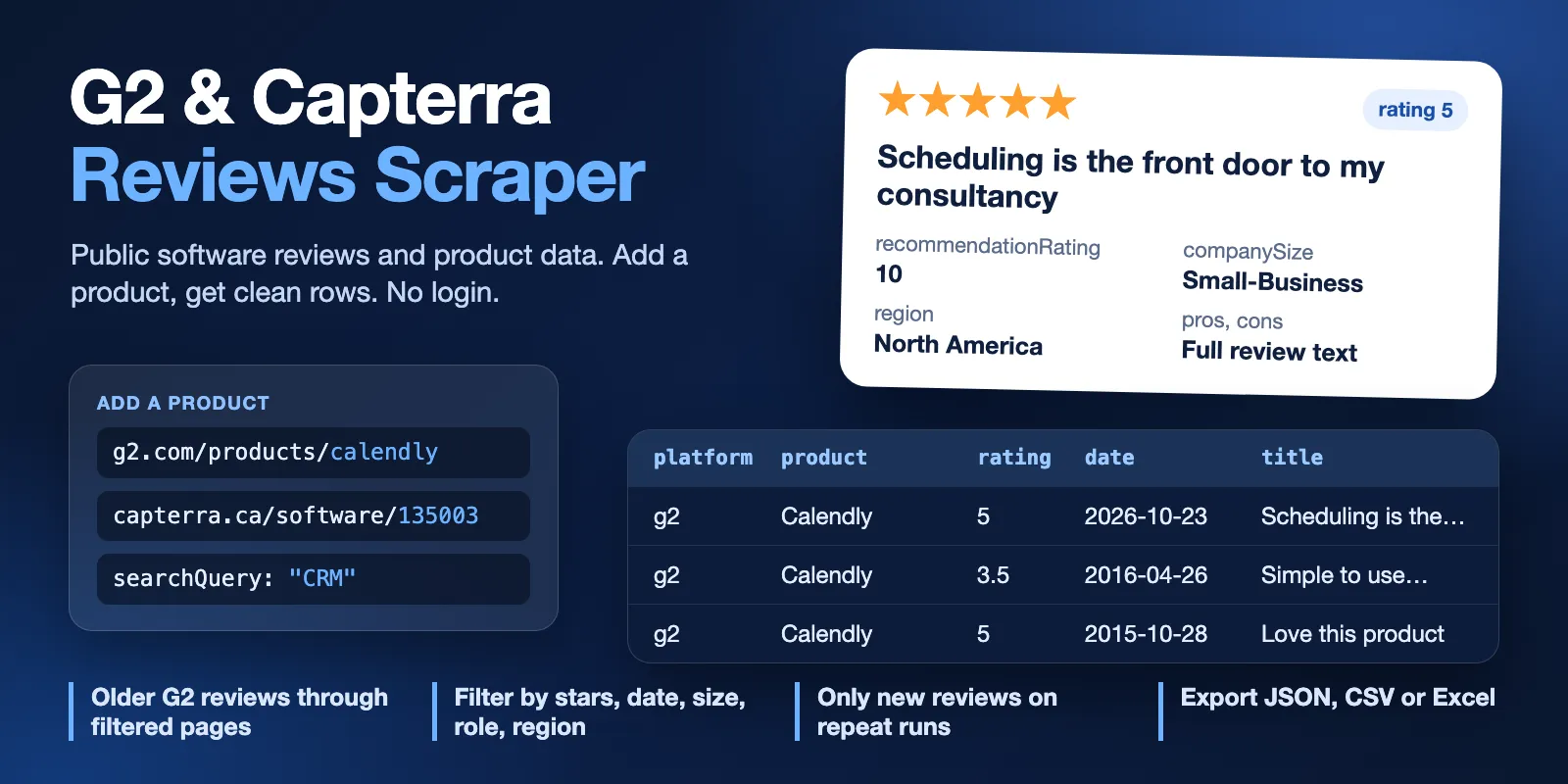
Table of contents
- What it does
- How it works
- Quick start
- Use cases
- Input
- Output
- Pricing
- Limits
- API, export and integrations
- Troubleshooting
- FAQ
- Related Actors
- Support
What it does
This G2 reviews scraper and Capterra review scraper reads public product pages. It saves one row per review, with the rating, title, pros, cons, date and the public reviewer details that the source shows.
It can also return product details, find G2 products by keyword or category, and compare products. It does not export reviewer names, photos, profile links or contacts.
G2 shows only 100 reviews for one list. For bigger requests, the Actor reads many filtered lists to reach older reviews. This gets far more than 100 reviews, but it does not promise every review of a large product. Each deep run reports how many reviews the source has and how many you got.
Good fit
- Read what customers say about your product or a competitor, with ratings and full text.
- Pull reviews from one segment, for example small business reviews from North America.
- Watch a product and get only new reviews on each scheduled run.
- Compare the rating, review count and price of several products.
How it works
- You add product links, a G2 keyword or a G2 category. The Actor opens the public pages of that source.
- It reads the reviews or product details, applies your filters, and removes duplicates.
- It saves rows to the Dataset. It also saves a run summary and one report per product, which state what was read and why the run stopped.
Quick start
-
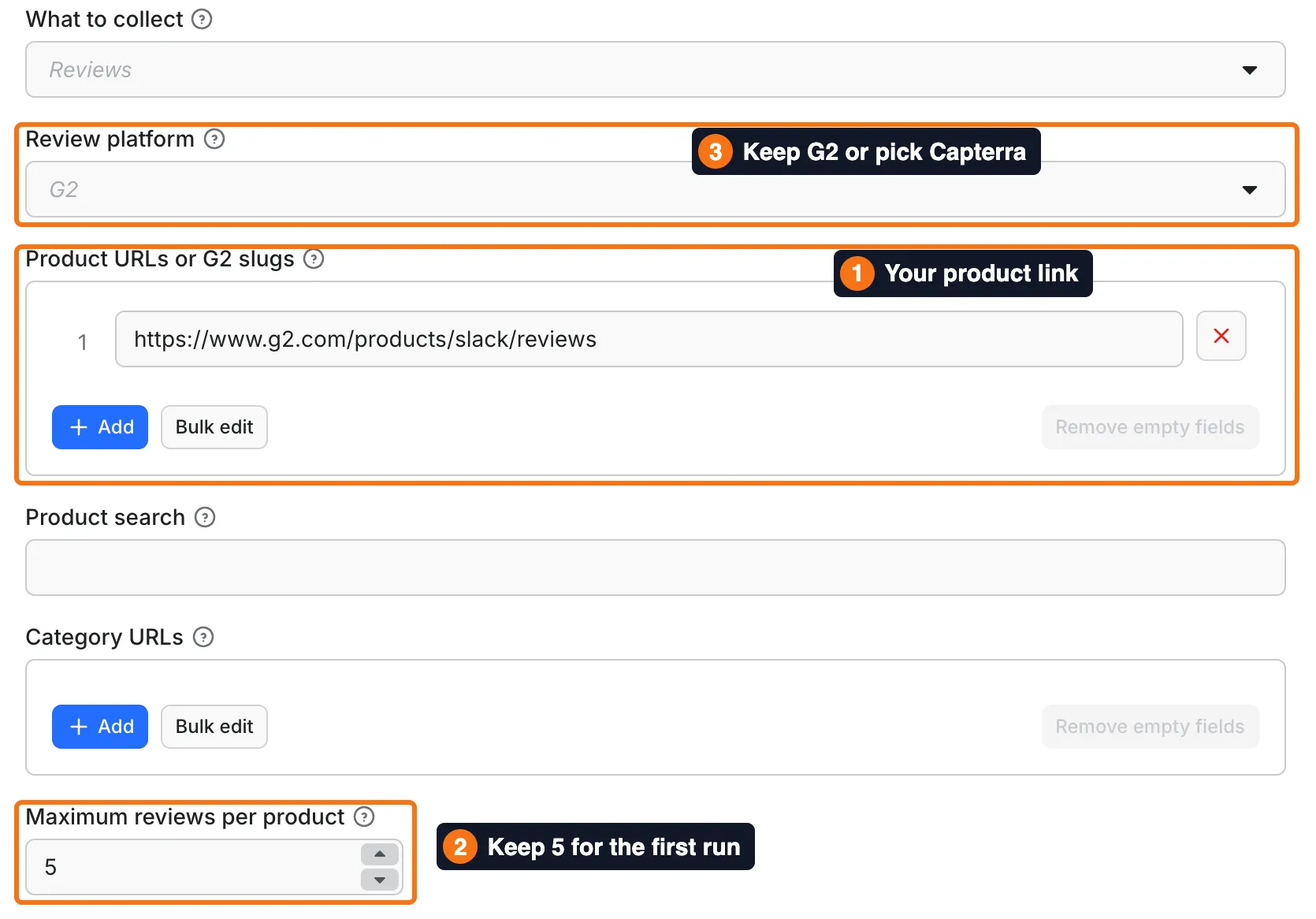
Open the Input tab. The form already holds a Slack link in Product URLs or G2 slugs (box 1). Replace it with your product, or keep it for a test.
-
Keep 5 in Maximum reviews per product (box 2) for the first run.
-
Keep G2 in Review platform (box 3), or choose Capterra for a Capterra link.
-
Click Start.
-
Open the Output tab and check the
rating,title,prosanddatecolumns.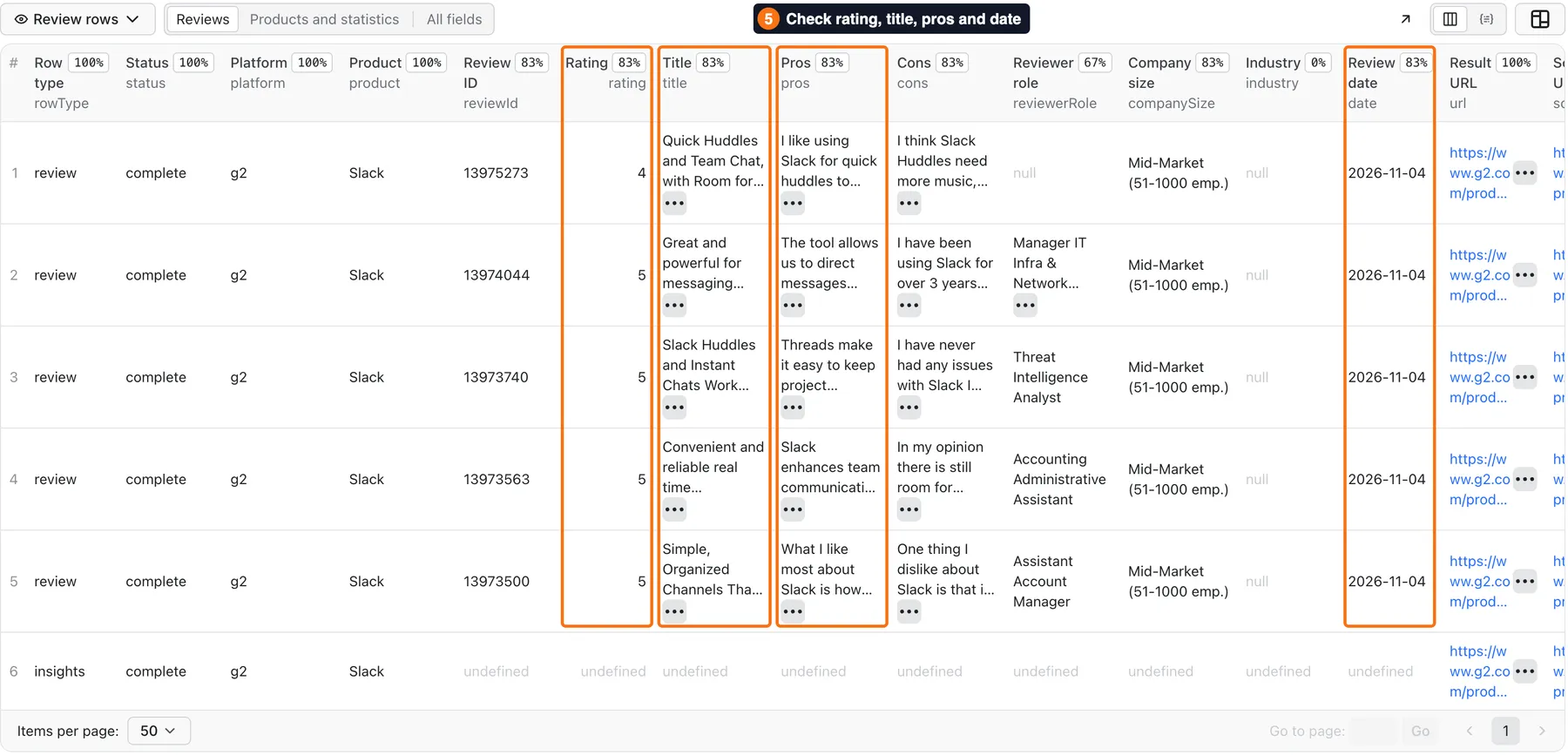
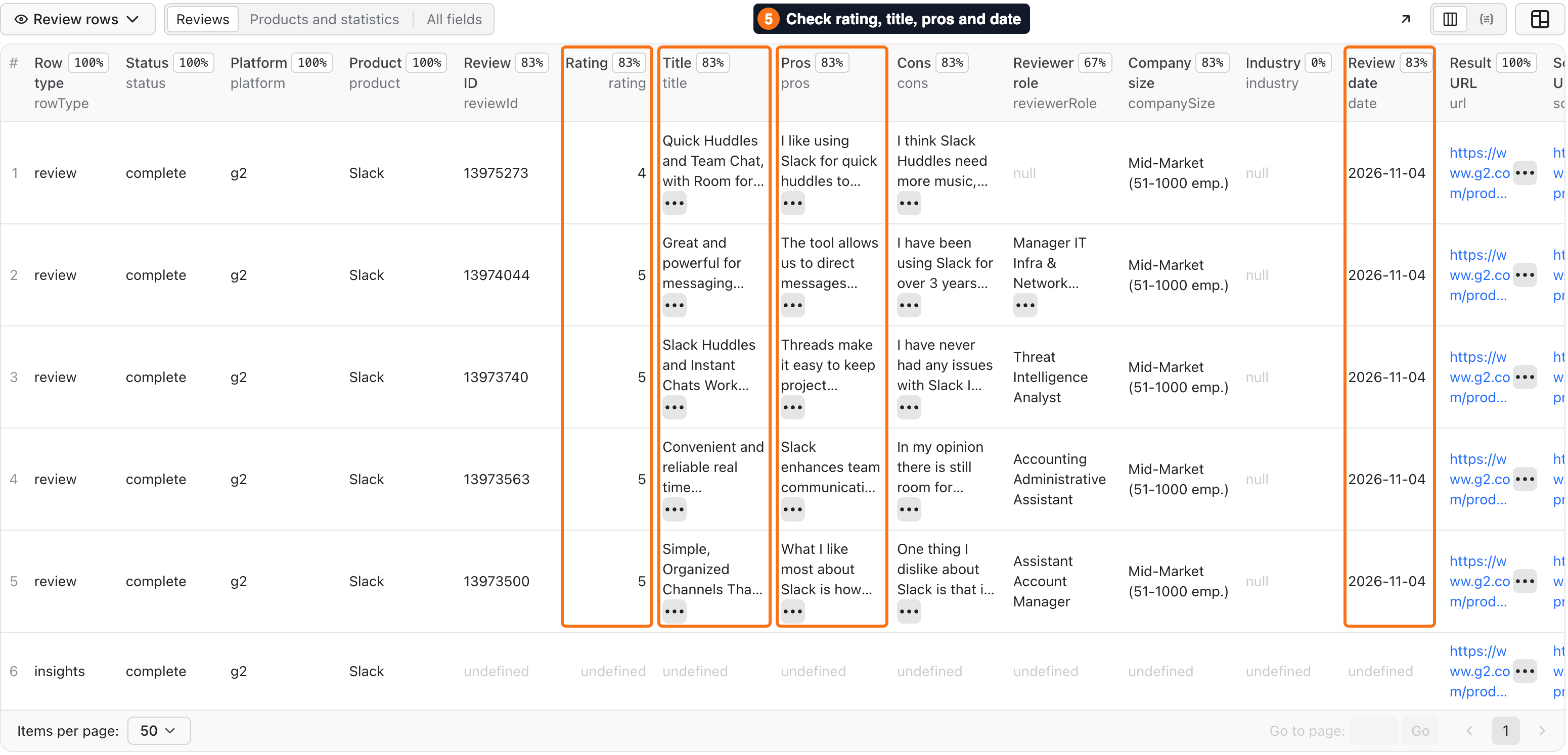
Expected result: 5 review rows and 1 statistics row, usually in 10–90 seconds. A slow G2 page can stretch this to about 3 minutes.
Use cases
| Buyer job | Input path | Output entity | Key fields | Next integration |
|---|---|---|---|---|
| Export the reviews of one product | productUrls, maxReviews | Review rows | rating, title, pros, cons, date | CSV, Google Sheets, BI tool |
| Study one customer segment | companySize, region, industry, starRatings | Filtered review rows | companySize, region, industry, rating | CSV, API |
| Get new reviews on a schedule | onlyNew, stateName | New review rows | reviewId, date, rating, text | Schedule, webhook, Slack or Notion |
| Build a list of products in a category | mode, searchQuery or categoryUrls | Product rows | product, aggregateRating, reviewCount, url | CSV, CRM import |
| Compare products | mode, productUrls | Product rows and one comparison row | product, aggregateRating, reviewCount, pricing | API, spreadsheet |
Input
Input fields
| Field | Plain name | Type | Required | Default / prefill | Allowed values | Effect | Example | Recommendation |
|---|---|---|---|---|---|---|---|---|
mode | What to collect | string | no | reviews | reviews, products, search, category, compare | Chooses the result type | reviews | Start with reviews |
platform | Review platform | string | no | g2 | g2, capterra, auto | Chooses the site | capterra | Use auto for links from both sites |
productUrls | Product links | array of strings | yes for reviews, products, compare | prefill: Slack on G2 | Up to 20 links, G2 slugs or numeric Capterra IDs | Sets the products to read | ["slack"], ["135003"] with capterra | Duplicate values are read once |
searchQuery | Product search | string | yes for search | none | Up to 200 characters | Finds G2 products | CRM | G2 only |
categoryUrls | Category links | array of strings | yes for category | none | Up to 20 G2 category links | Lists G2 category products | ["https://www.g2.com/categories/crm"] | G2 only |
maxReviews | Maximum reviews per product | integer | no | default 10, prefill 5 | 1–5000 | Stops after this many matching reviews | 100 | Above 100 on G2, raise the run Timeout |
maxProducts | Maximum products | integer | no | 10 | 1–10 | Limits search and category results | 5 | Lower it to spend less |
sortReviews | Review order | string | no | newest | newest, helpful, rating_high, rating_low | Sets the order | helpful | Above 100 G2 reviews the order is not strict |
starRatings | Star ratings | array of strings | no | [] | "1"–"5" | Keeps these star groups | ["1","2"] | Group 5 on G2 includes 4.5 |
publishedAfter | Reviews on or after | string | no | none | YYYY-MM-DD | Keeps newer reviews | 2026-01-01 | Good for recent reviews |
publishedBefore | Reviews on or before | string | no | none | YYYY-MM-DD | Keeps older reviews | 2020-01-01 | Old dates on G2 read filtered lists |
reviewSearch | Words in review | string | no | none | Text | Keeps reviews with every word | pricing support | Rare words need more pages |
companySize | Company size contains | string | no | none | Text | Keeps this size | Small-Business | On G2, Small-Business and Mid-Market filter at the source |
reviewerRole | Reviewer role contains | string | no | none | Text | Keeps this role | Marketing | Reviews with no role do not match |
industry | Industry contains | string | no | none | Text | Keeps this industry | Marketing and Advertising | Reviews with no industry do not match |
region | Region contains | string | no | none | Text | Keeps this region | North America | Exact G2 names filter at the source and fill the column |
includeInsights | Add review statistics | boolean | no | true | true, false | Adds one free statistics row per product | true | Turn off if you need review rows only |
onlyNew | Only new reviews | boolean | no | false | true, false | Returns reviews not seen before | true | The first run builds the history |
stateName | History store name | string | no | none | Lowercase letters, digits, hyphens | Keeps a separate history | slack-monitor | Use one name per watch |
maxPages | Maximum pages per product | integer | no | maxReviews / 4, at least 20 | 1–2000 | Stops after this many pages | 50 | Raise it for a rare filter or old dates |
transport | Connection route | string | no | auto | auto, direct, unblocker | Forces one route | auto | Keep auto |
deliveryConnector | Send results to | string | no | none | Your MCP connector | Posts a short summary after the run | Your Slack connector | Optional |
deliveryTarget | Notion page or channel | string | no | none | Notion page link or Slack channel ID | Sets where the summary goes | C0123456789 | Optional |
An empty productUrls in reviews, products or compare mode stops the run with PRODUCT_URLS_REQUIRED.
Interacting settings
| When | Input A | Input B | Effective behavior | Example | Cost/result effect |
|---|---|---|---|---|---|
| Big G2 request | maxReviews above 100 | publishedAfter is empty | Reads filtered lists to reach older reviews, and the order is no longer strict | maxReviews: 1000 | About 7 reviews per paid page |
| Old date on G2 | publishedBefore | newest pages are all later | Skips to filtered lists | publishedBefore: 2020-01-01 | More pages per row, narrow windows may return nothing |
| Rare filter | reviewSearch, industry or reviewerRole | maxPages | Stops at the page limit when few reviews match | 20 pages by default | Each page read is charged |
| Monitoring | onlyNew | sortReviews | Newest order is used, and a full page of known reviews ends the check | Repeat run | Usually 1 page |
| Monitoring | onlyNew with history | maxReviews above 100 | Filtered lists are not read | Repeat run | Usually 1 page |
| Mixed links | platform: auto | productUrls | Each link goes to its own site | G2 and Capterra | Pages of both sites are charged |
| Capterra link | platform: g2 | productUrls | The run stops with an input error | Choose capterra or auto | $0.01 only |
| Discovery | mode: search | platform: capterra | The run stops with an input error | Choose G2 or Auto | $0.01 only |
Input examples
First test
Expected behavior: reads one G2 page and stops at 5 reviews.
Expected output: 5 review rows with rating, title, pros, cons and date, plus 1 statistics row.
Limit or cost note: 1 page, $0.04 on the Free plan.
Older G2 reviews
Expected behavior: reads filtered lists, so the reviews are not in date order. Expected output: review rows from many years. A test reached reviews from 2015. Limit or cost note: set a higher run Timeout and a spending limit. Expect about 7 reviews per paid page.
Filtered segment
Expected behavior: applies the filters at the source where it can, and checks the rest on the saved reviews. Expected output: reviews that match every filter, with ratings of 4.5 and 5. Limit or cost note: filtered runs took from under a minute to about 4 minutes in tests.
Capterra reviews
Expected behavior: reads public regional pages. A page usually holds 25 reviews.
Expected output: review rows with subRatings, timeUsedProduct and country.
Limit or cost note: about $1.2 per 1,000 reviews on the Free plan.
Only new reviews
Expected behavior: the first run saves 5 reviews and remembers every review on the pages it read. Later runs return new reviews only. Expected output: new review rows, or no rows when nothing changed. Limit or cost note: an unchanged check reads 1 page, $0.04 on the Free plan.
Output
Output fields
Most fields are null when the source does not show them or when they do not apply to this row type. null never means zero.
| Field | Meaning | Type | Can be empty? | Example / enum | Source / notes |
|---|---|---|---|---|---|
rowType | Row type | string | no | review, product, insights, comparison, status | One value per row |
status | Row status | string | no | complete, partial, not_found | not_found is a free status row |
platform | Source site | string | no | g2, capterra | From the link |
product | Product name | string | conditional | Slack | Shown by the source |
productId | Source product ID | string | yes | 3437 | When available |
reviewId | Review ID | string | review rows only | 13975273 | Stable, used for onlyNew |
rating | Review score, 0–5 | number | review rows only | 4.5 | G2 half stars are kept |
recommendationRating | Recommendation score, 0–10 | number | yes | 8 | 0 is a real score |
title | Review title | string | yes | Quick Huddles and Team Chat | Capterra rating-only reviews can have none |
pros | What the reviewer likes | string | yes | I like using Slack… | |
cons | What the reviewer dislikes | string | yes | I think Slack Huddles… | |
problemsSolved | Problems solved or overall experience | string | yes | I use Slack to connect… | |
text | All answers as plain text | string | yes | What do you like best… | Capterra rating-only reviews can have none |
questions | Questions and answers | array | yes | [{"question":…,"answer":…}] | All public sections |
reviewerRole | Job title or role | string | yes | Agency Owner | Not on every review |
companySize | Size or segment | string | yes | Mid-Market (51-1000 emp.) | Wording differs by site |
industry | Reviewer industry | string | yes | Marketing and Advertising | Not on every review |
region | Reviewer region | string | yes | North America | On G2, filled mostly in filtered lists |
country | Reviewer country code | string | yes | US | When shown |
date | Review date | string | yes | 2026-11-04 | YYYY-MM-DD |
submittedAt | Exact publish time, UTC | string | yes | 2026-11-04T12:24:30.000Z | G2 only. Can be a day away from date, which is the date G2 shows. Empty when two reviews on a page share a title |
updatedAt | Exact last-change time, UTC | string | yes | 2026-11-04T12:24:30.000Z | G2 only. Taken as G2 gives it, so it can be earlier than submittedAt. Empty when two reviews on a page share a title |
subRatings | Scores by aspect | object | yes | {"easeOfUse":5,"functionality":5} | Mostly on Capterra |
verified | Verified label | boolean | yes | true | Often empty on Capterra |
currentUser | Current user label | boolean | yes | true | G2 only |
validationMethod | How the review was checked | string | yes | LinkedIn, a business email account | When shown |
incentive | Incentive note | string | yes | Organic review… | Source wording |
reviewSource | How it was collected | string | yes | Organic | Source label |
timeUsedProduct | Time with the product | string | yes | 2+ years | When shown |
switchedFrom | Previous product | string | yes | Rare: empty in all 1,670 reviews of our two largest test sets | |
switchingReason | Reason for the switch | string | yes | Rare, same as switchedFrom | |
vendorResponse | Vendor reply | string | yes | Rare, same as switchedFrom | |
url | Link to the review or product | string | no | https://www.g2.com/products/slack/reviews/… | Public link |
sourceUrl | Page that was read | string | no | https://www.capterra.ca/… | Shows the regional site |
fetchedAt | Read time, UTC | string | no | 2026-11-04T14:19:15.206Z | |
description | Product description | string | yes | Product rows | |
category | Product category | string | yes | CRM | Product rows |
aggregateRating | Overall rating | number | yes | 4.4 | Product rows |
reviewCount | Reviews on the source | number | yes | 27587 | Product rows |
pricing | Public price offers | array | yes | [{"price":20,"currency":"USD","name":"Sales Hub Starter"}] | A missing price is null, not zero |
alternatives | Other product links on the page | array | yes | Not a full list of alternatives | |
sourceThemes | Themes published by G2 | array | yes | ["Ease of Use (3620)"] | Statistics row |
sourceSummary | Summary published by G2 | string | yes | Written by G2, not by this Actor | |
sampleSize | Reviews in the statistics | number | statistics row only | 5 | This run's reviews only |
averageRating | Average of those reviews | number | statistics row only | 4.8 | Not the product's overall rating |
ratingDistribution | Count by star group | object | statistics row only | {"0":0,"1":0,"2":0,"3":0,"4":1,"5":4} | This run's reviews only. Group 0 holds reviews rated 0 |
complaintTerms | Frequent words in cons | array | statistics row only | [{"term":"music","count":1}] | Simple word counts for this set, not an opinion |
products | Compared products | array | comparison row only | compare mode |
Output entities and surfaces
| Situation | Dataset/API/KVS/live view | Result shape | User action |
|---|---|---|---|
| Normal item | Dataset, views reviews and products | One row per review or product | Open the Output tab or export |
| Domain-empty result | Dataset is empty or holds one status row; REPORTS in the Key-value store | NO_MATCHING_REVIEWS, NO_NEW_REVIEWS or not_found | Check the link and the filters |
| Partial result | Dataset keeps the saved rows; RUN_SUMMARY and REPORTS | partial with PAGE_LIMIT, DEADLINE, CHARGE_LIMIT or SOURCE_LIMIT | Read stopReason and raise that limit |
| Technical failure or retry | Run status FAILED; RUN_SUMMARY holds the error code | error and a code such as SOURCE_ERROR | Retry later, and open an Issue with the run ID if it repeats |
status: complete with stopReason: REVIEW_LIMIT means you got the number you asked for, and the source has more. In a deep G2 run, sourceReviewCount in REPORTS shows how many reviews the source reports, so you can compare it with deliveredReviews.
Output example
This is one review row from the first test above. It is trimmed: pros, cons, problemsSolved, questions and text are cut, and some empty fields are hidden.
Here reviewerRole, industry and region are null because this review does not show them in this list.
Send results to Slack or Notion
Pick your connector in the optional deliveryConnector field. After the run saves its data, the Actor posts a short summary (up to 25 rows and a link to the full dataset) there. Put a Notion page link or a Slack channel ID in deliveryTarget: in Notion every run is added on top of that one page, so your workspace does not fill up with new pages. A delivery error never fails the run and costs nothing extra. Connect a service once in Apify Console → MCP connectors.
Use case → fields
| Buyer job | Input path | Output entity | Key fields | Next integration |
|---|---|---|---|---|
| Voice of customer | productUrls, maxReviews | Review rows | pros, cons, problemsSolved, rating | CSV, BI tool |
| Segment research | companySize, region, industry | Review rows | companySize, region, industry, reviewerRole | CSV, API |
| Review monitoring | onlyNew, stateName | New review rows | reviewId, date, rating, vendorResponse | Schedule, Slack or Notion |
| Market map | searchQuery, categoryUrls | Product rows | product, aggregateRating, reviewCount, url | CRM import |
Pricing
Pricing unit
You pay per source page read, not per row. Rows, statistics and comparison rows are free. There are two events:
| Event | When it is charged | Free | Bronze | Silver | Gold and above |
|---|---|---|---|---|---|
| Run preparation | Once per run, including invalid input | $0.01 | $0.01 | $0.01 | $0.01 |
| Source page | Each page read and checked successfully | $0.03 | $0.027 | $0.024 | $0.021 |
A G2 page gives 8–10 new reviews in a normal run and about 7 in a deep run. A Capterra page gives up to 25. A page is the smallest unit, so one review costs the same as a full page. If you need only a few rows from many products, a price per row may suit you better.
Run preparation is a flat $0.01 and does not grow with run memory. Apify platform usage is included, so you do not pay for it separately.
- Valid run with no reviews: you pay for the pages read.
- Filter with no matches: you pay for every page checked, up to
maxPages. With the default this is 20 pages, $0.61 on the Free plan. - Unchanged monitoring run: 1 page, $0.04 on the Free plan.
- Partial run: you pay for the pages that were checked. Rows stay in the Dataset.
- Failed run or failed page: you pay $0.01 and any pages read before the failure. A failed page is free.
- Product page not found: the checked page is charged, and the status row is free.
Cost examples
These are measured page counts. The charge uses the Free plan price.
| Scenario | Input scope | Expected item/event count | Base charge | Optional charge | Stop/cap behavior |
|---|---|---|---|---|---|
| First test | 5 G2 reviews | 1 page, 5 reviews | $0.04 | none | Stops at maxReviews |
| Normal | 100 G2 reviews | 11–12 pages | $0.34–$0.37 | none | Stops at maxReviews |
| Older reviews in the default 300 seconds | maxReviews: 1000 on G2 | Up to 133 pages and 922 reviews, fewer when pages are slow | Up to $4.00 | none | Stops with DEADLINE |
| Older reviews with a longer Timeout | maxReviews: 1000 on G2, Timeout 900 seconds | 142–145 pages, 1000 reviews | $4.27–$4.36 | none | Stops at maxReviews |
| Spending limit | maxReviews: 1000 on G2, $2 limit, Bronze plan | 73 pages, about 500 reviews | $1.98 | none | Stops with CHARGE_LIMIT |
| Capterra | 1000 reviews | 41 pages | $1.24 | none | Stops at maxReviews |
| Two products | Product details | 2 pages | $0.07 | none | One page per product |
| G2 search | CRM, 3 products | 4 pages, 3 product rows | $0.13 | none | Failed product pages are not charged |
| Filter with no matches | Rare word, default limit | 20 pages | $0.61 | none | Stops with PAGE_LIMIT |
| Invalid input | No product | 0 pages | $0.01 | none | Run fails at once |
To control your spending, set Maximum cost per run in the run options. The Actor stops with CHARGE_LIMIT and keeps what it saved.
Limits
- Full history is not promised. G2 shows 100 reviews per filter combination and sort order. The Actor combines many lists, but a very large product can hold reviews that no list shows. Compare
sourceReviewCountwithdeliveredReviewsinREPORTS. - Deep G2 speed. Speed depends on how fast pages answer, and it varies a lot. Runs limited to about 275 seconds got 299–922 reviews, and runs reached 1000 reviews in 5–6.5 minutes. To be sure of more than about 100, raise the Timeout in the run options. The Actor stops about 25 seconds before the Timeout and keeps its rows.
- Slow pages. One G2 page usually takes a few seconds. A slow page that had to be retried took close to 3 minutes. In tests, 100 G2 reviews took about 1.5–5 minutes and 150 took about 3 minutes.
- Old date windows. A narrow old window on a large product is best-effort. It can spend paid pages and return few rows or none. Tests asking for 20 Slack reviews from before 2020 read 15–20 pages and returned 13–20 rows. Raise
maxPagesif you want a longer search. - G2 star groups. Group 5 includes 4.5, and group 4 includes 3.5 and 4.0. The
ratingcolumn keeps the exact value. - Capterra. Reviews come from public regional pages (Canada, or the UK as a fallback), and their list can differ from the US site. Rating-only reviews are valid and can have an empty
titleandtext. Category and keyword search work on G2 only. - Input limits.
productUrlsup to 20,categoryUrlsup to 20,maxReviewsup to 5000,maxPagesup to 2000,maxProductsup to 10. The Actor also stops at a request limit (REQUEST_LIMIT) and a data limit (BYTE_LIMIT), which grow withmaxPages. - Several products in one run are best-effort. If some products are saved and others fail, the run still ends as
SUCCEEDED. Failed products are listed inREPORTSwith statuserrorand their pages are not charged. If you add one product and it fails, the run ends asFAILED. - Memory. The default is 512 MB. 256 MB is too small for a big Capterra run.
- Only new reviews. The history stores the IDs of every review a run read, so a later run does not return older reviews that were read but not delivered, and it stops at the first page with a known review. Use one store name per search. If your store cannot be opened, the Actor warns you and uses its own separate store, so your first repeat run can return known reviews again.
- Not included. Private data, reviewer names, photos, profile links and contacts. Login is not supported.
API, export and integrations
- API: this works as a G2 scraper API. Start a run with the same input JSON, then read rows from the Dataset endpoint. The
reviewsandcsvlinks are on the Output tab. - Export: JSON, CSV, Excel, XML and HTML from the Dataset. Use
rating,dateandtextas main columns. - Scheduling: save the input as a task with
onlyNewandstateName, then add a schedule. Each run returns new reviews. - Webhooks / no-code: use an Apify webhook or an integration to send rows after a run. The next system reads
reviewIdto avoid duplicates. - SDK / MCP / agent: call the Actor from the Apify SDK or from the MCP server below.
Use with AI agents (MCP)
MCP server URL with only this Actor: https://mcp.apify.com?tools=cliqtomedia/software-reviews-scraper.
Smallest useful input:
Key output fields:
rowType: tells review rows from statistics and product rows.rating: the review score from 0 to 5.prosandcons: the reviewer's own words.date: the review date.url: the public link to the review.
Typical first run: 10–90 seconds, sometimes up to about 3 minutes, and $0.04 on the Free plan. Limits: 20 products per run and 5000 reviews per product. Only the default 300-second Timeout applies unless you change it. It is enough for about 100 G2 reviews, and for more only when pages answer fast.
Troubleshooting
I got fewer reviews than I asked for
Symptom: the run ended as partial with fewer rows.
Likely reason: a limit stopped it. stopReason names the limit.
Check: open RUN_SUMMARY and REPORTS in the Key-value store.
Action: for DEADLINE, raise the Timeout. For PAGE_LIMIT, raise maxPages. For CHARGE_LIMIT, raise the cost limit. For SOURCE_LIMIT, the lists the source shows are used up.
The run returned no rows
Symptom: the run succeeded and the Dataset is empty.
Likely reason: the filters match nothing, or onlyNew found nothing new.
Check: read stopReason in RUN_SUMMARY. NO_NEW_REVIEWS means nothing changed since the last run.
Action: loosen the filters or raise maxPages.
The run failed with SOURCE_ERROR
Symptom: run status FAILED, or a product has status error in REPORTS.
Likely reason: the source blocked or did not answer after several attempts.
Check: read the code in errors in RUN_SUMMARY. If the source returns nothing for 30 seconds and a product has failed, the other products are skipped and marked not_processed in REPORTS, with no page charges.
Action: run again later and keep transport on auto. A made-up link can also end here, so check that it opens in a browser.
The run failed at once with an input error
Symptom: run status FAILED after a second, with a code such as PRODUCT_URLS_REQUIRED, SEARCH_REQUIRES_G2 or INVALID_G2_PRODUCT_URL.
Likely reason: a required field is empty, or the link does not match platform.
Check: compare your input with the examples above.
Action: fix the input and start again. This attempt costs $0.01.
The product shows status not_found
Symptom: one status row with not_found.
Likely reason: the source has no page at this link.
Check: open the link in a browser.
Action: copy the correct product link and run again.
Repeat runs return old reviews
Symptom: onlyNew returned reviews you already have.
Likely reason: the stateName changed, or the store could not be opened.
Check: read stateFallbacks in RUN_SUMMARY.
Action: use the same name in every run, or choose a new name that belongs to you.
FAQ
How do I scrape G2 reviews without a login?
Add the product link and click Start. The Actor reads public pages only. You need no G2 account, cookie or API key.
Does a run with no results cost money?
Yes. You pay for the pages that were checked, because the work was done. Use maxPages and the cost limit to set a ceiling. A rare filter on the default setting stops after 20 pages.
Why is the price per page and not per review?
Some runs check many pages and find few matching reviews. A price per page is the same for every filter. In a deep G2 run, one page gives about 7 reviews. Filtered or date-limited runs give fewer reviews per page.
Can I get all reviews of a product?
This is not promised. A test on Calendly asked for 1000 of its 2,679 reviews and got them in 5–6.5 minutes, dated from 2015 to 2026. Very large products can hold reviews that no G2 list shows. REPORTS shows the source total next to your count.
How fresh are the reviews?
Each run reads the live pages, so a review appears when the source publishes it. A test run returned a review dated the same day.
Why is a field empty?
The source does not show it for that review or in that list. null means "not shown". On G2, region is usually filled when you filter by an exact region name.
Related Actors
- TrustRadius Reviews Scraper: Pros, Cons & Ratings: add a third software review source.
- Trustpilot Reviews Scraper - Ratings & Replies, No Login: add reviews from a company's general customers.
- Google Play Reviews Scraper: Ratings, Replies & Versions: read reviews of the same product's Android app.
- Apple App Store Reviews Scraper: Ratings & Review Text: read reviews of the same product's iOS app.
- Glassdoor Jobs & Reviews Scraper: see what employees say about the vendor.
Support
For a bug, question or feature request, open the Actor's Issues tab on Apify. Include the run ID, the input mode and the error text. Never send tokens, cookies, billing data or private data.


