

Pexels & Unsplash Free Stock Photos & Videos
Pricing
from $0.63 / 1,000 photo or video saveds
Pexels & Unsplash Free Stock Photos & Videos
Search free stock photos and videos on Pexels and Unsplash in one run. One table with author, size, tags, likes, downloads, license and file links. No login or API key needed.
Pricing
from $0.63 / 1,000 photo or video saveds
Rating
0.0
(0)
Developer

Cliqto Media
Maintained by CommunityActor stats
0
Bookmarked
2
Total users
1
Monthly active users
4 days ago
Last modified
Categories
Features
Share
This Actor searches Pexels and Unsplash by keyword and saves each free photo or video as a row: title, author, size, colors, tags, likes, downloads, license and direct file links.
It is for designers, bloggers, video editors and content teams who need free stock media in one table. The smallest
run is one keyword, such as mountains, and gives 20 photos (10 from each site) in a few seconds.
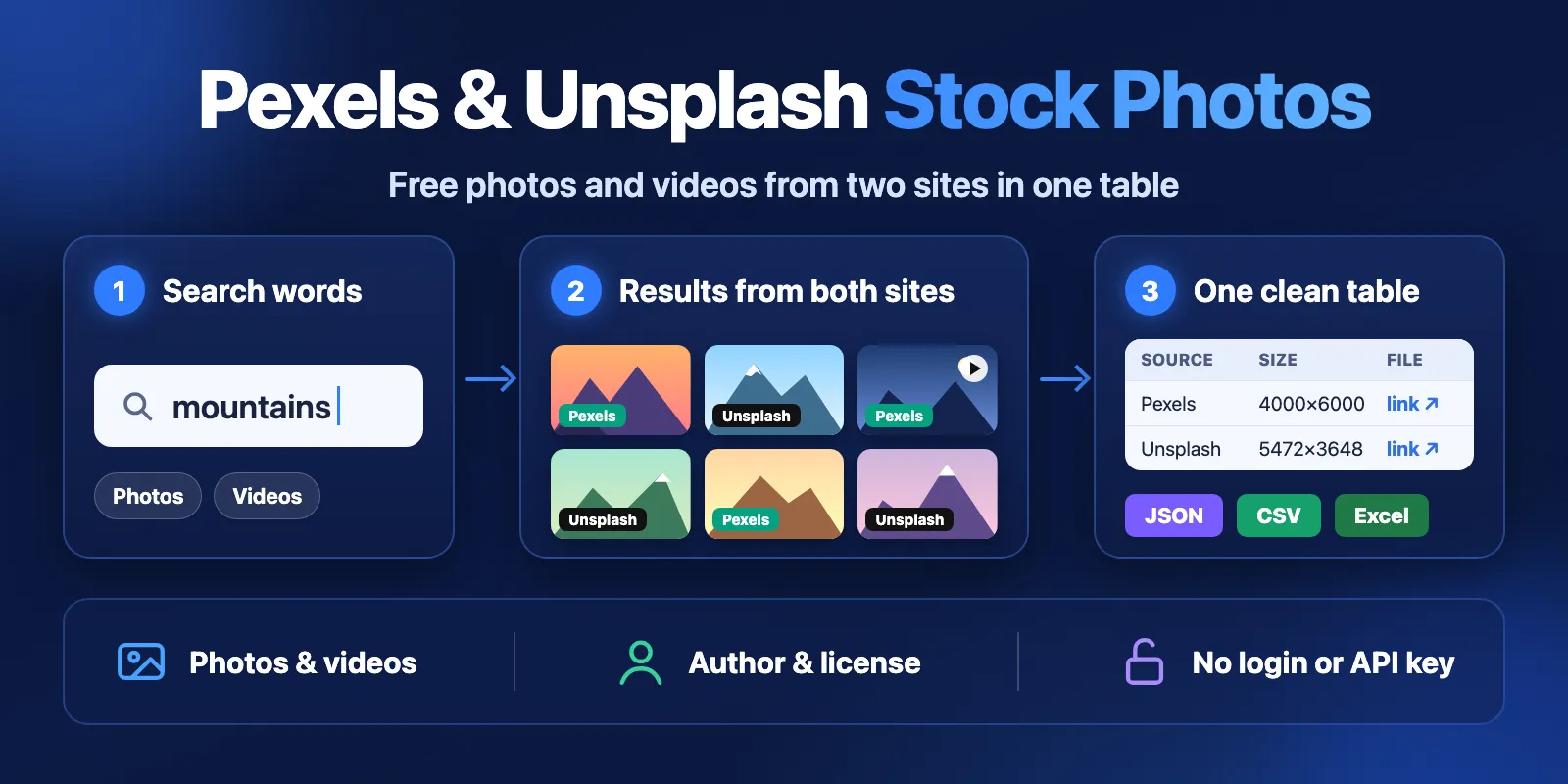
Table of contents
- What it does
- How it works
- Quick start
- Use cases
- Input
- Output
- Pricing
- Limits
- API, export and integrations
- Troubleshooting
- FAQ
- Related Actors
- Support
What it does
The Actor reads public search results and media pages of Pexels and Unsplash. For each photo or video it saves one Dataset row: title and alt text, author and author links, width and height, orientation, colors, tags, likes, downloads and views, camera and location when the author shared them, the license, and links to the preview and the full-size file. Pexels videos also get every video file (quality, size, fps, link).
Besides keyword search, it reads Pexels curated photos, single photos or videos by ID or link, similar photos, collections, all media of a photographer and Unsplash topics.
It does not log in, does not download the files themselves and does not save paid Unsplash+ photos unless you ask for them. No API key is needed.
Good fit
- Find free photos for an article, a slide deck or a social post and keep author and license next to each file.
- Compare what Pexels and Unsplash have for the same keyword in one table.
- Export all photos of a photographer, a collection or an Unsplash topic.
- Watch a keyword every week and get only photos that were not in earlier runs.
How it works
- You give keywords, links or IDs and pick the sources (Pexels, Unsplash or both) and the media type.
- The Actor reads the search pages of each source in turn, so both sites fill the table, applies your filters (orientation, color, size, video length) and removes duplicates.
- With Add tags, stats and camera data on (default), it opens each item for tags, stats, camera and location.
- It saves one row per photo or video in the Dataset. The run summary (
RUN_SUMMARY) says how many items were saved from each source, which searches found nothing and why the run stopped.
Quick start
-
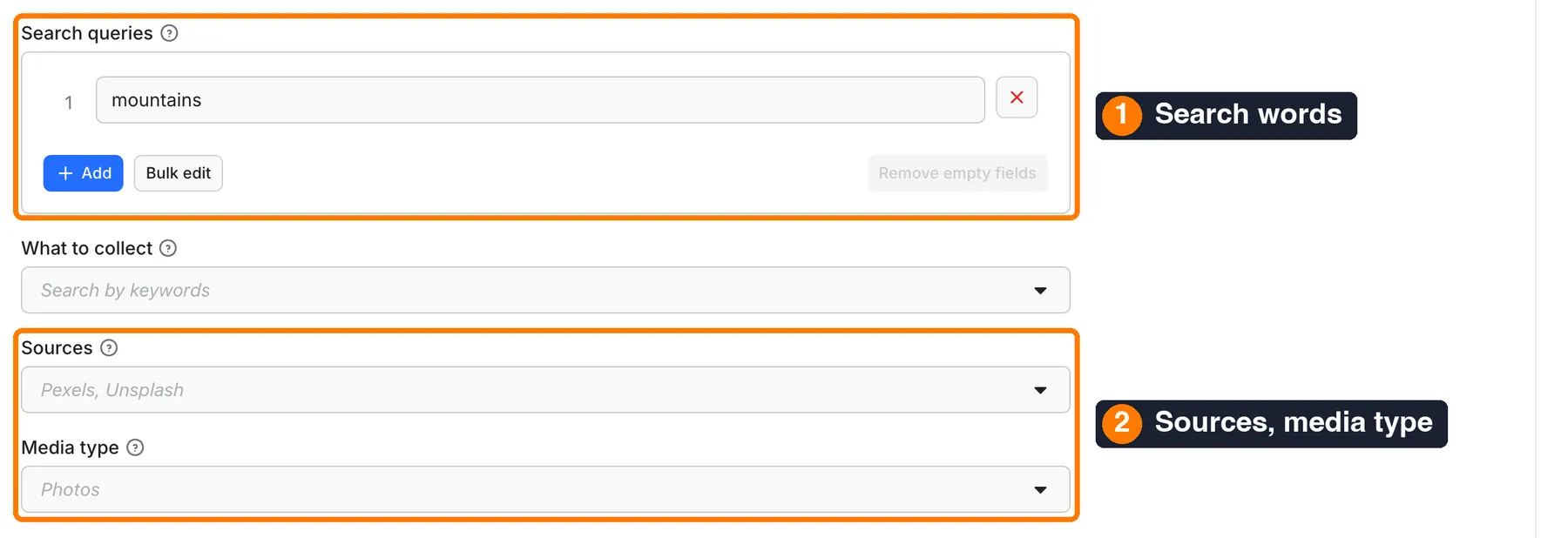
Open the Input tab. Search queries already has
mountains(box 1 in the picture). Add more keywords, one per line, if you need them. -
Keep Sources (Pexels and Unsplash) and Media type (Photos) for a first test (box 2). For videos, choose Videos: they come from Pexels.
-
Keep Max results at the prefilled 20 (in the Output section). Without a value the Actor saves up to 100.
-
Click Start.
-
Open the Output tab and check the Overview table (box 5): preview, source, type, title, author, width and height. License and file links are further right; the Videos and Authors views show more.
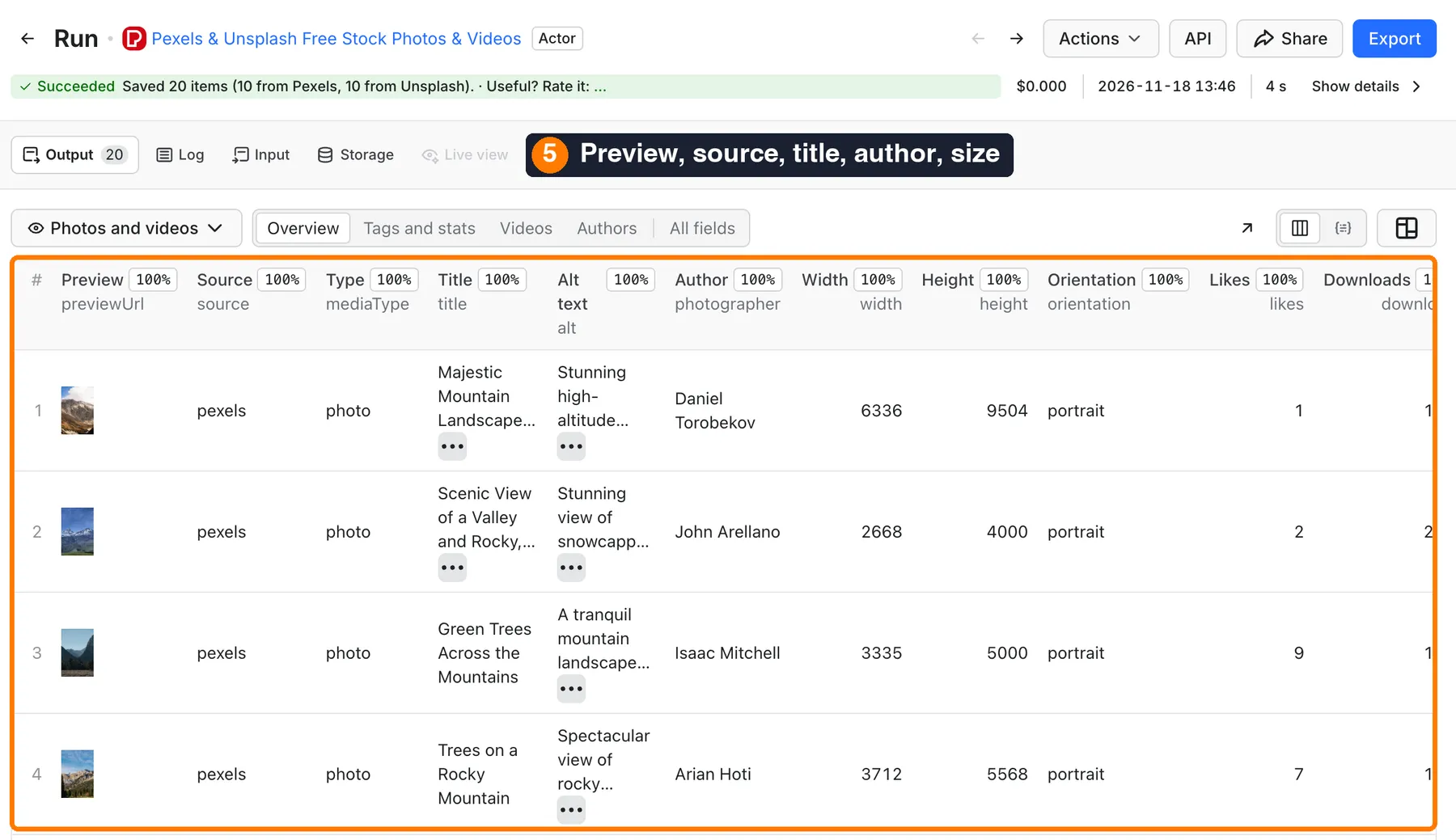
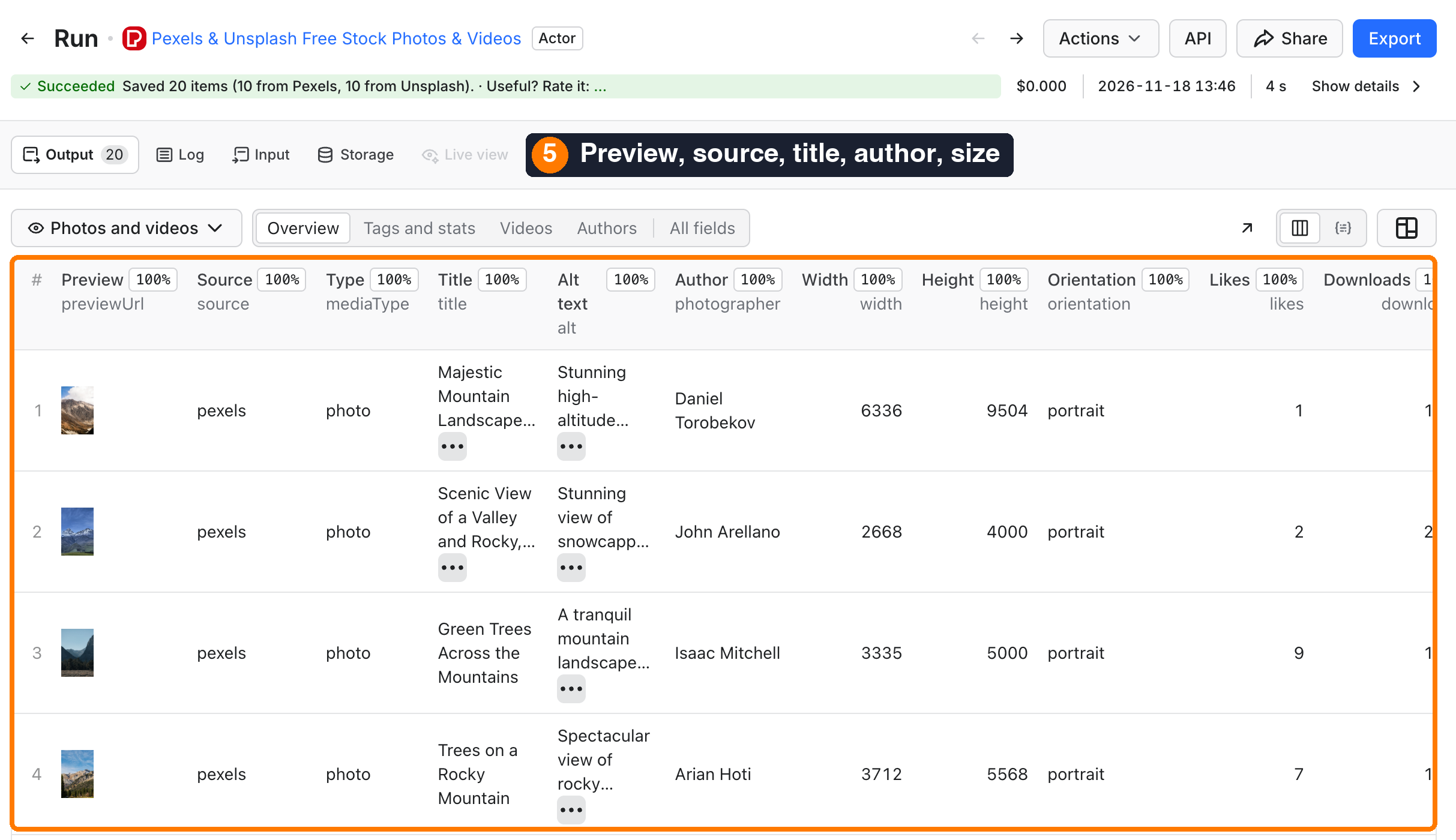
Expected result: 20 photos for “mountains”, 10 from Pexels and 10 from Unsplash, in about 5 seconds.
Use cases
| Buyer job | Input path | Output entity | Key fields | Next integration |
|---|---|---|---|---|
| Photos for an article or a post | searchQueries, orientation | photo row | previewUrl, downloadUrl, photographer, license | CSV or Google Sheets |
| Stock video clips for editing | mediaType: videos, minDuration | video row | videoFiles, duration, fps, width, height | Excel export, editing list |
| Credit authors correctly | any | photo or video row | photographer, photographerUrl, license, licenseUrl | your CMS |
| New photos for a keyword every week | onlyNew, stateName | new photo row | id, url, createdAt | schedule + Slack or Notion |
| A photographer or collection export | mode: byUser or byCollection | photo or video row | id, title, likes, downloads, downloadUrl | spreadsheet |
| What is popular in a niche | searchQueries, includeDetails | photo row with stats | likes, downloads, views, tags | spreadsheet or BI tool |
Input
Input fields
| Field | Plain name | Type | Required | Default / prefill | Allowed values | Effect | Example | Recommendation |
|---|---|---|---|---|---|---|---|---|
searchQueries | Search queries | array of strings | no* | prefill ["mountains"] | any text, up to 500 | each keyword is searched on each source | ["beach", "office desk"] | one idea per line |
mode | What to collect | string | no | search | search, curated, byIds, similar, byCollection, byUser, byTopic | which list below is read | "byUser" | keep search for keywords |
sources | Sources | array | no | ["pexels", "unsplash"] | pexels, unsplash | sites to search | ["unsplash"] | both for more choice |
mediaType | Media type | string | no | photos | photos, videos, all | photos, videos or both | "videos" | videos come from Pexels only |
startUrls | Pexels or Unsplash links | array of strings | no* | none | photo, video, search, collection, photographer or topic links | always read, whatever the mode | ["https://unsplash.com/t/nature"] | paste links from the sites |
mediaIds | Photo / video IDs or links | array of strings | no* | none | digits = Pexels, other IDs = Unsplash, or links | for modes byIds and similar | ["33999682", "Bkci_8qcdvQ"] | — |
collections | Collections | array of strings | no* | none | links or pexels: / unsplash: + ID | for mode byCollection | ["unsplash:317099"] | — |
usernames | Photographers | array of strings | no* | none | profile links or pexels: / unsplash: + username | for mode byUser | ["unsplash:kalenemsley"] | — |
topics | Unsplash topics | array of strings | no* | none | topic slugs or links | for mode byTopic | ["wallpapers", "travel"] | — |
orientation | Orientation | string | no | any | any, landscape, portrait, square | only that shape | "landscape" | landscape for banners |
color | Color | string | no | any | color name or hex (ff0000, Pexels only) | main color of the photo | "blue" | — |
size | Size (Pexels) | string | no | any | any, large, medium, small | minimum size on Pexels | "large" | — |
peopleCount / peopleAge | People in photo / People age | string | no | any | 0, 1, 2 / baby, child, teenager, adult | Pexels people filters | "0" | 0 for photos without people |
minWidth / minHeight / maxWidth / maxHeight | Size limits (px) | integer | no | none | 0–100000 | skips items outside the size | 3000 | minWidth for print |
minDuration / maxDuration / minFps | Video length (s) and fps | integer | no | none | 0–86400 / 0–240 | skips videos outside the range | 5 / 30 / 50 | — |
orderBy | Order (Unsplash) | string | no | relevant | relevant, latest | Unsplash result order | "latest" | latest for monitoring |
includePremium | Include Unsplash+ (paid) photos | boolean | no | false | true/false | adds paid Unsplash+ photos, marked isPremium: true | true | keep off for free media |
contentFilter | Safe search (Unsplash) | string | no | low | low, high | high hides more sensitive photos | "high" | — |
locale | Search language (Pexels) | string | no | en-US | e.g. de-DE, es-ES, ja-JP | language of your keywords on Pexels | "de-DE" | — |
maxItems | Max results | integer | no | default 100, prefill 20 | 1–10000 | most items saved in the run | 500 | set it to control cost |
maxItemsPerQuery | Max results per query | integer | no | 0 = no limit | 0–10000 | limit for each keyword and source | 50 | spreads results over keywords |
includeDetails | Add tags, stats and camera data | boolean | no | true | true/false | one extra request per item for tags, stats, camera, location | false | off for faster runs with basic fields |
dedupe | Remove duplicates | boolean | no | true | true/false | an item found by two keywords is saved once | true | — |
onlyNew | Only new items | boolean | no | false | true/false | skips items saved by earlier runs with the same state name | true | use with a schedule |
stateName | State name | string | no | default | letters, digits, - | separate memory for each watch list | "mountains-weekly" | one name per watch list |
deliveryConnector / deliveryTarget | Send results to / page or channel | string | no | none | your Slack, Notion or other MCP connector | posts a short summary after the run | — | see Send results to Slack or Notion |
proxyConfiguration | Proxy | object | no | none | Apify Proxy settings | sends requests through your proxy | — | not needed usually |
pexelsApiKey | Your Pexels API key (optional) | string | no | none | free key from Pexels API | uses the official Pexels API (full curated feed) | — | not needed |
unsplashAccessKey | Your Unsplash access key (optional) | string | no | none | key from Unsplash Developers | uses the official Unsplash API | — | a demo key allows 50 requests per hour |
* Give at least one of searchQueries or startUrls, or the list for the chosen mode (mode: curated needs
nothing else). Empty lines and repeated keywords are skipped. A bad entry in a list (a link to another site, a
broken id, a keyword over 200 characters) is skipped with a warning in RUN_SUMMARY; the run fails only when no
valid entry is left. A bad setting (a wrong number or option) stops the run at once with a message that names the
field and shows an example.
Interacting settings
| When | Input A | Input B | Effective behavior | Example | Cost/result effect |
|---|---|---|---|---|---|
| Keywords and sources | searchQueries | sources | every keyword is searched on every source, sources take turns | 2 keywords × 2 sources = 4 searches | results are split between sources |
| Videos and Unsplash | mediaType | sources | Unsplash has no free videos, so it is skipped for videos (the log says so) | videos + both sources → Pexels only | none |
| Mode and lists | mode | collections etc. | only the list of the chosen mode is read; startUrls are always read | byUser + topics → topics ignored | the log names ignored fields |
| Run limit and query limit | maxItems | maxItemsPerQuery | each keyword stops at its own limit, the run stops at maxItems | 500 / 50 | maxItems caps the cost |
| Monitoring | onlyNew | stateName | each name keeps its own memory of saved items | mountains-weekly | items seen before are not saved or charged |
| Details | includeDetails | maxItems | details add one request per item | false for 10000 items | faster run, same price |
Input examples
First test (prefill)
Expected behavior: one search on Pexels and one on Unsplash.
Expected output: 20 photo rows, 10 from each site, with photographer, width, height, license, downloadUrl.
Limit or cost note: $0.023 on the Free plan.
Short landscape videos for a montage
Expected behavior: Pexels video search; videos longer than 20 s or below 50 fps are skipped (a video without an fps
value is kept).
Expected output: video rows with duration, fps and a videoFiles list (quality, size, link).
Limit or cost note: up to $0.05 on the Free plan.
Weekly new photos for a keyword
Expected behavior: the first run saves up to 200 photos; later runs save only photos not saved before.
Expected output: photo rows; RUN_SUMMARY counts the skipped ones.
Limit or cost note: a run with nothing new pays only the start fee ($0.005).
Output
Output fields
| Field | Meaning | Type | Can be empty? | Example / enum | Source / notes |
|---|---|---|---|---|---|
id | ID on the site | string | no | Bkci_8qcdvQ, 33999682 | stable, used for onlyNew |
source / mediaType | site and type | string | no | pexels, unsplash / photo, video | — |
url | page on the site | string | no | https://unsplash.com/photos/…-Bkci_8qcdvQ | — |
title / description / alt | title, caption, alt text | string | yes | Wet mountain valley | on Unsplash the title is the caption or alt text |
width / height / aspectRatio / orientation | size and shape | integer / number / string | rarely | 5760 / 3840 / 1.5 / landscape | full-size file in pixels |
colors / mainColor / blurHash | colors | array / string / string | yes | ["#26260c"] | blurHash is Unsplash only |
tags / topics | tags and Unsplash topics | array | can be [] | ["mountains", "snow", "valley"] | with includeDetails |
likes / downloads / views | counts | integer | yes | 7929 / 1952864 / 308735555 | downloads and views on Unsplash only |
photographer / photographerUsername / photographerId / photographerUrl | author | string | rarely | Kalen Emsley / kalenemsley | — |
photographerLocation / photographerAvatar | author location and picture | string | yes | — | as written on the profile |
photographerInstagram / photographerTwitter | author social names | string | yes | kalenemsley | only when the author shared them |
previewUrl | small preview image | string | no | — | for tables and galleries |
downloadUrl | full-size photo or best video file | string | rarely | — | direct file link |
imageUrls | the same photo in several sizes | object | yes | {"original": "…", "large": "…"} | photos only |
videoFiles | all files of a video | array of objects | can be [] | {"quality": "hd", "width": 1920, "link": "…"} | Pexels videos only |
duration / fps / videoPreviewUrl | video length, frame rate, preview | integer / number / string | yes | 15 / 25 | videos only |
license / licenseUrl | license name and page | string | no | Unsplash License, Pexels License | read the license before use |
isPremium | paid Unsplash+ photo | boolean | no | false | true only with includePremium |
createdAt | upload date | ISO date | yes | 2016-06-01T23:13:24Z | — |
camera / exif / location | camera, settings, place | string / object / object | yes | Canon, EOS 5D Mark III | Unsplash, with includeDetails |
query / mode / rank | which search found the item and position | string / string / integer | query yes | mountains / search / 1 | — |
detailsIncluded / scrapedAt | details read / time saved | boolean / ISO date | no | true | — |
Output entities and surfaces
| Situation | Dataset/API/KVS/live view | Result shape | User action |
|---|---|---|---|
| Normal item | Dataset, views Overview, Tags and stats, Videos, Authors | one row per photo or video | open, export or use downloadUrl |
| Domain-empty result | Dataset empty; RUN_SUMMARY status NOT_FOUND (nothing exists) or NO_RESULTS (filters or onlyNew removed all) | summary only | change keywords, filters or stateName |
| Partial result | Dataset has the saved rows; RUN_SUMMARY status PARTIAL with reason CHARGE_LIMIT, DEADLINE, ONE_SOURCE_FAILED or SCAN_LIMIT | rows saved so far | raise the spending limit or timeout, retry |
| Technical failure or retry | run fails; RUN_SUMMARY status ERROR with the source error, such as SOURCE_RATE_LIMITED or SOURCE_BLOCKED | rows saved before the failure stay | retry later; report if it repeats |
| Bad input | bad list entries are skipped with a warning; a bad setting fails at once with status INVALID_INPUT, the field name and an example | no rows, no item charges (failed run) | fix the field |
Output example
This example is trimmed and comes from the prefill run. null means the site does not give the value; it never
means zero.
Send results to Slack or Notion
Pick your connector in the optional deliveryConnector field. After the run saves its data, the Actor posts a short
summary (up to 25 items with author, size and link, plus a link to the full dataset) there. Put a Notion page link or
a Slack channel ID in deliveryTarget: in Notion every run is added on top of that one page, so your workspace does
not fill up with new pages. Without a page link, Notion delivery is skipped and the log says so. A delivery error
never fails the run and costs nothing extra. Connect a service once in Apify Console → MCP connectors.
Switching from another tool
The output is not a drop-in copy of other Pexels or Unsplash scrapers. Rename these fields in your pipeline:
| Other tools | This Actor |
|---|---|
type | mediaType |
reactions | likes |
highestQualityUrl, videoSrc | downloadUrl |
imageOriginal, imageLarge, imageMedium, imageSmall | imageUrls.* |
preview | previewUrl |
altDescription | alt |
searchQuery | query |
id is always a string, for both sites. Empty values are null, not "".
Use case → fields
| Buyer job | Input path | Output entity | Key fields | Next integration |
|---|---|---|---|---|
| Photos with credits | searchQueries | photo row | downloadUrl, photographer, license | CSV, Excel, Google Sheets |
| Video clips | mediaType: videos | video row | videoFiles, duration, fps | editing list |
| New photos alert | onlyNew, stateName | photo row | id, url, createdAt | Slack or Notion summary |
Pricing
Pricing unit
You pay per saved photo or video, plus a small start fee for each run. Tags, stats and camera data
(includeDetails) cost nothing extra. Apify platform usage is included in the price.
| Event | Free | Bronze | Silver | Gold and higher |
|---|---|---|---|---|
| Photo or video saved (per 1000) | $0.90 | $0.81 | $0.72 | $0.63 |
| Run start (per GB of run memory, at least 1) | $0.005 | $0.005 | $0.005 | $0.005 |
A search that finds nothing, filters that match nothing and a monitoring run with nothing new save no rows: you pay
only the start fee ($0.005). A bad setting fails at once and pays only the start fee. When the run reaches your spending
limit, it stops and keeps what it saved (status PARTIAL, reason CHARGE_LIMIT).
Cost examples
| Scenario | Input scope | Expected item/event count | Base charge | Optional charge | Stop/cap behavior |
|---|---|---|---|---|---|
| One photo | maxItems: 1 | 1 item | $0.0059 | none | stops at maxItems |
| First test (prefill) | mountains, maxItems: 20 | 20 items | $0.023 | none | stops at maxItems |
| Small export | maxItems: 100 | 100 items | $0.095 | none | stops at maxItems |
| Normal export | maxItems: 1000 | 1000 items | $0.905 | none | stops at maxItems |
| Large export | several keywords, maxItems: 10000 | 10000 items | $9.005 | none | stops at maxItems |
| Nothing found or new | no results or onlyNew | 0 items | $0.005 | none | status NOT_FOUND or NO_RESULTS |
Prices are for the Free plan; paid plans pay less per item. Runs over 4000 items use 512 MB memory, which still counts as one start fee.
Limits
- Up to 10000 items per run. A run of 10000 items takes about 11–13 minutes; the default timeout is 1 hour.
- Videos come from Pexels only: Unsplash has no free videos.
- Paid Unsplash+ photos are skipped by default; turn on
includePremiumto add them (isPremium: true). - Without your Pexels key,
mode: curatedreads only the newest page of the curated feed; with a free key from the Pexels API it reads the full feed. - Pexels search is fuzzy: a rare or misspelled keyword can still return near matches.
- Downloads, views, camera, EXIF and location exist on Unsplash only; Pexels gives likes.
- The Actor saves links, not the files. Follow the Pexels License and the Unsplash License when you use the media, and credit the author when you can.
- Public pages only: no login, no uploads, no account data.
- Up to 500 entries in each list (keywords, links, ids) and 200 characters per keyword.
- Each request waits up to 20 s and is tried up to 3 times with growing pauses, plus one more try through Apify datacenter proxy when you set no
proxy. A site that keeps answering HTTP 429
or 403 stops with
SOURCE_RATE_LIMITEDorSOURCE_BLOCKED; the other site goes on. - Strict filters and
onlyNew: each keyword reads at most 10 pages more thanmaxItemsneeds and stops after 3 pages in a row where everything was filtered out or seen before. The run reads at most 100 pages with nothing new before the first saved item (20 more per saved item); if it stops there,RUN_SUMMARYsaysPARTIALwith reasonSCAN_LIMITand lists the inputs it did not finish (up to 100 of them). Keywords that already gave items go on. Run the other inputs on their own or loosen the filters. onlyNewlooks for new items in the first pages of each keyword: after 3 pages in a row with nothing new it stops, so new items deeper in the site's relevance order are not found in that run.- The run stops 20 s before its timeout (75 s with Slack or Notion delivery) to save the summary.
API, export and integrations
- API: start a run with the input above through the Apify API or client and read Dataset items; the file link is
in
downloadUrl, the page inurl. - Export: CSV, Excel, JSON, XML or HTML from the Dataset, views Overview, Tags and stats, Videos and Authors.
- Scheduling: add a schedule in Apify Console with
onlyNew: trueand astateName; each run saves only new items. - Webhooks / no-code: an Apify webhook on run success can pass the Dataset to Make, Zapier or n8n.
- SDK / MCP / agent: see below.
Use with AI agents (MCP)
- MCP server URL with only this Actor:
https://mcp.apify.com?tools=cliqtomedia/stock-photos-scraper. - Smallest useful input:
{"searchQueries": ["mountains"], "maxItems": 20}. - Key output fields:
previewUrl(small image),downloadUrl(full file),photographer(author),license(license name),url(page on the site). - A 20-item run takes about 5 seconds and costs $0.023 on the Free plan. Keep
maxItemssmall, up to 10000.
Troubleshooting
The run saved 0 items
Symptom: empty Dataset, run succeeded.
Likely reason: no media for the keyword, or your filters or onlyNew removed everything.
Check: RUN_SUMMARY status: NOT_FOUND (the sites have nothing) or NO_RESULTS (filters or onlyNew removed all).
Action: shorten the keyword, loosen size, color or length filters, or use another stateName.
I asked for videos but got only Pexels rows
Symptom: no Unsplash rows with mediaType: videos.
Likely reason: Unsplash has no free videos.
Check: the log line “Unsplash has no free videos”.
Action: nothing to fix; use photos or all to get Unsplash photos too.
The run stopped early with status PARTIAL
Symptom: fewer items than maxItems.
Likely reason: your spending limit (CHARGE_LIMIT), the run timeout (DEADLINE), one site did not answer
(ONE_SOURCE_FAILED) or too many pages had nothing new for your filters (SCAN_LIMIT).
Check: RUN_SUMMARY reason and the list of searches that were not finished.
Action: raise the maximum cost per run or the timeout, or run again later. Saved rows stay in the Dataset.
FAQ
Do I need a Pexels or Unsplash account or API key?
No. The Actor reads public pages without login or key. Your own key is optional: with a Pexels key, curated photos come from the full feed.
Can I use the photos for free?
Pexels and Unsplash photos are free under their own licenses, which the Actor saves in license and licenseUrl.
Paid Unsplash+ photos are not free and are skipped unless you turn on includePremium.
Why are the counts from Pexels and Unsplash different?
The Actor takes results from the sources in turn, but one site can have fewer matches or fewer items left after your filters. The run summary shows the count from each source.
Are the results always the same?
The sites change their search order and add new media every day, so results can change between runs. Use onlyNew
to get only what is new.
Related Actors
- Google Images Scraper - Image URLs, Sizes & Source Pages — images from the whole web through Google Images, with sizes and source pages.
- Pinterest Search Scraper: Pins & Boards, No Login — pins and boards for a keyword, for visual ideas.
- Social Video Downloader: TikTok, Instagram, X - No Login — video files from social posts.
Support
For a bug, question or feature request, open the Actor's Issues tab on Apify. Include the run ID, your input (without private data) and the error text from the log. Never send tokens, API keys or billing data.
⭐ Found it useful? Rate this Actor. Something wrong? Report a problem — we fix reported problems.


