

Pexels Scraper | Photos, Videos and Download Stats
Pricing
from $0.99 / 1,000 photos
Pexels Scraper | Photos, Videos and Download Stats
Pexels scraper for free stock photos and videos: 20 photos in 7 seconds, 48 fields each, from a keyword, a Pexels link or an id. Get title, tags, photographer, size, colors, views, downloads, likes, camera data, place, dates and download links, with orientation and color filters. No API key.
Pricing
from $0.99 / 1,000 photos
Rating
0.0
(0)
Developer

SilentFlow
Maintained by CommunityActor stats
0
Bookmarked
8
Total users
5
Monthly active users
10 days ago
Last modified
Share
Pexels Scraper | Stock Photos, Videos, Views and Downloads (2026)

From SilentFlow. Creators of Pinterest Scraper and Leboncoin Scraper, with 420,000+ combined lifetime runs.
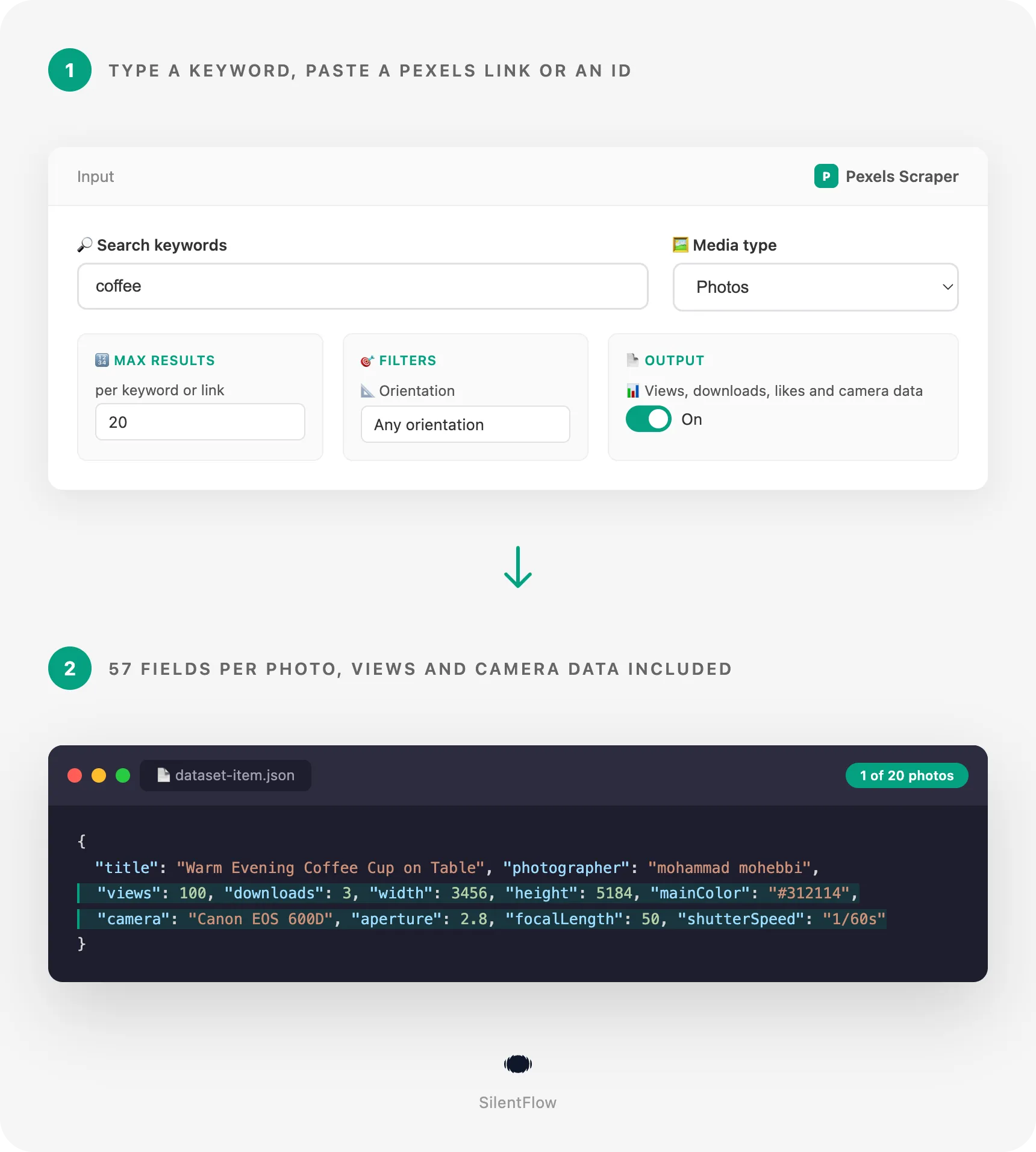
Every Pexels photo and video you need, as a table: title, description, tags, photographer, size, colors, views, downloads, likes, camera settings, place and download links. Type a keyword, paste a Pexels link or drop in photo ids, and get rows you can sort, filter and feed to a model or a media library. 20 coffee photos with all their data in 5 seconds on the prefilled run, no Pexels account and no API key.
Why choose this actor?
Saving Pexels images one by one and typing their captions into a spreadsheet? Guessing which photos people actually download, because the search page shows no numbers? Running one search mode at a time, then stitching keywords, collections and portfolios together by hand?
- 46 fields filled on a typical row, against the 20 the most used Pexels scraper shows. On a measured run of 100 coffee photos (5 Oct 2026), 46 of the 57 fields of a row carry a value on at least half of the rows: views, downloads and likes, the camera and its maker, aperture, focal length, ISO and shutter speed, file size, the date the photo was taken, content ratings, 4 image sizes and the original file, the photographer's profile, location, avatar and Instagram, and 40 tags per photo on average. The output example of the most used Pexels scraper has 20 keys and no views, downloads, likes or camera data.
- Keywords, Pexels links and ids, all in the same run. The most used Pexels scraper makes you pick one mode per run. Here you can type keywords, paste search pages with their filters, photo and video pages, photographer profiles and collections, and list photo or video ids, together, with duplicates removed across all of them. On a test run, 2 ids plus 1 filtered search link returned 14 rows in 4 seconds; a photographer link plus a collection link returned 40 rows in 9 seconds.
- Nothing to fill in before you press Start. The most used Pexels scraper makes its mode field mandatory. Here no field is required: any keyword, link or id is enough, and the form comes prefilled with coffee, so the first run returns 20 photos with their full data right away.

Try your first Pexels photo search
Paste this input into the Input tab (JSON view) and press Start. It is the prefilled input of the form: 20 coffee photos from Pexels, any orientation, any size, with views, downloads, likes and camera data.
The Apify Free plan is enough to run it and to try the actor on your own topics: no credit card, no Pexels account, no API key, no setup. Each photo or video becomes one row of the dataset, which you can export as JSON, CSV or Excel, open in Google Sheets, or read from the API.
Copy to your AI assistant
Paste this block into Claude, ChatGPT or Cursor to give it the full context of this actor:
How to scrape Pexels photos and videos
Get 100 coffee photos with their views and downloads
The simplest run: one keyword, a cap, and every row comes with its stats and camera data. On our test run, 100 coffee photos took 22 seconds.
Pull landscape videos of a place for a video edit
Switch the media type to videos and keep only horizontal clips. Each row carries the duration, the frame rate, the largest file link and every rendition (4K, Full HD, HD, SD). On our test run, 15 landscape mountain lake videos took 2 seconds.
Collect on-brand portrait photos in your brand color
Combine orientation, minimum size and a hex color to fill a story or a mobile banner with photos that already match your palette.
Input parameters
| Parameter | Type | Default | What it does |
|---|---|---|---|
searchQueries | array of strings | prefilled ["coffee"] | Keywords as typed in the Pexels search bar. Each one is its own search. |
startUrls | array of links | none | Pexels search pages, photo and video pages, photographer profiles, collections, image file links. |
mediaIds | array of strings | none | Photo or video ids. One row each. |
mediaType | select | photos | photos, videos or all (both in turn). Applies to keywords, profiles and collections. |
maxItems | integer | 100 (prefill 20) | Cap per keyword, search link, profile or collection. |
orientation | select | any | landscape, portrait or square. Applies to keywords. |
size | select | any | Minimum resolution: large (24 MP, 4K), medium (12 MP, Full HD), small (4 MP, HD). |
color | select or text | none | One of the 12 Pexels colors, or any hex code. |
includeDetails | boolean | true | Views, downloads, likes, camera data, file size, place and content ratings. |
Accepted formats
- Keywords: any words, in any language Pexels understands:
coffee,mountain lake,café,business meeting. - Search pages:
https://www.pexels.com/search/coffee/,https://www.pexels.com/search/videos/city%20night/, with theorientation,sizeandcolorfilters of the page kept. - Photo and video pages:
https://www.pexels.com/photo/coffee-cup-27860686/,https://www.pexels.com/video/man-holding-a-cup-of-coffee-6343885/, with or without a language prefix such as/fr-fr/. - Image and video files:
https://images.pexels.com/photos/27860686/pexels-photo-27860686.jpegandhttps://videos.pexels.com/video-files/6343885/...mp4resolve to their photo or video. - Photographers:
https://www.pexels.com/@ekaterina-bolovtsova/for the whole portfolio; the media type field picks photos, videos or both. - Collections:
https://www.pexels.com/collections/aquatic-aesthetic-bw7dkse/or just the end of it. - Ids:
27860686, or a full photo link in the ids field. - Colors:
red,turquoise,gray(orgrey),violet(orpurple),#2563eb,2563eb,#fff.
What data can you extract from Pexels?
Each row is one photo or video, with 57 fields grouped the way you read them. Fields Pexels has no value for are null, never an empty string, so a column means the same thing on every row.
- Identity (5):
id,url,mediaType,title,slug. The id is Pexels' own and never changes; the url is the permanent page of the photo or video. - Content (4):
description(a full-sentence caption, written for screen readers),tags(40 per photo on average on our coffee run),licenseandlicenseUrl. - Photographer (10): name, id, username, profile link, location, avatar, Instagram and X handles, donation link, and whether they are a Pexels Hero.
- Measures (10):
width,height,aspectRatio,orientation,durationandfpsfor videos,fileSizefor photos, andviews,downloads,likes. - Colors (2):
mainColorand the 4 to 5colorsof the palette, as hex codes, for photos. - Camera (7):
camera,cameraMake,aperture,focalLength,iso,shutterSpeed,software, read from the original file. On our coffee run, 70 photos out of 100 carried their camera. - Place and time (7):
location(a place name, on 25 photos out of 100 on our coffee run),latitudeandlongitudewhen Pexels has them,photographedAt,createdAt,publishedAt,updatedAt, all in RFC 3339 UTC. - Content ratings (1 object, 5 values):
contentSafetygives the likelihood that a photo is adult, racy, violent, medical or a spoof, fromvery_unlikelytovery_likely. - Media (8):
imageUrl(the original file),imageLargeUrl(1440 px),imageMediumUrl(750 px),imageSmallUrl(130 px high),downloadUrl, and for videosvideoUrl(the largest file),videoPreviewUrlandvideoFiles(every rendition with its quality, size, frame rate and links). - Run (3):
foundBy(keyword, url or id),searchQuery,scrapedAt.
On our coffee run the most viewed photo had 19,433,872 views and the most downloaded 97,652 downloads; the median photo had 92,663 views.
Output example
One real row from a run on 5 Oct 2026 (keyword coffee):
A video row fills duration, fps, videoUrl, videoPreviewUrl and videoFiles instead of the palette and camera fields. From the same day, Aerial Footage of a Lake (id 10027098): 23 seconds at 25 frames per second, 3840 x 2160, 284,950 views, 2,006 downloads, 49 likes, with its 4K file first in videoFiles.
Advanced usage
Build a large image dataset on one topic
Pexels shows at most 480 results for one search. When you ask for more and leave orientation and size open, the run keeps going through landscape, portrait and square results and through each size, and only keeps photos it has not delivered yet. On our test run, 1,000 unique coffee photos took 48 seconds with the extra data turned off. Turn includeDetails back on when you need the stats and camera fields; the run takes longer, since each photo then gets its own lookups (100 photos in 22 seconds on our run).
Archive a photographer's whole portfolio with its stats
Paste a profile to get every photo and video of a photographer, with views, downloads and likes per work. Set the media type to photos or videos to take one kind only, and raise maxItems to the size of the portfolio.
Mirror a curated collection into your media library
Collections are hand-picked sets around a theme. Point the run at one and send the rows to your library or your DAM with their original files, captions and tags. The media type you pick decides whether videos of the collection come along.
Track the views and downloads of a watchlist every week
List the photos and videos you follow (yours, a competitor's, the ones your campaigns use) and schedule the run weekly from the Schedules tab. Each run gives their current views, downloads and likes, so you can chart how they grow.
Replay a search you built on pexels.com
Set your filters on the Pexels search page, copy the address and paste it: the keyword, the media type, the orientation, the size and the color of the page are all kept. Mix it with keywords and ids in the same run; a photo found twice is delivered once.
FAQ
What is Pexels? Pexels is one of the largest free stock photo and video sites, a Canva company, where photographers and filmmakers publish work anyone can use under the Pexels license. It sits next to Unsplash and Pixabay as a go-to source of free visuals for websites, ads, social posts and AI training sets.
Do I need a Pexels account or a Pexels API key? No. The actor reads the public Pexels pages and data the site shows any visitor. You only need an Apify account, and the Free plan is enough to start.
What does one row contain? One photo or video with up to 57 fields: identity, caption and tags, photographer, size and orientation, views, downloads and likes, colors, camera settings, place and dates, content ratings, and links to every image size and video file. On our 100-photo coffee run, 46 of those fields were filled on at least half of the rows.
How many results can I get for one keyword? Pexels shows up to 480 results per search. Past that, the run walks the orientations and sizes you left open and keeps only new photos: 1,000 unique coffee photos on our test run. How far it goes depends on the keyword; a niche keyword runs out sooner, and the log tells you when a keyword has nothing more.
Can I mix keywords, links and ids in one run?
Yes. Ids and links to single photos are read first, then search pages, profiles and collections, then keywords. A photo met twice is delivered once, and maxItems applies to each keyword or link on its own.
Can I get videos?
Yes. Set the media type to videos, or to all for photos and videos in turn, or paste video pages and video searches. Video rows carry the duration, the frame rate, the largest file and the full list of renditions with their quality, resolution and links.
How do the filters combine?
They stack, as on the Pexels search page. orientation: portrait with size: large and color: #2563eb returns tall photos of 24 megapixels or more whose palette is close to that blue. Filters apply to keywords; a search link keeps the filters it was copied with.
Why are camera or place fields empty on some photos?
They come from the original file and from the photographer. Phones and editing tools often strip them: on our coffee run, 70 photos out of 100 had their camera and 25 out of 100 a place name. When Pexels has no value, the field is null.
How fresh is the data? Live. Every run reads Pexels at the moment it runs, so views, downloads and likes are those of that day. Schedule the run to follow how they change.
Are the image and video links permanent?
The url of a photo or video is its permanent Pexels page. The image and video links point to Pexels' own file servers and keep working as long as the photo or video stays online on Pexels. Keep the id to look a photo up again later.
Can I use the photos commercially?
The Pexels license allows free use, including commercial use, without attribution, and lets you edit the photos. It does not allow selling unaltered copies, redistributing them on other stock sites, or implying that people in a photo endorse your product. Each row links the license in licenseUrl; read it before you publish.
A photographer or collection link returned nothing. Why? The profile or collection may have been removed or made private, or it may hold only the other media type: a portfolio of videos returns nothing with the media type set to photos. The run ends with a message that says which link had nothing.
Can I run it from my code or an AI agent?
Yes. Call silentflow/pexels-scraper with the Apify API, the Python or JavaScript client, or any MCP-ready agent, with the input shown above. Paste the block of the Copy to your AI assistant section into your assistant to give it the whole schema.
More SilentFlow scrapers
🛒 E-commerce
 Pinterest - Pinterest Scraper | Pins, Boards and Profiles
 Leboncoin - Leboncoin Scraper | Classified Ads, Prices and Sellers
 Leboncoin - Leboncoin Ad Details Scraper
 Back Market - Back Market Scraper | Refurbished Prices
 ImportYeti - US Customs Records, Suppliers & Trade Data - ImportYeti Scraper - US Customs Records, Suppliers & Trade Data
 TikTok Shop - TikTok Shop Scraper | Products, Sellers and Creator Videos
 1688 Wholesale - 1688 Wholesale Scraper
 Naver - Naver Scraper | Shopping Products, Prices and Reviews
 Udemy Course - Udemy Course Scraper
 JD - JD Products Scraper | Prices, Brands and Barcodes
 Store Leads Ecommerce - Store Leads Ecommerce Scraper
 Amazon Seller - Amazon Seller Scraper | Emails, Phones and Ratings
 Naver - Naver Reviews Scraper | Shopping Product Reviews
 Bring a Trailer - Bring a Trailer Scraper
 Lowes - Lowes Products Scraper | Prices, Stock and Specs
 Store Leads - Store Leads Scraper | Shopify Data
 Avito - Avito Scraper | Listings, Prices and Sellers
 Leboncoin - Leboncoin Scraper
 Mobile.de - Mobile.de Scraper
 Naver - Naver Products Scraper | Shopping Prices, Sellers and Ratings
 Taobao - Taobao Scraper | Products, Prices and Sellers
 Udemy - Udemy Scraper
 Agoda - Agoda Scraper | Hotel Prices and Guest Ratings
 Alibaba - Alibaba Products Scraper | Wholesale Prices and MOQ
 AliExpress - AliExpress Reviews Scraper | Feedback, Ratings and Photos
 AliExpress - AliExpress Scraper | Products, Prices and Sales
 Allegro - Allegro Scraper | Products, Prices and Sellers
 Avito - Avito Profiles Scraper | Sellers, Ratings and Reviews
 Back Market - Back Market Scraper | Refurbished Electronics Prices
 BAUHAUS - BAUHAUS Scraper | Product Prices, EAN and Specs
 CARFAX - CARFAX Scraper | Used Cars, Prices and History
 Coupang - Coupang Detail Scraper | Product Prices and Options
 Ctrip - Ctrip Scraper | Attractions, Tickets and Reviews
 eBay Marketplace - eBay Marketplace Scraper
 Europages - Europages Scraper | Suppliers and B2B Companies
 Eventim - Eventim Scraper | Events, Ticket Prices and Venues
 GasBuddy - GasBuddy Scraper | Gas Prices by Station
 Google Hotels - Google Hotels Scraper | Prices, Offers and Ratings
 Homedepot - Homedepot Reviews Scraper | Customer Reviews and Ratings
 Leboncoin - Leboncoin Details Scraper | Full Ad Data and Sellers
 Mercari - Mercari Scraper | Listings, Sold Prices and Sellers
 Vinted Marketplace - Vinted Marketplace Scraper
 Walmart - Walmart Product Scraper
 Alibaba - Alibaba Scraper | Products, Prices and Suppliers
 Amazon - Amazon Product Scraper
 Amazon Marketplace - Amazon Marketplace Scraper
 AutoScout24 - AutoScout24 Scraper
 eBay Listings - eBay Listings Scraper
 Europages Deep Dive Extractor - Europages Deep Dive Extractor | VAT, Decision Makers, ISO Certs
 Pinterest - Pinterest Scraper
 Trip - Trip Scraper | Hotels, Prices and Reviews
 Vinted - Vinted Scraper
 Walmart - Walmart Scraper | Prices, Reviews, Sellers, Availability
💼 Jobs
 ZipRecruiter - ZipRecruiter Jobs Scraper | Salary, Company & Location Filters
 Indeed - Indeed Company Reviews Scraper
 Multi Board - Multi Board Job Scraper
 Glassdoor Job Listings - Glassdoor Job Listings Scraper
 🔥 Glassdoor - 🔥 Glassdoor Scraper
 LinkedIn Job Search - LinkedIn Job Search Scraper | Salaries & Seniority
 ATS - ATS Jobs Scraper | Greenhouse, Lever and Ashby
 Dice Tech - Dice Tech Jobs Scraper
 iimjobs - iimjobs Scraper | Jobs, Companies and Recruiters
 Jora - Jora Jobs Scraper
 Malt Freelancer - Malt Freelancer Scraper
 Malt - Malt Scraper | Freelance Profiles
 Welcome to the Jungle - Welcome to the Jungle Job Scraper
 All - All Jobs Scraper
 Arbeitsagentur - Arbeitsagentur Jobs Scraper
 Cutshort - Cutshort Jobs Scraper | Salaries, Skills and Companies
 Dice - Dice Jobs Scraper | US Tech Jobs, Salaries, Skills
 Glassdoor - Glassdoor Jobs Scraper
 Indeed - Indeed Jobs Scraper | Job Listings in 73 Countries
 Jora - Jora Scraper | Jobs in Australia, New Zealand, Singapore
 StepStone - StepStone Scraper
 YCombinator - YCombinator Jobs Scraper | Startup Jobs, Salaries and Founders
 Arbeitsagentur - Arbeitsagentur Scraper | German and Austrian Job Board
 Indeed - Indeed Companies Scraper | Reviews, Salaries, Interviews
 Indeed - Indeed Jobs Scraper | NLP Skills
 LinkedIn - LinkedIn Jobs Scraper
 Naukri & NaukriGulf - Naukri & NaukriGulf Jobs Scraper
 Seek - Seek Job Scraper
 Welcome to the Jungle - Welcome to the Jungle Scraper | Jobs and Company Data
 Ziprecruiter - Ziprecruiter Scraper
🏠 Real estate
 SeLoger - SeLoger Scraper | Real Estate Listings
 Anjuke - Anjuke Scraper | Rental Listings, Prices and Agents
 Realtor Rental Listings - Realtor Rental Listings Scraper
 Airbnb Pro Host Contact & - Airbnb Pro Host Contact & Email Scraper
 Bien'ici - Bien'ici Scraper | Property Listings
 Rightmove - Rightmove Scraper
 Trulia Rental Listings - Trulia Rental Listings Scraper
 Airbnb Professional Host - Airbnb Professional Host Scraper | Emails, Phones, SIRET
 Airbnb Search - Airbnb Search Scraper
 Bienici - Bienici Scraper
 Idealista - Idealista Scraper
 Realestate.com.au - Realestate.com.au Scraper
 SeLoger - SeLoger Scraper | French Property Listings and Agencies
 Zillow - Zillow Scraper
 Airbnb Search - Airbnb Search Scraper | Prices, Fees, Amenities, Hosts
 Idealista - Idealista Scraper
 Realtor Rental - Realtor Rental Scraper
 Trulia Rental - Trulia Rental Scraper | US Rentals, Prices, Pet Policy
📣 Social media
 LinkedIn Post Search - LinkedIn Post Search Scraper | Keywords, Hashtags & Profiles
 Facebook Search - Facebook Search Scraper
 Instagram - Instagram Story Scraper | Stories & Highlights
 LinkedIn Leads - LinkedIn Leads Scraper | Sales Navigator Export
 TikTok - TikTok Scraper
 YouTube - YouTube Channel Scraper | Videos, Shorts and Views
 Facebook Search - Facebook Search Profiles Scraper | People by Name or Keyword
 Instagram Engagement - Instagram Engagement Scraper
 Meta Ad Library - Meta Ad Library Scraper
 OnlyFans - OnlyFans Profile Scraper
 TikTok Trend - TikTok Trend Scraper | Trending Hashtags and Videos
 OnlyFans - OnlyFans Creator Scraper
 Skool Community - Skool Community Scraper
 Bilibili - Bilibili Scraper
 Facebook Thread - Facebook Thread Profiles Scraper | Followers, Bios & Engagement
 Kuaishou - Kuaishou Scraper | Videos, Comments and Creator Stats
 LinkedIn Event - LinkedIn Event Scraper
 Reddit - Reddit Scraper | Posts, Comments and Subreddits
 Reddit - Reddit Scraper | Comments, Posts and Users
 Snapchat - Snapchat Contacts Scraper | Phones, Emails and Websites
 Weibo - Weibo Scraper | Posts, Profiles and Engagement
 Xigua - Xigua Scraper | Videos, Creators and Downloads
 Discord - Discord Scraper | Servers, Member Counts and Invites
 Facebook - Facebook Company Scraper | Emails, Phones, Ratings
 Facebook Business Page - Facebook Business Page Scraper
 Kwai - Kwai Scraper | Videos, Creators and Hashtags
 LinkedIn Ads Library - No Cookies - LinkedIn Ads Library Scraper - No Cookies
 LinkedIn Hashtag & - LinkedIn Hashtag & Post Scraper | No Cookies
 Skool Group - Skool Group Scraper
 Snapchat - Snapchat Ads Scraper | Ad Library, Impressions & Targeting
 YouTube - YouTube Transcript Scraper
🏢 Business data
 Tencent - Tencent Scraper | Maps Places, Phones and Ratings
 LinkedIn People Search - LinkedIn People Search Scraper | Profiles & Companies
 LinkedIn Company Search - LinkedIn Company Search Scraper | Profiles & Firmographics
 Company Data - Company Data Scraper | Emails, Phones and Tech Stack
 FanDuel - FanDuel Scraper | Odds, Spreads and Player Props
 ForexFactory - ForexFactory Scraper | Economic Calendar and Forecasts
 Justdial - Justdial Companies Scraper | Business Leads, Phones and Emails
 Kakao - Kakao Scraper | Map Places, Reviews and Phones
 OpenTable - OpenTable Reviews Scraper | Restaurant Reviews and Ratings
 SoftwareAdvice - SoftwareAdvice Scraper | Reviews, Ratings and Pros & Cons
 Teachable Course - Teachable Course Scraper
 Zomato - Zomato Reviews Scraper | Restaurant Ratings and Replies
 2GIS - 2GIS Reviews Scraper | Ratings, Photos and Owner Replies
 LinkedIn Sales Navigator - LinkedIn Sales Navigator Scraper
 Teachable - Courses, Prices & Instructors - Teachable Scraper - Courses, Prices & Instructors
 Trustpilot - Trustpilot Scraper | Reviews, Ratings and Company Contacts
 Website Tech Stack - Website Tech Stack Scraper
✈️ Travel
 Google Maps - Google Maps Scraper
 Booking.com Hotel - Booking.com Hotel Scraper
 Flight Price - Flight Price Scraper
 Trip - Trip Reviews Scraper | Hotel Reviews and Ratings
 Booking - Booking Scraper | Hotel Prices, Photos, Availability
🎯 Lead generation
 Northdata - Northdata Company Scraper
 ZocDoc - ZocDoc Scraper | Doctors, Reviews and Availability
 UK Companies House - UK Companies House Enricher
 Dealroom - Dealroom Scraper | Companies and Investors
 CNPJ Brazilian - CNPJ Brazilian Company Enricher
 Google Ads Transparency - Google Ads Transparency Scraper
 SIRET - SIRET Company Enricher
 BuiltWith - BuiltWith Scraper | Tech Stacks and Top Sites
 Domain - Domain Enricher
 French Company Prospector - French Company Prospector
 SEC - SEC Scraper | EDGAR Filings and Company Data
 USPTO - USPTO Scraper | Trademark Search and Status
 ZocDoc - ZocDoc Scraper
 Clutch - Clutch Scraper | Agencies, Reviews, Ratings, Services
 Clutch Agency - Clutch Agency Scraper
 Dealroom Startup Data - Dealroom Startup Data Scraper
 G2 - G2 Reviews Scraper
 PagesJaunes - PagesJaunes Scraper | French Business Emails and SIRET
 PagesJaunes - PagesJaunes Business Scraper
 SIRET French - SIRET French Company Enricher
 ThomasNet Suppliers - ThomasNet Suppliers Scraper
🔎 SEO
 Similarweb - Similarweb Scraper | Website Traffic, Rankings and Competitors
 Google News - Google News Scraper
 Apple - Apple Scraper | App Store Apps, Ratings and Charts
🧰 More tools
 PrizePicks - PrizePicks Scraper | Player Props, Lines and Projections
 Apple - Apple Reviews Scraper | App Store Reviews and Ratings
Support
Need something this scraper doesn't do yet? We ship features fast.
- Feature requests go straight to our backlog
- Enterprise needs? We do custom integrations and high-volume plans
- Pricing questions? Check the Monetization tab on the actor page
Response time: usually under 24 hours.
Legal compliance
This actor extracts publicly available data from pexels.com: the photos and videos, their captions and statistics, and the public profiles of the people who published them. It does not bypass any login, paywall or CAPTCHA. Users are responsible for complying with Pexels' terms of service, the Pexels license for any image or video they use, and applicable data protection laws (GDPR, CCPA, and PIPL where relevant). Rows name photographers and link their public social profiles, which is personal data: handle it accordingly, and do not use it for unsolicited contact. The data returned is informational; verify accuracy for regulated use cases.
Pexels Scraper by SilentFlow: Pexels photos and videos as a dataset, with the numbers and camera data behind them.


