

Target Scraper: Products, Prices & Store Stock, No Login
Pricing
from $0.67 / 1,000 target products
Target Scraper: Products, Prices & Store Stock, No Login
Track Target.com prices, deals and shelf stock for any store or ZIP. Search by keyword, category, link, TCIN or UPC; add reviews, nearby-store stock and change-only runs. No login.
Pricing
from $0.67 / 1,000 target products
Rating
0.0
(0)
Developer

Cliqto Media
Maintained by CommunityActor stats
0
Bookmarked
3
Total users
2
Monthly active users
5 days ago
Last modified
Categories
Features
Share
Search Target.com by keyword, category, product link, TCIN, UPC or DPCI and get each product's price, regular price, promotion, rating and stock in a chosen Target store, with no login.
It is built for US retail analysts, resellers and brand teams who watch Target prices and shelf stock. The smallest run is one keyword such as air fryer with 10 products; it usually finishes in 5–10 seconds, up to about 25 seconds when Target answers slowly.
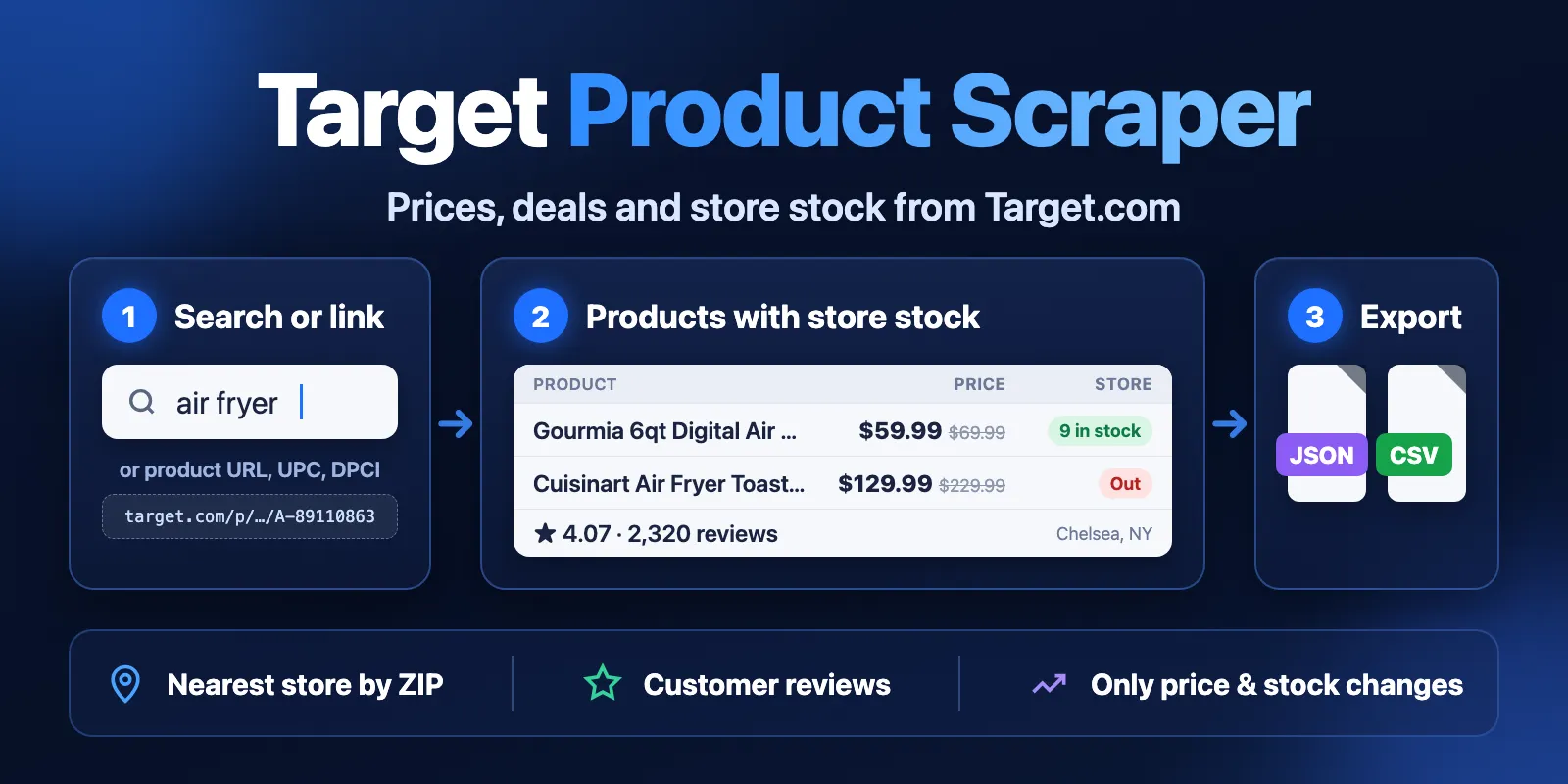
Table of contents
- What it does
- How it works
- Quick start
- Use cases
- Input
- Output
- Pricing
- Limits
- API, export and integrations
- Troubleshooting
- FAQ
- Related Actors
- Support
What it does
Target Scraper reads Target's public product data and saves one row per product: title, brand, TCIN, UPC, DPCI, current and regular price, discount, rating, review count, and availability for shipping, pickup and the selected store, including the in-store quantity. It can also add customer reviews, stock in nearby stores, the nearest store to a ZIP code, and a "changed since last run" mark for scheduled price watching.
It covers target.com in the United States only. It does not log in, add to cart or read account data.
Good fit
- Check prices and promotions for a keyword or category, sorted by price, rating or best sellers.
- See whether a product is on the shelf in one store, or in the 1–20 stores closest to a ZIP code.
- Look up a list of product links, TCINs, UPCs or DPCIs and get current price and stock.
- Collect customer reviews (for example, the lowest-rated first) next to product data.
- Run on a schedule and save only products whose price or stock changed.
How it works
- You give it keywords, Target category links, product links or TCINs, and a store (a store ID or a ZIP code).
- It reads Target's search pages (up to 24 products per page) and product data for that store, then applies your filters: in stock only, clearance only, minimum discount, maximum price.
- It saves one Dataset row per product, optional review rows, and a
RUN_SUMMARYrecord with counts, the stop reason and the run status. Bad links and searches with no results get a free status row instead of being silently skipped.
Quick start
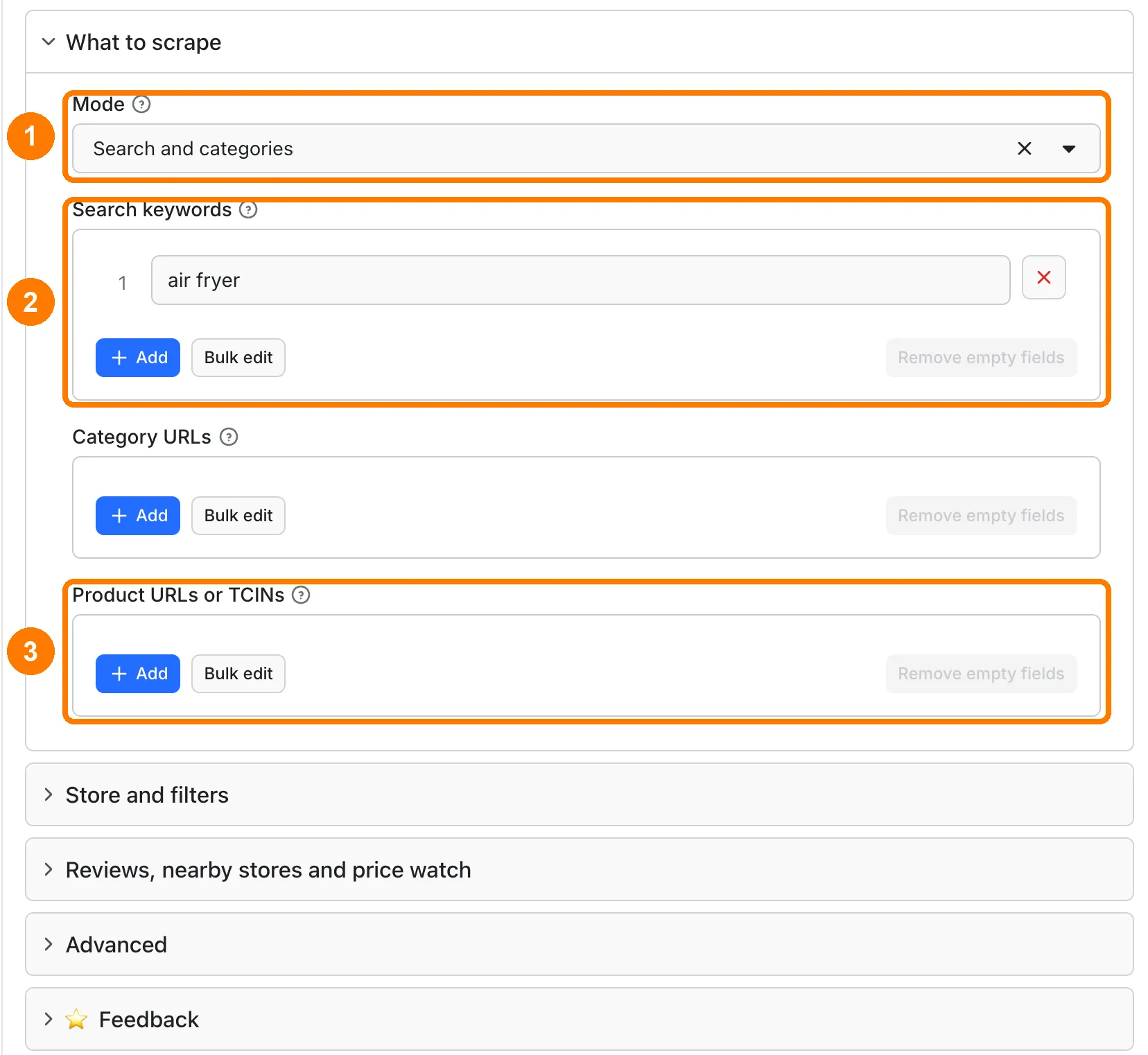
-
Open the Input tab. Keep Mode on
Search and categories(box 1 in the picture). -
Search keywords is already set to
air fryer; type your own product words if you like (box 2). To check exact products instead, switch Mode toProductsand paste links or TCINs into Product URLs or TCINs (box 3). -
Optional: lower on the form (not shown in the picture), Store and filters has Target store ID (
2281by default) and US ZIP code, and Maximum products (10in the example) is in Reviews, nearby stores and price watch. -
Click Start.
-
Open the Output tab, view Products, and check the price columns (box 1), the discount (box 2) and the store stock columns
availabilityandstoreQuantity(box 3).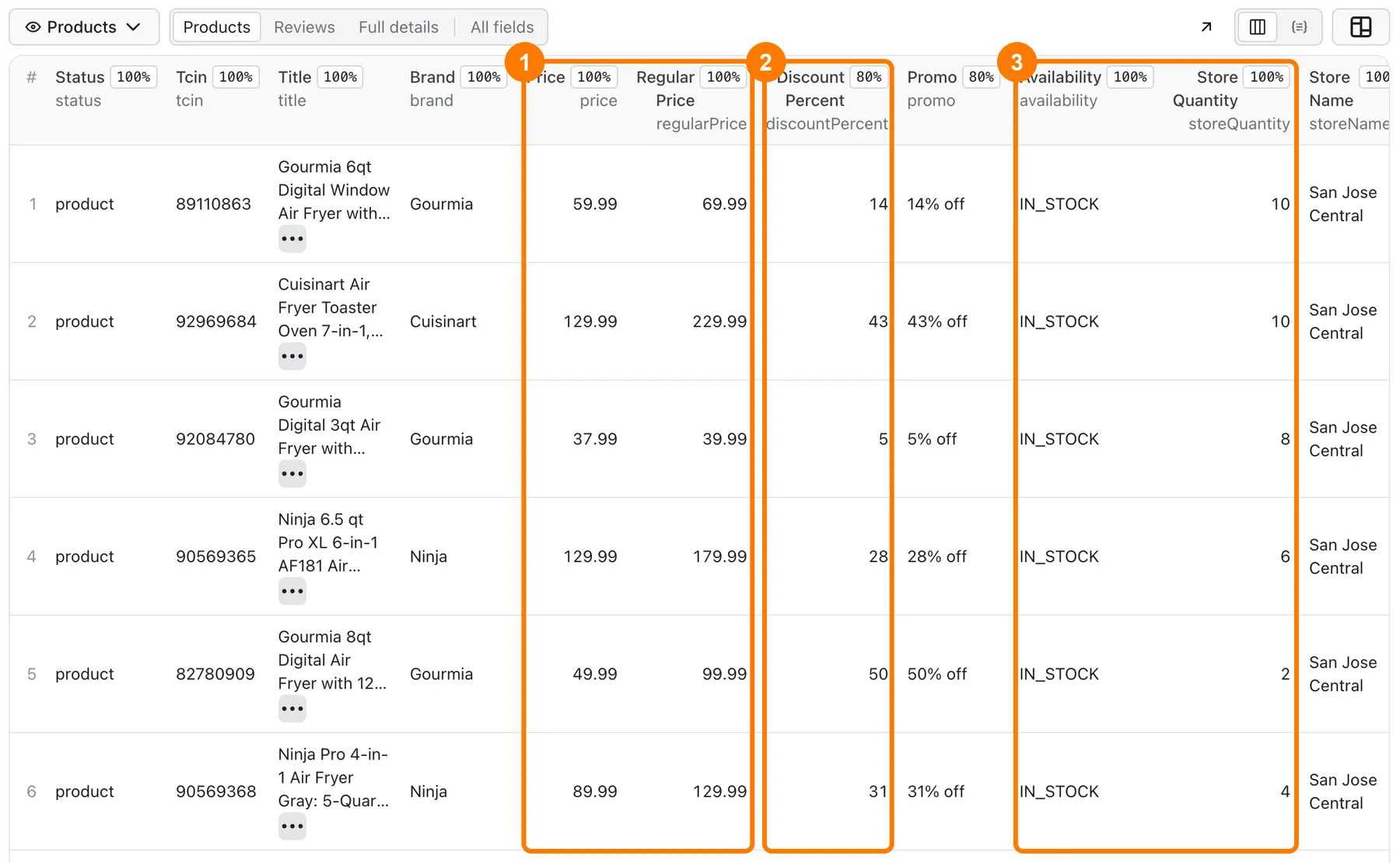
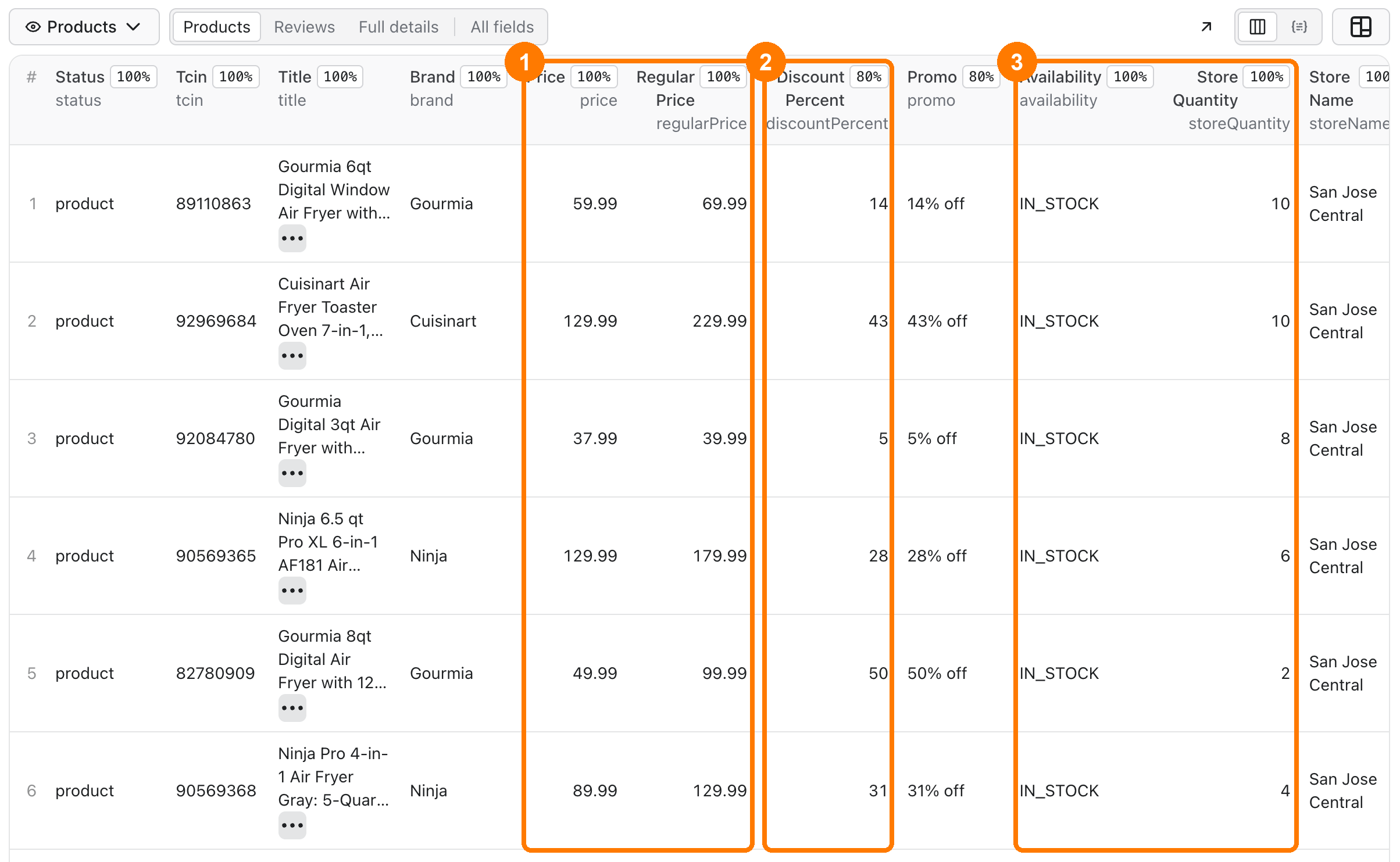
Expected result: 10 air fryer products with prices and stock for store 2281 (San Jose Central). Test runs took 4–7 seconds (once 24 seconds when Target was slow) and cost $0.011 on the Free plan.
Use cases
| Buyer job | Input path | Output entity | Key fields | Next integration |
|---|---|---|---|---|
| Price check for a keyword | searchQueries, sort | Product row | price, regularPrice, discountPercent, promo | CSV / Google Sheets export |
| Shelf stock in local stores | zipCode, useNearestStore, nearbyStoresCount | Product row | storeQuantity, storeAvailability, nearbyStores | Scheduled run + webhook |
| Look up a product list | mode: product, productUrls | Product row | tcin, upc, dpci, price, availability | API |
| Read customer complaints | maxReviewsPerProduct, reviewsSort | Review row | reviewRating, reviewText, reviewSubmittedAt | Dataset view reviews |
| Price watch on a schedule | onlyChanges | Product row | changeType, previousPrice, price | Slack or Notion summary |
Input
Input fields
| Field | Plain name | Type | Required | Default / prefill | Allowed values | Effect | Example | Recommendation |
|---|---|---|---|---|---|---|---|---|
mode | Mode | string | no | search | search, product | product reads only productUrls | product | Use product for a fixed list |
searchQueries | Search keywords | array of strings | one of three inputs | prefill ["air fryer"] | any text, also a UPC or DPCI | one search per phrase | ["air fryer", "810002864582"] | Put UPC/DPCI codes here |
categoryUrls | Category URLs | array of strings | one of three inputs | empty | https://www.target.com/c/... links | reads the category grid | https://www.target.com/c/headphones-electronics/-/N-5xteg | — |
productUrls | Product URLs or TCINs | array of strings | one of three inputs | empty | https://www.target.com/p/... links or 8-digit TCINs | one product lookup each | ["89110863"] | Can be mixed with searches |
storeId | Target store ID | string | no | 2281 | Target store number | store used for stock and pickup | 3412 | Ignored when useNearestStore is on |
zipCode | US ZIP code | string | for nearest/nearby stores | empty | 5-digit ZIP | location for nearby stock | 10001 | — |
sort | Sort search results | string | no | relevance | relevance, price_low, price_high, bestselling, newest, rating | order of search pages | price_low | — |
onlyInStock | Only in stock | boolean | no | false | — | drops products with no shipping, pickup or store stock | true | — |
onlyClearance | Only clearance or discounted | boolean | no | false | — | keeps clearance or below-regular-price products | true | — |
minDiscountPercent | Minimum discount (%) | integer | no | empty | 0–100 | keeps products with at least this discount | 20 | — |
maxPrice | Maximum price (USD) | number | no | empty | ≥ 0 | keeps products at or below this price | 100 | — |
includeSponsored | Include sponsored products | boolean | no | true | — | adds Target's sponsored recommendations that match your keywords | false | Turn off for organic order only |
maxReviewsPerProduct | Reviews per product | integer | no | 0 | 0–500 | adds review rows per product | 20 | Each review is a paid row |
reviewsSort | Review order | string | no | most_recent | most_recent, helpfulness_desc, highest_rating, lowest_rating | which reviews come first | lowest_rating | — |
useNearestStore | Use the nearest store to ZIP code | boolean | no | false | needs zipCode | replaces storeId with the closest store | true | — |
nearbyStoresCount | Nearby stores to check | integer | no | 0 | 0–20, needs zipCode | adds nearbyStores to each product | 5 | One extra request per product |
nearbyRadiusMiles | Nearby radius, miles | integer | no | 25 | 1–100 | search radius for nearby stores | 10 | — |
onlyChanges | Only new or changed products | boolean | no | false | — | saves only new products or price/stock changes since the last run with the same input | true | For scheduled runs |
maxItems | Maximum products | integer | no | 100, prefill 10 | ≥ 1 | stops after this many product rows across all inputs | 500 | Target shows about 1,200 per search |
maxProductsPerSearch | Maximum per search or category | integer | no | empty | ≥ 1 | extra limit for each keyword or category | 50 | Use with several keywords |
maxSearchPages | Maximum pages per search | integer | no | 50 | 1–50 | 24 products per page | 5 | — |
maxRequestRetries | Request retries | integer | no | 2 | 0–10 | retries for rate limits and server errors | 3 | — |
deliveryConnector | Send results to | string | no | empty | your MCP connector | posts a run summary | Slack connector | See below |
deliveryTarget | Notion page or channel | string | no | empty | Notion page link or Slack channel ID | where the summary goes | C0123456789 | Required for Notion |
At least one of searchQueries, categoryUrls or productUrls is needed; an empty input fails at once with a clear message and costs only the start fee. Duplicate products found by two searches are saved once.
Interacting settings
| When | Input A | Input B | Effective behavior | Example | Cost/result effect |
|---|---|---|---|---|---|
| Nearest store on | useNearestStore | storeId | the store Target's store finder lists first for zipCode replaces storeId; nearbyStores distances come from another Target service and can differ slightly | ZIP 10001 → store 3412 Chelsea 23rd and 8th | one extra request per run |
| Nearby stock on | nearbyStoresCount | nearbyRadiusMiles | up to N stores within the radius per product | 3 stores within 25 mi | one extra request per product |
| Product mode | mode: product | searchQueries, categoryUrls | searches and categories are ignored | — | 2 requests per product |
| Change watch | onlyChanges | maxItems | unchanged products still count toward maxItems but are not saved or charged | second run: 0 saved, 2 unchanged | only requests are charged |
| Several keywords | maxItems | maxProductsPerSearch | maxItems caps the whole run; maxProductsPerSearch caps each keyword | 3 keywords × 50 | — |
Input examples
Price check for one keyword
Expected behavior: reads the first search page for air fryer with stock for store 2281.
Expected output: 10 product rows with price, regularPrice, storeAvailability, storeQuantity.
Limit or cost note: 5 requests, 10 products, $0.011 on the Free plan (run 5aJ7kaTK4GsUFFG3v).
Reviews and nearest store
Expected behavior: uses the store nearest to ZIP 10001, adds stock in 3 nearby stores and the 3 lowest-rated reviews for each product.
Expected output: 2 product rows with nearbyStores, plus 6 rows with status: "review".
Limit or cost note: 10 requests, 2 products, 6 reviews, $0.0094 on the Free plan (run T54eFcf1L9IzepFAw). Add "onlyChanges": true to watch prices: a repeat run with nothing changed saves 0 products and charges only the start and requests (runs Pvl0ycRbfEtoURAHX, bbp5vBRbZ63Hqq7i7).
Output
Output fields
| Field | Meaning | Type | Can be empty? | Example / enum | Source / notes |
|---|---|---|---|---|---|
status | Row type | string | no | product, review, invalid_input, not_found | status rows are free |
tcin | Target item number | string | only on status rows | 89110863 | — |
title, brand | Product name and brand | string | rarely | Gourmia | — |
price | Current price, USD | number | yes, when Target shows no price | 59.99 | may come from an online pricing location, see priceLocationId |
regularPrice | Regular price, USD | number | yes | 69.99 | — |
discountPercent, promo | Discount and promo label | number / string | yes | 14, "14% off" | — |
rating, reviewsCount | Average rating and number of reviews | number | yes | 4.07, 2320 | — |
availability | Overall status | string | yes | IN_STOCK, OUT_OF_STOCK | any channel in stock |
storeAvailability, storeQuantity | Stock in the selected store | string / number | yes | IN_STOCK, 10 | — |
shippingAvailability, pickupAvailability | Shipping and pickup status | string | yes | IN_STOCK, UNAVAILABLE | — |
storeId, storeName | Store used for this row | string | yes | 2281, San Jose Central | — |
upc, dpci | Barcodes | string | yes | 810002864582, 072-04-0231 | upc can be empty in search rows; product mode fills it more often |
isSponsored, position | Sponsored flag and place in results | boolean / number | yes | true, 1 | place on Target's page; sponsored products are counted separately, and skipped duplicates or filtered products leave gaps |
nearbyStores | Stock in nearby stores | array | yes, unless nearbyStoresCount > 0 | [{"storeName":"Manhattan Herald Square","distanceMiles":0.27,"quantity":9,"availability":"IN_STOCK"}] | — |
changeType, previousPrice, previousAvailability | Change since last run | string / number | yes, unless onlyChanges | new, changed | — |
reviewRating, reviewTitle, reviewText, reviewAuthor, reviewSubmittedAt | Review content | mixed | only on review rows | 1, "Damaged" | — |
url, images, description, bullets, variants | Product page and details | mixed | yes | — | — |
searchQuery, fetchedAt, message | Input that found the row, time, note | string | yes | air fryer | message explains status rows |
priceType, onSale, isClearance, boughtLastMonth | Price label, sale and clearance flags, recent sales note | string / boolean | yes | sale, true | as Target shows them |
isMarketplace, soldBy, itemType, parentTcin, variants | Seller and item family | mixed | yes | false, Target | parentTcin links a size or color to its family |
priceLocationId, fulfillmentStoreId, fulfillmentStoreName, inStoreAvailability, zipCode | Where price and stock were checked | string | yes | 3991, 2281 | — |
categoryId, thumbnail, source | Category, main image, input type | string | yes | 5xteg, search | — |
reviewId, reviewVerified, reviewRecommended, reviewIncentivized, reviewHelpfulVotes, reviewPhotos | Review details | mixed | only on review rows | true, 3 | null when Target does not say |
reviewCount, savePercent, scrapedAt | Same values as reviewsCount, discountPercent, fetchedAt | number / string | yes | 2320 | kept so files from other Target scrapers keep their column names |
Output entities and surfaces
| Situation | Dataset/API/KVS/live view | Result shape | User action |
|---|---|---|---|
| Normal item | Dataset, views products, reviews, all (Full details) | one row per product or review | open, export or call the API |
| Domain-empty result | Dataset | not_found row with message | check the keyword or link |
| Partial result | Dataset + RUN_SUMMARY | saved rows, status: "partial" with stopReason | raise the spending limit or retry later |
| Technical failure or retry | RUN_SUMMARY, run log | stopReason such as SOURCE_ERROR, INVALID_INPUT, DEADLINE | fix input or rerun |
Views are table layouts, not filters: product and review rows share one Dataset, so filter by status when you export.
Output example
This example is trimmed and contains one product from the Quick start run. null means Target did not return that value or the option was off; the Actor never fills a missing value with a guess.
Send results to Slack or Notion
Pick your connector in the optional deliveryConnector field. After the run saves its data, the Actor posts a short summary (up to 25 rows and a link to the full dataset) there. Put a Notion page link or a Slack channel ID in deliveryTarget: in Notion every run is added on top of that one page, so your workspace does not fill up with new pages. Without a page link, Notion delivery is skipped and the log says so. A delivery error never fails the run and costs nothing extra. Connect a service once in Apify Console → MCP connectors.
Use case → fields
| Buyer job | Input path | Output entity | Key fields | Next integration |
|---|---|---|---|---|
| Price check | searchQueries | Product row | price, regularPrice, discountPercent | CSV export |
| Local stock | zipCode, nearbyStoresCount | Product row | storeQuantity, nearbyStores | Webhook |
| Review mining | maxReviewsPerProduct | Review row | reviewRating, reviewText | reviews view |
| Price watch | onlyChanges | Product row | changeType, previousPrice | Slack or Notion |
Pricing
Pricing unit
Pay per event. You pay for each saved product, each saved review, and each request the Actor sends to Target (one search page of up to 24 products, one product lookup, one page of up to 50 reviews, or one nearby-stores check).
| Event | Free | Bronze | Silver | Gold and higher |
|---|---|---|---|---|
| Run start | $0.001 | $0.001 | $0.001 | $0.001 |
| Request to Target | $0.0001 | $0.00009 | $0.00008 | $0.00007 |
| Product saved | $0.00095 | $0.000855 | $0.00076 | $0.000665 |
| Review saved | $0.00092 | $0.000828 | $0.000736 | $0.000644 |
The start fee is for the default 256 MB and scales with run memory (per GB). Platform usage is included: you do not pay for compute separately. Status rows (not_found, invalid_input) are free. A search with no results or a filter that matches nothing costs the start fee and the requests it made. With onlyChanges, unchanged products are not charged; only the requests are. On a partial run you pay only for rows that were saved.
Cost examples
| Scenario | Input scope | Expected item/event count | Base charge | Optional charge | Stop/cap behavior |
|---|---|---|---|---|---|
| Quick start | air fryer, 10 products | 5 requests, 10 products | $0.011 (Free) | none | stops at maxItems |
| One product link | 1 TCIN | 2 requests, 1 product | $0.0022 (Free) | none | — |
| Typical | 1 keyword, 100 products | about 14 requests, 100 products | $0.097 (Free) / $0.068 (Gold) | none | stops at maxItems |
| Extras | ZIP nearest store, 2 products, 3 reviews each, 3 nearby stores | 10 requests, 2 products, 6 reviews | $0.0039 | $0.0055 reviews | — |
| Monitor repeat | onlyChanges, 1,200 products, nothing changed | 101 requests, 0 products | $0.011 (Free) | none | unchanged rows are free |
| No match | keyword with no Target results | 1 request, 0 products | $0.0011 | none | not_found row |
The default spending limit per run is $1. When the limit is reached, the Actor stops, keeps what it saved and marks the run partial with stopReason: "CHARGE_LIMIT".
Limits
- target.com (USA) only. No login, cart, account, Target Circle or member prices.
- Target shows about 1,200 products per search (50 pages of 24) and may end a listing earlier. Split large jobs into several keywords or categories.
- Broad words such as
toysopen a Target category page instead of a search; the Actor follows that category, and rows then carry bothsearchQueryandcategoryId. - The price can come from Target's online pricing location rather than the selected store; check
priceLocationIdandstoreQuantity. - Sponsored products come from Target's recommendations that match your keywords; their order may differ from the live Target page, and they can be missing when Target limits requests.
onlyChangesremembers up to 50,000 products per input; older ones are dropped first.- UPC and DPCI lookups go through
searchQueries;productUrlsaccepts only Target links and TCINs. - Each response from Target is limited to 4 MB and 15 seconds; the run has a 300-second default timeout. A full 1,200-product search took 130–200 seconds in tests; for several large searches in one run, raise the run timeout.
maxItemsand the run option Max paid items count product rows only. Review rows come on top: up tomaxReviewsPerProductfor each product, somaxItems: 2with 3 reviews each gives 8 rows. Use the run's spending limit to cap the total cost.
API, export and integrations
- API: start a run with
POST https://api.apify.com/v2/acts/cliqtomedia~target-scraper/runsand the input JSON; read rows from the run's default Dataset. - Export: JSON, CSV, Excel, XML or HTML from the Dataset tab or the Dataset API.
- Scheduling: create an Apify schedule with
onlyChanges: trueto save only price and stock changes each day. - Webhooks / no-code: an Apify webhook on run success can pass the Dataset ID to Make, Zapier or n8n; the next system reads
tcin,priceandstoreQuantity. - SDK / MCP / agent: call it from the Apify JavaScript or Python client, or through the MCP server below.
Use with AI agents (MCP)
- MCP server URL with only this Actor:
https://mcp.apify.com?tools=cliqtomedia/target-scraper. - Smallest useful input:
{"searchQueries": ["air fryer"], "storeId": "2281", "maxItems": 10}. - Key output fields:
tcin(Target item ID),price(current USD price),regularPrice(price before discount),storeAvailabilityandstoreQuantity(stock in the chosen store),status(product,review,not_foundorinvalid_input). - A 10-product run usually takes 5–10 seconds (up to about 25 seconds when Target is slow) and costs $0.011 on the Free plan. Runs stop at
maxItemsand at the run's spending limit.
Troubleshooting
The run is partial with SOURCE_ERROR
Symptom: fewer products than expected, RUN_SUMMARY.status is partial.
Likely reason: Target answered with rate limits (HTTP 429 or 435) or server errors after all retries.
Check: sourceErrors and stopReason in RUN_SUMMARY.
Action: rerun later, raise maxRequestRetries, or split the job into smaller runs.
The run is partial with DEADLINE or CHARGE_LIMIT
Symptom: fewer products than maxItems, RUN_SUMMARY.status is partial.
Likely reason: the run reached its timeout (DEADLINE) or its spending limit (CHARGE_LIMIT) before maxItems.
Check: stopReason and savedProducts in RUN_SUMMARY; the saved rows are kept and only they are charged.
Action: raise the run timeout or the spending limit, or split the job into smaller runs.
A keyword returns a not_found row
Symptom: one row with status: "not_found".
Likely reason: Target has no products for the phrase and would show unrelated recommendations instead; the Actor does not sell those as results.
Check: search the same phrase on target.com.
Action: use a broader keyword or a category link.
The run failed with INVALID_INPUT
Symptom: the run fails at once.
Likely reason: no keyword, category or product was given, or useNearestStore / nearbyStoresCount was set without zipCode.
Check: the error message in the log; it shows a valid example.
Action: fix the field named in the message.
Store stock looks wrong
Symptom: storeAvailability differs from what you expect.
Likely reason: wrong store ID, or the price comes from the online pricing location.
Check: storeName, fulfillmentStoreId and priceLocationId in the row.
Action: set the right storeId, or use zipCode with useNearestStore.
FAQ
Do I need a Target account or proxy?
No. The Actor reads Target's public product data without a login. You do not need to set up a proxy.
How do I find my store ID?
Open the store page on target.com: the number in the link is the store ID. Or set zipCode and turn on useNearestStore; the row shows the chosen storeId and storeName.
Can I search by UPC or DPCI?
Yes. Put the code in searchQueries, for example 810002864582 or 072-09-0092. In a test, both returned the matching TCIN.
Why are reviews in the same table as products?
They share one Dataset. Use the reviews view or filter status = review when exporting.
Is the data complete and fresh?
Each row is read live at fetchedAt. Target can hide fields or end a listing early, and the Actor leaves a value empty rather than guessing it.
Related Actors
- Walmart Products & Reviews Scraper - No Login — compare the same products on Walmart.
- Amazon Product Scraper: Prices, Reviews, BSR, No Login — prices, reviews and BSR from Amazon.
- Home Depot Products & Prices Scraper - No Login — another US retailer with store prices.
- Google Shopping Scraper - Prices, Stores & Offers, No Login — offers from many stores for one product.
Support
For a bug, question or feature request, open the Actor's Issues tab on Apify. Include the run ID, the input mode and the error text from the log. Never send tokens, cookies or private data.
⭐ Found it useful? Rate this Actor. Something wrong? Report a problem — we fix reported problems.


