

Amazon Product Scraper: Prices, Reviews, BSR, No Login
Pricing
from $0.29 / 1,000 search results
Amazon Product Scraper: Prices, Reviews, BSR, No Login
Track Amazon prices and rivals with no login: get price, rating and reviews count by keyword, ASIN or link, plus Best Sellers Rank, seller and stock from product pages, across 9 marketplaces, then see what changed since the last run.
Pricing
from $0.29 / 1,000 search results
Rating
0.0
(0)
Developer

Cliqto Media
Maintained by CommunityActor stats
0
Bookmarked
2
Total users
1
Monthly active users
3 days ago
Last modified
Categories
Security
Limited permissionsShare
Amazon Product Scraper reads public Amazon pages by keyword, ASIN or link and returns rows with price, rating and reviews count, with no login or API key. Product pages add Best Sellers Rank, seller and stock. Use it to compare products or watch prices over time: the smallest run takes one keyword, returns 10 rows in about 10 seconds and costs $0.0068 on the Free plan.
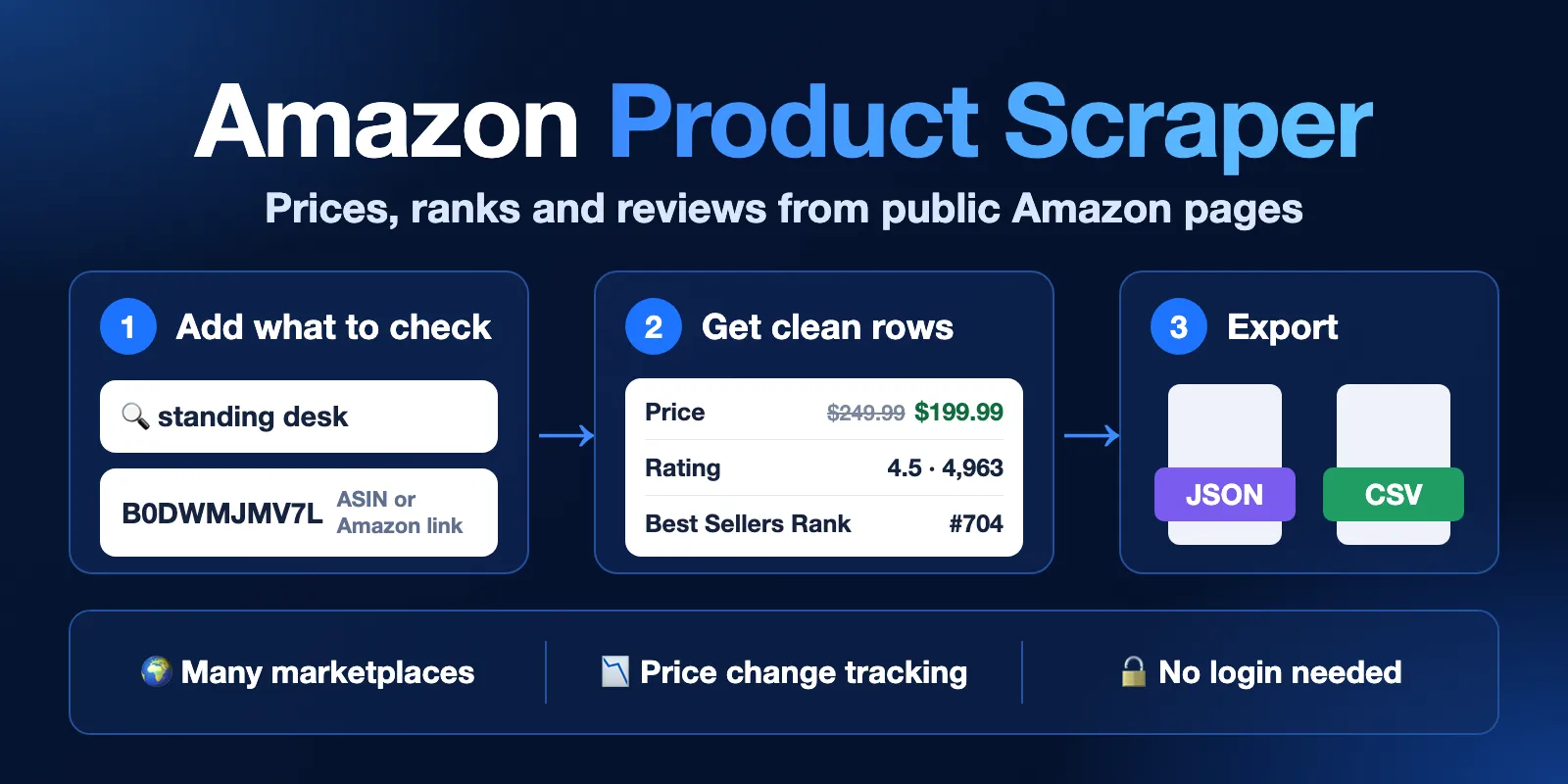
The values in this banner are examples.
Table of contents
- What it does
- How it works
- Quick start
- Use cases
- Input
- Output
- Pricing
- Limits
- API, export and integrations
- Troubleshooting
- FAQ
- Related Actors
- Support
What it does
This Amazon scraper collects public product data from Amazon search results, category pages, product pages, ranking lists and public reviews. It works on nine stores: amazon.com, .de, .co.uk, .fr, .it, .es, .ca, .co.jp and .com.au.
The result is one Dataset row per product or review. A run can also remember prices under a name you choose. The next run with that name shows what changed.
The Actor reads only what a signed-out visitor sees. It does not log in, solve CAPTCHAs or collect reviewer names.
Good fit
- Track a competitor's price and stock with a daily scheduled run in
mode: product. - Find products for a keyword with price, rating, reviews count and search position.
- Check Best Sellers Rank and seller for a list of ASINs.
- Compare one ASIN across stores, with each store's price in its own currency.
- Spot a discount that may not be real: the strike-through price rose while the price did not fall.
How it works
- You add keywords, ASINs or any Amazon links and choose a store.
- The Actor opens the public pages, sets a delivery address in the chosen store when it can, and retries blocked pages.
- It removes duplicates, applies your filters and compares prices with the previous run if you set
monitorName. - It saves rows to the Dataset, a run report to
RUN_SUMMARYand results per input toSUMMARY.
Quick start
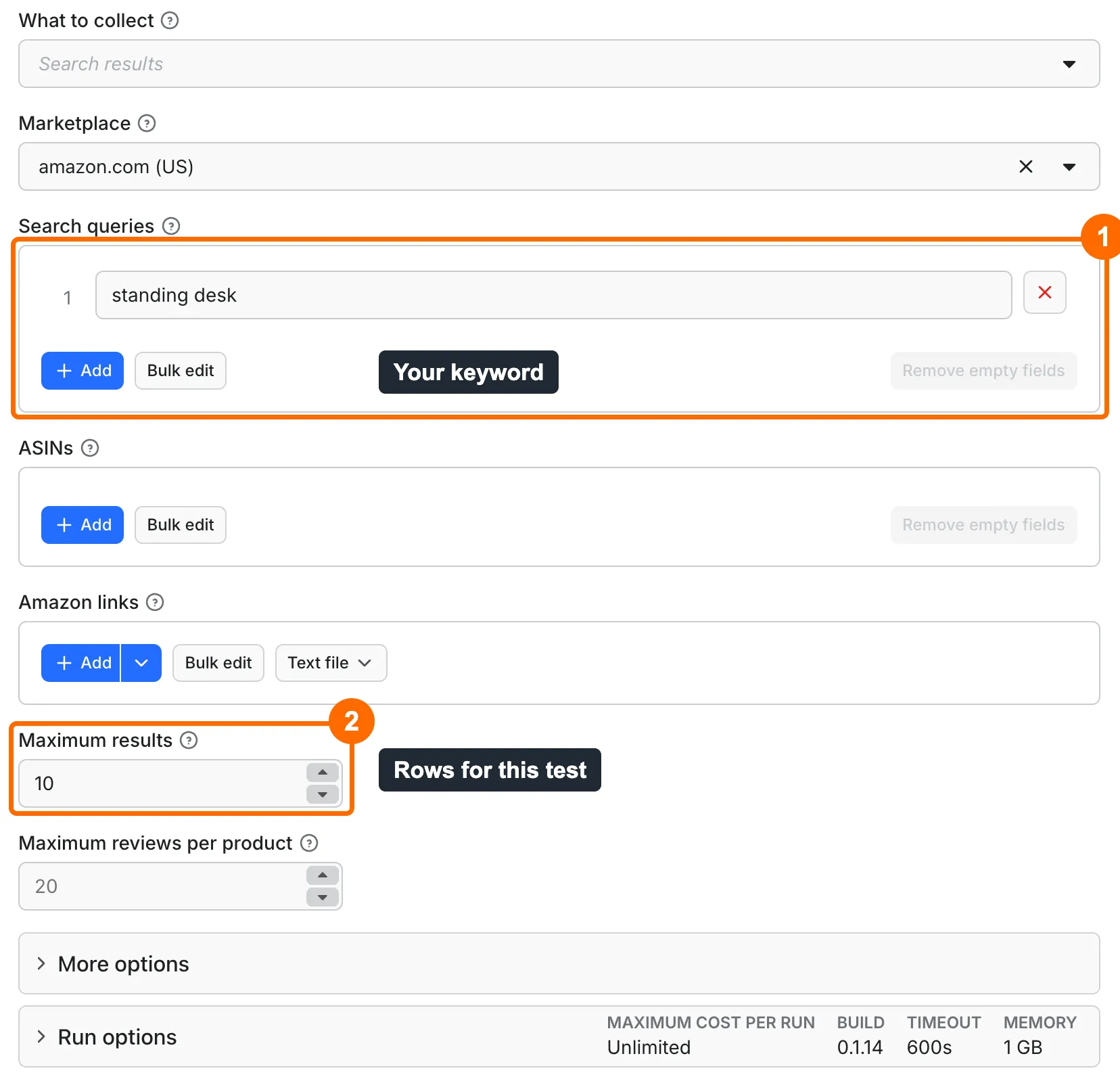
-
Open the Input tab. The form already holds
standing deskinsearchQueries(box 1 in the picture). The store stayscom. -
Keep
maxItemsat 10 for a first test (box 2). Then start the run. -
Open the Output tab when the run ends (box 3 in the second picture). In the Products view, read
title,priceandrating(box 4).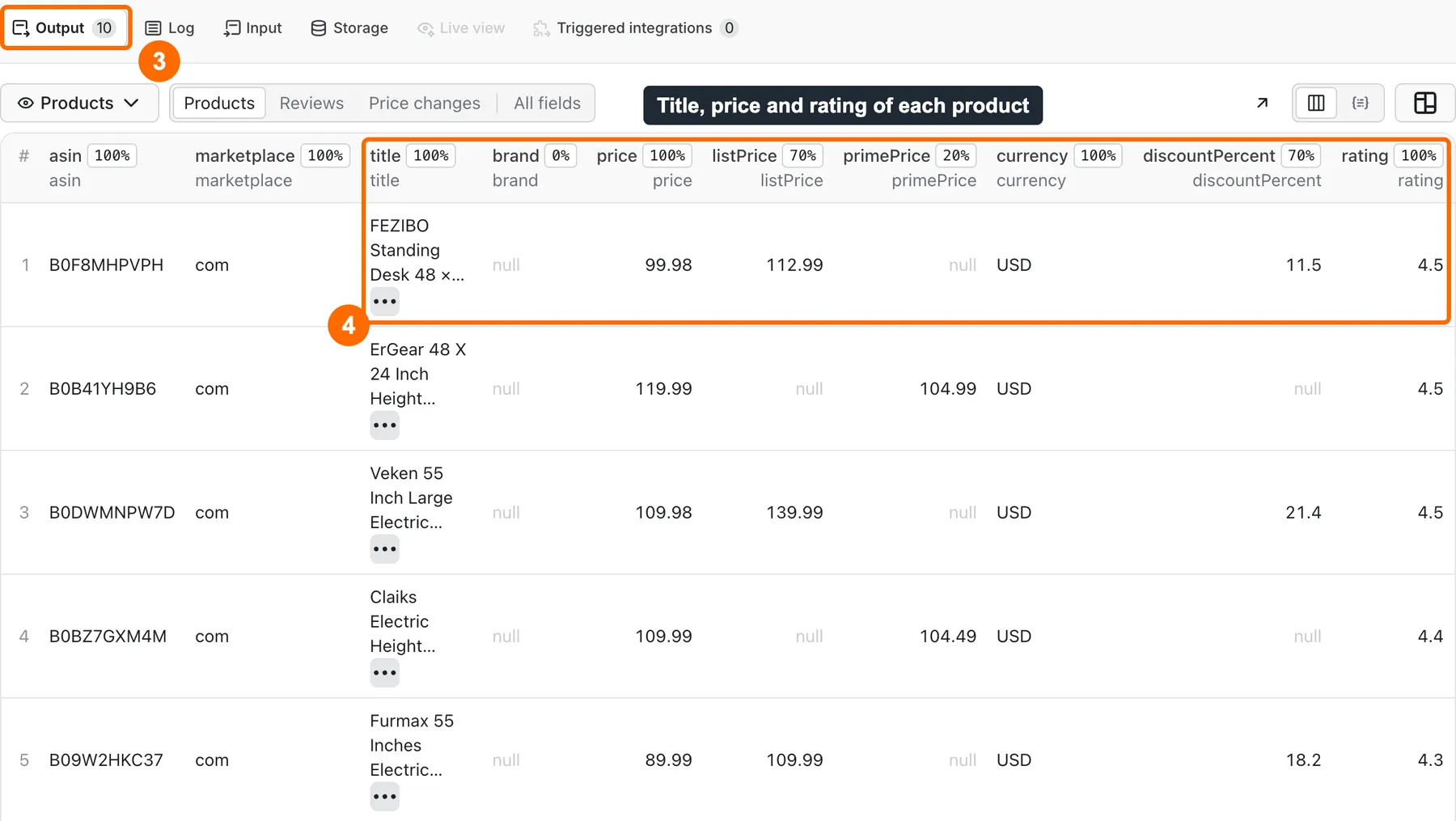
Search rows have no
seller,bsror stock, andbrandcan be empty, as in this picture. Usemode: productto fill them. -
Download the rows from the run page as CSV, Excel or JSON.
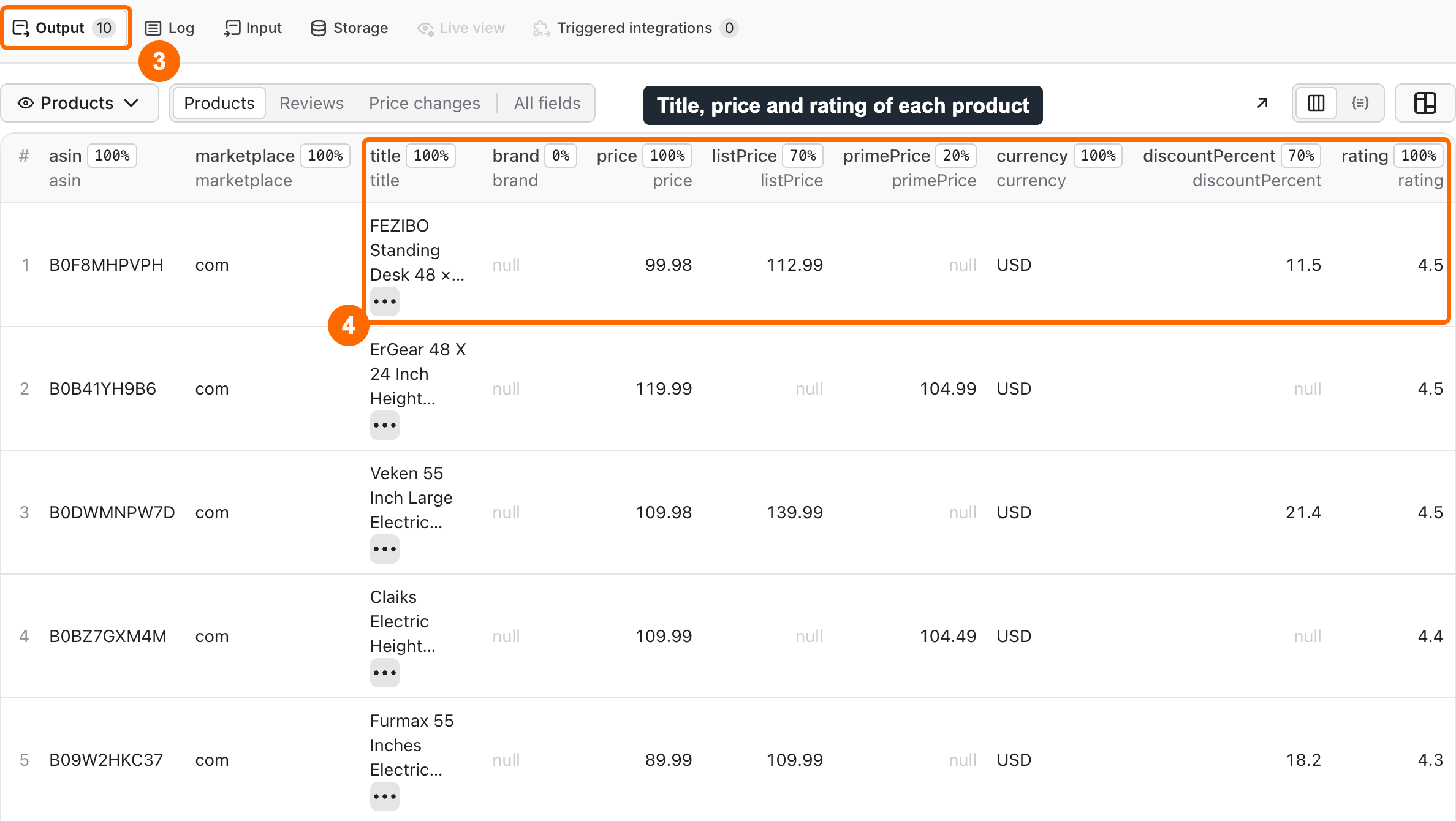
Expected result: 10 rows in about 10 seconds, each with an ASIN, a title, a price and a search position. The run costs $0.0068 on the Free plan.
Use cases
| Buyer job | Input path | Output entity | Key fields | Next integration |
|---|---|---|---|---|
| Watch competitor prices | mode: product, asins, monitorName | Product row | changeStatus, price, previousPrice, priceChange | Schedule plus Slack delivery |
| Research a keyword | searchQueries | Search row | title, price, rating, reviewsCount, searchRank | CSV or Excel export |
| Check a catalog of ASINs | mode: product, asins | Product row | brand, seller, bsr, inStock, category | API or spreadsheet |
| Read a ranking list | mode: bestsellers, rankingType | Ranking row | searchRank, title, price, rating | CSV export |
| Sum up customer opinion | mode: reviews, asins | Review and summary rows | reviewText, starDistribution, reviewThemes | AI agent through MCP |
Input
Input fields
No field is required by the form, but a run needs something to read. With no valid keyword, ASIN or link, the run fails with NO_TARGETS at no charge. Duplicates in one run are removed: four forms of one ASIN give one row.
| Field | Plain name | Type | Required | Default / prefill | Allowed values | Effect | Example | Recommendation |
|---|---|---|---|---|---|---|---|---|
mode | What to read | string | no | default search | search, product, reviews, bestsellers | Picks the page type | product | Links in productUrls keep their own type in any mode |
marketplace | Store | string | no | default and prefill com | com, de, co.uk, fr, it, es, ca, co.jp, com.au | Store for keywords and ASINs | de | com has no setup charge |
searchQueries | Keywords | array of strings | for search | prefill standing desk | up to 50 | Keywords to search | yoga mat | One row limit covers all keywords |
asins | ASINs | array of strings | for product and reviews | none | up to 1000 | Amazon product IDs | B0DWMJMV7L | The largest list tested is 60 |
productUrls | Amazon links | array of objects | no | none | up to 1000 | Search, category, product or ranking links | {"url":"https://www.amazon.com/dp/B0DWMJMV7L"} | The store comes from the link |
maxItems | Row limit | integer | no | default 100, prefill 10 | 1 to 1500 | Paid rows in the whole run | 500 | Lower it to control spending |
maxReviews | Reviews per product | integer | no | default 20 | 1 to 100 | Reviews to read per product | 10 | A product may return fewer |
extraMarketplaces | Other stores | array of strings | no | none | up to 8 stores | Also reads these stores | ["de","co.uk"] | Each store above com adds a setup charge |
rankingType | Ranking list | string | no | default bestsellers | bestsellers, new-releases, movers | List in bestsellers mode with no link | movers | Used only with mode: bestsellers |
deliveryZip | Postcode | string | no | store default | postcode of the main store | Prices for this postcode | 10001 | Not available on it and es |
sortBy | Sort order | string | no | default relevance | relevance, price-asc, price-desc, rating, newest | Order of search results | newest | Search only |
minPrice, maxPrice | Price range | number | no | none | 0 or more, in store currency | Removes rows outside the range | 50 | Rows with no price do not pass |
minRating | Lowest rating | number | no | none | 0 to 5 | Removes rows below it | 4.5 | Rows with no rating do not pass |
primeOnly | Prime only | boolean | no | false | true, false | Uses Amazon's Prime filter | true | Search on com only |
excludeSponsored | Skip sponsored | boolean | no | false | true, false | Skips sponsored rows | true | Skipped rows still count in searchRank |
reviewsNewerThan | Reviews since | string | no | none | YYYY-MM-DD | Keeps newer reviews | 2026-01-01 | Reviews with no date do not pass |
reviewStars | Review stars | array | no | none | star ratings | Keeps these ratings | ["1","2"] | Reviews with no rating do not pass |
includeVariants | Variants | boolean | no | false | true, false | Adds sizes and colors in variants | true | Product mode |
variantPrices | Variant prices | boolean | no | false | true, false | Opens up to 20 variant pages per product | true | Needs includeVariants. Each page is one page-check |
monitorName | Monitor name | string | no | none | letters, digits, hyphens, up to 40 | Remembers prices between runs | my-desks | Keep the same name for each run |
onlyChanges | Only changes | boolean | no | false | true, false | Outputs only changed rows | true | Needs monitorName |
outputFormat | Row shape | string | no | default flat | flat, nested | Flat columns or nested groups | nested | Use flat for spreadsheets |
deliveryConnector | Connector | string | no | none | your MCP connector | Posts a summary after the run | Slack connector | Optional |
deliveryTarget | Where to post | string | no | none | Notion page link or Slack channel ID | Destination of the summary | Slack channel ID | Empty lets the connector decide |
Interacting settings
| When | Input A | Input B | Effective behavior | Example | Cost/result effect |
|---|---|---|---|---|---|
| Filter removes all rows | minPrice | searchQueries | The Actor keeps reading, up to 20 pages per keyword | minPrice: 99999 | 20 page-check for one keyword, $0.052, 0 rows |
| Unchanged monitor | monitorName | onlyChanges | Unchanged items are hidden | same list twice | One page-check per unchanged item, no result charge |
| One ASIN in many stores | asins | extraMarketplaces | One row, with prices in marketplacePrices | ["de","co.uk"] | One marketplace-setup per store other than com |
| Variant prices | includeVariants | variantPrices | Opens variant pages | 14 variants | One page-check per opened page |
| Limit reached | maxItems | maxTotalChargeUsd | The first limit reached ends the run | maxItems: 100 | Status partial at the charge limit |
| Invalid pair | minPrice | maxPrice | Run fails if minPrice is higher | 10 and 5 | Fails with INVALID_INPUT, no charge |
Input examples
Search one keyword
Expected behavior: the Actor reads one search page.
Expected output: 10 search rows with asin, title, price, rating and searchRank.
Limit or cost note: $0.0068 on the Free plan.
Track prices of products
Expected behavior: the first run marks every row new. Later runs output only rows that changed.
Expected output: product rows with changeStatus, price, previousPrice and priceChange.
Limit or cost note: a changed row costs one product-result. An unchanged item costs one page-check.
Output
Output fields
Every flat row has the same columns. A field with no value is null, not missing. Search rows have no brand, seller, bsr or inStock, because these appear only on the product page. Use mode: product when you need them.
| Field | Meaning | Type | Can be empty? | Example / enum | Source / notes |
|---|---|---|---|---|---|
recordType | Row type | string | no | product, search, ranking, review, reviewSummary | Set by the Actor |
status | Row state | string | no | complete, partial, not_found, error | note explains the last three |
note | Why a row is not complete | string | yes | Amazon shows only an excerpt... | Set by the Actor |
asin | Amazon product ID | string | no | B0F8MHPVPH | Page |
marketplace | Store | string | no | com | Input or link |
title | Product title | string | conditional | FEZIBO Standing Desk... | Page, in the store's language |
brand | Brand | string | yes | Veken | Product page |
price | Price everyone pays | number | yes | 99.98 | Page |
listPrice | Strike-through price | number | yes | 112.99 | Page |
primePrice | Price only Prime members pay | number | yes | 104.99 | Page, when shown |
currency | ISO currency code | string | yes | USD | Page |
discountPercent | Discount from listPrice | number | yes | 11.5 | Calculated |
discountFromPreviousPercent | Real discount from the previous run | number | yes | 10 | Monitor only |
fakeDiscountSuspected | Strike-through price rose or appeared while the price did not fall | boolean | yes | true | Monitor only |
deliveryLocation | Delivery location on the page | string | yes | 75001 | Page |
priceIsLocal | Price is for an address in this store | boolean | yes | true | false on it and es |
rating | Average stars | number | yes | 4.5 | Page |
reviewsCount | Number of ratings | number | yes | 4963 | Page |
starDistribution | Share of reviews per star | object | yes | {"5":78} | Product page |
reviewThemes | Frequent pros and cons with counts | array | yes | Quality, 673 mentions | Amazon or counted |
themesSource | Where themes came from | string | yes | amazon, frequency | Set by the Actor |
verifiedShare | Share of verified purchases read | number | yes | 0.9 | Needs full reviews |
aiReviewsSummary | Amazon's own review summary | string | yes | Customers find... | Product page |
bsr | Best Sellers Rank in the main category | number | yes | 704 | Product page |
bsrRanks | Rank in every listed category | array | yes | Product page | |
searchRank | Place on the page, sponsored included | number | yes | 1 | Search and ranking rows |
organicRank | Place among non-sponsored results | number | yes | 1 | Search rows |
rankingType | Ranking list | string | yes | bestsellers | Ranking rows |
isSponsored | Sponsored result | boolean | yes | false | Search rows |
searchQuery | Keyword or link behind the row | string | yes | standing desk | Input |
category, breadcrumbs | Main category and path | string, array | yes | Utility Tables | Product page |
seller | Seller name | string | yes | Aborder Products | Product page |
prime | Prime badge seen | boolean | yes | true | null means unknown: signed-out pages usually hide it |
inStock | Availability | boolean | yes | true | null when the page does not say |
images | Image links | array | yes | Page | |
url | Product page | string | yes | https://www.amazon.com/dp/B0F8MHPVPH | Built from the ASIN |
features, description | Bullets and description | array, string | yes | Product page | |
boughtPastMonth | Amazon's sales text | string | yes | 5K+ bought in past month | Page |
deliveryText | Delivery estimate | string | yes | Page | |
variants | Other sizes and colors | array | yes | With includeVariants | |
marketplacePrices | Price per store | array | yes | With extraMarketplaces | |
changeStatus | Change since last run | string | yes | new, priceDown, priceUp, backInStock, outOfStock, removed, unchanged | Monitor only |
priceChange, previousPrice | Difference and last price | number | yes | -10, 159.98 | Monitor only |
reviewId | Review ID | string | yes | R3QR3YJUS5M67Q | Review rows |
reviewRating, reviewTitle | Stars and title of the review | number, string | yes | Empty for excerpts | |
reviewText | Review text or excerpt | string | yes | Great desk... | No reviewer names |
reviewDate, reviewDateText | Date as YYYY-MM-DD and as written | string | yes | Empty for excerpts | |
reviewVerified | Verified purchase | boolean | yes | true | Empty for excerpts |
reviewUrl | Public link to the review | string | yes | Review rows | |
reviewAspect | Topic of the excerpt | string | yes | quality | Excerpts |
reviewIsExcerpt | Only an excerpt could be read | boolean | yes | true | Review rows |
Output entities and surfaces
| Situation | Dataset/API/KVS/live view | Result shape | User action |
|---|---|---|---|
| Normal item | Dataset views Products, Reviews, Price changes | One row with status: complete | Open a view or export it |
| Domain-empty result | Empty Dataset, RUN_SUMMARY | stopReason is NO_RESULTS, NO_MATCHES or NO_CHANGES, with a reason | Change the keyword or filters |
| ASIN does not exist | Dataset row, RUN_SUMMARY | Free row with status: not_found, or run status NOT_FOUND | Check the ASIN and store |
| Partial row | Dataset | status: partial, a note, some null fields | Read note |
| Partial run | Dataset, RUN_SUMMARY | status: partial, with unprocessedInputs and failedInputs | Run those inputs again |
| Technical failure | Run status FAILED, RUN_SUMMARY | stopReason, no useful rows | Follow Troubleshooting |
Output example
This is a real row from the keyword example, trimmed to the filled fields. Fields not shown are null in this row.
null means the page did not show the value. It does not mean the value is zero.
Send results to Slack or Notion
Pick your connector in the optional deliveryConnector field. After the run saves its data, the Actor posts a short summary (up to 25 rows and a link to the full dataset) there. Put a Notion page link or a Slack channel ID in deliveryTarget: in Notion every run is added on top of that one page, so your workspace does not fill up with new pages. A delivery error never fails the run and costs nothing extra. Connect a service once in Apify Console → MCP connectors.
Use case → fields
| Buyer job | Input path | Output entity | Key fields | Next integration |
|---|---|---|---|---|
| Watch prices | asins, monitorName | Product row | changeStatus, price, previousPrice | Slack delivery |
| Find products | searchQueries | Search row | title, price, rating, searchRank | CSV export |
| Check sellers and rank | asins | Product row | seller, bsr, inStock | API |
| Compare stores | asins, extraMarketplaces | Product row | marketplacePrices | JSON export |
| Read opinion | mode: reviews | Review rows | reviewText, reviewThemes | MCP |
Pricing
Pricing unit
You pay per event. There is no start fee, and the developer pays platform usage. The price of result events falls with your Apify plan.
| Event | When it is charged | Free | Bronze | Silver | Gold and above |
|---|---|---|---|---|---|
search-result | One row from search, category or ranking pages | $0.00042 | $0.000378 | $0.000336 | $0.000294 |
product-result | One full row from a product page | $0.0045 | $0.00405 | $0.0036 | $0.00315 |
review-result | One public review or excerpt | $0.001 | $0.0009 | $0.0008 | $0.0007 |
page-check | One search page, one unchanged monitor item, one opened variant page, one product page with no price | $0.0026 | $0.0026 | $0.0026 | $0.0026 |
marketplace-setup | Setting an address, once per store in a run, except com | $0.035 | $0.035 | $0.035 | $0.035 |
local-page | One search page on it or es | $0.01 | $0.01 | $0.01 | $0.01 |
What you pay when there are no rows:
- A keyword with no results costs one
page-check, $0.0026. - A filter with no matches costs one
page-checkper page read, up to 20 pages per keyword, so $0.052 per keyword. - A monitor with no changes costs one
page-checkper unchanged item or search page. - Invalid input costs nothing, because the run stops before reading any page.
- A
not_foundrow and a failed input are not charged as results. Pages read before a failure stay charged.
The smallest maximum charge you can set for a run is $0.04. That is enough for one row in any store. When a run reaches your maximum charge, it ends as SUCCEEDED with status: partial and stopReason: CHARGE_LIMIT, and it never goes over the limit.
Cost examples
Amounts are on the Free plan, then on the Gold plan. Search pages hold about 20 rows.
| Scenario | Input scope | Expected item/event count | Base charge | Optional charge | Stop/cap behavior |
|---|---|---|---|---|---|
| Small search | 1 keyword, com, 10 rows | 1 page, 10 rows | $0.0068 / $0.0055 | none | maxItems |
| Normal search | com, 100 rows | about 5 pages, 100 rows | about $0.055 / $0.042 | none | maxItems |
| Big search | com, 1000 rows | about 50 pages, 1000 rows | about $0.55 / $0.42 | none | maxItems |
| Search in Germany | 1 keyword, de, 5 rows | 1 setup, 1 page, 5 rows | $0.040 / $0.039 | setup in base | maxItems |
| Products | 60 ASINs, com | 60 rows | $0.27 / $0.19 | variant pages | maxItems |
| Reviews | 1 ASIN, com, 5 reviews | 1 page, 5 reviews, 1 free summary | $0.0076 / $0.0061 | none | maxReviews |
| Monitor, no changes | 1 ASIN, onlyChanges | 1 check | $0.0026 / $0.0026 | none | none |
Limits
- One run saves at most 1500 rows (
maxItems). The largest test had 10 keywords. It took 345 to 538 seconds at 1024 MB, so it comes close to the default 600-second timeout. - One run takes up to 50 keywords, 1000 ASINs and 1000 links. The largest product list tested is 60 ASINs: it took 206 to 256 seconds at 1024 MB. Blocks make it slower: in one of those runs, 22 of 82 page requests were blocked and retried. On a long list raise the run timeout. Inputs not reached are listed in
unprocessedInputsand not charged. - Search reads up to 20 pages per keyword. Ranking lists read up to 2 pages.
- Reviews on amazon.com are public excerpts only.
reviewText,reviewId,reviewAspectandreviewIsExcerptare filled, but stars, title, date andreviewVerifiedare empty. The full review pages need a login, and this Actor does not log in. On amazon.de, reviews came with full fields. Other stores may differ: checkreviewIsExcerpt. A product may return fewer reviews thanmaxReviews. - On amazon.it and amazon.es no delivery address can be set.
priceIsLocalisfalse. Search rows there have prices. A product page row may have no price: it comes withstatus: partialand costs onepage-check, not aproduct-result. For prices on these two stores use search. - A batch is best-effort: one failed input does not stop the others, and a run with useful rows stays SUCCEEDED with
status: partial. Five failed pages in a row end the run withSOURCE_ERROR. So do 100 seconds with no page read. A page above 16 MB counts as failed for its input. - Prices depend on the delivery address and on time. Two runs may differ, and search order may differ from what you see in your browser.
- Offers from other sellers are not collected:
sellerholds the seller shown on the product page. - The Actor does not collect buyer names, does not use cookies and does not solve CAPTCHAs.
- This Actor is not made by or linked to Amazon.
- Minimum memory is 1024 MB. Default run settings are 1024 MB and 600 seconds.
API, export and integrations
- API: start a run with the Apify API and the same JSON as the input form. Read rows from the Dataset items endpoint. Use
view=products,view=reviewsorview=changes. - Export: download the Dataset as JSON, CSV, Excel, XML or HTML from the Output tab.
- Scheduling: create an Apify Schedule with the same
monitorNameto track prices. ReadchangeStatusin each run. - Webhooks / no-code: an Apify webhook on run end can start your next step. It reads
defaultDatasetIdfrom the run. - SDK / MCP / agent: see below.
Use with AI agents (MCP)
MCP server URL with only this Actor: https://mcp.apify.com?tools=cliqtomedia/amazon-scraper
Smallest useful input:
Key output fields:
asin: Amazon product ID.title: product title.priceandcurrency: price everyone pays and its currency.ratingandreviewsCount: average stars and number of ratings.searchRank: place on the search page.
Typical run: about 10 seconds and $0.0068 on the Free plan for this input. Limits: up to 1500 rows per run, and the maximum charge per run cannot be under $0.04.
Troubleshooting
The run failed right after the start
Symptom: FAILED with NO_TARGETS or INVALID_INPUT.
Likely reason: there is no valid keyword, ASIN or link, or a pair of fields conflicts.
Check: read reason in RUN_SUMMARY.
Action: fix the input and run again. This failure costs nothing.
The run succeeded with 0 rows
Symptom: an empty Dataset and stopReason set in RUN_SUMMARY.
Likely reason: NO_RESULTS means Amazon has no results. NO_MATCHES means your filters removed all rows. NO_CHANGES means a monitor saw no change.
Check: notes shows how many rows the filters removed.
Action: change the keyword or filters. For NO_CHANGES, no action is needed.
Fewer rows than maxItems
Symptom: status: partial, or fewer rows with status: complete.
Likely reason: the keyword ran out of results, or the run reached CHARGE_LIMIT, DEADLINE or MAX_ITEMS.
Check: read stopReason and unprocessedInputs in RUN_SUMMARY.
Action: raise the maximum charge or timeout, and run the listed inputs again.
Some inputs failed
Symptom: inputs in failedInputs, stopReason: SOURCE_ERROR.
Likely reason: Amazon blocked these pages after retries. One failed input does not stop the others, but five failed pages in a row end the run. A run with useful rows stays SUCCEEDED with status: partial. A run with no useful rows ends as FAILED.
Check: look at failedInputs and pages.blocks in RUN_SUMMARY.
Action: wait and run only the failed inputs again.
The run stopped with 0 rows on a store other than amazon.com
Symptom: CHARGE_LIMIT and no rows on de or another store.
Likely reason: your maximum charge cannot cover the rest of the work after marketplace-setup, $0.035.
Check: compare the maximum charge with the Cost examples.
Action: raise the maximum charge.
Prices differ from my browser
Symptom: price is not what you see on Amazon.
Likely reason: the delivery address or the time differs. A Prime price goes in primePrice, not price.
Check: read deliveryLocation and priceIsLocal.
Action: set deliveryZip to your postcode. This does not work on it and es.
Review stars and dates are empty
Symptom: reviewRating and reviewDate are null, and reviewIsExcerpt is true.
Likely reason: on amazon.com only excerpts are public without a login.
Check: read note in the row.
Action: use starDistribution and reviewThemes in the summary row for the overall picture.
Monitor shows a warning about a storage name
Symptom: notes says price history is unavailable, and rows have no change data.
Likely reason: your account already has a storage with this monitorName that this Actor may not open.
Check: read notes in RUN_SUMMARY.
Action: use a new monitorName.
FAQ
Do I need an Amazon account, cookies or an API key?
No. The Actor reads public pages and takes no login, no cookies and no Amazon API key. You need only an Apify account.
How do I scrape products from Amazon?
Add a keyword to searchQueries, or ASINs to asins with mode: product. Click Start and open the Output tab. The Quick start above shows each step.
Can I export Amazon data to CSV?
Yes. Open the Output tab and download CSV, Excel or JSON. With outputFormat: flat every row has the same columns.
Is it a price tracker?
It can work like one. Set monitorName and run the Actor on a schedule. It does not send alerts by itself: use deliveryConnector to post a summary to Slack or Notion, or read changeStatus through the API.
What does a run with no results cost?
One page-check, $0.0026. A filter with no matches can read up to 20 pages per keyword. Set a maximum charge if you use strict filters on many keywords.
Can I get all reviews of a product?
No. Amazon shows only the first public reviews without a login, and this Actor does not go past that. On amazon.com they are excerpts.
Is scraping Amazon allowed?
The Actor reads public pages only and collects no reviewer names. Whether your use is allowed depends on your country, your purpose and Amazon's terms. Ask your legal adviser if you are not sure.
How fresh is the data?
Each row shows the page at the time of the run. Rank and price change during the day. Run again to get newer values.
Related Actors
- eBay Sold Listings Scraper - Sold Prices & Dates: sold prices and dates from another marketplace.
- WooCommerce Store Products Export - Prices, Stock, No Login: prices and stock from one online store.
- Wildberries Scraper: Products, Prices, Reviews, No Login: products, prices and reviews from Wildberries.
- JD.com Scraper: Prices, Review Counts & Ratings, No Login: prices, review counts and ratings from JD.com.
Support
For a bug, question or feature request, open the Actor's Issues tab on Apify. Include the run ID, the input mode and the error text. Never send tokens, cookies or billing data.


