

Twitch Follower Count & Channel Stats (Helix API), No Login
Pricing
from $1.40 / 1,000 channels
Twitch Follower Count & Channel Stats (Helix API), No Login
Check Twitch follower count, bio, partner status, game, language and tags for up to 1,000 channels by login, plus channel search. Official Twitch Helix API with your own free key. No login.
Pricing
from $1.40 / 1,000 channels
Rating
0.0
(0)
Developer

Cliqto Media
Maintained by CommunityActor stats
0
Bookmarked
2
Total users
1
Monthly active users
6 days ago
Last modified
Categories
Features
Share
Twitch Follower Count & Channel Stats gets the follower count, bio, partner or affiliate status, last game, stream title, language, tags and creation date for a list of Twitch channels. You paste logins or twitch.tv links, or type a search word, and add your own free Twitch Client ID and Client Secret. You get one clean table row per channel, with numbers as numbers.
The Actor uses only the official Twitch Helix API: no login to Twitch, no cookies, no proxy and no page scraping. One run can check up to 1,000 channels by login plus up to 1,000 channels from a search. A Twitch key is required. Without a key the run returns one api_key_required row and stops.
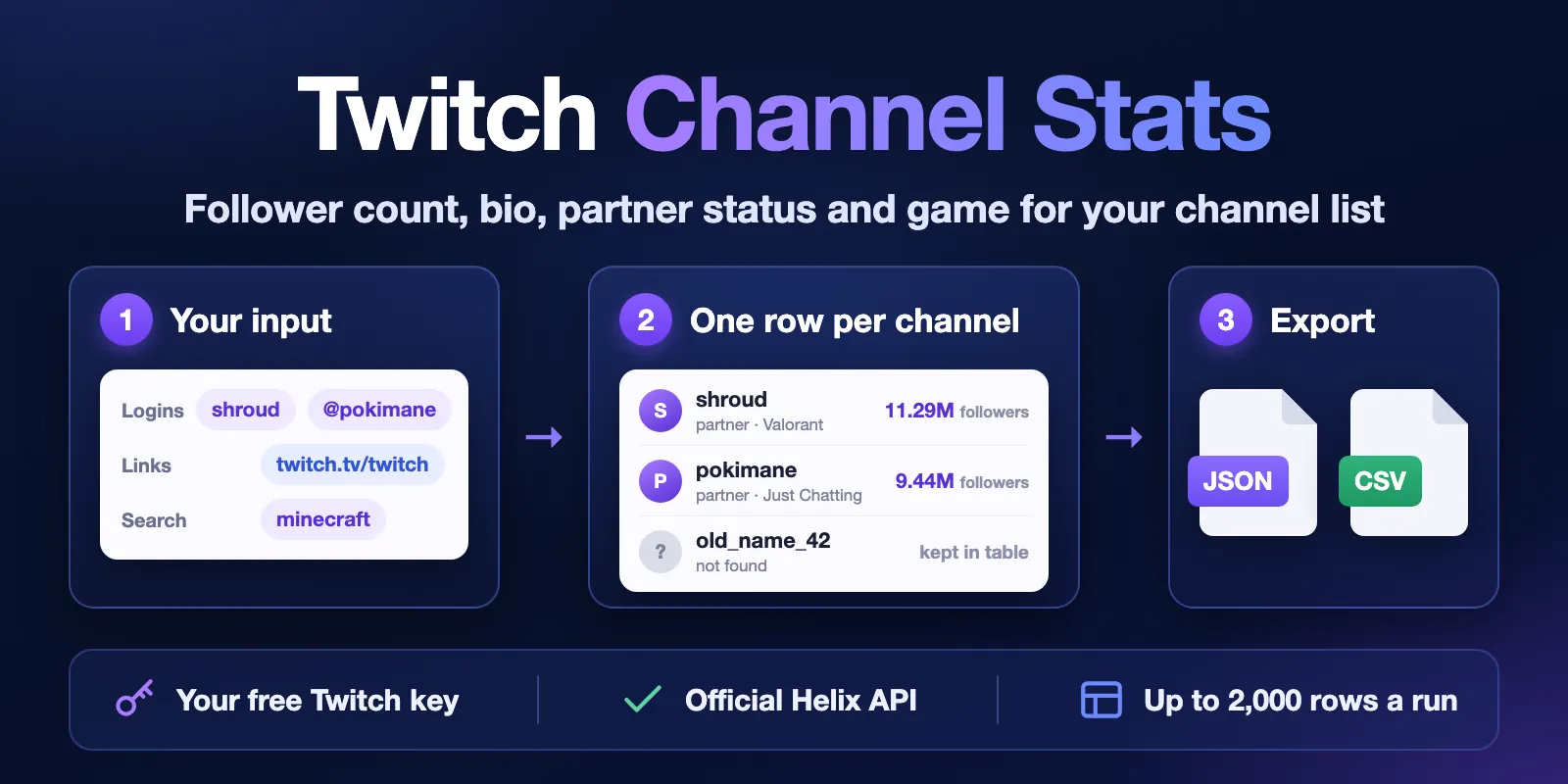
Table of contents
- What it does
- Get your Twitch key
- Quick start
- Input
- Input examples
- Output example
- Output fields
- Pricing and cost examples
- Use cases
- Scheduling and monitoring
- API, export and AI agents
- Limits and partial results
- Troubleshooting
- FAQ
- Related Actors
- Support
What it does
You give a list of Twitch channels, a search word, or both. The Actor asks the Twitch Helix API and saves one row per channel:
| Group | Fields |
|---|---|
| Profile | login, display name, user ID, bio, partner / affiliate / normal, creation date, avatar, channel link |
| Audience | follower count (the total number, not the list of followers) |
| Channel | game or category, stream title, language and tags of the current or last stream |
- Accepts logins (
shroud), handles (@pokimane) and links (https://www.twitch.tv/twitch). Upper and lower case do not matter. - Rows come in the order of your list. A login that appears twice is looked up once.
- Search rows come in Twitch's search order, with their place in
searchRank. A channel that is already in your list is not saved twice. - A login with no active channel gets a
not_foundrow with your original line. A line that is not a Twitch login gets aninvalid_inputrow. nullmeans "Twitch did not send this value". It is never written as0.- E-mail addresses in a bio are replaced with
[email removed]. The Actor does not collect contacts.
Good fit
- You have a list of streamers and need their follower counts and status in a table.
- You know the start of a channel name (for example
minecraftorspeedrun) and want every matching channel with its size. - You want an official, stable data source instead of page scraping.
Not a fit
- You have no Twitch account with two-factor authentication. You need it to make the free key.
- You need the list of followers, viewer counts of live streams, clips or videos. This Actor gives the follower total and the channel profile only.
- You need e-mails or other contacts of streamers. This Actor does not collect them.
Get your Twitch key
The key is free. It takes about 5 minutes.
- Turn on two-factor authentication in your Twitch account (Settings → Security and Privacy). Twitch asks for it before you can make an app.
- Open the Twitch Developer Console and click Register Your Application.
- Type any name. Set OAuth Redirect URL to
http://localhost, Category to Analytics Tool and Client Type to Confidential. Click Create. - Click Manage on your app. Copy the Client ID into the Client ID field of this Actor.
- Click New Secret, copy the secret into the Client Secret field. Twitch shows the secret only once.
Your Twitch limits. Twitch API calls are free. Twitch gives each app about 800 requests per minute. The Actor uses about one request per channel and pauses when your app is close to the limit, so other tools that use the same app keep working.
Both fields are secret: Apify stores them encrypted. The Actor sends them only to Twitch to get a short-lived app token, and cancels that token when the run ends. It never writes the key or the token to the dataset, the logs or the run summary. The Actor does not log in to your Twitch account and cannot change anything in it.
Quick start
- Get a key (see above).
- Paste your Client ID and Client Secret.
- The Channels field already has
twitch. Add more logins or links, one per line, or type a word into Search channels. - Click Start. One channel takes about 3 seconds.
- Open the Channels view of the dataset, or download it as CSV, Excel or JSON.
If you click Start without a key, the run still ends as SUCCEEDED, with one api_key_required row that tells you how to get a key. No channel is looked up. Apify charges the Actor start fee for every run, including this one (see Pricing).
Input
| Field | Type | Required | Default | Range | What it does |
|---|---|---|---|---|---|
clientId | string, secret | yes, for real data | none | — | Client ID of your Twitch app. |
clientSecret | string, secret | yes, for real data | none | — | Client Secret of your Twitch app. |
channels | array of strings | one of channels or searchQuery | prefill: twitch | up to 1,000 lines | Logins, @handles or twitch.tv links, one per line. |
searchQuery | string | one of channels or searchQuery | none | start of a channel name | Find channels whose login starts with this text (Twitch channel search). |
maxItems | integer | no | 50 | 1–1,000 | How many search results to save. It does not limit channels. |
You can use channels and searchQuery in the same run. The list is checked first, then the search.
Input examples
A list of channels (the prefill plus your key)
Find 200 channels whose name starts with a word
Output example
A real row:
A search result:
(Other fields are filled as in the first row.)
A login with no channel:
(Other fields of this row are null too.)
Output fields
The Channels view shows the main columns. The All fields view shows every field.
| Field | Type | Can be null | Example | Meaning |
|---|---|---|---|---|
status | string | no | complete | Row status, see the table below. |
input | string | yes | Shroud | Your original line, or the search word for search rows. null only for api_key_required. |
matchedBy | string | yes | login | login for your list, search for search results. |
searchRank | integer | yes | 1 | Place in Twitch search results. null for list rows. |
userId | string | yes | 37402112 | Twitch user ID. Stays the same when a streamer renames the channel. |
login | string | yes | shroud | Channel login in lower case. |
displayName | string | yes | shroud | Name as shown on Twitch. |
description | string | yes | I'm back baby | Channel bio. E-mail addresses are replaced with [email removed]. |
broadcasterType | string | yes | partner | partner, affiliate or normal. |
followers | integer | yes | 11293693 | Follower total at fetchedAt. |
gameId | string | yes | 771448419 | Twitch ID of the game or category. |
gameName | string | yes | AION 2 | Game or category of the current or last stream. |
language | string | yes | en | Stream language (ISO 639-1), or other. |
title | string | yes | Title of the current or last stream. Empty string if the channel never set one. | |
tags | array of strings | yes | ["English"] | Channel tags. [] = the channel has no tags. |
createdAt | string, ISO date UTC | yes | 2012-11-03T15:50:32.000Z | When the account was made. |
profileImageUrl | string | yes | https://static-cdn.jtvnw.net/… | Avatar link. |
url | string | yes | https://www.twitch.tv/shroud | Channel link. |
source | string | no | twitch-helix | Data source. |
fetchedAt | string, ISO date UTC | no | 2026-10-22T06:00:53.205Z | When the row was read. |
message | string | yes | Reason, for rows that are not complete. |
Row statuses
status | When | Charged |
|---|---|---|
complete | Channel found, all stats saved | channel event |
partial | Channel found, but Twitch did not send some fields (see message) | channel event |
not_found | No active channel with this login: renamed, banned, deleted or never existed | small empty-result event |
invalid_input | The line is not a Twitch login or link | small empty-result event |
api_key_required | No Client ID or Client Secret in the input (one row per run) | no event |
Run summary
The run's key-value store has a RUN_SUMMARY record: run status (COMPLETE, PARTIAL, NO_RESULTS, API_KEY_REQUIRED, INVALID_INPUT, ERROR, CANCELLED), stop reason, counts, moreAvailable (search had more channels than maxItems) and your app's Twitch request limit before and after the run. Two counters look alike: input.duplicateChannels counts logins repeated in your list, and counts.skippedDuplicate counts search results that were already saved from your list. The run's status message says the same in one line, for example Saved 8 channels (1 login not found, 1 invalid entry).
Pricing and cost examples
Pay per event. Apify platform usage is included. Twitch does not charge for the API.
| Event | When | Free | Bronze | Silver | Gold and above |
|---|---|---|---|---|---|
| Actor start | once per run, charged by Apify automatically | $0.0008 | $0.0008 | $0.0008 | $0.0008 |
| Channel | per complete or partial row | $0.002 | $0.0018 | $0.0016 | $0.0014 |
| Empty result | per not_found or invalid_input row | $0.00003 | $0.00003 | $0.00003 | $0.00003 |
That is $2.00 per 1,000 channels on the Free plan and $1.40 on Gold.
| Example run | Free | Bronze | Silver | Gold+ |
|---|---|---|---|---|
No key (one api_key_required row) | $0.0008 | $0.0008 | $0.0008 | $0.0008 |
| 1 channel (the prefill) | $0.0028 | $0.0026 | $0.0024 | $0.0022 |
| 10 channels | $0.021 | $0.019 | $0.017 | $0.015 |
| 100 channels | $0.20 | $0.18 | $0.16 | $0.14 |
| 1,000 channels | $2.00 | $1.80 | $1.60 | $1.40 |
| 1,000 channels + 1,000 search results | $4.00 | $3.60 | $3.20 | $2.80 |
| 1,000 logins, none found | $0.031 | $0.031 | $0.031 | $0.031 |
| Search with no matches | $0.0008 | $0.0008 | $0.0008 | $0.0008 |
Honest note: every run pays the $0.0008 start fee, also a run without a key or with a wrong key. Apify charges it automatically when a paid Actor starts. Put many channels in one run instead of many small runs.
Set Maximum cost per run in the run options to cap a run. The Actor checks the limit before each row. It stops before a charge would go above it, keeps what it saved and ends as PARTIAL with reason CHARGE_LIMIT. The run still SUCCEEDED.
Use cases
| Buyer job | Input | Key fields | Next step |
|---|---|---|---|
| Check streamers before a sponsorship | the creators' logins | followers, broadcasterType, gameName, language | Shortlist channels of the right size and language |
| Track follower growth | the same list every week | followers, fetchedAt, userId | Chart the growth in a sheet |
| Find channels by name | searchQuery with the start of a channel name | searchRank, followers, gameName, tags | Build a list of Twitch channels to study |
| Clean a creator list | a list from a sheet or CRM | status, login, url | Remove renamed or banned channels |
| Enrich data for BI or a model | many logins | all fields | Join on userId |
Scheduling and monitoring
Use an Apify Schedule to run the same list every day or week. Each run saves the current numbers with fetchedAt. Join rows of different runs on userId to see how followers grow. The Actor does not keep data between runs.
API, export and AI agents
- Export: download the dataset as JSON, CSV, Excel, XML or HTML.
- API: start a run with
POST https://api.apify.com/v2/acts/cliqtomedia~twitch-channels/runsand the input JSON. Read rows from the run's default dataset. - Integrations: Make, Zapier, n8n, webhooks and Google Sheets work through the standard Apify integrations. Use
userIdas a stable key.
Use with AI agents (MCP)
- MCP server with only this Actor:
https://mcp.apify.com?tools=cliqtomedia/twitch-channels - Smallest useful input:
{"channels": ["twitch"], "clientId": "<the user's Client ID>", "clientSecret": "<the user's Client Secret>"} - Key output fields:
login,followers,broadcasterType,gameName,language,url,status. - One channel takes about 3 seconds. 200 channels took 25–30 seconds in our tests. 1,000 logins plus 1,000 search results took about 3.5 minutes.
- The agent needs the user's own Twitch Client ID and Client Secret. Without them the run returns
api_key_required.
Limits and partial results
- Up to 1,000 lines in
channelsand up to 1,000 search results per run. We tested both at once: 1,991 channels saved in about 218 seconds. - The Actor stops looking up channels 15 seconds before the run timeout so it can save the results. It keeps the saved rows and ends as
PARTIALwith reasonTIME_LIMIT. The default timeout of 300 seconds is enough for the maximum input. - If your Twitch app runs out of requests and does not get them back within about a minute, the Actor keeps the saved rows and ends as
PARTIALwith reasonQUOTA_LIMIT. - If Twitch fails again and again, the run keeps saved rows and ends with reason
SOURCE_ERROR. followersis live atfetchedAtand changes all the time.- Twitch search matches the start of the channel login (
minecraftfindsminecraft,minecraftliveand similar). It does not search games, stream titles or bios, and finds only channels that streamed in the last 6 months. Twitch decides the order and may stop giving results beforemaxItems. - A renamed, banned or deleted channel comes back as
not_found. Look it up by its new login.
Data comes from the Twitch Helix API under your own Twitch app. Please follow the Twitch Developer Agreement. This Actor is not affiliated with or endorsed by Twitch.
Troubleshooting
I got one api_key_required row
Symptom: the run SUCCEEDED with one row and status API_KEY_REQUIRED. Reason: the Client ID or Client Secret field is empty. Action: get a key and run again.
The run failed with API_KEY_INVALID
Symptom: status ERROR, code API_KEY_INVALID, no rows. Likely reasons: a typo, an old secret after you pressed New Secret again, or the app's Client Type is Public. Action: open your app in the Developer Console, check that it is Confidential, make a new secret and paste both values again.
Some rows are not_found
Likely reason: the channel was renamed, banned or deleted, or the login has a typo. Check: open https://www.twitch.tv/<login> in a browser. Twitch does not say which of these it is.
Some rows are invalid_input
The line is not a Twitch login or channel link, for example a video link or a name with spaces. A login has only letters, digits and _, up to 25 characters. Check the input field and fix the line. If no line is a Twitch login and there is no search word, the run fails with INVALID_INPUT and saves no rows. Only the start fee is charged.
Search gave fewer rows than maxItems
Twitch had no more matching channels. moreAvailable in RUN_SUMMARY is false in this case. Try a different word.
FAQ
Do I need a Twitch account?
Yes, to make the free key, with two-factor authentication on. The Actor does not log in to your account and does not use cookies.
Does it cost Twitch money?
No. The Twitch API is free. You pay only the Apify price above.
Can I get the list of followers?
No. Twitch gives the follower list only to the channel owner. This Actor gives the follower total, which is public.
Does it show if a channel is live now?
No. gameName and title are from the current or last stream. For live streams with viewer counts, use a live stream Actor.
Is personal data included?
Only public channel data that Twitch shows on the channel page. E-mail addresses in bios are removed. No viewer data.
Related Actors
- YouTube Search Results Scraper — find YouTube videos and creators by keyword.
- Bluesky Scraper — posts and profiles from Bluesky.
- Threads Scraper — posts and profiles from Threads.
Support
For a bug, question or feature request, open an issue on the Actor's Issues tab. Add the run ID and your input, but never post your Client Secret.


