

Wayback Machine Snapshots & Archived Text (No Login)
Pricing
from $0.42 / 1,000 snapshots
Wayback Machine Snapshots & Archived Text (No Login)
List Wayback Machine captures of a URL, URL prefix or whole domain with date, archived link, HTTP status, MIME type and digest. Optional archived page title and text. Date range, dedupe and status filters. No login.
Pricing
from $0.42 / 1,000 snapshots
Rating
0.0
(0)
Developer

Cliqto Media
Maintained by CommunityActor stats
0
Bookmarked
2
Total users
1
Monthly active users
2 days ago
Last modified
Categories
Share
Add a URL, a URL prefix or a whole domain. The Actor reads the Internet Archive Wayback Machine index and returns one row for each capture: date, snapshot link, HTTP status, MIME type and content digest. It can also return the archived page title and visible text.
It is for SEO and OSINT work: page history, deleted content, old titles, and the list of URLs a site had. The smallest run is one site with 20 captures and takes about 10–30 seconds. No login and no API key.
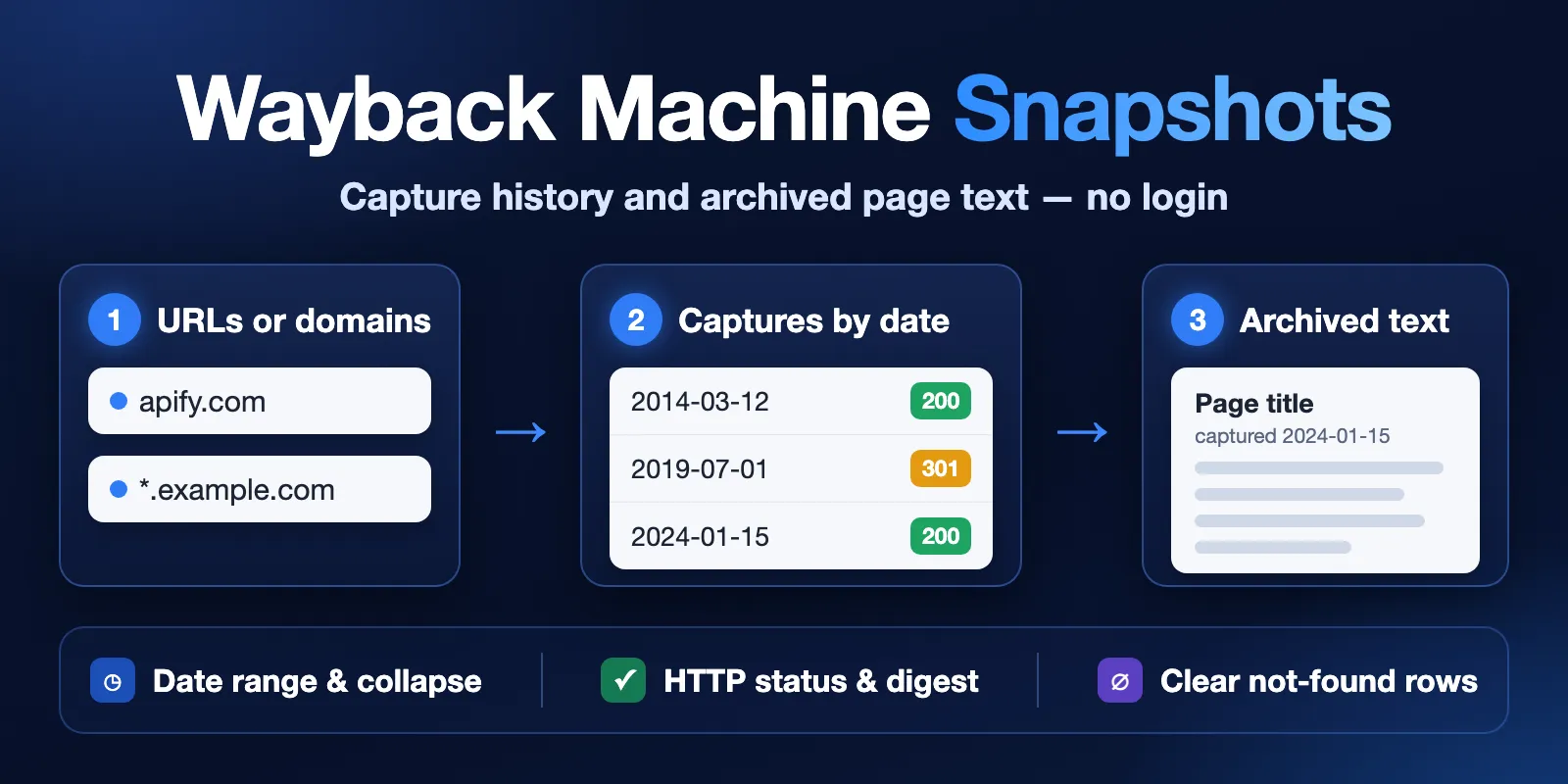
Table of contents
- What it does
- How it works
- Quick start
- Use cases
- Input
- Output
- Pricing
- Limits
- API, export and integrations
- Troubleshooting
- FAQ
- Related Actors
- Support
What it does
The Actor asks the public Wayback Machine CDX index which captures exist for each input. It saves each capture as one row in the Dataset. When you turn on Include archived page text, it also downloads the raw archived page (without the Wayback toolbar) and returns its title and visible text with paragraphs.
If a URL has no captures for your filters, you get one not_found row for it. You do not get an empty table that looks like a failure. If the archive fails for a URL, you get an error row, which is free. If a site is excluded from the archive, you get a free error row with errorCode: SOURCE_EXCLUDED and the run goes on.
What data you get
| Data | Where it comes from | Fields |
|---|---|---|
| Capture index | Wayback Machine CDX index | originalUrl, urlKey, timestamp, capturedAt, statusCode, mimeType, digest, length |
| Archived link | built from the capture | snapshotUrl |
| Page title and text (optional) | the raw archived page | title, text, textLength, textTruncated, contentStatus |
| Result status | the Actor | status, statusReason, errorCode, sourceUrl, fetchedAt |
Only public archive data is returned. No account data, cookies or personal profiles.
Good fit
- SEO page history: see when a page was first captured, how its HTTP status changed (200 → 301 → 404), and what the old title and text said.
- Recover deleted content: get the visible text of an old version of a page by date.
- OSINT and site mapping: list the archived URLs of a site or all its subdomains with Deduplicate set to one per URL (
collapse: urlkey). - Change detection: keep only captures where content changed with Deduplicate set to "Only when content changed" (
collapse: digest).
Not a fit
- It does not take screenshots and does not download images, scripts or PDFs: it can list their captures (File types), but saves no files. Text is extracted only from successful (2xx) HTML or plain-text captures.
- It does not search archive.org collections, books or media items. It works with the Wayback Machine web capture index only.
- The archive does not have every page or every day. Missing captures mean the archive has none, not that the page did not exist.
- E-mail addresses and phone numbers in archived text are replaced with
[email removed]and[phone removed]. Phone masking covers international numbers (+44 20 7946 0958) and common national formats ((555) 123-4567,555-123-4567,020 7946 0958); unusual formats can stay.
How it works
- You add URLs, URL prefixes or domains, and optional dates and filters.
- The Actor asks the public Wayback Machine index which captures exist, at most one request per second, and keeps the captures that match your filters.
- For each capture it saves one Dataset row with the date, the archived link, the HTTP status and the content hash. With page text on, it also opens the archived page and saves its title and visible text.
- A URL without captures gets one
not_foundrow. A URL the archive cannot answer gets a freeerrorrow. The run summary (RUN_SUMMARY) shows the counts and why the run stopped.
Quick start
-
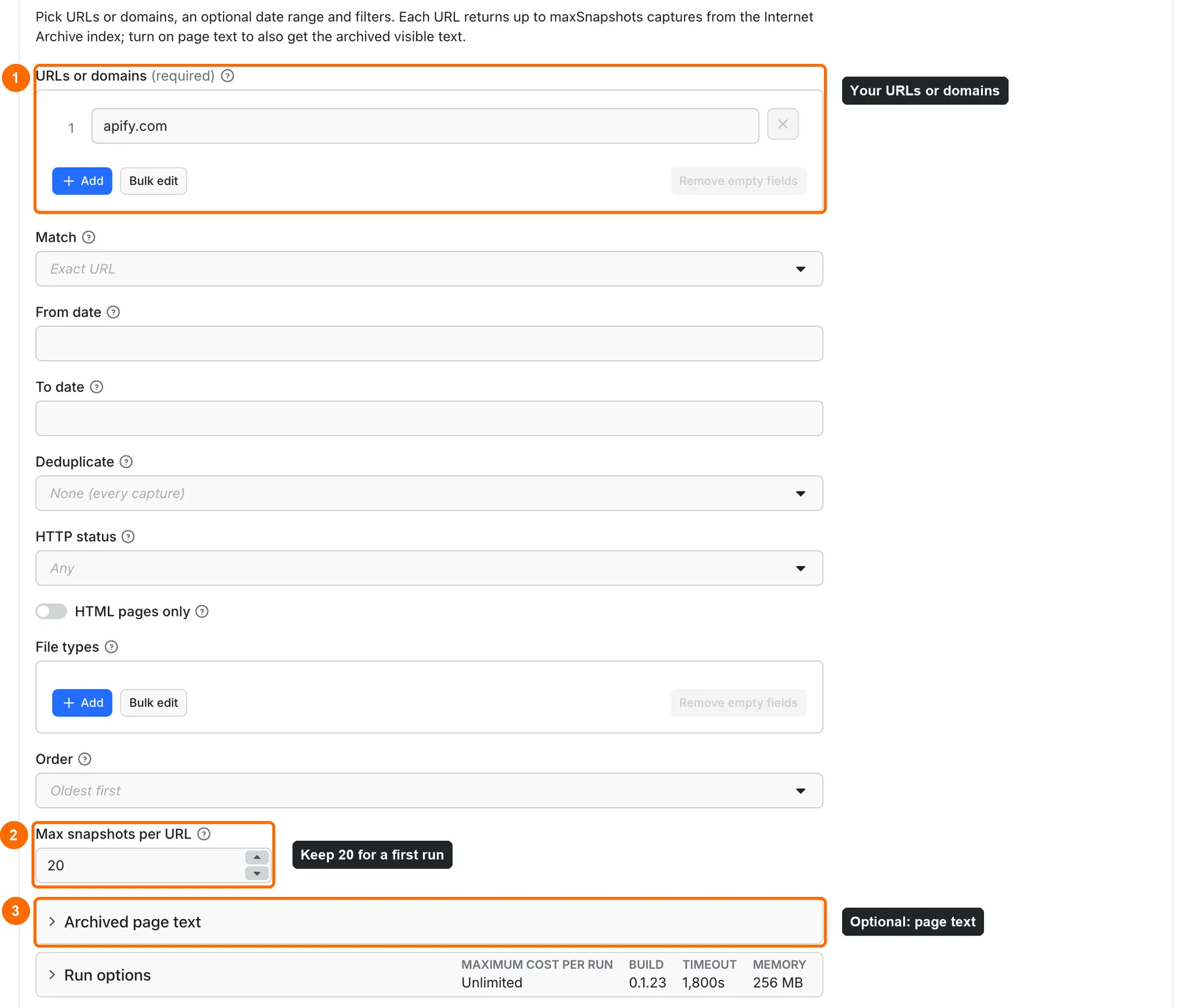
Open the Input tab. Keep the prefilled URLs or domains value
apify.com, or add your own site, for examplewikipedia.org(box 1 in the picture). -
Keep Max snapshots per URL at the prefill
20(box 2). Without the prefill the default is100. -
Optional: open Archived page text and turn on Include archived page text to also get the old title and text (box 3). Leave it off for the first run.
-
Click Start.
-
Open the Output tab and check the Snapshots view:
capturedAt,snapshotUrl,statusCodeandmimeType(boxes 1–3 in the table picture).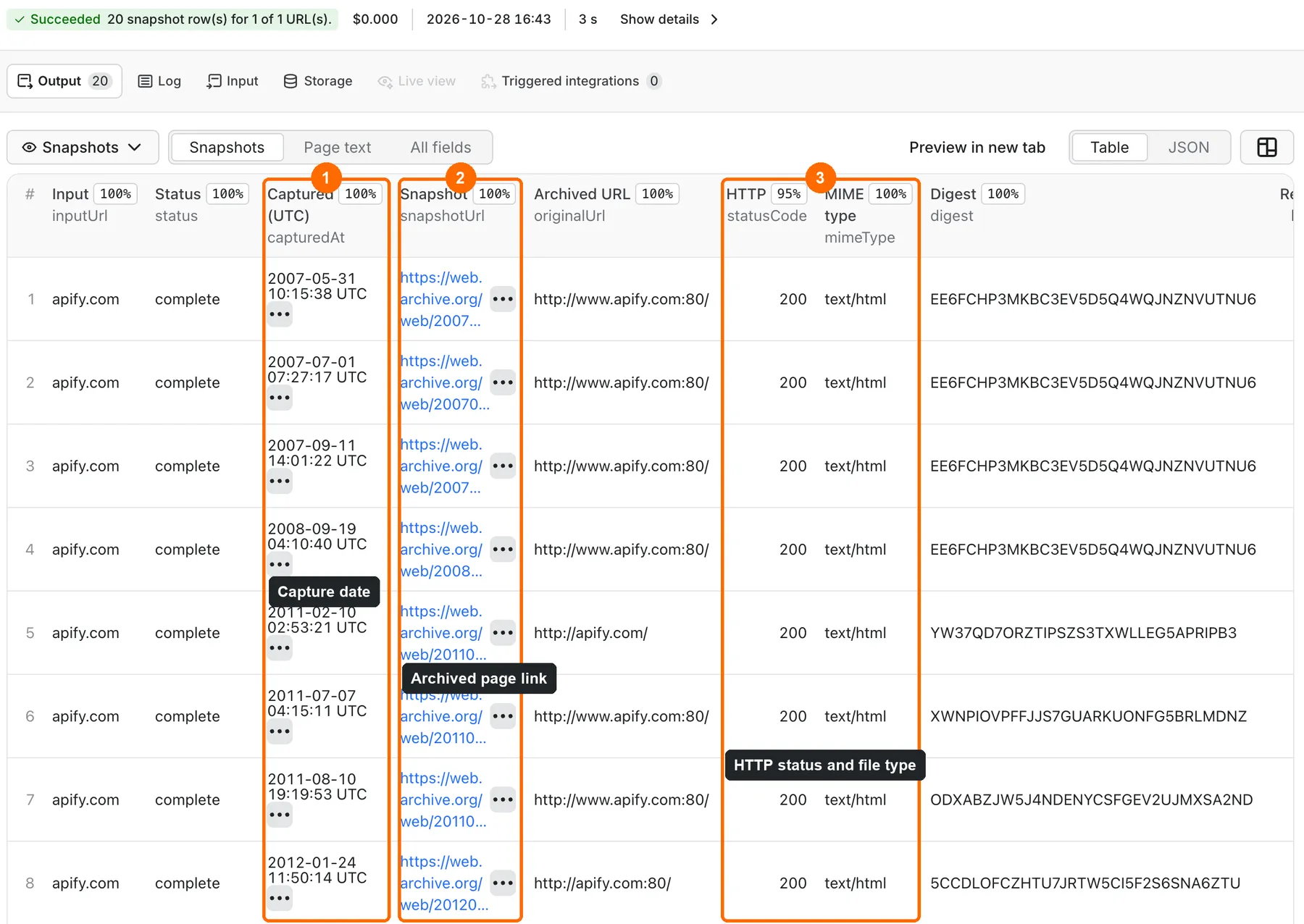
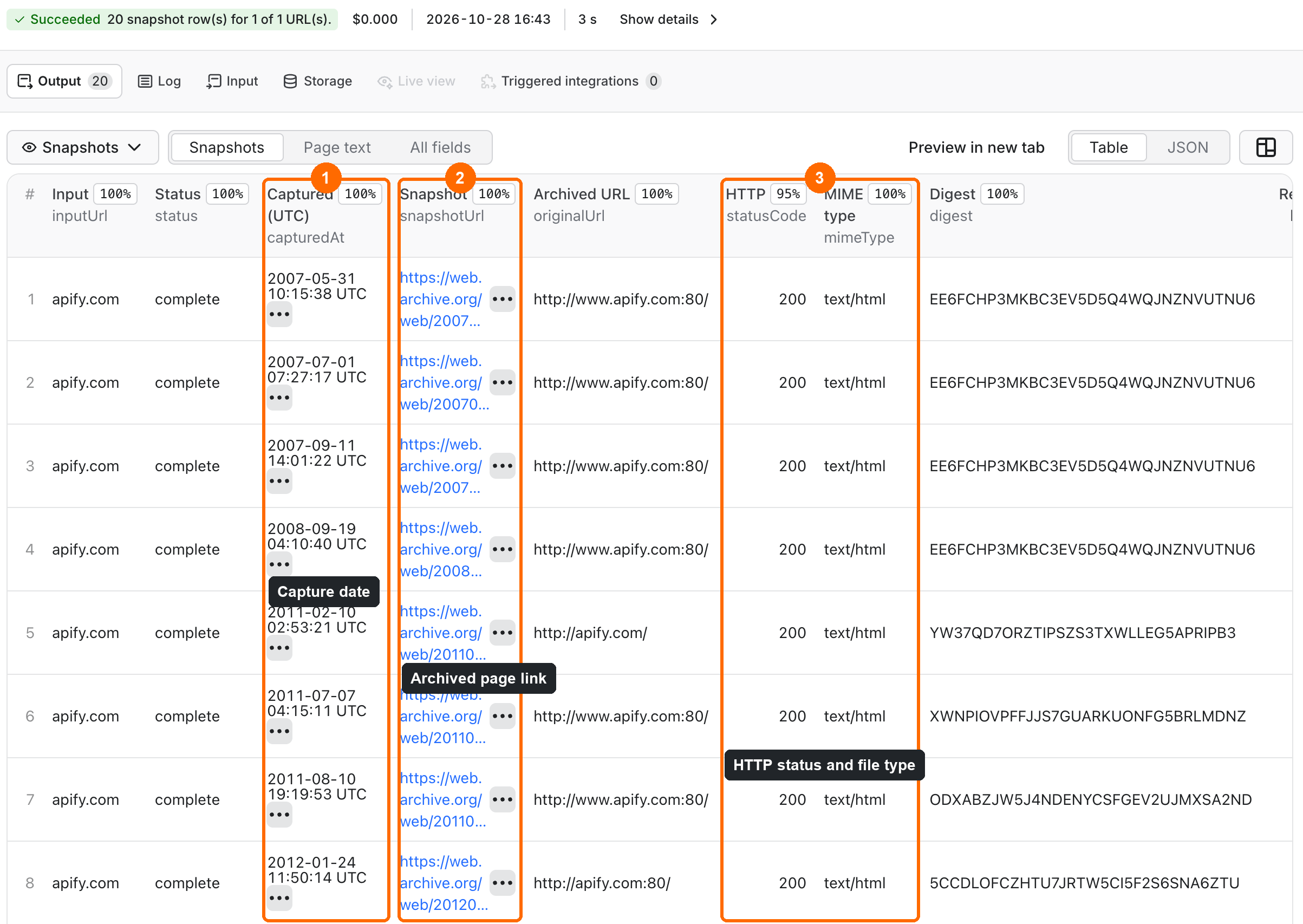
Expected result: 20 rows for apify.com, oldest capture first, each with a working link to the archived page.
Use cases
| Buyer job | Input path | Output entity | Key fields | Next integration |
|---|---|---|---|---|
| Page history by month | urls, collapse: month | capture row | capturedAt, statusCode, snapshotUrl | spreadsheet export |
| Old title and text | urls, includeContent: true, statusFilter: 2xx | capture row with text | title, text, textLength | content diff, LLM |
| All archived URLs of a site | urls: ["*.apify.com"], collapse: urlkey | one row per URL | originalUrl, capturedAt | crawl list, link audit |
| Content changes only | urls, collapse: digest | changed captures | digest, capturedAt | change log |
Scheduling and monitoring
Use an Apify schedule to check a page or a site regularly. Set From date to a recent date and Deduplicate to "Only when content changed" (collapse: digest) to get only captures with new content. Each run is independent: the Actor does not remember earlier runs, so compare digest or capturedAt with your last export.
Input
Input fields
| Field | Plain name | Type | Required | Default / prefill | Allowed values | Effect | Example | Recommendation |
|---|---|---|---|---|---|---|---|---|
urls | URLs or domains | array of strings | yes | prefill ["apify.com"] | 1–100 http(s) URLs or domains | what to look up | apify.com/blog/* | path* = every URL under the path, *.domain = domain with subdomains |
matchType | Match | string | no | exact | exact, prefix, host, domain | how wide each URL matches | domain | a * in the URL overrides it for that entry |
from | From date | string | no | empty (first capture) | 2015, 2015-06, 2015-06-01, 20150601 | earliest capture date, UTC | 2020 | |
to | To date | string | no | empty (latest capture) | same formats, inclusive | latest capture date, UTC | 2020-12 | 2020 means up to the end of 2020 |
collapse | Deduplicate | string | no | none | none, digest, hour, day, month, year, urlkey | keep one capture per period, per changed content or per URL | month | urlkey for site URL lists |
statusFilter | HTTP status | string | no | any | any, 2xx, 3xx, 4xx, 5xx | keep one status class | 2xx | 2xx before asking for text |
onlyHtml | HTML pages only | boolean | no | false | true / false | skip images, scripts, PDFs | true | use with prefix and domain |
mimeTypes | File types | array of strings | no | empty (all types) | up to 20 MIME types; a value ending in / keeps the whole family | keep only captures of these file types | ["application/pdf"], ["image/"] | find archived PDFs or images of a site; not together with HTML pages only |
sortOrder | Order | string | no | oldest | oldest, newest | which captures come first | newest | newest works for exact URLs only |
maxSnapshots | Max snapshots per URL | integer | no | 100 (prefill 20) | 1–10000 | stop after this many captures for each input | 500 | each capture row is one paid result |
includeContent | Include archived page text (section Archived page text) | boolean | no | false | true / false | also download the archived page | true | slower: about 2–4 s per page, at most 300 pages per run |
maxContentChars | Max text characters | integer | no | 5000 | 100–100000 | cut text per capture | 20000 | textLength still shows the full length |
Empty urls is rejected with a clear message. One invalid entry (for example ftp://...) stops the run before any lookup; only the start fee is charged. Duplicate inputs (http/https, www., a root /, letter case) are looked up once.
Interacting settings
| When | Input A | Input B | Effective behavior | Example | Cost/result effect |
|---|---|---|---|---|---|
A URL ends with * or starts with *. | urls | matchType | the wildcard wins for that entry | apify.com/store* → prefix | none |
| Newest first | sortOrder: newest | matchType | allowed for exact URLs only | apify.com | none |
| Text for non-2xx captures | includeContent | statusFilter | redirects, errors and revisit records get contentStatus: skipped_not_2xx and no text | statusFilter: any | no text fee for skipped rows |
| Only some file types | mimeTypes | onlyHtml | use one of them; both together stop the run with an input error | mimeTypes: ["text/html", "application/pdf"] | only the start fee for the input error |
| Many captures with text | includeContent | maxSnapshots | text stops after 300 pages per run, later rows get skipped_limit | 20 sites × 100 | no text fee after the limit |
Input examples
Page history with text, one capture per year
Expected behavior: one successful capture per year from 2019 to 2024, each with title and text.
Expected output: rows with capturedAt, snapshotUrl, statusCode: 200, title, text.
Limit or cost note: start fee + 6 × (capture + text) at the prices below.
All archived pages of a domain
Expected behavior: one row for each distinct archived HTML URL on the domain and its subdomains.
Expected output: originalUrl, capturedAt (first capture of that URL), statusCode.
Archived PDFs and images of a site
Expected behavior: one row for each distinct archived PDF or image URL under apify.com.
Expected output: originalUrl, mimeType (for example image/png), capturedAt, snapshotUrl (opens the archived file).
Limit or cost note: rows only, no page text for these files (contentStatus: skipped_not_text if text is on).
Output
Output fields
| Field | Meaning | Type | Can be empty? | Example / enum | Source / notes |
|---|---|---|---|---|---|
inputUrl | your input entry | string | no | apify.com | as you typed it |
matchType | how it was matched | string | no | exact | after wildcard rules |
originalUrl | the URL the archive captured | string | null on not_found | https://apify.com/ | CDX original |
urlKey | archive URL key | string | null on not_found | com,apify)/ | CDX urlkey |
timestamp | capture time, 14 digits | string | null on not_found | 20240115083000 | UTC |
capturedAt | capture time | ISO string | null on not_found | 2024-01-15T08:30:00Z | UTC |
snapshotUrl | link to the archived page | string | null on not_found | https://web.archive.org/web/20240115083000/https://apify.com/ | replay link |
statusCode | archived HTTP status | integer | yes | 200, 301 | null for revisit records without a status |
mimeType | archived content type | string | yes | text/html | |
digest | content hash (SHA-1, base32) | string | yes | 2C5… | same digest = same content |
length | archive record size, bytes | integer | yes | 14231 | compressed record, not page size |
title | archived page title | string | yes | Apify: Full-stack web scraping | only with text |
text | archived visible text | string | yes | Web scraping… | e-mails and phones masked |
textLength | full text length before the cut | integer | yes | 8312 | |
textTruncated | text was cut | boolean | yes | true | |
contentStatus | text result | string | no | not_requested, ok, empty, skipped_not_text, skipped_not_2xx, skipped_limit, unavailable, error | |
status | row result | string | no | complete, partial, not_found, error | |
statusReason | short note | string | yes | The Wayback Machine has no captures for this URL. | |
errorCode | error code | string | yes | SOURCE_UNAVAILABLE, SOURCE_EXCLUDED | only on error rows |
sourceUrl | archive index request that produced the row | string | no | https://web.archive.org/cdx/search/cdx?url=apify.com&… | provenance |
fetchedAt | when the Actor read it | ISO string | no | 2026-10-17T08:37:10Z |
null means the archive did not give the value. It is never replaced with 0 or an empty string.
Output entities and surfaces
| Situation | Dataset/API/KVS/live view | Result shape | User action |
|---|---|---|---|
| Normal item | Dataset, views Snapshots and Page text | one row per capture, status: complete | open snapshotUrl or export |
| Domain-empty result | Dataset | one row per input, status: not_found, capture fields null | widen dates, filters or matchType |
| Partial result | Dataset | status: partial, contentStatus: unavailable or error, capture fields filled | the archive did not return the page text; the capture data is still valid |
| Technical failure or retry | Dataset + KVS RUN_SUMMARY | status: error row (free), rows saved before the failure stay; run status SUCCEEDED when fewer than half of the URLs failed and all were looked up, otherwise FAILED | run the failed URLs again later |
RUN_SUMMARY in the default key-value store shows the run status, the reason, counts, and per input: captures, first and last date, and moreAvailable when more captures exist beyond maxSnapshots.
Output example
Input: the first example above. One of its 6 rows from a real run; text is shortened here.
Use case → fields
| Buyer job | Input path | Output entity | Key fields | Next integration |
|---|---|---|---|---|
| When a page first appeared | urls, sortOrder: oldest, maxSnapshots: 1 | first capture row | capturedAt, snapshotUrl | domain age check |
| Status history (200 → 301 → 404) | urls, collapse: month | capture rows | capturedAt, statusCode, mimeType | SEO audit sheet |
| Old title and text by date | urls, from, to, includeContent: true, statusFilter: 2xx | capture row with text | title, text, textTruncated | content diff, LLM |
| Pages a site used to have | urls: ["*.apify.com"], collapse: urlkey, onlyHtml: true | one row per URL | originalUrl, capturedAt, statusCode | redirect map, link audit |
| Old PDFs and images of a site | urls: ["apify.com/*"], mimeTypes: ["application/pdf", "image/"] | one row per file capture | originalUrl, mimeType, snapshotUrl | file recovery list |
Pricing
Pricing unit
You pay per event. Platform usage is included in the price.
| Event | Price | When it is charged |
|---|---|---|
| Actor start | $0.0025 | once per run for each GB of run memory; the default 256 MB counts as one start |
Capture row (snapshot) | $0.0006 | each saved capture row |
Page text (snapshot-text) | $0.0005 | each capture with extracted text (contentStatus: ok) |
URL with no captures (not-found) | $0.0006 | each input with no captures for your filters |
Bronze, Silver and Gold Store plans pay 10%, 20% and 30% less for rows, text and URLs with no captures (Gold: $0.00042 per row or per URL with no captures). The start fee is the same for every plan.
| Capture rows (no text) | Free plan | Gold plan |
|---|---|---|
| 1 | $0.0031 | $0.0029 |
| 10 | $0.0085 | $0.0067 |
| 100 | $0.0625 | $0.0445 |
The flat start fee matters most in tiny runs: with fewer than about 6 captures, most of the cost is the start fee. Put several URLs in one run instead of one run per URL.
error rows, skipped text, pages without visible text (contentStatus: empty) and rows over your Maximum cost per run limit are not charged. An invalid input pays only the start fee. When the run reaches your cost limit, it stops, keeps the saved rows and ends as SUCCEEDED with reason: CHARGE_LIMIT in RUN_SUMMARY.
Cost examples
| Scenario | Input scope | Expected item/event count | Base charge | Optional charge | Stop/cap behavior |
|---|---|---|---|---|---|
| Prefill | apify.com, 20 captures | 20 rows | $0.0025 + 20 × $0.0006 = $0.0145 | none | stops at 20 |
| Page text | 4 sites × 25 captures with text | 100 rows + 100 texts | $0.0025 + $0.06 = $0.0625 | $0.05 | text stops at 300 pages |
| Big list | apify.com/*, 1,000 captures | 1,000 rows | $0.0025 + $0.60 = $0.6025 | none | stops at maxSnapshots |
| No captures | 1 URL the archive does not have | 1 not-found | $0.0025 + $0.0006 = $0.0031 | none | — |
Limits
- Up to 100 URLs per run and 10,000 captures per URL. 10,000 captures cost $6.0025 at the base price, so raise Maximum cost per run for such runs.
- Page text for up to 300 captures per run, at most one archived page every 2 seconds; only the first 3 MB of a page are read (then
textTruncated: true). - The Actor is polite to the archive: at most 1 request per second. The first "too many requests" answer from the archive index stops all lookups; saved rows stay.
- URLs with no captures are slow to confirm: the archive can take 5–40 seconds per such URL, and the Actor checks three at a time. 99 such URLs took 4–12 minutes in our tests.
- A
partialrow means the capture is real but the archive did not return its page text. You pay for the row, not for the text. - A run with 100 URLs takes about 15–20 minutes (default timeout 30 minutes). 100 URLs × 3 captures with text (283 texts) took about 17 minutes.
- If one URL fails (for example a very large site the archive cannot list in time), it gets a free
errorrow and the other URLs go on. The run still SUCCEEDS withreason: SOME_URLS_FAILEDwhen fewer than half of the URLs failed. - If the archive keeps failing, the run stops after two failed URLs in a row. Inputs not looked up get a free
errorrow withstatusReason: Not looked up, and the run ends as FAILED with the saved rows kept. - A run stops listing after about 58 minutes, or 15 seconds before its own timeout, whichever comes first. Saved rows stay;
RUN_SUMMARYshowsreason: DEADLINE. - One archive index answer can be at most 16 MB and must come within 90 seconds; one archived page within 45 seconds. A slower answer gives an
error(index) orpartial(text) row. - After 3 archived pages in a row fail (or one "too many requests" answer), the Actor stops fetching page text for the rest of the run and keeps listing captures. Later rows get
contentStatus: skipped_limitwith the reason instatusReason, and no text fee.
API, export and integrations
- API: start a run with the Apify API or client (
POST /v2/acts/cliqtomedia~wayback-machine-snapshots/runs) with the same JSON input; read rows from the run's default Dataset. - Scheduling: see Scheduling and monitoring.
- Export: download the Dataset as JSON, CSV, Excel or XML from the Output tab or the Dataset API.
Use with AI agents (MCP)
- MCP server URL with only this Actor:
https://mcp.apify.com?tools=cliqtomedia/wayback-machine-snapshots. - Smallest useful input:
{"urls": ["apify.com"], "maxSnapshots": 20}. - Key output fields:
capturedAt(capture time, UTC),snapshotUrl(archived page link),statusCode(archived HTTP status,nullfor revisit records),status(complete,partial,not_found,error),text(archived visible text whenincludeContentis true). - Typical run: 10–30 seconds and $0.0145 for 20 captures; with text, about 2–4 seconds and $0.0011 per page. Limits: 100 URLs, 10,000 captures per URL, 300 texts per run.
Troubleshooting
Every row is not_found
Symptom: one not_found row per URL.
Likely reason: the archive has no captures for that exact URL and filters.
Check: open https://web.archive.org/web/*/<your URL> in a browser.
Action: remove from/to, statusFilter, onlyHtml or mimeTypes, or use matchType: prefix or domain.
Text is empty for many rows
Symptom: contentStatus is skipped_not_2xx or skipped_not_text.
Likely reason: those captures are redirects, errors, revisit records or non-HTML files.
Check: the statusCode and mimeType of the row.
Action: set statusFilter: 2xx and onlyHtml: true.
The run stopped with RATE_LIMITED or SOURCE_ERROR
Symptom: run status FAILED, some rows saved, RUN_SUMMARY shows the reason.
Likely reason: the archive asked us to slow down or did not answer.
Check: the time of the run and the number of inputs.
Action: run again later, or split a large list into smaller runs. error rows are not charged.
A very large site has an error row with SOURCE_TIMEOUT
Symptom: one free error row for a site like reddit.com, HTTP 504 in statusReason.
Likely reason: the archive could not list millions of captures in time.
Check: RUN_SUMMARY shows SOME_URLS_FAILED; other URLs are fine.
Action: add from/to, collapse: year or statusFilter: 2xx, or use a more exact URL, and run that URL again.
A URL has an error row with SOURCE_EXCLUDED
Symptom: one free error row for the URL, the other URLs are listed as usual.
Likely reason: the site asked the archive not to show its captures, or the archive removed them.
Check: open https://web.archive.org/web/*/<your URL> in a browser.
Action: none; the archive does not show these captures to anyone. Three such URLs in a row stop the run with SOURCE_BLOCKED, because that looks like the archive refusing all requests.
Many captures look the same
Symptom: several rows with the same digest or the same text.
Likely reason: the archive captured an unchanged page many times.
Action: set Deduplicate to "Only when content changed" (collapse: digest) to keep only changed content.
FAQ
Do I need a Wayback Machine account or API key?
No. The Actor uses the public Wayback Machine index and archived pages. No login, no key, no cookies.
Why do I get fewer captures than I asked for?
maxSnapshots is a maximum. The archive may have fewer captures for your filters. RUN_SUMMARY shows moreAvailable: true when more exist. With sortOrder: newest, repeated identical index lines are skipped, so a few rows fewer can come back.
How fresh is the data?
Rows show what the Wayback Machine index has at run time. New captures can take hours or days to appear in the index.
Is the archived content mine to reuse?
Archived pages belong to their original publishers, and use of the Wayback Machine is subject to the Internet Archive Terms of Use. You are responsible for how you use the results. This Actor is not affiliated with the Internet Archive.
I come from another Wayback Actor. How do the fields map?
queryUrl → inputUrl, archiveDate → capturedAt, archiveUrl → snapshotUrl, contentLength → length, contentDigest → digest, content → text. statusCode here is a number or null, not a string. A URL with no captures returns a not_found row instead of nothing.
Related Actors
- Bulk URL Status & Redirect Checker — check which of the archived URLs still work today and where they redirect.
- XML Sitemap URLs Extractor — get the current URL list of a site to compare with its archived URLs.
- Website to Markdown for RAG — get the live text of the same pages to compare with the archived text.
- SEO Site Audit — audit broken links, meta tags and speed of the live site.
- Domain WHOIS (RDAP) & DNS Lookup — add registration dates and DNS records to the archive history of a domain.
Support
For a bug, question or feature request, open an issue on the Actor's Issues tab. Include the run ID, your input (without private data) and the error text. Never send tokens or cookies.


