

Webpage to Markdown API: Clean Markdown for LLMs & Agents
Pricing
from $0.21 / 1,000 url checkeds
Webpage to Markdown API: Clean Markdown for LLMs & Agents
Turn any public web page URL into clean Markdown with title and word count. Built for AI agents and LLM tools: one URL or up to 100 per run, optional JavaScript rendering, pay per page. No login.
Pricing
from $0.21 / 1,000 url checkeds
Rating
0.0
(0)
Developer

Cliqto Media
Maintained by CommunityActor stats
0
Bookmarked
2
Total users
1
Monthly active users
5 days ago
Last modified
Categories
Features
Share
Turn any public web page URL into clean, LLM-ready Markdown with the page title, word count and HTTP status. No login, no API key for the site: give one URL (or up to 100) and get one JSON row per page in a few seconds, from $0.0015 for a single page.
It works as a simple URL to Markdown converter for AI agents, LLM tools, RAG pipelines and scripts that need the readable text of a page, not a whole-site crawl. The smallest run is one URL, for example https://apify.com.
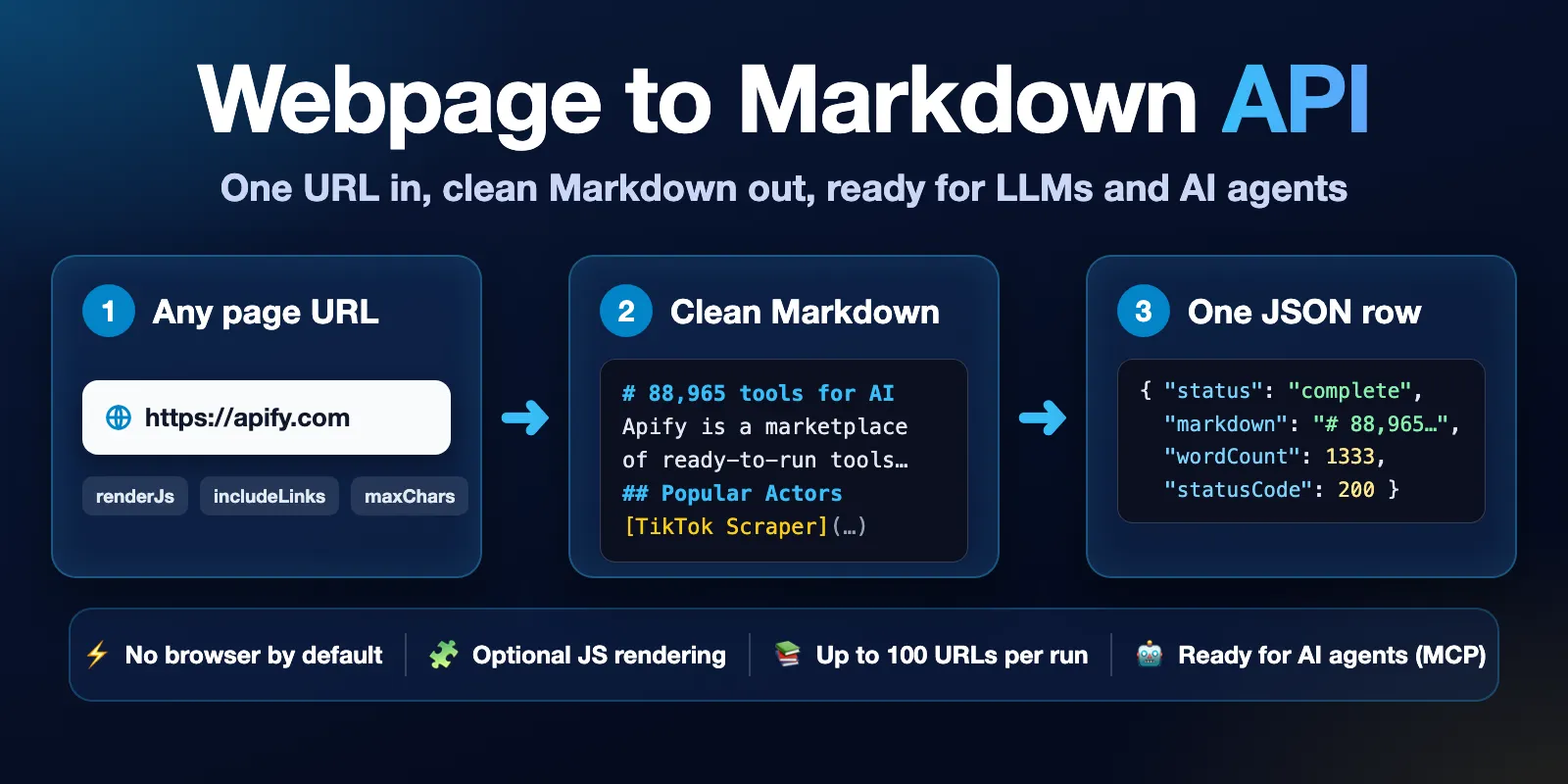
Table of contents
- What it does
- Quick start
- Use cases
- Input
- Output
- Pricing and limits
- API, export and integrations
- Troubleshooting
- FAQ
- Related Actors
- Support
What it does
The Actor downloads each page over plain HTTP, keeps the main content and removes navigation, headers, footers and cookie banners. It converts the rest to Markdown and saves one Dataset row per URL with url, title, markdown, wordCount, statusCode and fetchedAt.
Some pages build their text with JavaScript. For them, set renderJs to true: the Actor opens the page in a headless Chromium browser first. Without it, such pages come back as partial with the hint NEEDS_JS.
Good fit
- An AI agent or LLM tool needs to read one page as Markdown in one quick call.
- A RAG or summary pipeline needs clean text from a list of known URLs (up to 100 per run).
- A script needs the title, word count and HTTP status of a page together with its text.
Not a fit / limits
- Whole-site crawling. The Actor reads only the URLs you give; it does not follow links.
- Pages behind a login, paywall or CAPTCHA. The Actor does not log in and does not bypass them.
- Sites with strong bot protection may answer
403. You get anHTTP_ERRORrow, not a bypass. - Private and internal network addresses (for example
localhost,10.x.x.x) are blocked.
Quick start
- Open the Input tab.
- Keep the prefilled Page URL
https://apify.comor paste your own page. - Leave Render JavaScript off for normal pages.
- Click Start.
- Open the Output tab. The Markdown view shows
url,titleandmarkdown; the Pages view shows status, HTTP code and word count.
Expected result: one row with status: "complete", the page title and about 1,300 words of Markdown for https://apify.com.
Use cases
| Buyer job | Input path | Output entity | Key fields | Next integration |
|---|---|---|---|---|
| Let an AI agent read a page | url | one page | markdown, title, wordCount | Apify MCP server, agent tool call |
| Feed a RAG index from known URLs | urls (up to 100) | one row per page | url, markdown, fetchedAt | API, LangChain, LlamaIndex, n8n |
| Fit a page into an LLM context window | url + maxChars | cut page | markdown, truncated | prompt template |
| Read a JavaScript app page | url + renderJs | rendered page | markdown, renderedJs | same as above |
| Collect links of a page | url + includeLinks | page with links | links, title | crawler or link checker |
Input
Input fields
| Field | Plain name | Type | Required | Default / prefill | Allowed values | Effect | Example | Recommendation |
|---|---|---|---|---|---|---|---|---|
url | Page URL | string | one of url / urls | prefill https://apify.com | public http/https URL | one page to convert | https://en.wikipedia.org/wiki/Markdown | use for a single page |
urls | More page URLs | array of strings | one of url / urls | empty | together with url up to 100 different URLs | more pages in the same run, each its own row | ["https://react.dev"] | batch known pages in one run to save the start fee |
renderJs | Render JavaScript | boolean | no | false | true / false | opens pages in Chromium before converting; slower, 1 GB memory, extra js-render charge | true | turn on only for rows with NEEDS_JS |
includeLinks | Include links | boolean | no | false | true / false | adds a links array with absolute links of the page (up to 5,000) | true | turn on when you need the links |
maxChars | Max Markdown characters | integer | no | 0 (no limit) | 0 or 500–500000 | cuts the Markdown at a word boundary; sets truncated: true and status: "partial" | 20000 | set to fit your LLM context |
- You must give at least one URL. An empty input stops the run with the message
Add a page address. - Duplicate URLs are removed; the run keeps the first one.
- More than 100 different URLs stops the run with a clear message. Split the list into several runs.
- Unknown input fields stop the run with a clear message, so typos do not go unnoticed.
- Without a limit, Markdown is still capped at 500,000 characters per page.
Interacting settings
| When | Input A | Input B | Effective behavior | Example | Cost/result effect |
|---|---|---|---|---|---|
| Both are set | url | urls | merged into one list, url first, duplicates removed | url + 3 urls = 4 rows | one start fee for all rows |
| JavaScript app with a text limit | renderJs | maxChars | page is rendered first, then cut | renderJs: true, maxChars: 20000 | js-render + page charge |
More than 10 URLs or renderJs | urls | renderJs | the run gets 1 GB memory instead of 256 MB | 50 URLs | faster; you do not pay memory, the developer does |
Input examples
One page
Expected behavior: the page is fetched over HTTP in about a second.
Expected output: one complete row with title, markdown and wordCount (about 1,300).
Cost note: one start, one url and one page event.
A long page cut for an LLM
Expected output: one partial row with truncated: true, 20,000 characters of Markdown and a links array.
A batch with a JavaScript app
Expected behavior: both pages open in a browser. Expected output: two rows with renderedJs: true.
Output
Each URL becomes one row in the default Dataset, in the order you gave. A run summary is saved as RUN_SUMMARY in the default Key-value store.
Output fields
| Field | Meaning | Type | Can be empty? | Example / enum | Source / notes |
|---|---|---|---|---|---|
url | URL as you gave it | string | no | https://apify.com | input |
finalUrl | URL after redirects | string | yes, when the page did not load | https://apify.com/ | HTTP response |
status | result of the row | string | no | complete, partial, not_found, error | see below |
statusCode | HTTP status code | integer | yes, when there was no answer | 200 | HTTP response |
title | page title | string | yes | Apify: Marketplace of ready-to-run tools for AI | <title> or Open Graph |
description | meta description | string | yes | Thousands of tools to automate… | <meta name="description"> |
language | page language | string | yes | en | <html lang> |
markdown | main content as Markdown | string | yes, when nothing could be converted | # 88,965 tools for your AI… | main content only |
wordCount | words in markdown | integer | no (0 when empty) | 1333 | counted after conversion |
truncated | Markdown was cut | boolean | no | false | by maxChars or the 500,000 cap |
renderedJs | page opened in a browser | boolean | no | false | renderJs |
links | absolute links of the page | array of strings | only with includeLinks | ["https://apify.com/store"] | up to 5,000 |
fetchedAt | when the page was fetched | string (ISO 8601) | no | 2026-10-15T19:14:50.149Z | run clock |
error | why the row is not complete | object {code, message} | yes, null when complete | {"code":"NOT_FOUND","message":"The page does not exist (HTTP 404)"} | see codes below |
Status values:
complete— the page loaded and has Markdown.partial— Markdown was cut bymaxChars(truncated: true), or the page is a JavaScript app with no text in its HTML (error.code: "NEEDS_JS").not_found— HTTP 404/410 (NOT_FOUND) or the page has no readable text (NO_CONTENT).error— the page could not be read. Codes:HTTP_ERROR,TIMEOUT,DNS_ERROR,BLOCKED_URL,INVALID_URL,NOT_HTML,TOO_LARGE,TOO_MANY_REDIRECTS,CONNECTION_FAILED,PARSE_FAILED,TECHNICAL_ERROR, and for URLs the run did not start:CHARGE_LIMIT,RUN_TIME_LIMIT,SITES_NOT_RESPONDING,ABORTED.
Output entities and surfaces
| Situation | Dataset/API/KVS/live view | Result shape | User action |
|---|---|---|---|
| Normal page | Dataset, views Markdown and Pages | full row, status: "complete" | use markdown |
| Page does not exist | Dataset | status: "not_found", markdown: null | check the URL |
| Cut or JavaScript page | Dataset | status: "partial", truncated or NEEDS_JS | raise maxChars or set renderJs |
| Site error or block | Dataset + RUN_SUMMARY.failedUrls | status: "error", error.code | see Troubleshooting |
| Whole run | Key-value store RUN_SUMMARY, run status message | status, counts, charged pages, failed URLs | check counts |
Output example
This is one row from a real run of the first input example; markdown is trimmed here. null means the page did not give that value (for example, no meta description).
Pricing and limits
Pricing unit
This Actor uses pay-per-event pricing. You pay for events; the developer pays the platform usage (compute, storage).
| Event | When it is charged | Free plan | Bronze | Silver | Gold and higher |
|---|---|---|---|---|---|
| Actor start | once per run (one per GB of run memory; default memory is 1 GB or less, so one) | $0.0011 | $0.0011 | $0.0011 | $0.0011 |
| URL checked | each URL the run fetched or checked (one row) | $0.0003 | $0.0003 | $0.0003 | $0.0003 |
| Page converted | each page with Markdown (complete, or partial cut by maxChars) | $0.0001 | $0.00008 | $0.00005 | $0.00002 |
| JavaScript render | each page the browser opened (only with renderJs) | $0.0055 | $0.0055 | $0.0055 | $0.0055 |
- A page that does not exist, has no text, needs JavaScript or fails (
not_found,error,NEEDS_JS) costs only the URL checked event. You do not pay the page event. - URLs the run did not start (
CHARGE_LIMIT,RUN_TIME_LIMIT,SITES_NOT_RESPONDING) cost nothing. - An input error (for example, no URL) costs only the Actor start.
- Your maximum cost per run is respected: the Actor does not start a page it cannot pay for and marks the rest
CHARGE_LIMIT.
Cost examples
| Scenario | Input scope | Events | Free plan | Gold |
|---|---|---|---|---|
| One page | 1 URL | start + 1 URL + 1 page | $0.0015 | $0.00142 |
| One missing page | 1 URL, HTTP 404 | start + 1 URL | $0.0014 | $0.0014 |
| Ten pages | 10 URLs | start + 10 URL + 10 page | $0.0051 | $0.0043 |
| Full batch | 100 URLs | start + 100 URL + 100 page | $0.0411 | $0.0331 |
| One JavaScript page | 1 URL, renderJs | start + 1 URL + 1 render + 1 page | $0.007 | $0.00692 |
Limits
- Up to 100 different URLs per run; 5 pages at a time over HTTP, 2 in the browser.
- One page: up to 15 seconds per request, 2 attempts, 10 MB of HTML, 5 redirects.
- A run stops starting new pages after about 4 minutes, so it fits the default 300-second timeout. If for 60 seconds no site gives a real answer (only timeouts, dropped connections, or server errors 5xx/429), the rest are marked
SITES_NOT_RESPONDINGat no charge. - Typical time: about 1–2 seconds for one page on a warm start, up to about 10 seconds on a cold start; about 11 seconds with
renderJs; about 70 seconds for 100 pages.
API, export and integrations
- API: start a run with
POST https://api.apify.com/v2/acts/cliqtomedia~webpage-to-markdown-api/run-sync-get-dataset-itemsand the input JSON; the answer is the list of rows. See the Apify API docs. - Export: download the Dataset as JSON, CSV, Excel or HTML from the Output tab or the API.
- Scheduling and webhooks: use Apify schedules to re-read the same pages, and webhooks to send rows to your system when a run ends.
- No-code: the Actor works in Make, Zapier, n8n and other Apify integrations; map
markdownandtitle.
Use with AI agents (MCP)
- MCP server with only this Actor:
https://mcp.apify.com?tools=cliqtomedia/webpage-to-markdown-api(Apify MCP docs). - Smallest useful input:
{"url": "https://apify.com"}. - Key output fields:
markdown(the text),title,wordCount(size before you put it in a prompt),statusanderror.code(why a page has no text). - Typical call: one page in a few seconds for $0.0015 on the Free plan. Up to 100 URLs per call; use
maxCharsto keep the answer small.
Troubleshooting
The row is partial with NEEDS_JS
Symptom: markdown is empty or very short and error.code is NEEDS_JS.
Likely reason: the page builds its text with JavaScript.
Action: run again with "renderJs": true.
The row is error with HTTP_ERROR 403
Symptom: statusCode: 403.
Likely reason: the site blocks automated requests or needs a login.
Action: try renderJs. If it still fails, the site does not allow this kind of access; the Actor does not bypass protection.
Rows are marked CHARGE_LIMIT
Likely reason: the maximum cost per run you set was reached. Action: raise the limit or split the URLs into smaller runs.
Rows are marked TIMEOUT or SITES_NOT_RESPONDING
Likely reason: the sites were too slow or did not answer. Action: try these URLs again later. Not processed URLs are free.
FAQ
Do I need a login or an API key for the site?
No. The Actor reads public pages only. You need only your Apify account.
Does it crawl the whole website?
No. It reads exactly the URLs you give. For many pages of one site, first get the page list (for example with a sitemap tool), then pass the URLs here.
Why is the Markdown shorter than the page?
The Actor removes menus, headers, footers and cookie banners and keeps the main content. If text is missing, the page may need renderJs.
Is the text always the same as in my browser?
Not always. Sites can show different content by region, cookies or bot checks. The row shows statusCode and fetchedAt, so you know what the Actor received and when.
Who is responsible for how I use the pages?
You are. Follow the target site's terms and robots rules.
Related Actors
- XML Sitemap URLs Extractor — get the page URLs of a site, then convert them here.
- Website Metadata & Open Graph Scraper — only titles, descriptions and preview images, without the page text.
- Website Screenshot & PDF Generator — a picture or PDF of the same page.
Support
For a bug, question or feature request, open an issue on the Issues tab of this Actor. Include the run ID, your input (without secrets) and the error.code you see. Never send tokens, cookies or private data.


