

Website Traffic Estimator: Similarweb Visits & Rank
Pricing
from $1.40 / 1,000 domain checkeds
Website Traffic Estimator: Similarweb Visits & Rank
Check monthly visits, global rank, traffic sources, top countries and keywords for a list of websites from public Similarweb estimates. Compare competitors, score leads and monitor traffic changes. No login or API key.
Pricing
from $1.40 / 1,000 domain checkeds
Rating
0.0
(0)
Developer

Cliqto Media
Maintained by CommunityActor stats
0
Bookmarked
2
Total users
1
Monthly active users
7 days ago
Last modified
Features
Share
Website Traffic Estimator checks a list of websites and returns public Similarweb traffic estimates for each domain: monthly visits, global and country rank, engagement, traffic sources, top countries and keywords.
Use it to compare competitors, score leads and monitor traffic. No login or API key is needed. The smallest run is one domain, such as apify.com: it costs $0.004 on the Free plan and usually finishes in under a minute.
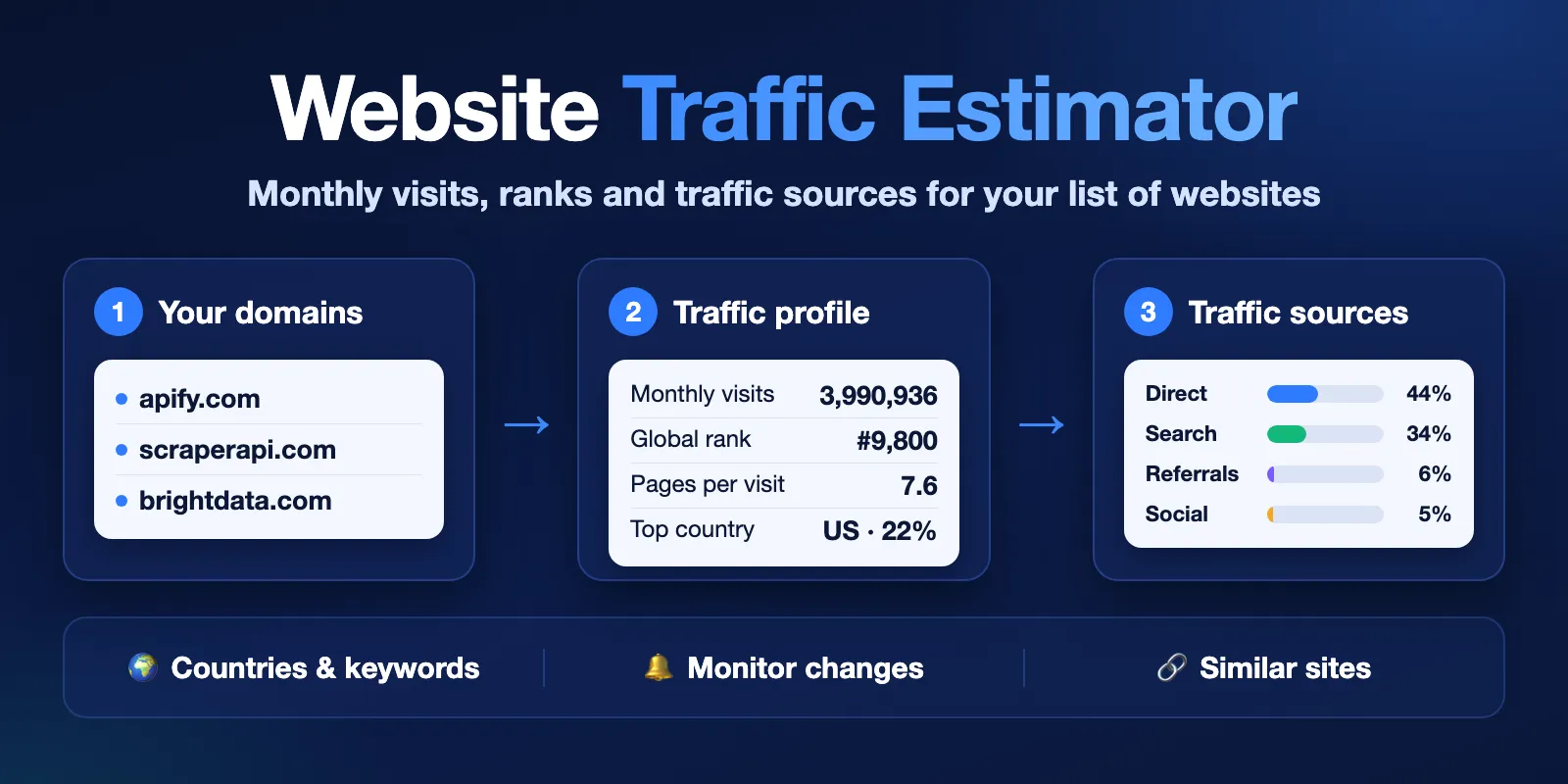
Table of contents
- What it does
- How it works
- Quick start
- Use cases
- Input
- Output
- Pricing
- Limits
- API, export and integrations
- Troubleshooting
- FAQ
- Related Actors
- Support
What it does
You add domains or website URLs. For each domain the Actor returns one dataset row with the latest public Similarweb estimate:
- Traffic: monthly visits, change from the previous month and up to 3 months of visit history.
- Ranks: global rank, rank in the main country and rank in the site category.
- Engagement: bounce rate, pages per visit and average visit time.
- Traffic sources: shares of direct, search, paid, referral, social, email, display ads and AI chatbot traffic.
- Audience: top countries, top keywords with search volume, similar sites and public company facts.
It does not need a Similarweb account, login or cookies. All numbers are estimates from the public source, not data from the site's own analytics.
Good fit
- Compare the traffic of competitors or partners in one table.
- Score a lead list by monthly visits or global rank, and drop small sites with a filter.
- Watch a list of domains every week or month and see which sites grew or fell.
How it works
- The Actor reads your list, removes
www, duplicates and broken entries, and keeps one entry per domain. - For each domain it opens the public Similarweb website profile and reads the estimate. If you turn on the fallback, it can also try SimilarSites and the Tranco list.
- It saves one row per domain in the dataset, a
RUN_SUMMARYreport and aCOMPARISONtable sorted by visits in the key-value store. In monitor mode it also compares each domain with your last run.
Quick start
-
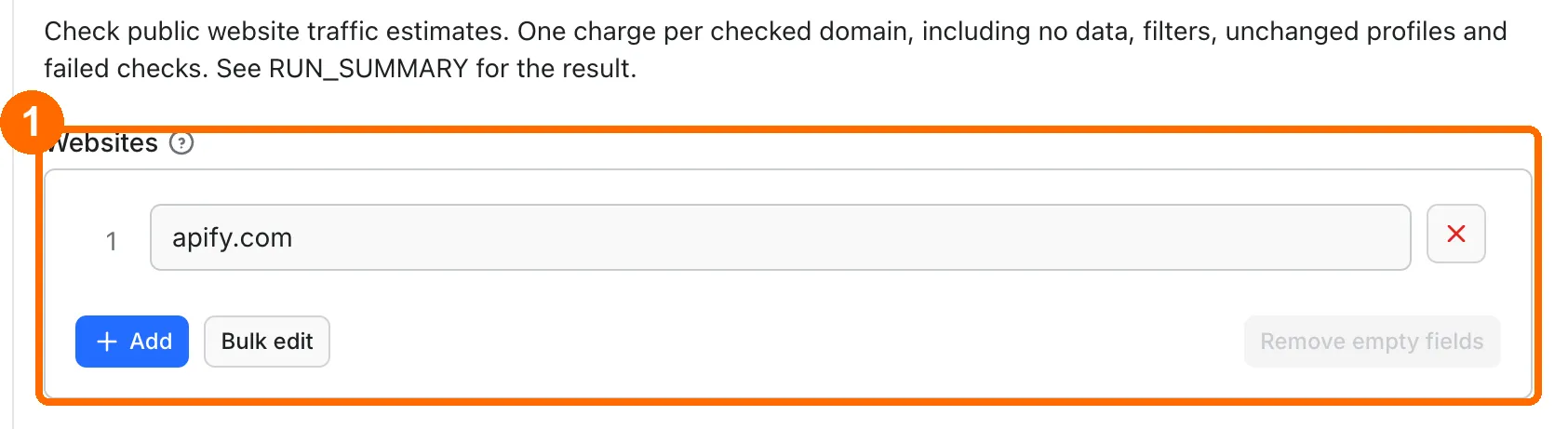
Open the Input tab. The Websites list already has
apify.com(box 1; the picture shows only this field). -
Add your own domains or URLs, one per line. You can keep the other settings as they are.
-
Click Start at the bottom of the page (below the picture's frame).
-
When the run finishes, open the Output tab and choose the Traffic comparison view (box 4).
-
Check
status,visitsandglobalRankfor each domain (box 5).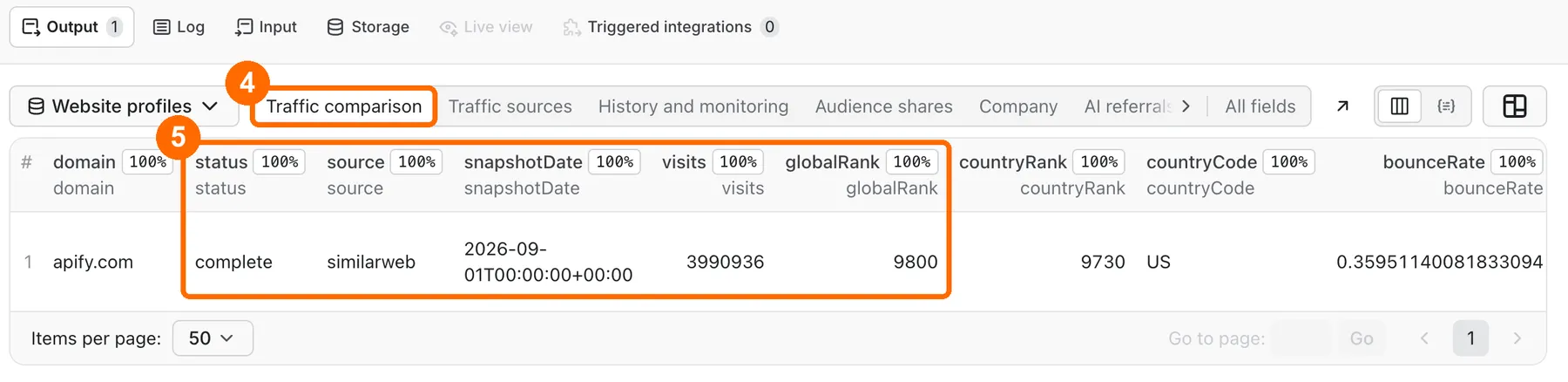
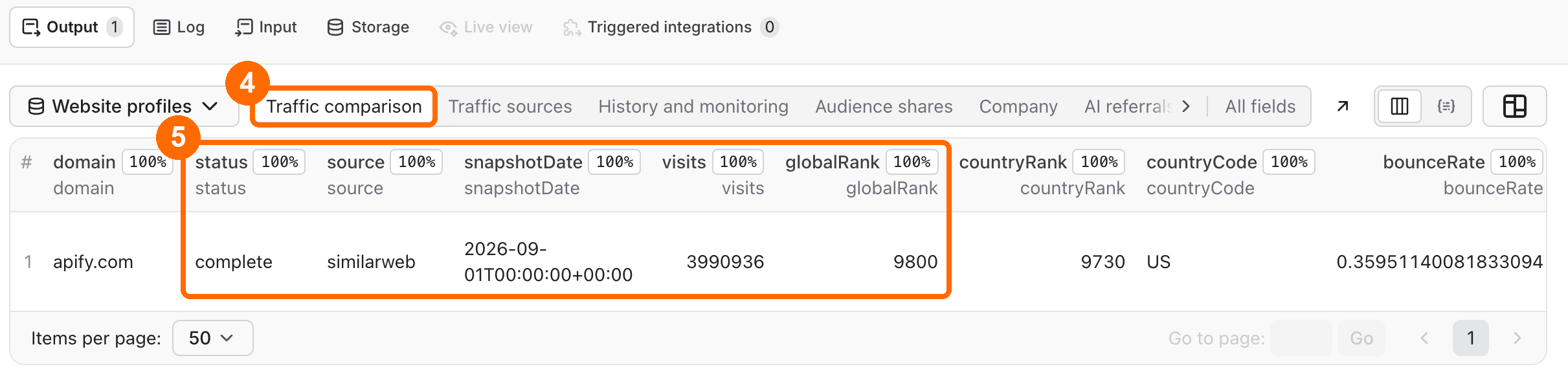
Expected result: one row for apify.com with status: complete, about 4 million monthly visits and a global rank near 10,000 (the numbers change every month). Channel shares are filled when channelDataStatus is available; if it is unavailable, visits and rank are still there and the shares stay null.
Use cases
| Buyer job | Input path | Output entity | Key fields | Next integration |
|---|---|---|---|---|
| Compare competitors | domains | One row per domain | visits, globalRank, organicShare, paidShare | Export CSV or Excel; COMPARISON record |
| Score or filter a lead list | domains, minMonthlyVisits, maxGlobalRank, countries | Rows that match the filters | visits, globalRank, countryCode, category | API or Make / Zapier into your CRM |
| Track traffic over time | mode: monitor, stateName, onlyChanges | New or changed profiles | changeStatus, visitsChangePercent, monthlyVisits | Apify schedule + Slack or Notion summary |
| Research SEO and channels | domains, includeSources, includeDetails | Full traffic profile | topKeywords, organicShare, topReferrers, similarSites | Spreadsheet with outputFormat: flat |
Input
Input fields
| Field | Plain name | Type | Required | Default / prefill | Allowed values | Effect |
|---|---|---|---|---|---|---|
domains | Websites | array of strings | yes, or one of the two lists below | prefill ["apify.com"] | domains or full URLs | The domains to check. www and duplicates are removed. Other subdomains stay separate. Broken entries are skipped and counted in RUN_SUMMARY.invalidEntries. |
domainsText | Paste a list | string | no | empty | commas, spaces or new lines | Added to Websites. Handy for pasting a long list. |
websites | Additional websites | array of strings | no | empty | domains or URLs | Added to Websites. For API callers that already use this name. |
mode | Run mode | string | no | lookup | lookup, monitor | monitor compares this run with your saved state. |
stateName | Monitor store name | string | in monitor mode | empty | 3–63 letters, digits or hyphens | Name of the store that keeps the last results. Reuse it for the same list. |
onlyChanges | Only changed profiles | boolean | no | false | In monitor mode, write only new or changed profiles. | |
includeSources | Traffic sources | boolean | no | true | Adds channel shares and the trafficSources list. | |
includeCountries | Top countries | boolean | no | true | Adds topCountries with traffic shares. | |
includeDetails | More public data | boolean | no | true | Adds company, audience, keywords, referrals, social networks, ads, technologies, similar sites and rank history. | |
includeAiTraffic | AI referral report | boolean | no | false | Adds AI chatbot referrals and prompts. Costs one extra AI check per domain. | |
fallbackToOpenData | Use fallback data | boolean | no | false | If Similarweb fails, try SimilarSites and Tranco. These rows are partial. | |
outputFormat | Row format | string | no | full | full, flat | flat turns lists into JSON text columns that end in Json, for spreadsheets. |
minMonthlyVisits | Minimum monthly visits | integer | no | 0 (off) | 0 or more | Write only profiles with at least this many visits. |
maxGlobalRank | Largest global rank number | integer | no | 0 (off) | 0 or more | 100 keeps ranks 1–100. |
countries | Main audience countries | array of strings | no | [] (off) | two-letter codes like US, GB | Keep profiles whose main country is in the list. |
categoryFilter | Category contains | string | no | empty (off) | any text | Keep profiles whose category contains this text. |
proxyMode | Connection route | string | no | auto | auto, direct, datacenter, residential | auto tries direct, datacenter and residential routes in that order and stops at the first one that works. |
maxConcurrency | Parallel domain checks | integer | no | 4 | 1–15 | Lower it if the source asks you to slow down. |
deliveryConnector | Send results to (optional) | string | no | empty | your MCP connector | Posts a short summary to Slack, Notion or another connector. |
deliveryTarget | Notion page or channel (optional) | string | no | empty | Notion page link or Slack channel ID | Where the summary goes. |
An empty list stops the run with DOMAINS_REQUIRED. A list where every entry is broken stops with INVALID_DOMAIN. The Actor sets no fixed list size; your timeout and charge limit decide how many domains one run checks. Tested: 100 domains on the default 300-second timeout. Five of seven runs finished in 151 to 226 seconds. Two runs reached the timeout and stopped partway, after 88 and 96 domains; only the checked domains were charged. For lists above about 50 domains, set the run timeout to 600 seconds or split the list into batches. Lists above 100 domains were not tested.
Interacting settings
| When | Input A | Input B | Effective behavior | Cost/result effect |
|---|---|---|---|---|
| You use filters | minMonthlyVisits, maxGlobalRank, countries, categoryFilter | — | All filters must match. Rows that fail are not written. | Every checked domain is charged, also filtered ones. |
| You monitor | mode: monitor | onlyChanges: true | Unchanged profiles are not written. | Unchanged domains are still charged. |
| You monitor | mode: monitor | stateName empty | The run stops before any check. | Only the start fee. |
| You force a route | proxyMode: direct, datacenter or residential | — | Every source request uses only that route. If it is blocked, the domain gets status: error. | Same domain check charge; no extra route charge. |
Input examples
Compare a few competitors
Expected behavior: the Actor checks 3 domains with the default settings.
Expected output: 3 rows with visits, globalRank, channel shares and topCountries.
Cost note: start fee plus 3 domain checks.
Weekly monitoring of large sites only
Expected behavior: the first run marks every domain new. Later runs write only profiles marked increased, decreased or changed.
Expected output: rows with changeStatus and visitsChangePercent.
Cost note: every checked domain is charged, also unchanged ones.
Output
Output fields
The main fields are below. Full rows also have rank history, rank competitors, top referrers, social networks, advertising, technologies and interests.
| Field | Meaning | Type | Can be empty? | Example / enum |
|---|---|---|---|---|
domain | Checked domain | string | no | apify.com |
status | Result of the check | string | no | complete, partial, not_found, error |
reason | Why a row is not complete | string | yes | NO_DATA, FALLBACK_UNDATED, SOURCE_RATE_LIMIT |
source, sourceUrl | Where the estimate comes from | string | yes | similarweb |
snapshotDate | Month of the estimate | string | yes | 2026-09-01 |
visits | Estimated monthly visits | number | yes | 3990936 |
changePercent | Change from the previous month, in percent | number | yes | -5.01 |
monthlyVisits | Up to 3 months of visits | array | yes | [{ "month": "2026-09-01", "visits": 3990936 }] |
globalRank, countryRank, categoryRank | Ranks; 1 is the biggest | number | yes | 9800, 9730, 272 |
countryCode | Main audience country | string | yes | US |
bounceRate | Share of one-page visits, 0–1 | number | yes | 0.3595 |
pagesPerVisit, avgVisitSec | Pages per visit, visit length in seconds | number | yes | 7.61, 317 |
directShare, organicShare, paidShare, referralsShare, social_organicShare, mailShare, adsShare, gen_aiShare | Traffic source shares, 0–1 (not percent) | number | yes | 0.44, 0.34 |
channelDataStatus | Whether channel shares were found | string | yes | available, unavailable |
topCountries | Countries with traffic share | array | yes | [{ "countryCode": "US", "share": 0.221 }] |
topKeywords | Search keywords with volume and CPC | array | yes | [{ "keyword": "apify", "volume": 798490 }] |
similarSites | Similar websites | array | yes | [{ "domain": "brightdata.com" }] |
company | Public company facts | object | yes | { "name": "Apify", "yearFounded": 2016 } |
changeStatus | Monitor result | string | no | not_monitored, new, unchanged, increased, decreased, changed |
visitsChangePercent | Change in visits since your last monitor run | number | yes | 12.5 |
aiTraffic, aiTrafficStatus | AI chatbot traffic, only when includeAiTraffic is on | object, string | yes | available, unavailable |
fetchedAt | When the row was made | string | no | ISO date and time |
Output entities and surfaces
| Situation | Where | Result shape | User action |
|---|---|---|---|
| Normal item | Dataset, views Traffic comparison, Traffic sources, History and monitoring, Audience shares, Company | One row per domain, status: complete | Open a view, export, or read visits and globalRank |
| No estimate for a domain | Dataset | status: not_found, reason: NO_DATA, metrics null | Check the spelling. Very small sites often have no estimate. |
| Partial result | Dataset | status: partial; some fields null | Read source and reason. Fallback rows have no known month. |
| Channel shares missing | Dataset and RUN_SUMMARY.channelDataUnavailable | status: complete, channelDataStatus: unavailable, share fields null | Run the domain again later |
| Technical failure | Dataset and RUN_SUMMARY | status: error with a reason code | Run again later or lower maxConcurrency |
| Run report | Key-value store RUN_SUMMARY | Counts, status, stopReason, invalidEntries, channelDataUnavailable, warnings, delivery | Check why a run stopped early |
| Side-by-side table | Key-value store COMPARISON | Rows sorted by visits | Compare domains quickly |
| AI referral report (opt-in) | Dataset, views AI referrals and AI report details | AI fields filled only when AI referral report is on | Turn on AI referral report; it adds the ai-checked charge |
Output example
This example is trimmed and shows one row from a real run. null means the source did not publish that value. The Actor never fills a gap with a guess.
Send results to Slack or Notion
Pick your connector in the optional deliveryConnector field. After the run saves its data, the Actor posts a short summary (up to 25 rows and a link to the full dataset) there. Put a Notion page link or a Slack channel ID in deliveryTarget: in Notion every run is added on top of that one page, so your workspace does not fill up with new pages. A delivery error never fails the run and costs nothing extra. Connect a service once in Apify Console → MCP connectors.
Each summary line looks like apify.com — complete — 3,990,936 visits — global rank 9800.
Pricing
Pricing unit
You pay per event. Platform usage is included in these prices: the Actor's developer pays Apify for it, so you get no separate usage bill.
| Event | When it is charged | Free plan price | Discounts |
|---|---|---|---|
| Actor start | Once per run | $0.002 | same on all plans |
| Domain check | Each domain the Actor checks | $0.002 | −10% / −20% / −30% on Bronze / Silver / Gold and higher |
| AI check | Each checked domain, only when includeAiTraffic is on | $0.0078 | −10% / −20% / −30% |
The start fee is counted per GB of run memory. This Actor runs with 256–512 MB, so it is one start fee per run.
A domain check costs the same for every result: complete, partial, not_found, error, a row removed by your filters, or an unchanged row in monitor mode. Broken entries that the Actor skips are free. An invalid input (for example, no domains) costs only the start fee. When your charge limit is reached, the run stops with stopReason: CHARGE_LIMIT and the remaining domains are not charged.
Proxy routes are included in the domain check price. There is no extra charge for a retry on another route.
Cost examples
Free plan, default settings, no AI:
| Scenario | Input scope | Domain checks | Base charge | Optional charge | Stop/cap behavior |
|---|---|---|---|---|---|
| Smallest run | 1 domain | 1 | $0.004 | none | Minimum charge limit is $0.004 |
| Competitor list | 10 domains | 10 | $0.022 | +$0.078 with AI | Stops at your charge limit |
| Lead list | 100 domains | 100 | $0.202 | +$0.78 with AI | Stops at your charge limit |
| Large list | 1,000 domains | 1,000 | $2.002 | +$7.80 with AI | Needs a longer timeout (the time is an estimate, not tested) |
On the Gold plan, 1,000 domains cost $1.402. A list this large was not tested; the largest tested run is 100 domains.
Limits
- All numbers are public Similarweb estimates. They are not exact and can differ from the site's own analytics.
- The source publishes one month at a time and up to 3 months of history. The Actor does not make older history.
- Small sites often have no estimate. They return
not_found. - Some shares and names are hidden by the source. They stay
null. - Channel shares come from a second public source. If it does not answer, the row keeps visits and rank,
channelDataStatusisunavailable, andRUN_SUMMARY.channelDataUnavailablecounts these rows. The domain check is charged the same. - Fallback rows from SimilarSites have no known month. Tranco gives a popularity rank, not visits.
- The source can block or slow requests. The Actor then retries on other connection routes. 100% coverage is not promised.
- The default timeout is 300 seconds. That fits about 50 domains with a safe margin. With 100 domains, five of seven test runs finished in 151 to 226 seconds and two stopped at the timeout after 88 and 96 domains. For lists above about 50 domains, set the timeout to 600 seconds in the run options or split the list into batches.
- Similarweb terms limit automated reuse of its data. Check that your use fits them.
API, export and integrations
- API: start a run with
POST https://api.apify.com/v2/acts/cliqtomedia~website-traffic-estimator/runsand the input JSON. Read rows from the run's default dataset. - Export: download the dataset as JSON, CSV, Excel, XML or HTML. Use
outputFormat: flatfor clean spreadsheet columns. - Scheduling: create an Apify schedule with
mode: monitorand a fixedstateNameto track the same list every week. - Webhooks / no-code: use an Apify webhook, Make, Zapier or n8n on run success, then read
visitsandglobalRankfrom the dataset. - Slack / Notion: set
deliveryConnectorto get a short summary after each run.
Use with AI agents (MCP)
- MCP server URL with only this Actor:
https://mcp.apify.com?tools=cliqtomedia/website-traffic-estimator - Smallest useful input:
{"domains": ["apify.com"]} - Key output fields:
visits(estimated monthly visits),globalRank(1 is the biggest site),organicShare(search share, 0–1),topCountries(main countries with shares) andstatus(complete,partial,not_found,error). - A one-domain run with default settings costs $0.004 on the Free plan and usually finishes in under a minute.
- Limits: a domain check is charged also for
not_foundand filtered rows; the default timeout is 300 seconds.
Troubleshooting
Every row says not_found
Symptom: rows have status: not_found and reason: NO_DATA.
Likely reason: the sites are too small for a public estimate, or the domain is misspelled.
Check: open the sourceUrl of one row in a browser.
Action: fix the spelling, or turn on fallbackToOpenData to get a SimilarSites or Tranco value.
Rows have status: error
Symptom: some rows have status: error and a reason such as SOURCE_RATE_LIMIT.
Likely reason: the source slowed or blocked requests.
Check: read RUN_SUMMARY for stopReason and the error count.
Action: run those domains again later, or lower maxConcurrency to 1–2.
The run stopped before the end of the list
Symptom: RUN_SUMMARY.stopReason is CHARGE_LIMIT or DEADLINE.
Likely reason: your charge limit or the run timeout was reached. With DEADLINE after some domains were checked, the run ends as succeeded with a partial status message, and the rows it saved stay in the dataset. A DEADLINE before any domain was checked ends as failed.
Check: RUN_SUMMARY.unprocessedDomains lists the domains that were not checked. They were not charged.
Action: raise the maximum charge or the run timeout, then run the unprocessed domains.
Channel shares are empty
Symptom: channelDataStatus: unavailable and directShare, organicShare and the other shares are null.
Likely reason: the second public source for channel shares did not answer for this domain.
Check: RUN_SUMMARY.channelDataUnavailable shows how many rows have this.
Action: run those domains again later. Visits and rank in the same row are still valid.
Some of my domains are missing
Symptom: fewer rows than entries in your list.
Likely reason: duplicates and www copies were merged, broken entries were skipped (see RUN_SUMMARY.invalidEntries), or your filters removed rows.
Action: check RUN_SUMMARY and turn off filters to see every checked domain.
FAQ
Do I need a Similarweb account?
No. The Actor reads public website profiles. No login, cookies or API key are needed.
How accurate are the visits?
They are Similarweb estimates for one month. Use them to compare sites with each other, not as exact counts. For big sites they are usually close; for small sites they are rough or missing.
Why do the shares not add up to 100%?
Shares are fractions from 0 to 1, and the source can hide some channels. Hidden shares are null. If channelDataStatus is unavailable, all shares are null for that row.
Do I pay for domains with no data?
Yes. Every checked domain is charged the same, also not_found and filtered rows. Skipped broken entries and domains left after a charge limit stop are free.
How fresh is the data?
Each row has snapshotDate, the month of the estimate. The source updates it about once a month.
Related Actors
- Domain WHOIS (RDAP) & DNS Lookup, No Login — add domain age, registrar and DNS records to the same list.
- Website Tech Stack Detector: CMS, Versions & CDN, No Login — see which CMS, frameworks and CDN each site uses.
- SEO Site Audit: Broken Links, Meta Tags & Speed — check broken links, meta tags and speed on the sites you found.
- Website Contact Scraper | Contacts & Social Links — find public contact pages and social links for high-traffic leads.
Support
For a bug, question or feature request, open the Actor's Issues tab on Apify. Include the run ID, the mode you used and the reason code you see. Never send tokens, cookies or private data.


