

Fragrantica Perfume Scraper
Pricing
from $1.00 / 1,000 results
Fragrantica Perfume Scraper
[No hidden charges] - Scrape perfumes from Fragrantica (fragrantica.com): name, brand, year, gender, rating, fragrance family, main accords, note pyramid, and perfumers. Use perfume, designer or note pages. Export JSON, CSV or Excel.
Pricing
from $1.00 / 1,000 results
Rating
5.0
(1)
Developer

ActorFlow
Maintained by CommunityActor stats
0
Bookmarked
1
Total users
1
Monthly active users
11 hours ago
Last modified
Categories
Security
Limited permissionsShare
Fragrantica Perfume Scraper - Notes, Accords & Ratings
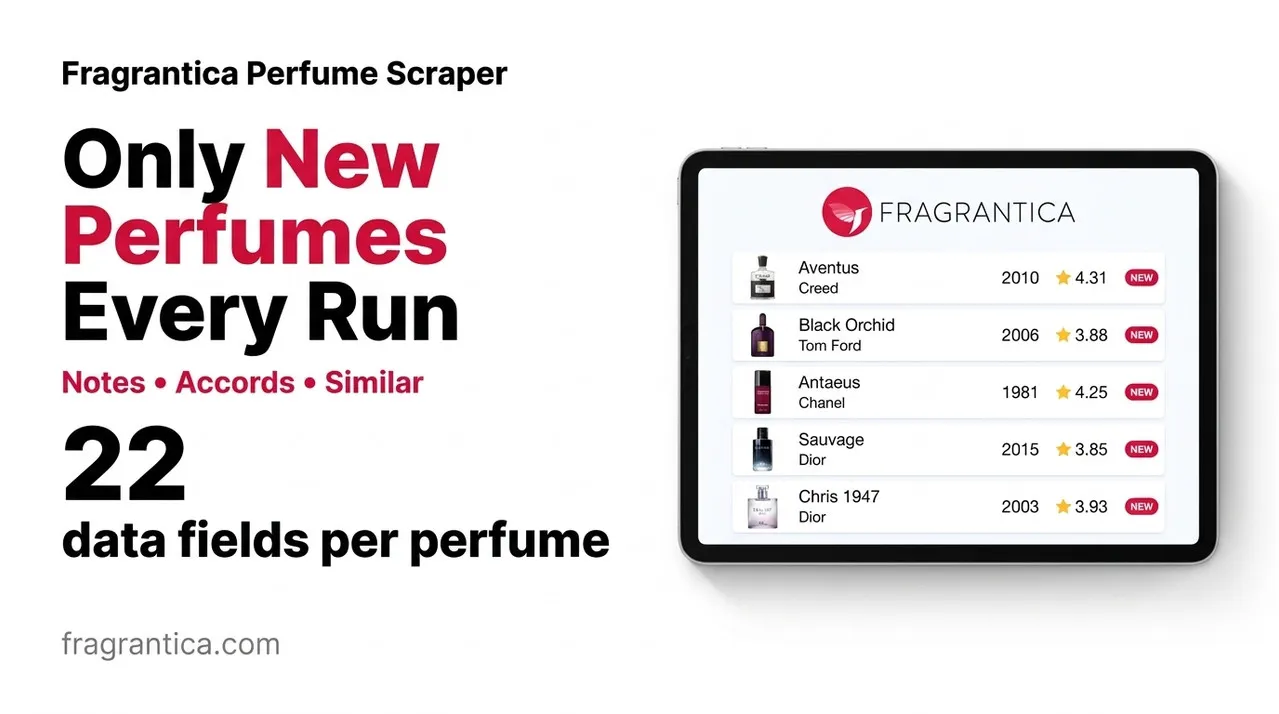
Scrape perfume data from Fragrantica (fragrantica.com): name, brand, launch year, gender, community rating, fragrance family, main accords, the full note pyramid (top, middle and base notes), perfumers and description. Paste perfume, designer or note page URLs, or just type a brand name, press Start, and export the results as JSON, CSV or Excel - or call the scraper as an API.
Target website: fragrantica.com
✨ Features of this Fragrantica perfume scraper
- Perfume profile extraction - rating and vote count, fragrance family, main accords with strength and colour, top/middle/base notes, perfumers, brand logo, image and description.
- Related perfumes - the perfume's collection and the list of similar perfumes members also like.
- Designer and note pages - paste a brand page such as
/designers/Chanel.htmlor a note page such as/notes/Lavender-1.htmland get every perfume listed there. - Brand names as input - type
Maison Francis Kurkdjianand the scraper opens that brand's page for you. - One consistent output - every record has the same fields; anything Fragrantica does not list is
null, so the dataset loads cleanly into a spreadsheet or database. - Filtering - gender, launch year, minimum rating and minimum number of rating votes.
- 20 language editions - brand names are looked up in the edition you choose, and perfume pages from any edition work as start URLs.
- Cache for scheduled runs - set a cache project name and every run returns only perfumes you have not saved before.
- Fast listing mode - turn off full profiles to get cheap listing records (name, brand, year, gender, image, link) without opening each perfume.
- Proxy support - an optional proxy configuration if you want to choose your own proxies.
- No browser required - plain HTTP requests keep runs fast and cheap.
🚀 How to scrape Fragrantica perfume data in 5 steps
- Sign up for a free Apify account - includes $5 monthly credit.
- Open the actor page and click Try for free.
- Fill in the Input fields (a Fragrantica URL or a brand name is required).
- Click Start and wait for the run to complete.
- Download results from the Output tab in JSON, CSV, or Excel format.
You can also run this actor via the Apify API or integrate it directly into your workflows using Zapier, Make, or n8n.
💰 Pricing for the Fragrantica scraper
This actor uses pay-per-result billing based on the compute units a run consumes.
- New Apify accounts include $5 of free monthly credit.
- The scraper uses plain HTTP requests instead of a headless browser, so it costs significantly less to run than browser-based scrapers.
- Proxies are disabled by default; leaving them off keeps runs cheapest.
- Perfumes skipped by the cache are not charged.
- Switching Open each perfume page off (listing mode) is the cheapest way to collect perfume names and links for a whole brand.
🖼️ Fragrantica scraper input screenshot
The input form starts with the Fragrantica URLs, the full-profile switch, the cache name and the max perfumes limit, then the optional brand and filter fields. The proxy settings are last.
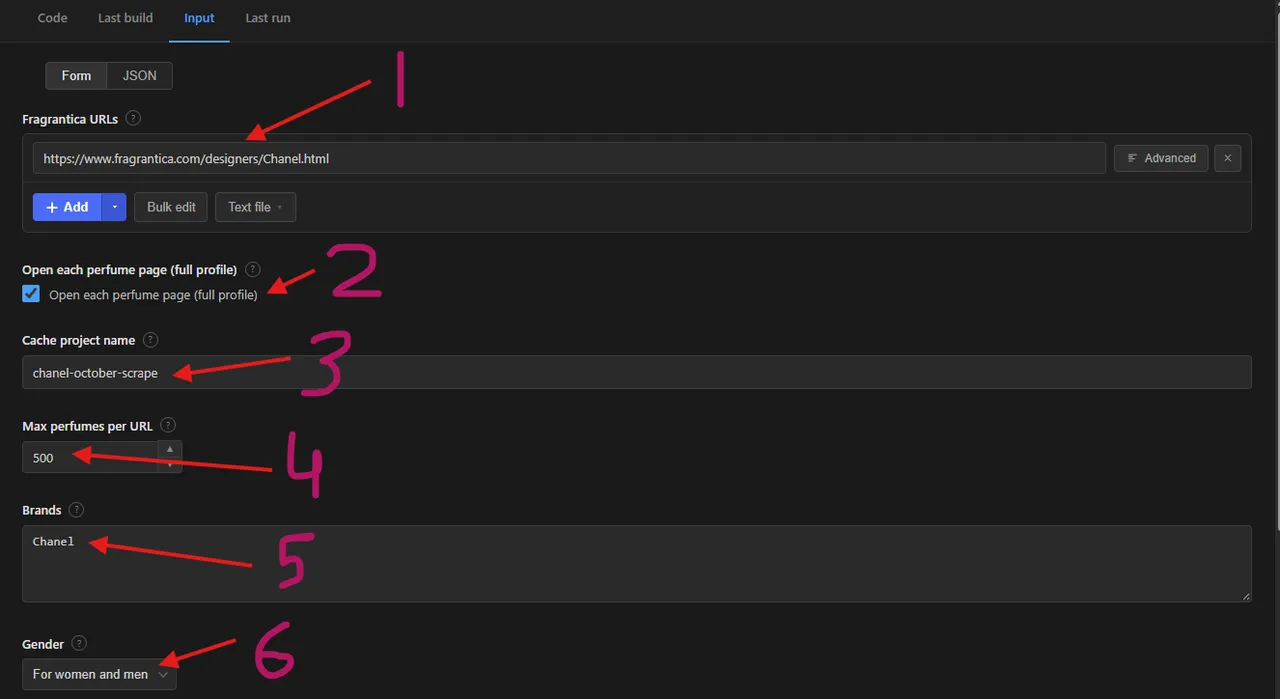
- Fragrantica URLs - perfume, designer or note pages to scrape (here the Chanel designer page)
- Open each perfume page (full profile) - on for the full profile, off for fast listing records
- Cache project name - reuse the same name on every scheduled run to get only new perfumes
- Max perfumes per URL - limit for each start URL or brand (here 500)
- Brands - brand names to scrape, for example
Chanel - Gender - filter for women, men or both (here women and men)
The language edition, launch year, rating and votes filters follow below these fields, and the proxy configuration comes last.
🔧 Fragrantica scraper input configuration
| Field | Type | Required | Default | Description |
|---|---|---|---|---|
Fragrantica URLs (startUrls) | array | — | https://www.fragrantica.com/designers/Chanel.html | Perfume pages, or designer and note pages. A perfume page returns that perfume; a designer or note page returns the perfumes listed on it. |
Open each perfume page (scrapeDetails) | boolean | — | true | On: full profile for every perfume. Off: fast listing records only. |
Cache project name (cacheProjectName) | string | — | — | Use the same name on each scheduled run to get only new perfumes. Perfumes already saved under that name are skipped and not charged. Each record gets changeType: "new". |
Max perfumes per URL (maxItems) | integer | — | 5 | Maximum perfumes saved for each start URL or brand. |
Brands (brands) | array | — | — | Brand names spelled as on Fragrantica, for example Chanel. Each brand returns the perfumes on its designer page. |
Gender (gender) | string | — | any | any, female, male or unisex. |
Launched from / until (yearFrom, yearTo) | integer | — | — | Only perfumes launched in or after / in or before this year. |
Minimum rating (minRating) | string | — | any | any, 3, 3.5, 4 or 4.5 (average community rating out of 5). |
Minimum rating votes (minVotes) | integer | — | — | Only perfumes rated by at least this many members. |
Language edition (language) | string | — | en | Fragrantica edition used for the brand names. |
Proxy configuration (proxyConfiguration) | object | — | no proxy | Optional. Choose your own proxies if you want to. |
Supported URL types:
- Perfume page:
https://www.fragrantica.com/perfume/Dior/Sauvage-31861.html - Designer (brand) page:
https://www.fragrantica.com/designers/Chanel.html - Note page:
https://www.fragrantica.com/notes/Lavender-1.html
Filters apply to the perfumes found on designer and note pages. Perfume pages you paste are always saved. Gender and launch year are checked before a perfume page is opened; rating and vote filters need the perfume page, so the scraper opens pages until maxItems perfumes match.
📦 Fragrantica scraper output data
The output is a dataset of JSON records with one fixed set of fields: id, url, name, brand, brandUrl, brandLogoUrl, gender, year, imageUrl, ratingValue, ratingCount, reviewsCount, fragranceFamily, description, perfumers, mainAccords, notes, collection, similarPerfumes, detailsScraped, changeType and scrapedAt. Fields without a value are null; records from listing mode (detailsScraped: false) carry only the name, brand, year, gender, image and link and null for the rest. perfumers and each note have a name, page link and image; each main accord has a name, strength and colour; collection holds the collection name and its perfumes; similarPerfumes lists the perfumes members also like. The dataset has 3 views:
- Perfumes - an overview table with image, name, brand, year, gender, rating, votes, family and perfumers.
- Notes and accords - main accords, the note pyramid and perfumers of every perfume.
- Collection and similar perfumes - the collection a perfume belongs to and the perfumes members also like.
Output at a glance:
| Perfume | Brand | Year | Gender | Rating | Votes | Family |
|---|---|---|---|---|---|---|
| Antaeus Sport Cologne | Chanel | 1985 | male | 4.71 | 7 | Woody Aromatic |
| Antaeus | Chanel | 1981 | male | 4.25 | 6,159 | Woody Chypre |
| Cuir de Russie Parfum | Chanel | 1924 | unisex | 4.56 | 212 | Leather |
| Bois Noir | Chanel | 1987 | male | 4.42 | 65 | Aromatic Fougere |
| Le 1940 Rouge de Chanel | Chanel | 1931 | female | 4.17 | 6 | Floral Aldehyde |
Sample output (raw JSON, long lists cut to 2 items):
🔁 Scrape only new Fragrantica perfumes with the cache
Set the same Cache project name on every scheduled run. Perfumes already saved under that name are skipped: they are not charged and do not count towards Max perfumes per URL, so a brand page that has 300 perfumes only returns the ones you have not seen yet. Every saved perfume record gets changeType: "new"; with the cache off the field is null. Each name keeps its own separate cache, and perfumes skipped by the cache are never opened, so cached perfumes also save the perfume-page work. Add the actor to an Apify Schedule to pick up new releases of a brand or note automatically.
🐍 How to scrape Fragrantica with Python, JavaScript or the API
Run the actor programmatically with the official Apify clients. Replace <YOUR_API_TOKEN> with the token from your Apify Console.
Python (pip install apify-client):
JavaScript (npm install apify-client):
cURL - start a run and wait for the dataset:
💡 What you can use Fragrantica perfume data for
- Building a perfume catalogue or comparison site with notes, accords and ratings.
- Fragrance recommendation engines that match perfumes by accords, notes and family.
- Market research on which brands, notes and launch years rate best with the community.
- Retail and e-commerce enrichment: add notes, accords and ratings to your own product listings.
- Trend analysis of ratings and launch years across a brand, a note or a whole catalogue.
Perfume retailers, niche brands, content creators, data analysts and fragrance app developers use this data in the beauty, fashion and e-commerce industries.
⚠️ Limitations of the Fragrantica scraper
- Community vote breakdowns - The longevity, sillage, season, gender and price-value vote charts, and the love/like/dislike rating split, are loaded by the website after the page opens and are not part of the output.
- Keyword search and perfumer pages - Search results pages and perfumer pages cannot be scraped. Use a brand name, a designer page or a note page instead.
- Rounded review counts - For popular perfumes the site shows the number of reviews rounded (for example 4.3K), and
reviewsCountfollows it. The reviews themselves are not part of this actor's output. - Rating and vote filters - They need the perfume page, so a filter that few perfumes match makes the run open many pages before
maxItemsmatches are found. - Description language -
fragranceFamilyis read from the English description and is empty on other language editions.
❓ Fragrantica scraper FAQ
Can I scrape Fragrantica legally?
The actor only collects data that is already publicly visible on Fragrantica - no login, paywall or private content is accessed. Scraping publicly available data is generally considered lawful (see the hiQ Labs v. LinkedIn ruling), but you are responsible for complying with Fragrantica's Terms of Service and applicable laws such as GDPR/CCPA, especially when you store reviewer usernames.
What data does the Fragrantica scraper return?
Each perfume record has the name, brand, year, gender, rating and vote count, fragrance family, main accords with strength and colour, top, middle and base notes with links and images, perfumers, brand logo, image, description, the perfume's collection and similar perfumes.
How many perfumes can I scrape from one URL?
maxItems limits the perfumes saved for each start URL or brand, not for the whole run. A designer page lists every perfume of the brand, so a large brand can return several hundred perfumes.
Do I need a proxy to scrape fragrantica.com?
No. The proxy configuration is off by default and the scraper runs without any proxy setup. If you prefer, choose your own proxies in the proxy field.
How do I scrape Fragrantica with Python?
Use the Python example above: call the actor with the Apify client and iterate over the dataset items.
Can I run this Fragrantica scraper on a schedule?
Yes. Use Apify Schedules to run the actor daily or weekly. Set a Cache project name and each run returns only perfumes you have not saved before; perfumes already in the cache are skipped and not charged.
What output formats are supported?
JSON, CSV, Excel, XML and RSS, either from the Output tab or through the Apify API.
Why are some perfumes missing perfumers or a launch year?
Fragrantica does not list a perfumer or a launch year for every perfume, especially for older or unofficial entries. Those fields are null in the output.
🔗 Relevant actors for Fragrantica perfume data
| Scraper | Description |
|---|---|
| 🧴 Incidecoder Scraper | Scrapes skincare product pages: full ingredient lists and highlights. |
| 🍷 Vivino Wine Scraper | Scrapes wine data from Vivino: name, winery, vintage, region and ratings. |
| 🍷 Vivino Wine Reviews Scraper | Scrapes user reviews and tasting notes from Vivino. |
| 🛍️ Google Shopping Scraper | Scrapes Google Shopping product listings, prices and deals for any search. |
🔗 Other actors you may find useful
| Scraper | Description |
|---|---|
| 🛒 AliExpress Products Scraper | Scrape AliExpress products, prices, variants, store and shipping data. |
| 🏷️ Mercari Japan Scraper | Scrapes Mercari Japan listings: prices in JPY, sold status and condition. |
| 📱 Google Play Store Reviews Scraper | Scrapes user reviews from Google Play Store apps. |
| 🎒 Carousell Products Scraper | Scrape Carousell.sg product listings with prices and seller ratings. |
| 🧩 Shopify App Store Scraper | Scrapes apps from the Shopify App Store: ratings, pricing and developers. |
💬 Support & contact
If you encounter any issues or have questions, please open an issue.
You can also find more of our actors on the Actor Flow page.


