

Shopify App Store Scraper - Apps, Pricing & Developers
Pricing
from $0.80 / 1,000 results
Shopify App Store Scraper - Apps, Pricing & Developers
Scrapes apps from the Shopify App Store (apps.shopify.com): name, rating, review count, pricing plans, developer contact, categories, languages, integrations and launch date. Search by keyword, category, developer, app URL or app handle. Reviews: see the Shopify App Reviews scraper.
Pricing
from $0.80 / 1,000 results
Rating
0.0
(0)
Developer

ActorFlow
Maintained by CommunityActor stats
0
Bookmarked
2
Total users
1
Monthly active users
a day ago
Last modified
Categories
Share
Scrape apps from the Shopify App Store (apps.shopify.com): app name, rating, review count, rating breakdown, pricing plans, developer name, address and support email, categories, languages, integrations, launch date, and screenshots. For merchant reviews, use the companion Shopify App Reviews scraper. Search by keyword, paste a search, category, developer or app URL, press Start, and export the results as JSON, CSV or Excel, or call the scraper as an API.
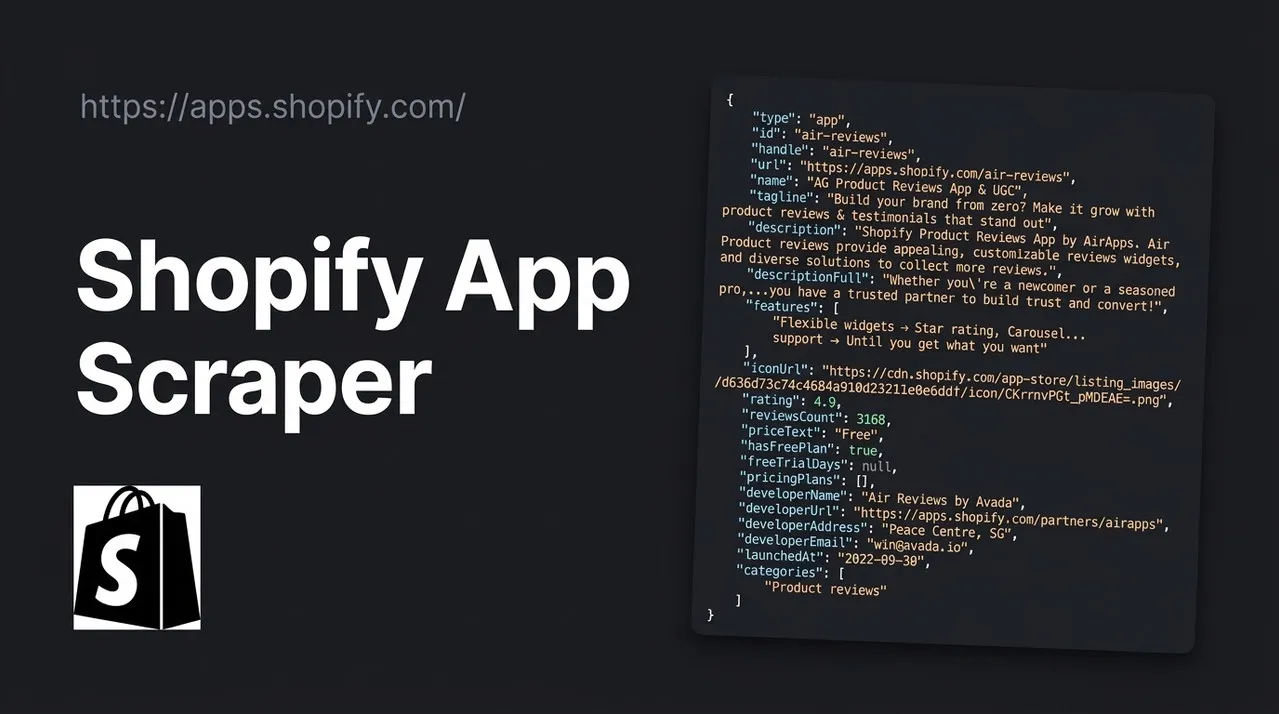
Target website: apps.shopify.com
✨ Features of this Shopify App Store scraper
- Shopify app data extraction: name, tagline, description, key features, rating, reviews count, 1-5 star breakdown, price text, free plan and free trial days, every pricing plan with its price and features, developer details, resource links, categories, languages, "works with" integrations, launch date, Built for Shopify badge, screenshots and demo store.
- Reviews live in a separate actor: the Shopify App Reviews scraper returns one row per merchant review and accepts the app URLs from this actor's dataset (see the enrichment section below).
- Keyword, category and developer filtering: search the App Store by keyword, or scrape any category, subcategory or developer page.
- Pagination support: follows search and category pages until your item limit is reached.
- Sponsored results: paid (Ad) results are skipped by default, or kept and flagged with
isAd. - Monitoring cache: a cache project name skips apps you already scraped, so scheduled runs return only new ones.
- Proxy support: works without a proxy; Apify Proxy can be switched on if you need it.
- No browser required: the scraper reads pages over plain HTTP, which makes runs fast and cheap.
🚀 How to scrape Shopify App Store apps in 5 steps
- Sign up for a free Apify account — includes $5 monthly credit.
- Open the actor page and click Try for free.
- Fill in the Input fields (a keyword, an App Store URL or an app handle is required).
- Click Start and wait for the run to complete.
- Download results from the Output tab in JSON, CSV, or Excel format.
You can also run this actor via the Apify API or integrate it directly into your workflows using Zapier, Make, or n8n.
💰 Pricing
This actor uses pay-per-result billing: you pay for each app saved to the dataset.
- New Apify accounts include $5 of free monthly credit.
- The scraper does not run a browser, so it costs significantly less to run than browser-based scrapers.
- Proxies are off by default, which keeps runs cheapest.
🔧 Input configuration
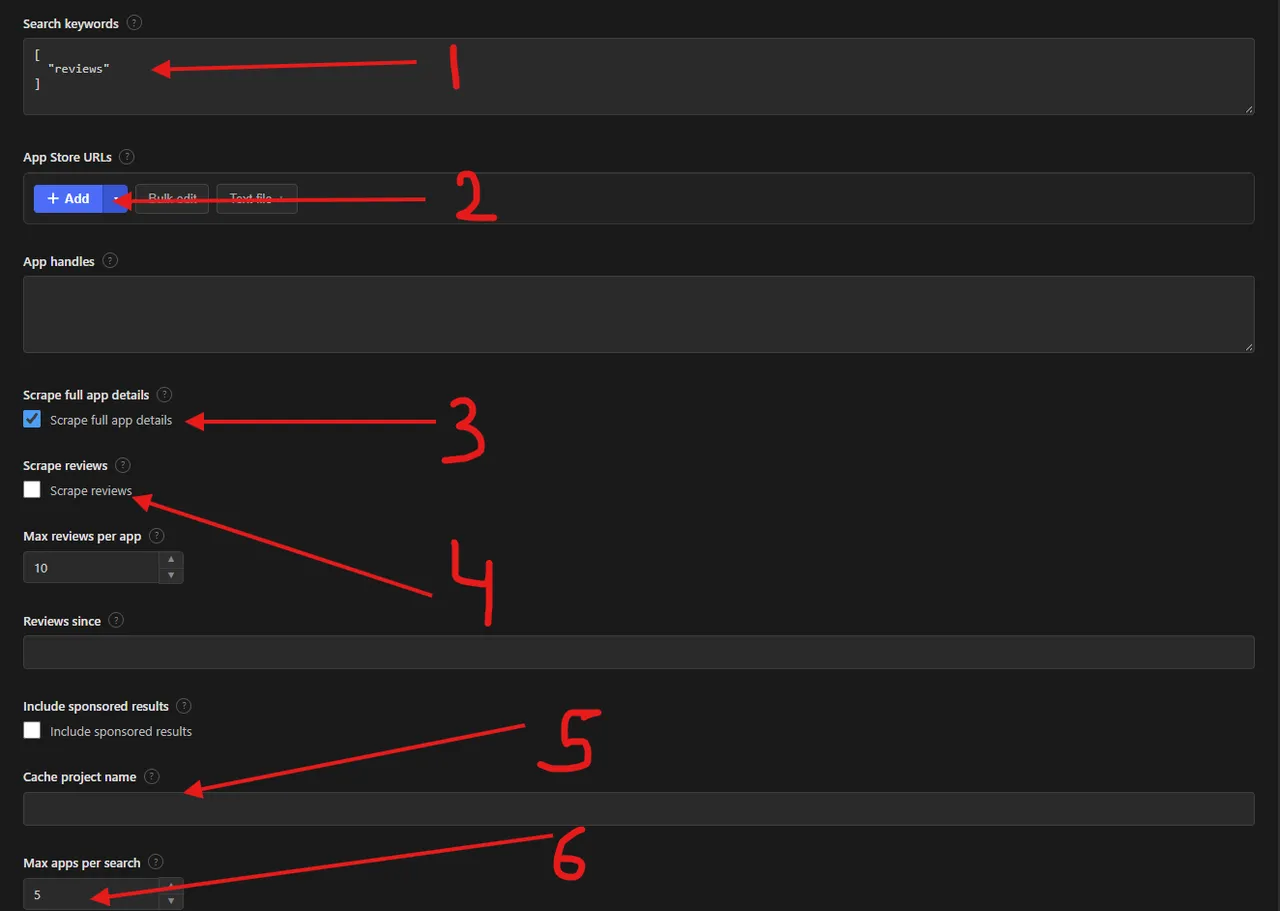
Note: the screenshot was taken before an update and the input has changed since. The Scrape reviews, Max reviews per app and Reviews since fields (and the numbered arrow 4) no longer exist: reviews now come from the separate Shopify App Reviews scraper. Use the table below for the current fields.
The numbers in the screenshot mark these fields:
- Search keywords (
keywords): words to search the App Store for, one search per keyword. - App Store URLs (
startUrls): search, category, developer or app URLs. - Scrape full app details (
scrapeDetails): opens every app page for pricing plans, developer contact, categories and more. - Scrape reviews: removed in the update, see the note above.
- Cache project name (
cacheProjectName): reuse the same name on scheduled runs to get only new apps. - Max apps per search (
maxItems): maximum apps saved for each keyword or URL.
| Field | Type | Required | Default | Description |
|---|---|---|---|---|
Search keywords (keywords) | array | — | ["reviews"] (prefill) | Words to search the App Store for. Each keyword is searched separately. |
App Store URLs (startUrls) | array | — | [] | Search, category, developer or app URLs (see below). |
App handles (appHandles) | array | — | [] | App handles from the app URL, for example judgeme. |
Scrape full app details (scrapeDetails) | boolean | — | true | Open every app page for pricing plans, developer contact, categories and more. Off = search card fields only. |
Include sponsored results (includeAds) | boolean | — | false | Keep paid (Ad) results, flagged with isAd: true. |
Cache project name (cacheProjectName) | string | — | — | Same name on every scheduled run = only new apps; cached ones are skipped and not charged. |
Max apps per search (maxItems) | integer | — | 5 | Maximum unique apps saved for each keyword, search, category or developer URL. |
Proxy configuration (proxyConfiguration) | object | — | {"useApifyProxy": false} | Works without a proxy. |
Supported URL types:
- Search:
https://apps.shopify.com/search?q=reviews - Category or subcategory:
https://apps.shopify.com/categories/marketing-and-conversion(one page of featured apps) orhttps://apps.shopify.com/categories/marketing-and-conversion-social-trust-product-reviews/all(full paginated list) - Developer:
https://apps.shopify.com/partners/judge-me - App:
https://apps.shopify.com/judgeme - App reviews page:
https://apps.shopify.com/judgeme/reviewsis read as its app. For the reviews themselves use the Shopify App Reviews scraper.
📦 Shopify App Store scraper output data
Each dataset item is one app as JSON with the fields type, id, handle, url, name, tagline, description, descriptionFull, features, iconUrl, rating, reviewsCount, ratingBreakdown, priceText, hasFreePlan, freeTrialDays, pricingPlans, developerName, developerUrl, developerAddress, developerEmail, privacyPolicyUrl, faqUrl, documentationUrl, tutorialUrl, launchedAt, categories, languages, worksWith, isBuiltForShopify, screenshots, demoStoreUrl, isAd, searchPosition and scrapedAt. Cached runs add changeType: "new". The dataset has 1 view: Overview, a compact table of apps with name, rating, reviews count, price, developer and launch date.
Output at a glance:
| App | Rating | Reviews | Price | Developer | Launched |
|---|---|---|---|---|---|
| Judge.me Product Reviews App | 5.0 | 48,565 | Free plan available | Judge.me | 2015-06-25 |
| Loox ‑ Product Reviews App | 4.9 | 9,879 | Free plan available | Loox | 2015-10-16 |
| AG Product Reviews App & UGC | 4.9 | 3,168 | Free | Air Reviews by Avada | 2022-09-30 |
| REVIEWS.io Product Reviews App | 4.7 | 772 | Free plan available | Reviews.io | 2014-08-06 |
| TrustShop: Product Reviews | 4.9 | 368 | Free plan available | Trust1.io | 2023-11-15 |
Sample output (raw JSON):
A paid app has plans like { "name": "Awesome", "price": "$15/month", "priceAmount": 15, "features": ["AI (replies, summary, translations)", "Coupons & Referrals"] }.
🧩 How to enrich Shopify apps with their reviews (Shopify App Reviews scraper)
This actor returns one row per app. When you also need the merchant reviews of those apps, use the dedicated Shopify App Reviews scraper. It returns one row per review and accepts the app URLs from this actor's dataset.
No code (Apify Console):
- Run this actor for your keyword, category or developer. Open the run's Output tab.
- Export the dataset as CSV or Excel with only the
urlcolumn (one app URL per row), or copy theurlvalues. - Open the Shopify App Reviews scraper, click Bulk edit (or Text file) under Shopify app or reviews URLs and paste the URLs.
- Set Max reviews per app, optionally filter by stars or date, and click Start.
- Join the two datasets on
handle(this actor) =appHandle(reviews scraper).
With code (Python):
Each review row has reviewId, rating, postedAt, body, storeName, storeCountry, usageDuration, developerReply, plus appHandle, appName and appUrl for the join.
🐍 How to scrape the Shopify App Store with Python, JavaScript or the API
Run the actor programmatically with the official Apify clients. Replace <YOUR_API_TOKEN> with the token from your Apify Console.
Python (pip install apify-client):
JavaScript (npm install apify-client):
cURL — start a run and wait for the dataset:
💡 What you can use Shopify App Store data for
- Competitor research: compare ratings, review counts, pricing plans and features of every app in a category.
- Lead generation: build lists of Shopify app developers with their support email, address and website links.
- Review monitoring: pair the app list with the Shopify App Reviews scraper to track new merchant reviews and developer replies for your app or your competitors' apps.
- Pricing intelligence: follow plan prices, free plans and free trial lengths across a niche.
- Market sizing: find gaps in categories with few highly rated apps, and spot newly launched apps.
Shopify app developers, SaaS founders, agencies, investors and e-commerce analysts use this data for product strategy, sales prospecting and market research.
⚠️ Limitations & known issues
- Rate limiting — The App Store briefly answers bursts with "too many requests". The scraper waits and retries automatically; keep concurrency around 5 for large runs.
- Top-level category pages — Pages like
/categories/marketing-and-conversionshow one fixed page of featured apps (about 40). Use a subcategory/allURL for the full, paginated list. - Free apps — Apps that are simply "Free" have no pricing plan cards, so
pricingPlansis empty. - No reviews here — this actor returns apps only. Merchant reviews come from the Shopify App Reviews scraper, which takes this actor's app URLs.
❓ Frequently asked questions
Can I scrape the Shopify App Store legally?
This actor only collects data that is publicly visible on apps.shopify.com, without any login. Scraping publicly available data is generally considered lawful (see hiQ Labs v. LinkedIn), but you are responsible for complying with Shopify's Terms of Service and laws such as GDPR or CCPA, for example when you store reviewer store names or developer emails.
What data does the Shopify App Store scraper return?
Every app comes with name, rating, reviews count and price text. With "Scrape full app details" on (default) you also get pricing plans, developer contact, categories, languages, integrations, launch date, screenshots and the rating breakdown. Merchant reviews come from the Shopify App Reviews scraper.
How many apps can I scrape from one search?
maxItems limits the apps saved for each keyword, search URL, category URL or developer URL. Search and category pages show 24-28 apps per page, and the scraper keeps paging until the limit or the last page.
Do I need a proxy to scrape apps.shopify.com?
No. The proxy is off by default and the site works without one. If you run very large jobs and see repeated rate limiting, lower the concurrency or switch on an Apify datacenter proxy.
How do I scrape the Shopify App Store with Python?
Use the Python example above: call the actor with your input, then iterate over the items of the run's default dataset.
Can I run this Shopify App Store scraper on a schedule?
Yes, with Apify Schedules. Set a cache project name and use the same one on every run: apps already scraped are skipped, not charged and do not count towards Max apps per search, so each run returns only new apps.
What output formats are supported?
JSON, CSV, Excel, XML and RSS, either from the Output tab or through the Apify API.
Why are some sponsored apps missing from my search results?
Search and category pages mix paid (Ad) results into the list. They are skipped by default so positions match organic ranking; switch on "Include sponsored results" to keep them with isAd: true.
🔗 Relevant actors for Shopify App Store data
| Scraper | Description |
|---|---|
| ⭐ Shopify App Reviews Scraper | One row per merchant review of any Shopify app, with star, date, store and developer reply filters. |
| 📱 Google Play Store Reviews Scraper | Google Play app reviews with text, star rating and developer reply. |
🔗 Other actors you may find useful
| Scraper | Description |
|---|---|
| 📅 Facebook Events Scraper | Public Facebook events by keyword, location and date, without logging in. |
| 📈 Kalshi Markets Scraper | Kalshi prediction markets: yes/no prices, implied probability and volume. |
| 💼 Dice Jobs Scraper | Tech job listings from Dice by keyword or URL: company, salary and location. |
| 🚗 Copart Search Scraper | Copart auction lots: damage, odometer, current bid and location. |
| 🥾 AllTrails Scraper | Hiking, biking and running trails by park, city, state or coordinates. |
💬 Support & contact
If you encounter any issues or have questions, please open an issue or reach out via the Apify Community Forum.
You can also find more of our actors on the Actor Flow page.


