

Weibo Scraper - Posts, Comments, Profiles & Hot Search
Pricing
from $0.80 / 1,000 results
Weibo Scraper - Posts, Comments, Profiles & Hot Search
Scrapes Weibo without login: posts by keyword, hashtag, user or link, user profiles, comments with replies, likes and the hot search list. Date filters, long-post full text, automatic splitting of big searches and a cache for new posts only.
Pricing
from $0.80 / 1,000 results
Rating
0.0
(0)
Developer

ActorFlow
Maintained by CommunityActor stats
0
Bookmarked
3
Total users
1
Monthly active users
19 days ago
Last modified
Categories
Features
Share
微博 (Weibo) 帖子、评论与用户资料采集器
🇬🇧 English version below / 英文版在下方: 跳转到 English version ⬇️
无需登录,采集微博 (weibo.com) 的帖子、评论、用户资料和热搜。 支持关键词或话题搜索、用户时间线、单条微博链接,可获取正文、图片、视频链接、互动数据、发布地区和作者信息。数据可导出为 JSON、CSV 或 Excel,也可以通过 API 调用。粘贴微博链接或输入关键词,点击 Start,即可得到整洁的数据表。
目标网站: weibo.com
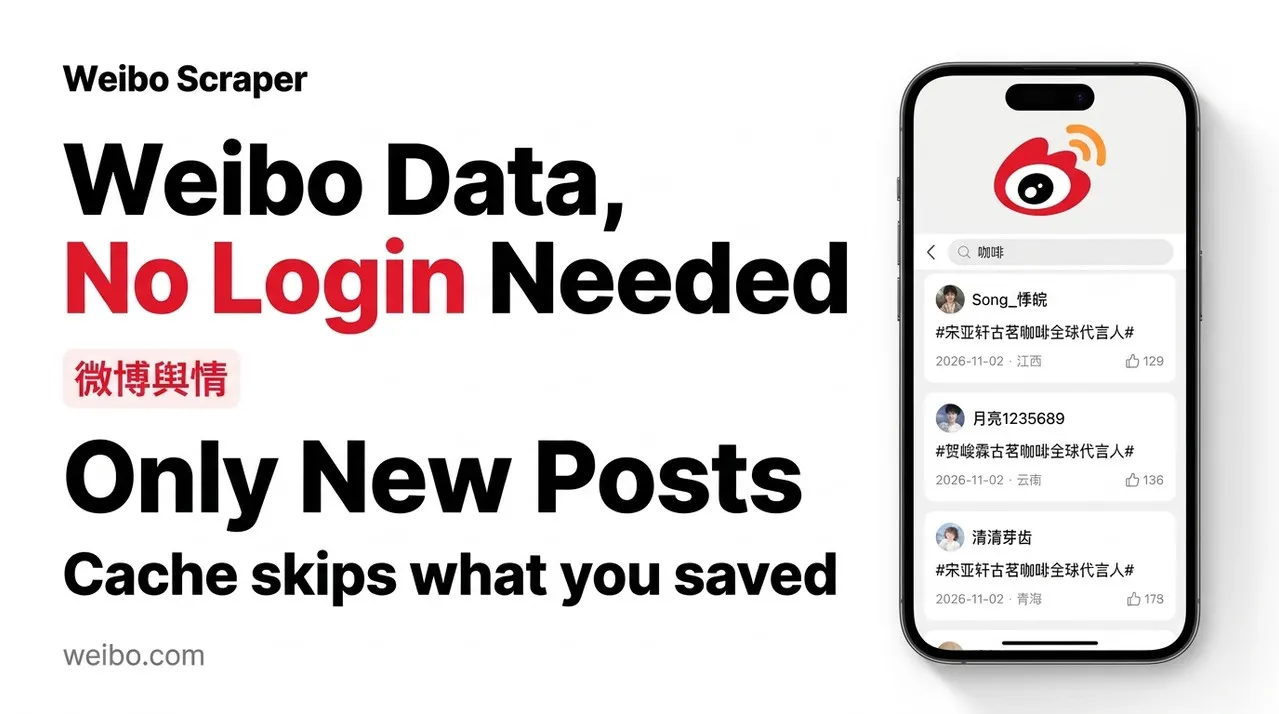
✨ 微博采集器功能
- 帖子采集 — 关键词和话题搜索、用户时间线或单条微博链接,包含完整正文、图片、视频链接、话题、@提及、转发的原微博、来源客户端和地区。
- 评论及回复 — 采集微博的全部评论(按时间或按热度排序),可选采集每条评论下的回复。
- 点赞用户 — 点赞用户的昵称、主页链接、粉丝数和认证信息。
- 用户资料 — 粉丝数、关注数、微博数、简介、所在地、性别、认证、会员等级和注册时间。
- 热搜榜 — 当前微博热搜,含排名、关键词和热度值。
- 日期筛选 — 采集指定日期范围内的帖子,或只采集原创微博(不含转发)。
- 大型搜索自动拆分 — 微博单个关键词只返回约 1,000 条,单个用户约 1,900 条。超出后采集器会自动按日期拆分搜索,获取更多数据。
- 长微博全文 — 微博在列表中会截断长文,采集器会获取完整正文。
- 缓存,只采集新帖 — 每次定时运行使用同一个缓存名称,只会得到以前没有保存过的帖子。
- 自动过滤推广微博 — 跳过混入搜索结果的广告。
- 支持代理 — Apify 数据中心代理即可。
- 无需浏览器 — 运行速度快,成本远低于基于浏览器的采集器。
🚀 5 步采集微博
- 注册免费的 Apify 账号,每月赠送 $5 额度。
- 打开采集器页面,点击 Try for free。
- 选择要采集的内容,并填写输入字段:微博链接、搜索关键词或用户 ID。
- 点击 Start,等待运行完成。
- 在 Output 标签页下载 JSON、CSV 或 Excel 格式的结果。
也可以通过 Apify API 运行,或使用 Zapier、Make、n8n 集成到你的工作流中。
💰 价格
采集器按结果数量计费:每条保存到数据集的帖子、用户资料、评论、点赞或热搜关键词计费一次。
- 新的 Apify 账号每月包含 $5 免费额度。
- 采集器使用普通 HTTP 请求而不是浏览器,因此成本远低于浏览器类采集器。
- 被缓存跳过的帖子不收费。
🖼️ 输入界面截图
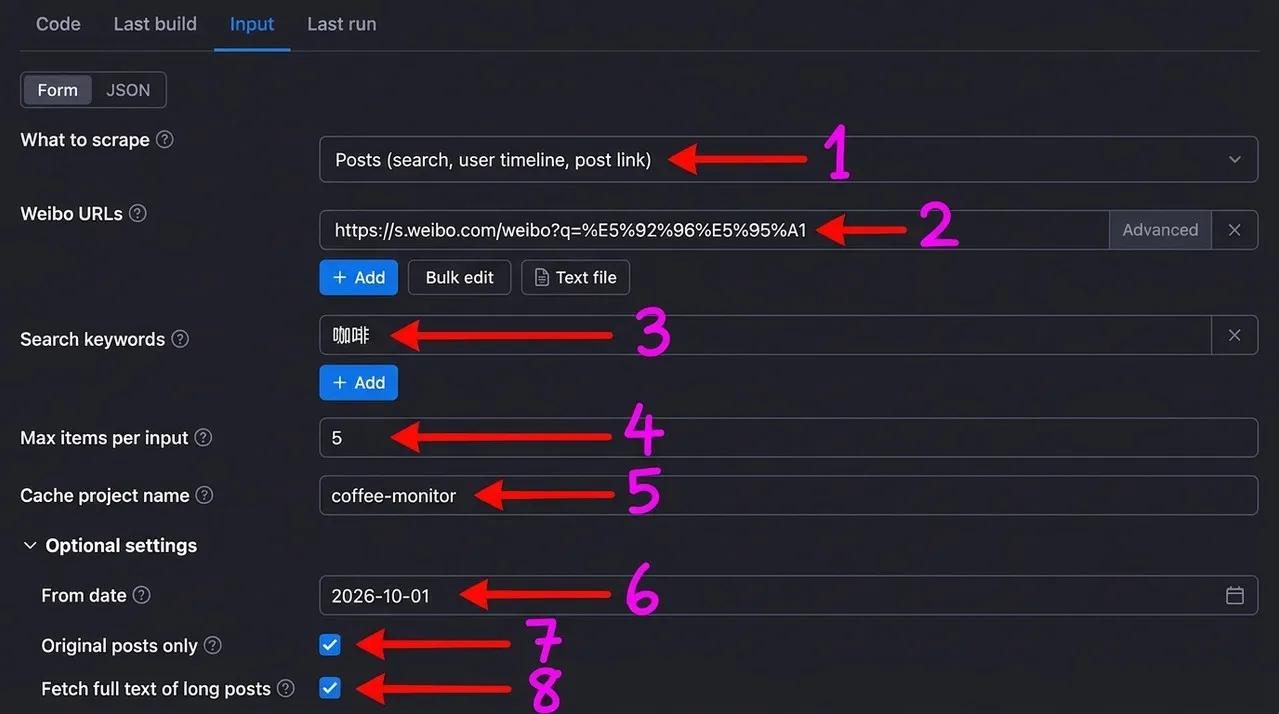
图中数字对应下列输入字段:
- 采集内容:帖子、用户资料、评论、点赞或热搜。
- 微博链接:搜索页、用户主页或单条微博。
- 搜索关键词:关键词或 #话题#,每行一个。
- 每个输入的最大数量:每个链接、关键词或用户 ID 的记录上限。
- 缓存项目名称:每次定时运行使用相同名称,只获取新帖。
- 起始日期:只采集该日期之后发布的帖子。
- 仅原创微博:不含转发。
- 获取长微博全文:获取被微博截断的长微博完整正文。
🔧 输入配置
| 字段 | 类型 | 必填 | 默认值 | 说明 |
|---|---|---|---|---|
采集内容 (mode) | string | — | posts | 帖子(搜索、用户时间线、微博链接)、用户资料、帖子评论、点赞用户或热搜。 |
微博链接 (startUrls) | array | — | https://s.weibo.com/weibo?q=咖啡 | 搜索页、用户主页或单条微博。评论和点赞模式使用微博链接,资料模式使用用户链接。 |
搜索关键词 (searchTerms) | array | — | — | 关键词或 #话题#,每行一个。用于帖子模式。 |
用户 ID (userIds) | array | — | — | 微博用户数字 ID,例如 1669879400。帖子模式采集其时间线,资料模式采集其资料。 |
每个输入的最大数量 (maxItems) | integer | — | 5 | 每个链接、关键词或用户 ID 最多保存的记录数。超出微博自身限制时会自动按日期拆分。 |
缓存项目名称 (cacheProjectName) | string | — | — | 每次定时运行使用相同名称,只获取新帖。仅帖子模式。 |
起始日期 (startDate) | string | — | — | 只采集该日期(含)之后发布的帖子(YYYY-MM-DD,中国时间)。仅帖子模式。 |
结束日期 (endDate) | string | — | — | 只采集该日期(含)之前发布的帖子。未设置任何日期时,需要拆分的搜索默认回溯 30 天。 |
仅原创微博 (onlyOriginal) | boolean | — | false | 不含转发。仅帖子模式。 |
获取长微博全文 (includeFullText) | boolean | — | true | 获取被微博截断的长微博完整正文(每条多一次请求)。 |
包含评论回复 (includeReplies) | boolean | — | false | 评论模式下,同时保存每条评论下的回复,回复计入数量上限。 |
评论排序 (commentOrder) | string | — | time | 按时间排序可获取最多评论;按热度排序返回热门评论,可能更早停止。 |
代理配置 (proxyConfiguration) | object | — | 启用 Apify Proxy | 数据中心代理即可。 |
支持的链接类型:
- 搜索:
https://s.weibo.com/weibo?q=咖啡 - 用户:
https://weibo.com/u/1669879400、https://weibo.com/1669879400或https://m.weibo.cn/profile/1669879400 - 微博:
https://weibo.com/1669879400/RoDbmCVmy或https://m.weibo.cn/detail/5360890183685401
📦 输出数据
采集器会为每条帖子、用户资料、评论、点赞用户或热搜关键词保存一条记录。帖子记录包含 id、mblogid、url、text、isTruncated、createdAt、source、region、repostsCount、commentsCount、likesCount、isRepost、hashtags、mentions、images、videoUrl、videoCoverUrl、videoDuration、videoViews、authorId、authorName、authorUrl、authorAvatar、authorVerified、authorVerifiedType、repostedPostId、repostedPostUrl、repostedPostText、repostedPostAuthor 和 searchQuery。用户资料、评论、点赞和热搜记录有各自的字段,详见数据集视图。
数据集提供 5 个视图:帖子(正文、日期、作者、互动和链接)、用户资料(粉丝、关注、微博数、认证和所在地)、评论(评论和回复及点赞、作者)、点赞(点赞用户)和热搜(关键词、排名和热度)。完整的 JSON 示例见下方英文版。
🔁 只采集新帖:缓存
每次运行设置相同的缓存项目名称,例如 coffee-monitor。已在该名称下保存的帖子会被跳过,不收费,也不计入每个输入的最大数量,因此每次定时运行只返回新帖。不同名称使用独立的缓存。在 Apify Schedules 中以相同输入每天或每小时运行,即可持续获得某个关键词或某个用户的新微博。
🐍 通过 Python、JavaScript 或 API 调用
可使用官方 Apify 客户端以编程方式运行。将 <YOUR_API_TOKEN> 替换为 Apify Console 中的令牌。Python、JavaScript 和 cURL 示例见下方英文版,输入示例:
💡 微博数据的用途
- 在中国最大的微博平台上做品牌监测和社交聆听
- 通过微博热搜追踪趋势和热点话题
- 对营销活动、新品发布和新闻的评论做情感分析
- 达人研究:资料、粉丝、认证和发布历史
- 按关键词、话题和地区研究中国消费者
市场营销和公关团队、市场研究人员、数据分析师以及消费品、娱乐、媒体和金融行业的机构,使用微博数据了解中国的舆情。
⚠️ 使用限制
- 搜索深度 — 一次搜索中,微博每个关键词只返回约 1,000 条、每个用户约 1,900 条。采集器会按日期拆分更大的搜索,因此更大的最大数量需要指定日期范围或使用默认的 30 天回溯。
- 评论 — 微博按时间顺序公开约 90% 的评论,其余需要登录才能获取。
- 点赞 — 微博最多列出 11 页、每页 50 个点赞用户。
- 转发和粉丝列表 — 需要登录微博,无法获取。
- 关注列表 — 只有前 20 个账号是公开的。
- 大数值 — 超过 1,000,000 的数值,微博显示为取整后的数字。
- 受限微博 — 被作者隐藏或限制的微博无法打开。
- 速度 — 微博搜索较慢,大型搜索需要一些时间。
❓ 常见问题
采集微博合法吗?
采集器只收集 weibo.com 上已公开可见的数据:不涉及登录、付费墙或私密内容。采集公开数据通常被认为是合法的(参见 hiQ Labs v. LinkedIn 判例),但当数据包含个人信息时,你需要自行遵守微博的服务条款以及 GDPR、CCPA 和中国《个人信息保护法》(PIPL) 等适用法律。
采集器返回哪些数据?
帖子:正文、日期、作者、地区、来源客户端、点赞/评论/转发数、话题、@提及、图片和视频链接。用户资料、评论、点赞和热搜各自返回其字段;开启选项后,长微博会补充完整正文。
一次微博搜索能采集多少帖子?
每个输入的最大数量分别作用于每个关键词、用户或链接。微博自身每个关键词约显示 1,000 条、每个用户约 1,900 条,超出后采集器会按日期窗口(从新到旧)拆分搜索并去重。
需要代理吗?
默认使用 Apify Proxy,数据中心代理即可,不需要住宅代理。
如何用 Python 采集微博?
使用下方英文版中的 Python 示例,然后遍历 Apify 客户端返回的数据集条目。
可以定时运行吗?
可以。使用 Apify Schedules 每小时或每天运行,并在每次运行中设置相同的缓存项目名称,这样只会返回并收费你以前没见过的帖子。
支持哪些输出格式?
JSON、CSV、Excel、XML 和 RSS,可在 Output 标签页下载,也可通过 Apify API 获取。
为什么有些微博只显示部分正文?
微博在列表中会截断长文,采集器会获取完整正文。少数微博受作者限制而拒绝该请求,其记录保留截断的文本,且 isTruncated 为 true。
💬 支持与联系
如有问题或疑问,请提交 issue。更多采集器见 Actor Flow 页面。
🇬🇧 English version
🇨🇳 中文版在上方 / The Chinese version is above.
Weibo (新浪微博) Posts, Comments & Profiles Scraper
Scrape Weibo posts, comments, user profiles and hot search from Weibo (weibo.com) without a login. Search by keyword or hashtag, collect a user's timeline, open a single post, and get text, images, video links, engagement counts, region and author details. Export the data as JSON, CSV or Excel, or call the actor as an API. Paste a Weibo link or type a keyword, press Start and get a clean table.
Target website: weibo.com
✨ Features of this Weibo scraper
- Weibo post extraction — posts from keyword and hashtag search, from a user's timeline, or from a single post link, with full text, images, video links, hashtags, mentions, reposted-post details, source app and region.
- Comments with replies — every comment of a post (newest first or most liked first) and, optionally, the replies under each comment.
- Users who liked a post — name, profile link, followers and verification of each user who liked it.
- User profile extraction — followers, following, post count, bio, location, gender, verification, VIP level and account creation date.
- Hot search extraction — the current Weibo trending list with rank, keyword and heat value.
- Date filtering — collect posts between two dates, or only original posts without reposts.
- Automatic splitting of big searches — Weibo returns only about 1,000 posts for one keyword and about 1,900 for one user. Above that, the actor cuts the search into date windows by itself to collect more.
- Full text of long posts — Weibo cuts long posts short in lists; the actor fetches the complete text.
- Cache for new posts only — use one cache name on every scheduled run to get only posts you have not saved before.
- Promoted posts left out — ads that Weibo mixes into search results are skipped.
- Proxy support — Apify datacenter proxies are enough.
- No browser required — runs are fast and cost significantly less than browser-based scrapers.
🚀 How to scrape Weibo posts in 5 steps
- Sign up for a free Apify account — includes $5 monthly credit.
- Open the actor page and click Try for free.
- Choose what to scrape and fill in the Input fields: Weibo URLs, search keywords or user IDs.
- Click Start and wait for the run to complete.
- Download results from the Output tab in JSON, CSV, or Excel format.
You can also run this actor via the Apify API or integrate it directly into your workflows using Zapier, Make, or n8n.
💰 Pricing for the Weibo scraper
This actor uses pay-per-result billing: you pay for each post, profile, comment, like or trending keyword saved to the dataset.
- New Apify accounts include $5 of free monthly credit.
- The actor sends plain HTTP requests instead of driving a browser, so it costs significantly less to run than browser-based scrapers.
- Posts skipped by the cache are not charged.
🖼️ Weibo scraper input screenshot
The numbers match the input fields below:
- What to scrape: posts, profiles, comments, likes or hot search.
- Weibo URLs: search pages, user pages or single posts.
- Search keywords: keywords or #hashtags, one per entry.
- Max items per input: the record limit for each URL, keyword or user ID.
- Cache project name: reuse it on each scheduled run to get only new posts.
- From date: only posts published on or after this date.
- Original posts only: leave out reposts.
- Fetch full text of long posts: get the complete text of posts Weibo cuts short.
🔧 Weibo scraper input configuration
| Field | Type | Required | Default | Description |
|---|---|---|---|---|
What to scrape (mode) | string | — | posts | Posts (search, user timeline, post link), User profiles, Post comments, Post likes, or Hot search. |
Weibo URLs (startUrls) | array | — | https://s.weibo.com/weibo?q=咖啡 | Search pages, user pages or single posts. Comments and likes modes take post links; profiles mode takes user links. |
Search keywords (searchTerms) | array | — | — | Keywords or #hashtags, one per entry. Used in posts mode. |
User IDs (userIds) | array | — | — | Numeric Weibo user IDs, for example 1669879400. Posts mode scrapes their timeline, profiles mode their profile. |
Max items per input (maxItems) | integer | — | 5 | Maximum records saved for each URL, keyword or user ID. Above Weibo's own limits the search is split by date automatically. |
From date (startDate) | string | — | — | Only posts published on or after this date (YYYY-MM-DD, China time). Posts mode only. |
To date (endDate) | string | — | — | Only posts published on or before this date. Without any date, searches that need splitting look back 30 days. |
Original posts only (onlyOriginal) | boolean | — | false | Leave out reposts. Posts mode only. |
Fetch full text of long posts (includeFullText) | boolean | — | true | Get the complete text of posts that Weibo cuts short (one extra request each). |
Include replies to comments (includeReplies) | boolean | — | false | In comments mode, also save the replies under each comment. They count towards the item limit. |
Comment order (commentOrder) | string | — | time | Newest first reaches the most comments; most liked first returns the popular ones and may stop earlier. |
Cache project name (cacheProjectName) | string | — | — | Use the same name on each scheduled run to get only new posts. Posts mode only. |
Proxy configuration (proxyConfiguration) | object | — | Apify Proxy on | Datacenter proxies are enough for Weibo. |
Supported URL types:
- Search:
https://s.weibo.com/weibo?q=coffee - User:
https://weibo.com/u/1669879400,https://weibo.com/1669879400orhttps://m.weibo.cn/profile/1669879400 - Post:
https://weibo.com/1669879400/RoDbmCVmyorhttps://m.weibo.cn/detail/5360890183685401
📦 Weibo scraper output data
The actor saves one record per post, profile, comment, liker or trending keyword to the dataset. Post records contain id, mblogid, url, text, isTruncated, createdAt, source, region, repostsCount, commentsCount, likesCount, isRepost, hashtags, mentions, images, videoUrl, videoCoverUrl, videoDuration, videoViews, authorId, authorName, authorUrl, authorAvatar, authorVerified, authorVerifiedType, repostedPostId, repostedPostUrl, repostedPostText, repostedPostAuthor and searchQuery. Profile, comment, like and hot search records have their own fields, listed in the dataset views.
The dataset has 5 views: Posts (text, date, author, engagement and link), Profiles (followers, following, posts, verification and location), Comments (comments and replies with likes and author), Likes (users who liked a post) and Hot search (trending keywords with rank and heat).
Output at a glance:
| Author | Text | Date | Region | Likes | Comments | Post |
|---|---|---|---|---|---|---|
| Song_悸皖 | #宋亚轩[超话]# 🐬#宋亚轩古茗咖啡全球代言人#🩵#… | 2026-11-02 | 江西 | 0 | 0 | link |
| 月亮1235689 | #贺峻霖令人心动的offer8#💚#贺峻霖古茗咖啡全球代… | 2026-11-02 | 云南 | 0 | 0 | link |
| 小鱼打工8号 | #贺峻霖令人心动的offer8#💚#贺峻霖古茗咖啡全球代… | 2026-11-02 | 云南 | 0 | 0 | link |
| 清清芽齿 | #宋亚轩古茗咖啡全球代言人##宋亚轩HUAWEI nov… | 2026-11-02 | 青海 | 0 | 0 | link |
| 林栩栩yy | #邓为百妖谱#⛅#邓为司狂澜#🌸 👓三餐有烟火,四… | 2026-11-02 | 浙江 | 0 | 0 | link |
Sample output (raw JSON):
🔁 Scrape only new Weibo posts with the cache
Set the same Cache project name on every run, for example coffee-monitor. Posts already saved under that name are skipped, are not charged and do not count towards Max items per input, so each scheduled run returns only new posts. Different names keep separate caches. In Apify Schedules, run the actor daily or hourly with the same input to build a feed of new Weibo posts for a keyword or a user.
🐍 How to scrape Weibo with Python, JavaScript or the API
Run the actor programmatically with the official Apify clients. Replace <YOUR_API_TOKEN> with the token from your Apify Console.
Python (pip install apify-client):
JavaScript (npm install apify-client):
cURL — start a run and wait for the dataset:
💡 What you can use Weibo data for
- Brand monitoring and social listening on China's largest microblog
- Trend and hot topic tracking with the Weibo trending list
- Sentiment analysis of comments on campaigns, launches and news
- Influencer research: profiles, followers, verification and posting history
- Market research on Chinese consumers by keyword, hashtag and region
Marketing and PR teams, market researchers, data analysts and agencies in consumer goods, entertainment, media and finance use Weibo data to follow public opinion in China.
⚠️ Limitations of the Weibo scraper
- Search depth — Weibo answers only about 1,000 posts per keyword and about 1,900 per user in one search. The actor splits larger searches by date, so a bigger Max items per input needs a date range or the default 30-day look-back.
- Comments — Weibo exposes roughly 90% of a post's comments in time order; the rest cannot be reached without a login.
- Likes — Weibo lists the users who liked a post in at most 11 pages of 50.
- Reposts and fans lists — these need a Weibo login and are not available.
- Following lists — only the first 20 accounts are public.
- Large counts — Weibo shows counts above 1,000,000 as a rounded number.
- Restricted posts — posts that are hidden or limited by their author cannot be opened.
- Speed — Weibo search is slow, so large searches take a while.
❓ Weibo scraper FAQ
Can I scrape Weibo legally?
The actor only collects data that is already publicly visible on weibo.com: no login, paywall or private content is accessed. Scraping publicly available data is generally considered lawful (see the hiQ Labs v. LinkedIn precedent), but you are responsible for complying with Weibo's Terms of Service and applicable laws such as GDPR, CCPA and China's PIPL when the data includes personal information.
What data does the Weibo scraper return?
For posts it returns the text, date, author, region, source app, likes, comments and reposts counts, hashtags, mentions, images and video links. Profiles, comments, likes and the hot search list each return their own fields, and the full text of long posts is added when the option is on.
How many posts can I scrape from one Weibo search?
Max items per input applies to each keyword, user or URL separately. Weibo itself shows about 1,000 posts per keyword and about 1,900 per user, so above that the actor splits the search into date windows (newest first) and removes duplicates.
Do I need a proxy to scrape weibo.com?
The default is Apify Proxy, and datacenter proxies are enough; residential proxies are not needed.
How do I scrape Weibo with Python?
Use the Python example above, then iterate over the dataset items returned by the Apify client.
Can I run this Weibo scraper on a schedule?
Yes. Use Apify Schedules to run it hourly or daily. Add the same Cache project name to every run so that only posts you have not seen before are returned and charged.
What output formats are supported?
JSON, CSV, Excel, XML and RSS, either from the Output tab or through the Apify API.
Why do some Weibo posts show only part of the text?
Weibo cuts long posts short in lists and the actor fetches the full text. A few posts are restricted by their author and refuse that request, so their record keeps the shortened text and isTruncated is true.
🔗 Relevant actors for Weibo
| Scraper | Description |
|---|---|
| 📌 Pinterest Pins, Boards & Profiles Scraper | Scrape Pinterest pins, videos, boards and profiles. |
| 💬 YouTube Comments Scraper + Sentiment Analysis | Scrape comments and replies from YouTube videos. |
| 👻 Snapchat Profile Scraper | Scrape public Snapchat profiles, Spotlights and Stories. |
| 📰 Substack Scraper | Scrape Substack posts and comments by keyword or publication. |
| 🧠 Sentiment Analysis | Classify the sentiment of your texts as positive, negative or neutral. |
🔗 Other actors you may find useful
| Scraper | Description |
|---|---|
| 🏠 Avito Listings Scraper | Scrape classified listings from Avito.ru with automatic splitting of large searches. |
| 🍷 Total Wine Scraper | Scrape Total Wine & More wine, liquor and beer prices and stock. |
| 🥾 AllTrails Scraper | Scrape hiking, biking and running trails from AllTrails. |
| 🗞️ Google News AI Scraper | Search Google News by keyword and optionally extract full article text. |
| 📈 Kalshi Markets Scraper | Scrape Kalshi prediction market prices and implied probability. |
💬 Support & contact
If you encounter any issues or have questions, please open an issue.
You can also find more of our actors on the Actor Flow page.


