

YouTube Comments Scraper + Sentiment Analysis
Pricing
from $0.10 / 1,000 results
YouTube Comments Scraper + Sentiment Analysis
Scrape comments and replies from YouTube (youtube.com) videos: text, author, channel, likes, replies, pinned and creator-hearted flags, optional free sentiment analysis. Paste video, Shorts or youtu.be links, sort by top or newest, export JSON, CSV or Excel.
Pricing
from $0.10 / 1,000 results
Rating
0.0
(0)
Developer

ActorFlow
Maintained by CommunityActor stats
0
Bookmarked
2
Total users
1
Monthly active users
2 days ago
Last modified
Categories
Share
YouTube Comments Scraper
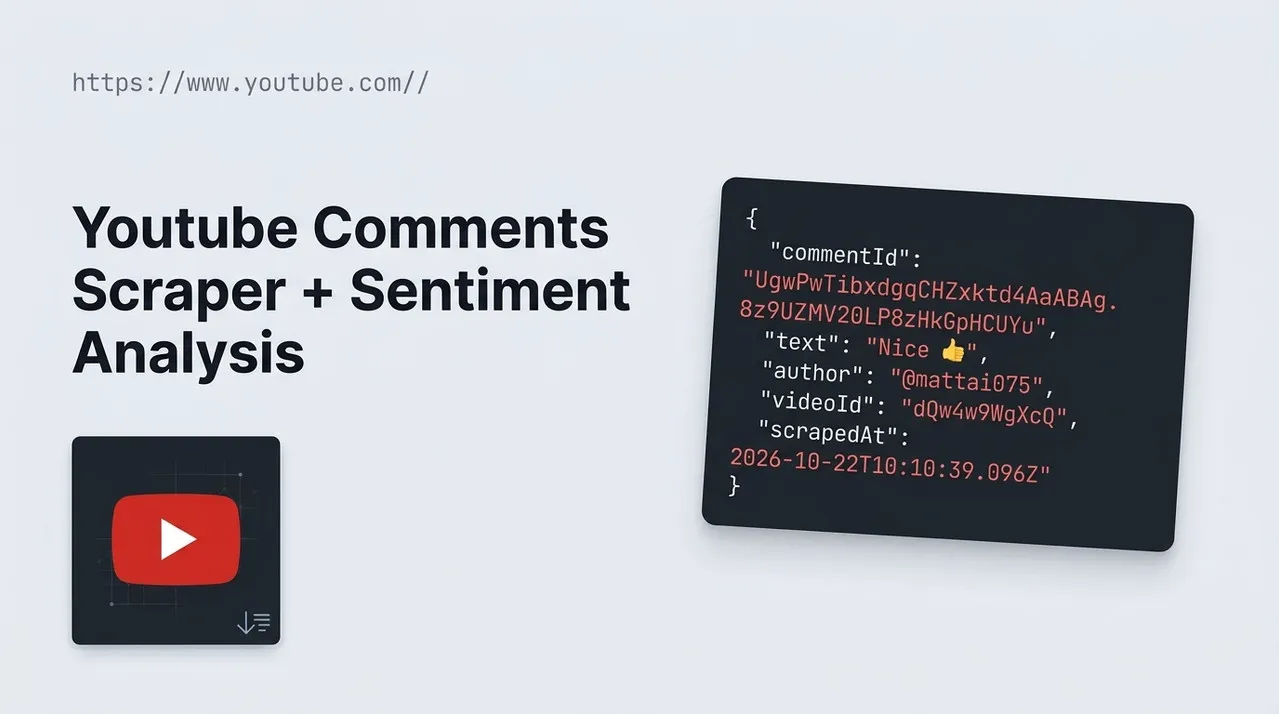
Scrape comments from YouTube (youtube.com) videos: comment text, author, channel link, likes, reply count, pinned and creator-hearted flags, replies, optional sentiment analysis and the video title. Export to JSON, CSV or Excel, or call it as an API. Paste a YouTube video URL, sort by top or newest comments, and press Start.
Target website: YouTube (youtube.com)
✨ Features of this YouTube comments scraper
- Comment extraction — top-level comments from any public video, Short or youtu.be link, with author, channel, likes and reply count.
- Replies — switch on replies to collect the answers under each comment, linked to their parent by
parentCommentId. - Pagination support — keeps loading comment pages until it has the number of comments you asked for.
- Sort by top or newest — YouTube's default ranking or newest first.
- Pinned and hearted flags — see which comments the video owner pinned or hearted, and which were written by the owner.
- Free sentiment analysis — optional: label every comment positive, negative, neutral or mixed with a confidence score, at no extra charge.
- Cache, new comments only — use one cache name across scheduled runs and get only new comments.
- Proxy support — configurable Apify Proxy, off by default.
- No browser required — fast and cheap runs.
🚀 How to scrape YouTube comments in 5 steps
- Sign up for a free Apify account — includes $5 monthly credit.
- Open the actor page and click Try for free.
- Paste one or more YouTube video URLs into Video URLs.
- Click Start and wait for the run to complete.
- Download results from the Output tab in JSON, CSV, or Excel format.
You can also run this actor via the Apify API or integrate it directly into your workflows using Zapier, Make, or n8n.
💰 Pricing for the YouTube comments scraper
This actor uses pay-per-result billing based on the compute units a run consumes.
- New Apify accounts include $5 of free monthly credit.
- It reads the data YouTube sends to its own pages instead of driving a browser, so it costs significantly less to run than browser-based scrapers.
- Proxies are off by default, which keeps runs cheapest.
- Comments skipped by the cache are not charged.
- Sentiment analysis is free: switching it on adds no extra charge to the run.
🖼️ YouTube comments scraper input screenshot
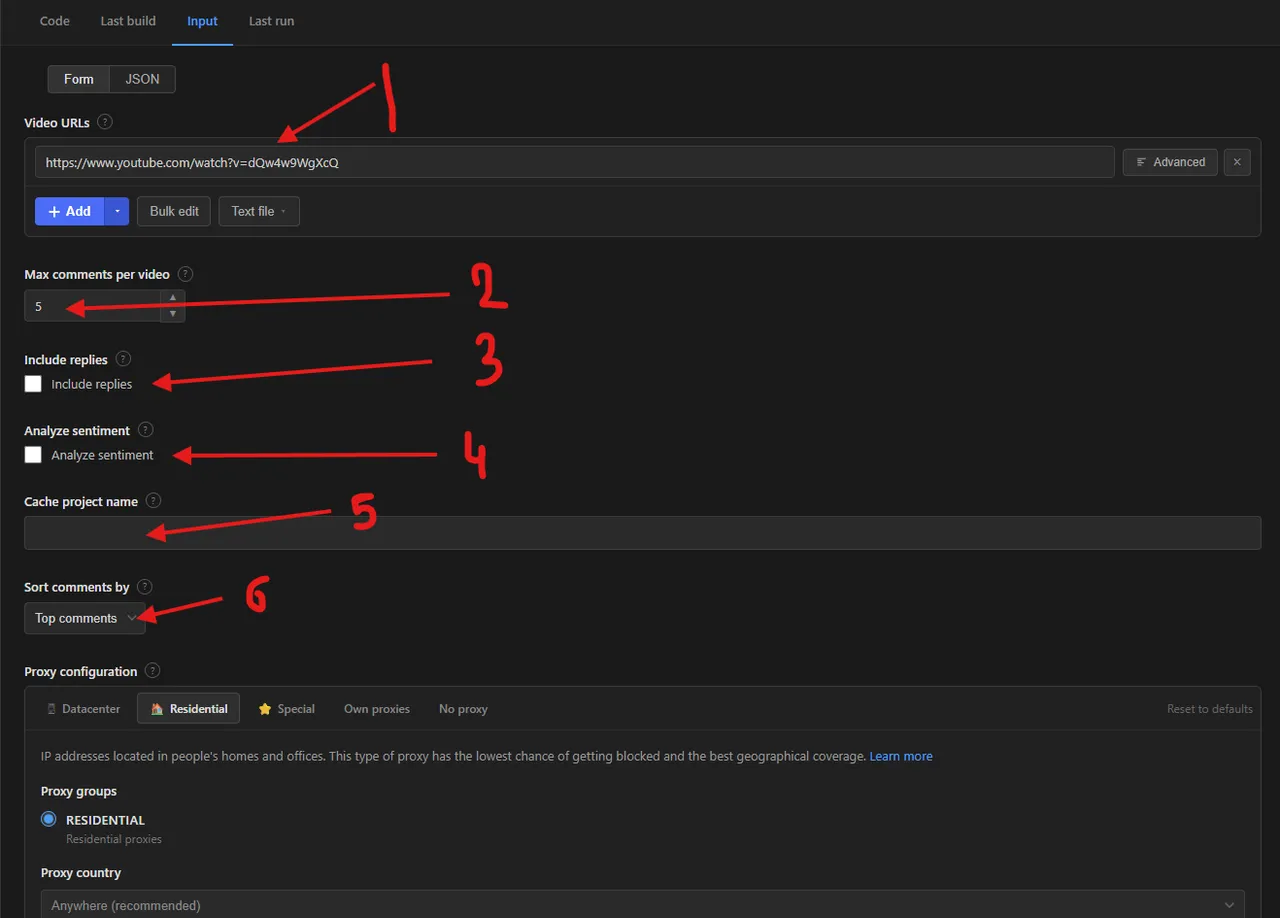
Numbered labels in the screenshot:
- Video URLs — the YouTube videos to collect comments from.
- Max comments per video — how many comments to save for each video.
- Include replies — also collect the replies under each comment.
- Analyze sentiment — label every comment positive, negative, neutral or mixed (free).
- Cache project name — reuse the same name on scheduled runs to get only new comments.
- Sort comments by — top comments or newest first.
The proxy configuration sits below these fields.
🔧 YouTube comments scraper input configuration
| Field | Type | Required | Default | Description |
|---|---|---|---|---|
Video URLs (startUrls) | array | ✅ | Rick Astley video (prefill) | YouTube videos to collect comments from: watch links, youtu.be short links, Shorts and embed links. |
Max comments per video (maxItems) | integer | — | 5 | Maximum comments saved for each video, replies included when they are switched on. |
Include replies (includeReplies) | boolean | — | false | Also collect the replies under each comment. Replies count towards the maximum and follow the comment they answer. |
Analyze sentiment (analyzeSentiment) | boolean | — | false | Label every comment as positive, negative, neutral or mixed, with a confidence score. Free: no extra charge. |
Cache project name (cacheProjectName) | string | — | — | Same name on each run = only new comments. Replies of a comment already in the cache are not opened again. |
Sorting
| Field | Type | Required | Default | Description |
|---|---|---|---|---|
Sort comments by (sortBy) | string | — | top | top (YouTube's default ranking) or newest. Use newest first together with the cache to collect only new comments on each run. |
Proxy
| Field | Type | Required | Default | Description |
|---|---|---|---|---|
Proxy configuration (proxyConfiguration) | object | — | no proxy | Works without a proxy for small runs. Switch on Apify Proxy for large runs or if YouTube starts blocking requests. |
Supported URL types:
- Watch link:
https://www.youtube.com/watch?v=dQw4w9WgXcQ - Short link:
https://youtu.be/dQw4w9WgXcQ - Shorts:
https://www.youtube.com/shorts/dQw4w9WgXcQ - Embed:
https://www.youtube.com/embed/dQw4w9WgXcQ
📦 YouTube comments scraper output data
The output is a dataset of comment records with the fields commentId, text, author, authorChannelId, authorChannelUrl, authorAvatar, likeCount, replyCount, publishedTimeText, isReply, parentCommentId, isPinned, isHeartedByCreator, isByVideoOwner, isVerifiedAuthor, videoId, videoUrl, videoTitle, scrapedAt and, when sentiment analysis is on, sentiment and sentimentConfidence. The dataset has 3 views:
- Overview — author, comment text, likes, replies, age, whether it is a reply and the video title.
- Sentiment — author, comment text, sentiment label, confidence, likes and video (filled when sentiment analysis is on).
- Pinned and hearted — the flags the video owner sets: pinned, hearted, written by the owner, verified author, plus the author's channel link.
Output at a glance:
| Author | Comment | Likes | Replies | Published | Reply |
|---|---|---|---|---|---|
| @bdr8823 | My algebra teacher said that this was a link to th | 69000 | 622 | 7 years ago | no |
| @mattai075 | Nice 👌 | 1800 | 0 | 7 years ago | yes |
Sample output (raw JSON):
🔁 Scrape only new YouTube comments with the cache
Set the same Cache project name on every scheduled run. Comments already saved under that name are skipped: they are not charged and do not count towards Max comments per video. Each name keeps its own separate cache. Combine it with Sort comments by: Newest first: the scraper stops as soon as it reaches a whole page of comments it already knows, so a scheduled run only reads the new ones. Replies of a comment already in the cache are not opened again. Add the actor to an Apify Schedule to monitor new comments on a video automatically.
🐍 How to scrape YouTube comments with Python, JavaScript or the API
Run the actor programmatically with the official Apify clients. Replace <YOUR_API_TOKEN> with the token from your Apify Console.
Python (pip install apify-client):
JavaScript (npm install apify-client):
cURL — start a run and wait for the dataset:
💡 What you can use YouTube comment data for
- Sentiment analysis of audience reactions to a video, ad or product launch
- Brand and reputation monitoring: new comments on your own or competitors' videos
- Finding questions, feature requests and complaints in the comments of tutorial and review videos
- Influencer and creator research: who engages, what gets liked and what the creator hearts or pins
- Training and evaluating text models on real conversation threads
Marketers, community managers, researchers and data teams typically use this data across media, e-commerce, education and entertainment.
⚠️ Limitations of the YouTube comments scraper
- Comment depth — sorted by top, YouTube serves roughly 1,200 top-level comments per video, even when the video has millions; sorted by newest first it goes much deeper (tens of thousands in testing). To get more, use newest first.
- Rounded likes — YouTube shows likes as "1.5K" above a thousand, so
likeCountis rounded the same way. - Relative dates — YouTube only shows the age of a comment ("2 days ago"), so
publishedTimeTextis not an exact date. - Comments turned off — videos with comments disabled return nothing; the run logs a warning.
- Video links only — channel pages and playlists are not accepted; paste the video links you want.
- Login-required content — age-restricted or members-only videos and comments behind a login are not collected.
❓ YouTube comments scraper FAQ
Can I scrape YouTube comments legally?
The actor only collects comments that are already publicly visible on YouTube — no login, paywall or private content is accessed. Scraping publicly available data is generally considered lawful (see hiQ Labs v. LinkedIn), but you are responsible for complying with YouTube's Terms of Service and applicable laws such as GDPR or CCPA, since comments contain personal data like names and profile links.
What data does the YouTube comments scraper return?
Each record has the comment text, author name, channel link and avatar, likes, reply count, age, whether it is a reply and which comment it answers, the pinned, hearted, owner and verified flags, and the video id, link and title.
How many comments can I scrape from one YouTube video?
maxItems limits the comments saved for each video, not the whole run, and replies count towards it when they are switched on. The scraper keeps loading comment pages until it has that many or YouTube stops serving more. Sorted by top, YouTube serves roughly 1,200 top-level comments per video, even when the video has millions; sorted by newest first it goes much deeper, so use newest first for very large pulls.
Do I need a proxy to scrape YouTube comments?
No for small runs: the input defaults to no proxy, which is cheapest. For large runs or many videos at once, switch on Apify Proxy in the proxy field.
How do I scrape YouTube comments with Python?
Use the Python example above: call the actor with the Apify client and iterate over the dataset items.
Can I run this YouTube comments scraper on a schedule?
Yes. Use Apify Schedules to run it daily or hourly. Set a Cache project name and sort by Newest first, and each run returns only the comments posted since the last one; comments already seen are skipped and not charged.
How does the sentiment analysis work, and does it cost extra?
Switch on Analyze sentiment and every comment gets a sentiment label (positive, negative, neutral or mixed) and a sentimentConfidence from 0 to 1. It is free: there is no extra charge for it, only the normal result cost of the run. Comments with no text, or that could not be classified, get an empty sentiment instead of failing the run.
What output formats are supported?
JSON, CSV, Excel, XML and RSS, either from the Output tab or through the Apify API.
🔗 Relevant actors for YouTube data
| Scraper | Description |
|---|---|
| ▶️ YouTube Video List Scraper | Scrape video listings from YouTube channels and playlists, with optional details. |
| 📺 YouTube Channel Info and Stats Scraper | Scrape channel info and statistics from YouTube channel About pages. |
| ⬇️ YouTube Video Downloader | Download YouTube videos, Shorts, playlists and channels as MP4, MP3 and more. |
| ⭐ Google Play Reviews Scraper | Scrape user reviews from Google Play Store apps, including review text. |
| 🍷 Vivino Wine Reviews Scraper | Scrape user reviews and tasting notes from Vivino, including the review text. |
🔗 Other actors you may find useful
| Scraper | Description |
|---|---|
| 💼 Dice Jobs Scraper | Scrape tech job listings from Dice: title, company, location and employment type. |
| 📈 Kalshi Markets Scraper | Scrape Kalshi prediction markets: yes/no prices, implied probability and volume. |
| 🏠 Otodom Property Scraper | Scrape property listings from Otodom.pl: price, area, rooms and address. |
| ✈️ Kiwi.com Flight Scraper | Scrape flight prices and schedules from Kiwi.com, including airline and times. |
| 🛒 Craigslist Listings Scraper | Scrape Craigslist listings in any city and category: title, price and more. |
💬 Support & contact
If you encounter any issues or have questions, please open an issue or reach out via the Apify Community Forum.
You can also find more of our actors on the Actor Flow page.


