
Facebook Followers & Following Scraper
Pricing
from $2.00 / 1,000 relationship results
Facebook Followers & Following Scraper
Extract public Facebook followers and following from Pages and profiles: names, usernames, profile URLs, images, verification, source counts and honest list-coverage status. Counts-only mode with change tracking. No login or cookies.
Pricing
from $2.00 / 1,000 relationship results
Rating
0.0
(0)
Developer

Delowar Munna
Maintained by CommunityActor stats
1
Bookmarked
31
Total users
11
Monthly active users
13 hours ago
Last modified
Categories
Features
Share
Facebook Followers & Following Scraper — Public Lists, Counts & Coverage
Get the public followers and following lists of Facebook Pages and profiles as clean rows, one per relationship, with names, usernames, profile URLs, images, verification badges and, when Facebook shows one, a subtitle, plus the source's follower and following counts. Every list also reports how complete it is.
- 👥 Followers and following in one run: one row per relationship (
FOLLOWER/FOLLOWING) - 🔓 No Facebook login, cookies, account or token
- 📄 Pages and public profiles, given as URLs, usernames, numeric IDs,
profile.php?id=links or direct/followers//followinglinks - 🔎 Search within a list by name, run by Facebook itself, so it reaches matches deep in a large list
- 🔢 Exact vs abbreviated counts:
28,735,511is markedEXACT,28Mis markedABBREVIATEDand is never treated as exact - 📊 Honest coverage: every list gets a free status row saying
FULL,LIMITED,PARTIAL,PREVIEW_ONLYorPRIVATE - 📈 Counts-only mode with change tracking: schedule it daily or weekly to follow audience growth
- 💸 You pay for rows delivered, plus one small session charge per list read through Apify Residential proxy. Status rows, pagination, retries, duplicates and private lists are free.
⚠️ Read this first: Facebook shows only part of a big audience
To a logged-out visitor, Facebook exposes a subset of a large follower list. It is not the whole audience. For example, measured on 2026-11-01:
| Source | Followers shown on the Page | Followers Facebook exposes as a list |
|---|---|---|
| NASA | 28,735,511 | ~1,358 |
| Mark Zuckerberg | 121,454,746 | 10,000 |
| National Geographic | 51,440,528 | ~549 |
| A small local business | 14 | 4 |
Within that exposed list, this Actor pages all the way to Facebook's own end of the list. It does not stop at the first 8 rows. It never claims to return a complete follower graph: when Facebook ends the list well short of the count on the Page, the list is marked LIMITED. Following lists are usually short, and they are often returned in full (NASA follows 52 accounts, and all 52 come back, marked FULL).
Quick start
That is all that is required. Leave the proxy at its default (Apify Residential, which full lists need). Run with the form's defaults and you get NASA's first 25 followers and first 25 accounts it follows: 50 relationship rows plus 2 free status rows.
More examples
A deep follower list (this input produced the sample output below: 1,000 followers over 125 pages, about 5 minutes):
Followers and following of several sources:
Search within a follower list:
Counts only:
Track counts over time (schedule it daily or weekly):
Input
| Field | What it does |
|---|---|
startUrls | Pages / profiles: URL, username, numeric ID, profile.php?id=, or a /followers / /following URL (a list URL reads only that list). Up to 500. |
mode | RELATIONSHIPS (default) or COUNTS |
lists | FOLLOWERS, FOLLOWING or both (default both) |
maxFollowers / maxFollowing | Most rows per source for each list (default 100, max 10,000) |
searchByName | Only list entries whose name matches, e.g. john |
includeSourceCounts | Source follower / following counts on every row (default on) |
includeProfileImage, includeSubtitle, includeVerification | Include those target fields (default on) |
parseSubtitle | Fill targetLocation / targetWorkplace / targetSchool from the subtitle when it says what it is (default on) |
deduplicate | Two inputs that are the same account are read and charged once (default on) |
monitorCounts, trackerKey | COUNTS mode: return the change since the last run under that tracker name |
maxConcurrency | Sources read in parallel (default 3) |
proxyConfiguration | Apify Residential (default, needed for lists past 8 rows), Apify Datacenter, no proxy, or your own proxy URLs |
Output
Relationships table
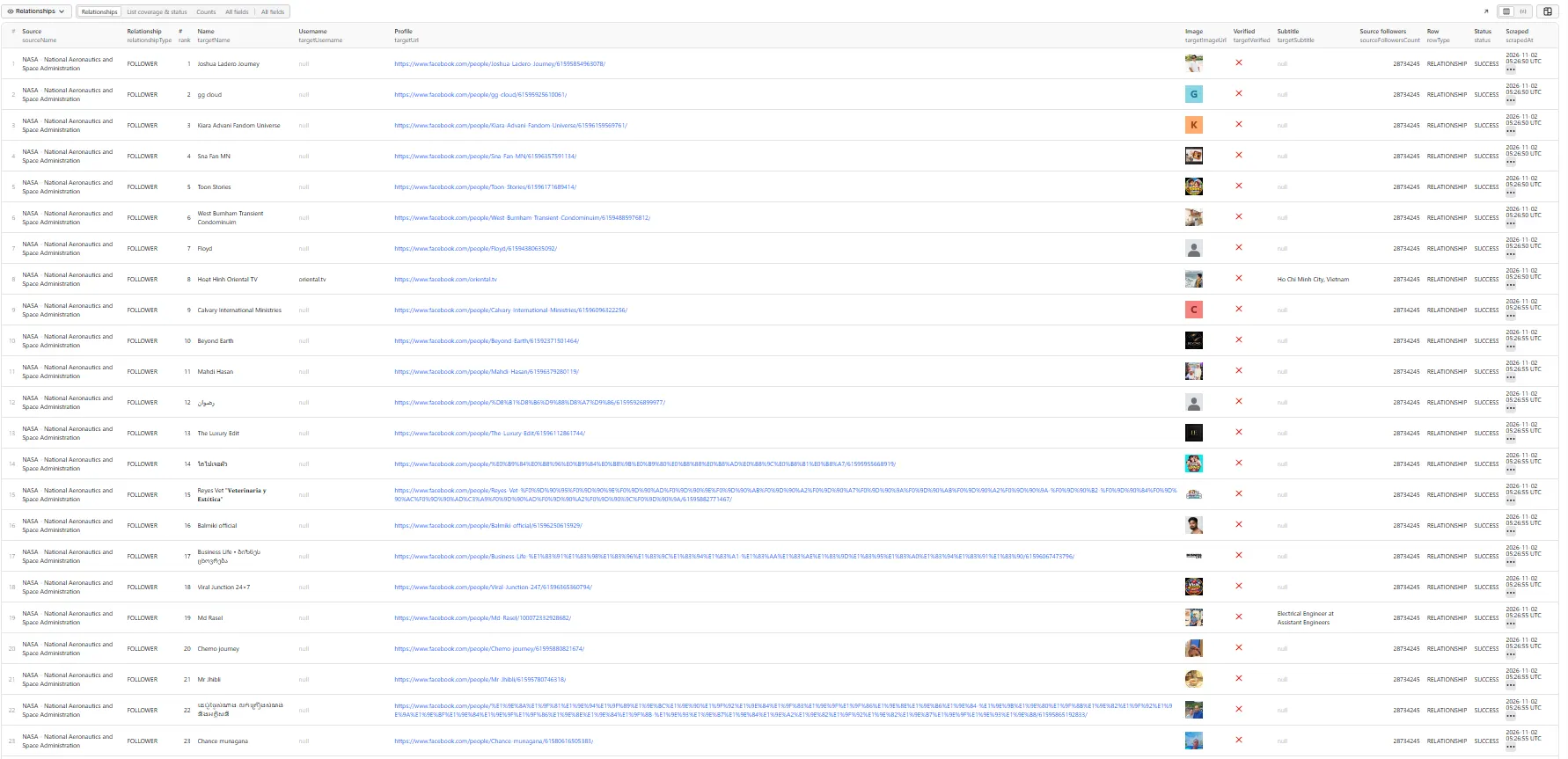
Relationship row (charged)
One row per follower / followed account. rank is the position in Facebook's list. It is Facebook's display order, not when the follow happened or how important the account is. A real row from the 1,000-follower NASA run above:
In that run, 82 of 1,000 rows had a subtitle (Facebook shows none for most accounts), and 131 had a vanity username.
Status row (free): one per source and list
The status row from the same run:
coverageStatus | Meaning |
|---|---|
FULL | The list was read to Facebook's end, and it matches the count the source shows |
LIMITED | Read to Facebook's end, but Facebook exposes far fewer accounts than the source's count (typical for big Pages) |
PARTIAL | Stopped at your limit (or the run stopped) while Facebook had more |
PREVIEW_ONLY | Only the first rows Facebook embeds in the page could be read; pagination was not available this run |
PRIVATE | Facebook does not show this list publicly. This is not "0 followers" |
UNAVAILABLE | The source could not be read (not found, blocked, failed) |
UNKNOWN | No count to compare with, or a name search (which has no total) |
Statuses: SUCCESS, NO_RESULTS, PRIVATE_OR_RESTRICTED, PAGE_NOT_FOUND, UNSUPPORTED_SOURCE, DUPLICATE_SOURCE, PAGINATION_UNAVAILABLE, PAGINATION_FAILED, PARTIAL_RESULT, RATE_LIMITED, BLOCKED, PROVIDER_ERROR (plus BASELINE_CREATED in COUNTS mode).
Counts row (COUNTS mode, charged)
A real row from the Counts example above (NASA, natgeo, zuck):
With monitorCounts: true, the first run stores a baseline (BASELINE_CREATED, deltas empty). Later runs under the same trackerKey fill previous… and followersDelta / followingDelta.
Dataset views: Relationships, List coverage & status, Counts, All fields. The key-value store holds RUN_SUMMARY (per-source results and coverage totals) and, when something did not finish, RETRY_INPUT, a ready-to-run input with just those sources.
FAQ
Can it scrape a Page's followers? The accounts a Page follows? Yes and yes. Pick FOLLOWERS, FOLLOWING or both.
Are full lists always available? No. Facebook exposes only part of a large audience to logged-out visitors (see the table at the top). The Actor reads the exposed list to its end and labels the result honestly. FULL is used only when the result matches the source's own count.
What does PREVIEW_ONLY mean? Facebook embeds the first 8 accounts of a list in the page itself. Normally the Actor continues past them. If it cannot (most often because the run uses Apify Datacenter or no proxy, which Facebook refuses for pagination), you get those rows marked PREVIEW_ONLY, never presented as the whole list.
How many rows can a list return? At most what Facebook exposes. That number is in exposedListCount and listExposedCount; the largest lists stop at 10,000. Facebook serves 8 accounts per page, so deep lists take longer.
What if a big run reaches its timeout? Shortly before the run timeout (default 1 hour), the Actor stops paging and still writes a STATUS row for every list, with stoppedBy: "RUN_STOPPED" and the message "stopped before the run's timeout". The run ends SUCCEEDED, every delivered row is kept, and RETRY_INPUT in the key-value store lists the sources that did not finish. To collect more, raise the run timeout in the run options or lower maxFollowers / maxFollowing.
Does it need a Facebook login, cookies or a proxy? No login and no cookies. For lists past the first 8 rows it needs the default Apify Residential proxy: Facebook refuses list pagination from datacenter addresses. Counts mode needs no pagination: it always uses Apify Datacenter (even when Residential is selected) and is never charged a residential session.
Pages and profiles? Both. sourceType is PAGE or PROFILE. Some profiles hide a list (Mark Zuckerberg's following list is not public). That list comes back PRIVATE_OR_RESTRICTED.
Which input forms work? https://www.facebook.com/NASA, NASA, @NASA, 100044561550831, https://www.facebook.com/profile.php?id=…, …/people/Name/<id>/, https://www.facebook.com/NASA/followers and …/following. m.facebook.com links work too. Groups, events and non-Facebook URLs get an UNSUPPORTED_SOURCE status row.
Can I get followers and following in one run? Yes. An account in both lists is two rows, one per relationship.
Can I search within a follower list? Yes, with searchByName. Facebook does the matching, so a name deep in a large list is found without paging through the whole list.
Are profile images, verification badges and subtitles included? Yes (targetImageUrl, targetVerified, targetSubtitle). The subtitle is the short line Facebook shows under a name, e.g. "Works at Samsung" or a town. Image links from Facebook expire after a few days.
Why are subtitle, location, workplace and school often empty? Facebook shows a subtitle for only a minority of accounts in these lists (roughly 5–35% in our tests), and the Actor never invents one. When there is a subtitle, it is parsed only where the wording says what it is: "Works at …" or "Engineer at …" → workplace; "Lives in …" or "City, Country" → location; "Studied at …" or a name containing College / University / School → school. A single bare word such as "Chittagong" could be a town, an employer or a school, so it stays in targetSubtitle only. These three columns are in the All fields view rather than the main table.
What is targetUsername? The account's vanity username taken from its profile link (e.g. john.smith). Accounts whose link is /people/…/<id> have none, so it is empty for them.
Are the counts exact? The follower count is usually exact (28,735,511, from the Page's own description). Some counts are only shown abbreviated, like 121M. Each count has a …Precision field: EXACT, ABBREVIATED or UNKNOWN. Facebook no longer shows a "likes" count for these Pages, so none is returned. A "talking about this" count is returned where Facebook shows it.
Can counts be tracked over time? Yes: mode: COUNTS + monitorCounts: true. The first run is the baseline (BASELINE_CREATED, deltas empty, not 0). After that you get followersDelta / followingDelta, computed only when both values are exact. A failed run never overwrites the stored counts.
Private or restricted lists? They are not bypassed. You get a free PRIVATE_OR_RESTRICTED status row instead of a misleading zero.
Can I use it through the API or MCP? Yes, like any Apify Actor: the Apify API, the JavaScript / Python clients, integrations, and Apify's MCP server. The input is plain JSON (examples above).
Pricing
Pay per event:
- Relationship result: each unique follower / following row delivered.
- Source count result: each counts row delivered in COUNTS mode.
- Residential proxy session: one per followers or following list read through Apify Residential proxy that delivers at least one row. It covers the residential traffic of loading that list's page and is shown openly rather than hidden in the row price. It is not charged with Apify Datacenter, no proxy, or your own proxy URLs.
Never charged: status rows, private or empty lists, sources that are not found, page loads, pagination, retries and duplicates. See the Pricing tab for live rates. This README deliberately does not quote figures.
🚦 Proxy policy
Apify Residential proxy is the default, and full lists need it. Facebook answers the list page from any address, but refuses the requests for further pages from datacenter addresses (measured: every one refused across dozens of Apify Datacenter addresses).
| Proxy | Followers / following lists | Counts mode | Residential session event |
|---|---|---|---|
| Apify Residential (default) | full exposed list | ✅ | yes, one per list that delivers rows |
| Apify Datacenter / no proxy | first 8 rows per list, marked PREVIEW_ONLY | ✅ | no |
| Your own proxy URLs | depends on your provider (residential works) | ✅ | no |
When every address is refused, the Actor stops asking for further pages within seconds and says so in the log, rather than retrying for minutes.
To use your own residential provider, put it in the proxy editor's Custom proxy URLs field. That traffic goes through your provider, not Apify:
Good to know
- Unofficial. Not affiliated with, endorsed by, or connected to Meta or Facebook. This is not Graph API data.
- Public data only. Only what Facebook shows a logged-out visitor. It does not reveal hidden friends, private profiles or private follower lists.
- List order is Facebook's and is not chronological.
- Public list availability and depth vary by account and can change when Facebook changes its site.
- Count tracking starts from your first run. There is no history before it.


