

Instagram Followers / Following Scraper
Pricing
from $1.00 / 1,000 relationship results
Instagram Followers / Following Scraper
Export followers and following lists from public Instagram profiles. Get usernames, user IDs, names, profile URLs, verification and privacy status, plus optional profile metrics. Process multiple source accounts and export clean JSON, CSV or Excel.
Pricing
from $1.00 / 1,000 relationship results
Rating
0.0
(0)
Developer

Delowar Munna
Maintained by CommunityActor stats
0
Bookmarked
21
Total users
3
Monthly active users
6 days ago
Last modified
Categories
Share

Export followers and following lists from public Instagram profiles. Get usernames, user IDs, names, profile URLs, verification and privacy status, plus optional profile metrics. Process multiple source accounts and export clean JSON, CSV or Excel. No Instagram login or cookies required.
What this actor does
Instagram Followers / Following Scraper takes Instagram usernames, @handles or profile URLs and returns one clean row per relationship:
- 👥 Followers, following or both in one run. Every row is labelled
FOLLOWERorFOLLOWINGand carries its source profile. - 🪪 Identity fields for each returned account: user ID, username, full name, profile URL, profile picture, verified badge, private flag
- 🔢 Rank: the account's position in the list as Instagram returned it, from 1, per source profile and list
- 📊 Optional profile metrics: follower and following counts, bio, external URL, category and business flag for each returned account
- 🎯 Filters: verified accounts only, drop private accounts, or a follower-count range (with metrics on). Filtered rows are free.
- 🧾 Honest coverage: a free summary row per profile and list says whether you got the full available list, hit your limit, or Instagram served only part of it
- 🔁 No double billing: duplicates within a list are removed before they are charged
It is a relationship scraper. For full profile data (bio links, business contact, recent posts) feed the usernames into Instagram Profile Scraper.
How it works
- Normalize inputs.
natgeo,@NatGeoandhttps://www.instagram.com/natgeo/all becomenatgeo; duplicates are removed. Post, Reel and Story URLs are rejected with a free error row. - Resolve each source profile. Private and nonexistent profiles are reported straight away, without paging anything. The profile's displayed follower and following counts are kept for the coverage check.
- Page the list. Followers and following are fetched page by page, in order, until your limit, the end of the list, or a safety stop. Each list keeps its own cursor.
- Filter and enrich. Private and unverified filters run first. With profile metrics on, each remaining account is looked up once per run, then the follower-count range is applied.
- Export. One row per relationship, then one summary row per source profile and list with its coverage status.
FAQ
Which input formats are supported?
Usernames (natgeo), @handles (@natgeo) and profile URLs (https://www.instagram.com/natgeo/, instagram.com/natgeo, mobile and _u/ links). Up to 100 source profiles per run.
Do I need an Instagram login or cookies? No. You never provide a login, cookies, a session ID or a Meta API token.
Can I scrape followers, following or both?
Yes. Set relationshipType to FOLLOWERS, FOLLOWING or BOTH. With BOTH, rows from both lists are mixed in the dataset and labelled by relationshipType.
Can I process multiple profiles? Yes, up to 100 per run, several in parallel. One profile failing never stops the others.
Are private source profiles supported?
No. A private profile's followers and following are not public. It gets a free summary row with status SOURCE_PRIVATE.
Can private accounts appear in the results?
Yes. A public profile can be followed by, or follow, private accounts. They appear with public identity fields only (isPrivate: true); their content is never accessed. Turn off includePrivateAccounts to drop them, at no charge.
What fields are returned? See Output. Base rows carry the source profile, relationship type, rank and the account's identity fields.
Are follower counts for returned users included?
Only with includeProfileMetrics. Base rows leave the metric fields null, because the lists themselves don't contain counts.
What does includeProfileMetrics do?
It looks up each returned account once to add followersCount, followingCount, biography, externalUrl, categoryName and isBusinessAccount. postsCount is part of the schema but is usually null, because the lookup source rarely provides it. It costs one extra lookup per account, so these rows are billed at a separate, higher per-row price and the run is slower. It is required for minFollowers / maxFollowers.
Why might results stop before the displayed follower count?
Three reasons. Your limit (maxFollowersPerProfile / maxFollowingPerProfile) was reached. Instagram's displayed counts include deactivated and restricted accounts that are never listed. And Instagram serves only part of very large follower lists. On accounts with tens of millions of followers you may get only the first few dozen. The summary row tells you which case applied.
What does coverage status mean?
| Coverage status | Meaning |
|---|---|
FULL_AVAILABLE_SET | The list ended naturally and roughly matches the profile's displayed count: you have everything Instagram lists. |
LIMIT_REACHED | Your per-profile limit was reached; there are more. |
PROVIDER_LIMITED | The list ended well short of the displayed count. Typical for very large follower lists, which Instagram limits. |
PARTIAL_PUBLIC | Stopped early by an error, a safety stop or your spending limit. The rows delivered are valid. |
SOURCE_PRIVATE | The source profile is private. |
SOURCE_NOT_FOUND | The source profile doesn't exist (or was renamed). |
BLOCKED | Instagram or the data source refused the request even after retries. |
How does pricing work? See Pricing.
Can I resume a large export?
Within a run, yes. If a list hits a temporary error it resumes at the page where it stopped, and if Apify migrates the run to another server the run continues where it left off without charging rows twice. Across runs, profiles that failed for a temporary reason are saved to RETRY_INPUT, a ready-to-run input. A new run starts each list from the top.
Can I use it through the API or MCP? Yes. Call it like any Apify actor through the Apify API, the Apify clients for JavaScript and Python, or the Apify MCP server from an AI agent:
Input
| Field | Type | Default | Description |
|---|---|---|---|
profiles | string[] | ["nasa"] | Usernames, @handles or profile URLs (max 100) |
relationshipType | enum | FOLLOWING | FOLLOWERS, FOLLOWING or BOTH |
maxFollowersPerProfile | int | 1000 | Max follower rows per profile |
maxFollowingPerProfile | int | 1000 | Max following rows per profile |
includePrivateAccounts | bool | true | Keep returned accounts that are private |
verifiedOnly | bool | false | Return verified accounts only |
includeProfileMetrics | bool | false | Add per-account counts, bio, external URL and category (enriched-row price) |
minFollowers | int | 0 | Returned accounts with at least this many followers (needs metrics; 0 = off) |
maxFollowers | int | 0 | Returned accounts with at most this many followers (needs metrics; 0 = off) |
proxyConfiguration | object | Apify Proxy on | Proxy settings, see Proxy policy |
maxConcurrency | int | 5 | Source profiles processed in parallel (pages of one list are always sequential) |
maxRetries | int | 4 | Retries per profile on rate limits or temporary errors |
debugMode | bool | false | Verbose logging |
The run fails at startup, without charging anything, for an empty profiles list, a relationshipType other than the three above, a limit below 1, minFollowers greater than maxFollowers, or a follower-count filter without includeProfileMetrics.
Example 1: Followers of a profile
natgeo has over 260 million followers, and Instagram serves only the first few dozen of a list that large (PROVIDER_LIMITED). Follower lists of small and mid-sized accounts, and following lists, page through to your limit.
Example 2: Who a profile follows
Example 3: Both lists for several profiles
Example 4: Verified accounts only
Example 5: Followed accounts with 100k+ followers, with metrics
Output
The dataset holds three row types, with the same columns on every row so CSV and Excel exports stay stable:
rowType: "relationship": one returned follower or followed account (charged)rowType: "summary": one per source profile and list, with the coverage status (free)rowType: "error": an input that isn't a valid profile (free)
Filter on rowType when you only want relationships. The dataset has three tabs: Relationships, Profile metrics and Coverage & status.
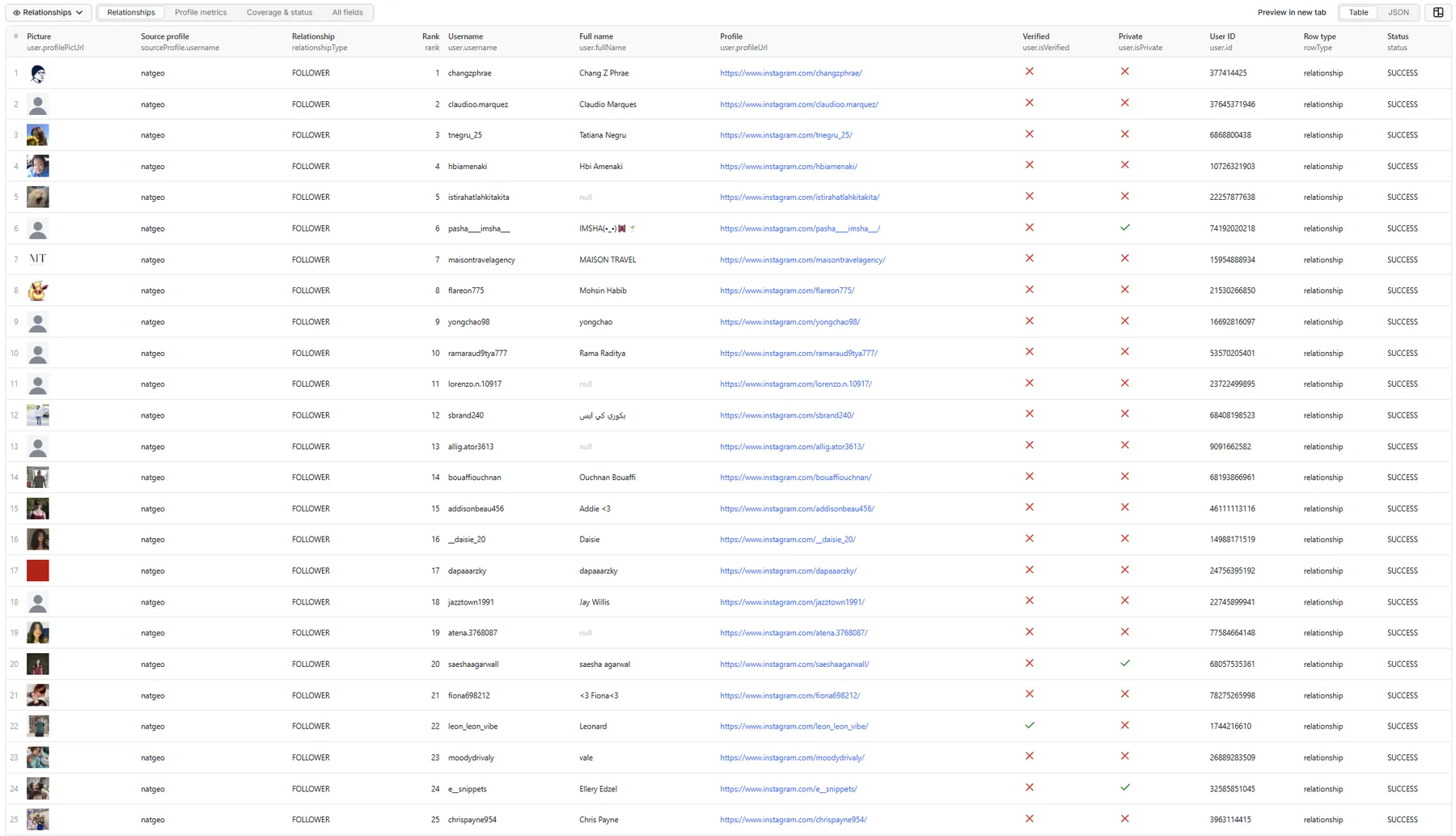
The Relationships and Coverage & status records below come from a real run with the default input: nasa's full following list, 90 rows over 2 pages, plus 1 summary row. Long Instagram CDN URLs are shortened with ….
Relationships tab
Without includeProfileMetrics, enriched is false and followersCount through isBusinessAccount are null.
Profile metrics tab
With includeProfileMetrics on, the same row carries the account's metrics and enriched: true. Illustrative record from a FOLLOWING run on nasa:
Coverage & status tab
One summary row per source profile and list. This one is from the real run above: the list ended at nasa's displayed following count, so you have the full list.
Very large follower list
A real summary row from a natgeo FOLLOWERS run: Instagram served 45 of natgeo's 268 million followers.
Private source profile
Status values
| Status | Meaning |
|---|---|
SUCCESS | Relationship delivered, or the list finished normally |
NO_RELATIONSHIPS | The list is empty |
PARTIAL_RESULT | Some rows were delivered before the list stopped (see the message) |
INVALID_PROFILE | The input isn't a valid username or profile URL |
PROFILE_NOT_FOUND | The source profile doesn't exist |
SOURCE_PRIVATE | The source profile is private |
RATE_LIMITED / BLOCKED | Refused upstream even after retries |
TEMPORARY_INSTAGRAM_ERROR / PROVIDER_ERROR | Temporary or data-source error after retries |
Run summary and retry input
Each run writes RUN_SUMMARY to the key-value store: profiles processed, succeeded and failed, follower and following rows saved, duplicates skipped, rows filtered (private, unverified, follower count), private and verified accounts returned, the coverage distribution, a per-profile/per-list breakdown, and request and timing figures. If any profile failed for a temporary reason, RETRY_INPUT holds a ready-to-run input containing just those profiles.
Pricing
Pay per event, per returned unique relationship row. There are two row prices:
- Relationship: a follower or following row with identity fields.
- Relationship with profile metrics: charged instead of the relationship price for rows enriched by
includeProfileMetrics. It costs more because each account needs its own lookup.
You are not charged for profile resolution, pagination, retries, duplicates, filtered-out accounts, summary rows, invalid inputs or failed profiles. There is no start fee. Rates can differ by Apify plan, so see the Pricing tab for the current rates on yours. This README deliberately doesn't quote figures.
The actor respects the spending limit you set for a run: it never charges past it, and when the limit is reached the run stops cleanly and no further rows are fetched. Profiles cut short or not started get a free summary row saying so (stop reason spendingLimit). With profile metrics on, the limit is checked against the metrics price, and no profile is looked up unless its row can still be charged.
🚦 Proxy policy
Use Apify Datacenter proxy (the default) or no proxy for normal runs. The proxy is used only to look up source profiles on Instagram; lists come from the actor's own data source.
Apify Residential proxy is not supported. The actor fails at startup if apifyProxyGroups includes RESIDENTIAL. In pay-per-event actors, residential bandwidth is billed per GB to the developer, not the run user, so a single bandwidth-heavy run could cost more than the per-result revenue.
If you need residential routing, supply your own residential provider in the proxy editor's Custom proxy URLs field. That traffic goes through your provider, not Apify, and is unaffected:
Limitations
- Public source profiles only. Private profiles' lists are not public.
- Very large follower lists are limited by Instagram. Accounts with millions of followers may return only the first few dozen; the summary row says
PROVIDER_LIMITED. Following lists and small-to-mid follower lists page through fully. - Order is not a ranking.
rankis the position Instagram returned the account in. Instagram doesn't guarantee that order and it changes over time. - Lists change. Follows and unfollows happen constantly; two runs rarely match exactly.
- Profile metrics are a snapshot from the moment of lookup.
postsCountis usuallynull. - Safety stops. With filters, a list is scanned for up to 20× its limit (at least 2,000 accounts). A run also stops lookups that keep returning nothing billable, such as a follower-count filter almost nothing matches. Affected lists end with
PARTIAL_PUBLICand a message. Loosen the filters or split the run. - Not included: audience overlap, change tracking, bot or audience-quality scoring, contact details, and posts. Those belong to other actors or downstream analysis.
Related actors
- Instagram Profile Scraper: full profile data for the usernames you export here
- Instagram Search Scraper: find source profiles by keyword
- Instagram Creator Leads Scraper: find creators by niche
- Instagram Posts Scraper: posts, carousels and Reels from profiles
Legal and privacy
This is an unofficial tool. It is not affiliated with, endorsed by or sponsored by Instagram or Meta. It processes only publicly available relationship information from public source profiles and never accesses private profiles' content. Public usernames and profile data can still be personal data. You are responsible for having a lawful basis for collecting and processing it (for example under GDPR or CCPA) and for complying with Instagram's terms in your use of the data. The actor does no follow/unfollow or messaging automation and infers no sensitive traits.
Local development
Locally, put a TikHub API key in storage/key_value_stores/tikhub-config/TIKHUB_API_KEY.txt or the TIKHUB_API_KEY environment variable; without it, lists can't be fetched.


