

Google Maps Email & Social Enricher
Pricing
from $2.40 / 1,000 lead-results
Google Maps Email & Social Enricher
Find emails and social profiles for businesses on Google Maps. Enriches each listing with up to four social profiles (LinkedIn, Facebook, Instagram, Twitter) and emails surfaced from the business website's home, contact, and about pages. Pay-per-lead pricing, CSV-friendly flat output.
Pricing
from $2.40 / 1,000 lead-results
Rating
0.0
(0)
Developer

Delowar Munna
Maintained by CommunityActor stats
0
Bookmarked
13
Total users
1
Monthly active users
15 days ago
Last modified
Categories
Share

Find emails, social profiles, and contact data for businesses discovered on Google Maps. Bridges the gap between a physical Google Maps listing and digital outreach (email + social) — built for B2B cold outreach, lead-gen agencies, and local-SEO marketers.
V1 stays deliberately shallow on the website side (homepage + a small number of likely contact / about pages, capped by maxCrawledPages) so runs are fast and cost-predictable. You pay one flat event per business pushed to the dataset that contains at least one of: website, email, or social link.
✨ Why this scraper
- Maps + website in one pass — 16 flat fields per business covering Google Maps metadata plus emails and four social profiles.
- Shallow by design — homepage + up to
maxCrawledPages-1extra contact / about pages per site. No deep crawling, no AI, no review scraping. - Pay-Per-Event — one flat
lead-resultevent per saved business that has at least one contact point. Empty rows are pushed for completeness but never charged. - Place URLs and search queries — supply queries, direct Google Maps URLs, or both.
- CSV-friendly output — flat structure, no nested objects, drops cleanly into Sheets / Excel / CRMs.
🚀 Quick start — sample inputs
Example 1 — single query
Example 2 — mix queries with direct Maps URLs, custom residential via your own provider
The actor blocks Apify Residential proxy; if you need residential routing, supply your own provider via
proxyConfiguration.proxyUrlsas shown. See 🚦 Proxy policy below.
📦 Output
The dataset has one view: Business leads — a 16-column flat table. Every row is the same shape; fields that were not found are returned as "".
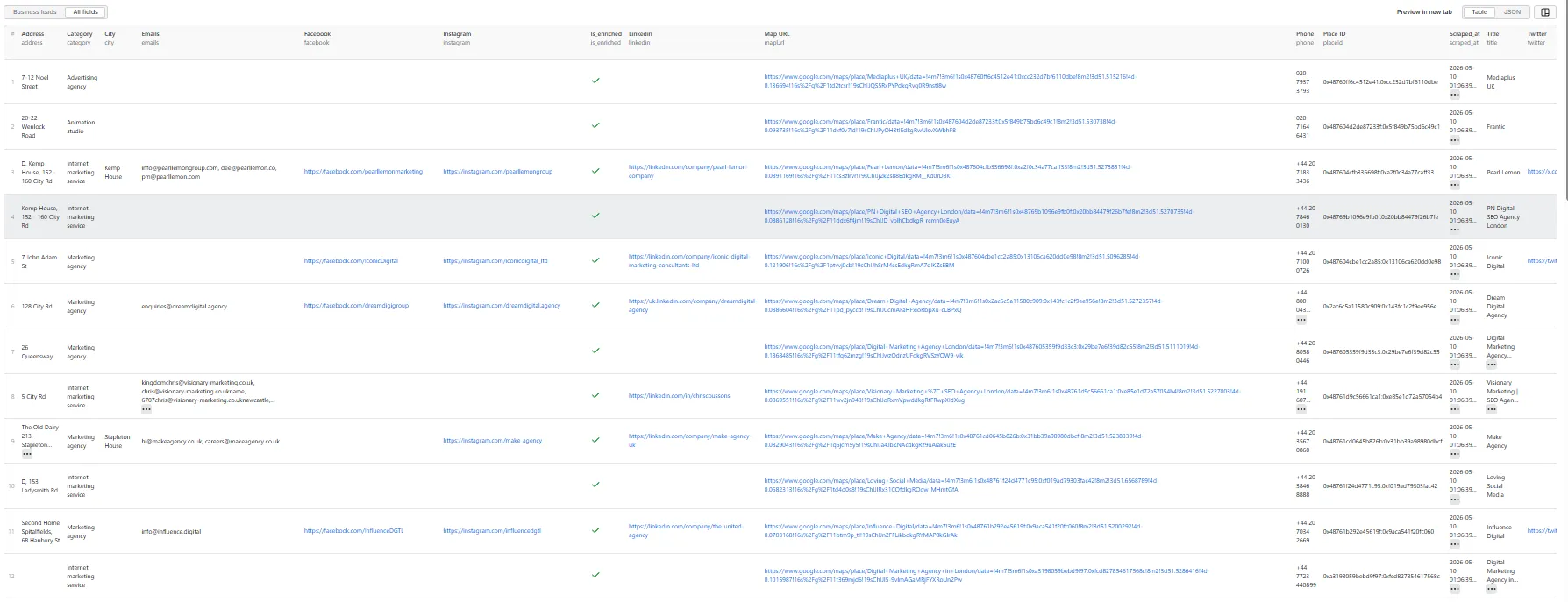
Output fields (16)
placeId, title, website, phone, emails, linkedin, facebook, instagram, twitter, category, address, city, zipCode, mapUrl, scraped_at, is_enriched.
Sample record — Business leads
is_enriched is true whenever the row has at least one of: website, emails, linkedin, facebook, instagram, twitter. The lead-result event is charged only for enriched rows.
💰 Pricing
Pay-Per-Event. One flat event per saved row that has any contact point (final per-event price is configured on the Apify console):
| Event | Charged when |
|---|---|
lead-result | Once per business pushed to the dataset that contains at least one of: website, emails, or any social profile URL. |
So your bill is count_of_enriched_rows × price_per_event.
The actor honours the user-configured per-run spending cap (Apify eventChargeLimitReached) and stops cleanly when reached.
Not charged
- Rows with no website, no email, and no social link — pushed for completeness, but
is_enriched: falseand not billed. - Duplicates (de-duplicated by Google Place ID).
- Rows missing a
title(filtered out). - Failed dataset pushes.
- Failed website fetches when no contact data was found.
- Anything after the per-run spending cap is reached.
🚦 Proxy policy
Use Apify Datacenter proxy or no proxy for normal runs — both work reliably for Google Maps search and shallow website fetches at this actor's conservative concurrency.
Apify Residential proxy is not supported. The actor will fail at startup if proxyConfiguration.apifyProxyGroups includes RESIDENTIAL. Reason: in pay-per-event actors, residential bandwidth (~/GB) is billed to the developer, not the run user, so a single bandwidth-heavy run could exceed the per-result event revenue.
If you genuinely need residential routing, supply your own residential provider via the proxy editor's Custom proxy URLs field — that traffic goes through your provider, not Apify, and is unaffected:
📊 Run summary
After each run, a RUN_SUMMARY entry is written to the key-value store:
charged_events always equals the number of dataset rows where is_enriched === true (and is bounded by the user's spending cap).
⚙️ Inputs
| Field | Type | Default | Purpose |
|---|---|---|---|
queries | Array | [] | Google Maps search terms. |
startUrls | Array | [] | Direct Google Maps place URLs or search URLs. |
maxResults | Integer | 50 | Run-wide cap on businesses processed (hard ceiling 5000). |
extractEmails | Boolean | true | Scan website pages for email addresses. |
extractSocials | Boolean | true | Detect LinkedIn / Facebook / Instagram / Twitter URLs. |
maxCrawledPages | Integer | 3 | Pages fetched per business website (homepage + contact / about). |
proxyConfiguration | Object | { "useApifyProxy": true } | Apify Proxy settings (Apify Residential is rejected at startup). |
deDuplication | Boolean | true | Skip duplicate businesses by Google Place ID. |
At least one of queries or startUrls must be provided.
🚧 Limitations (V1)
- Cards-only Maps extraction for search queries: V1 reads each business directly from the search results panel and does not click into individual place detail panels. Phone, website, full address, and
placeIdonly appear when Google surfaces them on the card. Direct Maps place URLs (viastartUrls) read the full panel. - Shallow website extraction: homepage + up to
maxCrawledPages-1extra pages (default 3 total). No deep crawling, no JS-rendered pages. - No email verification, deliverability checks, or AI scoring.
- No phone-number enrichment from the website (only the Maps phone is included).
- No login / cookie / session-based scraping.
- Address parsing into city / zipCode is best-effort; the full
addressfield is the source of truth. - Per-run hard cap is 5000 results; per-website page cap is 5.
🛠️ Technical notes
- Stack: Node.js 18+ · Apify SDK 3 · Crawlee · Puppeteer (Maps) · Cheerio + native
fetch(websites). - Concurrency: Maps
min=1,max=3(conservative); website pool=5. - Memory: 1 GB min · 2 GB default · 4 GB max.
- Per-page timeout: 15s; per-business budget: 45s; Maps handler timeout: 120s.
- Diagnostics: On the first Maps render failure (no feed, zero cards, or no place panel), the actor saves the page HTML and URL to the key-value store as
debug-no-feed-html/debug-zero-cards-html/debug-no-place-panel-html.


