
Instagram Hashtag Analytics
Pricing
from $30.00 / 1,000 hashtag reports
Instagram Hashtag Analytics
Instagram hashtag analytics with Reel and creator insights. One report per hashtag from up to 500 sampled posts and Reels: Reel share, plays, length and original audio; unique, verified and top creators and how concentrated they are; median engagement, media mix and co-occurring hashtags.
Pricing
from $30.00 / 1,000 hashtag reports
Rating
0.0
(0)
Developer

Delowar Munna
Maintained by CommunityActor stats
0
Bookmarked
2
Total users
1
Monthly active users
5 days ago
Last modified
Categories
Share

See how Reel-heavy an Instagram hashtag is and who actually posts in it. Each hashtag gets Reel analytics, creator analytics and median engagement from a sample of up to 500 public posts and Reels, exported as one clean analytics report per hashtag in JSON, CSV or Excel.
What this actor does
Instagram Hashtag Analytics takes one or more hashtags and returns one report row per hashtag, not thousands of raw posts:
- 🎬 Reels: Reel share of the sample, plus Reel likes, comments, views, plays, length and original-audio share, so you can tell a Reel-driven hashtag from a photo one
- 👥 Creators: unique creators, verified creators and their share, the share of the sample posted by the 10 busiest creators, and the top 10 creators with their post counts and average engagement
- 📊 Engagement: average and median likes, comments, video views and plays, totals, and an observed engagement rate for Reels/videos
- 🔬 Deep samples: 10 to 500 posts per hashtag, from the Top feed, the Recent feed or both
- 🧮 Honest denominators: every metric says how many sampled posts it was computed from (
likesAvailableFor,playsAvailableFor, …) - 🙈 No fake zeros: hidden likes and missing views are left out of the math, never counted as
0 - 🖼️ Content mix: Reels, images, carousels and other videos with their shares
- 📈 Volume: the post count Instagram displays for the hashtag
- #️⃣ Co-occurring hashtags: which other hashtags appear alongside it in the sampled captions, and how often
- 🏆 Top posts: compact examples of the best-performing sampled posts
- 🔎 Coverage metadata: sample mode, how many posts were requested and returned, Top/Recent overlap, oldest and newest sampled post, and a coverage status
Several hashtags in one run give you directly comparable rows, so you can sort them side by side in a spreadsheet. The run summary also names the leaders: largest hashtag, highest average likes, highest Reel share, most diverse creators.
How it works
- Normalize hashtags.
fitness,#Fitnessandhttps://www.instagram.com/explore/tags/fitness/all becomefitness. Duplicates are removed. Invalid entries get a freeINVALID_HASHTAGrow. - Sample. For each hashtag the actor reads Instagram's Top feed, its Recent feed, or both (the default), until it has the sample size you asked for.
- Deduplicate. A post that appears in both Top and Recent is counted once. Its
appearedInTop/appearedInRecentflags are kept, and the Recent feed tops the sample back up so the overlap doesn't shrink it. - Analyze. Averages, medians, mixes, creator stats and co-occurring hashtags are computed from the sample, using only the values Instagram actually shows.
- Report. One row per hashtag, plus free status rows for hashtags that couldn't be analyzed.
It runs without a browser, and needs no Instagram login and no cookies of yours.
FAQ
What does this actor analyze? Public Instagram hashtags. For each one you get volume, engagement, content mix, Reel, creator and co-occurring-hashtag analytics built from a sample of its public posts and Reels.
How is it different from Instagram Hashtag Scraper? Instagram Hashtag Scraper returns the raw posts, one row per post. This actor uses the same extraction code but returns one summary report per hashtag. Use the scraper when you need every post, and this actor when you need the answer: which hashtag is bigger, more engaged, more Reel-heavy or dominated by a few creators.
Is this complete historical hashtag data?
No. Instagram does not expose a complete public history for a hashtag. Every metric is an observed sample metric built from the posts that were sampled, and every report says exactly what that sample was: mode, size, time range and coverage. The one exception is availablePostsCount, which is the count Instagram itself displays. It is never derived from the sample, and it is null when the feed doesn't return it.
What does sample size mean?
sampleSizePerHashtag is the total number of unique posts and Reels to analyze per hashtag (10–500, default 100). In TOP_AND_RECENT mode it is split about 50/50 between the two feeds. Small or niche hashtags may return fewer. The report shows sampleRequested and sampleReturned, and coverageStatus explains any gap.
What is TOP vs RECENT? They are Instagram's two hashtag tabs. TOP is ranked by Instagram and gives a quality, high-engagement snapshot. RECENT is the newest posts and shows current activity. TOP_AND_RECENT (the default) combines them for a balanced research view.
Are averages based on visible values only?
Yes. Each average and median uses only the posts where Instagram shows that number, and the …AvailableFor field next to it gives the count. For example, avgLikes: 1851 with likesAvailableFor: 36 means 36 sampled posts had visible likes.
Are hidden likes treated as zero?
Never. A post with hidden likes is left out of the like metrics and counted in likesHiddenCount. Missing views and plays are handled the same way.
Are Reels included?
Yes. Reels are identified from Instagram's own labelling, and reelShare tells you how Reel-heavy a hashtag is. A video Instagram doesn't mark as a Reel is counted as videosNonReel, not guessed.
Are views and plays included?
Yes, separately, because Instagram reports them as different metrics: avgPlays / medianPlays and avgViews / medianViews, plus Reel-only versions. engagementRateObserved = (likes + comments) ÷ plays over Reels and videos where all three are visible. It is a Coregent-derived sample metric, not an Instagram-native rate, and it is null when fewer than 5 videos qualify.
Are creator analytics included?
Yes: uniqueCreators, verifiedCreators, verifiedCreatorShare, top10CreatorShare (the share of sampled posts made by the 10 most frequent creators) and up to 10 topCreators with their post counts and average engagement. They are computed from the sampled posts only. The actor does no extra profile lookups.
What are co-occurring hashtags?
The other hashtags used in the sampled captions, with how many sampled posts used each (count) and the share of the sample (sampleShare). They are case-normalized and exclude the hashtag you're analyzing.
Are related hashtags platform-provided or sample-derived?
Sample-derived. cooccurringHashtags comes from the captions of the posts in this sample. The actor does not mix in any Instagram-provided "related hashtags" list.
How many hashtags can I analyze?
Up to 100 per run, analyzed in parallel (maxConcurrency, default 5).
How does pricing work? You pay per completed hashtag report, not per sampled post: one charge per started 100 sampled posts, so a standard 100-post report is one charge and a 500-post report is five. Invalid hashtags, hashtags with no public posts, partial samples cut short by an upstream error, and error rows are free. The rate can differ by Apify plan; see the Pricing tab for the current rate on yours. This README deliberately doesn't quote figures.
Can I use the API or MCP? Yes. Like every Apify Actor it can be run through the Apify API, the JavaScript and Python clients, integrations (Make, Zapier, n8n…) and the Apify MCP server, so AI agents can call it as a tool.
Can I schedule recurring reports? Yes. Create an Apify Schedule (for example daily or weekly) with your hashtag list and compare the reports over time. Each run is an independent snapshot.
Input
| Field | Type | Default | Description |
|---|---|---|---|
hashtags | string[] | ["fitness"] | Hashtags, with or without #, or /explore/tags/<tag>/ URLs. Up to 100 |
sampleMode | enum | TOP_AND_RECENT | TOP, RECENT or TOP_AND_RECENT (split ~50/50) |
sampleSizePerHashtag | integer | 100 | Total unique posts to analyze per hashtag, 10–500 (common: 25, 50, 100, 250, 500) |
minPostDate | string | empty | Only sample posts from this date on: ISO date (2026-09-01) or a period (7 days) |
includeMediaMix | boolean | true | Reels / images / carousels / other videos and their shares |
includeReelAnalytics | boolean | true | Reel likes, comments, plays, views, length, original-audio share |
includeCreatorAnalytics | boolean | true | Unique / verified creators, top-10 share, top creators |
includeCooccurringHashtags | boolean | true | Hashtags used alongside the analyzed one |
maxRelatedHashtags | integer | 25 | Co-occurring hashtags listed per report (0–100) |
includeTopExamples | boolean | true | Best-performing sampled posts |
maxTopExamples | integer | 10 | Top posts per report (0–50) |
includeRawSample | boolean | false | Attach every sampled post (compact form) to its report as samplePosts |
maxConcurrency | integer | 5 | Hashtags analyzed in parallel (1–8) |
debugMode | boolean | false | Verbose logging |
Engagement and coverage are always included. Turning a section off leaves its columns null, so every row keeps the same columns.
Tip: if you paste JSON into the Console's JSON editor, include the five
include…switches as in Example 2. Switches missing from pasted JSON can be saved as off, which leaves those report sections empty. Through the API, missing switches default to on.
Example 1: One hashtag
Example 2: Compare 20 hashtags
The run behind the comparison table under Output: one report per hashtag.
Example 3: Recent campaign analysis
Example 4: Deep research on one hashtag
Output
One row per hashtag. Report rows have rowType: "hashtag_analytics"; hashtags that couldn't be analyzed get a free row with rowType: "error". Every row has the same keys, and a section you turn off leaves its columns null, so CSV and Excel exports keep stable columns. Top-level metrics are flat for easy comparison; creators, co-occurring hashtags and examples are nested arrays.
The dataset has six tabs:
| Tab | What it shows |
|---|---|
| Hashtag reports | The headline comparison: volume, sample size, likes, comments, plays, Reel share, creators |
| Engagement | Averages, medians, totals and denominators for likes, comments, views and plays |
| Content mix & Reels | Reels / images / carousels / other videos, shares and Reel metrics |
| Creators | Unique and verified creators, top-10 share, top creators |
| Co-occurring hashtags & top posts | Hashtags used alongside and the best-performing sampled posts |
| Sample coverage & status | Mode, requested/returned, Top/Recent split, time range, coverage status, errors |
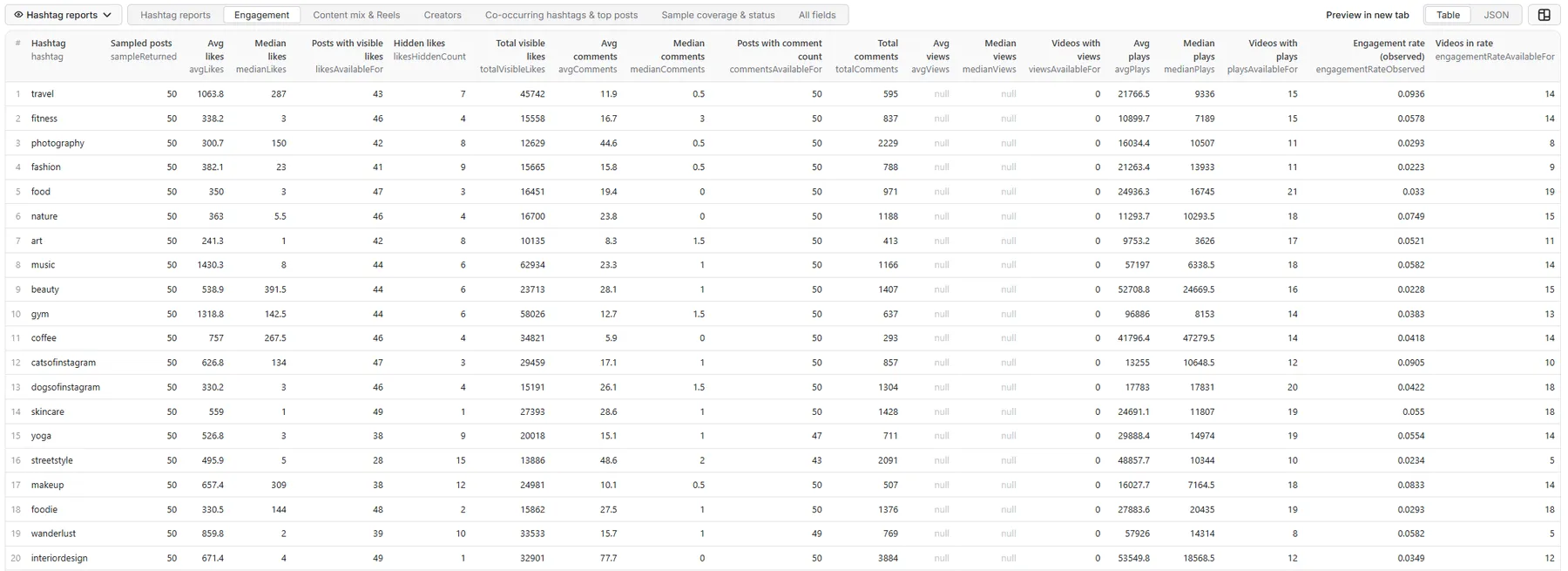
The samples below are real rows from runs with sampleSizePerHashtag: 50 on October 16, 2026. Nested arrays are shortened to their first entries.
Engagement table view: 20 hashtags in one run
Comparing hashtags
The same 20-hashtag run, sorted by observed engagement rate. Medians far below averages show where a few viral posts carry a hashtag: #fitness averages 338.2 likes but its median post has 3.
| Hashtag | Avg likes | Median likes | Hidden likes | Avg plays | Median plays | Engagement rate (videos) |
|---|---|---|---|---|---|---|
| #travel | 1,063.8 | 287 | 7 | 21,766.5 | 9,336 | 9.4% (14) |
| #catsofinstagram | 626.8 | 134 | 3 | 13,255 | 10,648.5 | 9.0% (10) |
| #makeup | 657.4 | 309 | 12 | 16,027.7 | 7,164.5 | 8.3% (14) |
| #nature | 363 | 5.5 | 4 | 11,293.7 | 10,293.5 | 7.5% (15) |
| #music | 1,430.3 | 8 | 6 | 57,197 | 6,338.5 | 5.8% (14) |
| #wanderlust | 859.8 | 2 | 10 | 57,926 | 14,314 | 5.8% (5) |
| #fitness | 338.2 | 3 | 4 | 10,899.7 | 7,189 | 5.8% (14) |
| #yoga | 526.8 | 3 | 9 | 29,888.4 | 14,974 | 5.5% (14) |
| #skincare | 559 | 1 | 1 | 24,691.1 | 11,807 | 5.5% (18) |
| #art | 241.3 | 1 | 8 | 9,753.2 | 3,626 | 5.2% (11) |
| #dogsofinstagram | 330.2 | 3 | 4 | 17,783 | 17,831 | 4.2% (18) |
| #coffee | 757 | 267.5 | 4 | 41,796.4 | 47,279.5 | 4.2% (14) |
| #gym | 1,318.8 | 142.5 | 6 | 96,886 | 8,153 | 3.8% (13) |
| #interiordesign | 671.4 | 4 | 1 | 53,549.8 | 18,568.5 | 3.5% (12) |
| #food | 350 | 3 | 3 | 24,936.3 | 16,745 | 3.3% (19) |
| #photography | 300.7 | 150 | 8 | 16,034.4 | 10,507 | 2.9% (8) |
| #foodie | 330.5 | 144 | 2 | 27,883.6 | 20,435 | 2.9% (18) |
| #streetstyle | 495.9 | 5 | 15 | 48,857.7 | 10,344 | 2.3% (5) |
| #beauty | 538.9 | 391.5 | 6 | 52,708.8 | 24,669.5 | 2.3% (15) |
| #fashion | 382.1 | 23 | 9 | 21,263.4 | 13,933 | 2.2% (9) |
Engagement rate = (likes + comments) ÷ plays, over the Reels and videos in the bracketed count.
Full record: #fitness (a separate one-hashtag run with every section on)
Hashtag reports tab
Engagement tab: hidden likes left out of the math
Seven of the 50 sampled #travel posts hide their likes, so the like metrics use the other 43 (likesAvailableFor). No sampled post exposed a view count, so views are null rather than 0.
Content mix & Reels tab
Creators tab
Co-occurring hashtags & top posts tab
Sample coverage & status tab
recentSamplePostsPerDay extrapolates from the time span the Recent sample covers. On a very busy hashtag 25 Recent posts can cover only a few minutes (recentSampleObservedHours: 0.05 here), so treat it as an order of magnitude; larger samples give a steadier figure.
Coverage status
| Value | Meaning |
|---|---|
FULL_REQUESTED_SAMPLE | The requested sample size was reached |
LOW_RESULT_HASHTAG | Instagram returned fewer public posts than requested |
BOUNDED_SAMPLE | The minPostDate window ended the sample early |
PARTIAL_SAMPLE | An upstream error cut the sample short. The report is delivered free |
NO_RESULTS | No public posts were found |
Status values
| Status | Meaning | Charged |
|---|---|---|
SUCCESS | Report built | Yes, one charge per started 100 sampled posts |
PARTIAL_SAMPLE | Report built from an interrupted sample | No |
NO_RESULTS | The hashtag has no public posts (in the date window) | No |
INVALID_HASHTAG | Not a valid hashtag | No |
HASHTAG_UNAVAILABLE | Instagram has no public hashtag by that name (hidden or restricted) | No |
RATE_LIMITED / BLOCKED / PROVIDER_ERROR | Temporary upstream problem, safe to retry | No |
ANALYTICS_ERROR | The sample could not be analyzed | No |
One failed hashtag never fails the run.
Run summary and retry input
The key-value store record RUN_SUMMARY holds the run totals (hashtags requested, succeeded, failed, reports saved, sampled posts processed, Top/Recent duplicates removed), metric availability rates, and a comparison of the hashtags in the run (largest hashtag, highest average and median likes, highest Reel share, most diverse creators, highest observed engagement rate). Hashtags that failed for a temporary reason are saved in RETRY_INPUT, ready to re-run.
Use it from code (API)
The actor works with the Apify API and the official clients. Get your API token in Apify Console under Settings → API & Integrations. Results are the same rows as in the dataset tabs above.
JavaScript (npm install apify-client):
Python (pip install apify-client):
HTTP (one call that runs the actor and returns its rows; suits small runs that finish within the API's 5-minute synchronous limit):
For larger runs, start the actor asynchronously (POST /v2/acts/coregent~instagram-hashtag-analytics/runs) and read the dataset when it finishes, or use the client libraries above, which wait for you. The run's RUN_SUMMARY record (key-value store) holds the cross-hashtag comparison.
Pricing
Pay per event: completed hashtag reports are charged once per started 100 sampled posts. Deeper samples need more upstream work, so a 100-post report is one charge, a 250-post report three and a 500-post report five. A hashtag with fewer posts than requested is charged for the posts actually sampled. Sampled posts are never charged individually, and free rows (see the status table) cost nothing. The run only starts a hashtag your spending limit can cover at its full sample size, and stops cleanly when the limit is reached. The rate can differ by Apify plan; see the Pricing tab for the current rate on yours. This README deliberately doesn't quote figures.
Limitations
- Metrics describe the sample, not every post that ever used the hashtag. Engagement counts also change over time.
- Instagram decides what its Top and Recent tabs show. Small, new or restricted hashtags may return fewer posts than requested.
availablePostsCountis Instagram's displayed count where it is exposed, not an independently verified total.- Some sampled posts may show no creator username when Instagram's fallback feed only names the creator's numeric id. Creator metrics still count them by id, and
creatorsAvailableForshows the coverage. - The actor reports what Instagram shows and does not invent scores. There is no proprietary "difficulty" or trend prediction.
Related actors
- Instagram Hashtag Scraper: the raw posts and Reels behind each hashtag
- Instagram Search Scraper: discover hashtags to analyze
- Instagram Profile Scraper: deep profiles of the top creators you find
Legal and privacy
This is an unofficial product and is not affiliated with Instagram or Meta. It processes public content only, and analytics are based on available public samples, not guaranteed platform-wide totals. Public creator data can still be personal data: you are responsible for lawful use of the results, including GDPR/CCPA where they apply.
Local development
For an offline smoke test that spends no upstream balance, point TIKHUB_BASE_URL at a local mock server and set TIKHUB_API_KEY=fake.


