

Instagram Search Scraper
Pricing
from $1.25 / 1,000 search results
Instagram Search Scraper
Search Instagram by keyword for profiles, hashtags, places and popular Reels. Export ranked results with profile metrics, hashtag popularity, location details, engagement data and the source query as clean JSON, CSV or Excel.
Pricing
from $1.25 / 1,000 search results
Rating
0.0
(0)
Developer

Delowar Munna
Maintained by CommunityActor stats
0
Bookmarked
15
Total users
7
Monthly active users
7 days ago
Last modified
Categories
Share
Search Instagram by keyword and discover matching profiles, hashtags, places and popular Reels. Export ranked search results with profile metrics, hashtag popularity, location details, engagement data and the source query as clean JSON, CSV or Excel.
What this actor does
Instagram Search Scraper takes one or more keywords (fitness coach, canberra cafe, nike, ai tools, travel) and returns one row per search result:
- 🔎 Four search types:
PROFILES,HASHTAGS,PLACESandPOPULAR_REELS, one or several per run - 🧭 Query lineage on every row: the
query, itsqueryIndex, thesearchTypeand the result'srank - 🏅 Instagram's own rank, preserved: rows are never re-ranked, and filtered-out results leave their rank gap in place
- 👤 Profiles: username, name, URL, picture, verified and private flags. Follower counts, bio and business contact come with full details on (see What each result contains)
- #️⃣ Hashtags: name, URL, post count and related hashtags from the same search
- 📍 Places: name, URL, address and coordinates. Place detail lookups (postcode, phone, website, opening hours) are temporarily unavailable
- 🎬 Popular Reels: URL, caption, creator, likes, comments, plays, duration, video, thumbnail and audio, hashtags, mentions, tagged users, collaborators and location
- 🎯 Profile filters: minimum/maximum followers and verified-only. Filtered-out profiles are never charged
- 🚫 No login, no cookies: you never provide an Instagram account, session ID or Meta token
It is a discovery actor: keyword in, ranked entities out. For the full data behind a result, pass it to a dedicated extractor (see Next steps).
What each result contains
Instagram's search returns identity fields for profiles and places. The rest needs one lookup per result, which you turn on with Full profile & place details (fetchFullDetails). Place lookups are temporarily unavailable (see Limitations); profile lookups work. It's off by default, so plain searches stay fast and cheap. Hashtags and Reels arrive complete from search and never need it.
| Result type | Always returned (from search) | Only with full details on | Never available from search |
|---|---|---|---|
| Profile | id, username, fullName, profileUrl, profilePicUrl, isVerified, isPrivate | followersCount, followingCount, postsCount, bio, isBusinessAccount, businessCategory, externalUrl, businessEmail, businessPhone, city, address, latitude, longitude; recentPosts with Include recent posts (when available) | — |
| Place | id, name, url, address, latitude, longitude | Temporarily unavailable: city, postcode, category, phone, website, priceRange, openingHours, isOpen stay null until the upstream lookup is restored | subtitle, slug |
| Hashtag | id, name, url, postsCount, related hashtags | — | postsPerDay, difficulty |
| Reel | url, shortCode, caption, timestamp, creator, likesCount, commentsCount, sharesCount, videoPlayCount, durationSeconds, thumbnail, video and audio URLs, music, hashtags, mentions, taggedUsers, coauthors, location (when tagged) | — | videoViewCount (Reel search reports plays, not views) |
Fields that aren't available for a row are null, never guessed. Every row keeps the same keys, so CSV and Excel columns stay stable. In the Console output, the Profiles tab shows the search fields and the Profile details tab shows the looked-up ones.
How it works
- Plan. Queries are cleaned (whitespace, Unicode, case-insensitive duplicates) and every query is paired with every selected search type. Each query × type pair is one search operation.
- Search. Each operation reads Instagram's search results in order, page by page where the search type supports pages, until it reaches your limit or the end of the results. Pages of one operation are fetched one after another; operations run in parallel.
- Filter and deduplicate. Within an operation the same entity is returned once. Profile filters are applied before a row is saved. The same entity can appear under different queries or search types, because that's a separate search.
- Optional details. With full details on, each profile or place result is looked up for its complete public profile or place page. A profile found by several queries is looked up once.
- Export. One row per result. A search that returns nothing or fails gets one free status row, so every query × type can be matched to an output.
FAQ
What can I search? Any keyword or phrase: brands, niches, places, topics, product names. Searches run against Instagram's public search for profiles, hashtags, places and Reels.
Which search types are supported? PROFILES (creators, brands, businesses), HASHTAGS, PLACES (locations and venues) and POPULAR_REELS.
Do I need an Instagram login or cookies? No. You don't provide any login, password, cookies, session IDs or Meta token. The actor only reads public search results.
Can I search several keywords at once? Yes. Up to 100 queries per run. Duplicates are removed case-insensitively (Nike and nike are one search).
Can I select several search types? Yes. Each query is searched once per selected type, and every row says which searchType it came from.
What does the result limit apply to? maxResultsPerQuery is the maximum number of results per query and per search type. Two queries × three types × 100 = up to 600 rows. Instagram's search can return fewer than you ask for: places typically stop at a few dozen per query, and profile and hashtag searches thin out after the first few hundred.
Are result ranks preserved? Yes. rank starts at 1 and is the result's position in Instagram's own result list for that query and type. The actor never re-sorts results. If a filter removes rank 2, the next row is still rank 3.
What profile data is returned? By default: id, username, fullName, profileUrl, profilePicUrl, isVerified and isPrivate. That's everything Instagram's search returns for a profile. With Full profile & place details on, you also get exact followersCount, followingCount, postsCount, bio, isBusinessAccount, businessCategory, externalUrl and the public business email, phone, city and address. With Include recent posts on, up to 3 recent posts are added when the lookup returns them. Not every lookup does; an empty recentPosts list means none came back.
What hashtag data is returned? name, url, id and postsCount, plus related hashtags: the other hashtags Instagram returned for the same keyword, grouped as relatedFrequent (1M+ posts), relatedAverage (50K–1M) and relatedRare (under 50K). postsPerDay and difficulty are always null, because Instagram's search doesn't expose them. For hashtag scoring, see Instagram Hashtag Opportunity Analyzer.
What place data is returned? id, name, url, address, latitude and longitude from search. The detail lookup that adds city, postcode, category, phone, website, priceRange, openingHours and isOpen is temporarily unavailable: those fields stay null, and you are not charged for place details while it is down. Turning Include place details off returns only ID, name and URL.
What popular Reel data is returned? url, shortCode, caption, timestamp, creator, likesCount (null with likesHidden: true when the creator hides likes — never a fake zero), commentsCount, sharesCount, videoPlayCount (plays), durationSeconds, hashtags, mentions, taggedUsers, coauthors, music, location and the thumbnail, video and audio URLs. videoViewCount is usually null, because Reel search reports plays rather than views. location is set only when the creator tagged one.
Can I filter profiles by followers? Yes. Set minFollowers and/or maxFollowers, and verifiedOnly if needed. Instagram's profile search carries no follower counts, so while a follower filter is set each profile is looked up to check it. A kept profile is charged the details event and returns its full details (see Pricing). A profile the filter drops is not charged. A profile whose count can't be determined is left out while a follower filter is set.
Why can results differ from what I see in the Instagram app? Instagram personalizes search for logged-in users and varies results by time, region and language. This actor searches anonymously, so results show what Instagram returns to a logged-out visitor at the time of the run. Treat rank as a snapshot, not a permanent position.
Does it return private profiles? A private account can appear in profile search results with isPrivate: true and its public header fields. The actor never accesses private content.
Are media URLs permanent? No. Instagram CDN links are signed and expire. Download thumbnails, videos or audio soon after the run, or set includePopularReelMedia: false if you don't need them.
How is pricing calculated? Per delivered result, plus an optional details charge. See Pricing.
Can I use the API, MCP or schedules? Yes. Call the actor with the Apify API or any Apify client library, give AI agents access through Apify's MCP server, or schedule it in Apify Console to track the same searches over time. The API tab has ready-made snippets.
Next steps: full details for a result
Search finds entities. Dedicated Coregent actors extract them in depth:
| Search result | Feed …Url into | For |
|---|---|---|
profile.profileUrl | Instagram Profile Scraper | Full profile metadata and business contact |
profile.profileUrl | Instagram Posts Scraper | The profile's posts and Reels |
hashtag.name | Instagram Hashtag Scraper | Posts under the hashtag |
reel.url | Instagram Reels Scraper | Full Reel details |
reel.url | Instagram Comments Scraper | The Reel's comments |
Input
| Field | Type | Default | Description |
|---|---|---|---|
queries | string[] | ["nike"] | Keywords to search, up to 100 per run |
searchTypes | string[] | ["PROFILES"] | Any of PROFILES, HASHTAGS, PLACES, POPULAR_REELS |
maxResultsPerQuery | int | 50 | Max results per query and search type (1–250) |
minFollowers | int | 0 | Profiles: minimum followers (0 = no minimum) |
maxFollowers | int | — | Profiles: maximum followers (empty = no maximum) |
verifiedOnly | bool | false | Profiles: verified accounts only |
includeProfileBusinessDetails | bool | true | Business fields on looked-up profiles (full details, recent posts or a follower filter) |
fetchFullDetails | bool | false | Look up each profile and place for the fields search doesn't return (see What each result contains). Charged per result, see Pricing |
includeRecentPosts | bool | false | Up to 3 recent posts per profile when available (needs a profile lookup) |
includeRelatedHashtags | bool | true | Related hashtags from the same search |
includePlaceDetails | bool | true | Category, address and coordinates for places (plus phone, website, hours with full details) |
includePopularReelMedia | bool | true | Thumbnail, video and audio URLs on Reel results |
proxyConfiguration | object | Apify Proxy on | Proxy settings, see Proxy policy |
maxConcurrency | int | 5 | Search operations run in parallel |
maxRetries | int | 3 | Retries per search on rate limits, blocks or temporary errors |
debugMode | bool | false | Verbose logging |
Invalid input is reported, not guessed at: empty or punctuation-only queries become free INVALID_QUERY rows, and unknown search types become free UNSUPPORTED_SEARCH_TYPE rows. A result limit outside 1–250, a negative follower filter or minFollowers above maxFollowers stops the run at startup with a clear message. A # is never required for hashtag search: #travel and travel are the same search.
Example 1: Profile search
Example 2: Hashtag discovery
Example 3: Place search
Returns each place's name, URL, address and coordinates. Place detail lookups are temporarily unavailable, so fetchFullDetails adds nothing for places right now.
Example 4: Popular Reels
Example 5: Several keywords and types
Maximum potential rows: 2 queries × 3 types × 100 = 600.
Example 6: Qualified creators only
Example 7: Everything for one keyword (used for the screenshot and samples below)
Up to 4 types × 10 = 40 rows, plus a details charge for each of the 10 profiles.
Output
One row per search result. Every row, result or status, has the same keys, so CSV and Excel exports keep stable columns. Exactly one of profile, hashtag, place or reel is filled; the others are null.
The dataset has seven tabs: All results, Profiles, Profile details, Hashtags, Places, Popular Reels and Status & errors.
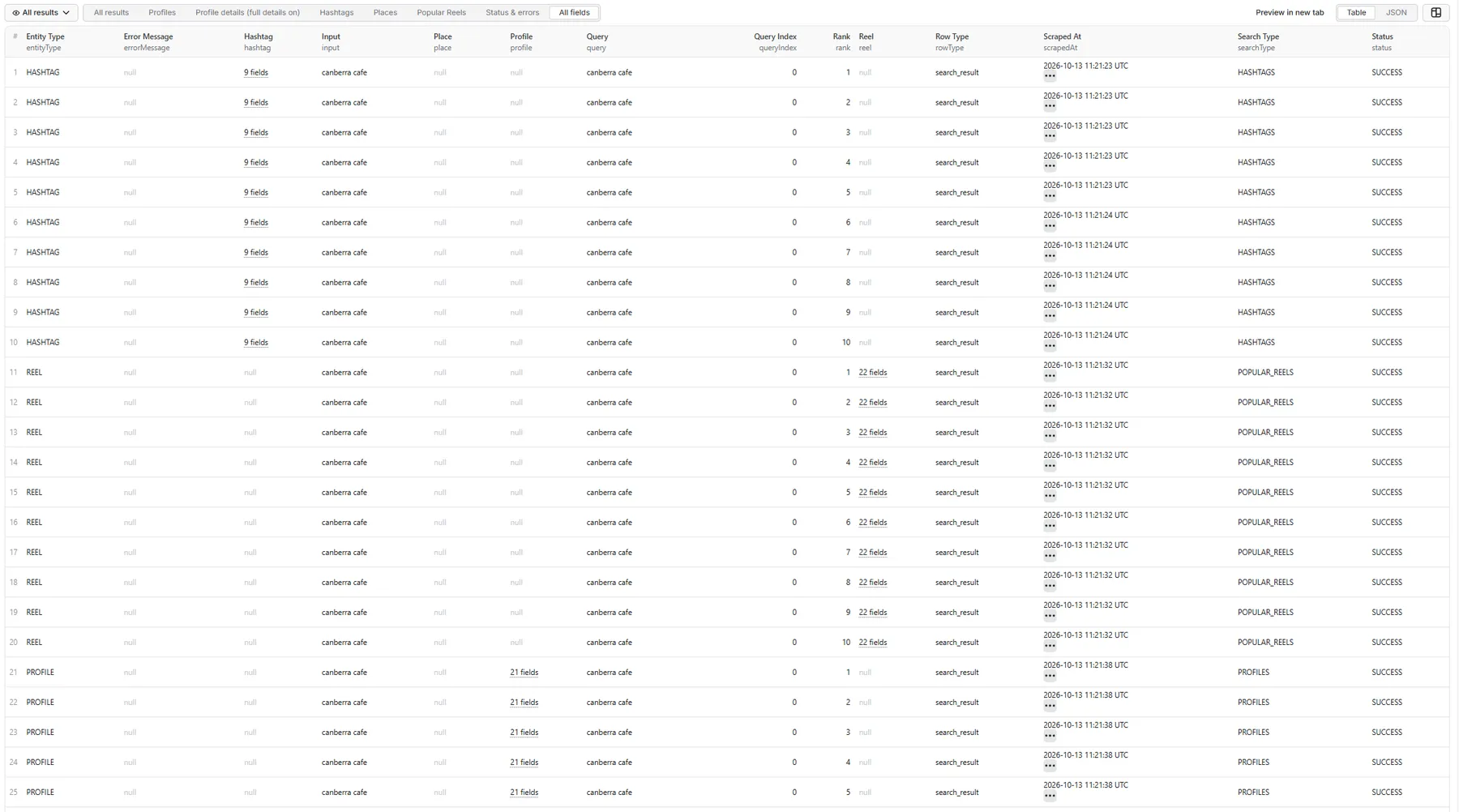
| Field | Description |
|---|---|
rowType | search_result, or error for a status row |
status | SUCCESS on results; the outcome code on status rows |
errorMessage | Why a status row was written |
entityType | PROFILE, HASHTAG, PLACE or REEL |
query / queryIndex | The query as searched, and its position in your (deduplicated) query list |
searchType | The search type this row came from |
rank | Instagram's rank for this result, starting at 1 |
profile / hashtag / place / reel | The result's data (see the FAQ above for each type's fields) |
input | The query as you entered it |
scrapedAt | ISO timestamp |
The records below come from a real run with Example 7 (40 rows: 10 per search type). Long Instagram CDN URLs are shortened with ….
Full record: a profile with full details
All results tab: one row per result, any type
Profiles tab: the search fields
Profile details tab: the same profile, looked up
Hashtags tab: a hashtag with its related hashtags (3 of 10 shown)
Places tab: a place
Search fields only: the detail fields stay null while place lookups are temporarily unavailable.
Popular Reels tab: the Reel (caption shortened)
Full Reel record: media, people, music and location
Status & errors tab: a search with no results
From a separate run for skincare: Instagram returned no places for it, so the search wrote one free status row.
Status rows
| Status | Meaning | Charged? |
|---|---|---|
NO_RESULTS | Instagram returned nothing for this query and type, or the filters removed every result | No |
INVALID_QUERY | Empty, blank, punctuation-only or over-long query | No |
UNSUPPORTED_SEARCH_TYPE | A search type this actor doesn't support | No |
RATE_LIMITED / BLOCKED / TEMPORARY_INSTAGRAM_ERROR / PROVIDER_ERROR | The search couldn't be completed after retries | No |
PARTIAL_RESULT | Some results were returned before the search stopped early | Results returned are charged; the status row is free |
Searches that fail with a retryable status are saved to the key-value store record RETRY_INPUT, ready to run again. A run summary with counts per search type is saved to RUN_SUMMARY.
Pricing
This actor uses pay-per-event pricing. You pay only for what you get:
- Search result: charged once per delivered unique result (a profile, hashtag, place or Reel).
- Result details: charged on top for a profile or place result that the actor looked up for full details. This happens only when you turn on Full profile & place details or Include recent posts, or when a follower filter needs an exact count that the search result didn't include.
Never charged: searches and pagination, retries, duplicates, filtered-out profiles, no-result and error status rows, and the run summary. A run with no results costs nothing in result events.
Live rates are on the actor's Pricing tab in Apify Console, and they can differ by Apify plan. This README deliberately doesn't quote figures, so it can't drift out of date. Your run stops gracefully when it reaches the spending limit you set for it.
Limitations
- Snapshot, not personalized search. Results reflect anonymous search at run time and can differ from what a logged-in user sees.
- Depth depends on Instagram.
maxResultsPerQueryis a maximum, not a guarantee. Place search in particular returns a short list per query. - Search fields are identity-only for profiles. Instagram's search returns no follower counts, bio or business contact for profiles, and no city, category, phone, website or hours for places. These need full details on. Reel search reports plays but not views.
- Place details are temporarily unavailable. The lookup behind a place's postcode, phone, website, category and opening hours is currently failing upstream. Place rows still return name, URL, address and coordinates from search and are charged as search results only; no details charge applies. The actor stops trying after two failed place lookups in a run, so runs aren't slowed down, and resumes automatically once the lookup works again.
- No audio search and no generic post search. Instagram has no stable public surface for these.
- Media URLs expire. Instagram signs its CDN links.
- Lookups that return nothing billable are capped per run. Checking profiles that your follower filters then drop, and searches that find nothing, use upstream requests you aren't charged for. A run may make up to 300 of those, plus one for every request that did produce a charged result. Past that, profiles that still need a follower check are left out (logged, and counted in
RUN_SUMMARY.detailLookups.budgetStops) and searches not yet started end with a free status row. Normal runs never get near it; a very narrow follower range over many queries can.
🚦 Proxy policy
Use Apify Datacenter proxy or no proxy for normal runs. Searches are served through a managed source, so this actor sends very little traffic through the proxy.
Apify Residential proxy is not supported. The actor will fail at startup if apifyProxyGroups includes RESIDENTIAL. Reason: in pay-per-event actors, residential bandwidth is billed to the developer, not the run user, so a single bandwidth-heavy run could exceed the per-result event revenue.
If you genuinely need residential routing, supply your own residential provider via the proxy editor's Custom proxy URLs field. That traffic goes through your provider, not Apify, and is unaffected:
Compliance and privacy
- This is an unofficial tool. It is not affiliated with, endorsed by or sponsored by Instagram or Meta.
- It processes public search results only and never accesses private content, collects credentials or harvests cookies.
- Public profile and business data can still be personal data. You are responsible for processing it lawfully (for example under the GDPR or the Australian Privacy Act) and in line with Instagram's terms.
- Search rank is a snapshot of anonymous search at run time.
Support
Found a bug or need a field? Open an issue on the actor's Issues tab in Apify Console.


