
Instagram Hashtag Scraper
Pricing
from $1.00 / 1,000 hashtag results
Instagram Hashtag Scraper
Scrape public Instagram posts and Reels for one or more hashtags. Extract captions, creators, likes, comments, Reel plays/views, media URLs, hashtags, mentions, tagged users, locations and audio metadata. Export clean JSON, CSV or Excel.
Pricing
from $1.00 / 1,000 hashtag results
Rating
0.0
(0)
Developer

Delowar Munna
Maintained by CommunityActor stats
0
Bookmarked
10
Total users
5
Monthly active users
8 days ago
Last modified
Categories
Share
Scrape public Instagram posts and Reels for one or more hashtags. Extract captions, creators, likes, comments, Reel plays/views, media URLs, hashtags, mentions, tagged users, locations and audio metadata. Export clean JSON, CSV or Excel.
What this actor does
Instagram Hashtag Scraper takes hashtags (fitness, #travel, or a hashtag URL) and returns one clean row per post or Reel per hashtag:
- 🏷️ Query lineage: every row keeps the hashtag it came from (
queryHashtag), its position in your list (queryIndex) and its position in Instagram's feed (rank) - 🎬 Posts and Reels in one schema:
contentTypeisPOSTorREEL, andmediaTypeisIMAGE,VIDEOorCAROUSEL - 📝 Text: caption, hashtags and mentions (parsed, without
#/@) - 📊 Engagement as real numbers: likes, comments, shares where public, Reel plays and views kept separate. No "1.2K" strings
- 🙈 Hidden likes done right:
likesCount: nullwithlikesHidden: true. Never a fake zero - 👤 Creators: username, full name, verified flag and profile URL, plus collaborators and tagged users
- 🎵 Reel audio: track title, artist and whether it's original audio, as Instagram labels it
- 🖼️ Media: thumbnail, image/video URLs and every carousel slide nested in
carouselChildren, at no extra charge - 📍 Location when the post is tagged with one
- 🔎 Filters: date window, minimum likes / comments / views, posts-only or Reels-only. Filtered-out rows are never charged
It is a hashtag discovery actor. For a creator's full profile use Instagram Profile Scraper; for a post's comments use Instagram Comments Scraper.
How it works
- Normalize hashtags.
#Fitness,fitnessandhttps://www.instagram.com/explore/tags/fitness/are the same hashtag. Duplicates are removed (case doesn't matter), and invalid entries (spaces, punctuation) get a freeINVALID_HASHTAGrow so every input is accounted for. - Read Instagram's hashtag feed. The Top tab by default, the Recent tab if you choose it, or the Reels tab when you only want Reels. Pages of one hashtag are read in order; several hashtags run in parallel.
- Normalize every item into the same row: content type, engagement, creator, media, audio, location and lineage.
- Filter and deduplicate. Date, content-type and engagement filters run before anything is saved. Pagination overlap is removed per hashtag. Nothing removed is charged.
- Stop safely. At your per-hashtag limit, the end of the feed, a repeated cursor, three pages with nothing new, the date boundary (Recent feed), or your spending limit.
FAQ
Which hashtag formats work? fitness, #fitness, #Fitness and https://www.instagram.com/explore/tags/fitness/. One hashtag per line. Non-English (東京, café), numeric (2026) and underscore (small_business) hashtags all work.
Do I need an Instagram login or cookies? No. There's no login, cookie, session ID or Meta API token, and you never hand over account access.
Are both posts and Reels included? Yes, in one schema. Use Content type to keep only feed posts or only Reels.
Can I scrape multiple hashtags? Yes, up to 100 per run. Each hashtag runs independently, and one failing hashtag never fails the run.
How many results can I get per hashtag? Set Max results per hashtag (up to 5,000). Instagram only exposes a limited, rolling window of each hashtag, so popular hashtags can stop before your limit and small ones may have only a handful of posts. This actor doesn't promise complete historical coverage of a hashtag.
Does it return top or recent posts? Your choice, using Instagram's own tabs. Top ranks by engagement and Recent shows newest first. Default reads Top, which is mostly Reels; with Content type: Reels the posts are filtered out for free. rank is the position in the feed you chose.
Are likes and comments included? Yes, as exact integers. Likes the creator has hidden come back as null with likesHidden: true.
Are Reel views/plays included? Yes, when Instagram shows them. videoPlayCount and videoViewCount are separate metrics and are never merged.
Are creators included? Yes: username, full name, verified flag, profile URL and Instagram ID. Collaborators (coauthors) and tagged users are included too. If Instagram's primary feed is unavailable for a hashtag, the actor continues on a backup feed whose items name the creator by ID only. Those rows have owner.username: null and are counted in the run summary.
Are media URLs included? Yes: a thumbnail, mediaUrls (image or video, one per carousel slide) and carouselChildren. Instagram's CDN links expire, so download media soon after the run if you need the files.
Are audio/music fields included? Yes, for Reels where Instagram shows them: track title, artist, audio ID and isOriginalAudio. There's no external music recognition.
Can I filter by date? Yes: Only posts newer than / Only posts older than take an ISO date (2026-09-01) or a period (7 days). On the Recent feed, paging stops once older posts are reached. The Top feed isn't chronological, so there the date filter runs on what was fetched, and coverage of a date range isn't guaranteed.
Can I filter by engagement? Yes: minimum likes, comments and views. Views apply to Reels and videos only, since photos have no view count. Posts with hidden likes can't be verified and don't pass a likes threshold.
Can the same post appear for multiple hashtags? Yes, by design. A post tagged #fitness and #gym is returned once for each hashtag you asked for, so each row keeps its discovery attribution. Within one hashtag every post appears once.
Why might I get fewer results than expected? Instagram limits how far back each hashtag goes, hides some hashtags entirely (HASHTAG_UNAVAILABLE), removes posts, and your filters may exclude much of what's there. A hashtag that returns nothing gets a free NO_RESULTS row that says why.
How does pricing work? See Pricing: you pay per returned post/Reel per hashtag, and nothing else.
Can I schedule it, use the API, or connect it to AI agents (MCP)? Yes. Schedule runs in Apify Console (for example a daily campaign-hashtag check), call it through the Apify API or client libraries (code examples), connect it to Make, Zapier or n8n, or expose it to AI agents through Apify's MCP server.
Input
| Field | Default | Description |
|---|---|---|
hashtags | ["fitness"] | Hashtags with or without #, or hashtag URLs. Up to 100. |
maxResultsPerHashtag | 100 | Max unique posts/Reels saved per hashtag (1–5,000). |
contentTypes | ["ALL"] | ALL, POSTS (photos, videos, carousels) or REELS. |
sort | DEFAULT | DEFAULT, TOP or RECENT (Instagram's own hashtag tabs). |
postsNewerThan / postsOlderThan | empty | ISO date or period such as 24 hours, 7 days, 30 days. |
minLikes / minComments / minViews | 0 (off) | Engagement thresholds. Views apply to Reels and videos only. |
includeMediaUrls | true | Thumbnail, media and carousel-slide URLs. |
includeOwnerDetails | true | Creator full name and verified flag. |
includeAudio | true | Reel audio metadata. |
includeLocation | true | Tagged location. |
maxConcurrency | 5 | Hashtags processed in parallel (1–10). |
debugMode | false | Verbose logging. |
Example 1: Minimal
Example 2: Several hashtags
Example 3: Reels only, with audio
Example 4: The last 30 days, newest first
Example 5: High-engagement posts only
Example 6: Local discovery
Output
One row per post/Reel per hashtag. Every row, results and status rows alike, has the same keys, so CSV and Excel exports keep stable columns. Unavailable values are null. The dataset has five tabs: Posts & Reels, Engagement, Creators, people & location, Media & audio, and Status & errors.
Posts & Reels table view
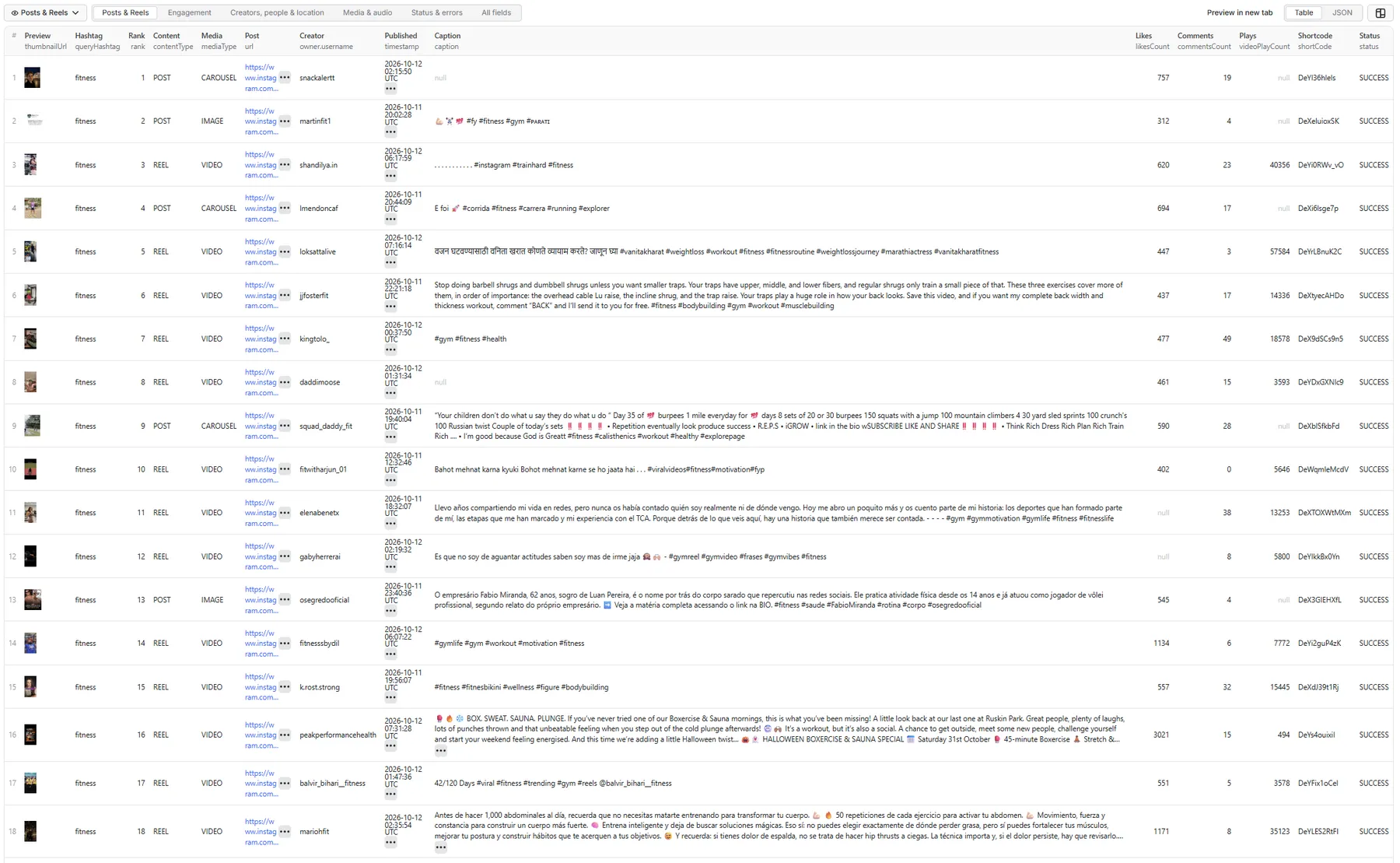
Full record: a Reel with licensed music
Real records from a #fitness run (October 2026). Instagram CDN links are shortened here with …; in your dataset they are full signed URLs that expire after a few days.
Posts & Reels tab: an image post
Engagement tab: a Reel with hidden likes
Hidden likes come back as likesCount: null with likesHidden: true, never as zero. Reel plays (videoPlayCount) and views (videoViewCount) are kept apart; the hashtag feed often reports plays only.
Creators, people & location tab: a collaboration Reel
Media & audio tab: a carousel
Each slide is nested in carouselChildren, and mediaUrls has one entry per slide. A carousel is one result, whatever its slide count.
Status & errors tab: a hashtag with no matching posts
Illustrative: status rows appear only when a hashtag has a problem, and the run above had none. The remaining keys are present and null.
Status values
| Status | Meaning | Charged? |
|---|---|---|
SUCCESS | A post or Reel row | Yes |
NO_RESULTS | The hashtag had no public posts, or none matched your filters | No |
INVALID_HASHTAG | The input isn't a valid hashtag (spaces, punctuation, empty) | No |
HASHTAG_UNAVAILABLE | Instagram has no public hashtag by that name. It may be hidden or restricted | No |
PARTIAL_RESULT | The hashtag stopped early after returning some rows (reason in errorMessage), or a row is missing a core field | No |
RATE_LIMITED / BLOCKED / TEMPORARY_INSTAGRAM_ERROR / PROVIDER_ERROR | The hashtag couldn't be fetched this time | No |
Run summary and retry input
The key-value store record RUN_SUMMARY holds the run's totals: hashtags completed, partial and failed; results saved (posts vs Reels); duplicates skipped; rows filtered by date, content type and each engagement threshold; per-hashtag results and stop reasons; and field-availability rates (creator username, views, audio, location, media). Hashtags that failed for a temporary reason are saved to RETRY_INPUT, a ready-to-run input with just those hashtags.
Use it from code (API)
The actor works with the Apify API and the official clients. Get your API token in Apify Console under Settings → API & Integrations. Results are the same rows as in the dataset tabs above.
JavaScript (npm install apify-client):
Python (pip install apify-client):
HTTP (one call that runs the actor and returns its rows; suits small runs that finish within the API's 5-minute synchronous limit):
For larger runs, start the actor asynchronously (POST /v2/acts/coregent~instagram-hashtag-scraper/runs) and read the dataset when it finishes, or use the client libraries above, which wait for you.
Pricing
Pay per event, per returned post or Reel per hashtag. One carousel is one result, whatever its slide count. You aren't charged for hashtag lookups, pagination, retries, invalid or unavailable hashtags, duplicates, filtered-out posts, incomplete rows or status rows. There is no start fee. The per-result rate can differ by Apify plan; see the Pricing tab for the current rate on yours. This README deliberately doesn't quote figures.
The actor respects the spending limit you set for a run: when it's reached, the run stops cleanly and no further results are fetched.
Limitations
- Public content only. Private accounts, Stories and close-friends content are out of scope.
- No complete hashtag archive. Instagram exposes a limited, changing window of each hashtag. Ordering and availability can change between runs, and engagement counts keep changing after scraping.
- Some fields aren't always public. Hidden likes, Reel views (the hashtag feed mostly reports plays), shares, locations and some audio IDs come back as
nullwhen they aren't exposed reliably. Rows from the backup feed name the creator by ID only. - Media URLs expire. No media files are downloaded or stored.
- Filters have a scan limit. With filters on, a hashtag is scanned for up to 10× your limit (at least 300 posts). The run also stops paging that keeps returning nothing billable. Affected hashtags get a free
PARTIAL_RESULTrow that says so. - Not included: comments, likers, followers, full creator profiles, hashtag analytics or trend scores. These belong to separate actors.
Related actors
- Instagram Profile Scraper: full profiles for the creators you discover
- Instagram Posts Scraper: every post of a profile, or posts by URL
- Instagram Reels Scraper: a profile's Reels with plays and audio
- Instagram Comments Scraper: comments on the posts you find
- Instagram Creator Leads Scraper: creators by niche, as leads
Legal and privacy
This is an unofficial tool. It is not affiliated with, endorsed by or sponsored by Instagram or Meta. It processes only publicly accessible content and never accesses private accounts or interacts with any account. Public posts can contain personal data (names, faces, tagged people, locations). You are responsible for having a lawful basis for collecting and processing it (for example under GDPR or CCPA) and for complying with Instagram's terms in your use of the data.
Local development


