
Tiktok Contact Extractor
Pricing
from $2.00 / 1,000 creator profile processeds
Tiktok Contact Extractor
TikTok Contact Extractor finds public contact details from TikTok creators, including emails, phones, websites, Instagram, YouTube, and profile data. Use it for influencer outreach, lead generation, creator partnerships, and contact-ready CRM exports.
Pricing
from $2.00 / 1,000 creator profile processeds
Rating
0.0
(0)
Developer

Delowar Munna
Maintained by CommunityActor stats
0
Bookmarked
57
Total users
6
Monthly active users
2 months ago
Last modified
Categories
Share
Extract public emails, phones, websites, and outreach clues from TikTok creators with source attribution, confidence scoring, and contact-ready lead exports.
What does this actor do?
TikTok Contact Extractor is an Apify Actor that extracts publicly available contact details from TikTok creators, including:
- Emails — extracted from bios and linked websites
- Phone numbers — extracted from bios and linked websites when public
- Instagram, YouTube, X and Threads handles — from bios or linked pages, with clickable URLs
- External URLs — bio links, websites, contact pages
- Profile metadata — followers, verification status, display name, bio text
- Source attribution — where each contact clue was found (bio, website, contact page)
- Confidence scores — how trustworthy each contact value is
- Lead quality indicators — outreach readiness and lead scoring
This actor is designed as a contact discovery and lead-enrichment tool, not a general TikTok scraper. It helps answer:
- Which TikTok creators have public contact information?
- Which creators are contactable right now?
- Which contact details came from bio text versus linked websites?
- Which creator leads look most trustworthy and complete?
Why use this actor?
- Multi-source contact extraction — bio text, link-in-bio websites, and contact pages
- Clear source attribution — every contact field shows where it was found
- Confidence scoring — heuristic scores per email and phone based on source quality
- Lead qualification — contact readiness levels and lead quality scores
- CRM-ready flat output — one row per creator, easy to import anywhere
- Multiple input modes — direct profiles, keyword discovery, and hashtag discovery
- Deduplication — creators found from multiple sources are merged automatically
- Every row is contactable — creators with no email are filtered out, and where we can tell in advance they are skipped before you are charged
- Cost controls — per-source caps and a skip list that stops you paying twice for creators you already have
- Structured error handling — partial results with error details, not broken runs
Who this is for
| You are | You want |
|---|---|
| Influencer / creator marketing | A shortlist of creators you can actually email today, not a follower dump |
| Agency or brand partnerships | Contact details plus enough signal to decide who is worth an outreach slot |
| Lead generation | A CRM-ready export with your own row IDs already attached |
| Sales / BD research | Business-domain addresses and role mailboxes, told apart from personal gmail |
Quickstart
1. Enter a hashtag for the niche you want. 2. Click Start. 3. Export. Every creator you get has an email address.
That is the whole thing. Every extraction option is on by default and there is nothing to tune.
Choose your input path
All three can be combined in one run.
| Path | Use it when | Lookups per delivered email |
|---|---|---|
hashtags ⭐ | Start here. Contactable creators in a niche | ~1.2 |
keywords | A specific phrase, or a niche with no obvious tag | ~1.4 on a good term, ~6.4 on a broad one |
profiles / profileRecords | You already know exactly who you want | 1.0, and no discovery charge |
Hashtags are the cheapest way to get emails, and it is not close. TikTok returns each creator's bio during hashtag discovery, so creators with no email are skipped before we look them up — you are never charged for them. Keyword search does not return bios, so a creator who turns out to have no email has already cost a lookup.
Good hashtags: #ugccreator, #ugccommunity, #smallbusinesscheck,
#contentcreator, or whatever tag your niche actually uses.
If you use keywords, be specific. Measured on this actor's own benchmark, a niche term like "ugc creator" returns a 72% contact rate — the best of any input. A broad name-like term such as "swift" returns 13%, because it surfaces fan accounts rather than businesses. The term matters more than any setting.
Supplying your own profiles avoids the discovery charge entirely, but you have to know the names already — and a hand-built list measured a 41% contact rate against 66–72% for discovery. Search finds contactable people better than memory does.
Input
| Parameter | Type | Default | Description |
|---|---|---|---|
profiles | string[] | [] | TikTok profile URLs or @usernames |
profileRecords | object[] | [] | Profiles with your own row IDs — {"profile": "@creator", "externalId": "your-id"}. Every result carries the externalId back, so you can join to your CRM without matching on username. Works alongside profiles |
keywords | string[] | [] | Keywords to discover creators (e.g. "ugc creator skincare") |
hashtags | string[] | [] | Hashtags to discover creators from |
maxCreators | integer | 500 | Absolute maximum creator records for the whole run |
maxCreatorsPerSource | integer | 50 | Cap on creators from each keyword and each hashtag, so one broad term cannot consume the run. Applies per source, not in total. No unlimited setting |
searchRegion | string | "" | Biases keyword discovery towards creators ranking in one country's Google results. This is where Google searches from, not a verified creator location — TikTok does not publish creator location. Affects keywords only |
skipUsernames | string[] | [] | Creators you already have. Skipped before any lookup, so they cost nothing and are never charged. Paste usernames from a previous run to enrich only what is new |
emailDomainAllowlist | string[] | [] | Only keep emails on these domains (subdomains match). Empty = any domain |
emailDomainBlocklist | string[] | [] | Drop emails on these domains. Ignored when an allowlist is set |
minFollowers | integer | 0 | Minimum follower count filter |
maxFollowers | integer | 0 | Maximum follower count filter (0 = no limit) |
At least one of profiles, keywords, or hashtags is required.
Sample input 1: Keyword discovery
Find creators related to specific keywords. Every creator is returned with its contact fields, so filter the dataset by primaryEmail if you only want the contactable ones:
Sample input 2: Direct profile enrichment with hashtag discovery
Enrich a known list of profiles and discover more creators from hashtags:
Run limits
Published because you should be able to plan a run before you start it. Anything over a limit is ignored with a warning in the log — nothing is silently truncated.
| Input | Maximum per run |
|---|---|
profiles + profileRecords combined | 1,000 |
hashtags | 50 |
keywords | 50 |
| Creators per keyword or hashtag | 50 each (configurable, 1–500) |
Output
Each output row represents one creator with normalized contact data and source metadata. Results are available in four dataset views:
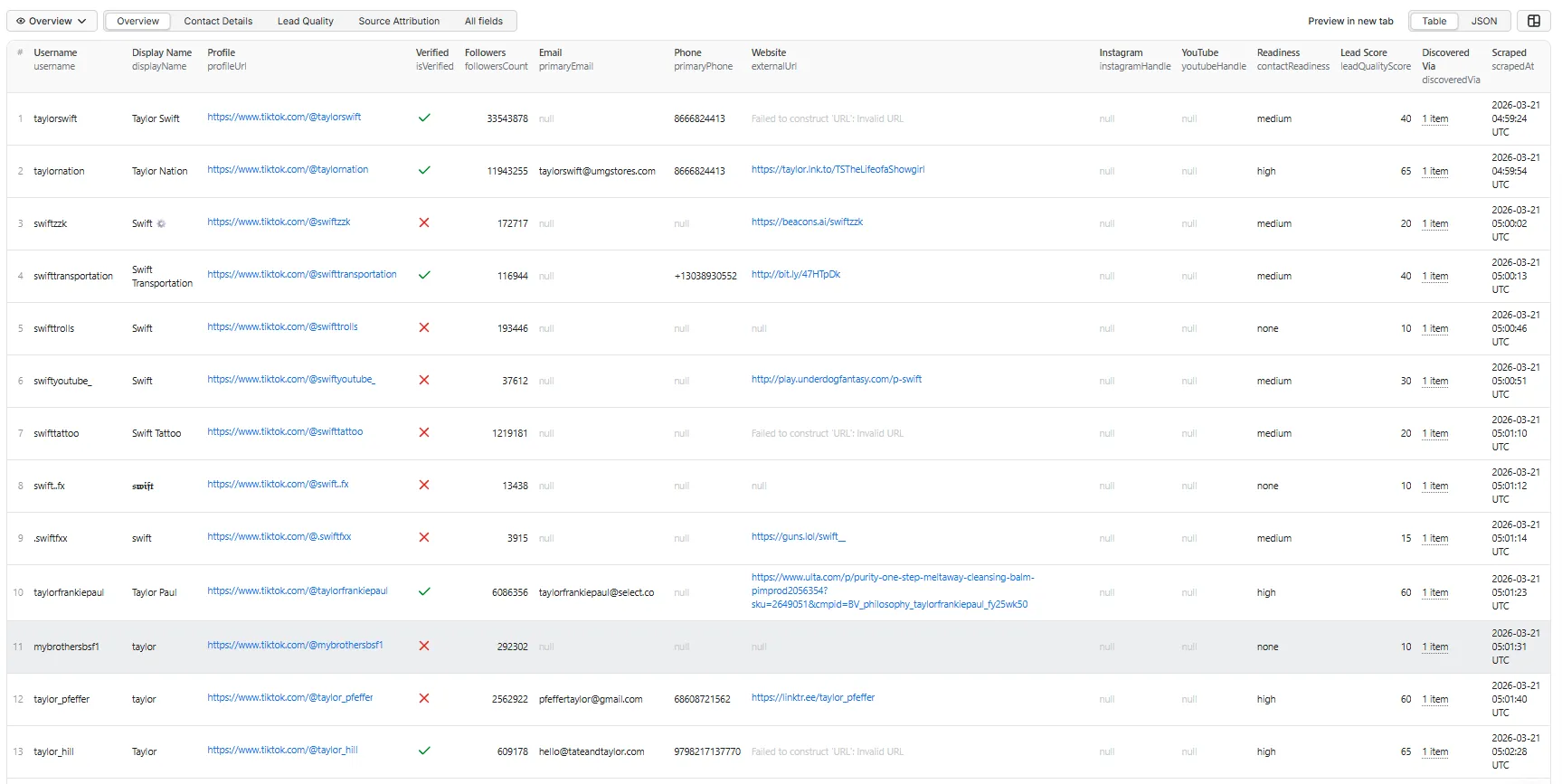
Overview tab
Key identity fields, primary contacts, lead score, and discovery source.
Contact Details tab
Full contact data including all emails, phones, handles, and links.
Lead Quality tab
Confidence scores, readiness levels, quality scores, and business signals.
Source Attribution tab
Where each contact was found, website visit status, and discovery lineage.
Full output (all fields)
Each record contains 47+ fields across identity, stats, contact, source attribution, confidence, lineage, and metadata:
Output fields
Creator identity fields
| Field | Description |
|---|---|
username | TikTok username |
profileUrl | Full profile URL |
userId | TikTok internal user ID (if available) |
displayName | Display name / nickname |
bio | Full bio text |
profilePictureUrl | Avatar URL |
isVerified | Verified badge status |
accountPrivate | Whether the account is private |
Public stats fields
| Field | Description |
|---|---|
followersCount | Follower count |
followingCount | Following count |
likesCount | Total likes/hearts received |
videosCount | Total videos posted |
Contact fields
| Field | Description |
|---|---|
primaryEmail | Best email found. A personal mailbox is preferred over a role account when both exist |
allEmails | All unique emails found across sources |
primaryPhone | Best phone number found |
allPhones | All unique phone numbers found |
externalUrl | Bio link URL |
externalDomain | Domain of bio link |
instagramHandle | Instagram username |
youtubeHandle | YouTube handle |
xHandle | X (Twitter) handle |
threadsHandle | Threads handle |
instagramProfileUrl | Clickable Instagram profile URL |
youtubeProfileUrl | Clickable YouTube profile URL |
xProfileUrl | Clickable X profile URL |
threadsProfileUrl | Clickable Threads profile URL |
tiktokBioLink | Raw bio link from TikTok profile |
contactPageUrl | Contact/about page URL from website |
contactFormUrl | URL of a page carrying a real contact form (a message box or an email field — search and newsletter forms do not count) |
emailSourceUrl | The exact page an email was found on. Empty when the email came from the bio |
otherPublicLinks | Other URLs found in bio or website |
Contact classification fields
Derived from the primary email at no extra cost. They exist so you can sort a lead list by usefulness in a spreadsheet without writing a formula.
| Field | Description |
|---|---|
emailDomain | Domain part of primaryEmail |
emailDomainClass | business / free / disposable / unknown |
emailIsRoleAccount | True for info@, booking@, press@ and similar shared mailboxes |
emailSyntaxValid | Syntax check only. Not mailbox verification — no mail server is contacted |
contactFound | True when at least one email or phone was delivered |
emailFound / phoneFound | Per-channel presence flags |
contactCount | Number of distinct contact channels found (email, phone, website, Instagram, YouTube, contact form) |
Source attribution fields
| Field | Description |
|---|---|
emailSource | Where the email was found: bio, website_homepage, bio_and_website |
phoneSource | Where the phone was found |
instagramSource | Where Instagram handle was found |
youtubeSource | Where YouTube handle was found |
contactSourceSummary | Human-readable summary of all contact sources |
bioContainsEmail | Whether bio text contained an email |
bioContainsPhone | Whether bio text contained a phone number |
websiteContainsEmail | Whether linked website contained an email |
websiteContainsPhone | Whether linked website contained a phone |
websiteVisited | Whether the bio link was visited |
websiteVisitStatus | success or error |
Confidence and quality fields
| Field | Description |
|---|---|
emailConfidence | Email confidence score (0.0–1.0) |
phoneConfidence | Phone confidence score (0.0–1.0) |
contactReadiness | high, medium, low, or none |
contactReadinessReason | Why this readiness level was assigned |
leadQualityScore | Lead quality score (0–100) |
leadQualityReason | Scoring breakdown |
isBusinessLikeProfile | Whether bio contains business/outreach keywords |
isLikelyCreatorLead | Whether creator has contacts + meaningful following |
Discovery lineage fields
| Field | Description |
|---|---|
discoveredVia | How this creator was found: profile_input, keyword, hashtag |
sourceProfiles | Which profile inputs led to this creator |
sourceKeywords | Which keyword searches led to this creator |
sourceHashtags | Which hashtag searches led to this creator |
discoveryCount | Number of input sources that found this creator |
externalId | Your own row ID, echoed back from profileRecords. Empty if you did not supply one |
inputIndex | Position of this creator in your input list |
resultStatus | Present and set to filtered_out on stub rows for creators your follower range excluded. Absent on normal rows |
filteredReason | Why a stub row was filtered out |
Run metadata fields
| Field | Description |
|---|---|
resultStatus | What happened for this creator — see below |
retryable | Whether a re-run could plausibly do better |
scrapedAt | ISO 8601 timestamp |
isPartial | Whether extraction was incomplete |
errorType | Error type if failed |
errorMessage | Error message if failed |
Result status values
One readable column instead of reasoning over isPartial, errorType and null checks.
retryable is the half that matters for automation: it separates "this creator genuinely
publishes nothing" from "we could not finish looking".
resultStatus | Meaning | retryable |
|---|---|---|
contact_found | At least one email or phone was delivered | false |
no_contact_found | Profile read successfully; nothing public to find | false |
partial_contact_search | Bio parsed, but the linked website could not be read | true |
Pricing
Pay-per-event. You pay for results, never for compute time.
The exact rate for each event is on this actor's pricing page in the Apify Console. That page is the only authoritative source — a number copied into a README goes stale the first time a price changes, and a stale price is worse than no price.
What this section does tell you, and what will not go stale, is exactly which events a run fires, so you can multiply by the posted rate and know your bill before you press Start.
The three events
| Event | Fires |
|---|---|
creator-profile-result | Once for every profile evaluated |
creator-discovery-result | In addition, only for a creator we found for you from a keyword or hashtag |
contact-found | In addition, only when the row carries at least one email or phone number |
A row with no contact details costs you strictly less than a row with one. That is the whole point of splitting the charge: you should not pay the same for a miss as for a hit.
They stack. These are not alternatives — up to three can apply to one creator:
| That creator | profile | discovery | contact |
|---|---|---|---|
| You pasted them; no contact details found | ✓ | — | — |
| You pasted them; we found an email | ✓ | — | ✓ |
| We found them via keyword/hashtag; no contact details | ✓ | ✓ | — |
| We found them via keyword/hashtag; we found an email | ✓ | ✓ | ✓ |
The last row is the common case on a hashtag run, and it is the most you can ever be charged for a single creator. The run log prints the count as it goes —
Charged 1 profile, 1 discovery, 1 contact event(s)Two worked examples
A — 1,000 creators you supplied, 20% of them contactable
| Event | Count |
|---|---|
creator-profile-result | 1,000 |
creator-discovery-result | 0 — you supplied them, we found nobody |
contact-found | 200 |
B — 1,000 creators discovered from 20 keywords, 20% of them contactable
| Event | Count |
|---|---|
creator-profile-result | 1,000 |
creator-discovery-result | 1,000 — every one of them had to be found |
contact-found | 200 |
What you are never charged for
- Profiles we could not load. A failure costs you nothing.
- Usernames that do not exist. A deleted or misspelled handle produces no row at all, so there is nothing to charge. It is not returned as an empty creator.
- Creators on your
skipUsernameslist. They are skipped before any lookup happens, so they cost us nothing and we charge you nothing. - Any crawling. Visiting a bio link, a Linktree, and a contact page is included in the profile event. There is no per-page charge and no way to run up a bill by enabling something.
- Runs with no input configured.
What you are charged for, and how to see it
Filters reduce output, not scan cost. A creator excluded by your follower range was already
fetched before we knew their follower count, so that creator costs the same as any other and is
charged creator-profile-result.
So that this is never a surprise on an invoice, every charged profile appears in your dataset.
Filtered ones arrive as a stub row with resultStatus: "filtered_out" and no contact columns.
Count the rows and you have counted the charges. Filter that column out in the dataset view and you
have your clean list.
Spending limit: if yours is reached, the actor stops cleanly rather than running up a bill.
Free plan
The actor works on the Apify Free plan. Every feature is available and nothing is degraded.
One limit applies: a Free-plan run stops after 100 lookups that return no creator. Those are deleted, renamed or misspelled usernames. A normal creator list contains very few, so you are unlikely to meet this; a list of bad usernames meets it quickly.
If it happens: everything already found is in your dataset and unaffected, you are told in the run log and status, the run ends cleanly rather than erroring, and you are never charged for a lookup that found nothing — on any plan. Any paid Apify plan removes the limit.
The reason is narrow and worth stating plainly: a lookup for a handle that does not exist still costs us an upstream API call, and because it produces no row it consumes none of the Free plan's monthly credit. It is the one cost with nothing else bounding it.
Cost controls
| Control | What it does |
|---|---|
skipUsernames | Creators you already have. Skipped before any lookup, so they are free. Paste last run's usernames to enrich only what is new |
maxCreatorsPerSource | Stops one broad keyword or hashtag consuming the whole run. Default 50, applied to each source separately |
maxCreators | Absolute ceiling for the run. Default 500, max 5,000 |
emailDomainBlocklist | Drops addresses you do not want before they reach contact-found |
The single biggest saving is skipUsernames on a repeat run. It is the one control that removes
work rather than discarding it after the fact.
Result status guide
Every row carries resultStatus. Four values, and what to do about each:
resultStatus | Meaning | What to do |
|---|---|---|
contact_found | An email or phone was found | Use it |
no_contact_found | We looked everywhere available and found nothing public | Nothing to do — this creator has no public contact route |
partial_contact_search | Their website could not be reached, so the search was incomplete | Worth a re-run later; the site may have been temporarily down |
filtered_out | Evaluated and charged, then excluded by your follower range | Filter these out of your export |
When a website was visited, websiteVisitStatus says how it went:
websiteVisitStatus | Meaning |
|---|---|
success | The site was fetched and mined |
link_hub | The bio link was a Linktree-style hub; we read its destinations |
link_hub_followed | We identified the creator's own site behind the hub and mined that too |
skipped_platform | The bio link pointed at YouTube, Instagram or similar. Deliberately not mined — see Limitations |
error | The site did not respond |
Contact extraction logic
Bio extraction
The actor parses public TikTok bios for:
- Email addresses (regex-based)
- Phone numbers (various formats)
- Instagram handles (
ig: @handle,instagram.com/handle) - YouTube handles (
yt: @handle,youtube.com/@handle) - Website URLs
- Business/outreach hints (collabs, partnerships, inquiries, etc.)
Link-in-bio extraction
The actor visits each creator's public bio link and extracts:
- Email addresses from page text and HTML
- Phone numbers
- Contact/about page links (and visits them too)
- Instagram and YouTube links
- Contact form detection
Confidence scoring
Confidence increases when:
- A contact value appears in multiple sources (bio + website)
- An email uses a brand/custom domain
- The bio contains business context keywords
Confidence decreases when:
- The email uses a disposable domain
- The value is ambiguous or partial
- Only a single low-quality source is available
Confidence scores are heuristics, not guarantees. They indicate relative trustworthiness.
Lead quality scoring
Lead quality is scored 0–100 based on:
- Having an email (+25), phone (+15), website (+10)
- Multi-source confirmation (email in bio AND website)
- Social presence (Instagram, YouTube)
- Follower count and verification
- Business-oriented bio
Confidence scores are not verification
Read this before you send anything.
emailConfidenceandphoneConfidenceare heuristics about where a value came from, not checks that it works. A score of 0.95 means "found in a place that is usually reliable, on a business domain, confirmed in more than one source". It does not mean the mailbox exists, is monitored, or will accept your message.
No mailbox is ever contacted, no SMTP check is performed, and no third-party verification service
is called. If you need deliverability guarantees, run the exported addresses through a dedicated
verifier before a campaign. What this actor gives you is a ranked, sourced starting list — with
emailSourceUrl pointing at the exact page an address came from, so you can check any row
yourself in one click.
Cross-platform contacts
Handles and clickable profile URLs are extracted for four platforms when a creator publishes them:
| Platform | Handle | URL |
|---|---|---|
instagramHandle | instagramProfileUrl | |
| YouTube | youtubeHandle | youtubeProfileUrl |
| X (Twitter) | xHandle | xProfileUrl |
| Threads | threadsHandle | threadsProfileUrl |
These are read from what the creator already published in their bio or on their site. Nothing is looked up on those platforms, no extra request is made, and there is no separate charge.
Use cases
- Influencer outreach — find creators with public emails for sponsorship pitches
- Lead generation — build niche-specific lists of contactable creators
- Creator partnerships — identify business-ready creators with complete contact info
- CRM enrichment — enrich existing creator lists with contact data and quality scores
- Campaign sourcing — find outreach-ready creators in target niches
- Affiliate recruiting — discover creators open to business inquiries
Tips and best practices
- Start with direct profiles for highest accuracy — the actor visits each profile page
- Filter the results, not the run — every creator is returned with its contact fields, so sort or filter the dataset by
primaryEmail,contactReadinessorleadQualityScoreafter the run - Use
contactReadinessandleadQualityScoreto prioritise high-confidence leads — both are always returned - Check
contactReadiness— "high" means strong public contact data - Use
leadQualityScoreto sort and prioritize leads for outreach - Start small — test with a few profiles before running large discovery batches
- Schedule for monitoring — run periodically to discover new contactable creators
Proxy configuration
There is nothing to configure. Proxy handling is automatic and has no input field.
Creator profiles are fetched through a hosted API that uses no proxy at all, which covers the overwhelming majority of every run. Where a proxy is genuinely needed — discovery pages and a rare fallback path — the actor enables Apify's datacenter proxy on its own.
Apify Residential is never used. It is billed per gigabyte and cannot be selected, requested, or configured here.
Important notes
- All data comes from public sources only. This actor does not access private or login-only data.
- Emails and phones are extracted on a best-effort basis. Not all creators have public contact information.
- Website-derived contacts may vary by page structure. Some websites block scraping or use dynamic rendering.
- Confidence scores are heuristics, not guarantees. They indicate relative trustworthiness, not verified accuracy.
- Some creators will have no public contact information. They are still returned, with empty contact fields and a
contactReadinessofnone, so you can filter or sort them out in the dataset view or your own export. - This actor does not send messages, validate inboxes, or verify contacts. It extracts and scores publicly available data.
Integrations
- Google Sheets — export contact records to spreadsheets for team use
- CRM systems — flat output is ready for direct CRM import
- Airtable — structured records map cleanly to Airtable bases
- Webhooks — trigger outreach workflows when a run completes
- API — access results programmatically via the Apify API
What this actor is NOT
Stated plainly so you can rule it out in ten seconds rather than after a run:
- Not a private-data tool. Everything comes from pages any logged-out visitor can see. No login, no cookies, no scraping of anything behind a follow or a DM.
- Not an email verifier. See the callout above.
- Not an outreach sender. It finds contact routes; it never messages anyone.
- Not a general TikTok scraper. It does not collect videos, comments, sounds, view counts or engagement history. If you want those, this is the wrong actor.
- Not a location filter.
countryHintwas removed precisely because it read like one and was not — TikTok does not publish creator location.
Limitations
- Contact extraction depends on what creators make public. Many creators have no public email or phone.
- Bio links pointing at another platform are not mined for contacts. If a creator's link goes to
YouTube, Instagram, Linktree, Amazon or a similar site, the page is not scanned for contact
details — those belong to the platform, not the creator. Reporting a corporate switchboard as a
creator's phone number is worse than reporting nothing.
websiteVisitStatusreadsskipped_platformin that case. - A link-in-bio hub is read, but we will not guess which link is the creator's. Linktree, Beacons, Stan.store and similar pages are parsed for the creator's own destinations. Those pages also carry sponsors and affiliate links, and nothing in the markup says which is which — so we follow a destination only when it matches the creator's handle, or when it is the only candidate. Otherwise we return no website rather than a stranger's. An early version ranked by URL length and confidently returned a sponsor's site for two different creators; declining is better.
- Website visits may fail for sites with aggressive bot protection.
- Phone number parsing is best-effort and may include false positives from numeric strings in bios.
- Keyword and hashtag discovery depend on TikTok search results, which vary by region and time.
- The actor does not bypass any TikTok restrictions or access private content.
FAQ
How many creators can I extract contacts for?
Up to 5,000 per run via maxCreators. Actual results depend on how many creators are discoverable from your inputs.
Why are some fields null?
Fields like primaryEmail, primaryPhone, and instagramHandle are only populated when public data is found. Not all creators share contact information publicly.
What is the difference between primaryEmail and allEmails?
primaryEmail is the first/best email found. allEmails contains all unique emails found across bio and website sources.
What does contactReadiness: "high" mean?
It means the creator has strong public contact data — typically an email plus a website or multiple confirmed sources.
Does this actor validate email addresses? No. It extracts publicly visible email addresses and scores their confidence based on source quality. It does not verify that an inbox exists.
What happens if a profile is private or unavailable?
A partial result is emitted with isPartial: true and an error message, so you can identify failures without the whole run breaking.
What does a run actually cost me? Rates are on the pricing page in the Console. The Pricing section above shows exactly which events fire for a given run, so you can work out the bill before you press Start.
Why am I charged for creators that were filtered out?
Because filtering happens after we fetch the profile — we cannot know a creator's follower count
until we have looked them up, and the lookup is the cost. Rather than hide that, every charged
profile appears in your dataset, filtered ones as a filtered_out stub. Every charge has a row.
How do I avoid paying twice for the same creator?
Put last run's usernames in skipUsernames. They are skipped before any lookup, so they cost
nothing at all.
Can I join the results back to my own list?
Yes. Use profileRecords instead of profiles and give each entry an externalId. It comes
back on every row, stubs included, so you can join on your own key instead of on username.
A creator's bio links to Linktree. Does that work? Yes. Link-in-bio hubs are read for the creator's own destinations, and if we can identify their real website behind the hub we follow it and mine that too. If we cannot tell which link is theirs and which is a sponsor's, we deliberately return nothing rather than guess — see Limitations.
Is this legal? It collects only publicly visible information. How you then use that information is regulated — see Legal & compliance below.
Legal & compliance
This actor collects only publicly visible information — the same things any logged-out visitor can read on a profile page or a creator's own website. It performs no login, uses no cookies, and accesses nothing private.
Collecting a contact detail and being allowed to use it are different questions, and the second one is yours to answer:
- GDPR / UK GDPR treat a work email as personal data. You need a lawful basis to process it, and legitimate interest for B2B outreach carries conditions — including telling people where you got their details and honouring opt-outs.
- CAN-SPAM, PECR and equivalents govern what you may send once you have an address.
- A published address is not consent. A creator listing an email for brand enquiries has not agreed to a bulk campaign.
The emailSourceUrl field exists partly for this: it records the exact page each address came
from, which is what a provenance question looks like in practice.
This is not legal advice. If you are running outreach at scale, take your own.
Related actors
- TikTok Profile Scraper — full profile and stats data, when contacts are not the point
- TikTok Hashtag Scraper — video-level data from a hashtag
- Google Maps Website Contact Extractor — the same contact-extraction idea for local businesses
Changelog
Last verified against live TikTok: 2026-08-27.
| Date | Change |
|---|---|
| 2026-08-27 | Three-event pricing: a row without contacts no longer costs the same as one with |
| 2026-08-27 | Every charged profile now appears in the dataset, filtered ones as a filtered_out stub |
| 2026-08-27 | Added skipUsernames — skip creators you already have, before any lookup, for free |
| 2026-08-27 | Added per-keyword and per-hashtag caps so one broad input cannot consume a run |
| 2026-08-27 | Added profileRecords with externalId for CRM join-back |
| 2026-08-27 | Link-in-bio hubs (Linktree, Beacons, Stan.store and similar) are now read, not skipped |
| 2026-08-27 | Contact-page crawl now continues while any channel is missing, not just emails |
| 2026-08-27 | Added X and Threads handles, plus clickable profile URLs for all four platforms |
| 2026-08-27 | Added emailSourceUrl — the exact page an address was found on |
| 2026-08-27 | Simplified the input from 24 fields to 12; everything removed was already the default |


