

Tiktok Keyword Search Scraper
Pricing
from $1.20 / 1,000 search results
Tiktok Keyword Search Scraper
TikTok Keyword Search Scraper extracts TikTok videos from keyword-based search results, including rank, captions, creators, stats, and URLs. Use it for market research, trend tracking, competitor monitoring, SEO-style analysis, and AI workflows.
Pricing
from $1.20 / 1,000 search results
Rating
2.5
(2)
Developer

Delowar Munna
Maintained by CommunityActor stats
4
Bookmarked
344
Total users
100
Monthly active users
11 days ago
Last modified
Categories
Share
Search TikTok videos by keyword with ranking context, filters, creator data, and structured export-ready results.

What does this actor do?
TikTok Keyword Search Scraper is an Apify Actor that searches TikTok for videos by keyword and exports structured search results with rich metadata. It is designed for content research, competitor monitoring, trend spotting, influencer discovery, SEO/content ideation, and AI/LLM workflows.
For each keyword, the actor:
- Searches TikTok for videos — or creators/accounts with
searchType: "user" - Extracts results with pagination (hundreds per keyword, past the old ~150 in-browser cap)
- Preserves search rank, page number, and position context
- Returns structured records with video, creator, engagement, music, and content data
- Supports multi-keyword batch mode with cross-keyword deduplication
- Optionally adds a per-keyword insights summary and no-watermark download URLs
Who is this for?
- Content strategists & social media marketers — see what actually ranks for your keywords
- SEO / content researchers — analyze TikTok search visibility across queries and regions
- Brand & competitor monitoring teams — track who and what appears for competitive terms
- Influencer / creator discovery teams — find creators ranking for a niche
- Market researchers & analysts — build structured, comparable keyword datasets
- AI / data teams — generate clean, rank-labeled datasets for LLM and analytics workflows
Why use this actor?
- Rank-aware output — every result includes search rank, page number, position, and a rank bucket, so you can analyze what surfaces for a query, not just collect videos
- Clean, flat, spreadsheet-ready — analysis-ready rows for Sheets/Excel/BI/AI, not raw nested TikTok JSON
- Video or creator search — switch to
searchType: "user"to discover accounts, not just videos - Browserless & paginated — pulls from a hosted TikTok API for speed and depth (well past ~150/keyword), with an automatic browser fallback
- Keyword-focused — cleaner and simpler than all-in-one TikTok scrapers
- Multi-keyword batch mode — search multiple keywords in a single run with per-keyword traceability
- Rich metadata, always included — video details, creator summary, engagement stats (incl. reposts & engagement rate), music info, and parsed hashtags on every result
- Optional analytics & downloads — a free per-keyword insights summary, and opt-in no-watermark download URLs
- Filters that matter — sort (incl. most-viewed), date, and minimum views/likes/comments; plus a run-wide result cap
- Deduplication — optionally deduplicate when the same video/creator appears across multiple keywords
- Fair pricing — pay only per result; no run fee, and empty runs cost nothing
- Export-ready — structured output for CSV, JSON, Excel, API, and AI pipelines
- Part of a suite — pairs with TikTok Trend & Discovery Scraper, TikTok Profile Scraper, and TikTok Comment Scraper
Input
| Parameter | Type | Default | Description |
|---|---|---|---|
keywords | string[] | — | One or more TikTok search keywords (required) |
searchType | string | "video" | What to search for: video or user (creator/account search) |
maxItemsPerKeyword | integer | 50 | Maximum results to collect per keyword (1–500) |
maxTotalResults | integer | — | Optional overall cap across all keywords (leave empty for no limit) |
sort | string | "relevance" | Sort order: relevance, latest, mostLiked, mostViewed (video search) |
region | string | "" | Two-letter country code for region targeting (e.g. US, AU, GB) |
datePosted | string | "any" | Date filter: any, last24Hours, last7Days, last30Days, last90Days |
deduplicateAcrossKeywords | boolean | false | Remove duplicate videos/users across keywords |
minViews | integer | 0 | Only keep videos with at least this many views (video search; 0 = off) |
minLikes | integer | 0 | Only keep videos with at least this many likes (video search; 0 = off) |
minComments | integer | 0 | Only keep videos with at least this many comments (video search; 0 = off) |
includeKeywordInsights | boolean | false | Emit a per-keyword summary record (video search; not charged) |
includeDownloadUrl | boolean | false | Add a no-watermark videoDownloadUrl per result (video search; extra charge) |
videoDownloadQuality | string | "high" | Download variant when enabled: high (no-watermark) or low (smallest) |
No field toggles to configure. Caption, hashtags/mentions, creator, music, and engagement fields are always included in every result, so you get the full, consistent schema on every run.
mostViewedre-orders the fetched results by view count (a client-side sort over the batch TikTok returns, ~150/keyword).minViews/minLikes/minCommentsandmostViewedapply to video search; they are ignored forsearchType: user.
Example input: Basic keyword search
Example input: Multi-keyword research batch
Example input: Regional trending content
Example input: User (creator) search
With searchType: "user", each result is a TikTok creator/account (username, nickname, bio, follower/heart counts, verification) instead of a video. Video-only options (sort, datePosted, and the min-engagement filters) are ignored in this mode. User results appear in the Users dataset view.
Example input: Filtered research with insights + download URLs
Keeps only videos with ≥10,000 views, orders them by view count, adds a videoDownloadUrl per result (charged via video-download-url), and appends one per-keyword insights summary row. Use maxTotalResults to cap total results across many keywords.
Pricing & cost examples
This actor uses pay-per-result pricing: you are charged a fixed price per search result pushed to the dataset. There is no run fee, and empty runs cost nothing — you only pay for results you actually receive. (The per-result rate shown on the actor page is the discounted floor; the effective Free-tier rate is a little higher and drops as your Apify plan tier increases.)
| Search setup | Expected results | Estimated cost @ $1.60 / 1,000 |
|---|---|---|
| 1 keyword × 50 results | 50 | ~$0.08 |
| 3 keywords × 100 results | 300 | ~$0.48 |
| 10 keywords × 100 results | 1,000 | ~$1.60 |
| 20 keywords × 250 results | 5,000 | ~$8.00 |
You are billed for dataset records returned, not for input keywords — so filters and sort options never add hidden cost. Use maxItemsPerKeyword to keep runs predictable. The only optional extra charge is video-download-url (one per resolved URL), and only if you turn on includeDownloadUrl.
Output
In video search the actor outputs one record per result video; in user search (searchType: "user") it outputs one record per creator/account. Results are available in five dataset views:
- Search Results — keyword, rank, video URL, caption, engagement, and creator summary
- Creators — creator-focused view with follower counts and profile links
- Engagement — engagement metrics focused view (incl.
reposts) - Full Data — all fields including media, music, system metadata
- Users — creator/account results from
searchType: "user"(username, nickname, bio, follower/heart counts, verification) - Insights — one per-keyword summary row (video search): result count, engagement stats, top creators/hashtags, posting-time distribution
- Download URLs — video URL + no-watermark
videoDownloadUrlper result (populated whenincludeDownloadUrlis on)
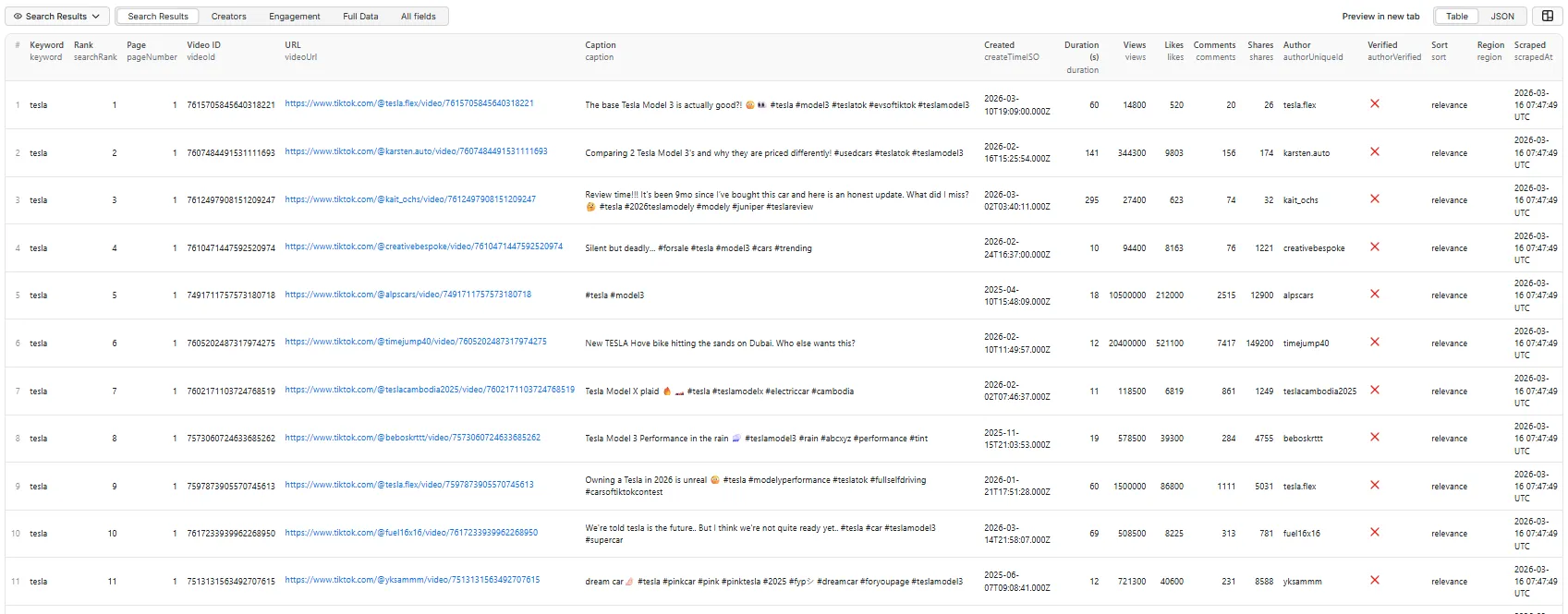
Search Results view
Creators view
Engagement view
Full Data view
Output fields
Search context fields
| Field | Description |
|---|---|
keyword | The search keyword that produced this result |
normalizedKeyword | Lowercase, whitespace-normalized version of the keyword |
searchType | keyword_video_search (video), keyword_user_search (user), or keyword_insights (summary) |
searchRank | Overall position in search results for this keyword |
pageNumber | Which page this result came from |
resultIndexOnPage | Position within the page |
keywordRankBucket | Rank band: top10, 11-50, or 51+ |
sort | Sort mode used (relevance/latest/mostLiked/mostViewed) |
region | Region code used for search |
dateFilter | Date filter applied |
scrapedAt | ISO 8601 timestamp of extraction |
runId | Actor run ID for batch traceability |
Video fields
| Field | Description |
|---|---|
videoId | TikTok video ID |
videoUrl | Full video URL |
shareUrl | Shareable video URL |
videoDownloadUrl | No-watermark downloadable video URL (only when includeDownloadUrl is on; else absent) |
caption | Video caption/description |
createTime | Unix timestamp of video creation |
createTimeISO | ISO 8601 creation time |
duration | Duration in seconds |
Engagement fields (always included)
| Field | Description |
|---|---|
views | Play/view count |
likes | Like count |
comments | Comment count |
shares | Share count |
saves | Save/collect count |
reposts | Repost count (best-effort; may be null) |
engagementTotal | Sum of likes + comments + shares + saves |
engagementRateByViews | engagementTotal / views (0–1; null when views unknown) |
Creator fields (always included)
| Field | Description |
|---|---|
authorId | Author user ID |
authorUniqueId | Author username |
authorNickname | Display name |
authorUrl | Profile URL |
authorVerified | Verified badge status |
authorAvatarUrl | Avatar image URL |
authorFollowerCount | Follower count (if available) |
authorFollowingCount | Following count (if available) |
authorHeartCount | Total hearts (if available) |
Music fields (always included)
| Field | Description |
|---|---|
musicId | Music/sound ID |
musicTitle | Music title |
musicAuthorName | Music author |
musicOriginal | Whether the sound is original |
musicDuration | Music duration in seconds |
Content fields
| Field | Description |
|---|---|
hashtags | Parsed hashtags from caption |
mentions | Parsed @mentions from caption |
isAd | Whether the video is an ad |
isSponsored | Whether the video is sponsored |
isSlideshow | Whether the post is an image slideshow/carousel (best-effort) |
videoFormat | Format class: video, slideshow, or ad |
Media fields
| Field | Description |
|---|---|
coverUrl | Video cover image URL |
dynamicCoverUrl | Animated cover URL |
originCoverUrl | Original cover URL |
videoWidth | Video width in pixels |
videoHeight | Video height in pixels |
ratio | Video aspect ratio |
System fields
| Field | Description |
|---|---|
inputKeywordIndex | Index of the keyword in the input array |
isDuplicateAcrossKeywords | Whether this video appeared under a previous keyword |
source | Always tiktok_search |
scrapeStatus | ok or error status |
User record fields (searchType: "user")
When searchType is user, each record describes a creator/account instead of a video (see the Users dataset view):
| Field | Description |
|---|---|
searchType | Always keyword_user_search |
searchRank / pageNumber / resultIndexOnPage | Ranking context |
userId / secUid | TikTok user IDs |
uniqueId | Username (@handle) |
nickname | Display name |
profileUrl | Profile URL |
avatarUrl | Avatar image URL |
verified | Verified badge status |
privateAccount | Whether the account is private |
region | Creator region (best-effort) |
followerCount | Followers (best-effort) |
followingCount | Following (best-effort) |
heartCount | Total hearts received (best-effort) |
videoCount | Number of videos (best-effort) |
diggCount | Likes given (best-effort) |
signature | Profile bio |
source | Always tiktok_user_search |
Some deep profile stats (
followingCount,videoCount,region) are populated on a best-effort basis — TikTok's user search returns a subset per result.
Keyword insights (searchType: "video")
Set includeKeywordInsights: true (off by default) and the actor also emits one summary record per keyword — a quick, analysis-ready snapshot of everything that ranked for that query. It appears in the Insights dataset view and is marked searchType: "keyword_insights" (filter on that to separate it from the per-video rows). It is video search only and not charged.
| Field | Description |
|---|---|
keyword / normalizedKeyword | The keyword this summary covers |
searchType | Always keyword_insights |
resultCount | Number of video results analyzed |
avgViews / medianViews / maxViews | View aggregates |
avgLikes / avgComments / avgShares / avgEngagementTotal | Engagement aggregates |
totalViews / totalLikes | Sum across results |
topHashtags | Top 10 { tag, count } by frequency |
topCreators | Top 10 { uniqueId, nickname, appearances, followerCount, maxViews } |
verifiedRatio / adRatio / slideshowRatio | Share of results that are verified / ads / slideshows |
postingByHourUTC | { "0".."23": count } posting-time distribution |
oldestCreateTimeISO / newestCreateTimeISO | Date range of the results |
Leave includeKeywordInsights off (default) to return only the raw video rows.
Video download URLs (searchType: "video")
Set includeDownloadUrl: true (off by default) to add a no-watermark videoDownloadUrl to each result. TikTok search results don't carry this, so it's resolved per video from TikTok's app API — a real per-video operation, billed via the separate video-download-url pay-per-event (only for results where a URL is resolved). Choose the variant with videoDownloadQuality (high = no-watermark, default; low = smallest file).
- Available on the hosted-API path only (a browser-fallback run leaves it null).
- URLs expire after a few days (TikTok CDN signing) — download promptly; the actor does not re-host files.
- To download, issue a GET with an app-like
User-Agent(the URL 302-redirects to the CDN.mp4).
Use cases
- Topic research — find top TikTok videos for any topic or keyword
- Trend monitoring — track keyword-based content trends over time with scheduled runs
- Creator discovery — identify creators ranking for target queries
- Competitor tracking — monitor what content appears for competitive keywords
- Keyword landscape analysis — compare search results across regions and sort modes
- AI dataset generation — build structured datasets for clustering, summarization, and analysis
- Content ideation — discover what types of content perform for a topic before creating
Tips and best practices
- Start small — use
maxItemsPerKeyword: 10–20for initial exploration - Use
searchRankfor analysis — compare how videos rank across keywords and regions - Enable deduplication — set
deduplicateAcrossKeywords: truewhen searching related keywords - Schedule for monitoring — run on a schedule to track keyword trends over time
- Use
normalizedKeyword— consistent lowercase version for grouping across runs
Reliability & anti-blocking
The actor is built to run reliably without any configuration:
- Browserless hosted-API extraction — when configured, results are pulled from a hosted TikTok API (no in-browser scraping), which is faster, more reliable, and paginates past the in-browser result cap. If the hosted API is unavailable, the actor automatically falls back to a real-browser scrape, so runs still complete.
- Automatic retries with exponential backoff on failed requests
- Session pooling (Crawlee) to spread requests and rotate browser sessions
- Anti-detection — masks automation signals (e.g.
navigator.webdriver) and uses a realistic browser fingerprint - Multi-strategy extraction — reads embedded page data first, then falls back to TikTok's in-page search API, so results survive layout changes
- Best-effort region targeting via localized cookies
- Per-keyword error isolation — a failure on one keyword does not stop the rest of the run
Reported success rate on the Apify marketplace: 100%.
Limitations
- Per-keyword result depth — with the hosted API the actor paginates and can return several hundred results per keyword (up to
maxItemsPerKeyword, max 500). On the browser fallback, TikTok returns roughly 150 per keyword in a single call, so depth is capped there. - Best-effort region — region is applied as a localized cookie hint. For strictly region-specific results, run from infrastructure in that region.
- Best-effort optional values — fields such as
saves,reposts,authorFollowerCount,musicDuration, and user-search stats (followingCount,videoCount,region) depend on what TikTok includes in its search response and may benull. mostViewedis a batch re-sort — it orders the ~150 results TikTok returns for a keyword, not all of TikTok, and applies to video search only.- Search results vary — TikTok ranking changes over time and by personalization, so results can differ between runs.
Free plan limitations
"Include Download URL" requires a paid Apify plan. On the Free plan the option is skipped, and you are not charged for it.
| Free plan | Any paid plan | |
|---|---|---|
| Search results | ✅ Full, unrestricted — no row cap | ✅ Full |
| All video/user metadata, filters, sorting, dedup | ✅ Included | ✅ Included |
| Keyword insights | ✅ Included | ✅ Included |
No-watermark download URLs (includeDownloadUrl) | ❌ Skipped, and not charged | ✅ Included |
Why: resolving a download URL costs one upstream API call per result, while search itself amortises one call across a whole page. Restricting that one option keeps the Actor sustainable without capping how many results you get. If a run is affected you'll see it in the log and in the run's status message, never as a failure.
Proxy & connectivity
No proxy configuration is required. The actor manages connectivity internally, and — consistent with its pay-per-result pricing — you are charged only per result returned, never for platform, compute, or proxy usage. There is no proxy input field to set.
Integrations
- Google Sheets — export search results to spreadsheets for team dashboards
- Slack/email — set up notifications when new results are found
- Webhooks — trigger downstream workflows when a run completes
- API — access results programmatically via the Apify API
- Other actors — feed discovered creators into TikTok Profile Scraper, or video URLs into TikTok Comment Scraper
FAQ
Can I search for creators/users instead of videos?
Yes. Set searchType: "user" to return TikTok creators/accounts (username, nickname, bio, follower/heart counts, verification) for each keyword. Results appear in the Users dataset view. Video-only options (sort, date filter, min-engagement filters) are ignored in user mode.
How do I keep costs predictable across many keywords?
Use maxTotalResults to set an overall cap across all keywords, and/or maxItemsPerKeyword per keyword. You are billed only per result returned — no run fee, and empty runs are free.
How many results can I get per keyword?
Up to maxItemsPerKeyword (max 500). With the hosted API the actor paginates to reach that depth; on the browser fallback TikTok returns roughly ~150 per keyword. The actual number depends on how many results TikTok has for that query.
Why are some fields null?
Fields like saves, authorFollowerCount, and musicDuration depend on what TikTok includes in its search data. They are extracted on a best-effort basis.
What does isDuplicateAcrossKeywords mean?
When the same video appears in results for multiple keywords, this field is set to true for subsequent appearances. With deduplicateAcrossKeywords: true, duplicates are removed entirely.
How does region targeting work? Region is set via cookies as a best-effort hint. For true region-specific results, use a proxy from that region.
Can I scrape hashtag pages or specific videos? This actor is focused on keyword search. For hashtag/trend discovery, use TikTok Trend & Discovery Scraper. For specific videos, use TikTok Video Scraper.


