
TikTok Hashtag Analytics
Pricing
from $30.00 / 1,000 hashtag analytics reports
TikTok Hashtag Analytics
Analyze TikTok hashtags: total views, video volume, average and median engagement, top creators and videos, creator concentration, related hashtags, sounds, posting activity, and trend tracking. One report per hashtag.
Pricing
from $30.00 / 1,000 hashtag analytics reports
Rating
0.0
(0)
Developer

Delowar Munna
Maintained by CommunityActor stats
0
Bookmarked
3
Total users
2
Monthly active users
4 days ago
Last modified
Categories
Security
Limited permissionsShare
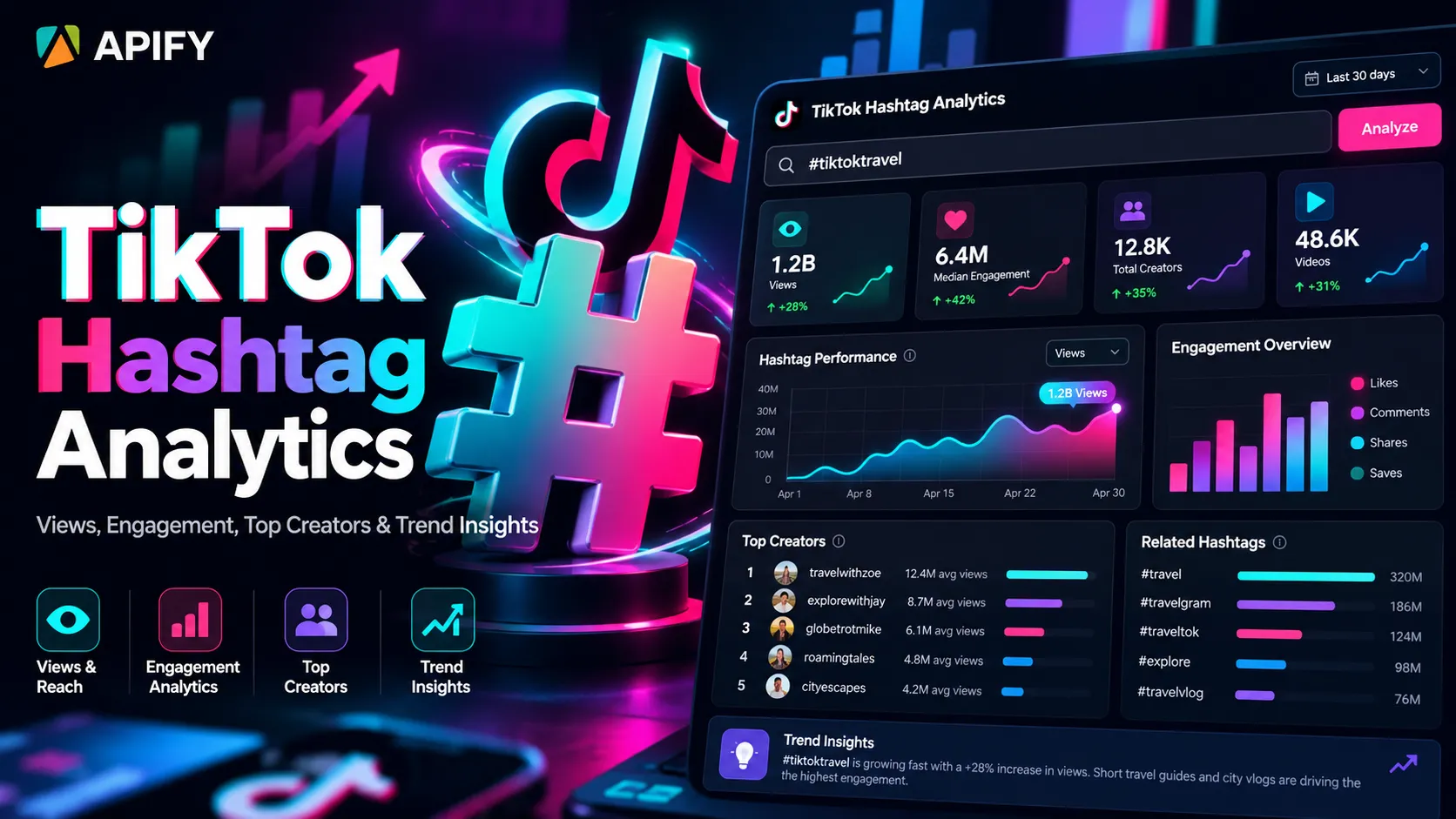
Views, engagement, top creators, related hashtags & trend insights — one decision-ready report per TikTok hashtag.
TikTok Hashtag Analytics turns TikTok hashtag data into structured hashtag intelligence. For each hashtag you give it, the Actor reads TikTok's global hashtag counters (total views, total video count), collects a bounded sample of the hashtag's public videos, and returns one analytics report: average and median performance, percentiles, engagement / share / save rates, viral concentration, creator diversity and concentration, related hashtags, top sounds, posting activity, content freshness, format and duration mix, ad / AI-labelled share, and optional trend tracking over time.
It answers questions like:
- Is
#booktoktoo broad, or still worth targeting? - Which of my candidate hashtags has the strongest median video performance?
- Is one viral post inflating the average?
- Which creators dominate this hashtag, and how concentrated is it?
- Which hashtags appear alongside it, and which sounds are most used?
- Is the hashtag getting more active over time?
No TikTok login, no cookies, no proxy setup.
How is this different from a TikTok Hashtag Scraper?
| TikTok Hashtag Scraper | TikTok Hashtag Analytics | |
|---|---|---|
| Question it answers | Which videos use this hashtag? | How large, active, concentrated, competitive and performant is this hashtag? |
| One result row | one video | one hashtag report |
| Output | raw video records | medians, percentiles, rates, concentration, creator mix, related hashtags, sounds, activity, trends |
If you need the raw videos, use a hashtag scraper. If you need to decide something about a hashtag, use this Actor. (You can still save the sampled videos alongside the report — see Save the sampled videos below.)
What does one result row represent?
One row = one hashtag analytics report. A run with 5 hashtags returns 5 rows. Hashtags that can't be analyzed (not found, invalid, no videos, provider error) still get a row with a status and statusMessage, so nothing disappears silently — those rows are free.
Global metrics vs. sample metrics
This is the most important thing to understand about the report:
global— TikTok's own hashtag-level counters:totalViews,videoCount,description,isCommerce, plusviewsPerVideoGlobal(totalViews / videoCount, a coarse aggregate, not a prediction of the views a new video will get). These describe the whole hashtag.- Everything else (
performance,concentration,creators,activity,content,sounds,topCreators,topVideos,relatedHashtags,topSounds) is computed from the bounded video sample.
TikTok's hashtag video feed exposes a bounded, ranked sample, not every video that ever used the hashtag. So medianViews, topCreators, relatedHashtags or the format mix describe the observed sample, not the entire TikTok hashtag universe. Activity fields are deliberately named sampleVideosLast24h, sampleVideosLast7d… for the same reason: they count videos in the sample, not TikTok-wide publishing volume.
What does BOUNDED_SAMPLE mean?
coverage.status tells you how the sample ended:
| Status | Meaning |
|---|---|
BOUNDED_SAMPLE | The requested number of videos was collected. It is still a sample, never the full hashtag. |
LIMITED | TikTok's feed (or your date filter) ran out before the requested size. |
PARTIAL | An upstream error cut the sample short. The report says so in statusMessage. |
NO_RESULTS | No videos were returned. |
There is deliberately no FULL status: the Actor never claims to have seen every video using a hashtag.
What's in a report
| Section | Fields (highlights) |
|---|---|
| Identity | inputHashtag (as you typed it), hashtag (canonical, lower-case, no #), hashtagId, hashtagUrl, region, mode, status |
global | totalViews, videoCount, description, isCommerce, viewsPerVideoGlobal |
sample | videosRequested, videosFetched, duplicatesRemoved, filteredByDate, videosSampled, uniqueCreators, sampleStartAt, sampleEndAt |
performance | avg and median views, likes, comments, shares, saves; p25Views, p75Views, p90Views, p90Likes, p90Shares; avg / median engagementRateByViews, saveRateByViews, shareRateByViews |
concentration | top1ViewSharePct, top5ViewSharePct, top10ViewSharePct (viral concentration); topCreatorVideoSharePct, top5CreatorVideoSharePct, top10CreatorVideoSharePct (creator concentration) |
creators | uniqueCreators, creatorDiversityRatio, verifiedCreators, verifiedCreatorSharePct; with enrichment: avg / median / p90 creator followers and the nano → mega tier mix |
activity | oldestSampleVideoAt, newestSampleVideoAt, sampleVideosLast24h/7d/30d, age buckets (0–1d, 1–7d, 7–30d, 30d+), medianVideoAgeHours, newContentSharePct |
content | video / photo / slideshow share, avg & median views by format, avg & median duration, duration bands (≤15s, 16–30s, 31–60s, 60s+) with median views & engagement, adSharePct, aiGeneratedSharePct, topLocations |
sounds | uniqueSounds, originalSoundSharePct, topSoundVideoSharePct, top5SoundVideoSharePct |
| Lists | topCreators[], topVideos[], relatedHashtags[], topSounds[] |
signals[] | explainable labels such as FRESH_CONTENT, CREATOR_CONCENTRATED, VIRAL_POST_CONCENTRATED (see below) |
comparison | COMPARE mode: this hashtag's rank within the run on 8 metrics |
history | saved-snapshot comparisons and trend (TREND mode / comparison periods) |
dataQuality | coverage % for views, likes, comments, shares, saves, timestamps, duration, sound, creator followers, ad label, AI label, location |
coverage | status, videosSampled, videosRequested, note |
Why median metrics?
TikTok performance is extremely skewed: one viral post can have more views than the other 99 videos combined. An average then describes nobody. The median is the typical video. Every performance metric is returned as both, plus percentiles (p25 / p75 / p90 views), and the concentration section shows how much of the sample's views come from the top 1, 5 and 10 videos — so an outlier is visible rather than hidden.
How is engagement rate calculated?
Per sampled video: engagementRateByViews = (likes + comments + shares) / views. The report gives the average and the median across the sample. Similarly saveRateByViews = saves / views and shareRateByViews = shares / views. These are Coregent-derived indicators from public counters, not official TikTok metrics.
How are top creators identified?
Videos are grouped by creator ID (not username — usernames can change). For each creator in the sample you get videosInSample, sampleViews, sampleLikes, sampleShares and medianVideoViews. The list is ranked by sample views by default; you can rank by videos in the sample, sample likes, or followers (with enrichment).
How is creator concentration calculated?
top5CreatorVideoSharePct = share of the sampled videos posted by the 5 creators with the most videos in the sample (same for top 1 and top 10). creatorDiversityRatio = uniqueCreators / videosSampled (1.0 = every video from a different creator).
What are related hashtags?
All other hashtags used in the sampled captions, excluding the hashtag itself (#BookTok, booktok and BOOKTOK count as one). For each: count (sampled videos using it), sharePct of the sample, sampleViews and medianViews of those videos. They are derived from the sample, not an official TikTok "related" list.
How are top sounds calculated?
Videos are grouped by TikTok's sound ID (not the title — titles repeat). For each sound: videosInSample, sampleViews, sampleEngagement, and whether it's an original sound. originalSoundSharePct shows how much of the sample uses creators' own audio rather than a shared track.
Opportunity signals
Signals are plain thresholds on metrics that are already in the report, so each one is explainable. They need at least 10 sampled videos.
| Signal | Rule |
|---|---|
HIGH_ACTIVITY | ≥ 10% of the sample posted in the last 24 hours |
FRESH_CONTENT | newContentSharePct (sample videos < 7 days old) ≥ 50% |
MATURE_HASHTAG | ≥ 70% of the sample is older than 30 days |
HIGH_CREATOR_DIVERSITY | creatorDiversityRatio ≥ 0.9 |
CREATOR_CONCENTRATED | top5CreatorVideoSharePct ≥ 30% |
VIRAL_POST_CONCENTRATED | top1ViewSharePct ≥ 30% |
HIGH_SHARE_RATE | medianShareRateByViews ≥ 0.005 |
HIGH_SAVE_RATE | medianSaveRateByViews ≥ 0.01 |
RISING_HASHTAG / DECLINING_HASHTAG | trend classification (below) is RISING / FALLING |
Input
| Field | Default | Description |
|---|---|---|
hashtags | ["booktok"] | Required. booktok, #booktok or https://www.tiktok.com/tag/booktok. Up to 100 per run. |
mode | SNAPSHOT | SNAPSHOT, COMPARE (adds within-run ranks) or TREND (compares with saved history). |
videosPerHashtag | 40 | Sample size per hashtag, 20–1000. TikTok serves 20 videos per page, so multiples of 20 work best (20, 40, 100, 200, 500, 1000). |
videosPublishedAfter | empty | Only analyze videos published on/after a date: 2026-10-01, 7 days ago, 30 days. |
region | US | Region for TikTok's hashtag feed: US, GB, FR, JP, VN or SG. |
includeHashtagMetadata | true | Global counters (global section). |
includeCreatorAnalytics | true | Creator diversity, concentration, verified share, top creators. |
includeRelatedHashtags | true | Co-occurring hashtags. |
includeSoundAnalytics | true | Sound section and top sounds. |
includeTopVideos | true | Most-viewed sampled videos. |
topVideosLimit / topCreatorsLimit / relatedHashtagsLimit / topSoundsLimit | 10 / 10 / 20 / 10 | List lengths. |
topCreatorsSortBy | sampleViews | sampleViews, videosInSample, sampleLikes or followers. |
enrichCreatorProfiles | false | Look up the top creators' profiles to add follower statistics and the creator tier mix (billed per creator profile). |
maxCreatorsToEnrich | 10 | Creators per hashtag to enrich (most-viewed first). |
comparisonPeriods | [] | PREVIOUS, 7_DAYS, 30_DAYS, 90_DAYS. TREND mode defaults to previous + 7 + 30 days. |
trackerKey | empty | Name a tracking project; history is kept per tracker key. |
saveHistory | true | Save a compact snapshot per report for later trend runs. |
includeSampleVideos | false | Save every sampled video to the run's key-value store (HASHTAG_SAMPLE_VIDEOS). |
maxConcurrency | 5 | Hashtags analyzed in parallel (1–15). |
Example inputs
Run with defaults — one hashtag, a 40-video sample, one report:
Compare several hashtags (standard 100-video samples, within-run ranks):
Campaign research — recent videos only, deeper sample, follower stats for the top creators:
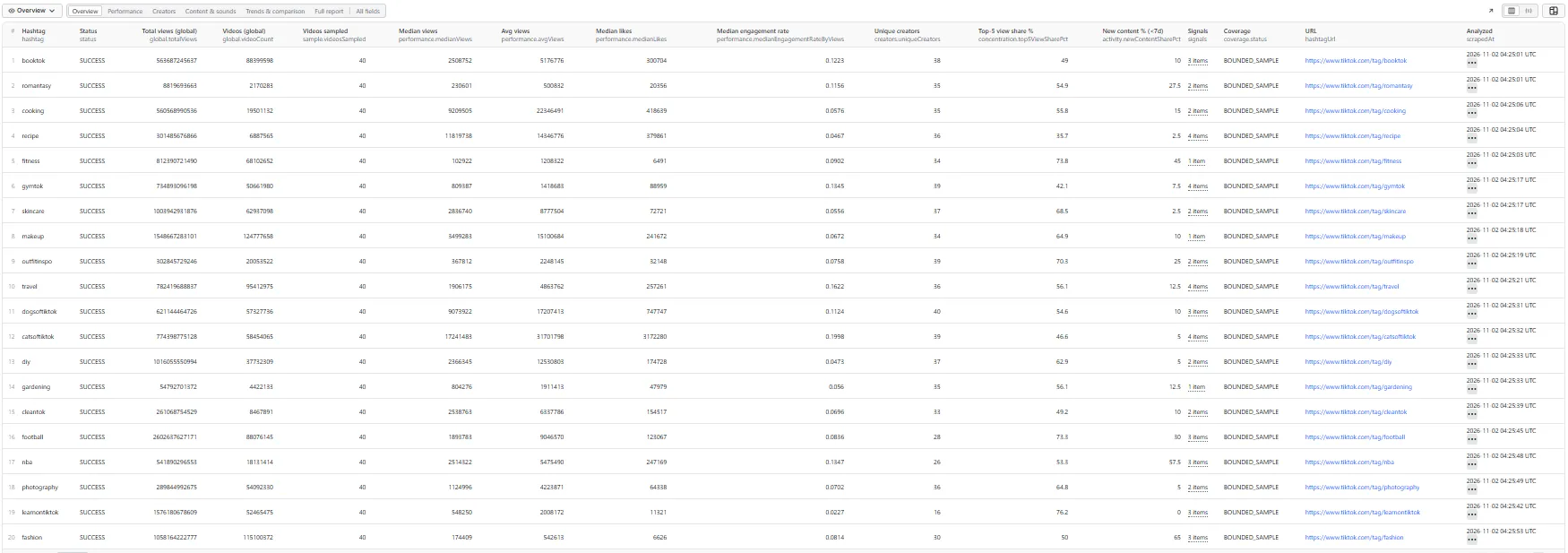
Benchmark a whole niche — the run behind the screenshot and sample output below: 20 hashtags ranked against each other, follower stats for the top 3 creators of each, history started for later trend runs:
Historical tracking — schedule this daily or weekly:
Output
Every dataset tab shows the same rows (one report per hashtag), with a different set of columns. The samples below are real records from the 20-hashtag Benchmark a whole niche run above (2026-11-02, US). Each shows the fields that tab displays, with lists cut to one or two items.
Overview
Performance
The average is about 21% above the median, the 90th-percentile video has 2.5× the median's views, and the top 10 videos hold 56.5% of the sample's views:
Creators
A creator-concentrated hashtag: the official @nba account posted 6 of the 40 sampled videos. The follower counts come from creator enrichment:
Content & sounds
Trends & comparison
In COMPARE mode every report is ranked against the other hashtags in the run (1 = highest). #catsoftiktok ranked 1st of the 20 for median views, median engagement rate and share rate. This was the tracker's first run, so the history comparison says INSUFFICIENT_HISTORY until a later run has a snapshot to compare against:
On a later run with the same trackerKey and sample settings, history.comparisons.PREVIOUS returns "status": "OK" with totalViewsDelta, videoCountDelta, medianViewsDelta and the other deltas described in the FAQ.
Full report
The complete #booktok record from the same run (lists cut to one or two items, description shortened):
A run summary (hashtags requested / succeeded / failed, videos requested / sampled / unique, reports created, trend comparisons, history snapshots saved) is stored in the run's key-value store as RUN_SUMMARY.
FAQ
Can I compare multiple hashtags? Yes. Put them all in hashtags and choose COMPARE mode. Each report gets comparison.ranks — its rank within the run (1 = highest) on total views, video count, median views, median engagement rate, creator diversity, new-content share, share rate and save rate. There is no single "best hashtag" score; you see the rank on every dimension.
Can I track hashtags over time? Yes. Every successful report saves a compact snapshot (unless you turn saveHistory off). Run TREND mode on a schedule and each report gets history.comparisons against the previous run and/or about 7, 30 or 90 days ago: totalViewsDelta, videoCountDelta, videoCountGrowthPct, medianViewsDelta, medianEngagementRateDelta, creatorDiversityDelta, newContentShareDelta. History starts with your first run; until a snapshot that old exists the period says INSUFFICIENT_HISTORY. Use trackerKey to keep separate histories per project.
Snapshots are only compared when they were taken with the same sample settings (sample size, date filter, region, enrichment) — history.comparisonCompatibility says HIGH or LOW. Runs less than 30 minutes apart don't create duplicate snapshots, and partial (error-truncated) samples are never saved.
What is trend momentum? history.trend is RISING, STABLE, FALLING or INSUFFICIENT_HISTORY, from the longest requested period that has a baseline. RISING = the hashtag's global video count grew by ≥ 0.5% per day and the sample is at least as fresh as before. FALLING = video-count growth ≤ 0.05% per day and the sample got less fresh. Anything in between is STABLE. It is a Coregent-derived classification, not TikTok trend data. Note that totalViewsDelta is the change in TikTok's cumulative counter between two observations — it is not "views earned by videos posted this week".
Does it require a TikTok login or cookies? No. It uses public TikTok data only, with no customer login, cookies or proxy configuration.
Does it use TikHub? Yes. TikTok data is fetched through TikHub's hosted TikTok API, browserlessly. That's why there's nothing to configure and no proxy section.
Are save / share metrics always available? Usually, but not guaranteed for every video. Check dataQuality — e.g. saveCoveragePct: 85 means 15% of the sampled videos didn't expose a save count.
How are missing metrics handled? Missing is never counted as zero. A median or average is computed only over the videos that carry that value, and dataQuality gives the coverage. A metric with no known values is null. Example: TikTok's hashtag feed doesn't include creator follower counts, so follower statistics stay null (with creatorFollowerCoveragePct: 0) unless you turn on creator enrichment — they're never reported as "0 followers".
What about AI-generated content and ads? aiGeneratedSharePct uses only TikTok's own AI-generated label — the Actor never infers it — and is computed over videos where TikTok exposed the label (aiLabelCoveragePct). adSharePct uses TikTok's ad flag the same way.
What's in topLocations? The creation region TikTok attaches to each video. It is creator/video metadata, not audience geography.
Can I get the sampled videos too? Turn on includeSampleVideos. Every normalized sampled video is saved in the run's key-value store as HASHTAG_SAMPLE_VIDEOS (grouped by hashtag). The dataset stays one report per hashtag.
What happens if one hashtag fails? The run continues. The failed hashtag gets a row with a status such as HASHTAG_NOT_FOUND, INVALID_HASHTAG, NO_RESULTS, RATE_LIMITED, VIDEOS_UNAVAILABLE or PROVIDER_ERROR, and isn't charged. Only exact hashtag names are analyzed: if TikTok has no hashtag with exactly that name, you get HASHTAG_NOT_FOUND rather than a report about a similar-sounding tag.
Can I use it via API or MCP? Yes — like any Apify Actor, run it from the Apify API, the JavaScript / Python clients, integrations (Make, Zapier, n8n…), or as a tool for AI agents through the Apify MCP server. Example:
How does pricing work?
Pay per event — you pay for analytics reports delivered, not for compute or proxies:
- Hashtag analysis — charged per delivered report, one event per started 100 sampled videos. A report on up to 100 videos is one event; 101–200 videos is two; a 1,000-video report is ten.
- Creator enrichment (optional) — charged per creator profile looked up when
enrichCreatorProfilesis on.
Not charged: hashtags that are not found, invalid, return no videos or fail; history snapshots; the run summary; the saved sample videos. A report whose sample an upstream error cut short (PARTIAL_SAMPLE) is charged only for the videos it actually analyzed. See the Pricing tab for current rates — this README deliberately doesn't quote figures, because live prices are set on the platform. If you set a maximum cost per run, the Actor respects it: it shrinks or skips samples before doing work it couldn't charge for.
Notes and limitations
- Unofficial product; not affiliated with, endorsed by, or connected to TikTok or ByteDance.
- Hashtag video feeds are bounded, ranked samples. Sample analytics do not represent every TikTok video using the hashtag; global views and video counts are separate TikTok metadata.
- TikTok's feed is ranked, not chronological: with a strict
videosPublishedAfterthe sample may be smaller than requested (coverage.status: LIMITED). - Creator follower counts change over time and are only available with enrichment.
- Save / share counts and AI / ad labels may be missing for some videos — see
dataQuality. - Trend classifications are Coregent-derived. Historical tracking starts only when you begin saving snapshots.
- The Actor does not provide official TikTok Analytics, a complete hashtag census, audience demographics, reach, impressions, watch time, retention, conversion rates or search volume.
- Use the data in line with TikTok's terms and applicable data-protection law.


