

X (Twitter) Profile Scraper
Pricing
from $4.00 / 1,000 profile results
X (Twitter) Profile Scraper
Bulk lookup of public X (Twitter) profiles by handle, URL or numeric ID. Get bio, website, location, followers, following, posts, verification, images and optional recent posts as clean JSON or CSV. No login, no cookies. Pay only for profiles saved.
Pricing
from $4.00 / 1,000 profile results
Rating
0.0
(0)
Developer

Delowar Munna
Maintained by CommunityActor stats
0
Bookmarked
2
Total users
1
Monthly active users
5 days ago
Last modified
Categories
Features
Share

Look up public X (Twitter) profiles in bulk by handle, profile URL or numeric user ID. Each account comes back as one clean, flat row: name, bio, website, location, followers, following, post count, verification, join date, profile and banner images, and pinned tweets. You can also add each profile's latest posts. Export to JSON, CSV, Excel or Google Sheets, or call it from the API, Make, Zapier, n8n or an AI agent.
- No login, no cookies, no X account. Public data only.
- Three ways in: handles (
nasa,@nasa), profile URLs (x.com/nasa) and numeric user IDs (11348282), in any mix. Duplicates are looked up once. - Clean output. Counts are numbers, dates are ISO (UTC), the website link is expanded and normalised, and the avatar is the full-size image. Values X doesn't provide stay empty; nothing is made up.
- Optional recent posts. Turn on Include recent posts to add each profile's latest posts with likes, retweets, replies and views.
- Filters for lead lists: minimum followers, verified accounts only, profiles with a website.
- Pay only for profiles saved. Accounts that aren't found, duplicates, filtered profiles and empty runs are free.
What can you do with it?
| Use case | What to enter | Typical setup |
|---|---|---|
| Influencer research | A list of creator handles | Minimum followers, export the Metrics view |
| Lead generation | Handles or profile URLs from a list or a CRM | Only profiles with a website, export the Bio & links view |
| Competitor and brand tracking | Competitor handles | Weekly schedule, compare follower counts over time |
| CRM and data enrichment | Handles or user IDs already in your database | API call from your pipeline; IDs still work after an account renames itself |
| Account audits | A list of accounts to check | Find suspended or deleted accounts in FAILED_TARGETS |
| AI agents and research | One or a few handles | Call through the Apify API or MCP server and read the JSON |
How to use it
- Add X handles, profile URLs, numeric user IDs, or a mix.
- Optionally turn on Include recent posts, or set filters.
- Click Start, then download the results from the Output tab.
Run it with the defaults and it looks up NASA, apify and SpaceX and returns 3 profiles.
Accepted inputs
| You enter | Field | Looked up as |
|---|---|---|
NASA or @NASA | X handles | handle NASA |
https://x.com/nasa, twitter.com/nasa/with_replies | Profile URLs | handle nasa |
https://x.com/i/user/11348282 | Profile URLs | user ID 11348282 |
11348282 | Numeric user IDs | user ID 11348282 |
Tweet links, X pages such as /explore, and non-X links aren't profiles. They're skipped and listed in the run's status message.
Filters
Filters are checked after each profile is looked up, so they don't make a run faster. Profiles a filter drops are never charged.
| Filter | Keeps |
|---|---|
| Minimum followers | Profiles with at least this many followers |
| Verified accounts only | Accounts with any verification badge (blue, gold business, grey government) |
| Only profiles with a website | Profiles that list a website |
Skip these profiles takes handles, URLs or IDs you already have, for example from an earlier run. Handle and ID entries are skipped before any lookup, and skipped profiles are never charged.
Monitor X profiles on a schedule
Follower counts, bios and websites change. Run the same list every day or week and you get a time series: follower growth for influencers and competitors, rebrands, new links in bio, accounts that went private or were suspended.
- Enter the accounts you want to track. Numeric user IDs are the safest choice for long-running tracking, because an ID keeps working after the account changes its handle.
- Optionally turn on Include recent posts to see what each account posted since the last check.
- Click Save as a new task, then open the task's Schedules and pick daily, weekly or a cron expression.
- Send the results where your team works: the Actor's Integrations tab connects runs to Google Sheets, Slack, email, webhooks, Make, Zapier and n8n. Every row has
collectedAt, so appending each run to one sheet gives you a history you can chart.
Each run is a fresh snapshot, so each profile is charged once per run. Accounts that disappear (renamed, suspended, deleted) show up in that run's FAILED_TARGETS and aren't charged.
Tip: set a maximum cost per run in the run options, so a list that grows over time can't turn into a surprise bill.
Input examples
Three profiles (the default run):
Mixed inputs with the 5 latest posts each:
Twenty well-known accounts from all three fields, with recent posts (the input behind the screenshots below; 11348282 is NASA's ID, so it's looked up once and the run saves 19 profiles):
Weekly competitor tracking (save as a task and schedule it; IDs keep working after a rename):
A lead list: verified accounts with a website and at least 10,000 followers:
Output
One row per unique account.
| Field | Description |
|---|---|
recordType | Always profile_result |
id | Numeric X user ID (as text) |
handle, name, url | Username, display name and profile link |
bio | Profile bio as written (links in it stay as X's short t.co links) |
website, websiteDomain | The profile's website, normalised, and its domain |
location | Location as written on the profile |
followersCount, followingCount, postsCount, mediaCount | Public counts: followers, following, posts and media posts |
isBlueVerified, verificationType | Verification: blue check, and the badge type (Business or Government, empty for none) |
isProtected | Protected (private) account |
accountCreatedAt | When the account was created (ISO, UTC) |
profileImageUrl, bannerImageUrl | Full-size avatar and banner image |
pinnedTweetIds | IDs of pinned tweets |
accountStatus | active for a found account |
recentPosts, recentPostsReturned | Latest posts (tweetId, url, text, createdAt, likeCount, retweetCount, replyCount, viewCount, isRetweet, isReply) and how many were added. Empty unless Include recent posts is on |
dataStatus | complete, or partial when recent posts were requested but couldn't be fetched (e.g. a protected account) |
sourceInput, sourceField, provider | Which entry found the profile, from which input field |
collectedAt | When the row was collected |
rawProviderData | Only with Include raw provider data (debugging) |
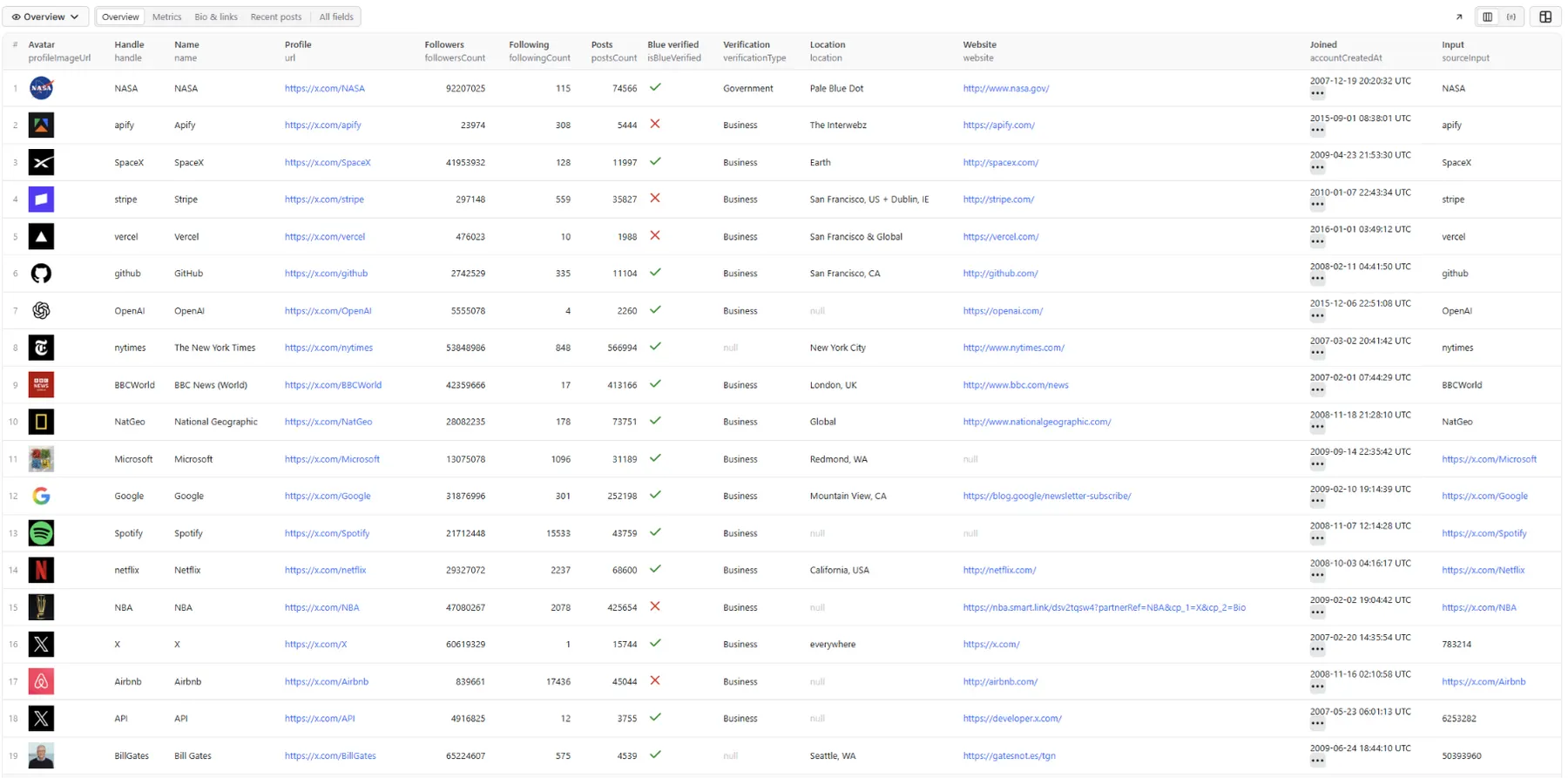
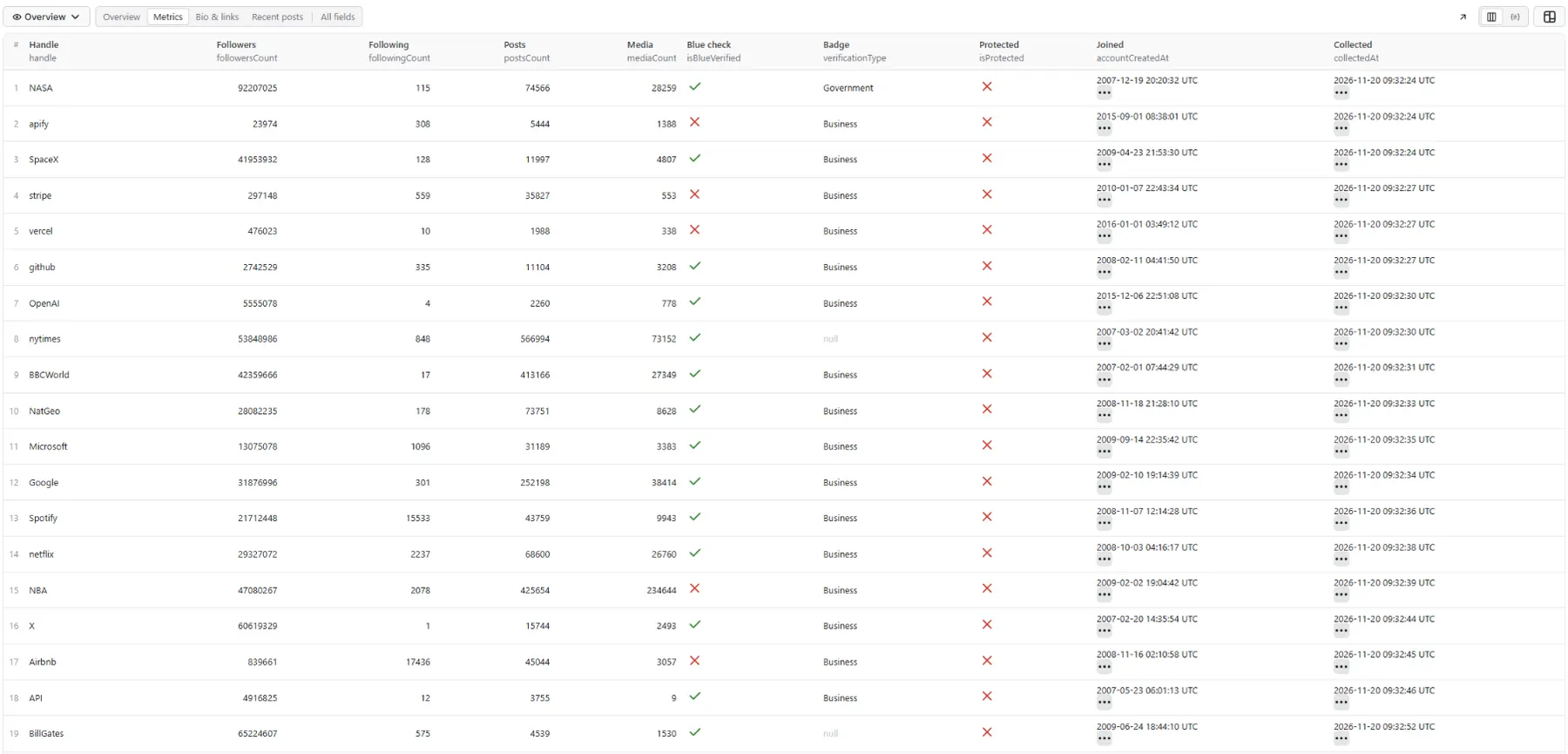
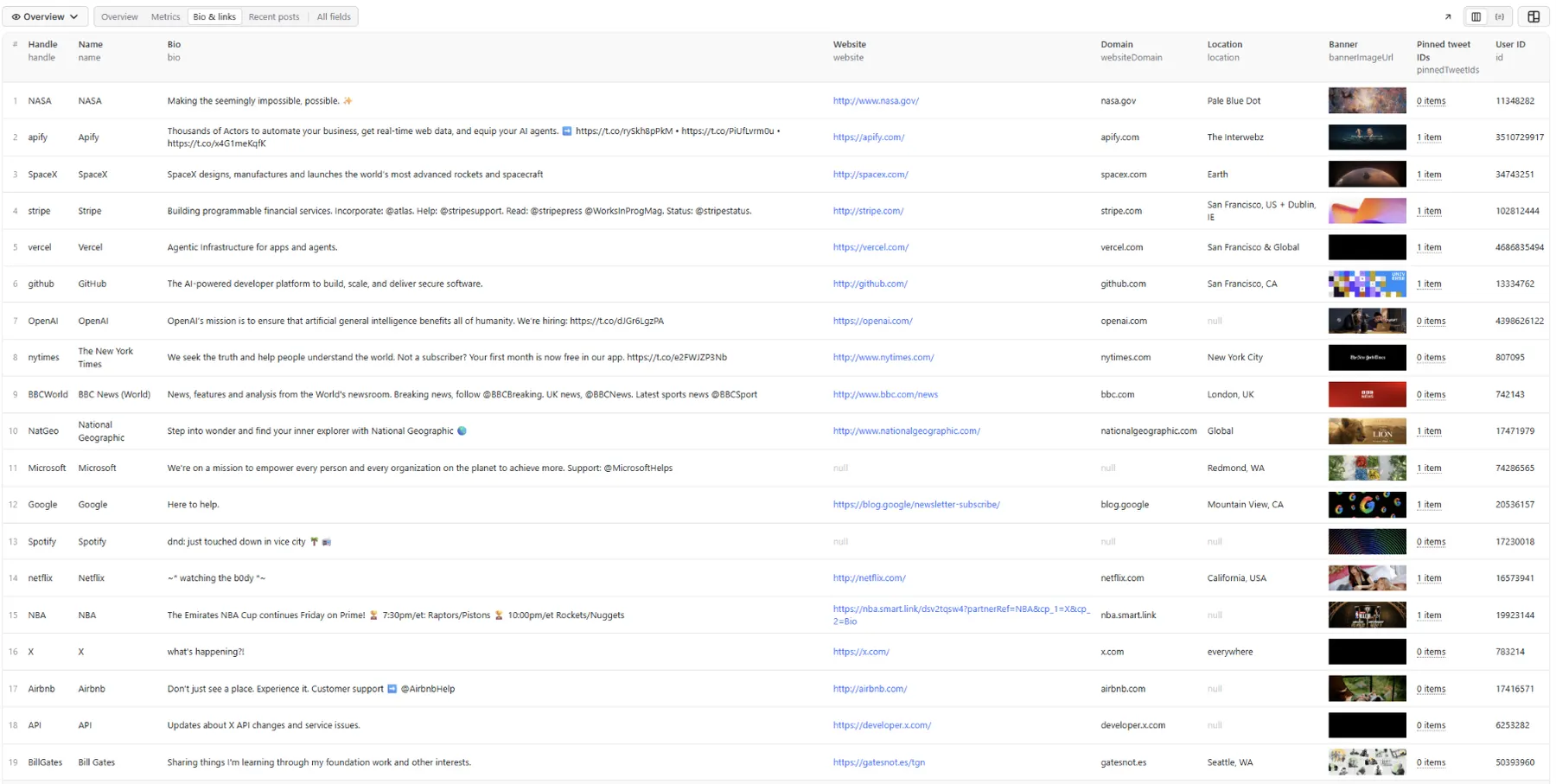
The Output tab has four views: Overview, Metrics, Bio & links and Recent posts. They show the same rows with different columns. The screenshots and samples below come from a real run of the 20-account input above.
Overview
Metrics
Bio & links
Recent posts
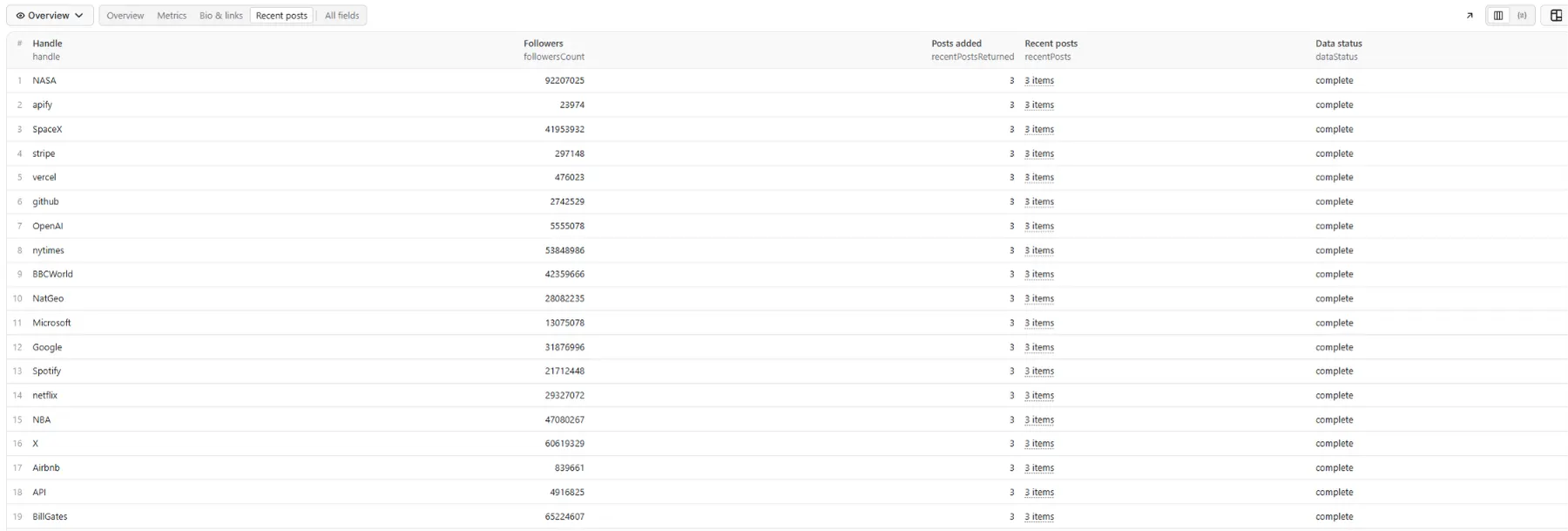
One of the three posts shown:
Every row has all the fields in the table above. Values a profile doesn't have stay empty: in this run 2 of 19 accounts list no website, 5 no location, and 9 have no pinned post.
Two key-value store records come with every run:
RUN_SUMMARY: inputs, invalid entries, lookups, profiles saved, duplicates, filtered profiles, failures by reason, recent posts added, events charged and why the run stopped.FAILED_TARGETS: each entry that couldn't be returned and why (not_found,suspended,unavailable,not_found_or_unavailable,rate_limited,provider_unavailable). Failed lookups never go in the dataset, so it holds only real profiles.
Pricing
This Actor uses pay-per-event pricing:
profile-result: one per unique profile saved to the dataset.recent-posts: one per saved profile whose recent posts were added. Only when you turn on Include recent posts, and only when the posts were actually added.
Nothing else is charged: accounts that aren't found or are suspended, duplicates, profiles dropped by your filters or skip list, the run summary, and runs that save nothing.
The prices are on the Actor's Pricing tab in the Apify Console, and they can differ by Apify plan. This README deliberately doesn't quote figures, so it never goes out of date. Set a maximum cost per run in the run options and the Actor stops before it would exceed it.
Limits and good to know
- Public data only. Protected accounts return their public profile, but not their posts. DMs, private lists and anything that needs a login aren't available.
- Counts are a snapshot taken when the run happened.
- Up to 1,000 profiles per run. For larger lists, split them across runs or schedule a task.
- Timeouts. If a run gets close to its timeout, it stops by itself, keeps every profile already saved and says so in the status message.
- Need tweets, not profiles? For search and full profile timelines, use our X (Twitter) Tweet Scraper.
FAQ
Do I need an X account or API key? No.
Is scraping X legal? This Actor collects publicly available profile data only. It isn't affiliated with X Corp. You're responsible for how you use the data: follow X's terms and data-protection laws such as GDPR, and don't collect personal data without a lawful reason.
Why was an account not returned? It doesn't exist, was renamed or suspended, or was temporarily unavailable. Look it up in FAILED_TARGETS. Renamed accounts are still found by their numeric ID.
Can I track follower growth over time? Yes. Save your list as a task, schedule it daily or weekly, and send each run to Google Sheets or your database. Each row's followersCount and collectedAt give you the history. See Monitor X profiles on a schedule.
Can I get followers or following lists? Not in this Actor. It returns each profile's counts, not the lists.
Can I use it from code or an AI agent? Yes. Call it through the Apify API, the Apify client libraries or the Apify MCP server, and read the dataset as JSON.
Feedback
Found a problem or need a field that's missing? Open an issue on the Actor's Issues tab and include the run link.


