

LinkedIn Reactions Scraper
Pricing
$1.00 / 1,000 reaction results
LinkedIn Reactions Scraper
Extract the people and organizations who reacted to public LinkedIn posts. Get reaction type, name, headline, profile URL, LinkedIn IDs and source-post context. Filter by Like, Celebrate, Support, Love, Insightful or Funny. No LinkedIn login or cookies required.
Pricing
$1.00 / 1,000 reaction results
Rating
0.0
(0)
Developer

Delowar Munna
Maintained by CommunityActor stats
0
Bookmarked
2
Total users
1
Monthly active users
5 days ago
Last modified
Categories
Share
Extract the people and organizations who reacted to public LinkedIn posts: everyone who liked, celebrated, supported, loved, found insightful or laughed at a post. Paste one or more post URLs and get one clean row per reaction with the reaction type, the reactor's name, headline, profile URL, LinkedIn ID and the source post. Export as JSON, CSV or Excel.
Reactions are the biggest engagement audience on LinkedIn: many more people react than comment. Use them for warm-lead discovery, competitor audience research, event and launch follow-up, executive audience analysis and CRM enrichment.
No LinkedIn login, cookies or browser extension required.
What you get
Each reaction row (rowType: "reaction"):
| Field | Description |
|---|---|
reactionType, reactionLabel | Normalised type (LIKE, PRAISE, EMPATHY, APPRECIATION, INTEREST, ENTERTAINMENT) and LinkedIn's label |
reactor.entityType | PERSON, ORGANIZATION or UNKNOWN |
reactor.name, reactor.headline | Reactor name and headline (for companies, the line LinkedIn shows under the name) |
reactor.profileUrl | Profile URL (people) or company page URL (organizations) |
reactor.linkedinId | LinkedIn member / company ID - stable, ideal for CRM matching |
reactor.publicIdentifier | Vanity slug (jane-doe) when LinkedIn exposes one - often null for people, see the FAQ |
reactor.imageUrl, reactor.companyPageUrl | Profile photo or logo; company page URL for organization reactors |
reactionUrn | Stable reaction identifier |
reactionIndex | Position in LinkedIn's reaction list for that post (source order, not a ranking) |
post | postId, postUrn, postUrl of the source post |
input, inputIndex, fetchedAt | What you supplied, its position in your list, and the fetch time |
Plus one free post summary row per input post (rowType: "post_summary"): its status, coverageStatus, LinkedIn's reported reaction total (and the per-type breakdown when LinkedIn shows one) next to what was extracted, and a reason whenever something stopped early. These rows are never charged.
Never estimated. A value LinkedIn does not expose for a reactor is null - not an empty string and not a guess.
Reaction types
| Value | LinkedIn label |
|---|---|
LIKE | Like |
PRAISE | Celebrate |
EMPATHY | Love |
APPRECIATION | Support |
INTEREST | Insightful |
ENTERTAINMENT | Funny |
How it works
- Each post URL or URN is normalised (tracking parameters and comment links are reduced to the post,
lnkd.inshort links are followed) and duplicates are removed. - The actor reads the post's public page to confirm it exists and to record LinkedIn's reported reaction total. Posts with no reactions finish here, free.
- Reactors are collected page by page from the post's reaction list, through a provider running on our own infrastructure - never through your account.
- Each reaction is normalised, deduplicated and saved as soon as its page arrives, so the first rows appear within seconds.
Input examples
One post, default limit (500 reactions):
Only Insightful, Love and Celebrate:
Every reaction on a post:
Multi-post lead research, one row per person across posts:
Output
One row per unique reaction, plus one free summary row per input post. Unavailable values are null, never guessed. Every reaction row has the same columns, so CSV and Excel exports stay stable.
The dataset has three tabs: Reactions, Reactor identity and Post status.
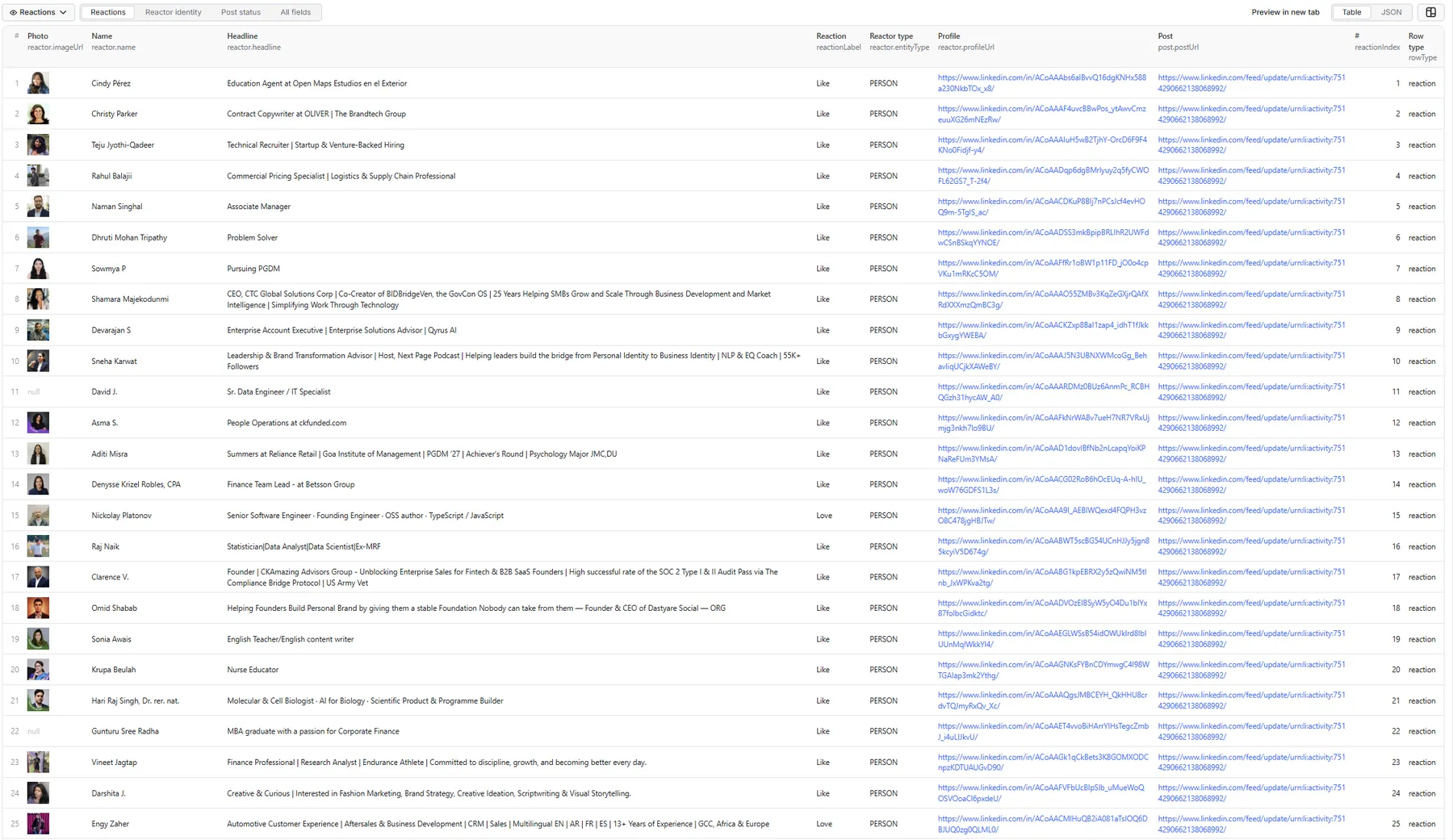
The records below come from a real run with the default input. It returned 500 reactions (the default per-post limit) from a post that LinkedIn reports at 7,424 reactions. Long LinkedIn image URLs are shortened with ….
Full record: an Insightful reaction
Reactions tab: the same reaction
Reactor identity tab: IDs for CRM matching
Organization reactors have "entityType": "ORGANIZATION", a numeric linkedinId, publicIdentifier set to the company slug, and companyPageUrl filled in. Their headline is the line LinkedIn shows under the name, such as "694 followers".
Post status tab: the post's summary row (free)
reportedByType holds LinkedIn's own count for each reaction type when the public post page shows one, and is null otherwise. LIMIT_REACHED means the run stopped at the 500-reaction limit; turn on Scrape all reactions to collect the rest.
Post status and coverage
Every input post gets a summary row. status says what happened:
| Status | Meaning |
|---|---|
SUCCESS | Reactions collected as requested |
PARTIAL_RESULT | Some reactions collected, then stopped early - the reason says why |
NO_REACTIONS | The post has no reactions (of the selected types / reactor kinds) |
INVALID_POST_URL | Not a supported post URL (profile, company or article URL, malformed value) |
POST_RESOLUTION_FAILED | A short link or URL could not be resolved to a post |
POST_NOT_FOUND | The post does not exist or was deleted |
POST_UNAVAILABLE | The post is not publicly accessible |
RATE_LIMITED, BLOCKED, TEMPORARY_LINKEDIN_ERROR, PROVIDER_ERROR | Temporary problems - the post is added to RETRY_INPUT |
SKIPPED_SPENDING_LIMIT | Not processed because your run's spending limit was reached |
coverageStatus says how complete a post is: FULL_SELECTED_TYPES (every available reaction of the selected types), LIMIT_REACHED (stopped at your per-post limit), PARTIAL_RESULT, NO_REACTIONS or POST_UNAVAILABLE.
The Run summary (key-value store record RUN_SUMMARY) has run totals, the per-type breakdown, field availability rates and duplicates skipped. The record RETRY_INPUT holds a ready-to-run input with only the posts worth retrying.
FAQ
Which LinkedIn post URL formats work?
https://www.linkedin.com/feed/update/urn:li:activity:<id>https://www.linkedin.com/posts/<author>_<slug>-activity-<id>-<hash>https://www.linkedin.com/posts/<author>_<slug>-ugcPost-<id>-<hash>urn:li:activity:<id>,urn:li:share:<id>,urn:li:ugcPost:<id>https://lnkd.in/<code>short links- Comment links (
?commentUrn=...) and country domains (uk.linkedin.com) are reduced to the post.
Do I need a LinkedIn login or cookies? No. You never supply credentials, cookies or a browser extension, and nothing runs through your LinkedIn account.
Can I select only Insightful, Love, etc.? Yes - set Reaction types. Leave it empty for all six. LinkedIn returns a post's reactions as one mixed list, so filtering happens as the list is read. On a post where your chosen type is rare (say Funny on a post with thousands of Likes), the actor stops after a run of pages with no match and marks the post PARTIAL_RESULT, rather than reading the whole list for a handful of rows.
Can I scrape multiple posts? Yes, up to 1,000 per run. Posts are processed in parallel and each gets its own summary row. One failing post never fails the run.
Can I scrape all reactors? Turn on Scrape all reactions. Safety caps on pages and runtime per post still apply; a post they stop is marked PARTIAL_RESULT.
How does the result limit work? Max reactions per post caps the reaction rows per post across all selected types together. It does not limit the number of posts.
Can one reaction type use up the whole limit? Yes. The limit is shared, and reactions come in LinkedIn's list order, so a common type such as Like can fill it before rarer types appear. To get rarer types, select them explicitly or raise the limit.
Are names, headlines and profile URLs included? Yes, wherever LinkedIn shows them. Every reactor also has a linkedinId. LinkedIn's reaction list usually links to people by member ID (/in/ACoAA...) rather than their vanity URL. Those links open the right profile, but publicIdentifier is then null. To get the vanity slug, run the profile URL through a profile scraper.
Are companies and organizations supported? Yes. Organization reactors have reactor.entityType = "ORGANIZATION" and a companyPageUrl. Turn off Include organizations or Include people to keep only one kind.
Is reaction order meaningful? No. reactionIndex is the position in LinkedIn's reaction list, not a measure of importance.
Why can the extracted count differ from LinkedIn's visible total? The total moves as people react and un-react between LinkedIn's count and the extraction. Your type, reactor-kind and limit settings also reduce it, and very large posts may hit the per-post safety caps. Each post's summary row shows LinkedIn's reported total next to the extracted count, so the gap is always visible.
How does pricing work? Pay per result: you pay for each unique reaction row saved to the dataset. Post lookups, pagination, retries, duplicates, filtered-out reactions, failed or reaction-less posts, post summary rows and the run summary are free. This README deliberately quotes no figures - see the Pricing tab for current rates, which can differ by Apify plan. Runs stop cleanly at your spending limit.
Can I schedule runs? Yes. Use Apify Schedules to re-run the same posts, for example daily during a launch week.
Can I use the API or MCP? Yes. The actor works through the Apify API, the client SDKs, webhooks, integrations (Zapier, Make, n8n) and the Apify MCP server.
How do I enrich reactors afterwards? Feed the reactor.profileUrl values into a LinkedIn profile scraper for full profiles and companies, then a work-email finder. Companion actors:
- LinkedIn Post Comments Scraper - the comment side of the same posts
- LinkedIn People Search & Profile Scraper - full reactor profiles
- LinkedIn Email Scraper - work emails for reactors
Limitations
- Only public posts. Private, members-only and deleted posts get a
POST_UNAVAILABLE/POST_NOT_FOUNDsummary row, free. - Reaction types are filtered client-side (see the FAQ), so very narrow selections on very large posts can end
PARTIAL_RESULT. - LinkedIn's reaction list may not expose every reactor on very large posts. Each post's summary row shows how far extraction got against LinkedIn's total.
- Connection degree and full profiles are not included - this actor returns who reacted, not their full profile.
🚦 Proxy policy
The proxy is used only for the public LinkedIn post pages the actor reads for post checks and reaction totals. Apify Datacenter proxy (default) or no proxy both work.
Apify Residential proxy is not supported. The actor fails at startup if apifyProxyGroups includes RESIDENTIAL. Reason: in pay-per-event actors, residential bandwidth is billed to the developer, not the run user, so a single bandwidth-heavy run could cost more than it earns.
If you genuinely need residential routing, supply your own residential provider via the proxy editor's Custom proxy URLs field - that traffic goes through your provider, not Apify, and is unaffected:
Compliance and privacy
This is an unofficial tool, not affiliated with or endorsed by LinkedIn. It collects only public post engagement data. Reaction data changes over time. Names, headlines and profile links are still personal data, so you are responsible for processing them lawfully (for example under GDPR or CCPA) and for respecting LinkedIn's terms. Which reactors are visible depends on what LinkedIn exposes publicly. The actor does not access private content, automate accounts, send messages or infer sensitive attributes.


