

Send Email API: SMTP, Resend & SendGrid — Letterkeel
Pricing
$1.00 / 1,000 email sents
Send Email API: SMTP, Resend & SendGrid — Letterkeel
Send email to anyone from Apify runs, webhooks and AI agents, from your own domain. Email sender for SMTP, Resend, SendGrid, Mailgun and Postmark: bulk mail merge from datasets, result digests with CSV, attachments, per-recipient status. $0.001 per email; failures free.
Pricing
$1.00 / 1,000 email sents
Rating
0.0
(0)
Developer

CyberMax
Maintained by CommunityActor stats
0
Bookmarked
1
Total users
1
Monthly active users
5 days ago
Last modified
Categories
Share
Letterkeel: Send Email API via SMTP, Resend, SendGrid, Mailgun & Postmark
Website: cybermaxtools.com/store/letterkeel-send-email · plans, related tools and bundles
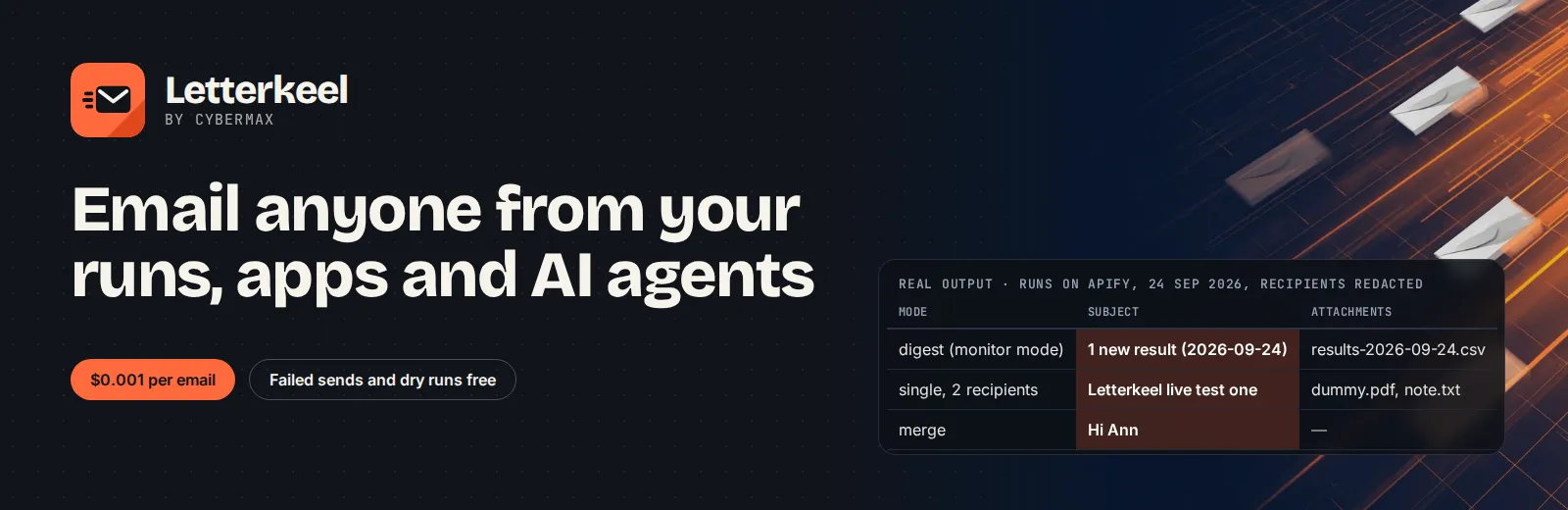
Email anyone from your Apify runs and agents
Give it your SMTP login or a Resend, SendGrid, Mailgun or Postmark key; it sends alerts, run digests with CSV and mail merges from your own domain, for $0.001 per email.
▶ Try it now with a prefilled input · $0.001 per email sent, failures and dry runs free (1,000 emails = $1) · Apify's free plan includes $5 of credit a month, enough for up to about 5,000 emails
Built for: Apify users who want results emailed · Automation builders on Make, Zapier and n8n · AI agents that need to send email · Small teams sending mail merges from a sheet or dataset
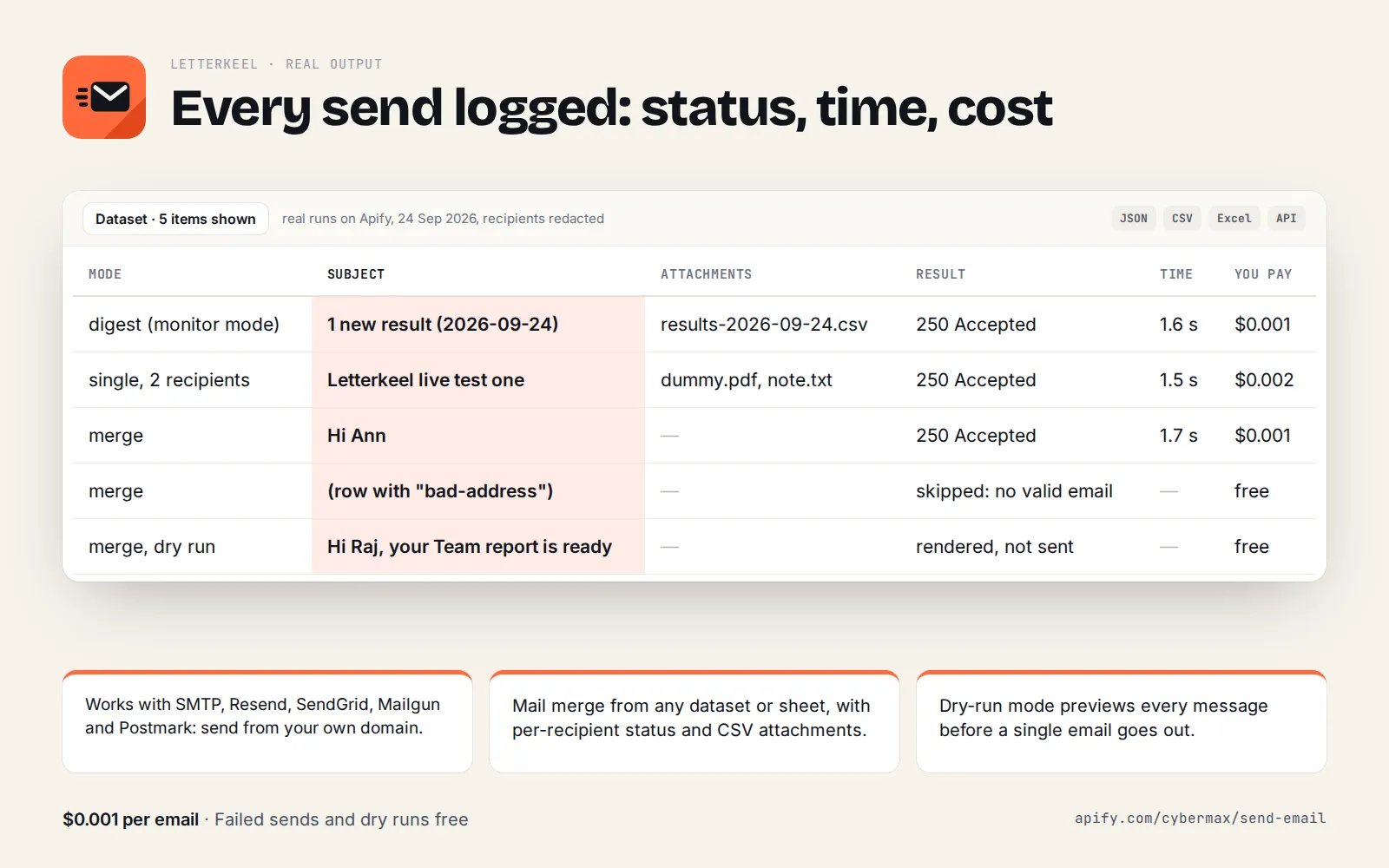
Real output (real runs on Apify, 24 Sep 2026, recipients redacted):
| Mode | Subject | Attachments | Result | Time | You pay |
|---|---|---|---|---|---|
| digest (monitor mode) | 1 new result (2026-09-24) | results-2026-09-24.csv | 250 Accepted | 1.6 s | $0.001 |
| single, 2 recipients | Letterkeel live test one | dummy.pdf, note.txt | 250 Accepted | 1.5 s | $0.002 |
| merge | Hi Ann | 250 Accepted | 1.7 s | $0.001 | |
| merge | (row with "bad-address") | skipped: no valid email | free | ||
| merge, dry run | Hi Raj, your Team report is ready | rendered, not sent | free |
Works with any SMTP server (Gmail / Google Workspace, Microsoft 365, Amazon SES, Zoho, Fastmail, any host) and runs from Apify webhooks and schedules too. One Actor covers every email job an automation needs:
- Single email: alert, notification or report to one or many addresses, with cc/bcc, reply-to and attachments.
- Digest: email the results of any Actor run as a clean table with the full data attached as CSV. Monitor mode sends only the rows that are new since the last run.
- Mail merge: one personalised email per dataset row (
Hi {{firstName}}), with invalid and duplicate addresses skipped for free. - List of emails: an AI agent or script sends several different emails in one call.
Every email gets a delivery record with the provider's message ID, the SMTP/HTTP response, rejected recipients and a readable error when something fails.
You pay per recipient your provider accepts. Dry runs, failed sends, invalid addresses and empty digests are free. No start fee, no subscription.
Why Letterkeel
- Email anyone, not just yourself. The free Apify "Send Email" utility only delivers to the Apify account owner's own address (its runs fail with "Users can only send an email to their own email address"). Letterkeel sends to customers, teammates and clients, from your domain, so replies come back to you and SPF/DKIM pass.
- Five providers, one input. Switch from SMTP to Resend, SendGrid, Mailgun (US/EU) or Postmark by changing one field; the templates, digests and reports stay the same.
- Made for chaining Actors. Point
datasetIdat{{resource.defaultDatasetId}}in an Apify webhook or integration and every finished run is emailed as a table + CSV. Attach a PDF or screenshot that another Actor saved in its key-value store. - Safe by default. Credentials are Apify secret inputs (stored encrypted, never logged). SMTP logins are checked
before the first email, so a wrong password fails fast with a hint ("Gmail and Outlook need an app password") and
nothing is sent or charged.
maxEmailscaps every run (default 100).dryRunpreviews every rendered email for free. - Reliable delivery. Rate limits (HTTP 429), provider outages (5xx) and temporary SMTP errors (4xx) are retried with backoff; permanent errors are reported per email, never silently dropped. Pooled SMTP connections and parallel API sends keep runs short.
- Better inbox placement. A plain-text part is generated from your HTML automatically, and
unsubscribeUrladds the one-clickList-Unsubscribeheaders that Gmail and Yahoo expect from bulk senders. - Tiny and fast. 256 MB, no browser; a single email run takes about 4 s on Apify.
Ready-made inputs (first try in one click)
Free dry run, no credentials needed: renders a two-row mail merge into the dataset, sends nothing, charges nothing.
One alert email through Resend (swap provider for smtp, sendgrid, mailgun or postmark):
Example
Email yourself the results of any Actor run (here: new articles found by Inkpluck), every morning, only the new ones:
Output (one record per email; this is the real record from a test run on Apify, recipient redacted; charged is 0
only because the developer's own runs aren't billed, so for you it would be 1):
Mail merge from rows (or from a dataset of leads):
With dryRun: true the dataset shows each rendered email (recipient, subject, text and HTML) and nothing is sent.
More examples in examples.
Input
| Field | What it does |
|---|---|
provider | smtp (default), resend, sendgrid, mailgun, postmark |
from | Sender, e.g. Acme Alerts <alerts@acme.com>; must be allowed by your SMTP login or verified with your provider |
to, cc, bcc, replyTo | Comma-separated addresses (Name <a@b.com> works) |
subject, html, text | Content with {{field}} placeholders ({{company.name}}, {{tags.0}}; {{{field}}} = raw HTML) |
mode | auto, single, messages, merge, digest (auto picks from the other fields) |
datasetId / items | Rows for merge or digest: an Apify dataset (e.g. another run's) or inline JSON |
toField, nameField | Merge: which row fields hold the address and the name (default: email, emailAddress, contactEmail…) |
digestFields, digestTitle, maxDigestRows, attachCsv, skipIfEmpty | Digest layout |
onlyNew, monitorName, idField | Monitor mode for scheduled runs |
messages | A list of different emails [{to, subject, html, text, cc, bcc, replyTo, attachments}] |
attachments, keyValueStoreId | Files by URL, from an Apify key-value store record, inline text or base64 (20 MB total) |
variables, headers, unsubscribeUrl, sendSeparately | Extra placeholders, custom headers, List-Unsubscribe, one email per to address |
smtpHost, smtpPort, smtpSecure, smtpUser, smtpPassword | SMTP settings (password is a secret input) |
apiKey, mailgunDomain, region, postmarkStream | API provider settings (key is a secret input) |
dryRun, maxEmails, maxConcurrency, delayBetweenEmailsMs | Preview, safety cap, speed and rate limiting |
Common SMTP settings: Gmail/Google Workspace smtp.gmail.com:587 with an
app password; Microsoft 365 smtp.office365.com:587; Amazon SES
email-smtp.<region>.amazonaws.com:587 with SMTP credentials; Zoho smtp.zoho.com:587; Resend
smtp.resend.com:587 (user resend, password = API key); SendGrid smtp.sendgrid.net:587 (user apikey).
Output
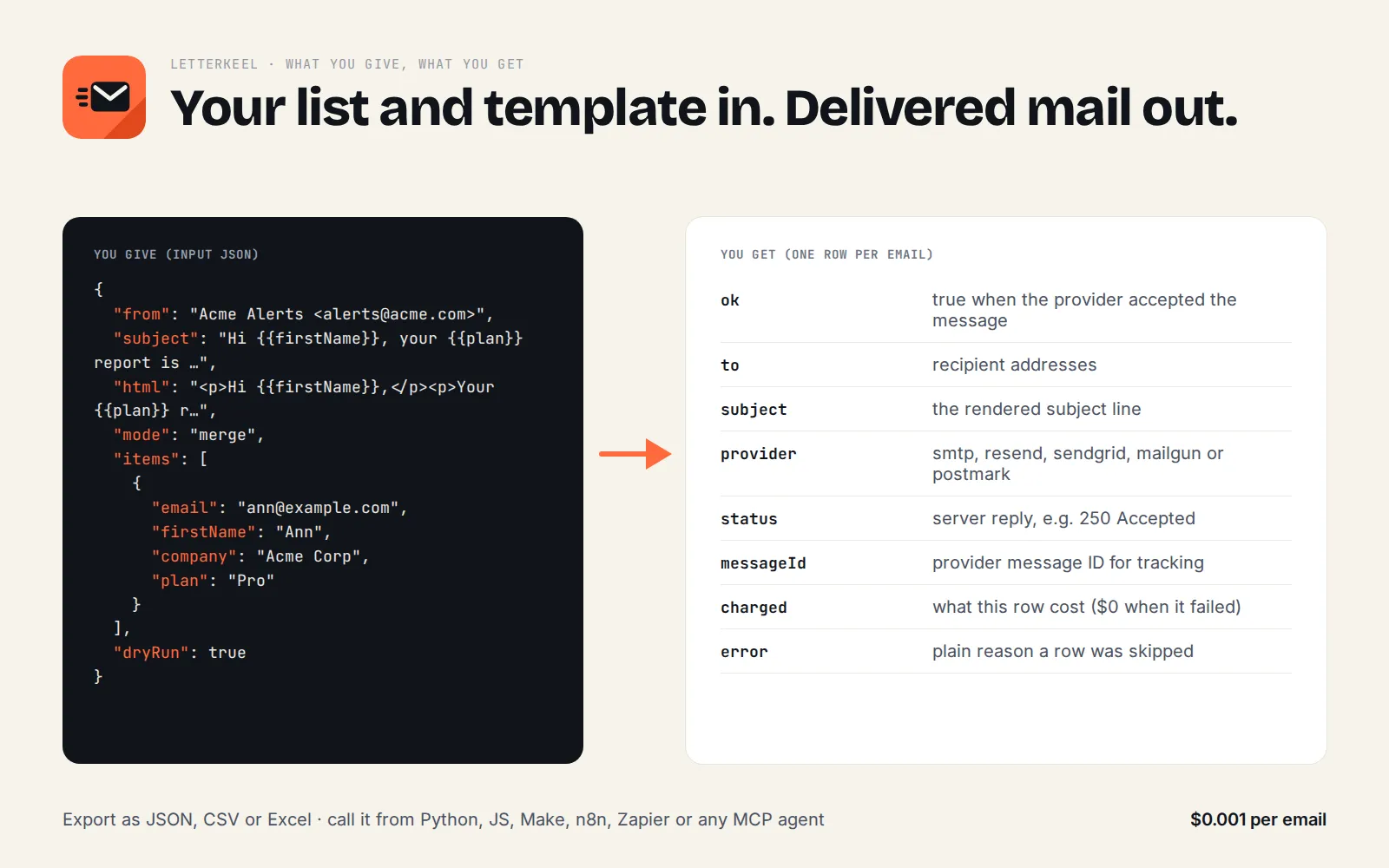
One dataset record per email: ok, to/cc/bcc, subject, recipients, charged, messageId, status,
rejected (SMTP recipients refused), attachments, rows (digest), error, ms, sentAt; in dry runs also the
rendered text and html. Skipped rows (invalid or duplicate addresses, bad messages) are records with ok: false
and the reason. The SUMMARY record in the run's key-value store has the totals (prepared, sent, failed,
skipped). The run fails, uncharged, only when every email failed or the input/credentials are wrong.
Why it pays for itself
- By hand: about 2 minutes to export a run's results, build the email and attach the CSV (estimate), so a daily digest ≈ 12 hours a year; here ≈ $0.37 a year at one email a day.
- The free Apify Send Email utility (3,600 users) can only send to the Apify account owner's own address; 10,416 of its 64,939 public runs in the last 30 days failed (16%, Apify Store stats, checked 25 Sep 2026). Letterkeel sends to anyone, from your domain.
- Store rival bhansalisoft/bulk-email-sender charges $0.01 per email plus a start fee (Apify Store pricing, checked 25 Sep 2026); CyberMax: $0.001, ten times less.
- Monitor mode: a scheduled digest emails only rows that are new since the last run; no new rows means no email and no charge.
▶ Run it on your own list: the example input is already filled in, so the first run takes one click.
Pricing
$0.001 per email sent (event email-sent, one per recipient your provider accepted: To + Cc + Bcc). 1,000
emails cost $1. Dry runs, failed sends, invalid or duplicate addresses and "no new rows" digests are free. You also
pay your email provider as usual (most have free tiers: Resend 3,000/month, Amazon SES from $0.10 per 1,000).
For comparison (Apify Store, 24 Sep 2026): the free Apify utility can only email the account owner; the other SMTP sender on the Store charges $0.01 per email plus a start fee.
Benchmark
Same job for each Actor: one HTML email to one external address (a test SMTP inbox), default settings, run on Apify on 24 Sep 2026. Rivals are the email-sending Actors on the Apify Store.
| Delivered | Sends to any address | Run time | Memory | Price per email | Message ID + SMTP response in output | |
|---|---|---|---|---|---|---|
| Letterkeel | 1/1 | yes | 4.0 s | 256 MB | $0.001 | yes |
| Apify Send Email (free) | 0/1: run failed, "Users can only send an email to their own email address" | no | 1.4 s | 1,024 MB | free | no |
| SMTP bulk sender | 1/1 | yes | 10.2 s | 4,096 MB | $0.01 + start fee | no (status text only) |
Apify's public run statistics for the free utility show 10,462 failed runs out of 66,453 in the last 30 days (16%).
Run it on a schedule (monitor mode)
Get a daily email with only what's new from any scraper:
- Create a task from your scraper and a task from Letterkeel with
"datasetId"set to the scraper task's dataset, or simpler: add an integration to the scraper task: Integrations → Connect Actor or task → cybermax/send-email, input{ "provider": "sendgrid", "apiKey": "SG....", "from": "Bot <bot@acme.com>", "to": "team@acme.com","datasetId": "{{resource.defaultDatasetId}}", "onlyNew": true, "monitorName": "new-leads", "idField": "url" } - Put the scraper task on an Apify Schedule (e.g.
0 7 * * *, 07:00 daily). - Every run, Letterkeel compares the rows with what it already emailed and sends one digest of the new ones. No new rows: no email, no charge.
Mail merge + monitor mode (mode: "merge", onlyNew: true) emails each new address exactly once, e.g. a welcome
email to every new sign-up in a dataset.
Integrations
- Apify webhooks and integrations: run Letterkeel when any Actor or task finishes, with
{{resource.defaultDatasetId}}(digest of results) or{{resource.defaultKeyValueStoreId}}(attach itsOUTPUTPDF/screenshot viakeyValueStoreId+attachments: [{"key": "OUTPUT", "filename": "page.png"}]). - Make: Apify → Run an Actor (
cybermax/send-email) with the JSON input; map fields from earlier modules intoto,subject,html. - Zapier: Apify → Run Actor action; e.g. new Google Sheets row → personalised email from your domain.
- n8n: the Apify node (Run Actor) with
{"to": "{{ $json.email }}", "subject": "…", "html": "…"}. - Google Sheets: export a sheet as CSV rows into
items(or a dataset) and usemode: "merge"; results (ok,messageId,error) come back as a dataset you can import withIMPORTDATA. - JavaScript:
import { ApifyClient } from 'apify-client';const client = new ApifyClient({ token: process.env.APIFY_TOKEN });const run = await client.actor('cybermax/send-email').call({provider: 'postmark', apiKey: process.env.POSTMARK_TOKEN, from: 'Acme <hi@acme.com>',to: 'ann@example.com', subject: 'Your export is ready', html: '<p>Download it <a href="https://acme.com/x">here</a>.</p>',});const { items } = await client.dataset(run.defaultDatasetId).listItems();console.log(items[0].ok, items[0].messageId);
- Python:
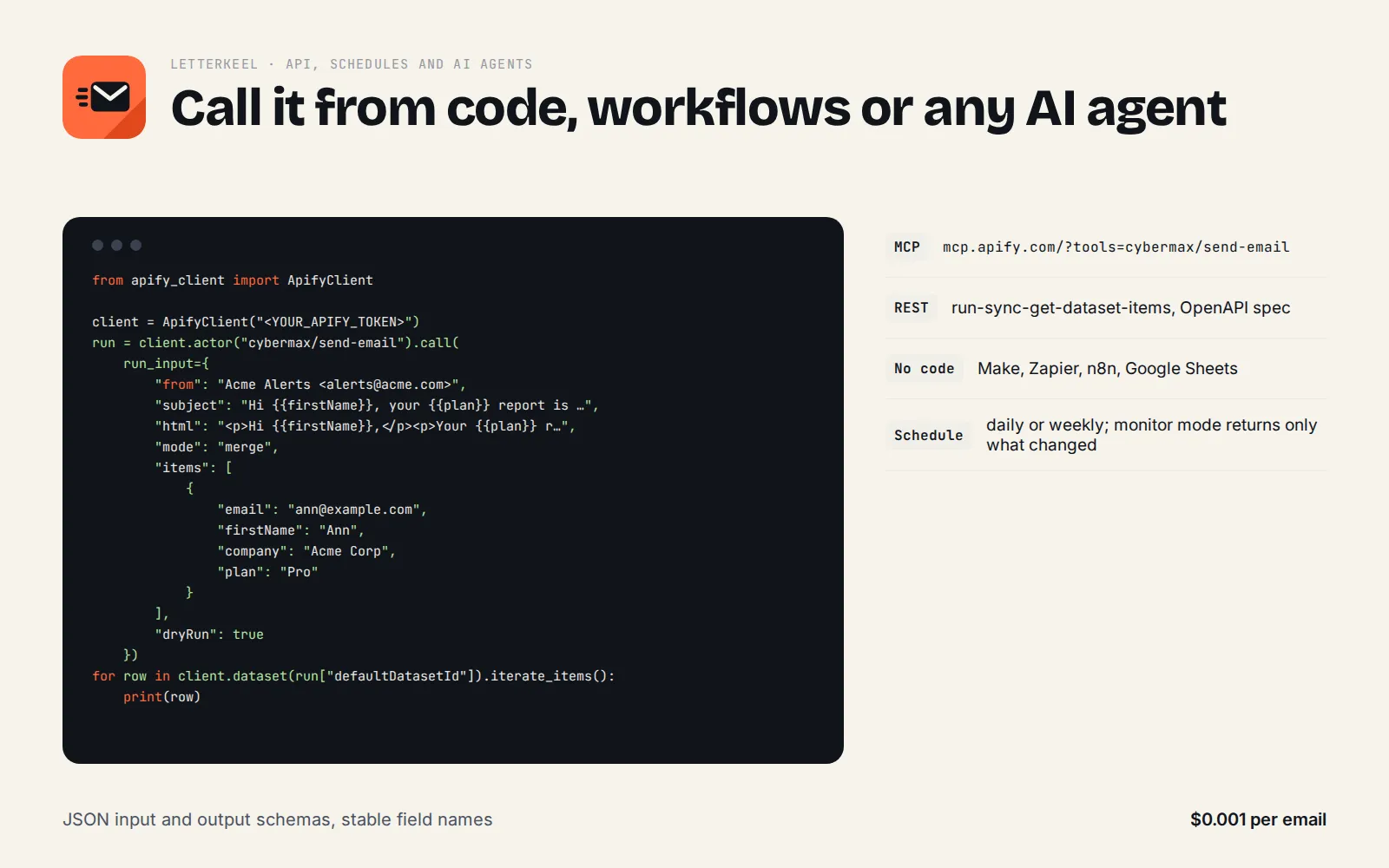
from apify_client import ApifyClientclient = ApifyClient("<APIFY_TOKEN>")run = client.actor("cybermax/send-email").call(run_input={"provider": "smtp", "smtpHost": "smtp.office365.com", "smtpUser": "me@acme.com", "smtpPassword": "<password>","from": "me@acme.com", "to": "boss@acme.com", "subject": "Weekly numbers", "text": "See attached.","attachments": [{"filename": "numbers.csv", "text": csv_string}]})print(next(client.dataset(run["defaultDatasetId"]).iterate_items())["ok"])
Use it from an AI agent (MCP)
- Apify MCP server: connect your MCP client (Claude, Cursor, VS Code, n8n…) to
https://mcp.apify.com/?tools=cybermax/send-emailwith your Apify token. The agent gets one tool that takes the input above (put your provider key in the agent's configuration, not in prompts). - Local MCP server (
send-email-mcp, Node 18+): keeps your provider credentials in environment variables, so the agent only chooses recipients, subject and body, and previews withdry_runbefore sending. - API (synchronous):
POST https://api.apify.com/v2/acts/cybermax~send-email/run-sync-get-dataset-items?token=<TOKEN>returns the delivery records. - Typical agent prompts: "Email this summary to the team", "Send each lead in this dataset a personalised intro", "Email me the new jobs every morning", "Send the PDF you just made to the client".
When NOT to use it
- Cold spam or bought lists. Letterkeel sends through your own account; your provider's rules apply and spam gets
your domain blocked. Use it for your own customers, sign-ups, team and people who expect your email. Add
unsubscribeUrlfor anything that isn't a one-to-one message. - You have no email provider. You need an SMTP login or an API key. Free options: Resend (3,000 emails/month), Brevo, Gmail with an app password (about 500/day); check each provider's current limits.
- Very large newsletters (100,000+). Use your provider's own campaign tool; Letterkeel caps a run at 5,000 emails.
- Receiving or reading email. Letterkeel only sends.
- Sending from port 25. Cloud hosts block it; use 587 or 465.
FAQ
Why not the free apify/send-mail? It is free but only delivers to your own Apify account email, so it can't reach customers, teammates or clients. Letterkeel sends to anyone through your own provider and returns the message ID and SMTP response for every email.
Why not call my email provider's API directly? You can, if you want to write the code. Letterkeel already turns any Actor's dataset into a table email with CSV, does mail merge with invalid and duplicate addresses skipped, retries rate limits, and switches between five providers by changing one field.
Is it for cold email? No. It sends through your own account and your provider's rules apply; use it for your own customers, sign-ups and team.
Can an AI agent use it (MCP)? Yes. Add https://mcp.apify.com/?tools=cybermax/send-email as an MCP server in Claude, Cursor, VS Code or any MCP client; the agent sees the input schema and calls Letterkeel directly.
Can I call it from Python, JavaScript or plain HTTP? Yes. POST your input JSON to https://api.apify.com/v2/acts/cybermax~send-email/run-sync-get-dataset-items?token=YOUR_APIFY_TOKEN and the results come back in the response, or use the apify-client package for Python or JavaScript. Recipes for Make, Zapier, n8n and Google Sheets are in Integrations.
Is it legal to use? Letterkeel sends through your own email account or provider. You are responsible for having consent or another lawful basis for each message and for following CAN-SPAM, GDPR and your provider's terms. This is general information, not legal advice.
Is my password safe? smtpPassword and apiKey are Apify secret inputs: encrypted at rest, hidden in the
Console and API after saving, and never written to logs or the dataset.
Am I charged when an email bounces later? Letterkeel charges when your provider accepts the email; later bounces
are reported by your provider. Recipients the SMTP server refuses during sending are listed in rejected and not
charged.
Can I send HTML with images? Yes: use absolute image URLs in the HTML, or attach files.
How do I test without sending? Set dryRun: true: every email is rendered into the dataset, nothing is sent,
nothing is charged, and no credentials are needed.
Start now
▶ Try Letterkeel with a prefilled input · $0.001 per email sent, failures and dry runs free (1,000 emails = $1). Questions or a missing field? Open an issue on the Store page and it gets answered the same day.
Also from CyberMax
- Printwren: HTML to PDF & URL to PDF API: make the PDF, then email it
- Capturewren: Website Screenshot API for AI Agents: email page snapshots
- Hollerdex: Website Contact Scraper: find the addresses first
- Inkpluck: Article Extractor: email a daily reading digest
- HireHeat Jobs: Career Site Job Listings: daily job alerts by email
All tools: apify.com/cybermax.
© 2026 CyberMax. All rights reserved.
Found Letterkeel useful? A quick rating on its Store page helps others find it.


