

Article Extractor & Scraper: URL to Text & Markdown — Inkpluck
Pricing
$1.00 / 1,000 article extracteds
Article Extractor & Scraper: URL to Text & Markdown — Inkpluck
Turn any article link into clean text and Markdown for LLMs and RAG. Article extractor and news scraper API: URLs or RSS feeds in; title, authors, publish date, language, top image and paywall flag out. newspaper3k-compatible. $0.001 per article; failures free.
Pricing
$1.00 / 1,000 article extracteds
Rating
0.0
(0)
Developer

CyberMax
Maintained by CommunityActor stats
0
Bookmarked
3
Total users
2
Monthly active users
5 days ago
Last modified
Categories
Share
Inkpluck: Article Extractor API, URL to Text, Markdown & Metadata
Website: cybermaxtools.com/store/inkpluck-article-extract · plans, related tools and bundles
Any article link to clean text and Markdown
Give it article URLs or RSS feeds; get back clean text, Markdown, title, authors, publish date, language and a paywall flag, for $0.001 per article.
▶ Try it now with a prefilled input · $0.001 per article, failures free (1,000 articles = $1) · Apify's free plan includes $5 of credit a month, enough for up to about 5,000 articles
Built for: AI and RAG builders feeding LLMs · Newsletter and media-monitoring teams · newspaper3k users who need a maintained drop-in · Researchers collecting news corpora
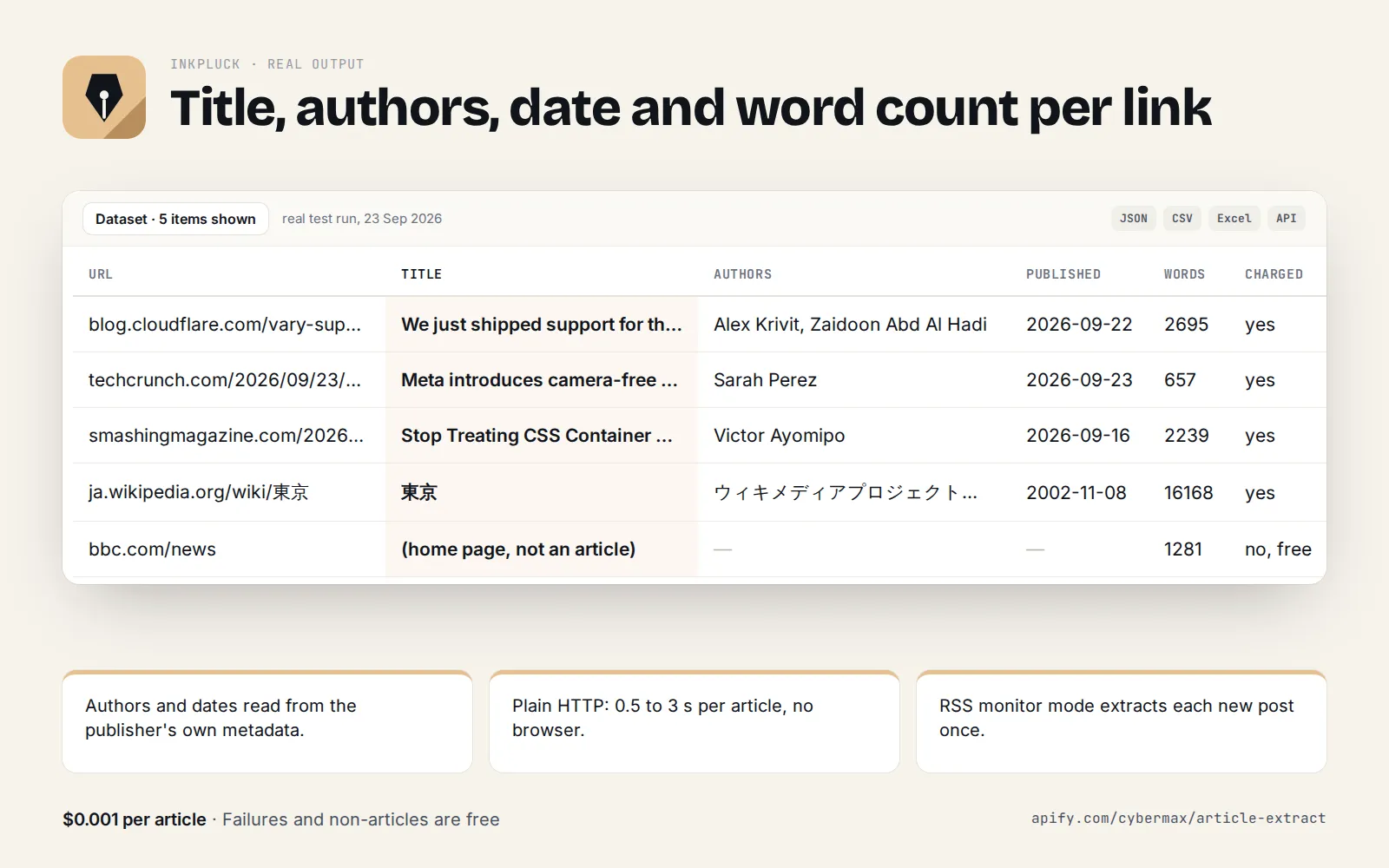
Real output (real test run, 23 Sep 2026):
| URL | Title | Authors | Published | Words | Charged |
|---|---|---|---|---|---|
| blog.cloudflare.com/vary-support/ | We just shipped support for the ugliest part of HTTP: Vary | Alex Krivit, Zaidoon Abd Al Hadi | 2026-09-22 | 2695 | yes |
| techcrunch.com/2026/09/23/meta-introduces-camera-free-ai-glasses/ | Meta introduces camera-free AI glasses | Sarah Perez | 2026-09-23 | 657 | yes |
| smashingmagazine.com/2026/09/stop-treating-css-container-q… | Stop Treating CSS Container Queries Like Traditional Media Queries | Victor Ayomipo | 2026-09-16 | 2239 | yes |
| ja.wikipedia.org/wiki/東京 | 東京 | ウィキメディアプロジェクトへの貢献者 | 2002-11-08 | 16168 | yes |
| bbc.com/news | (home page, not an article) | 1281 | no (free with onlyArticles) |
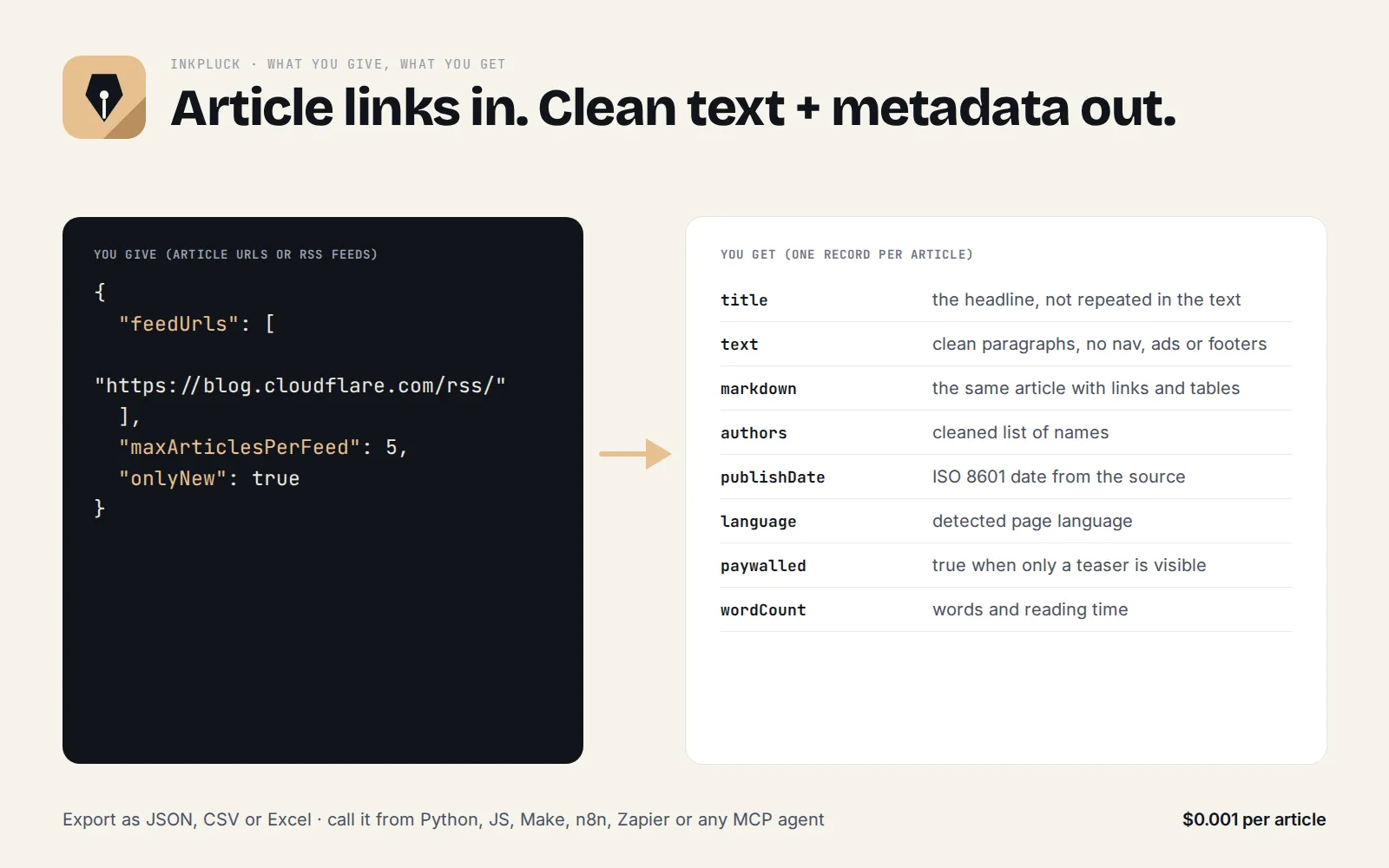
Besides the headline fields you also get update dates, site name, section, tags, top image, all images, embedded videos, word count and reading time, with no navigation, ads, cookie banners, "related stories" or footers. It is a maintained successor to newspaper3k (last release 2018), with the same field names available.
No start fee and no subscription. Pages that fail to load, bot walls, PDFs, JavaScript-only pages, paywalled teasers and pages with too little text cost nothing.
Why Inkpluck
- Metadata from the source, not guesses. Authors and dates come from the publisher's own schema.org JSON-LD
(
NewsArticle,BlogPosting,@graph), OpenGraph andarticle:*tags, Parsely/Sailthru/Dublin Core/citation meta tags and bylines, then the date in the URL (/2024/05/12/…). Dates are normalised to ISO 8601 UTC, and author lists are cleaned ("By Jane Doe and John Smith" becomes["Jane Doe", "John Smith"]; "Staff", "About the author" and profile URLs are dropped). - Text you can feed straight to an LLM. Mozilla Readability (the engine behind Firefox Reader View) finds the
article body; Inkpluck then writes plain text with blank lines between paragraphs, list items as
- …, table rows asa | b, and captions left out, plus a separate Markdown version with links and tables. The headline is its own field and is not repeated in the text. - Knows what isn't an article. Home pages, section pages (
/news,/tech) and teaser grids getlooksLikeArticle: false. Turn ononlyArticlesand they come back as free failures, handy when you feed it crawled link lists. - Paywalls are flagged, not hidden.
paywalled: truewhen the publisher marks the article as subscriber content (isAccessibleForFree: false) or only a teaser is visible. A teaser with too little text is a free failure. - Fast and cheap because it's plain HTTP. No headless browser: a typical article takes 0.5–3 s, and runs start in seconds. Charset detection handles old Windows-1252/ISO-8859 sites; CJK word counts are correct.
- Blocked? One automatic retry through Apify Proxy when a site answers 403/429/503 to a direct request, or send everything through your own proxy settings (e.g. residential).
- Watch feeds, get each new article once. Give it RSS/Atom feeds (
feedUrls) and turn ononlyNew: every run extracts only the articles it hasn't extracted before. Put it on an Apify Schedule and you have a daily "new articles as Markdown" feed for your agent, newsletter or RAG index. - Already have the HTML? Pass
htmlDocumentsand nothing is fetched. - newspaper3k drop-in.
newspaper3kFields: trueaddspublish_date,top_image,movies,meta_lang,meta_description,meta_keywords,canonical_linkandsource_urlnext totitle,authors,text,images.
Ready-made inputs (first try in one click)
Copy one into the Input tab (JSON view). Each finishes in seconds and costs a few tenths of a cent.
Two articles to text + Markdown (the Store's default input):
Latest posts from an RSS feed, only new ones on each run (pair with a daily Schedule):
newspaper3k drop-in (same field names as newspaper.Article):
Example
Input:
Output (one record per URL; a real record from a real run, text shortened here):
A home page with onlyArticles on (not charged):
In the same test batch, articles from the BBC, The Guardian, The Verge, Smashing Magazine, fly.io and Japanese
Wikipedia all came back with their bylines and dates (full outputs in examples/).
Input
| Field | Default | What it does |
|---|---|---|
urls | Article URLs, one per line (https:// optional; duplicates skipped) | |
feedUrls | RSS/Atom feeds; their newest items are extracted | |
maxArticlesPerFeed | 20 | Newest items taken from each feed |
onlyNew | false | Monitor mode: skip URLs extracted by earlier runs (free, no record) |
monitorName | default | Separate memory per watch list (kept in a named key-value store in your account) |
htmlDocuments | [{"url", "html"}]: extract HTML you already have, without fetching | |
onlyArticles | false | Home/section/listing pages become free failures |
outputMarkdown | true | Add the markdown field |
includeHtml | false | Add the cleaned article body as html |
newspaper3kFields | false | Add newspaper3k's attribute names |
minWords | 50 | Fewer words of article text = free failure |
maxConcurrency | 10 | Pages processed in parallel |
timeoutSecs | 20 | Per-page timeout (one automatic retry on network errors/5xx) |
retryBlockedWithProxy | true | Retry 403/429/503 pages once through Apify Proxy |
proxyConfiguration | none | Send every request through this proxy |
startUrls | Same as urls, in the [{"url": …}] format |
Output
One dataset record per input, in the order they finish. ok: true records are charged and have the article fields
above; ok: false records are free and carry an error (HTTP 403 (the site blocked the request),
not an HTML page (application/pdf), paywalled: only 38 words are visible…,
no article text in the page HTML (the page is built by JavaScript in the browser)not a valid http(s) URL…). Views: Articles (overview table)
and Text.
Why it pays for itself
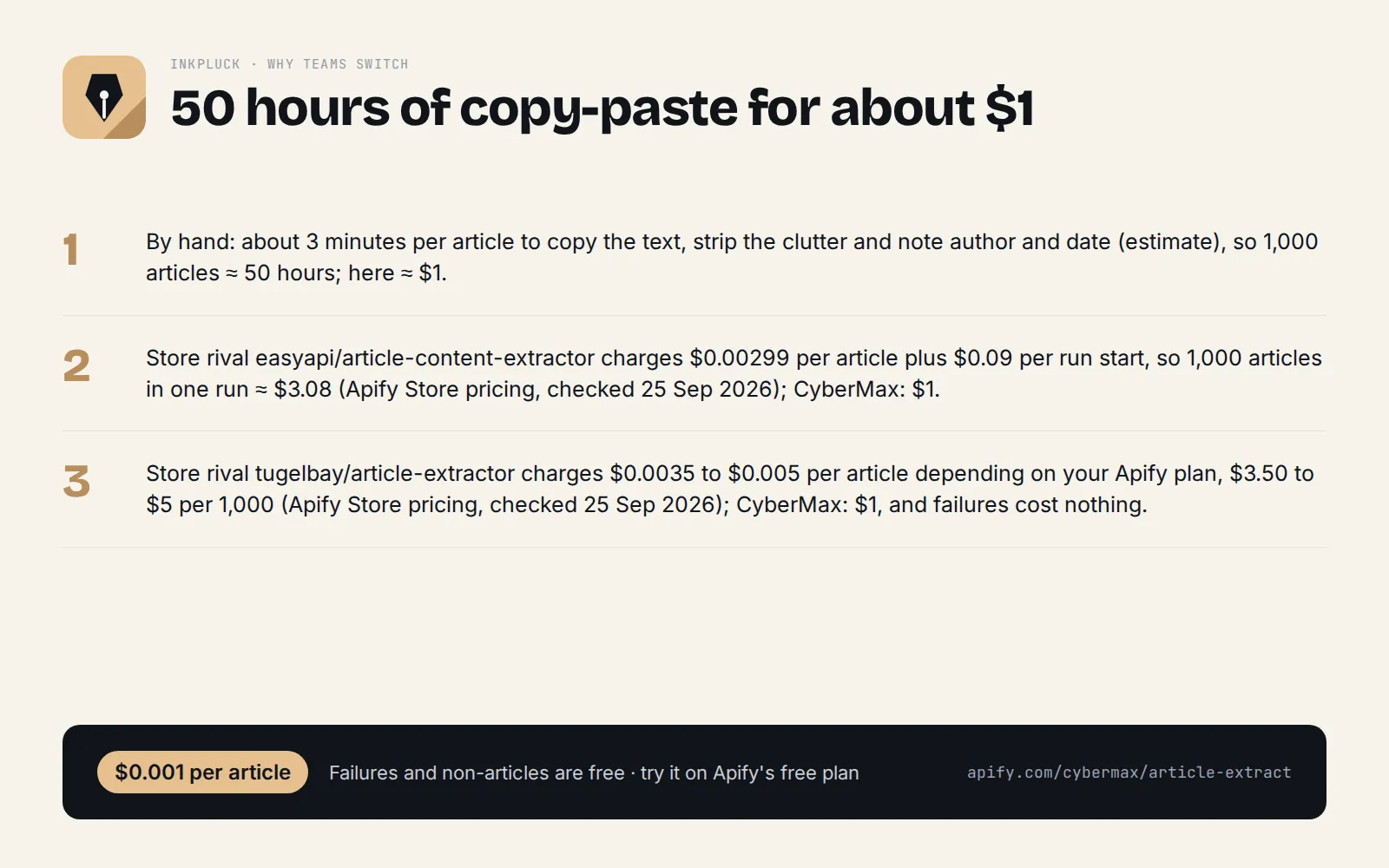
- By hand: about 3 minutes per article to copy the text, strip the clutter and note author and date (estimate), so 1,000 articles ≈ 50 hours; here ≈ $1.
- Store rival easyapi/article-content-extractor charges $0.00299 per article plus $0.09 per run start, so 1,000 articles in one run ≈ $3.08 (Apify Store pricing, checked 25 Sep 2026); CyberMax: $1.
- Store rival tugelbay/article-extractor charges $0.0035 to $0.005 per article depending on your Apify plan, $3.50 to $5 per 1,000 (Apify Store pricing, checked 25 Sep 2026); CyberMax: $1, and failures cost nothing.
- Monitor mode: with RSS feeds and onlyNew, each new article is extracted and charged once, so a daily schedule on 20 feeds with 50 new posts costs about $0.05 a day.
▶ Run it on your own list: the example input is already filled in, so the first run takes one click.
Pricing
$0.001 per article extracted (event article-extracted), no start fee. 1,000 articles cost at most $1.
Everything with ok: false is free.
For comparison (Apify Store, 23 Sep 2026): the most-used article Actor is free but crawls whole sites with a browser (you pay the compute, and ~5% of its public runs in the last 30 days failed or timed out); per-article Actors charge from about $0.003 per article plus a start fee of up to $0.09 per run.
Benchmark
Same 6 articles (The Guardian, BBC, The Verge, TechCrunch, Smashing Magazine, Cloudflare blog), each Actor with its default settings, run on Apify on 23 Sep 2026. Rivals are the most-used article extractors on the Apify Store.
| Articles returned | With author | With date | With top image | With language | Run time | Price for the 6 | |
|---|---|---|---|---|---|---|---|
| Inkpluck | 6/6 | 6 | 6 | 6 | 6 | 6.5 s | $0.006 |
| Rival A | 6/6 | 4 | 6 | 6 | 0 | 16.9 s | $0.19 (two start fees + per article) |
| Rival B | 4/6 (2 missing, 3 unrequested pages; run ended FAILED) | 4 | 4 | 4 | 0 | 10.6 s | $0.017 |
| Rival C | 6/6 (one article cut to 183 of ~1,240 words) | 5 | 6 | 3 | 6 | 4.2 s | $0.03 |
The most-used (free) rival could not be tested: it only runs after you grant it full access to your Apify account. Inkpluck needs no special permissions.
Run it on a schedule (monitor mode)
Watch feeds and get every new article exactly once, as Markdown, every morning:
- Create a task from this Actor with this input (free to save):
{ "feedUrls": ["https://techcrunch.com/feed/", "https://blog.cloudflare.com/rss/"], "onlyNew": true,"monitorName": "tech-news", "onlyArticles": true }
- In Apify Console → Schedules → Create, pick the task and a cron such as
0 7 * * *(07:00 daily). - Connect the output: a webhook, the Make/Zapier/n8n integration below, or read the task's last dataset with
GET https://api.apify.com/v2/actor-tasks/<task-id>/runs/last/dataset/items?token=<TOKEN>.
Only new articles are charged, so a schedule on 20 feeds that publish 50 new posts a day costs about $0.05 a day.
Integrations
- Make: add the Apify → Run an Actor module (Actor
cybermax/article-extract, "Run synchronously" on), then Apify → Get dataset items and maptitle,authors,publishDate,markdownto Notion, Airtable or Slack. - Zapier: Apify → Actor Run Finished trigger for your scheduled task, then Apify → Find Last Dataset Items; send each article to Google Docs, Slack or an email digest.
- n8n: the Apify node (Run Actor and get dataset) with
{"urls": {{ $json.links }}}, then an AI Agent node to summarise eachmarkdown. - Google Sheets:
=IMPORTDATA("https://api.apify.com/v2/actor-tasks/<task-id>/runs/last/dataset/items?format=csv&fields=title,authors,publishDate,wordCount,url&token=<TOKEN>")gives a live sheet of the latest articles. Use a separate, limited-permission Apify token here: anyone who can open the sheet can see it. - JavaScript:
import { ApifyClient } from 'apify-client';const client = new ApifyClient({ token: process.env.APIFY_TOKEN });const run = await client.actor('cybermax/article-extract').call({ urls: ['https://blog.cloudflare.com/vary-support/'] });const { items } = await client.dataset(run.defaultDatasetId).listItems();console.log(items[0].title, items[0].authors, items[0].markdown.slice(0, 200));
- Python (newspaper3k migration):
from apify_client import ApifyClientclient = ApifyClient("<APIFY_TOKEN>")run = client.actor("cybermax/article-extract").call(run_input={"urls": urls, "newspaper3kFields": True})for a in client.dataset(run["defaultDatasetId"]).iterate_items():if a["ok"]:print(a["title"], a["authors"], a["publish_date"], a["text"][:200])
- AI agents (MCP): see below.
Use it from an AI agent (MCP)
- Apify MCP server: connect your MCP client (Claude, Cursor, VS Code, LangChain, n8n…) to
https://mcp.apify.com/?tools=cybermax/article-extractwith your Apify token. The agent gets one tool that takes{"urls": [...]}and returns the records above. - API (synchronous):
POST https://api.apify.com/v2/acts/cybermax~article-extract/run-sync-get-dataset-items?token=<TOKEN>with the input JSON returns the records directly. - Typical agent prompts: "Read these 20 links and summarise each", "Who wrote this article and when?", "Turn this blog post into Markdown for my notes", "Build a RAG corpus from these URLs".
When NOT to use it
- Crawling a whole site to discover articles. Inkpluck extracts the URLs and feed items you give it; it doesn't follow links. Sites without a feed need their URLs from a sitemap or a search first.
- Pages rendered only by JavaScript (some single-page apps). Inkpluck reads the HTML the server sends, without a browser; such pages return a free failure that says so.
- Hard bot walls and logins. Sites like AP News, Reuters and the New York Times block data-centre IPs, including
Apify's default proxy; use a residential proxy in
proxyConfiguration, or expect a free failure. Inkpluck never logs in and never gets around paywalls. - PDFs, images, video transcripts. HTML only.
- Republishing. Articles are the publishers' copyright. Use the output for reading, analysis, search, summaries and research, and link to the source.
FAQ
Why not lukaskrivka/article-extractor-smart, the free one with the most users? It is free to use but crawls with a browser, so you pay the platform compute, and it needs full access to your Apify account to run. Inkpluck needs no special permissions, uses plain HTTP (0.5 to 3 s per article) and charges a flat $0.001 only for articles that worked.
Why not keep using newspaper3k? Its last release was in 2018. Inkpluck returns the same field names (turn on newspaper3kFields), plus Markdown, cleaned author lists, ISO dates and a paywall flag, with no server to maintain.
Why not copy and paste, or a free reader-view extension? Fine for a few pages. For hundreds, or a daily feed into an LLM, you need structured fields (authors, dates, language) and an API; that is what the $0.001 buys.
Can an AI agent use it (MCP)? Yes. Add https://mcp.apify.com/?tools=cybermax/article-extract as an MCP server in Claude, Cursor, VS Code or any MCP client; the agent sees the input schema and calls Inkpluck directly.
Can I call it from Python, JavaScript or plain HTTP? Yes. POST your input JSON to https://api.apify.com/v2/acts/cybermax~article-extract/run-sync-get-dataset-items?token=YOUR_APIFY_TOKEN and the results come back in the response, or use the apify-client package for Python or JavaScript. Recipes for Make, Zapier, n8n and Google Sheets are in Integrations.
Is it legal to use? Inkpluck fetches public article pages, with no login and no paywall bypass. The text still belongs to its publisher: fine for analysis, search and summaries, but get permission before republishing it. This is general information, not legal advice.
Is this a newspaper3k replacement? For Article(url).download(); .parse(), yes: the same fields (title,
authors, publish_date, text, top_image, images, movies, meta_*, canonical_link), maintained,
with Markdown and paywall detection on top. It does not do newspaper3k's nlp() keywords/summary; pass the text
to your LLM instead.
Am I charged for failures? No. Only records with "ok": true are charged.
How accurate are dates and authors? They come from the publisher's own structured data first, so they are what
the site itself declares. Pages without any date markup get the date in their URL, or null; Inkpluck never
invents a date.
Does it respect sites? It fetches each URL once, like a browser's first visit, with no crawling, no login and no personal data beyond the public byline.
Start now
▶ Try Inkpluck with a prefilled input · $0.001 per article, failures free (1,000 articles = $1). Questions or a missing field? Open an issue on the Store page and it gets answered the same day.
Also from CyberMax
- Printwren: HTML to PDF & URL to PDF API: save the articles as PDFs
- Capturewren: Website Screenshot API for AI Agents
- Keyfern: Keyword Ideas & Autocomplete
- Swellmeter: Google Trends Scraper & API
- DomainDNA: Tech Stack Detector, WHOIS & Domain Age API
- Insidewell: SEC Form 4 Insider Trading Tracker
All tools: apify.com/cybermax.
© 2026 CyberMax. All rights reserved.
Found Inkpluck useful? A quick rating on its Store page helps others find it.


