

Contact Details & Email Scraper by Domain — Hollerdex
Pricing
$4.00 / 1,000 domain with contacts founds
Contact Details & Email Scraper by Domain — Hollerdex
Get any company's best email, phone and social profiles from its domain. Contact details scraper and email scraper: labelled emails (sales, support, press), E.164 phones, LinkedIn, X, Instagram, contact page and form. Monitor mode flags changes. $0.004 per domain with contacts; misses free.
Pricing
$4.00 / 1,000 domain with contacts founds
Rating
0.0
(0)
Developer

CyberMax
Maintained by CommunityActor stats
0
Bookmarked
4
Total users
2
Monthly active users
4 days ago
Last modified
Categories
Share
Hollerdex — Website Contact Finder & Contact Details Scraper
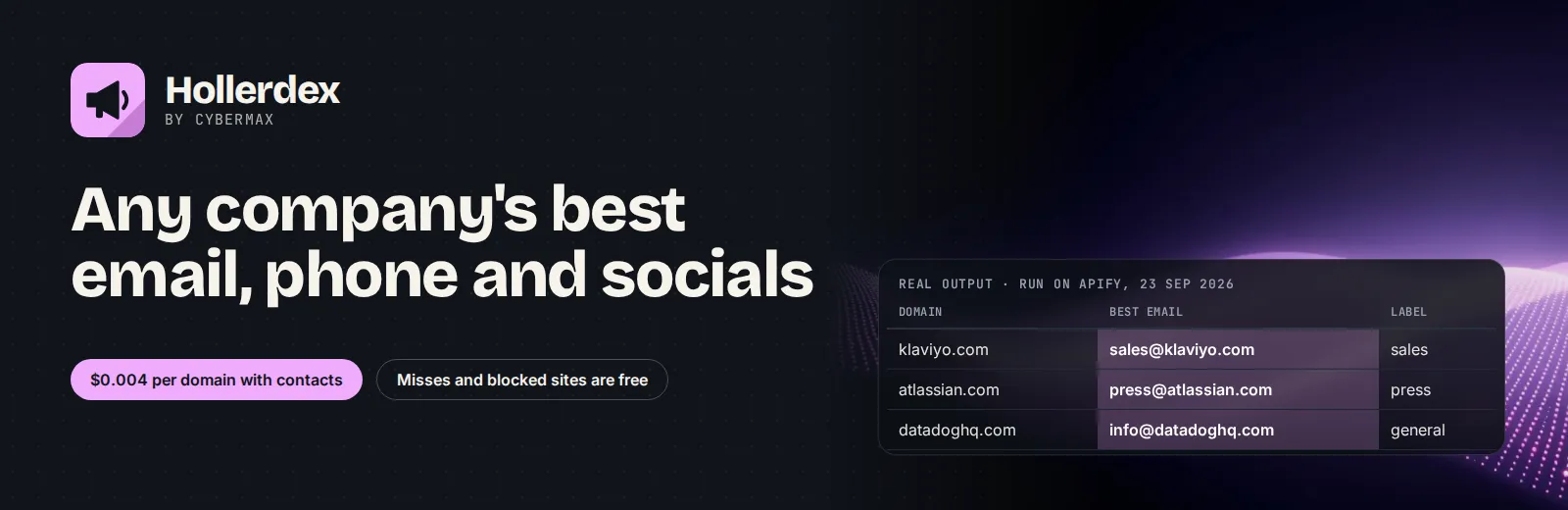
Website: cybermaxtools.com/store/hollerdex-website-contacts · plans, related tools and bundles
Any company's best email, phone and socials
Give it company domains; get one contact card per domain (best email labelled sales/support/press, E.164 phones, 14 social networks, contact page and form) for $0.004 per domain with contacts.
▶ Try it now with a prefilled input · $0.004 per domain with contacts, misses and blocked sites free (1,000 domains = $4) · Apify's free plan includes $5 of credit a month, enough for up to about 1,250 domains with contacts
Built for: Sales and lead-gen teams enriching domain lists · PR, partnerships and recruiting · CRM clean-up and RevOps · AI agents asked "how do I contact acme.com?"
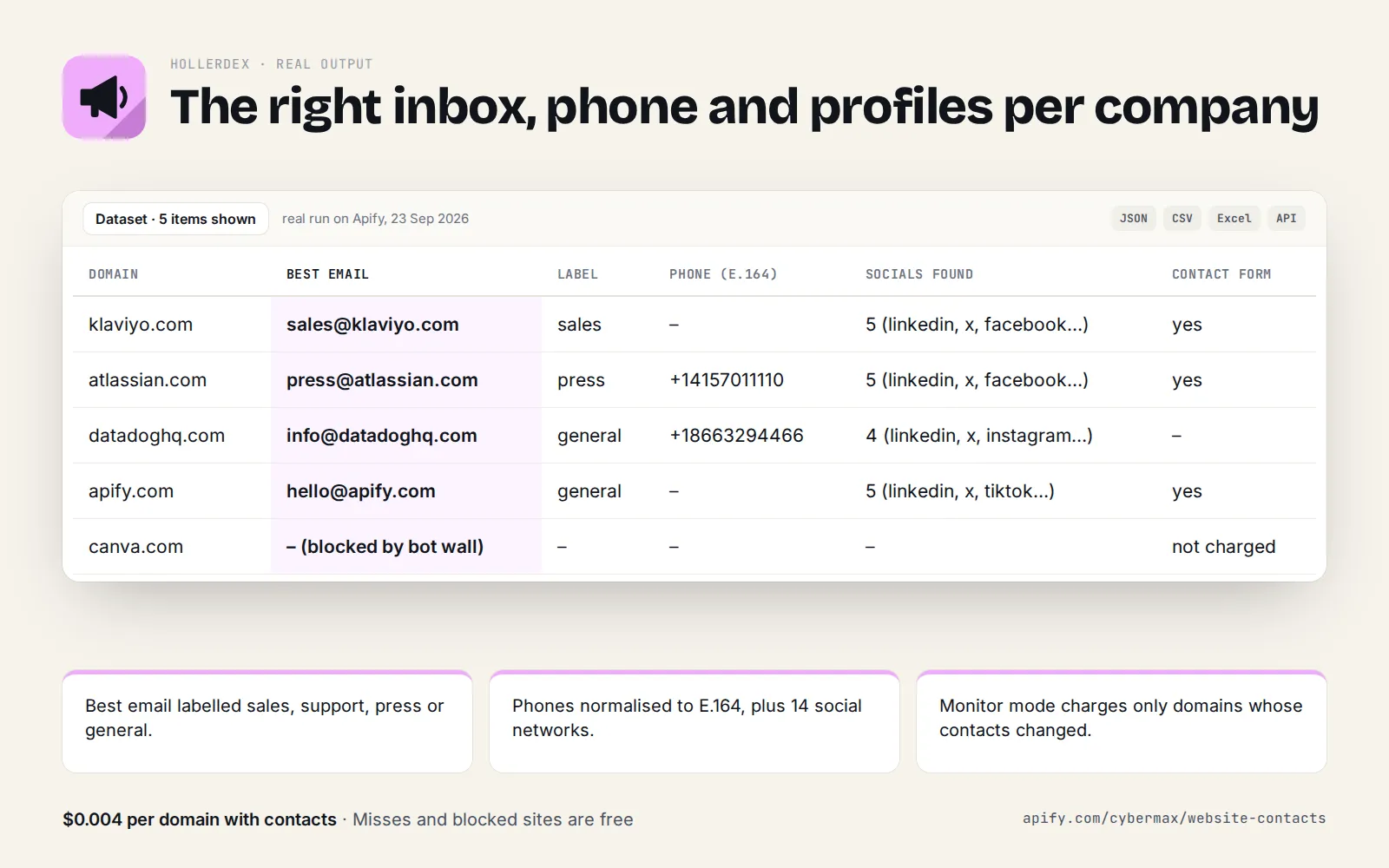
Real output (real run on Apify, 23 Sep 2026):
| Domain | Best email | Label | Phone (E.164) | Socials found | Contact form |
|---|---|---|---|---|---|
| klaviyo.com | sales@klaviyo.com | sales | – | 5 (linkedin, x, facebook…) | yes |
| atlassian.com | press@atlassian.com | press | +14157011110 | 5 (linkedin, x, facebook…) | yes |
| datadoghq.com | info@datadoghq.com | general | +18663294466 | 4 (linkedin, x, instagram…) | – |
| apify.com | hello@apify.com | general | – | 5 (linkedin, x, tiktok…) | yes |
| canva.com | – (blocked by bot wall) | – | – | – | not charged |
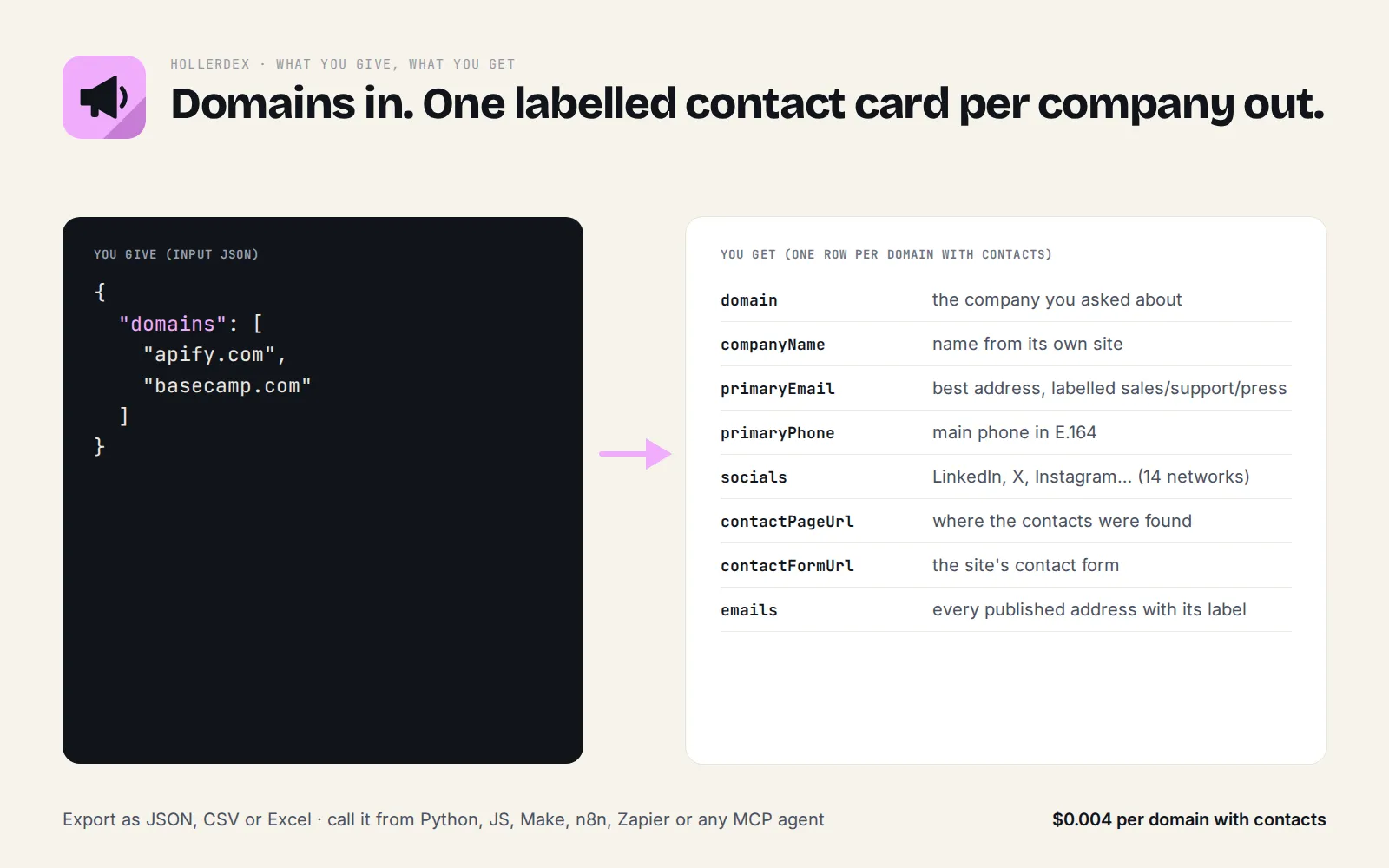
Each card also carries the postal address when the site publishes one, and every email, phone and profile comes with the page it was found on.
First try: $0.008 or less, about 5 seconds. The prefilled input (apify.com, basecamp.com) returned both contact cards in 4.9 s on 24 Sep 2026.
At a glance
| Question | Answer |
|---|---|
| What goes in? | Company domains, website URLs or work emails |
| What comes out? | One contact card per domain: best email (labelled), E.164 phones, 14 social networks, contact page, form, address |
| Price | $0.004 per domain with contacts; nothing found, blocked or unreachable = free |
| Cost of a first try | $0.008 or less (2 domains) |
| Alerts? | Yes: monitor: true + a schedule returns (and charges) only domains whose contacts changed |
| AI agents? | Callable through Apify's MCP server; listed in the official MCP Registry |
Hollerdex vs the most-used contact details scraper (our own test)
Same 2 domains on Apify, 24 Sep 2026 (apify.com, basecamp.com), both capped at 6 pages per site. Prices are each Actor's listed prices on Apify's free plan that day.
| Hollerdex | vdrmota/contact-info-scraper (2,230 users/30 days) | |
|---|---|---|
| Run time | 4.9 s | 6.4 s |
| Cost of this run | $0.008 (2 domains × $0.004) | $0.028 (12 pages × $0.002 + $0.004 start) |
| Emails found | apify.com: 2 (best: hello@apify.com); basecamp.com: 1 | apify.com: 1; basecamp.com: 1 |
| Social profiles | apify.com: 5 (LinkedIn, X, TikTok, GitHub, Discord), one per network | apify.com: 3 links (LinkedIn twice, X) |
| Phone noise | none returned (neither site lists a phone) | 5 "uncertain" numbers such as 8675309 and 035500000000002 |
| Best email picked + labelled (sales/support/press/personal) | yes | no (flat lists) |
| Contact page / contact form URL | yes | no |
| Pricing basis | per domain, only when something is found | per page visited, found or not |
The other tool is the better pick for crawling deep into one big site (hundreds of pages) or for its paid lead-enrichment add-on; Hollerdex is built for lists of company domains.
Why Hollerdex
- One flat price per domain, not per page. Page-based scrapers visit up to 20 pages per site and charge for each one. Hollerdex goes straight to the pages that hold contact details (contact, impressum/imprint, about, support) and charges once per domain. Blocked, empty and unreachable domains cost nothing.
- Ranked and labelled, ready for an agent or a CRM. Every email is tagged
role(sales, support, press, legal, careers…) orpersonal, the best address is picked for you, and emails that belong to other organisations (a regulator or an agency named in an imprint) are moved tootherEmails. Phones come in E.164 (+12122542246), including national numbers such as030 1234567on a .de site. - Finds what simple scrapers miss. It decodes Cloudflare-protected emails, reads
name [at] domain [dot] comand schema.org Organization data (emails, phones,sameAsprofiles, address), and ignores share buttons, tracking addresses andlogo@2x.pnglookalikes.
Real example summary (from a live run, 2026-09-23):
katzsdelicatessen.com: 1 email (best: press@katzsdelicatessen.com); 1 phone; 3 social profiles (x, facebook, instagram); contact form. Checked 5 page(s).
In our test run of 40 well-known domains (SaaS, shops, restaurants, banks, EU publishers), 32 returned
contacts, in about 10 seconds for the whole run. 5 were behind strong bot protection and came back
blocked: true at no charge.
What you get (one record per domain)
companyNamefrom schema.org, the site name or the page titleprimaryEmailandemails[]:{ email, type: "role" | "personal", role, onDomain, foundOn }primaryPhoneandphones[]:{ phone, e164, via: "tel-link" | "text" | "schema.org", foundOn }socials: the main profile per platform:linkedin,x,facebook,instagram,youtube,tiktok,github,threads,bluesky,telegram,discord,pinterest,whatsapp,crunchbase(allSocialProfileslists every one found)contactPageUrl,contactFormUrl,addresses[]otherEmails: addresses on other domains that appeared on the sitesummary: one line an LLM can quote;found,blocked,statusCode,pagesChecked,errors
Input
First try: the prefilled input (apify.com, basecamp.com) ran in 4.9 s on 24 Sep 2026 and costs at most $0.008.
Options: maxPagesPerDomain (default 6, max 15; the price is the same), includePersonalEmails
(default true; set false to keep only role addresses such as info@ or sales@), timeoutSecs,
maxConcurrency and an optional proxyConfiguration. Monitoring: monitor and monitorKey (below).
Ready-made inputs (first try in one click)
No account yet? See real results first on the free demo page: contact cards for well-known SaaS companies.
Paste one into the JSON tab of the input form (or send it to the API) and press Start. Each is sized so the first run is quick and cheap; you pay only for results (Apify's compute is included in the price).
| Preset | What you get | Cost |
|---|---|---|
| Contact cards for 2 companies | best email with its label, phones, socials, contact page | $0.008 or less |
| Company emails only (no personal names) | sales/support/press addresses only | $0.004 or less |
| Quick scan (3 pages per site) | the same card from fewer pages, faster | $0.008 or less |
Contact cards for 2 companies
Company emails only (no personal names)
Quick scan (3 pages per site)
Same thing from a script (returns the results directly):
Output at a glance (real run, 24 Sep 2026)
The prefilled input as table columns (each record also has every email, phone and profile with the page it was found on):
| domain | primaryEmail | email type | socials | contact page / form | pages checked |
|---|---|---|---|---|---|
| apify.com | hello@apify.com | role | linkedin, x, tiktok, github, discord | apify.com/contact | 5 |
| basecamp.com | jason@basecamp.com | personal | – | basecamp.com/support (form) | 4 |
Output (trimmed, real record)
Monitor mode: only contact cards that changed
Set "monitor": true to watch a list of domains. Hollerdex remembers each domain's contact card and, on the next
monitor run, returns only domains whose card changed: an email, phone number or social profile was added or
removed. Unchanged domains are left out of the dataset and not charged. The first monitor run returns every
domain as "change": "new". Checks that read nothing (bot wall, site down, timeout) never count as "removed":
the previous card is kept; if a contact page times out, only additions are reported.
Changed records carry three extra fields (structure shown; values depend on the site):
monitorKey names the watchlist (several can coexist; you can add domains without starting over). Without it,
the state is tied to the exact domain list. A run summary (new, changed, unchanged, failed) is saved as
the run's OUTPUT record.
Who it's for
- AI agents and MCP clients asked "how do I contact acme.com?" or "find the LinkedIn and support email for these 50 companies".
- Sales and lead-gen: enrich a list of domains from a CRM, Google Maps export or trade-show list.
- Partnerships, PR and recruiting: find the right role address (press@, partners@, careers@) instead of a generic inbox.
- Market research: which companies publish a phone number, use a contact form or are active on TikTok.
Why it pays for itself
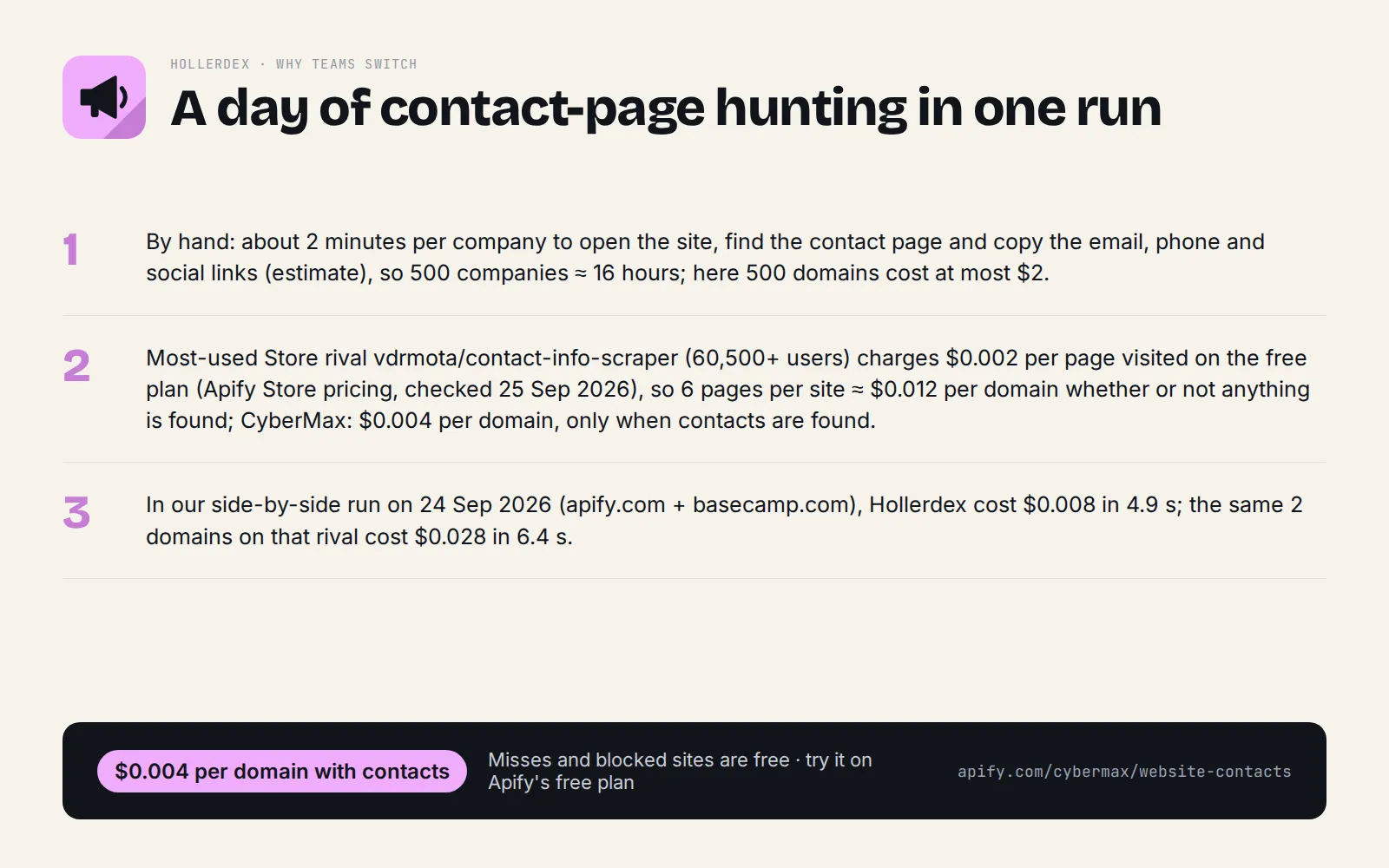
- By hand: about 2 minutes per company to open the site, find the contact page and copy the email, phone and social links (estimate), so 500 companies ≈ 16 hours; here 500 domains cost at most $2.
- Most-used Store rival vdrmota/contact-info-scraper (60,500+ users) charges $0.002 per page visited on the free plan (Apify Store pricing, checked 25 Sep 2026), so 6 pages per site ≈ $0.012 per domain whether or not anything is found; CyberMax: $0.004 per domain, only when contacts are found.
- In our side-by-side run on 24 Sep 2026 (apify.com + basecamp.com), Hollerdex cost $0.008 in 4.9 s; the same 2 domains on that rival cost $0.028 in 6.4 s (details in the comparison table above).
- Monitor mode returns and charges only domains whose contacts changed, so re-checking a CRM list every week costs cents.
▶ Run it on your own list: the example input is already filled in, so the first run takes one click.
Pricing
| Event | Price |
|---|---|
| Domain with contacts found (at least one email, phone or social profile) | $0.004 |
| Domain with nothing public, blocked by bot protection, or unreachable | free |
1,000 domains with contacts cost $4. You can cap the spend of any run with Apify's maximum charge setting.
When not to use it
- To find a specific person's private email: Hollerdex only reads what the company publishes on its own site.
- For sites behind heavy bot protection (some big consumer brands): they come back
blocked: true, free. - To send bulk unsolicited email: you are responsible for following anti-spam and privacy laws (CAN-SPAM, GDPR, CASL) when you use contact data.
FAQ
Why not vdrmota's Contact Details Scraper? It is the better pick for crawling hundreds of pages of one big site, and it has a paid lead-enrichment add-on. For a list of company domains, Hollerdex costs less per domain, charges nothing for misses, and picks and labels the best email for you.
Why not a people email-finder? Those tools look for named people's addresses. Hollerdex only returns what the company publishes on its own site (role addresses, phones, profiles, contact form), which is safer to use and verifiable by the page it was found on.
Why not copy it from the website myself? Fine for five companies. For a few hundred, it's hours of clicking, and you still have to normalise phone numbers and spot which email is sales vs support.
Can I call it from Python, JavaScript or plain HTTP? Yes. POST your input JSON to https://api.apify.com/v2/acts/cybermax~website-contacts/run-sync-get-dataset-items?token=YOUR_APIFY_TOKEN and the results come back in the response, or use the apify-client package for Python or JavaScript. Recipes for Make, Zapier, n8n and Google Sheets are in Integrations.
Is it legal to use? Hollerdex reads only pages a company publishes on its own website, with no login. Business emails and phone numbers can still be personal data under GDPR/CCPA, so use them for a legitimate business purpose and follow anti-spam rules (CAN-SPAM, PECR) when you contact anyone. This is general information, not legal advice.
How is this different from a page-based contact details scraper? Page-based scrapers charge per page crawled (the most-used one on the Store charges $0.002 per page, so a 5-page site costs $0.01). Hollerdex charges $0.004 once per domain, only when it finds something, and returns one ranked contact card instead of one row per page.
How much does a first run cost? $0.008 or less with the prefilled input (2 domains). No start fee, no compute charge on top; domains where nothing is found are free.
Is there a free way to try it? Apify's free plan includes monthly credit that covers over a thousand domains. The free demo page contact cards for well-known SaaS companies shows real output with no account.
Can I give it a list of URLs instead of domains? Yes. Any URL on the site works (https://www.acme.com/pricing); duplicates of the same domain are merged into one card.
Does it find personal emails? Only those a company publishes on its own site. Set includePersonalEmails: false to keep only role addresses (info@, sales@, support@).
What if a site blocks it? The domain comes back blocked: true and is free. For lists with many blocked sites, turn on proxyConfiguration.
Can an AI agent use it? Yes, through Apify's MCP server (https://mcp.apify.com/?tools=cybermax/website-contacts), and it's listed in the official MCP Registry. Each record has a one-line summary an LLM can quote.
How do I export to a CRM or Google Sheets? Use the dataset's CSV/Excel export, the Google Sheets integration, or the Make/Zapier/n8n recipes below.
Run it on a schedule
Apify Console → Schedules → Create new → cron 0 8 * * * (daily 8 AM) → Add Actor → Hollerdex with
your domain list and "monitor": true. With monitor mode a daily run is cheap: you only pay for domains whose
contact card changed. The same schedule through the API:
To get notified, open the Actor → Integrations and add an email, Slack or webhook notification on "Run succeeded" (or use the Make/Zapier/n8n recipes below).
Integrations
Make: Apify app → "Run an Actor" (Actor cybermax/website-contacts, input {"domains": ["acme.com"]},
run synchronously) → "Get dataset items" → map primaryEmail, primaryPhone, socials.linkedin into your CRM.
Zapier: Apify app → "Run Actor" action (from a new CRM company or sheet row), or the "Finished Actor Run" trigger on a scheduled monitor run → "Fetch dataset items" → update the record.
n8n: the Apify node ("Run an Actor and get dataset"), or an HTTP Request node:
Google Sheets: Apify's Google Sheets integration (Actor → Integrations), or pull the last run into a cell:
Python (pip install apify-client):
JavaScript (npm i apify-client):
AI agents (MCP): Hollerdex is a tool on Apify's MCP server, https://mcp.apify.com/?tools=cybermax/website-contacts
(Authorization: Bearer YOUR_TOKEN). Claude Desktop / Cursor config:
Each call is billed per domain with contacts to your Apify account.
Start now
▶ Try Hollerdex with a prefilled input · $0.004 per domain with contacts, misses and blocked sites free (1,000 domains = $4). Questions or a missing field? Open an issue on the Store page and it gets answered the same day.
Also from CyberMax
- DomainDNA: tech stack, email security (MX/SPF/DMARC) and domain age for the same domains.
- Logolark: company logo, icon and brand colour to complete each CRM record.
- HireHeat: which of your accounts are hiring right now, a timing signal for outreach.
- Linkheft: domain authority score and rank to prioritise the list.
- Capturewren: a screenshot and page text for each site.
All tools: Insidewell · Swellmeter · Gripeline · Keyfern · HireHeat Jobs · Printwren
Changelog
-
2026-09-24: head-to-head test vs the most-used contact details scraper; output table; saved tasks for common lookups.
-
2026-09-23: Monitor mode (
monitor,monitorKey: only contact cards with an added or removed email, phone or social profile), schedule & integration recipes.
© 2026 CyberMax. All rights reserved.
Found Hollerdex useful? A quick rating on its Store page helps others find it.


