

BiRefNet Background Remover — AI Image Cutout & Removal
Pricing
from $7.00 / 1,000 background removals
BiRefNet Background Remover — AI Image Cutout & Removal
Remove image backgrounds automatically with BiRefNet. Get a clean transparent PNG cutout (and an optional mask) in seconds, from $0.007/image. No GPU or subscription — a pay-as-you-go remove.bg alternative.
Pricing
from $7.00 / 1,000 background removals
Rating
0.0
(0)
Developer

daniel tr
Maintained by CommunityActor stats
1
Bookmarked
38
Total users
15
Monthly active users
12 days ago
Last modified
Categories
Share
BiRefNet Background Remover — AI Image Background Removal & Cutout ✂️
Remove the background from any image automatically with BiRefNet, a state-of-the-art segmentation model. Get a clean, transparent PNG cutout in just a few seconds — plus an optional black-and-white mask for compositing. No GPU, no subscription, no monthly fees: you pay a tiny fixed price per image. A fast, affordable alternative to remove.bg, Photoroom, and Adobe's "Remove Background".
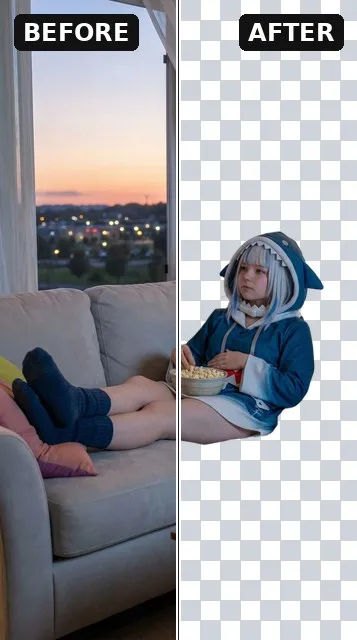
- ✂️ Transparent cutout — your subject on a clean alpha background (PNG or WebP).
- 🎭 Optional mask — the black-and-white segmentation mask, for compositing or downstream tools.
- 🪶 Edge refinement — smooth hair, fur, and fine detail out of the box.
Perfect for e-commerce product shots, marketplace listings, profile pictures, thumbnails, design assets, catalog automation, and n8n / Make / Zapier workflows and AI agents.
See it in action
Every output, from one run — the original image, the transparent cutout (PNG/WebP with a real alpha channel), and the optional black-and-white segmentation mask:
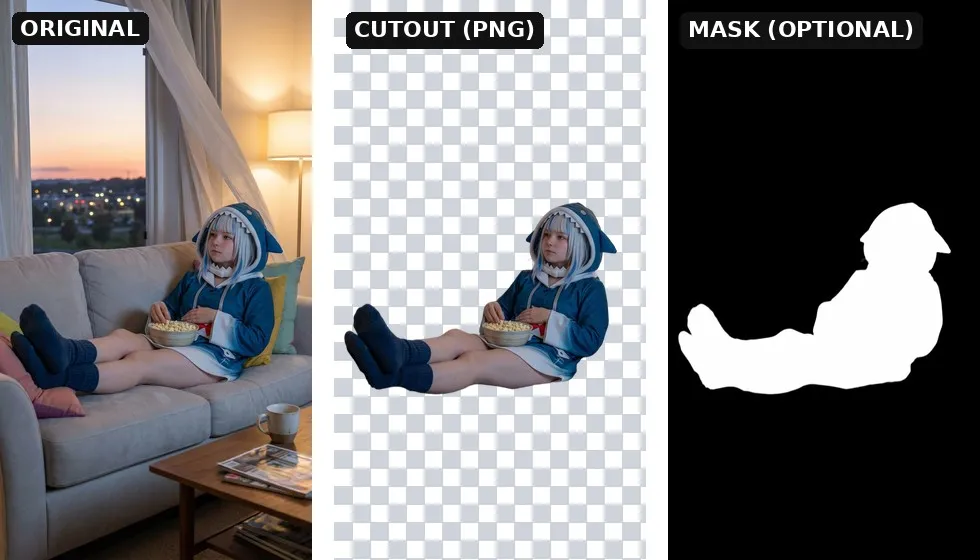
The cutout is a true transparent file — the checkerboard only visualizes the removed background and isn't part of the image. Turn on Also output the mask to additionally get the segmentation mask.
Why this Actor?
- ⚡ Fast — BiRefNet runs on dedicated GPUs and returns a cutout in a few seconds.
- 💸 Cheap — from $0.007 per image (as low as $7 per 1,000) — ~2× under Photoroom and 5–20× under remove.bg. Pay only for successful results; failed runs are never charged.
- 🎯 Accurate — BiRefNet is a top-performing dichotomous image segmentation model, great on hair, fur, and intricate edges.
- 🪟 True transparency — PNG/WebP output with a real alpha channel, ready to drop onto any background.
- 🎭 Mask on demand — flip one switch to also get the raw segmentation mask.
- 🔌 Automation-ready — call it from the Apify API, n8n, Make, Zapier, LangChain, or any AI agent via MCP.
How it compares
| This Actor (BiRefNet) | remove.bg / Photoroom | |
|---|---|---|
| Pricing model | Pay per image (from $0.007) | Monthly subscription / credits |
| Commitment | None — pay only for what you run | Recurring plan, credits expire |
| Failed runs | Never charged | Often consume credits |
| Transparent PNG | Yes | Yes (often paywalled at full res) |
| Segmentation mask | Yes, optional | Rarely exposed |
| API & automation | Native Apify API, n8n, Make, Zapier, MCP | Varies / limited |
| Watermark / resolution cap | None | Common on lower tiers |
Great when you want background removal on demand without a subscription — ideal for occasional use, automated pipelines, and pay-as-you-go scaling.
How it works
- Provide a public image URL.
- Choose your output format (PNG or WebP) and, optionally, turn on Also output the mask.
- The Actor removes the background and stores the cutout (and mask) in the run's dataset and key-value store.
- Download the file(s) from the output, or pipe the URL into the next step of your workflow.
Input example
| Field | Type | Default | Description |
|---|---|---|---|
imageUrl | string | — (required) | Public URL of the image to process (JPG, PNG, WebP). |
outputFormat | string | png | Cutout file format — png or webp (both keep transparency). |
outputMask | boolean | false | Also return the black-and-white segmentation mask. |
refineForeground | boolean | true | Clean up edges for smoother hair, fur, and fine detail. |
Output example
The cutout is also stored in the run's key-value store under the key cutout.png (or cutout.webp), and the mask — when requested — under mask.png (or mask.webp).
Pricing
You are charged per processed image at a price that drops with your Apify plan. The price is the same whether or not you also request the mask.
| Apify plan | Price per image | Per 1,000 images |
|---|---|---|
| Free | $0.0100 | $10.00 |
| Bronze | $0.0090 | $9.00 |
| Silver | $0.0080 | $8.00 |
| Gold / Platinum / Diamond | $0.0070 | $7.00 |
That's still the cheapest pay-as-you-go background-removal API around — roughly 2× cheaper than Photoroom's API (~$0.02/image) and 5–20× cheaper than remove.bg ($0.05–0.20/image), with no monthly subscription and no expiring credits.
Failed runs are never charged — you only pay for cutouts you actually receive. (Apify also applies its standard tiny platform fees for the Actor start and each dataset record.)
Tips for great results
- Use a clear subject — BiRefNet excels when the foreground stands out from the background.
- Keep resolution reasonable — very large images take a little longer; downscale first if you don't need full size.
- Output PNG for maximum compatibility, or WebP for smaller files — both preserve transparency.
- Turn on the mask when you want to composite, soften edges, or feed the selection into another tool.
- Leave edge refinement on for portraits and anything with hair or fur.
🎨 Need images to cut out? — FLUX.2 Klein Image Generator
No source image yet? Generate one. Our companion Actor, FLUX.2 Klein Image Generator, creates high-quality images from a text prompt (or edits an existing photo) in seconds — then pipe the imageUrl straight into this Actor to get a clean cutout.
The complete pipeline:
👉 Try FLUX.2 Klein Image Generator →
Use it from the API
Works the same from the Apify n8n node, Make, Zapier, LangChain, or the Apify MCP server for AI agents.
For the full request/response shape (run-sync, async, polling, downloading the cutout), see the OpenAPI spec at ./openapi.yaml — import it into Postman, Insomnia, or any OpenAPI client.
Templates & integrations
Drop this Actor into a no-code workflow to automate background removal end to end. In each tool, search for the Apify connector, authenticate with your Apify API token, and select danitn11/birefnet-background-remover with the action Run Actor (or Run Actor and get dataset items to receive the cutout URL back).
- n8n — add the Apify node → Run Actor, map
imageUrlfrom a previous step (e.g. a new row in a Sheet or an uploaded product photo), then push the resultingimageUrlto your storage or publishing node. - Make.com — use the Apify › Run an Actor module, then a Watch / Get dataset items module to read back
imageUrl. Chain into Shopify, Google Drive, or an image uploader. - Zapier — trigger (new file, form submission, etc.) → Apify: Run Actor → action (update a product listing, save to Drive, send a Slack message).
Common pattern — automated product-photo pipeline:
Use with AI agents (MCP server)
This Actor works as a tool for any MCP-compatible AI agent (Claude, Cursor, VS Code Copilot, custom agents) through Apify's hosted MCP server. Your agent can remove backgrounds as part of a larger task — "cut out this product and place it on white" — with billing through your Apify account.
Server URL (with this Actor preselected as a tool):
Authenticate with OAuth (you'll be redirected on first connect) or an Authorization: Bearer <APIFY_TOKEN> header.
Claude Code
Claude Desktop / claude.ai — add a custom connector with the server URL above (OAuth flow handles auth).
Cursor / VS Code — add to .cursor/mcp.json (or "MCP: Open User Configuration" in VS Code):
Local stdio (npx)
Then just ask your agent: "Remove the background from this image and give me a transparent PNG." The agent calls the Actor, waits for the result, and gets back the cutout URL from the output schema.
FAQ
How long does background removal take? Typically just a few seconds — BiRefNet runs on dedicated GPUs.
What image formats are supported? Input: JPG, PNG, and WebP via a publicly accessible URL. Output: PNG or WebP — both with a transparent background.
Do I get a transparent background? Yes. The cutout is a real alpha-channel PNG (or WebP), ready to drop onto any background.
Can I get the mask too? Yes — turn on Also output the mask and the Actor returns the black-and-white segmentation mask as a second file.
Is there a watermark or resolution cap? No. The output is clean and full-resolution, ready to publish.
What model is used?
BiRefNet (ZhengPeng7/BiRefNet) — a state-of-the-art bilateral reference network for high-accuracy image segmentation.


