
Website Screenshot & PDF API
Pricing
from $3.00 / 1,000 screenshot captureds
Website Screenshot & PDF API
Capture full-page screenshots (PNG, JPEG) and PDFs of any website. Hides cookie banners, blocks ads, emulates phones, tablets and dark mode. Run in batch or call it as a real-time HTTP API.
Pricing
from $3.00 / 1,000 screenshot captureds
Rating
0.0
(0)
Developer

DataDock Labs
Maintained by CommunityActor stats
0
Bookmarked
1
Total users
0
Monthly active users
4 days ago
Last modified
Categories
Features
Share
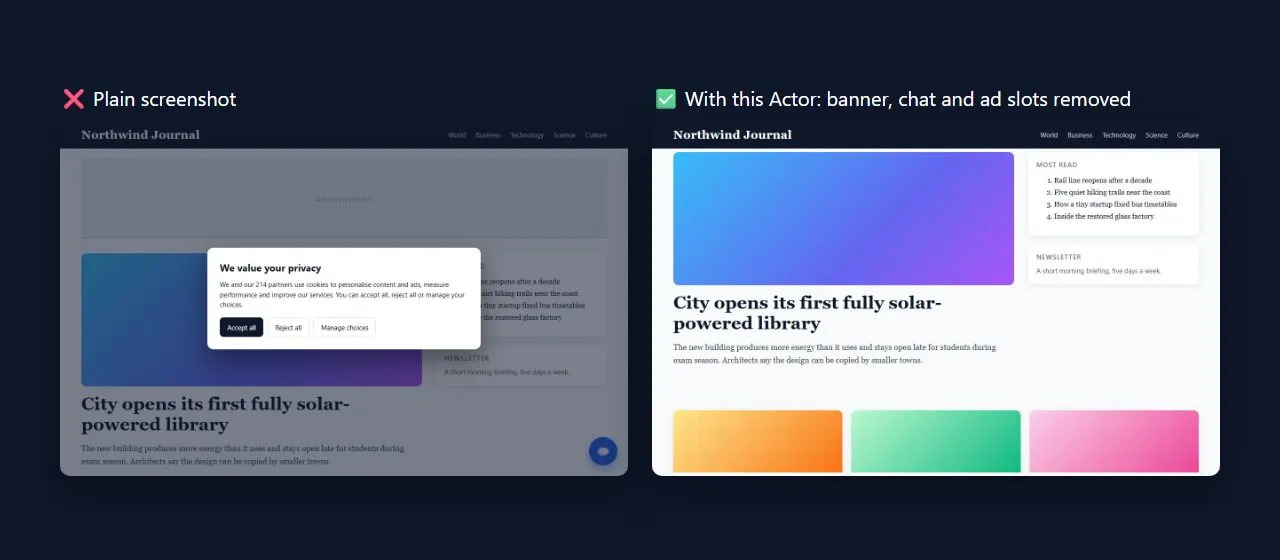
Capture full-page screenshots (PNG or JPEG) and PDFs of any public web page, in bulk or in real time. Cookie banners and ads are removed automatically, so screenshots look the way a visitor sees the page, without the clutter.
- 📸 Full-page, viewport or single-element screenshots in PNG or JPEG
- 📄 URL to PDF with paper size, orientation, margins and print/screen styles
- 🍪 Hides cookie-consent banners of the most common consent platforms (OneTrust, Cookiebot, Quantcast, Didomi, Usercentrics and 20+ more)
- 🚫 Blocks ads and trackers and collapses empty ad slots, so pages load faster
- 📱 Phone and tablet emulation (iPhone, Pixel, Galaxy, iPad), retina output and dark mode
- 🖱️ Lazy-loaded images appear: the page is scrolled before full-page captures
- ⚡ Real-time HTTP API (Standby mode): send a URL, get the image back in about a second
- 💸 Pay only for successful captures. Failed pages cost nothing.
What can I use it for?
- Website monitoring and visual change tracking
- Archiving pages, receipts and articles as PDF
- Social media previews, thumbnails and link cards
- SEO and competitor audits (desktop and mobile)
- Feeding page images to AI agents and vision models
- QA: checking how a site looks on different devices or in dark mode
How to use it
In Apify Console (no code)
- Paste one or more URLs into URLs (or upload a text file with one URL per line).
- Pick PNG, JPEG or PDF. Defaults work for most pages.
- Click Start. Files appear in the Output tab with a preview, and stay in the run's key-value store.
Via the API (batch)
Each dataset item contains a fileUrl you can download.
As a real-time API (Standby mode)
The Actor also runs as an always-ready web server. Send a GET or POST request and the response is the image or PDF itself. You can find the server URL in the Server tab of this Actor.
Endpoints: / and /screenshot (format from the format parameter), /pdf (always PDF).
Response: the file (image/png, image/jpeg or application/pdf). Add response=json to get metadata plus the file as base64.
Headers: X-Final-Url, X-Http-Status, X-Load-Time-Ms, X-Warnings.
Errors: 400 invalid input or URL, 422 the page could not be captured (not charged), 402 your run's spending limit was reached.
Input
All fields except urls are optional. In Standby mode use the same names as query parameters or JSON fields; short aliases are accepted (width, height, full_page, quality, delay, timeout, dark, hide, css, js, paper, landscape, margin).
| Field | Default | Description |
|---|---|---|
urls | – | Pages to capture (batch mode). Standby mode uses url. |
format | png | png, jpeg or pdf |
fullPage | true | Whole page or only the visible viewport |
device | desktop | desktop, iphone-15-pro, iphone-se, pixel-7, galaxy-s9, ipad-pro-11, ipad-mini |
viewportWidth / viewportHeight | 1366 / 768 | Desktop window size in px |
scaleFactor | 1 | 2 or 3 for retina images (desktop) |
hideCookieBanners | true | Hide cookie-consent pop-ups |
blockAds | true | Block ads/trackers and collapse ad slots |
darkMode | false | Prefer the site's dark theme |
hideSelectors | – | CSS selectors to hide |
customCss / customJs | – | CSS or JavaScript applied before the capture |
waitUntil | load | load, domcontentloaded, networkidle, commit |
waitForSelector | – | Wait until this element is visible |
delayMs | 0 | Extra wait in milliseconds |
selector | – | Capture only this element |
jpegQuality | 80 | JPEG quality 1-100 |
omitBackground | false | Transparent background (PNG) |
maxHeight | 16000 | Long pages are cut at this height (px) |
pdfFormat, pdfLandscape, pdfMarginMm, pdfPrintBackground, pdfMedia | A4, false, 10, true, print | PDF layout |
skipHttpErrors | false | Skip (and don't charge for) pages that return HTTP 400+ |
timeoutSecs | 30 | Page load timeout; slow pages are still captured with what rendered |
maxConcurrency | 3 | Pages captured in parallel (batch mode) |
proxyConfiguration | off | Optional Apify Proxy, for example to see a page from another country |
Output
Each page produces one dataset item. Files are stored in the run's default key-value store.
Failed pages have "status": "failed" and an error message, for example Domain not found: exmaple.com.
Pricing
This Actor uses pay-per-event pricing. You pay for each successful capture, with discounts on higher Apify plans:
| Event | Free & Bronze plans | Silver | Gold and above |
|---|---|---|---|
| Screenshot (PNG or JPEG) | $4.00 / 1,000 | $3.50 / 1,000 | $3.00 / 1,000 |
| $4.00 / 1,000 | $3.50 / 1,000 | $3.00 / 1,000 |
Failed pages, invalid URLs and skipped error pages are free. In batch mode the price above is all you pay. In Standby (real-time API) mode Apify also bills the server's platform usage to your account.
You can set a maximum cost per run in Apify Console; the Actor stops cleanly when the limit is reached.
Use with AI agents
AI agents can call this Actor through the Apify MCP server to "see" a web page, then pass the screenshot to a vision model. The screenshotUrl field links straight to the image.
Integrations
Use the Actor from Make, Zapier, n8n, Google Sheets, Slack, webhooks or the Apify API clients for JavaScript and Python. For example, schedule a daily run to screenshot your landing pages and get the files in Slack.
FAQ
Can it capture pages behind a login? No. It is built for public pages and does not handle accounts or passwords.
Are cookie banners accepted? No. Banners are only hidden with CSS. Nothing is clicked, so no consent is given on your behalf.
Why is a very long page cut off? Pages taller than maxHeight (16,000 px by default) are cut to keep files usable and captures fast. Lower it for smaller files.
Why does a page look different from my browser? Some sites show different content to new visitors, other regions or headless browsers. Try a proxy from your country, a longer delayMs, or waitUntil: networkidle.
Which websites can't be captured? Local and private network addresses are blocked for security, and some sites block automated browsers. Such pages fail and are not charged.
Is there a free website screenshot API? Every Apify account includes free monthly credits, so you can try this Actor without paying. After that you pay only for successful captures ($4 per 1,000, less on Silver and Gold plans).
How do I take a full-page screenshot of a website with an API? Call the Standby endpoint with ?url=... (full page is the default) or run the Actor with a list of URLs. Lazy-loaded images are scrolled into view first.
How do I convert a web page to PDF? Use the /pdf?url=... endpoint or set format to pdf. Pick paper size, orientation and margins; pdfMedia: screen keeps the on-screen design.
Can I capture thousands of URLs at once? Yes. Paste or upload a list of URLs; pages are captured in parallel and every file gets its own link in the dataset.
Is it legal? Taking screenshots of public web pages is generally fine, but the content belongs to its owners. Respect copyright and the sites' terms when you reuse the images.
Changelog
- 0.1 (November 2026): first release. PNG/JPEG/PDF, cookie banner and ad removal, device emulation, dark mode, lazy loading, Standby HTTP API.
More from DataDock Labs
- Google Sheets Sync: Export & Import: add it as an integration of this Actor to log every capture (URL, title, file link, size) in a Google Sheet automatically.
Support
Found a page that doesn't look right? Open an issue on the Issues tab with the URL and your input. You can also email datadocklabs@gmail.com or see the support page. More tools from DataDock Labs: datadock-labs.github.io.
If this Actor saves you time, a short review on its Store page helps other people find it. Thank you!


