

Google Flights Scraper & API — $0.01/Search
Pricing
from $6.00 / 1,000 flight searches
Google Flights Scraper & API — $0.01/Search
Google Flights API for cheap flights and airfare tracking: every flight for a route and date (100–300), one-way, round trip or multi-city, with price, airlines, flight numbers, stops, CO₂, price level and 60-day history, plus a cheapest-dates calendar. $0.01 per search; failed searches free.
Pricing
from $6.00 / 1,000 flight searches
Rating
0.0
(0)
Developer

Data Fabrik
Maintained by CommunityActor stats
1
Bookmarked
5
Total users
2
Monthly active users
16 days ago
Last modified
Categories
Security
Limited permissionsShare
Get every flight Google Flights has for a route and date — usually 100 to 300 options, not only the 10–15 shown before you click "View more flights" — with price, airlines, flight numbers, times, stops, layovers, aircraft, legroom and CO₂ emissions.
Each search also returns Google's price insights: whether today's price is low, typical or high, the typical price range, and the price history of the last 60 days. A second mode builds a cheapest-dates calendar: the lowest price for every departure day over up to a year.
- ✈️ One-way, round trip and multi-city (2 to 6 flights), any cabin, up to 9 passengers
- 🗺️ Many routes and dates in one run (every origin × every destination × every date)
- 🏙️ City codes (PAR, LON, NYC…) and multi-airport searches (
CDG+ORY) - 🔁 Round trips: optional return options for the cheapest or best outbound
- 📉 Price level, typical range and 60-day price history for every search
- 📅 Cheapest dates over a range, one-way or with a fixed trip length
- ⚡ HTTP only, no browser: a search takes 1–3 seconds
- 💸 Pay per search, not per flight — $0.01 per search with all its flights (about $0.03–$0.10 per 1,000 flights), less on paid plans; failed, empty and invalid searches are never charged
- 🔌 Works as a Google Flights API: call it over HTTP, from Python or JavaScript, or from Make, Zapier, n8n and MCP clients
How it works
The Google Flights website shows about 15 flights first and loads the rest when you click "View more flights". Both come from the same internal request. This Actor sends that request directly, over plain HTTP, and reads the complete list in one go: no browser, no clicking, no scrolling.
- One search = one request to Google (plus one per extra leg for return flights or multi-city trips).
- Google often answers the first request of a session with a temporary error: the Actor retries automatically, from a new IP when needed. You do not pay for retries.
- Results are parsed into flat, documented JSON (see Output fields below), with the same prices, times and flight numbers as the website.
- Each row has a
googleFlightsUrlthat opens the same search on Google Flights, so any result can be checked by hand.
Quick start
- Click Try for free (or Start) on this page.
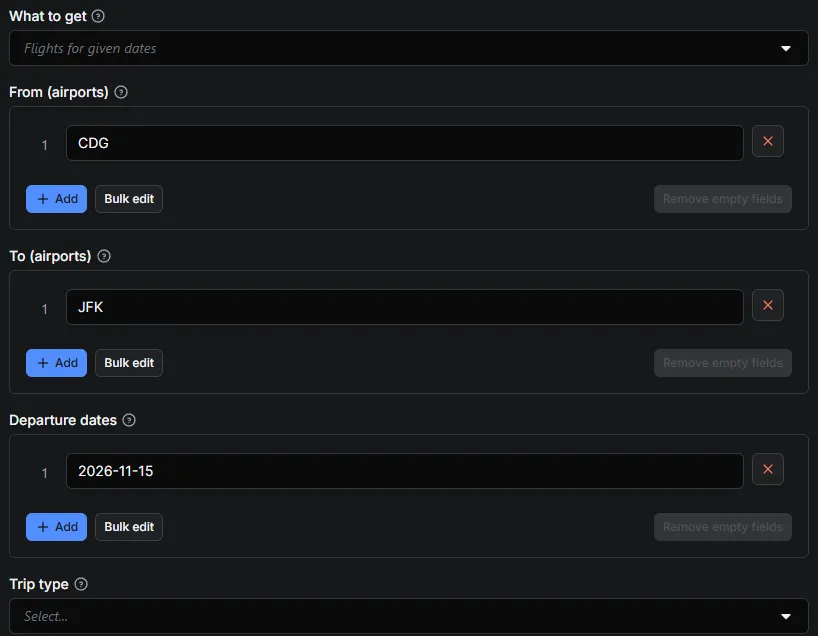
- In From (airports) and To (airports), type airport codes such as
CDGandJFK, or city codes such asPARandNYC. - Add one or more Departure dates (
YYYY-MM-DD). Leave it empty to search 30 days from today. - Click Start. A search takes a few seconds; the flights appear in the Output tab and can be downloaded as JSON, CSV, Excel or HTML.
The Free plan of Apify includes monthly credit, enough for hundreds of searches.
What you can do with it: cheap flights, airfare tracking, price alerts
- Fare monitoring: run it on a schedule for your routes and get alerted when
searchPriceLevelturnslow. - Travel apps and agencies: full result lists with flight numbers and segments, ready for your own filters.
- Market research: compare airlines, prices and emissions across hundreds of routes.
- Flexible trips: find the cheapest week to fly with the cheapest-dates mode.
- Corporate travel: check business-class fares and nonstop options on the routes your team flies, with times that fit meetings (
departureTimeRange). - Airline and airport analysis: which carriers serve a route, how often, with which aircraft, and how many flights are nonstop (
stops,segments[].aircraft,nonstopAvailable). - Sustainability reporting: CO₂ estimates per flight and per segment (
emissionsKg), and how each flight compares with the typical one on the route (emissionsVsTypicalPercent). - AI agents and chatbots: give an assistant live flight options through the Apify MCP server or the HTTP API, instead of letting it guess.
How it compares (public Apify Store data, October 2026)
| This Actor | Leader | Cheapest competitor | |
|---|---|---|---|
| Price for one search returning ~130 flights | $0.008 (Bronze), $0.01 (Free) | ≈ $0.018 ($0.017 per page + setup) | ≈ $0.0078 (per flight) |
| Start fee | $0.00005 | $0.00001 + $0.001 setup | $0.00005 |
| Flights returned | all 100–300, not just the top 15 | per page | all |
| Runs that fail or time out (30 days) | 0 % | 1 % | 7 % |
| Multi-city, price history, cheapest-dates calendar | yes, yes, yes ($0.005 per 60-day window) | yes, partial, no | yes, no, no |
| Failed, empty or filtered-out searches | free | — | — |
Source: Store API, publicActorRunStats30Days and pricing pages, 8 Oct 2026. Figures change.
Input
| Field | What it does |
|---|---|
What to get · mode | flights (every flight for given dates) or cheapest-dates (lowest price per day over a range). |
From (airports) · origins | Airports: IATA codes (CDG), city codes (PAR = CDG+ORY+BVA), lists (CDG+ORY) or Google place ids (/m/05qtj). |
To (airports) · destinations | Same format. Every origin is combined with every destination. |
Departure dates · departureDates | YYYY-MM-DD dates (flights mode). One search per route and date. Empty = 30 days from today. |
Trip type · tripType | one_way, round_trip or multi_city. Empty = one-way (round trip when returnDates or tripLengthDays is given, multi-city when multiCityTrips is given). |
Multi-city trips · multiCityTrips | Multi-city: one trip per line, flights separated by ; — CDG JFK 2027-06-15; JFK LAX 2027-06-20; LAX CDG 2027-06-27 (2 to 6 flights, airport or city codes). Leave origins, destinations and departureDates empty. |
Return dates (round trip) · returnDates | Round trip: one return date per departure date, same order. |
Trip length in days (round trip) · tripLengthDays | Round trip: return = departure + N days (required for round trips in cheapest-dates mode). |
Also get return flights (round trip) · returnFlightsFor | Round trip: also fetch the return options for the cheapest or best outbound (none by default). Multi-city: the flight of each leg that leads to the next leg's options (cheapest by default, or best). No extra charge. |
Cheapest dates: from, Cheapest dates: to · dateRangeStart / dateRangeEnd | Cheapest-dates mode: first and last departure day (up to 366 days). |
Cabin class · cabinClass | economy, premium_economy, business, first. |
Adults, Children (2–11), Infants in seat, Infants on lap · adults, children, infantsInSeat, infantsOnLap | Passengers (max 9 in total). Prices are the total for all passengers. |
Stops · maxStops | any, nonstop, one_stop_or_fewer, two_stops_or_fewer. |
Airlines · airlines | Only these airlines: IATA codes (AF, DL) or STAR_ALLIANCE, SKYTEAM, ONEWORLD. |
Max price · maxPrice | Only flights at or under this price (currency of the run, all passengers; whole-trip price for round trips and multi-city). Cheapest-dates mode: only days at or under it. |
Departure time, Arrival time · departureTimeRange / arrivalTimeRange | Only flights leaving / arriving in this local time range, e.g. 06:00-12:00 (or 22:00-06:00 overnight). Applies to every flight listed. Flights mode. |
Max flights per search · maxFlightsPerSearch | Cap per search (0 = all). Google's top flights come first. |
Include flights without a price · includeUnpricedFlights | Keep flights Google lists as "price unavailable". Off by default. |
Output format · outputFormat | flights: one row per flight (best for spreadsheets). searches: one item per search with a flights array. |
Currency, Language, Country · currency, language, country | Currency of prices, language of names, and point of sale. |
Parallel searches · maxConcurrency | Searches run in parallel (default 5). |
Retries per request · maxRetries | Retries per request (default 6). Google often needs one retry; it is automatic. |
Proxy · proxy | Apify datacenter proxy by default — cheap and enough for Google Flights. |
Dates must be in the future; omit departureDates to search 30 days from today.
Example: every flight Paris → New York on two dates
Example: cheapest week-long trips Lyon ⇄ Lisbon this winter
Example: multi-city Paris → New York → Los Angeles → Paris
Google Flights builds a multi-city trip one flight at a time: the Actor lists every option for the first flight, then the options of the second flight after the cheapest first one (or Google's best one with returnFlightsFor: "best"), and so on. Prices are for the whole trip.
Example: business class, nonstop, morning departures
Example: a family of four, one airline alliance, price cap
maxPrice is compared with the price Google shows: the total for all four passengers, round trip included.
Example: many routes in one run
Every origin is combined with every destination and every date: 3 × 3 × 2 = 18 searches, each with its 20 first flights.
Output
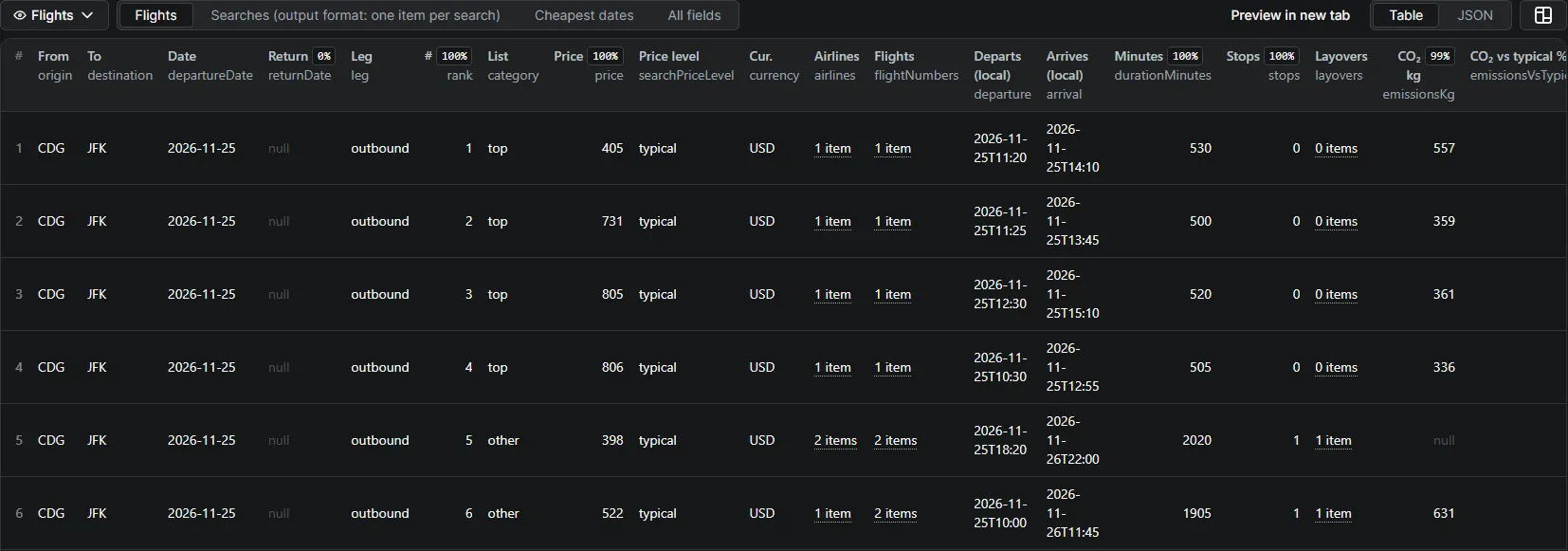
One row per flight (outputFormat: "flights"):
Times are local airport times. Round-trip prices are the total round-trip price, as on Google Flights.
A summary of each search — status, number of flights, cheapest price, price level, typical range, usual price and the 60-day priceHistory — is saved in the key-value store record SEARCHES (and inside each item with outputFormat: "searches"). Searches that fail or that Google rejects (unknown airport, date too far ahead) also appear in the dataset with their status and errors, free of charge. With maxPrice or a time range, the summary also has flightsMatchingFilters (flightsFound and cheapestPrice stay Google's figures for the whole search).
Multi-city rows also have itinerary (CDG→JFK 2026-11-15 | JFK→LAX 2026-11-20 | …), leg (leg1, leg2…), legIndex and, from the second flight on, afterFlights (the flights chosen before). The search summary has multiCity: each leg with its number of options and the flight followed, and tripPrice, the price of the whole trip. A trip where one flight has no option, or cannot be fetched, is returned free with its status.
Cheapest-dates mode returns one row per departure day: departureDate, returnDate, price, isCheapestInWindow.
Output fields
Flight rows (type: "flight")
| Field | Meaning |
|---|---|
searchId | Identifies the search the flight belongs to (route, dates, cabin). |
origin, destination, departureDate, returnDate, tripType, cabinClass, passengers | The search, as you asked for it. |
leg | outbound, return, or leg1, leg2… for multi-city trips. |
rank | Position in Google's order (1 = first). |
category | top (Google's "Top flights"), other (the rest), or return. |
price, currency | Price for all passengers, in your currency. Round trip and multi-city: price of the whole trip. |
airlines, flightNumbers, operatedBy | Airlines of the itinerary, flight numbers (AF 22), and Google's "operated by" mentions when there are any. |
from, to, departure, arrival | Airports and local date-times (2026-11-15T11:25). |
durationMinutes, stops | Total travel time and number of stops. |
layovers | Each stop: airport, airportName, city, durationMinutes, changeOfAirport (true when you must change airport, e.g. LGW → LHR). |
segments | Each flight of the itinerary: flightNumber, airline, airlineCode, from, fromName, to, toName, departure, arrival, durationMinutes, aircraft, legroom, overnight, alsoSoldAs (codeshare numbers), emissionsKg. |
emissionsKg, typicalEmissionsKg, emissionsVsTypicalPercent | Google's CO₂ estimate for the itinerary, the typical value on the route, and the difference in %. |
bookingToken | Google's identifier of this itinerary (used to ask for its return or next flights). |
withOutbound | Return rows only: the outbound flight numbers the return options go with. |
searchCheapestPrice, searchPriceLevel, typicalPriceRange, priceNote | Context of the whole search, repeated on every row so a CSV stays self-explanatory. |
googleFlightsUrl, scrapedAt | Link to the same search on Google Flights, and time of the run. |
Search summary (SEARCHES record, outputFormat: "searches", and dataset rows of searches without flights)
| Field | Meaning |
|---|---|
status | ok, no-results (Google has no flight, or none matches your filters), invalid (Google rejected the search), failed, or skipped-cost-limit. Only ok is charged. |
flightsFound, flightsReturned, flightsMatchingFilters | Flights Google has, flights returned, and (with filters) flights that match them. flightsMatchingFilters is present only when a filter is set. |
cheapestPrice, cheapestFlight, fastestDurationMinutes, nonstopAvailable | Quick answers for the whole search. |
priceLevel, typicalPriceRange, usualPrice, priceHistory | Google's price insights: low, typical or high, the usual range, and one price per day over the last 60 days. |
returnFlightsFor, multiCity | Which outbound the return options follow; for multi-city, each leg with its options, the flight followed and tripPrice. |
notes, errors | Plain-English explanation when something is missing. |
A round trip whose return request fails keeps status: "ok": the outbound flights are delivered, errors lists the return failure, and the search is charged once (return flights are never an extra charge).
Cheapest-dates rows (type: "calendarDay")
origin, destination, tripType, tripLengthDays, cabinClass, passengers, currency, departureDate, returnDate, price (cheapest price that day), isCheapestInWindow, window.
Windows without a price are one row of type: "calendarWindow" per 60-day window, with status (no-results, invalid or failed) and notes or errors; only windows with prices are charged.
Pricing
Pay per event — price per 1,000 events:
| Event | What you get | Free plan | Bronze | Silver | Gold+ |
|---|---|---|---|---|---|
flight-search | One route + date with at least one flight, all flights included (often 100–300 rows) — or one complete multi-city trip with the options of every flight | $10 | $8 | $7 | $6 |
price-calendar | Cheapest price for up to 60 consecutive departure days on one route | $6 | $5 | $4.50 | $4 |
So a search that returns 200 flights costs $0.01 on the Free plan — $0.05 per 1,000 flights. A full year of cheapest dates for one route is 7 calendar windows: about $0.04.
Empty, invalid and failed searches are never charged. Set a maximum cost per run in Apify and the scraper stops cleanly when it is reached.
Use it as an API
Run the Actor and get the flights in one HTTP call (token from Apify Console → Settings → API & Integrations):
Python, with the official apify-client package:
Fare alerts without code: schedule the Actor daily in Apify Console and send the dataset to Google Sheets, Slack, a webhook, Make, Zapier or n8n. Filter on searchPriceLevel = "low" to be told when a route is cheap.
JavaScript / Node.js, with apify-client:
Use it from an AI agent (MCP)
https://mcp.apify.com?tools=datafabrik/google-flights-scraper
Ask your agent: "Cheapest one-way CDG to JFK in the first week of June, economy, max 1 stop." The agent fills origins, destinations, departureDates, maxStops and reads the dataset. One search ≈ 3 s. For price alerts, let the agent schedule the Actor daily and compare priceLevel in the search summary.
Recipes
Compare airlines on a route (Python + pandas)
Find the cheapest day, then every flight that day
- Run
cheapest-datesmode on the route over the months you are flexible on. - Keep the rows where
isCheapestInWindowistrue(or sort byprice). - Run
flightsmode with those dates indepartureDatesto get every flight, with times, airlines and emissions.
Two small runs: about $0.04 for a year of daily prices, then $0.01 per date.
Daily fare tracking in Google Sheets
- Save your input as a Task in Apify Console (routes, dates,
maxPriceif you have a budget). - Add a Schedule (for example every morning at 7:00).
- In the task's Integrations tab, connect Google Sheets so each run's rows land in your spreadsheet.
- In the sheet, chart
pricebyscrapedAtperflightNumbers, or filter onsearchPriceLevel = "low".
More ready-to-run scripts (Python and Node, CSV export, price tracking): github.com/data-fabrik/apify-examples.
Tips for large runs
- City codes save searches:
PARsearches CDG, ORY and BVA at once (one search, one charge) instead of three. - Cap rows, not searches:
maxFlightsPerSearch: 20keeps the 20 first flights in Google's order, which keeps datasets small for dashboards. The price is the same. - Budget: set Maximum cost per run in the run options. The Actor stops cleanly before going over and tells you in the status message.
- Parallel searches: the default of 5 is a good balance; up to 20 works for big batches, the Actor retries Google's temporary errors on its own.
- Dates: Google Flights covers about 11 months ahead. Searches outside that range are returned as
invalidand free.
Limitations
- No booking: the Actor reads search results; it cannot buy tickets or give airline booking links.
googleFlightsUrlopens the search on Google Flights. - Prices move: they are the prices Google shows at the time of the run, for the
country(point of sale) andcurrencyyou choose. - Fare details: fare names, baggage allowances and seat maps are not part of the result list and are not returned.
- Multi-city: Google builds those trips one flight at a time, so the options of a leg are those that follow the flight chosen on the previous leg (cheapest or best), as on the website.
- Run timeout: each search is given 120 s. With 2,000 searches and
maxConcurrency: 5, allow up to 13 hours in the worst case: raise the run timeout in Console or split the input.
FAQ
Are these the prices Google Flights shows? Yes — the same data the Google Flights website loads, in the currency and country you choose. Prices change often; the scraper returns them at the time of the run.
Why do some flights have no price? Google lists some itineraries as "price unavailable". They are skipped unless you enable includeUnpricedFlights.
Can I book or get airline booking links? No, the scraper reads search results only. Each row has a googleFlightsUrl that opens the same search on Google Flights.
Multi-city trips? Yes, 2 to 6 flights per trip with multiCityTrips: one search (charged once) gives the options of every flight and the price of the whole trip.
Can I filter by price or time? Yes: maxPrice, departureTimeRange and arrivalTimeRange. A search where no flight matches is returned free, with Google's total in flightsFound and flightsMatchingFilters: 0.
How far ahead can I search? Google Flights covers about 11 months. Dates beyond that come back as invalid (not charged).
Is this an official Google Flights API? Google offers no public flights API (the old QPX Express API closed in 2018). This Actor returns the data the Google Flights website shows, as JSON.
Does it find cheap flights for flexible dates? Yes: cheapest-dates mode returns the cheapest price for every departure day over up to a year, so you spot the cheapest week before searching the flights of that day.
Can I track airfare over time? Schedule the Actor (daily or hourly) on your routes: every run stores priceLevel, typicalPriceRange and priceHistory (one price per day over the last 60 days), so you see when a fare is low and how it moves.
Can I search a whole month? Use cheapest-dates mode to find the cheapest days, then run flights mode on those days for the full list of flights.
Several routes at once? Yes: every origin is combined with every destination and every date, in one run.
Why is a price different from what I see on Google Flights? Google adapts prices to the point of sale and currency. Set country and currency to the ones of the site you compare with (fr and EUR for google.fr, for example). Prices can also change between two searches.
Does it work for any airport in the world? Yes, any airport Google Flights knows, with its IATA code. City codes (LON, NYC, TYO…) expand to all their airports. An unknown code returns an invalid row, free.
Can I get prices for several passengers? Yes, up to 9 (adults, children, infants in seat or on lap). Prices are the total for everyone, like on the website.
How do I get only nonstop flights? maxStops: "nonstop". Combine with airlines to keep one airline or an alliance.
Can I use it from an AI assistant? Yes. Add the Apify MCP server to Claude, ChatGPT, Cursor or another MCP client and ask for flights in plain language; the assistant fills the input and reads the result.
Is it legal? The scraper only collects public flight and price information shown to any visitor, no personal data. You are responsible for using the data in line with applicable laws and Google's terms.
More from Data Fabrik
| Actor | What you get |
|---|---|
| Google Trends Scraper & API | Interest over time, by country or region, and related queries for your own keywords |
| Google Trends Trending Now Scraper | What a country is searching right now, with search volume and related queries |
| Google Hotels Scraper & API | Hotel prices, ratings and every booking site's offer for any city or hotel |
| YouTube Transcript Scraper | Full text and timed captions of videos, Shorts, playlists and whole channels |
| YouTube Search Scraper | YouTube search results by keyword, with views, channel, duration and filters |
| YouTube Channel Videos & Shorts Scraper | Every video, Short and live stream of a channel, newest or most popular first |
Support
Found a problem or need a field? Open an issue on the Actor page — issues are answered quickly.
If this Actor saves you time, a short review on its Store page helps other users find it. If something is not right, open an issue first so it can be fixed.


