

Google Trends Trending Now Scraper — Daily Trending Searches
Pricing
from $0.20 / 1,000 trending searches
Google Trends Trending Now Scraper — Daily Trending Searches
Google Trends Trending Now as JSON/CSV: today's trending searches for any country, with search volume, growth, start time, related queries and categories. Past 4 h, 24 h, 48 h or 7 days. No browser. From $0.20 per 1,000 trends.
Pricing
from $0.20 / 1,000 trending searches
Rating
0.0
(0)
Developer

Data Fabrik
Maintained by CommunityActor stats
1
Bookmarked
1
Total users
1
Monthly active users
16 days ago
Last modified
Categories
Security
Limited permissionsShare
What is Google Trends Trending Now Scraper?
Get what people are searching for right now in any country, as clean JSON, CSV or Excel: the list behind trends.google.com/trending, with approximate search volume, growth, start time, whether the trend is still active, its related queries and categories. The easiest way to try it: click Try for free and Start, the US trends arrive in a few seconds. The $5 monthly credit of Apify's Free plan covers about 16,000 trends a month.
- 💲 From $0.20 per 1,000 trends ($0.30 on the Free plan), plus Apify's minimum start fee of $0.00005 per run. Empty or failed countries are free.
- 🌍 Any country, several per run, over the past 4 hours, 24 hours, 48 hours or 7 days.
- ⚡ No browser: one light HTTP request per country, a few seconds per run.
- ⏰ Ready for schedules: run it every hour for a near real-time feed, or once a day for a daily trends archive.
Need interest over time, interest by region or related queries for your own keywords? Use Google Trends Scraper & API from the same author.
What data can you extract from Google Trends Trending Now?
| Data | Example |
|---|---|
| Trending search and its rank by volume | 2, "sam darnold" |
| Country | US, GB, FR |
| Approximate search volume | 1000000 (1M+) |
| Growth | 1000 % |
| Start time, end time, still active | 2026-10-15T23:30:00Z, null, true |
| Related queries grouped in the trend | "broncos seahawks", "seahawks", "broncos"… |
| Categories | Sports, Entertainment, Technology |
| Link to explore the trend on Google Trends | https://trends.google.com/trends/explore?q=sam%20darnold&geo=US… |
What you can do with it
- 📰 News and content teams: spot breaking topics before they peak and write about them first.
- 🔎 SEO and marketing: find rising searches by country and category, feed your keyword research.
- 🛒 E-commerce and ads: react to sports events, product launches and weather peaks the same day.
- 📊 Research and data science: build a history of daily trending searches per country (Google keeps only a short window).
- 🔔 Dashboards and alerts: send new trends to Slack, Google Sheets or your database with Apify integrations.
Why run it on Apify
- 🔌 API: every run is an API call, with ready clients for Python and JavaScript (see below).
- ⏰ Scheduling: run it every hour or every day without a server.
- 🔗 Integrations: Google Sheets, Slack, Zapier, Make, webhooks, and your own database.
- 🚨 Monitoring: get an alert if a run fails or returns fewer trends than usual.
- 🛡️ Proxy rotation: residential proxies are used automatically when Google rate-limits, included in the price.
How it works
- For each country in Countries, the Actor sends the same request as the Trending Now page of Google Trends.
- It keeps the trends that started within the Time window, applies your filters (Category, Active trends only), sorts them by search volume and keeps the first Max trends per country.
- Each trend becomes one item in the dataset. A country with no trend (or that Google refuses) gets one free item with
status, so you always see what happened.
The Actor starts on a direct connection and switches to residential proxies if Google rate-limits it.
How to scrape Google Trends trending searches
- Click Try for free.
- Keep
USin Countries, or add your own (GB,FR,IN,DE…). - Click Start. The trends appear in the Trending now view in a few seconds.
- Download them as JSON, CSV or Excel, or connect an integration.
Watch the 40-second demo:
How it compares
Public Apify Store data, 10 October 2026:
| This Actor | Most-used Trending Now Actor | |
|---|---|---|
| Price per 1,000 trends | $0.20 (Gold) to $0.30 (Free plan) | $0.25 (Gold) to $1.00 (Free plan) |
| Start fee per run | $0.00005 | $0.02 |
| All 240 US trends once, Free plan | $0.07 | $0.26 |
| Hourly schedule for a month (720 runs), start fees alone | $0.04 | $14.40 |
| Countries without trends, failed requests | free | — |
| Runs that failed (last 30 days) | 0 % | 0 % |
Figures come from the public Store API and each Actor's pricing page; they change, check before you decide.
Input
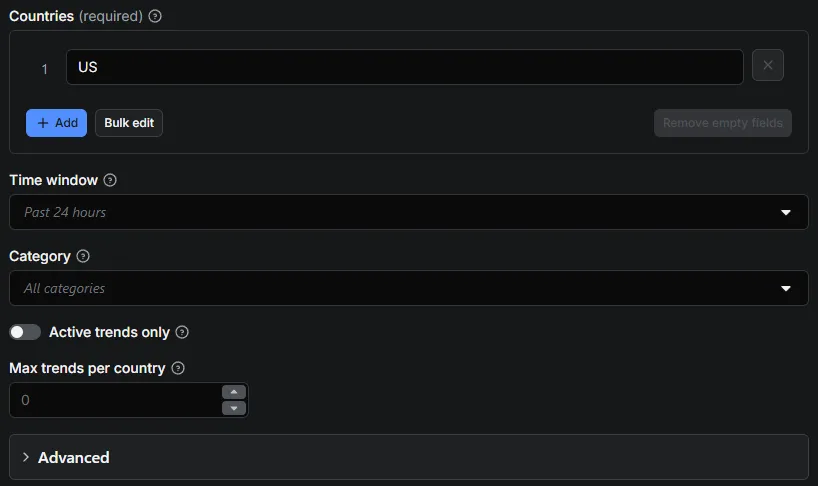
| Field | Meaning |
|---|---|
Countries · trendingGeos | Countries, as ISO codes (US, GB, FR, IN, BR, JP…). One request per country. Required. |
Time window · trendingHours | Time window: "4", "24" (default), "48" or "168" hours. |
Category · trendingCategory | Keep one category only: "0" = all (default), "3" Business and Finance, "4" Entertainment, "14" Politics, "17" Sports, "18" Technology… (full list in the input form). |
Active trends only · trendingActiveOnly | true to skip trends that have already ended. |
Max trends per country · trendingMaxItems | Maximum trends per country, sorted by search volume. 0 = all (240 for the US over 24 hours when tested). |
Language · language | Language Google uses for trend titles and related queries (en-US, fr, de, es…). |
Proxy · proxy | Used when the direct connection is rate-limited. Residential proxies by default (included in the price). |
Try a direct connection first · directFirst | Try a direct connection first (default on): faster; switches to the proxy after 3 rate-limit errors. |
Max retries per request · maxRetries | Retries per request on rate limits (default 6). |
Example inputs
Top 20 trends of the last 4 hours in the US and the UK:
Sports trends still active in France over the past 24 hours:
Output
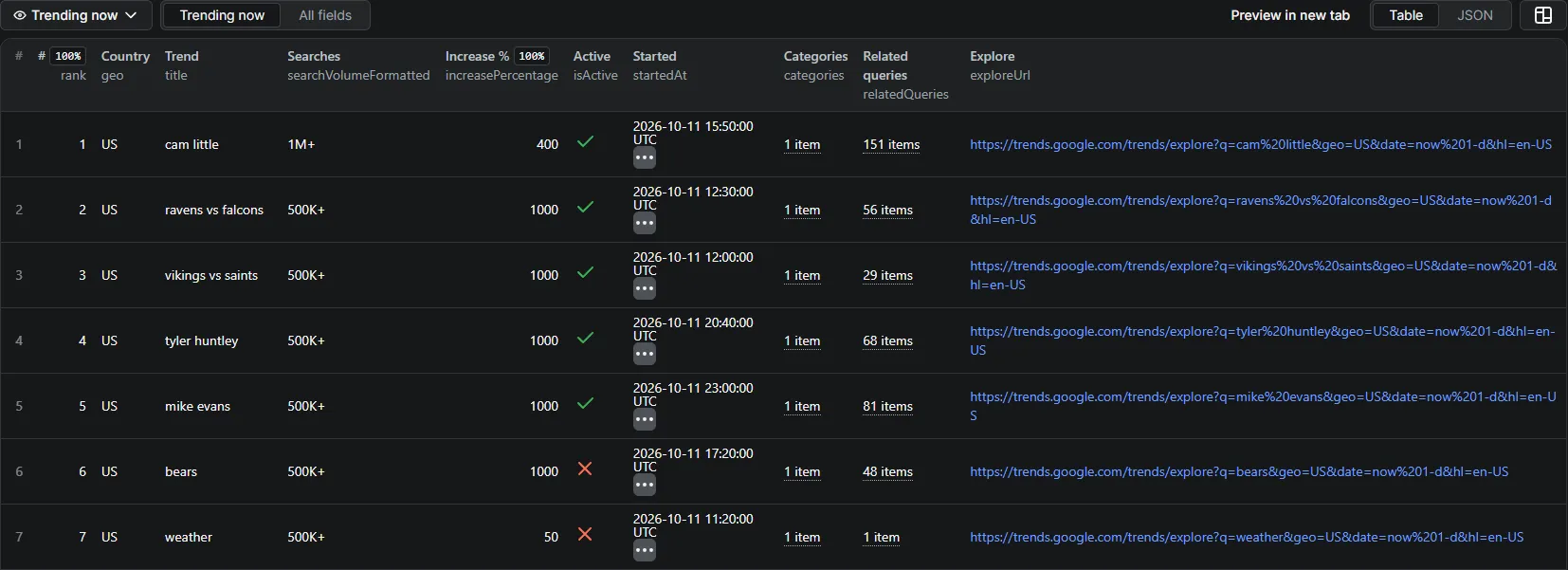
One item per trend. Two items from a US run on 16 October 2026 (default input: past 24 hours, all categories), related queries shortened:
| Field | Meaning |
|---|---|
rank, title, geo | Position by search volume, the trend, the country. |
startedAt, endedAt, isActive | When the trend started, ended (or null), and whether it is still active. |
searchVolume, searchVolumeFormatted, increasePercentage | Approximate searches (200K+) and growth in %. |
relatedQueries, categories, categoryIds | Searches grouped in the trend, and its categories. |
exploreUrl, timeWindowHours, scrapedAt | Link to explore the trend on Google Trends, the window you asked for, time of the run. |
status, errors, notes | Only on the free item of a country with no trend (no-data) or a failed request (failed). |
The run summary (OUTPUT in the key-value store) gives the number of trends delivered and the HTTP statistics.
Pricing
How much does it cost to scrape Google Trends Trending Now?
Pay per event, no subscription:
| Event | What you get | Price |
|---|---|---|
trending-item | One trending search returned | $0.30 per 1,000 on the Free plan, $0.27 Bronze, $0.25 Silver, $0.20 Gold and above |
Example: all 240 trends of the US once a day for a month ≈ 7,200 trends ≈ $2.16 on the Free plan, $1.44 on Gold. Countries without trends and failed requests are free. Set a maximum cost per run in the Apify Console and the Actor stops cleanly when it is reached.
Is it free?
Yes, to start: the Free plan includes $5 of usage every month, about 16,000 trends ($0.30 per 1,000).
Use it as an API
Run it and get the trends in one call:
Python:
JavaScript:
Use it from an AI agent (MCP)
Apify exposes every Store Actor through its MCP server. Add this URL to Claude, Cursor or any MCP client, then ask "What is trending in the UK right now? Top 10 with search volume":
https://mcp.apify.com?tools=datafabrik/google-trends-trending-now
The agent reads the input schema, runs the Actor and gets the trends back in a few seconds. Billing is the same (per trend, empty countries free).
Recipes
- Hourly feed: create a schedule in Apify Console (every hour) with Time window at 4 hours, and add a Slack or webhook integration.
- Daily archive: one run a day with Time window at 24 hours, exported to Google Sheets or your database; Google itself keeps only a short history.
- Compare countries: put several codes in Countries and group the dataset by
geo. - Go deeper on a trend: open
exploreUrl, or send thetitleto Google Trends Scraper & API for its interest over time and by region.
Good to know
- Search volumes are Google's approximations (
200K+,2K+), not exact counts. - Google lists trends by country only; regions and cities are not available on this page.
- The list changes all day: two runs a few minutes apart can differ.
- Data comes from the public Trending Now page of Google Trends. No login, no personal data.
FAQ
How many trends per country?
All that Google lists for the window: 240 for the US over 24 hours when tested, fewer for smaller countries. Use trendingMaxItems to keep the top ones.
Is it the same as Google's "Daily Search Trends" RSS?
It is the newer Trending Now list, with more trends, search volume, growth, categories and related queries.
Why did a country return nothing?
Some countries have few trends in a short window, or none in the category you chose. You get one free item with status: "no-data".
Can I get the trends of a past day?
No, Google shows only the current windows (up to 7 days). Schedule a daily run to build your own history.
What if a run fails or returns fewer trends?
Google sometimes rate-limits requests: the Actor retries, then switches to residential proxies. A country that still fails gets one free item with status: "failed" and the reason in errors, and you are not charged for it. Run it again a few minutes later; if it keeps failing, open an issue with the run link.
Do I need a proxy?
No. The Actor tries a direct connection first and falls back to residential proxies, included in the price.
Is there an API?
Yes: every Apify Actor is an API. See "Use it as an API" above.
Is it legal to scrape Google Trends?
The Actor reads only the public Trending Now page, with no login and no personal data. Aggregated, public data like this is generally fine to collect, but how you use it is your responsibility: check Google's terms and the rules that apply to you, and ask a lawyer if in doubt.
Can I get a custom version?
Yes: open an issue on the Actor page with what you need (other fields, another format, a delivery to your system).
More from Data Fabrik
| Actor | What you get |
|---|---|
| Google Trends Scraper & API | Interest over time, by country or region, and related queries for your own keywords |
| Google Flights Scraper & API | Every flight for a route and date, price insights and the cheapest dates |
| Google Hotels Scraper & API | Hotel prices, ratings and every booking site's offer for any city or hotel |
| YouTube Transcript Scraper | Full text and timed captions of videos, Shorts, playlists and whole channels |
| YouTube Search Scraper | YouTube search results by keyword, with views, channel, duration and filters |
| YouTube Channel Videos & Shorts Scraper | Every video, Short and live stream of a channel, newest or most popular first |
Support
Open an issue on the Actor page if something looks wrong; include the run link. Feature requests are welcome.
If this Actor saves you time, a short review on its Store page helps other users find it. If something is not right, open an issue first so it can be fixed.


