

Google Hotels Scraper & API — OTA Rates, $2.50/1K
Pricing
from $1.50 / 1,000 hotels
Google Hotels Scraper & API — OTA Rates, $2.50/1K
Google Hotels API and hotel price tracker: up to 500 hotels per search for any city and dates, or one hotel night by night (price calendar, rate shopping). Nightly price, total with taxes, stars, rating, amenities, GPS and every booking site’s price and link. $2.50 per 1,000 hotels; unpriced free.
Pricing
from $1.50 / 1,000 hotels
Rating
0.0
(0)
Developer

Data Fabrik
Maintained by CommunityActor stats
1
Bookmarked
1
Total users
1
Monthly active users
16 days ago
Last modified
Categories
Security
Limited permissionsShare
Scrape Google Hotels for any city, neighbourhood or landmark and any dates. For each property you get the nightly price and the stay total with taxes, Google's deal label ("35% less than usual"), star class, guest rating and review breakdown, amenities, coordinates, nearby places (airport, transit, sights with walking or driving time), photos, check-in/check-out times and the Google Hotels link.
Turn on one option and you also get every booking site's offer for each hotel — Booking.com, Expedia, Hotels.com, Agoda, Trip.com, the hotel's own website and dozens more — with the nightly price, the stay total with and without taxes, and the booking link.
- Not just the first 20. Google shows 20 properties per page; this Actor reads the following pages and returns up to 500 hotels per search, without duplicates.
- Price monitoring built in. Give several check-in dates — or
consecutiveDays: 30for the next 30 nights — and the Actor runs one search per location × date. - Track one hotel. Give a hotel (Google Hotels link, Google id or just its name) and get its price for every night of a period, with every booking site's offer: a ready-made rate-shopping calendar.
- Filters from Google itself: sort order, minimum rating, star class, price range, amenities.
- Fast and light. Pure HTTP, no browser. A 100-hotel search takes a few seconds.
- Fair billing. $2.50 per 1,000 hotels on the Free plan, down to $1.50 on Gold — you pay per hotel with a price. Unpriced hotels, failed or empty searches are never charged.
- A Google Hotels API. Call it over HTTP, from Python or JavaScript, or from Make, Zapier, n8n and MCP clients, and get JSON back.
How it works
Google Hotels loads its results 20 at a time and keeps the data of each page inside the page itself. The Actor opens the same pages a visitor opens, over plain HTTP, reads that data and follows the "next page" link until it has the number of hotels you asked for — up to 500 per search, without duplicates.
- Searches: one per location × check-in date. Google's own filters (sort, rating, stars, price, amenities) are sent with the search, exactly as when you click them on the website.
- Booking-site prices: with
includeOffers, the Actor also opens each hotel's page, where Google lists every booking site with its price and link. - Tracked hotels: a Google Hotels link or id is used as is; a hotel name is looked up once on Google Hotels, then priced for every date.
- Retries: a page that fails is fetched again from a new IP. A search stopped half-way still delivers the hotels already read.
Quick start
- Click Try for free (or Start) on this page.
- In Locations, type a city or area as you would in Google Hotels:
Rome,Shibuya, Tokyo,hotels near Times Square. - Set the Check-in date and the number of Nights (or leave the date empty for a stay 30 days from today).
- Click Start. The hotels appear in the Output tab and can be downloaded as JSON, CSV, Excel or HTML.
To follow one hotel instead, leave Locations empty and put its name or Google Hotels link in Hotels to track.
What can you do with it?
- Revenue management & rate shopping: compare your hotel's price with the competition in your area for every night of the season.
- Rate parity: check whether Booking.com, Expedia or the hotel's own site is cheapest for the same stay.
- Travel apps and AI agents: feed real hotel availability, prices and ratings into your product.
- Market research: average price per night by city, star class or date; which amenities 5-star hotels offer; how prices move before a big event.
- Lead lists for hospitality suppliers: hotels of a city with their class, rating, website and location.
- Event and seasonality studies: run the same city every day of a festival, a trade fair or a holiday period (
consecutiveDays) and see how prices and availability change. - Short-term rental investors: compare hotel prices per night in a neighbourhood with your own nightly rate, for every night of the year.
- Corporate travel: check which hotels near an office or a venue fit a travel policy (
maxPrice,minRating,hotelClass).
How it compares (public Apify Store data, October 2026)
| This Actor | Most-used Google Hotels Actor | Typical competitors | |
|---|---|---|---|
| Price per 1,000 hotels with a price | $2.00 (Bronze), $2.50 (Free) | $4.32 | $2.70–$4.49 |
| Hotels without a price | free | charged | charged |
| Every booking site's price for one hotel | $0.0035 | not offered | $0.002–$0.0072 |
| Runs that fail or time out (30 days) | 0 % | 61 % | 0–5 % |
| Track one hotel night by night (price calendar, rate parity) | yes (hotels + consecutiveDays) | no | one Actor does, per row |
| Start fee | $0.00005 | none | $0–$0.02 |
Source: Store API (publicActorRunStats30Days) and pricing pages, 8 Oct 2026.
Input
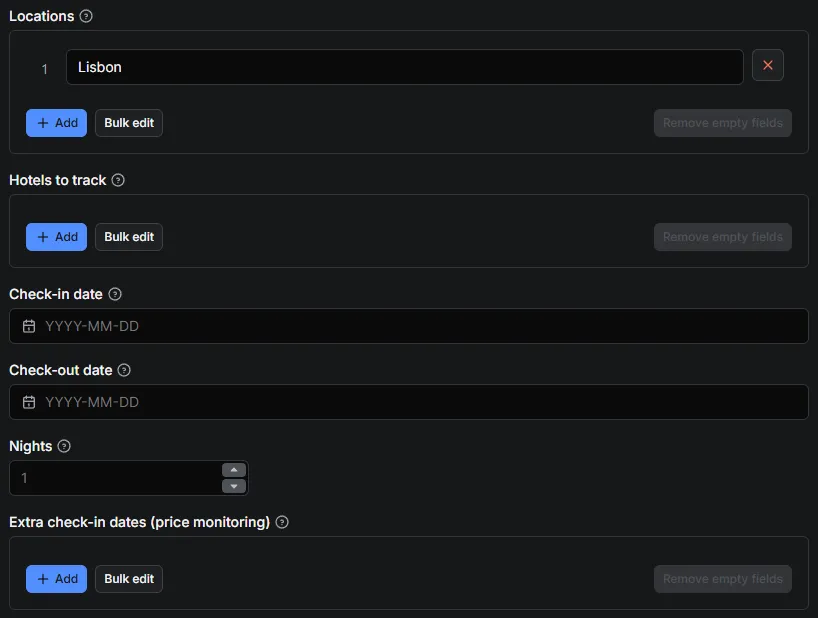
| Field | What it does | Default |
|---|---|---|
Locations · locations | One search per line, as you would type it in Google Hotels: Lisbon, Shinjuku, Tokyo, hotels near the Eiffel Tower, boutique hotels in Rome. A plain place name is searched as "hotels in …". Leave empty to track only hotels. | — |
Hotels to track · hotels | Specific hotels to price, one per line: the Google Hotels link (contains /entity/…), the Google id, or the hotel's name (Ritz Paris). One row per hotel × check-in date. | — |
Check-in date · checkIn | Check-in date, YYYY-MM-DD. Empty = a stay 30 days from today (handy for schedules). | today + 30 |
Check-out date · checkOut | Check-out date, YYYY-MM-DD. Empty = checkIn + nights. | — |
Nights · nights | Length of stay when there is no check-out date (1–30). Also used with checkInDates. | 1 |
Extra check-in dates (price monitoring) · checkInDates | More check-in dates for price monitoring; each location × date is one search. | — |
Consecutive check-in days · consecutiveDays | Also search the N-1 days after the check-in date (1–180): a price calendar. Applies to locations and hotels. Each day is a separate search: 30 days × 100 hotels = 3,000 hotel rows ($7.50 on the Free plan). Unpriced hotels are free. | 1 |
Adults · adults | Number of adult guests (1–12). | 2 |
Max hotels per search · maxResultsPerSearch | How many hotels to return per search (1–500). Each hotel with a price is one hotel event: 100 hotels ≈ $0.25 on the Free plan, unpriced hotels free. | 100 |
Currency · currency | Currency of every price: USD, EUR, GBP, JPY… | USD |
Sort by · sortBy | relevance, lowest_price, highest_rating, most_reviewed. | relevance |
Minimum guest rating · minRating | any, 3.5, 4.0, 4.5. | any |
Hotel class (stars) · hotelClass | Keep only these star classes (2–5), e.g. ["4","5"]. | all |
Minimum price per night, Maximum price per night · minPrice / maxPrice | Price per night range, in the chosen currency. | — |
Required amenities · amenities | Required amenities: free_parking, pool, indoor_pool, fitness_center, free_breakfast, spa, beach_access, pet_friendly. | — |
Add every booking site's price · includeOffers | Also return every booking site's offer for each hotel (opens each hotel's page). | false |
Hotels with booking-site prices (per search) · maxOfferLookupsPerSearch | With includeOffers, how many hotels per search get booking-site prices (first N). | 20 |
Language · language | Language of names, descriptions and labels (en, fr, de…). | en |
Country · country | Country Google prices for (us, gb, fr…). Sellers and prices can differ by country. | us |
Parallel searches · maxConcurrency | Searches running in parallel (1–20). | 5 |
Retries per page · maxRetries | Retries per page, each from a new IP. | 6 |
Proxy · proxy | Proxy settings. The default Apify Proxy is enough. | Apify Proxy |
Example input
Example: cheapest well-rated hotels near a venue
Example: prices of a whole city for every night of a month
30 searches (one per night), up to 200 hotels each: a ready-made price calendar for the city, by hotel.
Example: family trip with a pool and free parking
Output
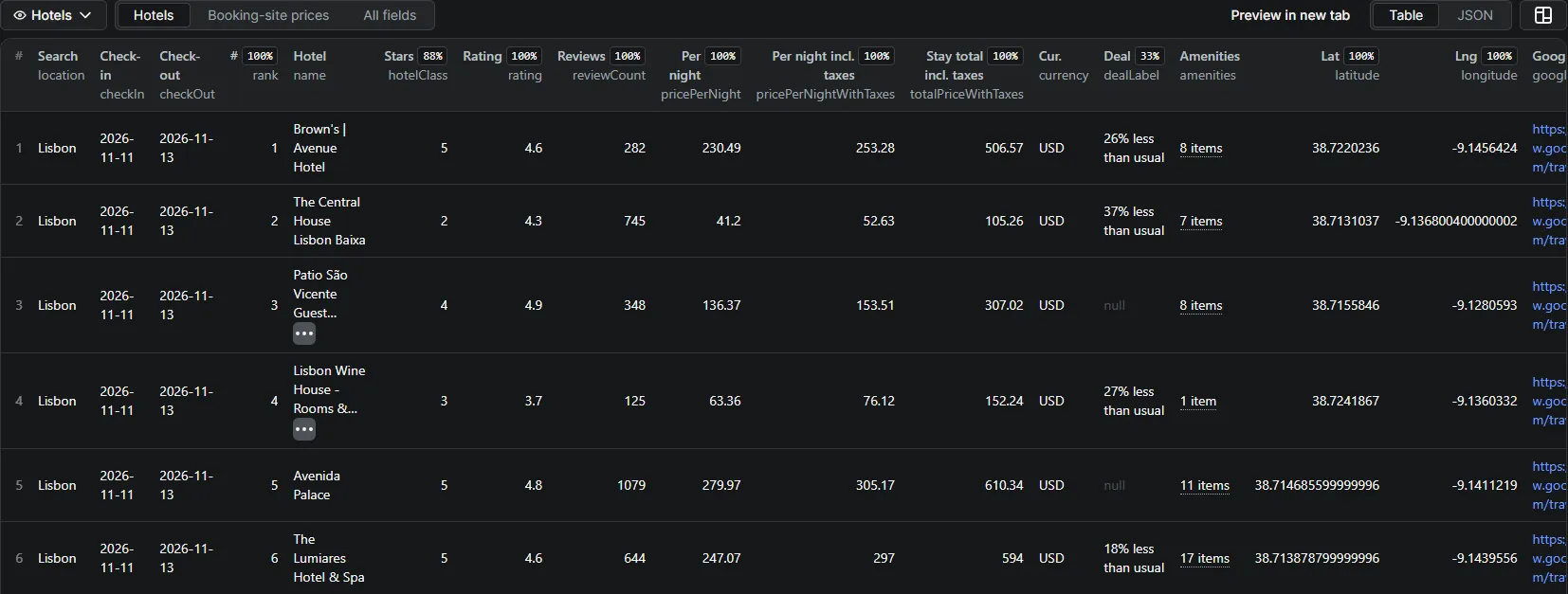
One row per hotel (view Hotels), for example:
Rows of tracked hotels have the same fields, plus hotelInput (your line), matchedName (the hotel Google picked for a name — check it) and rank: null. A hotel name Google cannot match gives a free no-results row.
Other fields: searchedPlace (the place Google understood — check it for unusual queries), entityId, propertyType (hotel, vacation rental or other), phone (on hotel pages), description, checkInTime, checkOutTime, thumbnail, photos, priceDates, scrapedAt.
With includeOffers, each hotel also has offersCount, cheapestOffer and offers (view Booking-site prices):
The hotel's own website comes first (isOfficialSite: true), then the other sites from cheapest to most expensive (stay total with taxes). A few sites give Google no price with taxes (taxesIncluded: false); they come last and cheapestOffer only uses them when nothing else is available.
The key-value store also holds SEARCHES — one line per search with the number of hotels, the cheapest and average price per night — and OUTPUT, the run summary.
Output fields
Hotel rows (type: "hotel")
| Field | Meaning |
|---|---|
searchId, location, checkIn, checkOut, nights, adults, currency | The search, as you asked for it. |
rank | Position in Google's list (1 = first); null for tracked hotels. |
name, entityId, propertyType | Hotel name, Google's id (stable, good for joins) and the kind of property as Google classes it: hotel, vacation rental or other. |
hotelClass, hotelClassLabel | Star class (1–5) and Google's label. |
rating, reviewCount, reviewsBreakdown | Guest rating out of 5, number of reviews, and the number of 1- to 5-star reviews. |
pricePerNight, pricePerNightWithTaxes | Price per night for the room, without and with taxes and fees. |
priceCurrency | Currency actually returned by Google; can differ from the requested currency when Google does not support it. |
totalPrice, totalPriceWithTaxes, taxesAndFees | Price of the whole stay, without and with taxes, and the taxes themselves. |
dealLabel | Google's deal badge, e.g. "35% less than usual", when there is one. |
priceDates | checkIn, checkOut and nights the price applies to, as Google reports them. |
latitude, longitude, countryCode | Location. |
amenities | Amenities as Google lists them (Free Wi-Fi, Pool, Breakfast…). |
nearbyPlaces | Airports, transit stations and sights with walking, driving or transit time. |
description, checkInTime, checkOutTime, phone, website | Practical details (phone on hotel pages). |
thumbnail, photos | Image links. |
searchedPlace | The place Google understood for your location — worth a look for unusual queries. |
googleHotelsUrl, googleMapsUrl, googleMapsCid, scrapedAt | Links to the hotel on Google, its Google Maps id, and time of the run. |
hotelInput, matchedName | Tracked hotels only: your line and the hotel name Google matched to it. |
Booking-site offers (includeOffers)
| Field | Meaning |
|---|---|
offersStatus, offersError | ok, no-offers, failed or skipped-cost-limit; offersError explains a failure. |
offersCount, cheapestOffer | Number of booking sites and the cheapest one. |
offers[] | provider, isOfficialSite, taxesIncluded, pricePerNight, pricePerNightWithTaxes, totalPrice, totalPriceWithTaxes, link. |
Search summary (SEARCHES record and dataset rows of searches without hotels)
status (ok, no-results, failed…), searchedPlace, hotelsFound, totalResultsOnGoogle, pagesRead, pricedHotels, cheapestPricePerNight, cheapestHotel, averagePricePerNight, offerLookups, notes, errors.
Track one hotel: hotel price tracker, price calendar and rate parity
The price of one hotel for every night of the next month, on every booking site:
Each hotel × date is one row: the hotel's price for that night, and with includeOffers every booking site (Booking.com, Expedia, Agoda, the hotel's own website…) with its price and link — the official site first. Schedule it daily to watch your own hotel and your competitors. The location filters (sortBy, minRating, hotelClass, prices, amenities) only apply to locations.
Pricing
Pay per event — price per 1,000 hotels on the paid plans:
| Event | When | Free plan | Bronze | Silver | Gold+ |
|---|---|---|---|---|---|
hotel | One hotel with a price returned | $2.50 | $2.00 | $1.80 | $1.50 |
hotel-offers | One hotel with every booking site's price (only with includeOffers) | $4.00 | $3.50 | $3.00 | $2.50 |
- Hotels without a price for your dates (sold out, no availability) are returned for free.
hotel-offersis charged for a hotel that has at least one booking-site offer, even if the hotel row itself had no price (free).- Apify adds its start fee of $0.00005 per run (
apify-actor-start). - Searches that fail or return nothing are free and still appear in the dataset with their status, so you always know what happened.
- A search of 100 hotels costs about $0.20 on the Bronze plan. The Actor stops cleanly when your maximum cost per run is reached.
- A tracked hotel is charged like one hotel row per date: 30 nights of one hotel with every booking site cost about $0.20 on the Free plan ($0.0025 + $0.004 per night), $0.17 on Bronze.
Use it as an API
Run the Actor and get the hotels in one HTTP call (token from Apify Console → Settings → API & Integrations):
Python, with the official apify-client package:
JavaScript / Node.js, with apify-client:
Rate shopping on a schedule: run it every morning in Apify Console with your city and the next weekends in checkInDates, and send the dataset to Google Sheets, Slack or a webhook.
Use it from an AI agent (MCP)
https://mcp.apify.com?tools=datafabrik/google-hotels-scraper
Prompt example: "Find hotels in Lisbon for 2 nights from June 10, rating 4+, under €150, and show the cheapest booking site for the top 5." The agent sets locations, checkIn, nights, minRating, maxPrice, includeOffers, maxOfferLookupsPerSearch: 5. A 40-hotel search answers in about 8 s.
Recipes
Average price per night by star class (Python + pandas)
Rate parity check for your hotel
- Put your hotel's Google Hotels link in
hotels, the next 30 days inconsecutiveDays, and turn onincludeOffers. - For each date, compare the official site (
isOfficialSite: true) with the cheapest other site inoffers. - Dates where an online travel agency is cheaper than your own site are parity issues to raise with that channel.
A competitive set, every morning
- Put your hotel and 5 to 10 competitors in
hotels(links or names), the next 60 days inconsecutiveDays. - Save it as a Task in Apify Console and add a daily Schedule.
- Connect the task to Google Sheets or a webhook, and chart
pricePerNightbycheckInandname.
More ready-to-run scripts (Python and Node, CSV export, price tracking): github.com/data-fabrik/apify-examples.
Tips for large runs
- Cost control: set Maximum cost per run in the run options; the Actor stops cleanly and tells you so. Hotels without a price are free.
- Big cities: one search returns up to 500 hotels. Split a city into neighbourhoods (one line each) and remove duplicates by
entityId. - Booking-site prices need one extra page per hotel: keep
maxOfferLookupsPerSearchat the number of hotels you really compare. - Country and currency:
countrydecides which booking sites and taxes Google shows; set it to your market. - Prices are for the whole room for the number of adults you set, in the currency you choose.
- A property with no price for your dates (sold out) still appears, with empty price fields — and is not charged.
- Booking links go through Google's redirect, as on the website; open them soon after the run.
Limitations
- One price per hotel, as in the Google Hotels list: room types, cancellation terms and breakfast options are not returned.
- Review texts are not returned, only the rating and the number of reviews per star.
- Prices move: they are those Google shows at the time of the run, for the
country,currencyand number of adults you choose. - Booking links go through Google's redirect and are meant to be opened soon after the run.
- Run timeout: a 500-hotel search with offers can take up to 55 min. For 100+ searches raise the run timeout in Console; the Actor stops offer lookups 90 s before each search's limit so hotels are always delivered.
FAQ
Is there an official Google Hotels API? Google's hotel APIs are for hotels and booking partners that send their own prices to Google, not for reading search results. This Actor returns what the Google Hotels website shows, as JSON.
How many hotels can I get for a city? Up to 500 per search. For more, split the city into neighbourhoods (one line each) and remove hotels found twice by their entityId.
Can I compare Booking.com, Expedia and the hotel's own site? Yes, turn on includeOffers. Each hotel then lists every booking site with its price and link, the official site first.
Does it give room types or reviews text? Not yet: one price per hotel, as in the Google Hotels list, and the rating with its 1–5 star breakdown.
How do I track the price of one hotel? Put its Google Hotels link, id or name in hotels, and the number of nights to follow in consecutiveDays. Check matchedName the first time when you give a name.
Can I monitor hotel prices every day? Yes: schedule the Actor in Apify Console (daily or hourly) with your locations or hotels and checkInDates; every run adds rows with scrapedAt, so you can chart how prices move.
Does it work as a rate shopping tool for my own hotel? Yes: put your hotel and your competitors in hotels, the nights to watch in consecutiveDays, and includeOffers: true to compare every booking site with your own website (rate parity).
Why are some prices empty? The property has no availability or no price for your dates on Google. These rows are free.
Can I use it from an AI assistant? Yes. Add the Apify MCP server to Claude, ChatGPT, Cursor or another MCP client and ask for hotels in plain language.
Is it legal?
The Actor reads public pages of Google Hotels, the way a visitor does, without logging in. It collects hotel information (businesses), not personal data. You are responsible for using the data in line with the laws and terms that apply to you.
More from Data Fabrik
| Actor | What you get |
|---|---|
| Google Trends Scraper & API | Interest over time, by country or region, and related queries for your own keywords |
| Google Trends Trending Now Scraper | What a country is searching right now, with search volume and related queries |
| Google Flights Scraper & API | Every flight for a route and date, price insights and the cheapest dates |
| YouTube Transcript Scraper | Full text and timed captions of videos, Shorts, playlists and whole channels |
| YouTube Search Scraper | YouTube search results by keyword, with views, channel, duration and filters |
| YouTube Channel Videos & Shorts Scraper | Every video, Short and live stream of a channel, newest or most popular first |
Support
Something missing or not working? Open an issue on the Actor's page — issues are answered quickly.
If this Actor saves you time, a short review on its Store page helps other users find it. If something is not right, open an issue first so it can be fixed.


