

Wikipedia Pageviews Tracker - Daily Views API
Pricing
$0.27 / 1,000 pageview days
Wikipedia Pageviews Tracker - Daily Views API
Official Wikimedia Analytics pageviews for any Wikipedia article or top pages. Daily day-rows, optional only-new monitor. CC0 data. $0.00027 per day-row.
Pricing
$0.27 / 1,000 pageview days
Rating
0.0
(0)
Developer

DigiVibeTech
Maintained by CommunityActor stats
0
Bookmarked
2
Total users
1
Monthly active users
3 days ago
Last modified
Categories
Features
Share
Wikipedia Pageviews Tracker — official Wikimedia Analytics pageviews for any Wikipedia article or top pages.
Try it free: press Start — the prefilled input runs a small real job (up to 20 × pageview day, about $0.005 in events). Apify's free plan includes monthly platform credit, so a first test costs you nothing. You can also set a maximum cost per run.
- What you get:
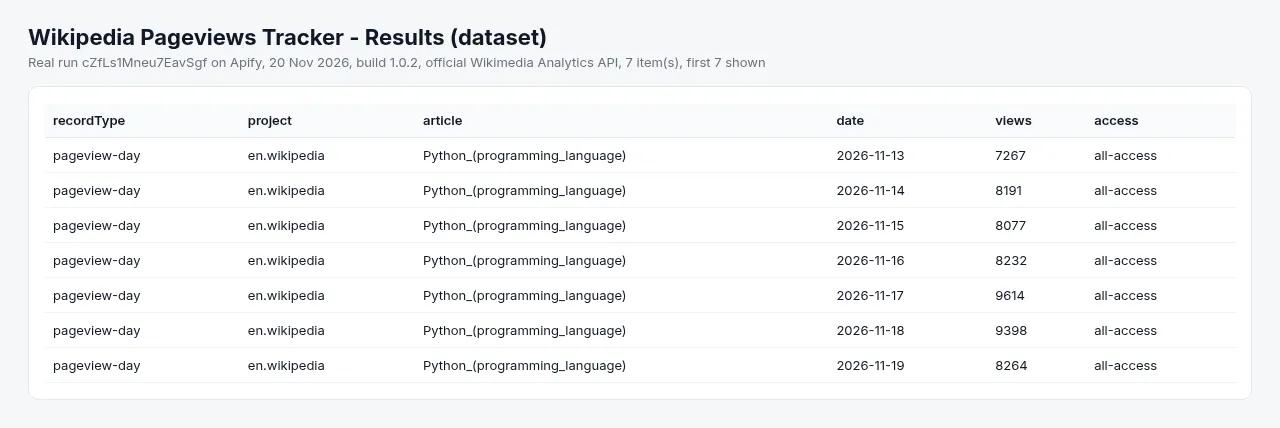
recordType,project,article,date,views,access - Who it's for: researchers, journalists, SEO and trend analysts
- Price: $0.00027 per pageview day
- Data source: Uses the official Wikimedia Analytics REST API; data is CC0.
What is Wikipedia Pageviews Tracker?
Fetch official Wikimedia Analytics (AQS) pageviews for any Wikipedia (or sister-project) article, plus optional top pages for a project/date. One dataset row per article+date (pageview-day). Optional only-new monitor.
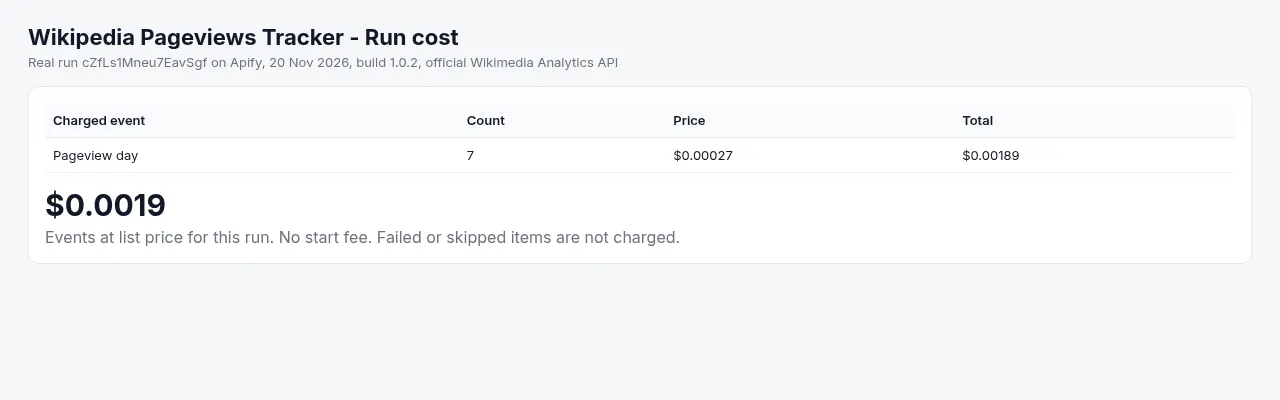
Price: $0.00027 per day-row. Failures are free. No start fee.
📸 Real-run screenshots
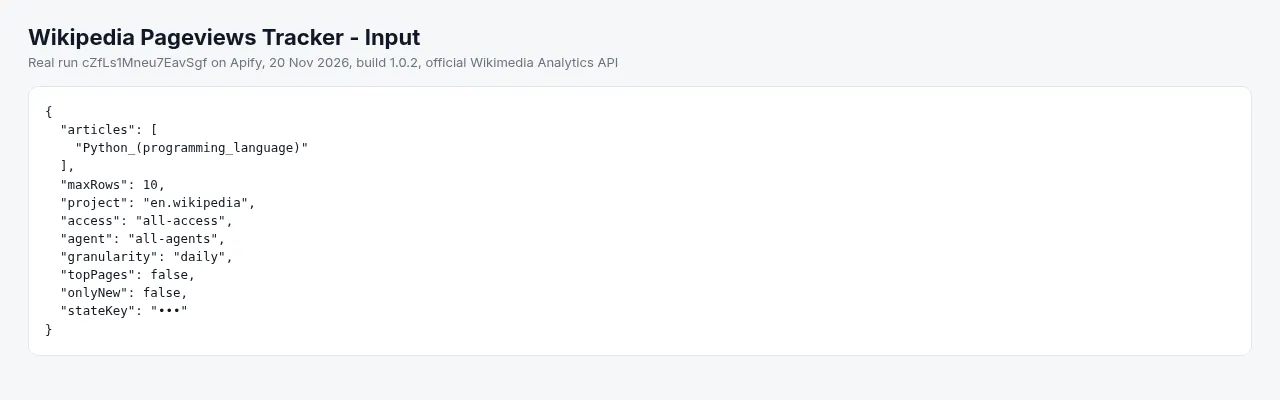
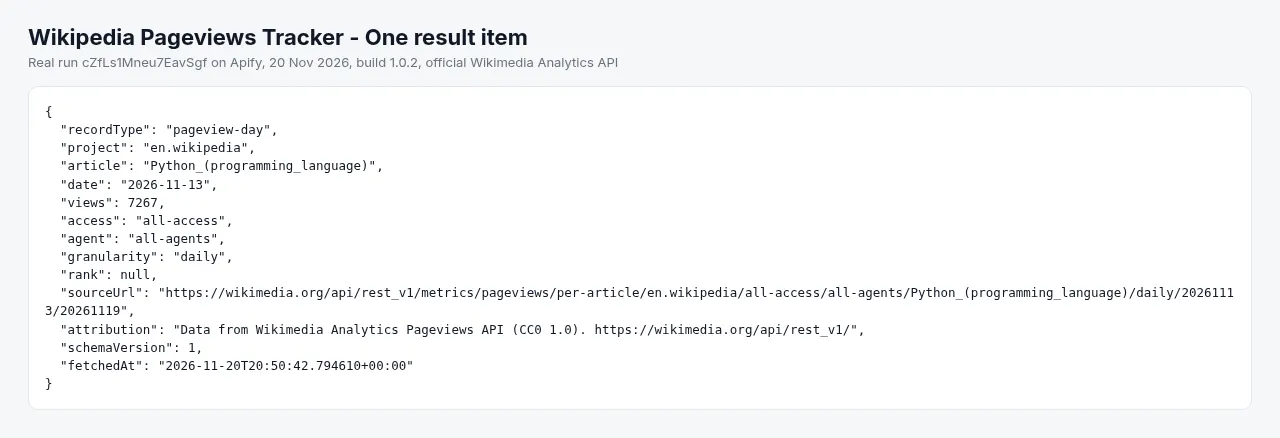
From real run cZfLs1Mneu7EavSgf on Apify, 20 Nov 2026 (build 1.0.2). Images are rendered from that run's own input, dataset and charged events.
⬇️ What data you get
One dataset item per result. Key fields:
| Field |
|---|
recordType |
project |
article |
date |
views |
access |
agent |
granularity |
rank |
sourceUrl |
attribution |
schemaVersion |
fetchedAt |
🎯 Use cases
- Track daily pageviews of articles as an interest signal
- Get top pages for a Wikipedia project
- Monitor new days only with the monitor mode
▶️ How to use
- Open the actor; the input is prefilled with a small real example.
- Replace it with your own input and set
maxRowsto control the cost. - Press Start. Results appear in the Output tab (Overview view).
- Download JSON, CSV or Excel, call the results via API, or schedule the actor.
⚙️ Input
| Field | Meaning |
|---|---|
articles | Titles or full /wiki/... URLs |
project | Default project for bare titles / top pages (en.wikipedia) |
access / agent / granularity | Wikimedia filters (defaults: all-access / all-agents / daily) |
start / end | YYYYMMDD inclusive; omit both → last 7 complete UTC days |
topPages / topDate | Optional most-viewed list for a day |
maxRows | Cap billed day-rows |
onlyNew / stateKey | Monitor mode: skip known (project,article,date) keys |
Example input
⬆️ Output
Each item: project, article, date, views, access, agent, granularity, optional rank, sourceUrl, attribution, schemaVersion=1. In monitor mode also status, changes, viewsDelta.
Example record (real run cZfLs1Mneu7EavSgf, 2026-11-20)
💵 Pricing and cost estimate
| Event | Price |
|---|---|
| Pageview day | $0.00027 |
Cost estimate
| Pageview days | Cost |
|---|---|
| 100 | $0.027 |
| 1,000 | $0.27 |
| 10,000 | $2.70 |
You pay only for these events: no subscription. Set Maximum cost per run in the run options and the actor stops before it is reached.
🔌 Integrations and API
Run it from n8n, Make, Zapier, Clay or any tool that can call an HTTP endpoint, connect a webhook to get notified when a run finishes, or let AI agents call it through the Apify MCP server (mcp.apify.com).
Run it and get the results in one call:
Python (pip install apify-client):
⚠️ Limits
- Data is returned as the source publishes it; fields the source leaves empty stay empty.
- Each run stops at
maxRowsresults, so the cost stays predictable.
🛡️ Data source, privacy and legality
Uses the official Wikimedia Analytics REST API; data is CC0.
Data & compliance
- Source:
https://wikimedia.org/api/rest_v1/metrics/pageviews/... - License: CC0 1.0 (Wikimedia Analytics API access policy)
- Honest User-Agent with contact:
WikiPageviews/1.0 DigiVibeTech [digivibetech.com/support](https://digivibetech.com/support/) (Apify Actor) - ≤1 request/second; wait for each response before the next
- Aggregate views only — no unique-devices-by-country, no editor identities
- Attribution on every item
Attribution
Data from Wikimedia Analytics Pageviews API (CC0 1.0). https://wikimedia.org/api/rest_v1/
❓ FAQ
How much does Wikipedia Pageviews Tracker cost?
$0.00027 per pageview day. See the cost estimate table above. There is no monthly fee.
Can I try it for free?
Yes. Press Start with the prefilled input: it runs a small real job (up to 20 × pageview day, about $0.005 in events). Apify's free plan includes monthly platform credit, which covers a first test.
Is it legal to use Wikipedia Pageviews Tracker?
Uses the official Wikimedia Analytics REST API; data is CC0. Use the results lawfully (terms of the source, GDPR where it applies). This is not legal advice.
Can I use it through the API or an MCP server?
Yes. Every run is available through the Apify API and the official client libraries, and AI agents can call the actor through the Apify MCP server. See Integrations and API above.
Something does not work. Where do I get help?
Open an issue on the Issues tab or use digivibetech.com/support. Include the run ID so we can reproduce it.
📝 Changelog
20 Nov 2026 — listing refresh
- README, listing text and input form restructured to the DigiVibeTech Apify quality standard v1. No feature or price change.
1.0 — builds 1.0.1 to 1.0.2
- First build 2026-10-14, latest build 2026-10-22 (2 successful builds).
🧩 More DigiVibeTech actors
- Website SEO & AI Search Audit (GEO/AEO)
- Article Text Extractor - News & Blog Content, Date, Image
- Broken Link & Image Checker - Sitemap or Crawl
- Bulk WHOIS & DNS Lookup - Domain Expiry, RDAP, SPF, DMARC
Maintained by DigiVibeTech. Questions or bugs: use the Issues tab or digivibetech.com/support; we reply within 2–5 business days.


