

YouTube Channel, Video & Comment Export - Official API
Pricing
from $0.80 / 1,000 item exporteds
YouTube Channel, Video & Comment Export - Official API
Export YouTube channel info, channel or playlist videos, video details and (opt-in) comments through the official YouTube Data API v3 with your own free API key. Quota-aware: stops before your daily units run out. Comments without author names or ids. $0.0008 per item plus $0.01 per run.
Pricing
from $0.80 / 1,000 item exporteds
Rating
0.0
(0)
Developer

DigiVibeTech
Maintained by CommunityActor stats
0
Bookmarked
2
Total users
1
Monthly active users
2 days ago
Last modified
Categories
Features
Share
YouTube Channel, Video & Comment Export — export YouTube channel info, channel or playlist videos, video details and (opt-in) comments through the official YouTube Data API v3 with your own free API key.
Try it free: press Start — the prefilled input runs a small real job (a few items). Apify's free plan includes monthly platform credit, so a first test costs you nothing. You can also set a maximum cost per run.
- What you get:
itemType,title,text,publishedAt,channelTitle,url - Who it's for: marketers, creators and researchers
- Price: $0.0008 per item exported plus $0.01 per run ($0.80 per 1,000 items, plus the per-run start fee). Failed inputs free
- Data source: Uses the official YouTube Data API v3 with your own free API key; comment author names and ids are not returned.
What is YouTube Channel, Video & Comment Export?
Export YouTube channel info, channel uploads, playlist videos, video details and (opt-in) comments to JSON, CSV or Excel through the official YouTube Data API v3, using your own free Google API key. One clean row per channel, video or comment, with stable columns, a quota counter that stops before your units run out, and no comment-author data.
✅ Why this one
- Official API, your own key: data comes from Google's documented Data API (
channels,playlistItems,videos,commentThreads,comments), not from scraped pages. No proxy, no login, no anti-bot workaround. - Quota-aware: every call this actor makes costs 1 quota unit (up to 50 channels or videos, or 100 comments per call). It counts units as it goes and stops before the run's budget (
quotaBudgetUnits, default 2,000 of the 10,000 a default key gets per day). The 100-unit search call is never used. - Comments are off by default, and never include the author: comment rows hold text, likes, dates and reply counts only. Author name, author channel id/URL and profile picture are dropped before saving.
- Your key stays private: a secret input, sent only to
www.googleapis.comin theX-Goog-Api-Keyheader, never written to the dataset, logs or run summary. - Price context: the three most-used comparable YouTube video, channel and comment actors in the Apify Store charged about $1.30–$4.00 per 1,000 results at their free-plan price (checked 10 Nov 2026; some give lower prices on paid Apify plans). This one costs $0.80 per 1,000 items plus $0.01 per run and uses the official YouTube Data API v3 with your own key, so it stays within your Google quota.
- Pay per item, plus $0.01 per run: failed inputs, not-found ids, quota stops and a rejected key are not charged as items. A wrong key or an API that is not enabled fails the run before any item is charged.
Modes
| Mode | Input | One row per | Quota units |
|---|---|---|---|
| Channel info | channels (UC... id, @handle, channel URL) | channel | 1 per 50 ids, 1 per handle |
| Channel videos | channels | video (newest uploads first) | 1 per channel + 1 per 50 videos (list) + 1 per 50 videos (details) |
| Playlist videos | playlists (PL... id or URL) | video | 1 per 50 videos (list) + 1 per 50 videos (details) |
| Video details | videos (id, watch / youtu.be / shorts / live URL) | video | 1 per 50 videos |
Comments (needs allowComments: true) | videos | top-level comment (+ replies if includeReplies) | 1 per 100 comments |
With the default 10,000 units a day, that is up to about 250,000 videos with full stats, or about 1,000,000 comments, per key per day.
⬇️ What data you get
Every row has every column (null where it does not apply), so Console tables and CSV exports never have missing cells. Views: All items, Channels, Videos, Comments.
| Field | Meaning |
|---|---|
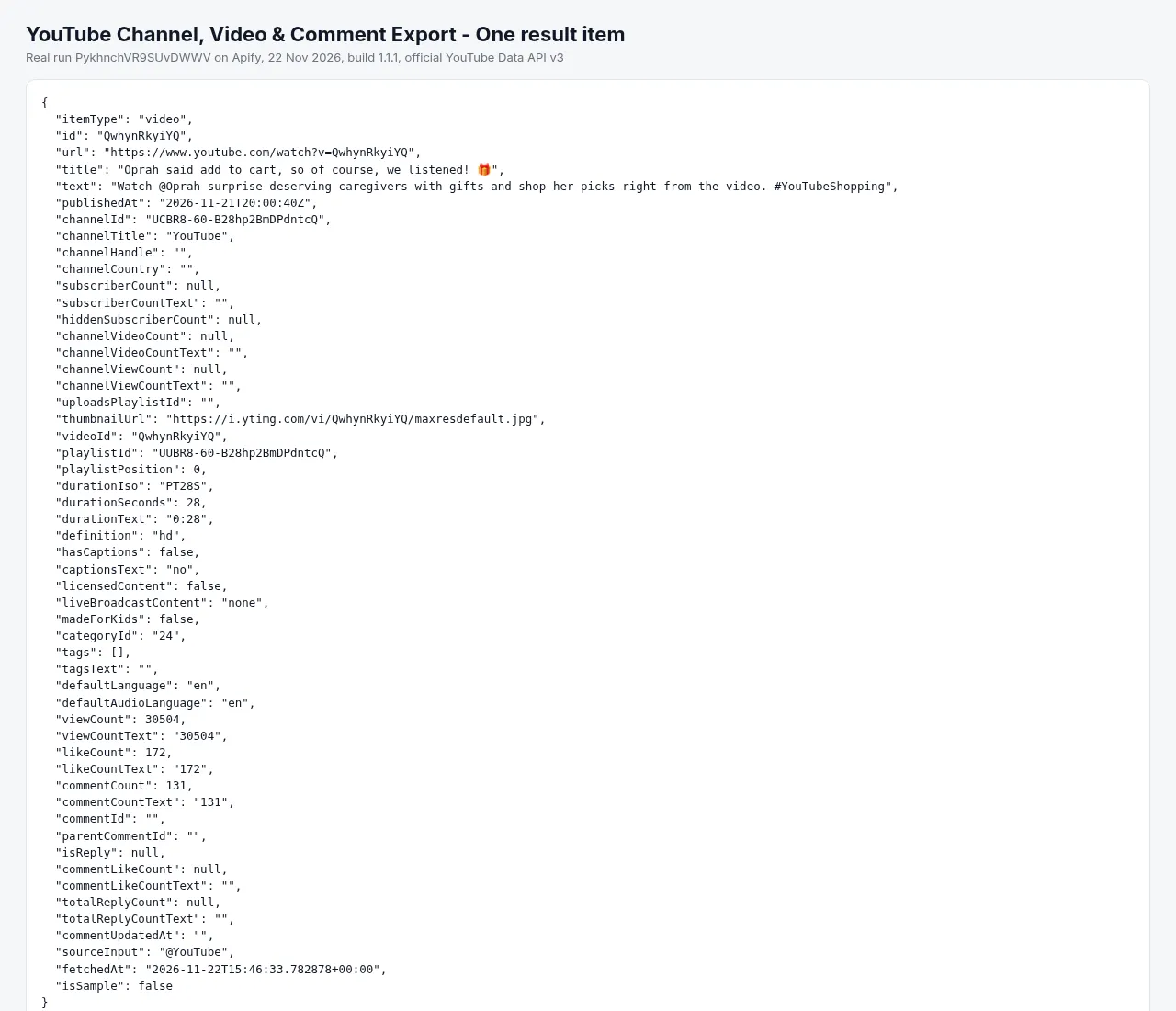
itemType, id, url, title, text, publishedAt | Shared columns (text = description or comment text) |
channelId, channelTitle, channelHandle, channelCountry, subscriberCount (+ subscriberCountText), hiddenSubscriberCount, channelVideoCount, channelViewCount, uploadsPlaylistId, thumbnailUrl | Channel rows (and the channel of each video) |
videoId, playlistId, playlistPosition, durationIso, durationSeconds, definition, hasCaptions, licensedContent, liveBroadcastContent, madeForKids, categoryId, tags, defaultLanguage, defaultAudioLanguage, viewCount, likeCount, commentCount | Video rows. likeCount / commentCount are null when YouTube does not report them (likes hidden, comments turned off); the views show the text twins likeCountText / commentCountText, which are then empty |
commentId, parentCommentId, isReply, commentLikeCount, totalReplyCount, commentUpdatedAt | Comment rows |
sourceInput, fetchedAt, isSample | Which input produced the row, and when |
Run summary with quota units used per endpoint (SUMMARY) and every skipped input or stop reason (ERRORS, never charged) are in the key-value store.
🎯 Use cases
- Export a channel's or playlist's videos with stats
- Get video details in bulk
- Collect opt-in comments without author data for sentiment analysis
▶️ How to use
- Open the actor; the input is prefilled with a small real example.
- Replace it with your own input and set
maxItemsto control the cost. - Press Start. Results appear in the Output tab (Overview view).
- Download JSON, CSV or Excel, call the results via API, or schedule the actor.
Try it first (free)
- Run with no key: the actor validates your input and returns 3 illustrative sample rows for the mode you picked (
isSample: true, fictional channel, not live data). Nothing is charged. - First real run: the default
maxItemsis 20, which costs $0.026 (20 × $0.0008 + $0.01 start). You can also setmaxChargeUsdor Apify's own max cost per run.
Real runs (22 Nov 2026, build 1.1.1)
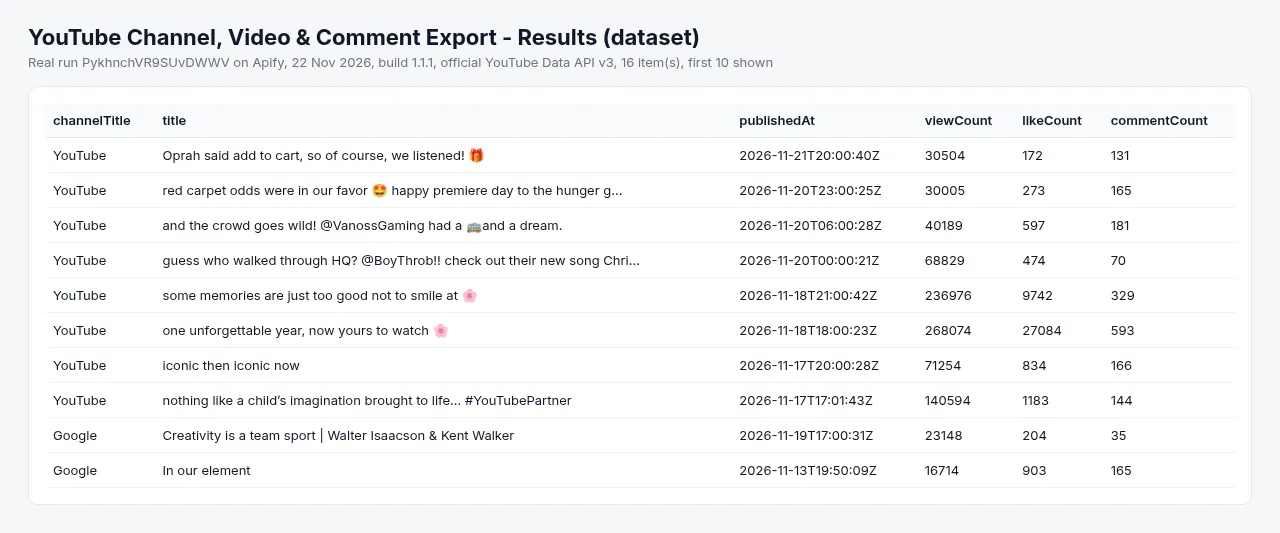
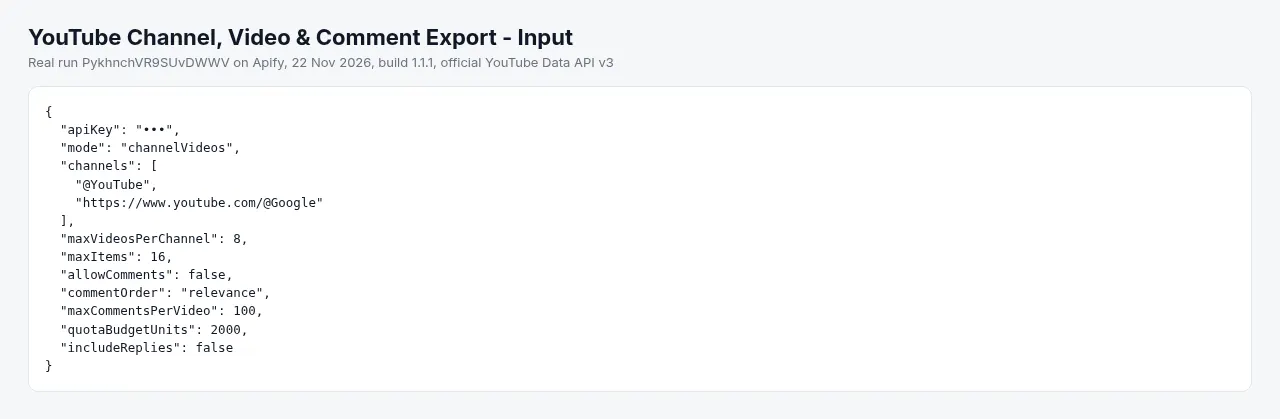
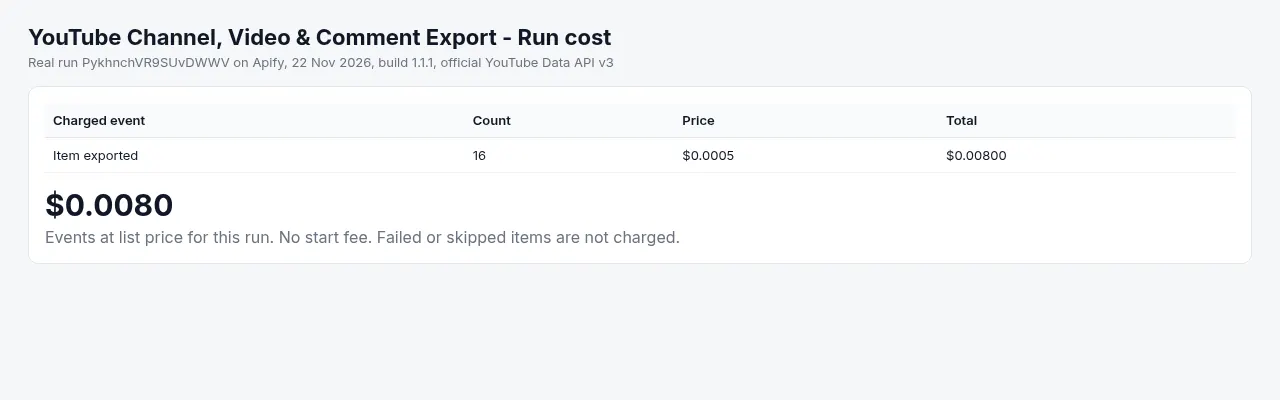
Channel videos, run PykhnchVR9SUvDWWV: input {"mode": "channelVideos", "channels": ["@YouTube", "https://www.youtube.com/@Google"], "maxVideosPerChannel": 8, "maxItems": 16}. 16 videos exported in 4.6 s using 6 quota units. At the current price that is 16 × $0.0008 = $0.0128 plus the $0.01 start (this run was charged at the earlier per-item price). First rows:
| Channel | Video | Published | Seconds | Views | Likes | Comments |
|---|---|---|---|---|---|---|
| YouTube | Oprah said add to cart, so of course, we listened! 🎁 | 2026-11-21 | 28 | 30504 | 172 | 131 |
| YouTube | red carpet odds were in our favor 🤩 happy premiere day to th | 2026-11-20 | 59 | 30005 | 273 | 165 |
| YouTube | and the crowd goes wild! @VanossGaming had a 🚌and a dream. | 2026-11-20 | 24 | 40189 | 597 | 181 |
| YouTube | guess who walked through HQ? @BoyThrob!! check out their new | 2026-11-20 | 21 | 68829 | 474 | 70 |
| YouTube | some memories are just too good not to smile at 🌸 | 2026-11-18 | 75 | 236976 | 9742 | 329 |
| YouTube | one unforgettable year, now yours to watch 🌸 | 2026-11-18 | 90 | 268074 | 27084 | 593 |
Comments (opt-in), run k01YAGYdmNAF2UE4s: 5 top-level comments on one public video, 1 quota unit; at the current price 5 × $0.0008 = $0.004 plus the $0.01 start (this run was charged at the earlier per-item price). One row; there is no author field to show:
Cost at the current prices: 200 videos = $0.17 (200 × $0.0008 + $0.01 start; about 9 quota units).
⚙️ Input
Example input
⬆️ Output
Each dataset row is one channel, video or comment (itemType). A real video row from run PykhnchVR9SUvDWWV (22 Nov 2026), shortened to the main fields:
💵 Pricing and cost estimate
Pay per event: $0.0008 per item exported plus $0.01 per run ($0.80 per 1,000 items). Sample rows, failed inputs, not-found ids and stopped runs are not charged as items. Apify platform usage is included.
🔌 Integrations and API
Run it from n8n, Make, Zapier, Clay or any tool that can call an HTTP endpoint, connect a webhook to get notified when a run finishes, or let AI agents call it through the Apify MCP server (mcp.apify.com).
Run it and get the results in one call:
Python (pip install apify-client):
Get a free API key (about 5 minutes)
- Open console.cloud.google.com, create (or pick) a project.
- APIs & Services → Library → enable YouTube Data API v3.
- APIs & Services → Credentials → Create credentials → API key. If you restrict it, restrict it to the YouTube Data API v3 (an HTTP-referrer or IP restriction blocks Apify's servers).
- Paste the key into
apiKey.
⚠️ Limits
- Comment export is off by default. You must set
allowComments: true. Comment rows never contain the author's name, channel id, channel URL or profile picture. Comment text itself is written by people; handle it under the data-protection law that applies to you. - No keyword search. Search costs 100 units per call, so this actor works from channel, playlist and video ids/URLs only. Custom
/c/URLs need search and are not supported: use the@handleor/channel/UC...URL. - What the API shows is what you get: subscriber counts are rounded by YouTube and hidden when the channel hides them; dislike counts are not public; held-for-review and hidden comments are not returned; private and deleted videos are reported as not found.
- Quota is per Google Cloud project and resets at midnight Pacific Time. When Google reports the daily quota as used up, the run stops and keeps what it already exported.
- No video, audio or caption download. Metadata, statistics and comment text only.
- Real-run screenshots are not in this README yet. A real private run exists (10 Nov 2026, build 1.0.2, channel videos mode); its Console screenshots are still to be taken.
🛡️ Data source, privacy and legality
Uses the official YouTube Data API v3 with your own free API key; comment author names and ids are not returned.
Responsible use
Use the export within YouTube's API Services Terms and Developer Policies, and the data-protection law that applies to you. This actor collects only public metadata through the official API and leaves out comment-author identity by design.
Built by DigiVibeTech with AI assistance; tested against fixtures in the documented API response shape and a local Apify pay-per-event test run. Questions or a field you need: digivibetech.com/support.
❓ FAQ
How much does YouTube Channel, Video & Comment Export cost?
The pay-per-event price will be published before the actor goes public.
Can I try it for free?
Yes. Press Start with the prefilled input: it runs a small real job (a few items). Apify's free plan includes monthly platform credit, which covers a first test.
Is it legal to use YouTube Channel, Video & Comment Export?
Uses the official YouTube Data API v3 with your own free API key; comment author names and ids are not returned. Use the results lawfully (terms of the source, GDPR where it applies). This is not legal advice.
Can I use it through the API or an MCP server?
Yes. Every run is available through the Apify API and the official client libraries, and AI agents can call the actor through the Apify MCP server. See Integrations and API above.
Something does not work. Where do I get help?
Open an issue on the Issues tab or use digivibetech.com/support. Include the run ID so we can reproduce it.
📝 Changelog
1.1 (22 Nov 2026)
- Verified end to end with a real key (runs
PykhnchVR9SUvDWWV,k01YAGYdmNAF2UE4s); README shows those runs instead of sample rows. Price shown in the listing.
20 Nov 2026 — listing refresh
- README, listing text and input form restructured to the DigiVibeTech Apify quality standard v1. No feature or price change.
1.0 — builds 1.0.1 to 1.0.3
- First build 2026-11-10, latest build 2026-11-10 (3 successful builds).
🧩 More DigiVibeTech actors
- Website SEO & AI Search Audit (GEO/AEO)
- Audio & Video Transcription - Speech to Text, Whisper, SRT
- Broken Link & Image Checker - Sitemap or Crawl
- Bulk Image Converter & Compressor - WebP, AVIF, JPEG, PNG
Maintained by DigiVibeTech. Questions or bugs: use the Issues tab or digivibetech.com/support; we reply within 2–5 business days.


