

Hotpads Property Search Scraper
Pricing
Pay per usage
Hotpads Property Search Scraper
Hotpads.com Property Search Scraper: Advanced real estate data extraction tool for automated property mining. Extract comprehensive listings, pricing, locations, amenities in JSON format. Ideal for market research, investment analysis, CRM integration & business intelligence.
Pricing
Pay per usage
Rating
0.0
(0)
Developer

ecomscrape
Maintained by CommunityActor stats
1
Bookmarked
19
Total users
0
Monthly active users
19 days ago
Last modified
Categories
Share
Contact
If you encounter any issues or need to exchange information, please feel free to contact us through the following link: My profile
Hotpads.com Property Search Scraper - Advanced Real Estate Data Extraction Tool
Introduction
HotPads stands as a reputable online real estate rental marketplace, focusing primarily on urban areas and cities across the United States, offering the largest and most trusted apartment and home rental site with verified listings and fraud protection technology. In today's competitive real estate market, accessing accurate and timely rental data is crucial for investors, analysts, property managers, and market researchers who need to make informed decisions based on comprehensive market intelligence.
The challenge of manually collecting property data from HotPads becomes overwhelming when dealing with thousands of listings across multiple markets. Our HotPads Property Search Scraper addresses this pain point by automating the data extraction process, enabling users to gather extensive property information efficiently and systematically for market analysis, competitive research, and investment decision-making.
Scraper Overview
The HotPads Property Search Scraper is a sophisticated data extraction tool designed to automate the collection of rental property information from HotPads.com. Since HotPads launched in 2005 as a rentals and real estate marketplace that enables users to search for housing using an interactive map, the platform has accumulated vast amounts of property data that our scraper can efficiently harvest.
This tool excels in extracting comprehensive property details including pricing, location data, amenities, property specifications, and market indicators. The scraper is built with advanced anti-detection mechanisms, proxy rotation capabilities, and robust error handling to ensure reliable data collection even from large-scale property searches.
Key Advantages:
- Scalable Data Collection: Process thousands of property listings simultaneously
- Real-time Market Intelligence: Access current pricing and availability data
- Comprehensive Data Fields: Extract 30+ data fields per property listing
- Geographic Flexibility: Target specific cities, neighborhoods, or regions
- Anti-Detection Technology: Built-in proxy support and request throttling
Target Users:
- Real estate investors and analysts
- Property management companies
- Market research firms
- Academic researchers studying housing trends
- Developers seeking market intelligence
- Real estate agents tracking competition
Input and Output Details
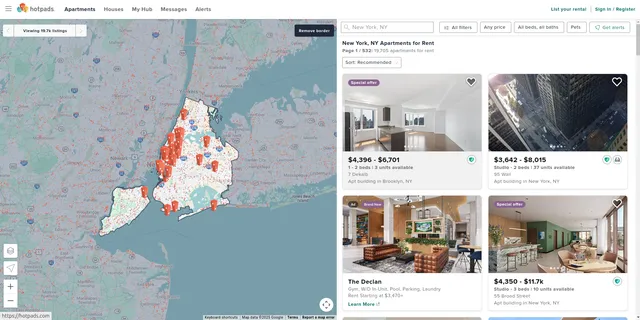
Example url 1: https://hotpads.com/new-york-ny/apartments-for-rent?lat=40.6975&lon=-73.9797&z=10
Example url 2: https://hotpads.com/mountain-view-ca/apartments-for-rent
Example url 3: https://hotpads.com/los-banos-ca/apartments-for-rent
Example Screenshot of property list by query page:
Input Format
The scraper accepts configuration through a JSON object with several key parameters:
Scrape with URLs:
The urls parameter: Add the URLs of the property list pages you want to scrape. You can paste URLs one by one, or use the Bulk edit section to add a prepared list.
The ignore_url_failures parameter: If set to true, the scraper will continue running even if some URLs fail to be scraped after the maximum number of retries is reached. This ensures that one problematic URL doesn't stop your entire scraping job.
When you provide a list of URLs for scraping, all options in the "Scrape with search filters" section will be disabled. The system will only collect data from the URLs you specified.
Scrape with Search Filters:
The location parameter: Enter the location to search for properties. Go to the HotPads website, choose a location and start searching, then copy the location value from the URL and paste it here. For example, from https://hotpads.com/las-vegas-nv/4-plus-bedroom-houses-for-rent?baths=2-8plus, the location value is las-vegas-nv.
The lat_lon parameter: Enter the latitude and longitude coordinates to search for properties in the format 'lat,long' (e.g., '51.507538,-0.127804'). This is optional and can be used for more precise location targeting.
The keyword parameter: Enter the keyword to search for properties (e.g., "apartment", "house", "condo", "townhouse").
The number_of_bedrooms parameter: Filter properties by minimum number of bedrooms:
""- Any"1"- 1+"2"- 2+"3"- 3+"4"- 4+
The number_of_bathrooms parameter: Filter properties by minimum number of bathrooms:
""- Any"1"- 1+"2"- 2+"3"- 3+"4"- 4+
The posted_date parameter: Filter properties by posting date:
""- Any"1"- Last 1 day"24"- Last 24 hours"168"- Last 7 days"720"- Last 30 days
The price_range parameter: Enter the price range to search for properties in the format 'min-max' (e.g., '1000-2000').
The sort_by parameter: Sort properties by specific criteria:
""- Recommended"activated"- Most recent"weekViews"- Most views"highPrice"- Highest price"lowPrice"- Lowest price
The page parameter: Specify the page number to start scraping from (e.g., 1, 2, 3...).
When using search filters for scraping, you need to leave the urls field empty in the "Scrape with URLs" configuration.
General Options:
The max_items_per_url parameter: Limit the number of items per URL or search filters you want to scrape. The default value is 20, providing a manageable batch size while allowing for comprehensive data collection.
The max_retries_per_url parameter: Limit the number of retries for each URL or search filters if the scrape is detected as a bot or the page fails to load. The default value is 2, providing a good balance between thoroughness and efficiency.
The proxy parameter: Proxy configuration is essential for maintaining anonymity and avoiding detection. The residential proxy option ensures that your scraping activities appear as legitimate browsing, reducing the risk of being blocked or rate-limited. You should choose a country that matches the location of the website you're scraping (e.g., US for hotpads.com).
Output Format
You get the output from the Hotpads.com Property Search Scraper stored in a tab. The following is an example of the Information Fields collected after running the Actor.
The scraper returns a comprehensive dataset with 30+ fields per property listing. Here's what each output field represents:
Location and Identification Fields:
- Address: Complete street address of the property for geographic analysis
- Alias Encoded: Internal HotPads identifier for unique property tracking
- Display Name: Marketing name or building name as shown on listings
- Geo: Latitude and longitude coordinates for mapping and proximity analysis
- Neighborhood: Named area or district for local market segmentation
- URI Building, URI Malone, URL Malone Unit, URI v2: Various HotPads internal URLs and identifiers for property linking and verification
Property Classification and Features:
- Property Type: Categorization (apartment, house, condo, etc.) for market analysis
- Listing Type: Rental classification (standard, luxury, affordable housing)
- Amenities: Comma-separated list of property features (pool, gym, parking, etc.)
- Models: Available unit types and floor plans within the property
- Full Description: Complete property description including marketing copy and key features
Housing Specializations:
- Student Housing: Boolean indicator for university-area properties
- Senior Housing: Flag for age-restricted communities
- Military Housing: Indicator for military-affiliated housing
- Income Restricted: Boolean for affordable or subsidized housing programs
Market and Quality Indicators:
- Claimed Free Listing: Property listing status affecting visibility
- Paid and Not Demoted: Premium listing status indicator
- Demoted: Reduced visibility status for quality control
- Paid Multifamily: Indicator for professional property management listings
- Trusted: Quality verification status from HotPads
- Priority: Search result ranking factor for competitive analysis
- Score: HotPads internal quality rating system
Media and Marketing:
- Photo Count: Number of available property images for quality assessment
- Media Photo URLs: Direct links to property images for visual analysis
- Has Special Offers: Boolean flag for promotional pricing or incentives
Temporal Data:
- Created: Initial listing date for market timing analysis
- Updated Time: Last modification timestamp for data freshness verification
Leasing Information:
- Rental Application Status: Current application processing status
- Broker: Property management or leasing agent information
Usage Guide
Method 1: Scrape with URLs
Step 1: Prepare Your Target URLs Navigate to HotPads.com and perform your desired property search. Copy the search result URL, ensuring it includes your specific criteria (location, price range, property type). The URL should contain geographic parameters and filters. You can paste URLs one by one, or use the Bulk edit section to add a prepared list.
Step 2: Configure Input Parameters
Set up your JSON input with the URLs array and appropriate retry limits. Configure proxy settings using residential proxies and match the proxy country to your target market (typically US for HotPads) for better success rates. Enable ignore_url_failures to ensure the scraper continues even if some URLs fail.
Step 3: Execute the Scraper Run the scraper with your configured input. Monitor the process for any error messages or rate limiting issues. The scraper will automatically handle pagination and data extraction from each URL you provided.
Step 4: Process the Output Review the extracted data for completeness and accuracy. The output can be exported to CSV, JSON, or integrated directly into your analysis tools or database systems.
Method 2: Scrape with Search Filters
Step 1: Determine Your Search Location
Go to the HotPads website, choose your desired location and start a search. Copy the location value from the URL. For example, from https://hotpads.com/las-vegas-nv/4-plus-bedroom-houses-for-rent, the location value is las-vegas-nv. Leave the urls field empty when using this method.
Step 2: Configure Search Filters Set up your search criteria:
- Location: Enter the location value copied from the website URL (e.g., "new-york-ny", "los-angeles-ca")
- Lat/Lon (optional): Add precise coordinates for more targeted searches (e.g., "40.7128,-74.0060")
- Keyword: Enter property type or search term (e.g., "apartment", "house", "condo")
- Bedrooms/Bathrooms: Filter by minimum number of rooms
- Posted Date: Filter by how recently listings were posted (last day, 24 hours, 7 days, or 30 days)
- Price Range: Set minimum and maximum price (e.g., "1000-3000")
- Sort By: Choose sorting criteria (recommended, most recent, most views, price)
- Page: Specify starting page number
Step 3: Configure Proxy Settings Use residential proxies with US proxy country setting for optimal results. Set appropriate retry limits (default: 2) and item limits per search (default: 20).
Step 4: Execute the Scraper Run the scraper with your configured search filters. Monitor the process for any error messages or rate limiting issues. The scraper will automatically handle pagination and extract properties matching your criteria.
Step 5: Process the Output Review the extracted data for completeness and accuracy. The output can be exported to CSV, JSON, or integrated directly into your analysis tools or database systems.
Best Practices:
- Start Small: Begin with smaller datasets (10-20 items) to test your configuration before scaling
- Geographic Proxies: Use US residential proxies to match HotPads' target market
- Request Delays: Implement delays between requests to avoid detection and rate limiting
- Regular Updates: Update your target URLs or search filters regularly to capture new listings
- Data Validation: Validate extracted data against manual samples to ensure accuracy
- Location Format: Ensure location values are copied exactly from HotPads URLs to avoid search errors
- URL vs Filters: Use URLs for specific searches with complex filters; use search filters for broader, keyword-based searches
- Price Ranges: Use realistic price ranges for your target location to get relevant results
- Coordinate Precision: When using lat/lon, ensure coordinates are accurate to avoid missing relevant properties
Common Error Handling:
- Timeout Errors: Increase
max_retries_per_urlor reducemax_items_per_url - Blocked Requests: Switch proxy groups or verify proxy country is set to US
- Invalid Location: Verify the location value matches the format from HotPads URLs (e.g., "new-york-ny")
- Missing Data Fields: Some properties may have incomplete information; handle null values appropriately in your processing pipeline
- Duplicate Entries: Implement deduplication based on property address or unique identifiers
- Empty Results: Check that your search filters (bedrooms, bathrooms, price range) aren't too restrictive
- Coordinate Errors: Verify lat/lon format is correct ("latitude,longitude" with no spaces)
- Page Not Found: Ensure URLs are current and haven't expired; HotPads may update their URL structure
Benefits and Applications
Time Efficiency: Automate the collection of property data that would take hundreds of hours to gather manually. Whether you are looking to track housing prices, understand rental trends, or find affordable apartments, HotPads offers detailed data on listings like prices, locations, and availability, and our scraper makes this data accessible at scale.
Market Intelligence: Generate comprehensive market reports, identify pricing trends, track inventory levels, and analyze competitive positioning across different neighborhoods and property types.
Investment Analysis: Evaluate potential investment opportunities by analyzing rent-to-price ratios, amenity distributions, and market saturation levels across target markets.
Academic Research: Support housing studies, urban planning research, and socioeconomic analysis with large-scale rental market datasets.
Business Applications: Property management companies can monitor competitor pricing, developers can identify market gaps, and real estate professionals can maintain current market knowledge for client advisory services.
Conclusion
The HotPads Property Search Scraper transforms manual property research into an automated, scalable process that delivers comprehensive market intelligence. By extracting detailed property information including pricing, amenities, location data, and market indicators, this tool empowers users to make data-driven decisions in the competitive rental market.
Whether you're conducting market analysis, tracking investment opportunities, or researching housing trends, this scraper provides the foundation for informed decision-making with reliable, up-to-date property data from one of the most trusted rental platforms in the United States.
Related Actors
- Hotpads Property Details Scraper: Your comprehensive tool for extracting valuable property information from Hotpads extensive directory platform.
Your feedback
We are always working to improve Actors' performance. So, if you have any technical feedback about Hotpads.com Property Search Scraper or simply found a bug, please create an issue on the Actor's Issues tab in Apify Console.


