
Agoda Hotel Reviews Scraper 🏨 Ratings, Text & Sentiment
Pricing
from $0.002 / review
Agoda Hotel Reviews Scraper 🏨 Ratings, Text & Sentiment
Scrape Agoda hotel reviews at scale - guest ratings, full original + translated text, positives/negatives, reviewer country & traveler type, stay dates, review photos & owner responses, plus LLM-ready markdown. Paste hotel URLs or IDs. Filter by date/rating/language; export JSON/CSV.

Agoda Hotel Reviews Scraper
Scrape Agoda hotel reviews at scale - guest scores (/10), full original + translated review text, what guests liked & disliked, reviewer country and traveler type, stay dates, review photos, and hotel owner responses - plus a per-review LLM-ready markdown block. Paste one or more Agoda hotel URLs or bare hotel IDs and export clean JSON, CSV, Excel, or via API. No login, no Agoda API key.
Reviews in every language, one actor. Agoda aggregates guest reviews from 33 languages and multiple booking sources. Default runs return Agoda's own reviews; opt in to other sources or pin specific languages when you need them - the output schema stays identical.
Runs on the Apify platform, so you get scheduling, a REST API, webhooks & integrations, proxy rotation, and run monitoring out of the box - plus incremental / since-date runs so you only pull what's new.
▶ Watch the walkthrough (90-second demo): https://www.youtube.com/watch?v=zSUbguMJiIg
What makes this Agoda scraper different
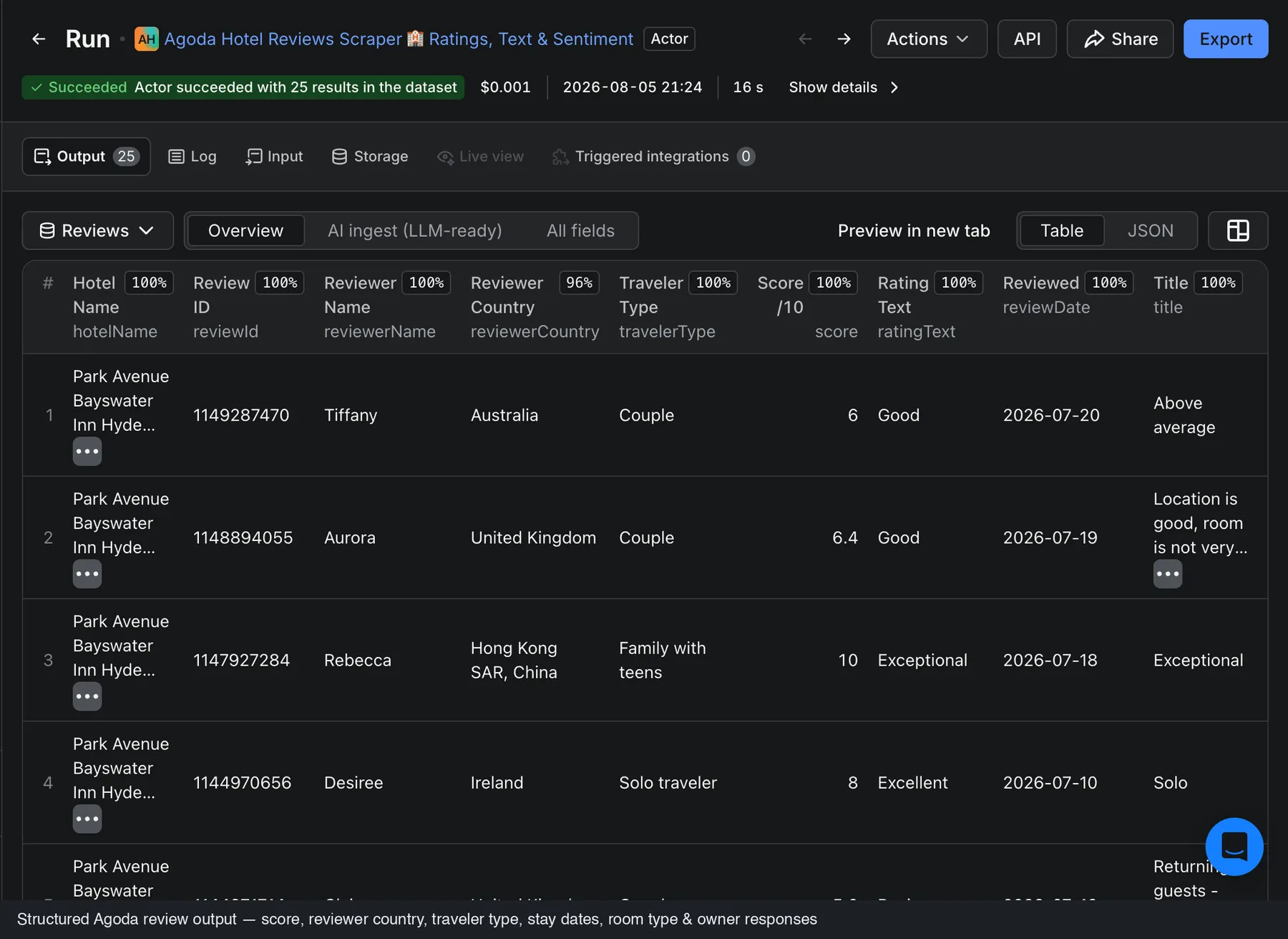
- One row per review, ready to analyze - every review is a flat record with the hotel context
(
hotelId/hotelName/hotelUrl) merged on, so each row stands alone in a spreadsheet or a database. - Original + translated text - you get what the guest actually wrote plus Agoda's translated title/body, with positives and negatives kept separate.
- Per-language pull - select one or more of Agoda's 33 review languages and the actor fetches a dedicated stream per language and merges + de-duplicates them for you.
- AI-ready out of the box - each review ships with a self-contained
markdownContentblock for RAG / vector-DB ingestion. No post-processing. - Fair pay-per-result pricing - pay per review returned (plus a small $0.005 run start fee); filter by date, rating, source or language to control exactly what you pull.
What does Agoda Hotel Reviews Scraper do?
Give it Agoda hotel-page URLs or numeric hotel IDs and it returns every public guest review it can reach for each property, newest-first, as clean structured rows. Each review carries the overall /10 score, the word rating label, the written review text (original + translated), separate liked / disliked notes, the reviewer's country, traveler type, room type, stay dates, length of stay, review photos, and any hotel owner response. Alongside the reviews it returns a hotel aggregate: property type, star rating, full address, coordinates, the Agoda score, the total review count, and per-source scores.
Does Agoda have a reviews API?
Agoda offers partner and affiliate APIs for rates and availability, but there is no public API for reading a property's guest reviews. This actor fills that gap: point it at any Agoda hotel URL or ID and get the reviews back as JSON/CSV, with no key and no partner account.
| Agoda partner/affiliate API | Agoda Hotel Reviews Scraper | |
|---|---|---|
| Read guest review text | Not available | Yes - full original + translated |
| Per-review score, liked/disliked, photos | Not available | Yes |
| Reviewer country & traveler type | Not available | Yes |
| Owner responses | Not available | Yes |
| Account / API key required | Yes (partner approval) | No |
| Output as JSON / CSV / Excel | - | Yes, plus REST API & MCP |
Who is it for?
- Revenue & reputation managers monitoring their own and competitor properties.
- Market & travel researchers analyzing guest sentiment across a city, region, or brand.
- Data & AI teams building review-summarization, sentiment, or RAG chatbots.
- Agencies & tooling vendors powering guest-experience dashboards and owner-response tracking.
Use cases
- Reputation & sentiment analysis - track scores and what guests praise or complain about over time.
- Competitor benchmarking - pull review volume, scores, and per-source ratings for any set of hotels.
- Market research - break reviews down by traveler type, reviewer country, and language.
- AI / RAG pipelines - ingest the
markdownContentcolumn straight into a vector DB. - Hospitality operations - monitor owner responses and guest-experience trends per property.
How to scrape Agoda reviews (to CSV)
- Open a hotel's page on Agoda and copy the URL, e.g.
https://www.agoda.com/bayswater-inn-hotel/hotel/london-gb.html. Any regional Agoda domain and a locale prefix (e.g./en-gb/) are fine, and a bare numeric hotel ID like11019also works. - Paste one hotel per line into Hotel URLs or IDs.
- (Optional) Set Max reviews per hotel, a date range, a score range, a sort order, the Review sources, or one or more Review languages.
- Click Start, then open the Output tab and Export as CSV, JSON, HTML, or Excel - or pull the data from the API.
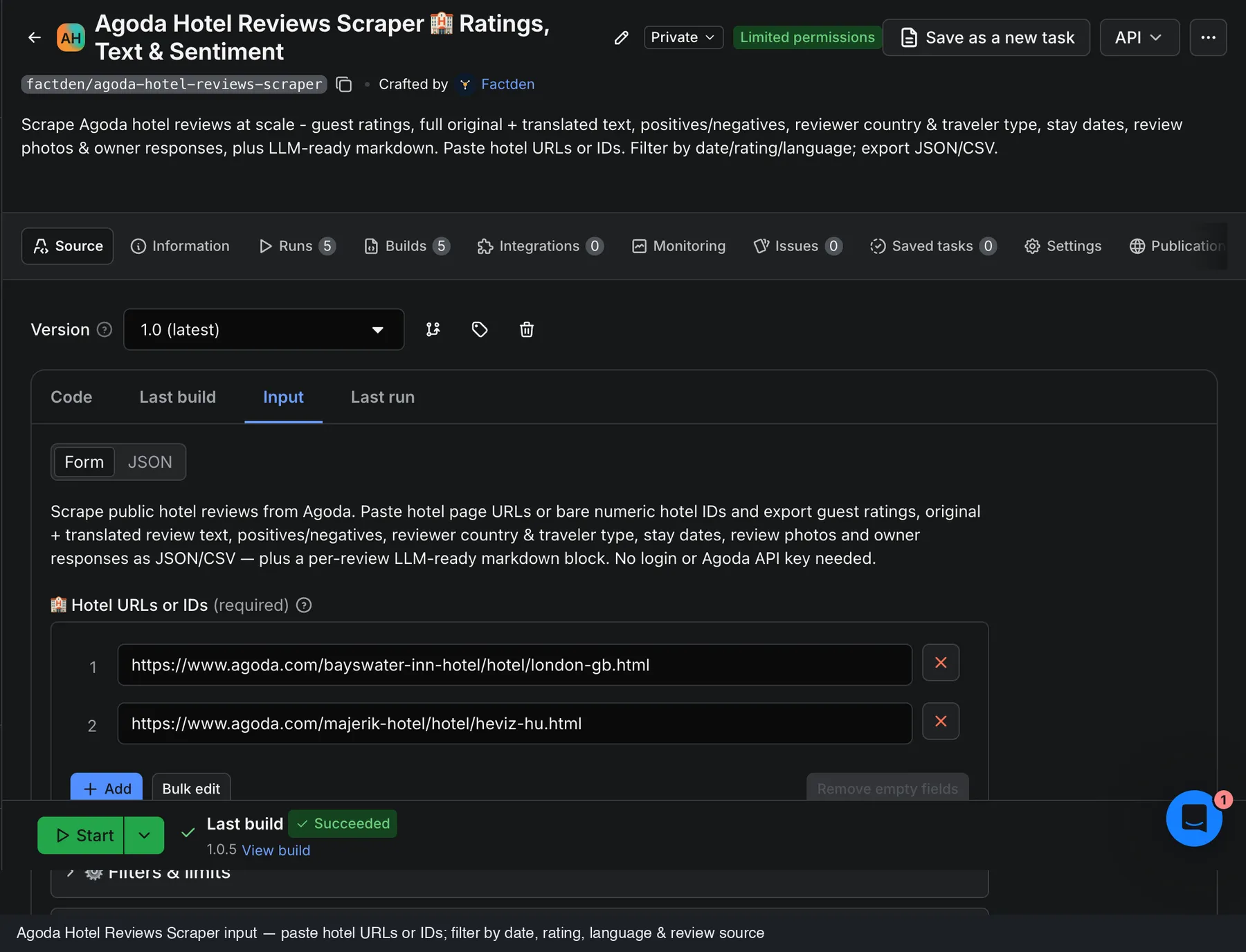
Input
| Field | Description |
|---|---|
Mode (mode) | reviews (default) for guest reviews, or prices for live room rates & availability by date. One run = one job. |
Hotel URLs or IDs (hotelUrls) | Agoda hotel-page URLs (any regional domain / locale prefix) or bare numeric hotel IDs (11019). One per line. Required. Used by both modes. |
Max reviews per hotel (maxReviews) | Reviews mode. Cap per hotel, fetched newest-first (default 200). |
Sort reviews by (sortBy) | newest (default), oldest, highestRating, lowestRating. Reviews are fetched newest-first; highest/lowest reorder the retrieved set. |
From / To date (fromDate / toDate) | Keep only reviews in a YYYY-MM-DD range - ideal for incremental / since-date monitoring. |
Min / Max rating (minRating / maxRating) | Keep only reviews within a score window. Agoda uses a 0-10 scale, not 1-5. |
Review sources (reviewSources) | Which booking sources' reviews to return. Defaults to Agoda's own reviews; add Booking.com / Priceline, or clear the field to include every source Agoda shows. |
Review languages (languages) | Return only selected languages (from Agoda's 33). Empty = all languages in one combined stream; select several to fetch and merge a stream per language. |
Proxy (proxyConfiguration) | Datacenter proxies are enough at typical volumes. |
Example input
This mixes two hotel URLs and a bare hotel ID. When you pass a bare ID, the actor uses it directly; when you pass a URL it resolves the current hotel automatically.
Prices mode - room rates & availability by date
Set Mode to prices to pull live room rates and availability for the same hotels, instead of reviews.
You get one row per hotel per check-in date in the offers dataset: room-wise rates, each room's rate plans
(pay-now vs pay-at-hotel, refundable vs non-refundable, breakfast), the inventory supplier, scarcity and a
sold-out flag.
| Field | Description |
|---|---|
Check-in date (checkInDate) | YYYY-MM-DD to price. Defaults to tomorrow. Up to ~365 days ahead. |
Nights (nights) | Length of stay (check-out = check-in + nights). Default 1. |
Price window end (priceWindowEnd) | Optional. Set a later date to price every check-in from your check-in through this date (one billable row per date) - ideal for rate/availability tracking. |
Price window step (priceWindowStep) | Days between sampled check-ins when a window end is set. 1 = daily, 7 = weekly (cheaper). |
Rooms / Adults / Children ages (rooms / adults / childrenAges) | The booking party. Rates adjust to occupancy. |
Currency (currency) | One of 24 currencies (USD default). The currency is set in the request, so the proxy country does not change it. One run = one currency. |
A sold-out date is still returned as a row ("available": false) - a checked date with no inventory is a real
result, delivered alongside the available dates. Example offers row (trimmed):
Output
In Reviews mode the actor writes to two datasets:
- Reviews (the default dataset) - one row per guest review, with the hotel context
(
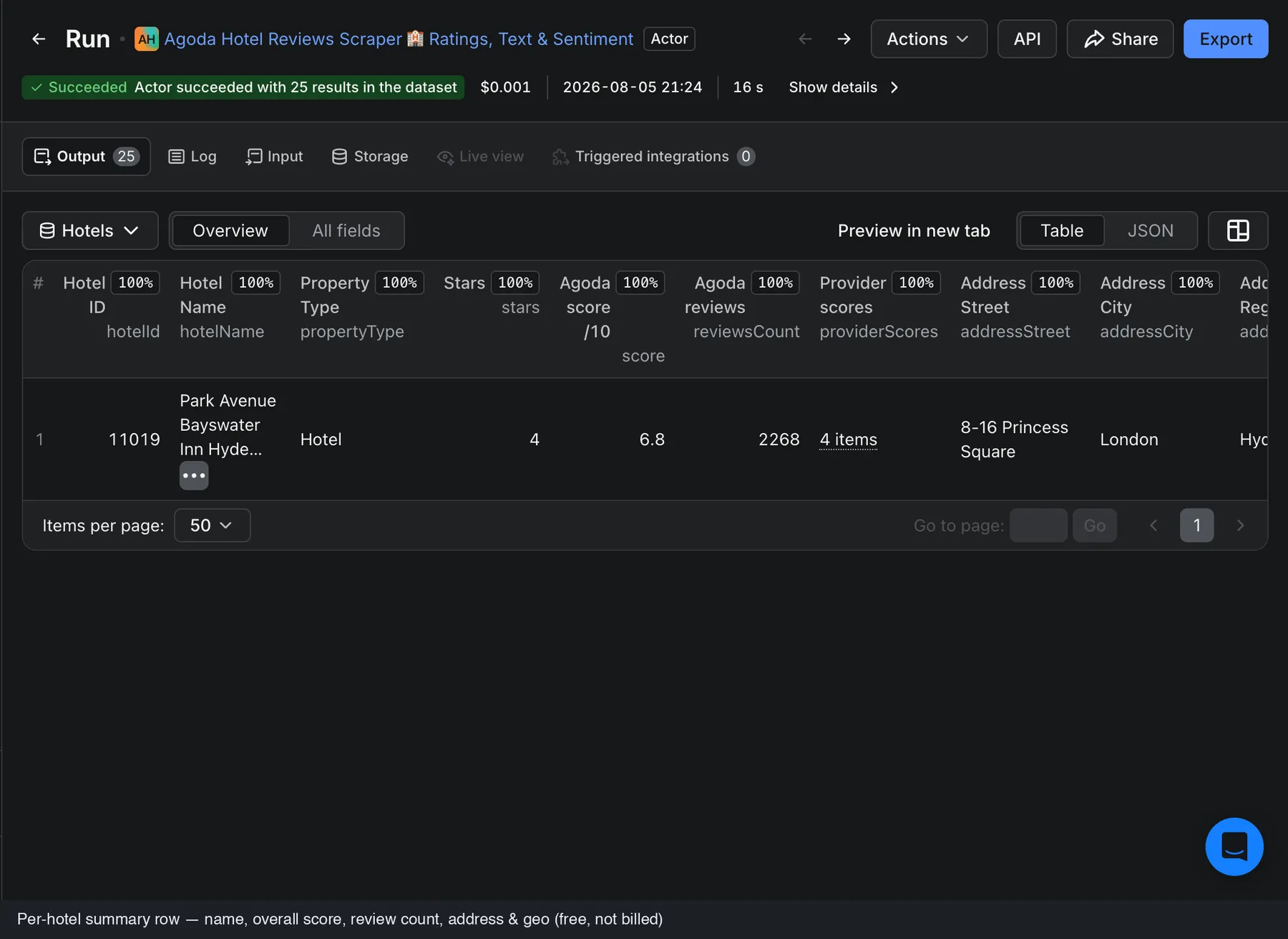
hotelId/hotelName/hotelUrl) merged onto every row. - Hotels - one row per hotel with the aggregate: property type, star rating, full address, coordinates, the Agoda score, total review count, and per-source scores.
In Prices mode the actor writes to the Offers dataset instead - one row per hotel per check-in date (see Prices mode above).
Prices mode: where to find your results. Prices runs write to the Offers dataset, not the default one, so the run's main Output counter can read 0 even though your rows are there. Open the Output tab (or Storage - Datasets) and select Offers / Prices & availability to see every hotel-date. The run log also prints the delivered count.
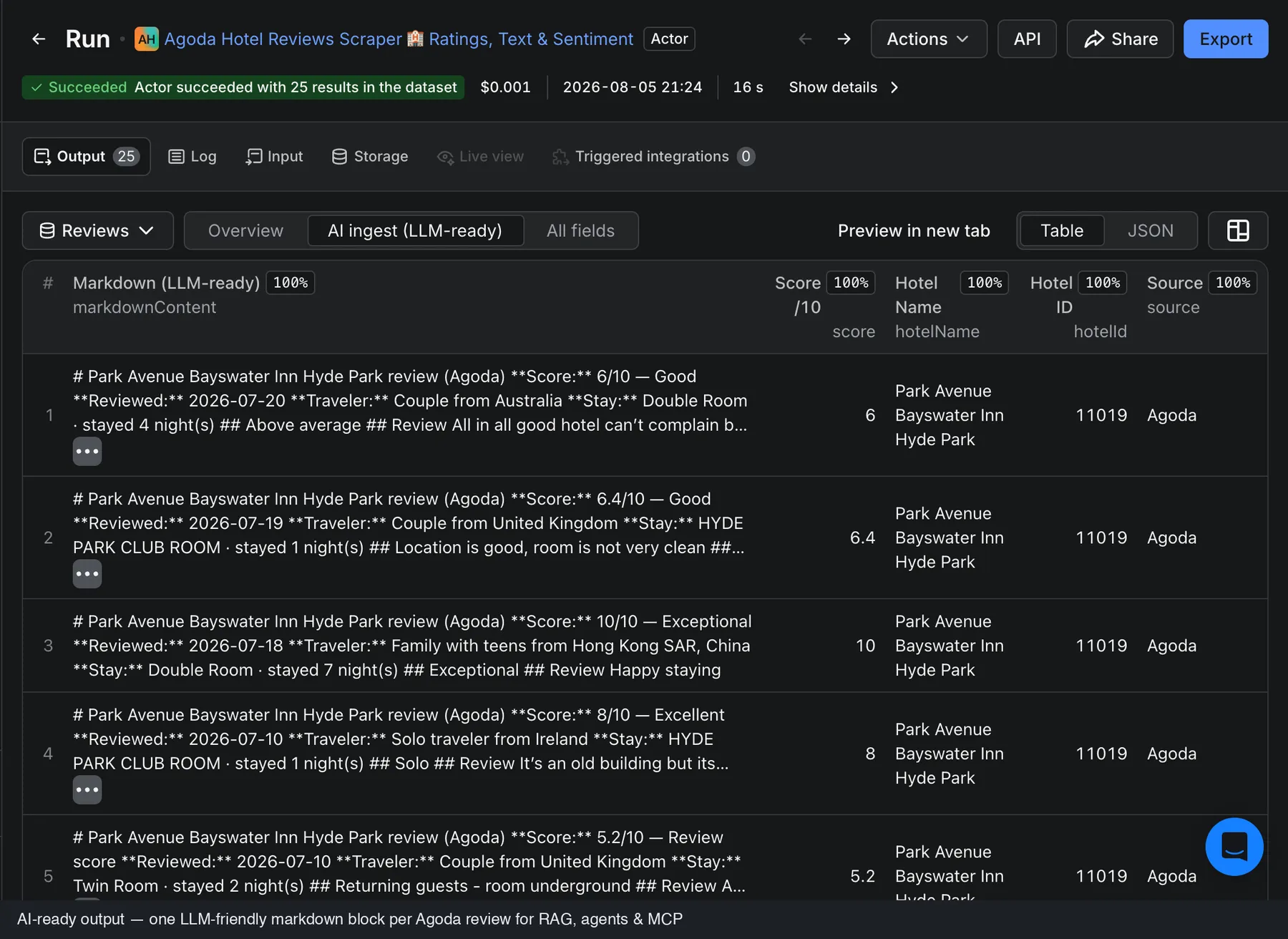
The Output tab shows the Reviews dataset by default, plus an AI ingest view (the LLM-ready
markdownContent column) and the Hotels dataset. Download any of them as JSON, HTML, CSV, or Excel, or
fetch them from the API (the reviews dataset also exposes ?view=aiIngest).
Here is a real review row from a run on the Park Avenue Bayswater Inn (London):
...and the matching hotel row from the Hotels dataset:
Scores are on Agoda's native 0-10 scale.
Hotels dataset - one row per hotel with the full aggregate:
AI ingest view - the self-contained, LLM-ready markdown for each review:
Data fields
Reviews dataset - one row per review. Every row also carries hotelId, hotelName and hotelUrl.
| Field | Description |
|---|---|
score, ratingText | Overall score on Agoda's 0-10 scale + word label ("Exceptional", "Good"…). |
title, text | Review headline and full body (original + translated, positives + negatives + comment combined). |
positives, negatives | What the guest liked and disliked, kept separate. |
reviewDate | Day the review was submitted (YYYY-MM-DD). |
reviewerName, reviewerCountry, travelerType | Who wrote it and how they travelled (Couple, Family, Solo…). |
roomType, checkInDate, checkOutDate, lengthOfStay | Stay context. |
reviewPhotos | Guest photo URLs {url, caption, id}. |
ownerResponse | Hotel/manager reply {text, date}, when present. |
source | The booking site the review was posted on (Agoda, Booking.com, …). |
markdownContent | Self-contained LLM-ready markdown block for RAG / vector-DB ingestion. |
Hotels dataset - one row per hotel.
| Field | Description |
|---|---|
hotelId, hotelName, hotelUrl | Property id, name, and source URL. |
propertyType, stars | Property type and star rating. |
addressStreet, addressCity, addressRegion, addressCountry, addressZip | Full address. |
latitude, longitude | Coordinates. |
score, reviewsCount | Agoda's aggregate score (0-10) and total review count. |
providerScores | Per-source score, review count and max score. |
reviewsExtracted, extractedAt | How many reviews this run pulled, and when. |
Run it via the API
Run the actor programmatically and get the reviews back in one call:
The response is the default (reviews) dataset - one row per review. Append ?view=aiIngest for the LLM-ready
markdown columns. The run's Hotels dataset (per-hotel aggregate) is available from the run's list of
datasets in the Console or via the API.
Run on a schedule
Use Apify Schedules to run this actor hourly, daily, or weekly. Pair a tight From date with a low Max reviews per hotel and you pull only what's new since the last run - the cheapest way to keep a reviews dataset continuously fresh. Wire the results into Google Sheets, Make, Zapier, n8n, a webhook, or your own app via the Apify API.
AI agents & RAG
Every review includes a self-contained markdownContent block, so you can drop reviews straight into a vector
DB or hand them to an LLM with no post-processing:
AI agents can also call this actor through the Apify MCP server, so assistants like Claude, ChatGPT and LangChain can pull Agoda reviews on demand.
How much does it cost to scrape Agoda reviews?
This actor uses pay-per-event pricing - you pay per result returned, plus a small $0.005 run start fee:
| Plan | Price per 1,000 reviews |
|---|---|
| Free | $4.00 |
| Bronze | $3.00 |
| Silver | $2.50 |
| Gold+ | $2.00 |
Examples: 500 reviews ≈ $2.00 (Free) · 5,000 reviews ≈ $20.00 (Free) / $10.00 (Gold), plus $0.005 per run. Lower Max reviews per hotel to cap spend, and your first runs are covered by Apify's free tier.
Prices mode
In Prices mode you pay per hotel-date returned (one hotel × check-in date) - from $0.0035 to
$0.005 depending on your subscription tier. A one-week price-tracking sweep of a hotel (7 dates) is ≈
$0.035; 20 hotels × 30 days ≈ $3.00. Use Price window step (e.g. 7 for weekly) to sample fewer
dates and cut cost.
Tips & advanced options
- Reviews are fetched newest-first, so a tight From date plus a low Max reviews per hotel is the cheapest way to monitor only what's new (schedule it daily for incremental tracking).
- Feed many hotels in one run - the actor de-duplicates repeated URLs and IDs automatically.
- Use Review languages to pull only, say, Japanese or German reviews; the streams are merged and deduped.
- Use Review sources to widen beyond Agoda to Booking.com/Priceline, or clear it for every source.
Related FactDen scrapers
Building a review-intelligence pipeline? Pair this with other FactDen actors on the Apify Store:
- Zomato Restaurant Reviews Scraper - Zomato restaurant reviews & owner responses, plus restaurant leads (phone, address, GPS) by city & cuisine
- Traveloka Hotel & Activity Reviews Scraper - Traveloka hotel & Xperience activity reviews: 1-10 ratings, category sub-scores, owner replies & English translation
- Qunar Hotel Reviews Scraper - the only Apify actor for Qunar (去哪儿): per-review sub-scores, sentiment, owner replies and LLM-ready markdown
- Booking.com Scraper - hotels, live prices, per-room rates, availability & occupancy, and guest reviews across a whole city or one hotel
- MCA India Company & Director Data Scraper - India MCA company master data + directors' personal email & phone, by CIN, DIN, name, or industry & state
- Expedia Reviews Scraper - hotel reviews across all seven Expedia Group brands.
- Hotels.com Reviews Scraper - Hotels.com ratings, review text & sentiment.
- Trip.com & Ctrip Reviews Scraper - hotel reviews across Trip.com / Ctrip.
- Google Hotels Scraper - live hotel prices, the OTA rate ladder & guest reviews from Google Hotels.
- TripAdvisor Hotel Reviews API - all TripAdvisor reviews for hotels, restaurants & attractions, plus subratings & the AI review summary.
- MakeMyTrip & Goibibo Reviews Scraper - MakeMyTrip + Goibibo hotel reviews & details (India's largest OTAs).
- Airbnb Data Scraper - Airbnb listings, prices, availability, occupancy & reviews.
⭐ Find this useful? Bookmark the actor and leave a review on its Apify Store page - it helps other travel and hospitality teams find it, and tells us which features to build next.
FAQ, disclaimers & support
- Does Agoda have a reviews API? No public one for reading guest reviews - Agoda's partner/affiliate APIs cover rates and availability only. This actor returns the review data with no key and no partner account.
- Do I need an Agoda account or API key? No.
- Is scraping Agoda reviews legal? This actor collects only publicly available review content and does not touch private or account data. You are responsible for complying with Agoda's Terms of Service and applicable laws (including data-protection rules like GDPR) when using the data. See Apify's guide, is web scraping legal?, for background.
- Can I use it via the Apify API or an MCP server? Yes - run it through the Apify REST API (see the example above) or connect it to an AI agent via the Apify MCP server, so assistants like Claude or ChatGPT can fetch Agoda reviews on demand.
- Can I get reviews in a specific language? Yes - select one or more of Agoda's 33 review languages in Review languages; the actor fetches a stream per language and merges + de-duplicates them.
- How many reviews can I get per hotel? As many as the hotel has - set Max reviews per hotel to cap it;
the hotel row's
reviewsCounttells you how many exist in total. - A hotel returned fewer reviews than expected. Your date/score/source/language filters, or Max reviews
per hotel, may be limiting the result;
reviewsCountshows how many exist in total. - A URL didn't resolve / "relisted or removed". Agoda sometimes relists a hotel under a new URL. Open the hotel on agoda.com and paste its current URL, or use the numeric hotel ID directly.
- Found a bug or need a field we don't return? Open the Issues tab on this actor's Apify page. Custom solutions are available on request.
Changelog
- 2026-10 - Prices mode added. New
mode: "prices"returns live room rates & availability by date (one row per hotel per check-in date) in a newoffersdataset: room-wise rates, rate plans, inventory supplier, breakfast/cancellation flags and scarcity, in 24 currencies. Billed per hotel-date returned. Reviews mode is unchanged. - 2026-08 - Initial release. Per-review rows + hotel aggregate across two datasets; 33-language per-language pull; Agoda / Booking.com / Priceline source filter; per-review LLM-ready markdown; incremental since-date runs; JSON/CSV/Excel export and full REST API.
⭐ If this actor saved you time, a review and a bookmark on the Apify Store page mean a lot - they help other travel and hospitality teams find it.


![Agoda [Only 💰$1] Reviews Scraper API: Guest Ratings & Comments avatar](https://images.apifyusercontent.com/V5PHxm83P-i51KMNmtBqU2jY3E7dBa3p0jRcJRSxwVA/rs:fill:76:76/cb:1/aHR0cHM6Ly9hcGlmeS1pbWFnZS11cGxvYWRzLXByb2QuczMudXMtZWFzdC0xLmFtYXpvbmF3cy5jb20vbmduOHZSRVNUa3NleVdFNnAtYWN0b3ItT21VcDN5em02dFdCZjVTaG4tTW15Y2hPSWtBNS1hZ29kYS1sb2dvLXBuZ19zZWVrbG9nby0zNzEwMjUucG5n.webp)

