

Shopify Store Analyzer — Apps, Contacts & Catalog Stats
Pricing
from $1.80 / 1,000 shopify store analyzeds
Shopify Store Analyzer — Apps, Contacts & Catalog Stats
Everything a Shopify store shows in public: name, location, currency, product count, price range, catalog activity, installed apps and theme, plus the emails and social profiles the store lists. Schedule it daily, weekly or monthly with Apify, n8n, Make or Zapier. Sites not on Shopify are free.
Pricing
from $1.80 / 1,000 shopify store analyzeds
Rating
0.0
(0)
Developer

FERMAJA
Maintained by CommunityActor stats
0
Bookmarked
2
Total users
1
Monthly active users
3 days ago
Last modified
Categories
Features
Share
Shopify Store Analyzer: apps, contacts and catalog stats for any store list
Paste a list of websites and get a lead-ready profile of every Shopify store on it: who they are, where they are, what they sell, how active the catalog is, which apps they pay for, and how to reach them.
- 🏪 The store: name, description, city, state, country, currency, .myshopify domain and the number of countries it ships to
- 📦 The catalog: product and collection counts, min / median / max price, % on sale, % in stock, products added in the last 30 days
- 🧩 The stack: Shopify theme plus 45+ detected apps and tools (Klaviyo, Attentive, Yotpo, Recharge, Gorgias, Rebuy, Triple Whale, Afterpay…)
- 📇 The contacts the store lists: public emails, phone and Instagram, TikTok, Facebook, YouTube, X, Pinterest and LinkedIn links. Big brands rarely print an email on the homepage: in our run of the prefilled 10 stores on 17 November 2026, 8 of 10 had an Instagram link, 6 of 10 TikTok and Facebook, 2 of 10 a public email and none a phone number
- 💸 Pay only for Shopify stores: sites that are not on Shopify get a free row that says so
Export as CSV, Excel or JSON, send it to Google Sheets, HubSpot, Slack, Make, Zapier or n8n, or call it from the API. No login, no browser, no API key.
Try it now: leave the form as it is and click Start. You get 10 analyzed Shopify stores in about 3 seconds.
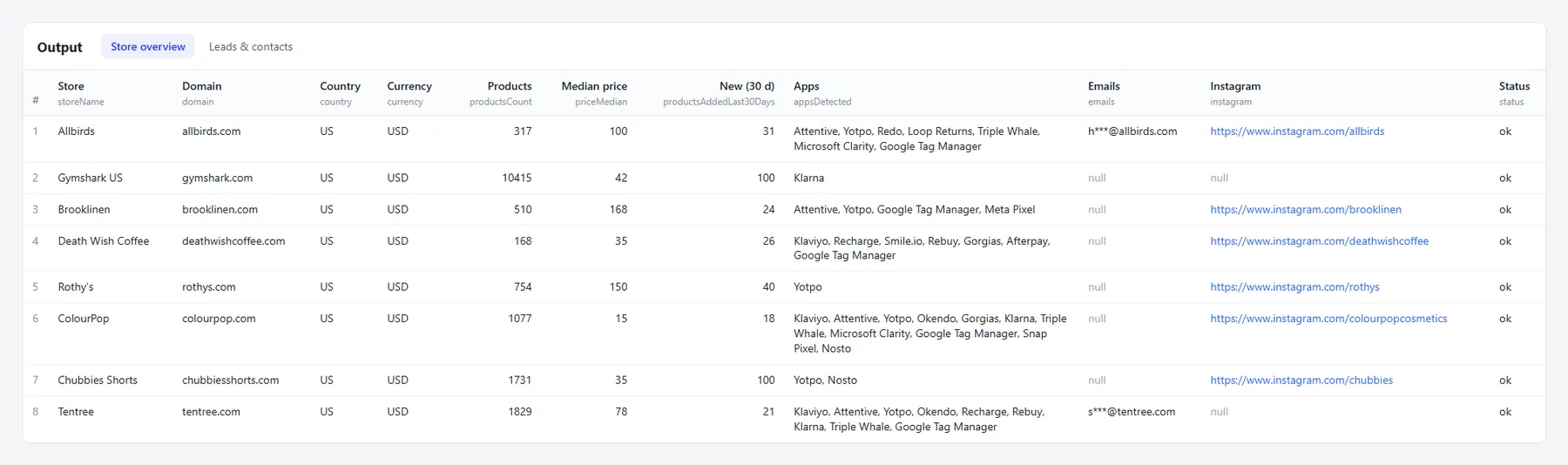
This is how your results look: the Store overview view of the Output tab, with real rows from a run on 12 November 2026 (the prefilled input: 10 Shopify stores). Emails are masked in this image only; your results show them in full.
✨ Why people pick it
- ✅ Paste anything.
allbirds.com, a product URL with tracking parameters,info@brooklinen.com,store.myshopify.com, comma, semicolon or|lists in one line, evenallbirds dot com. Duplicates are merged, Google and Facebook redirect links are opened, an Instagram or TikTok profile link checks the matching .com store, and a CRM row such asAllbirds, allbirds.com, San Francisco CAuses only the website. Etsy, Amazon and Shopify App Store links are skipped with a note. - ✅ Buying signals, not just a name. The apps column tells an agency or SaaS seller what the store already uses (and what it is missing); "products added in the last 30 days" shows whether the store is active right now.
- ✅ Built for chaining. Point it at the dataset of a Google Maps, Google Search or website scraper run and it reads the website column by itself.
- ✅ One flat row per store with the same fields every time, ready for a CRM, a sheet or an n8n node.
- 💸 Fair pricing. You pay only for Shopify stores with full data. Other sites, dead domains and stores that hide their data are free.
Who uses it
| You are… | You use it to… |
|---|---|
| 🎯 Agencies & freelancers | Find Shopify brands without email or reviews apps (no Klaviyo, no Yotpo) and pitch exactly what they lack |
| 🧩 Shopify app & SaaS sellers | Qualify a lead list by country, catalog size, price point and competing apps before outreach |
| 📈 E-commerce analysts | Compare competitors' catalog size, pricing, sale share and launch pace every month |
| 🤖 Automation builders | Enrich any list of domains in n8n, Make or Zapier and route Shopify stores to the right sequence |
How it works
- Add websites: paste domains, URLs, Markdown links or Shopify admin links, type store names ("Death Wish Coffee" is checked as deathwishcoffee.com), or pick a dataset from another Actor.
- It checks each site's public Shopify store file (the same
/meta.jsonand/products.jsonevery Shopify storefront publishes) and reads the homepage for theme, apps and contacts. - You get one row per website:
okrows are analyzed Shopify stores (charged), everything else is a free row with the reason.
💡 Tip: turn off Include rows for sites that are not Shopify to get a clean list of stores only.
Ready-made inputs
1. 🎯 Qualify a lead list
2. 🔗 Enrich another Actor's results (Google Maps, Google Search, website contact scraper…)
3. ⚡ Fast check of a long list (no catalog stats, 10 sites in parallel)
🗂️ Ready-made tasks
Find them under Tasks on this page: open one, press Start, and change the store list to your own:
- 👗 Shopify fashion brands: apps and contacts: which apps, theme and public contacts 10 well-known fashion stores use.
- 💄 Shopify beauty brands using Klaviyo and other apps: spot the email, review and loyalty apps of beauty stores, for app makers and agencies.
- 🏷️ Shopify store pricing and catalog check: price range, products on sale and new products for competitor or market research.
Example result
A complete real row from a run on 2026-11-17 (the prefilled input, the Allbirds row). Every field is shown, in the order you get it:
Every row has all fields (null when unknown). Catalog stats come from a sample of up to 100 products (productsSampled).
🔗 Use it in n8n
Install the official Apify node (n8n Cloud: search "Apify" in the nodes panel; self-hosted: install @apify/n8n-nodes-apify under Settings > Community Nodes) and add your Apify API token.
Workflow 1: 🎯 qualify a sheet of e-commerce leads
- Google Sheets: read your prospects (a
websitecolumn). - Aggregate: combine
websiteinto one list, so the Actor runs once for the whole sheet. - Apify → Run an Actor and get dataset: Actor
fermaja/shopify-store-analyzer, custom input (Expression mode):
- Filter: keep stores where
countryisUS,productsCount> 50 andappsDetecteddoes not containKlaviyo(your email-marketing pitch). - HubSpot, Pipedrive or Google Sheets: map
storeName,domain,country,productsCount,priceMedian,appsDetected,emailsandinstagram.
Workflow 2: 📧 Shopify stores, then their contacts. Chain two Actors:
- Apify → Run an Actor
fermaja/shopify-store-analyzerwith the input above. - Apify → Run an Actor and get dataset
fermaja/website-contact-scraperwith{ "datasetId": "{{ $json.defaultDatasetId }}", "datasetField": "domain" }. - Filter rows with
primaryEmail, then Instantly, Lemlist or HubSpot.
It also works the other way round: point Dataset ID at a Google Maps or website contact scraper run ({{ $json.defaultDatasetId }}) and this Actor reads its website column, so you learn which of those businesses sell on Shopify.
Workflow 3: 📈 monthly competitor report. Schedule Trigger (1st of the month) → Apify: Run an Actor and get dataset with { "websites": ["competitor1.com", "competitor2.com"] } → Google Sheets (append storeName, productsCount, priceMedian, productsOnSalePct, productsAddedLast30Days, appsDetected, scrapedAt) → Slack when appsDetected changes.
💡 Every row has the same flat fields (no nesting), so n8n maps them directly. Keep the custom input in Expression mode, or n8n sends the text {{ $json.defaultDatasetId }} instead of the ID (the run then stops and tells you so). Number fields must be numbers (10, not "10"), or the API rejects the run before it starts.
⏰ Run it on autopilot: daily, weekly or monthly
Stores add products, start sales and switch apps all the time. Set it once:
- 🗓️ Without any workflow tool: in Apify Console, save your input as a task, open Schedules → Create new, pick daily, weekly or monthly (or a cron such as
0 8 1 * *for the 1st of every month) and add the task. In the task's Integrations tab, send results to Google Sheets, Slack, email or a webhook. - ⚙️ Inside your workflow: run it from n8n, Make or Zapier on any schedule (see the n8n section above).
Popular rhythms: weekly for agencies watching new leads from their scrapers, monthly for competitor catalog and pricing reports, daily during a competitor's sale season.
💵 Pricing
You pay per Shopify store analyzed. Sites that are not on Shopify, unreachable sites and stores that hide their data are free. Apify plan discounts apply automatically:
| Your Apify plan | Price per store | Per 1,000 stores |
|---|---|---|
| Free | $0.0025 | $2.50 |
| Starter (Bronze) | $0.0022 | $2.20 |
| Scale (Silver) | $0.0020 | $2.00 |
| Business (Gold) and up | $0.0018 | $1.80 |
Plus a start fee of $0.005 per run (per GB of memory; the default is 512 MB).
Example: you check 1,000 websites from a Google Maps run and 400 of them are Shopify stores. On the Free plan you pay 400 × $0.0025 + $0.005 = $1.01. The 600 other sites cost nothing.
🙌 Just testing or comparing scrapers? You're very welcome. Click Start with the prefilled input: 10 Shopify stores in about 3 seconds, about 3 cents. Apify's free plan includes $5 of credit every month, which covers about 2,000 analyzed stores, so you can try it on your own list first.
🛡️ Set Maximum cost per run in the run options to cap your spend; the analyzer stops cleanly when it is reached and says so in the status message.
🚦 Every row tells you what happened
Each row has a status and, when something went wrong, a plain-English error. Filter on status in n8n, Make or Sheets to route rows.
status | What it means | Charged? |
|---|---|---|
ok | Shopify store with store data, catalog stats, apps and contacts | Yes |
partial | Shopify store, but its public store file is switched off or rate-limited; theme, apps and contacts are still filled | No |
not-shopify | The site loads but does not run on Shopify (saved only when Include non-Shopify websites is on) | No |
unreachable | The website could not be loaded (DNS, timeout, blocked); error says why | No |
duplicate | The same Shopify store as another line of your input (e.g. weareallbirds.myshopify.com and allbirds.com); error names that line. Saved only when Include non-Shopify websites is on | No |
The run's status message sums it up, e.g. "Done: 10 websites in 4s. 8 Shopify stores analyzed (you pay only for these), 1 not on Shopify, 1 unreachable.", plus a note for anything we adjusted in your input.
❓ FAQ
How do you know a site runs on Shopify?
Every Shopify storefront publishes a public store file (/meta.json) and loads its assets from Shopify's CDN. If neither is there, the site gets a free not-shopify row.
Is it legal? It reads only what each store publishes for every visitor: its public store file, its public product feed and its homepage. It does not log in. Emails and phones are the business contacts shown on the homepage. You are responsible for how you use the data under the laws of your country (for example GDPR and anti-spam rules for outreach).
Do I need a proxy? No. If many stores answer with rate limits on a very long list, pick Apify Proxy (datacenter); it is only used after repeated rate limits.
Why is a store partial?
Some stores (often large brands on Shopify Plus) switch off their public store file or rate-limit it. You get a free row with the theme, apps and contacts we could read, and you are not charged.
How accurate are the catalog stats?
They are computed from up to 100 products from the store's public product feed (productsSampled). productsCount and collectionsCount are the store's own totals.
⚠️ Limits
- Shopify only. WooCommerce, BigCommerce and custom stores are listed as
not-shopify(free). - Headless Shopify stores (a custom front end on another platform) often hide the store file and show up as
not-shopifyorpartial. - App detection looks at the homepage code: apps that load only on product or checkout pages may be missing.
- No revenue or traffic estimates: only data the store publishes.
🆕 What's new
-
🌳 1.0.16 (November 20, 2026): link-in-bio pages (
linktr.ee/gymshark,beacons.ai/...) are read like social profiles, so the matching store is analyzed (gymshark.com) instead of a free "not Shopify" row for linktr.ee. -
🧾 1.0.14 (November 18, 2026): the same store pasted twice under different addresses (its
.myshopify.comaddress and its own domain, or two domains that open the same store) is now charged once; the second line gets a freeduplicaterow that names the first. Websites followed by!,?or an emoji (rothys.com!,colourpop.com ✅) are no longer ignored. -
🧹 1.0.13 (November 17, 2026): CRM and business-card rows (
Allbirds, allbirds.com, San Francisco CA) now use only the website, instead of also checking sanfranciscoca.com. Google and Facebook redirect links are opened (before they were dropped),tentree dot comandmvmt .comare read as websites, and Etsy, Amazon and Shopify App Store links are skipped with a note. The status message now lists up to 4 notes, so every skipped line is explained. -
📋 1.0.12 (November 15, 2026): paste a spreadsheet column with its header row (
Website,Store URL) and the header is skipped instead of being checked as website.com. Instagram, Facebook, TikTok or LinkedIn profile links (instagram.com/allbirds) now check the matching .com store instead of being ignored. A dataset without a website column now lists its columns in the status message, and international domains show readable (bücher.de, notxn--bcher-kva.de). Sites that refuse our requests (HTTP 403/429) are now named in the status message with a proxy hint. -
🚦 November 9, 2026: new status reference table in this README, so you can route
ok,partial,not-shopifyandunreachablerows in your workflow. -
🛠️ 1.0.4 (November 7, 2026): type store names instead of websites (we check the matching .com and tell you in the status message), paste Markdown links or
admin.shopify.com/store/...links. If you paste a run ID where the Dataset ID goes, the status message now tells you where to find the right ID. -
🚀 1.0 (November 2026): first release. Store data, catalog stats, 45+ app signatures, theme, public emails, phones and 7 social networks, dataset import for chaining, and free rows for non-Shopify sites.
🧩 Related Actors
- 📧 Website Email & Contact Scraper: get emails, phones and social profiles for the stores you found.
- 💼 Company Jobs Scraper: hiring signals from 5 job boards for any list of companies.
- 🚀 Product Hunt Scraper: fresh launches, makers and their websites.
- ⭐ Google Play Reviews Scraper: app reviews in any language.


