

App Store Reviews Scraper
Pricing
from $0.35 / 1,000 reviews
App Store Reviews Scraper
App Store reviews per country. A watch returns only new reviews and the average rating per app version, with Slack or Discord alerts. Google Play reviews are not read while its robots.txt disallows them (checked each run). $0.50 per 1,000 reviews on Free, $0.35 on Gold, plus $0.003 per run.
Pricing
from $0.35 / 1,000 reviews
Rating
0.0
(0)
Developer

Fetchwright
Maintained by CommunityActor stats
0
Bookmarked
2
Total users
1
Monthly active users
18 hours ago
Last modified
Categories
Features
Share
App Store Reviews: Rating by Version & Alerts
Get App Store reviews for any app, per country, in one run. Each review has its stars, title, text, date and app version.
Turn on a watch and each scheduled run returns the reviews it has not returned before, per app and country. The run also reports the average rating and star distribution for each app version, and how that changed since the last run. A short alert can go to Slack, Discord or any webhook.
Price: $0.50 per 1,000 reviews on the Free plan, down to $0.35 on Gold, plus $0.003 per run. A watch run that finds nothing new costs only the $0.003 start fee.
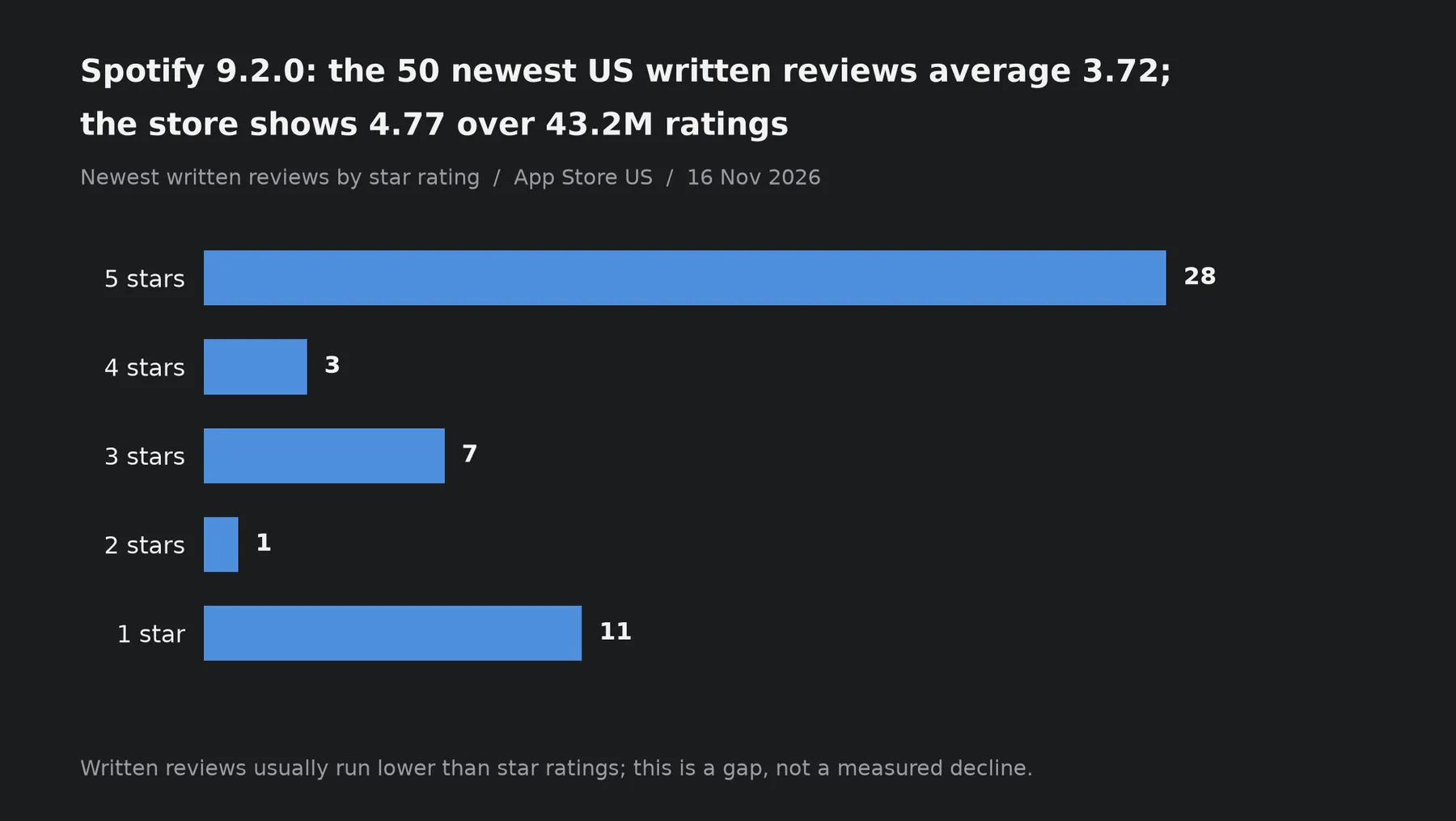
The newest 50 US written reviews of Spotify, recorded on 16 Nov 2026, average 3.72 stars; the App Store shows 4.77 over 43.2M ratings. Written reviews usually run lower than star ratings; this is a gap, not a measured decline.
Measured on 17 Nov 2026: each request returned 50 App Store reviews (Spotify, US and UK), with no block.
Rating per app version. These figures are from our test run on 17 Nov 2026 (Spotify, at most 50 reviews per list). Each run writes them to the VERSIONS record, which is not billed:
| App (store, list) | Newest version | Reviews | Average | Previous version |
|---|---|---|---|---|
| Spotify (App Store, US) | 9.2.0 | 50 | 3.72 | not among the newest 50 |
| Spotify (App Store, UK) | 9.2.0 | 50 | 4.28 | not among the newest 50 |
The release against the store's rating. When a list has a review to save, the run also asks the store once for the app's name and the rating it displays, and on the App Store for the current version and its release date, at no charge. For Spotify (App Store, US), Apple's Lookup API answered on 17 Nov 2026: version 9.2.0, released 13 Nov, rating 4.77 over 43,165,362 ratings, and the same 4.77 over 43,165,362 for the current version alone. With the 50 reviews above, the version report reads:
9.2.0 released 13 Nov: reviews since release average 3.72 over 50, against the store's displayed 4.77 in US (43.2M ratings; Apple shows the same figure for the current version)
A developer can reset the App Store rating with a new version. When Apple shows fewer ratings for the current version than overall (a reset), the line gives both figures; for the same reviews it would read, for example:
9.2.0 released 13 Nov: reviews since release average 3.72 over 50, against 4.77 for this version (12.3K ratings) and the store's 4.60 overall in US (43.2M)
The store's rating is not an all-time average of the reviews: it is the figure the store displays for one country (ratingCountry), and it counts star ratings given without a written review. Google Play's is Google's own figure, which weights recent ratings more, read for the first country in your list. A store rating of 0 (no ratings) is not compared.
The Slack or Discord alert for the first line starts:
A change between two versions is shown once both have at least 20 reviews. Below that the report says, for example, "too few reviews on 9.1.8 to compare (5)".
For: app teams checking how a release lands, ASO and product managers tracking competitors, and support teams who want new 1-2 star reviews in a channel. For a one-off export of thousands of old reviews, a cheaper bulk scraper is the better choice; this Actor is built for watching apps over time.
What you get per review
| Field | App Store | Google Play (when its reviews are read again) |
|---|---|---|
id (store:reviewId, unique across both stores; use it for upserts) | yes | yes |
rating (1-5), text, date, reviewId | yes | yes |
title | yes | (Google Play reviews have no title) |
appVersion | yes | when the store shows it (26 and 33 of 40 in our two test pages) |
helpfulVotes | yes | yes (thumbs up) |
totalVotes | yes | no |
developerReply, developerReplyDate | no (Apple's feed has no replies) | yes |
aspects (Google's aspect tags) | no | yes, as Google gives them |
userName (display name only) | yes, can be turned off | yes, can be turned off |
appName (the store's own name for the app, from Apple's Lookup API or the Google Play app page; if that request fails, the name part of your App Store link, otherwise the entry as you gave it) | yes | yes |
country, language, url, searchTarget, scrapedAt | yes | yes |
Reviewer profile links, profile pictures and account IDs are never kept.
How to use it
- Paste apps into Apps: App Store links or IDs (
324684580). Google Play links or package names (com.spotify.music) are accepted in the same list; while Google Play reviews are not read (see the top of this page) they return the app context and no review. - Pick Countries (two-letter codes such as
us,gb,de) and Maximum reviews per app and country. The Google Play review language applies once Google Play reviews are read again: Google Play is then read once per app and language, with the first country. - For monitoring, set Watch name (for example
my-app-daily) and, optionally, an Alert address (a Slack or Discord incoming webhook). - Save it as a task and add a schedule: daily suits most apps. Set the maximum above the reviews an app gets between two runs. A run that stops at its maximum leaves the rest for the next run (
backlogRemaining: true), but a maximum that is too low can lose reviews: Apple's feed shows only the newest ~500 per app and country, so a backlog can drop out of it before the next run. Such a run reportsgapPossible: true. Busy apps can fill that window in about a day (Spotify US: 500 reviews in about 29 hours). Run those twice a day with a maximum of 500. A daily watch of 3 apps costs 30 x $0.003 = $0.09 a month in start fees, plus $0.50 per 1,000 new reviews.
Input example:
Output example (one row):
The watch: only new reviews, and rating per app version
With Watch name set, the Actor remembers which reviews it returned for each app and country.
What a later run returns. Reviews it has not returned before, newest first, up to your maximum, back to where the last complete run stopped. A run that stops early leaves a backlog: at its maximum, at your maximum charge, at the time limit, or because a store refused. The next run reads back to the same point and returns the rest, after any newer reviews. SUMMARY reports backlogRemaining: true while a backlog is left. History from before the watch's first run is not filled in later. An edited review is not returned again, even if its stars changed, because the watch remembers the reviews it returned (at least the newest 5,000 per app). To start over, use a new watch name.
How a first run works. It returns the newest reviews up to your maximum and marks where the watch starts.
What the run summary reports. For each app and country, SUMMARY.apps[].versions holds:
latestVersionandpreviousVersion;- per version (the newest 5):
reviews,average,distribution(count per star),newThisRun,averageThisRunandaverageBeforeThisRun; changeVsPreviousVersion: the newest version's average minus the previous version's;latestVersionChangeSinceLastRun: how much the newest version's average moved with this run's reviews;averageThisRunanddistributionThisRunover the new reviews.
What the averages count. They cover the reviews this watch has returned, not the store's overall star rating: the stores' review lists hold written reviews only. A version with fewer than 5 reviews is marked tooFewReviews and gets no line in the alert. A change between versions needs at least 20 reviews on both (minSampleForChange); below that compareNote says why. A first run that sees only one version says how to reach the previous one. The same report, flat (one object per app, list and version), is in the VERSIONS record.
The alert has one line per app with new reviews. It shows the count, the average, and the newest version against the one before, and up to two of the lowest-rated new reviews follow (example at the top of this page). Webhook receivers (n8n, Make, Zapier) also get the facts as fields next to the chat text: watchName, outcome, reviewsSaved, datasetUrl, runUrl and apps[] (store, appId, appName, country, saved, averageThisRun, latestVersion, previousVersion, changeVsPreviousVersion).
Text from reviews cannot ping anyone or create links in your channel.
One run at a time. A watch runs one at a time: a second run of the same watch, started while the first is still running, stops before reading anything and charges nothing. For schedules, turn on Apify's option not to start a run while the previous one is still running.
How much does it cost?
You pay per review saved, plus a start fee per run.
| Plan | Free | Bronze | Silver | Gold |
|---|---|---|---|---|
| Per 1,000 reviews | $0.50 | $0.45 | $0.40 | $0.35 |
| Per run (start) | $0.003 | $0.003 | $0.003 | $0.003 |
Never charged:
- reviews a watch returned before;
- reviews older than a watch's cutoff;
- reviews over your maximums;
- apps that were not found;
- Google Play reviews while Google Play's robots.txt disallows their path (none are read);
- anything after a store refused or failed; reviews saved before that point stay in the dataset and count as charged.
Platform usage is included in the price.
| Job | Reviews | Cost on Free |
|---|---|---|
| One app, App Store, 2 countries, 100 newest each | 200 | $0.10 + $0.003 |
| Competitor sweep: 5 App Store apps x 3 countries, 200 each | 3,000 | $1.50 + $0.003 |
| Daily watch, 3 App Store apps, ~20 new reviews a day | ~600 a month | ~$0.30 + $0.09 a month |
| Watch run with nothing new | 0 | $0.003 |
Your Apify maximum charge per run is respected. The run stops at it and says so in SUMMARY (stoppedBy: max_charge).
Run summary (SUMMARY)
If Apify does not let this Actor open the watch memory store app-store-reviews-watch because another actor in your account made a store of the same name (under Apify's limited permissions an actor may open only the named stores it made), the run is not stopped: nothing was read from that store, so the watch follows its first-run rule once, and from then on its memory is kept in app-store-reviews-watch-<this Actor's ID> instead, unless the other store is later deleted, in which case the next run starts a new memory under the usual name (its first-run rule applies once), and the SUMMARY record says so under storeNotes.
Each run writes a SUMMARY record in its key-value store with:
outcome: complete, partial or failed;stoppedBy;reviewsSaved,reviewsReadandskippedAlreadyReturned.
Per app list (apps[]: App Store app and country, or Google Play app and language):
status: why reading stopped (end,caught_up,max_reviews,max_charge,refused,robots_disallowed,robots_unreadable,not_found,error,source_changed,time,request_cap);reviewsRead,saved,requests;moreAvailable, and for a watchbacklogRemaining;gapPossible;- the
versionsreport; appContext(requested only for a list with a review to save, and for a Google Play app whose reviews robots.txt disallows): the store'sappName,storeRating,storeRatingCountandratingCountrywithstoreRatingNote(what the figure is), and on the App StorestoreRatingForCurrentVersion,storeRatingCountForCurrentVersion,currentVersion,currentVersionReleasedAtandreleaseNotes;lastUpdatedAt(Google Play: the "Updated on" date, or null withlastUpdatedNote);statusandreason;sinceRelease: the newest N reviews read in this run that are dated on or after the release (Google Play: the last update), N (reviews), theiraverage, whether the store's rating wascompared, and thelineshown above once N is at least 20 (minSampleForChange); below thatnotesays why. For a watch, N is the new reviews plus the rest of the page that reached the last run's point;lowestRatedExamples.
Stores skipped or stopped: storesStopped gives, per store, status, scope (store: nothing more was asked of it; reviews: only its reviews were skipped) and reason. While Google Play's robots.txt disallows the review path it reads google_play: { status: "robots_disallowed", scope: "reviews", ... }.
Requests: requests, requestsBySource (app-context requests included; appContextRequestsBySource counts them alone) and peakRequestsPerMinuteBySource, against the budget in requestBudget (at most 17 requests a minute to the App Store and 30 to Google Play, 2,000 per run).
Alert: notification holds the alert's delivery status.
Rating per app version: a separate VERSIONS record holds the version report flat, one object per app, list and version, ready for a chart or a sheet. Each object also carries the app's storeRating, storeRatingCount, storeRatingForCurrentVersion, storeRatingCountForCurrentVersion, ratingCountry, currentVersion, currentVersionReleasedAt, lastUpdatedAt and isCurrentStoreVersion; the newest version's object adds releaseNotes and sinceReleaseLine.
Run status: a run ends SUCCEEDED even when a store refused. Check outcome in SUMMARY: anything other than complete means some app was not read in full. A quiet watch run has 0 rows in its dataset; SUMMARY still says what was checked.
Limits
- App Store: Apple's feed holds about the 500 newest reviews per app and country, so one run reads at most 500 per app and country. A watch on a very busy app needs to run often enough not to fall behind. When it may have, the run reports
gapPossible: truefor that app. - Google Play reviews are not read while robots.txt disallows them: play.google.com/robots.txt has
Disallow: /_for every user agent, which covers the path Google Play's review list loads from. Each run reads that file once before its first Google Play request and checks every Google Play path against it. The review list is skipped (robots_disallowed, nothing charged); the app page, which the file allows, still gives the app context. When the file allows the review path again, the same Actor reads Google Play reviews newest first, 40 per request, up to your maximum (at most 5,000 per app), once per app and language. - Per run: at most 50 app lists (each App Store app counts once per country, each Google Play app once) and 2,000 requests. Split longer lists over several tasks.
- Requests are paced: one at a time per store: at most 17 a minute to the App Store (at least 3.6 s apart, under the about 20 a minute Apple states for its Search API on the same host) and 30 a minute to Google Play. If a store refuses any request (HTTP 403 or 429, or a check page), review or app-context, the run sends no further request to that store: Apple's Lookup API and review feed are one host (itunes.apple.com), the Google Play app page and review list another (play.google.com). Nothing is retried, and no other address or user agent is tried. Reviews read before the refusal are saved; requests to the other store go on, and the run ends
partial. SUMMARYstoresStoppedand the status message say which store stopped, at which request, and why. - Few app details: the app's name, the rating the store displays and its count, and on the App Store the current version, its release date and release notes (one request per app list that has a review to save, not charged, 8-second timeout). No app icon, price or the store's rating histogram. If that request times out, fails or gets an answer this version cannot read, the reviews are read as without it; the app fields are null and
appContext.reasonsays why. After two such errors, or one unreadable answer, no further app-context request goes to that store in the run. A refusal stops the whole store (see above). - No developer replies on the App Store: Apple's feed does not carry them.
- We follow both stores' robots.txt and say who we are: requests to both stores carry the user agent
FetchwrightAppReviews/0.1 (+https://apify.com/fetchwright/app-store-reviews-scraper). Each run reads itunes.apple.com/robots.txt and play.google.com/robots.txt once each, before the first request to that store, and uses the rules for that user agent (otherwise those for every agent). If itunes.apple.com/robots.txt disallows the review feed or the Lookup API path (or cannot be read), the run reads no App Store reviews; on Google Play each path is checked on its own (see above). Either way SUMMARY says so (storesStopped, appstatusrobots_disallowedorrobots_unreadable), nothing is charged for what was skipped, and the other store is read as usual.
FAQ
Why use this App Store reviews scraper?
You get:
- a watch that skips reviews it returned before, and carries any backlog to the next run;
- the average and star distribution per app version with its change since the last run;
- built-in alerts.
Of the 11 most-used review scrapers in Apify Store on 17 Nov 2026, none sends its own alert, and none returns ratings per app version next to the review rows. Google Play reviews come back by themselves once Google Play's robots.txt allows them.
How fresh is the data?
Each run reads the store live; nothing is cached. The store itself shows new reviews with a delay. In our check on 17 Nov 2026 (Spotify, US), the newest review in Apple's feed was about 33 hours old.
How long does a run take?
About 4 seconds per App Store request. One app with 100 reviews in one country takes about 10 seconds plus start-up. A watch run that finds nothing new usually makes one request per app list (the app context is requested only when there is a review to save).
Is it legal to scrape app reviews?
The Actor reads public reviews that the store shows to anyone without an account, and follows each store's robots.txt. It keeps no profile links, pictures or account IDs, and display names can be turned off. If you store or publish reviews, your use must follow the stores' terms and the privacy law that applies to you (for example GDPR). This is not legal advice.
Is there an official API for App Store or Google Play reviews?
Apple publishes a public customer-reviews feed (newest ~500 per country), and the Actor reads it. App owners can also use App Store Connect and the Google Play Developer API, but only for their own apps. To read competitors' App Store reviews in many countries in one table, a scraper like this one is the usual route.
Can I get only 1-2 star reviews?
Every review is saved and charged, so filter the dataset on rating (for example in Google Sheets, Zapier or Make). The alert already shows the two lowest-rated new reviews per app.
Use it with AI agents (MCP)
Add the Actor to Claude, Cursor or another MCP client:
Ask the agent "get this week's new 1-star App Store reviews for Spotify in the US and UK, and tell me how version 9.2 compares with 9.1", and it can call this Actor directly through the Apify MCP server.


