
Google Trends Scraper
Pricing
from $0.25 / 1,000 keywords
Google Trends Scraper
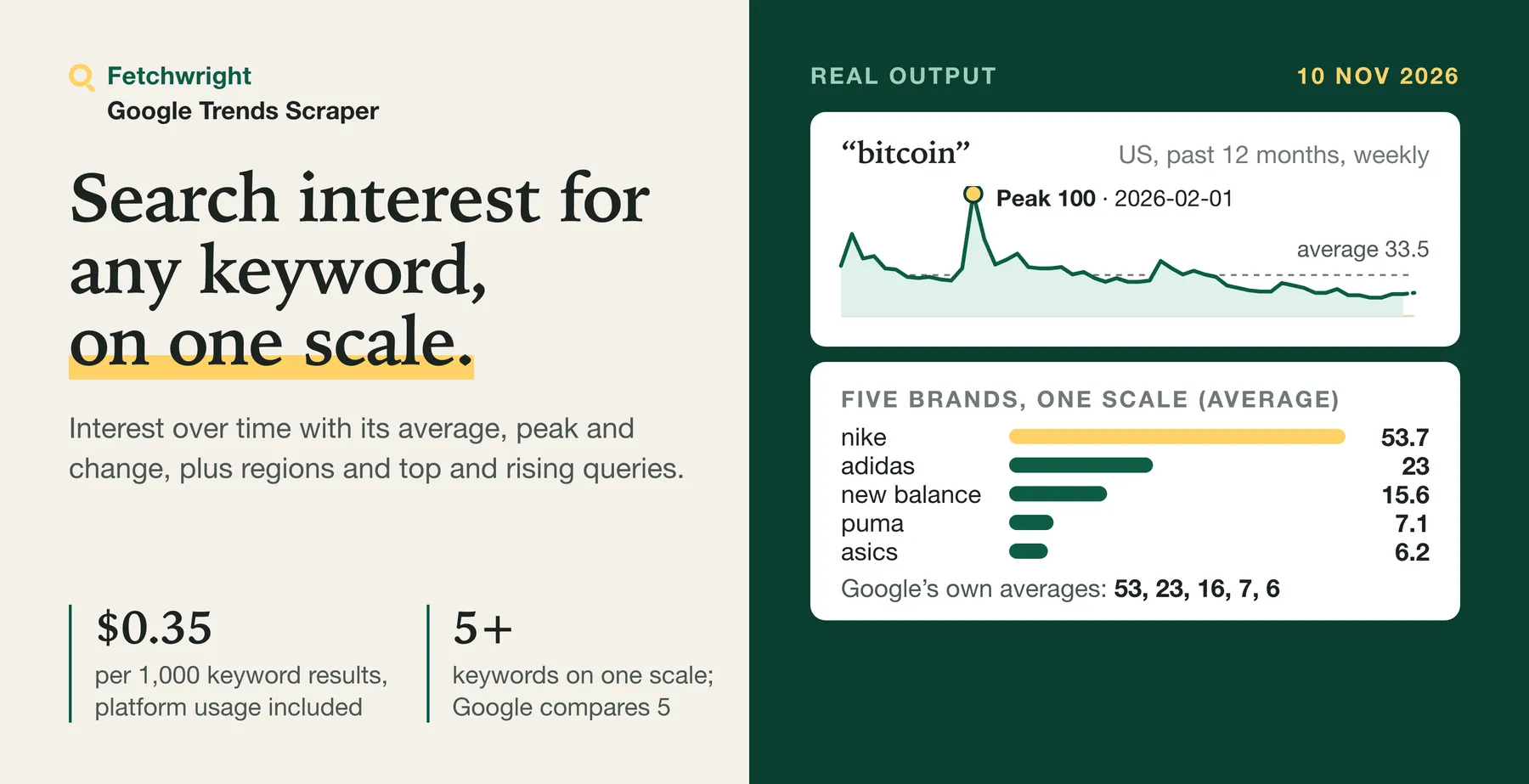
Google Trends Scraper, $0.35 per 1,000 keywords on Free ($0.25 on Business): interest over time with average, peak and change, interest by region, top and rising related queries. Compare 5 keywords on Google's scale, or more through an anchor. Any country, date range and search type. No login.
Pricing
from $0.25 / 1,000 keywords
Rating
0.0
(0)
Developer

Fetchwright
Maintained by CommunityActor stats
0
Bookmarked
2
Total users
1
Monthly active users
3 hours ago
Last modified
Features
Share
What does Google Trends Scraper do?
Google Trends Scraper turns Google Trends into clean data for $0.35 per 1,000 keywords on Apify's Free plan ($0.25 on Business and above), plus $0.0005 per run. Enter keywords and get one row per keyword with its interest over time, ready-made average, peak, latest value and change over the range, interest by region, and top and rising related queries with Google's Breakout flag. Compare up to 5 keywords on Google's own shared scale, or more than 5 on one scale. Any country or region, any date range back to 2004, and web, YouTube, News, Image or Shopping search. Try the prefilled example: it returns a year of US search interest in bitcoin.
Built for SEO and content teams choosing topics and timing, market researchers and analysts comparing brands and products, e-commerce and product teams watching demand by season and region, and developers and AI agents that need Google Trends as structured data through an API.
| What you get | Details |
|---|---|
| 📈 Interest over time | Every week, day or hour of the range on Google's 0-100 scale, with the incomplete last period marked |
| 🧮 Summary numbers | Average, peak and its date, latest value and change over the range, computed the same way for every keyword and explained in the row |
| 🗺️ Interest by region | States, provinces or countries with their codes, highest first; cities or US metro areas as an option |
| 🔎 Related queries | Top and rising searches, each with its value, a Breakout flag and a link |
| ⚖️ Compare keywords | Up to 5 keywords on Google's own shared scale, plus each keyword's share of interest in every region |
| 🔗 More than 5 on one scale | Any number of keywords linked through an anchor keyword onto one 0-100 scale, with the scale factors and a precision flag on every point |
| 🎯 Narrow the search | Category, and web, YouTube, News, Image or Shopping search |
| 🕑 What changed since the last run | On a schedule: change in latest value and average, new and dropped related queries, new Breakout queries, regions in and out of the top 10 |
| 🔗 Chain runs | Read keywords from another run's dataset |
| 💾 Export anywhere | JSON, CSV, Excel, or through the API |
Before you run a long list: Google can slow a run down or ask for verification. When that happens the run stops, saves a report of what it read, and the keywords it did not complete are not charged. How long a list one run can read is measured only for short lists so far (see Limits below), so split a large list into several smaller runs (see Limits below).
No Google account or login is needed. Because it runs on Apify you can also schedule it, call it through the API, send results to Google Sheets or Slack, and use it from AI agents through MCP.
Why choose Google Trends Scraper?
- Answers, not just points. Every row carries the average, peak, latest value and change over the range, so you can sort a long keyword list by growth without a spreadsheet. The row shows the inputs of each number, so you can check it.
- Honest about Google's data. The incomplete last period is flagged and left out of the average and the change, Google's own notes about changes in its data are passed on, and keywords without enough search interest are marked
no_datainstead of returning a misleading line. - You pay only for complete results. A keyword is charged only when everything you asked for was read and checked. Keywords without enough search interest, keywords only partly read and keywords that could not be read are saved with the reason and never charged.
- Comparisons as Google makes them. Up to 5 keywords on one scale, Google's own average for each, and each keyword's share of interest per region.
- More than 5 keywords on one scale. Google stops at 5; this Actor links groups of keywords through a shared anchor keyword and rescales them onto one scale, and says how precise each value is.
- What changed since the last run. On a schedule, every row lists the change in latest value and average, new and dropped related queries, new Breakout queries and regions that entered or left the top 10, at no extra charge.
- Works with keyword lists. Keywords from a list or from another run's dataset, and a clean stop at your maximum charge, at the run timeout or when Google stops the run, with the unfinished keywords listed.
How do I scrape Google Trends?
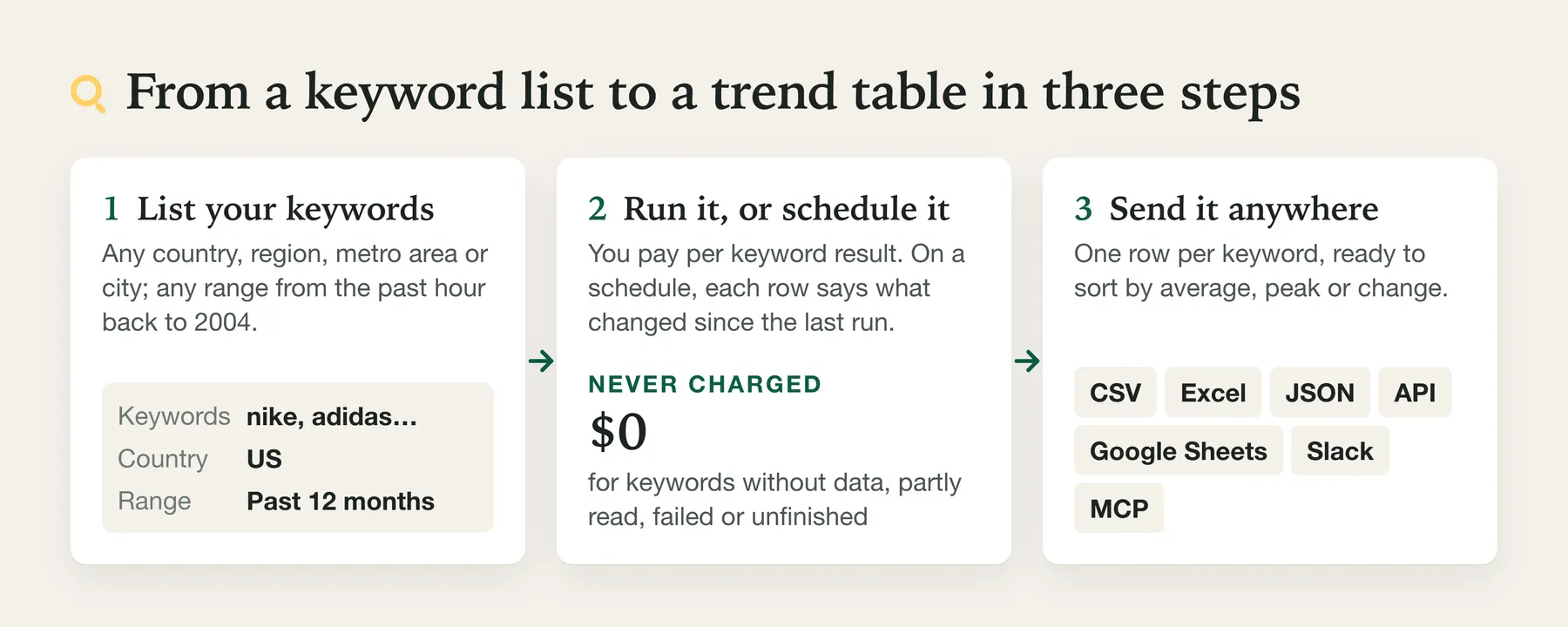
- Create a free Apify account.
- Open the Actor and add one or more keywords.
- Choose a location and a time range, and optionally turn on Compare keywords on one scale.
- Click Start.
- Download the results as CSV, Excel or JSON, or fetch them through the API.
Run it on a schedule. For monitoring, run it weekly, with Compare with the previous run. Apify's short video shows how to set up a schedule:
⬇️ Input for Google Trends Scraper
| Field | What it does |
|---|---|
| Keywords | One keyword per line. Duplicates are removed, ignoring case. |
| Maximum keywords | Caps results and cost. Default 100, up to 5,000. |
| Location | Country code (US, GB or UK), country name (Germany), region code (US-CA, GB-SCT), or empty for worldwide. Unknown values stop the run at once with a hint. |
| Time range | Past hour, 4 hours, day, 7 days, 30 days, 90 days, 12 months (default), 5 years, or 2004 to today. In tests on 10 November 2026 the past hour came by the minute, the past day in 8-minute steps, the past 7 days by the hour, 12 months and 5 years by the week, and 2004 to today by the month. |
| Start date / End date | An exact range instead, for example 2024-01-01 to 2024-12-31. The end date defaults to today. |
| Compare keywords on one scale | Up to 5 keywords share Google's own 0-100 scale. More than 5 are linked through an anchor keyword and put on one scale too. |
| Anchor keyword | With more than 5 compared: the keyword that links the groups. Pick one of middling popularity; empty means the first keyword. |
| Interest over time / Interest by region / Related queries and topics | What each row includes. All on by default. |
| Region detail | Auto, countries (worldwide only), states or provinces, cities, or US metro areas. |
| Include low search volume regions | Also list regions with little search volume, as on Google Trends. On by default for cities, off otherwise. |
| Search type | Web (default), YouTube, News, Image or Shopping search. |
| Category | Google Trends category number, for example 7 for Finance. Default 0, all categories. |
| Language | Language of region names and topics, for example en-US (default) or de. |
| Compare with the previous run | Each row says what changed since the last run of the same watch. No extra charge. |
| Watch name | Keeps the records of two scheduled watches on the same keywords apart. |
| Read keywords from a dataset | Take keywords from another run's dataset. |
| Keywords read at once | 1 to 5, default 3. Its effect on speed is not yet measured for this version. |
| Proxy | Leave on (the default). Whatever you choose, a run that Google asks for verification, keeps limiting or refuses stops early, as described under Limits. |
More ready-made inputs:
⬆️ Output from Google Trends Scraper
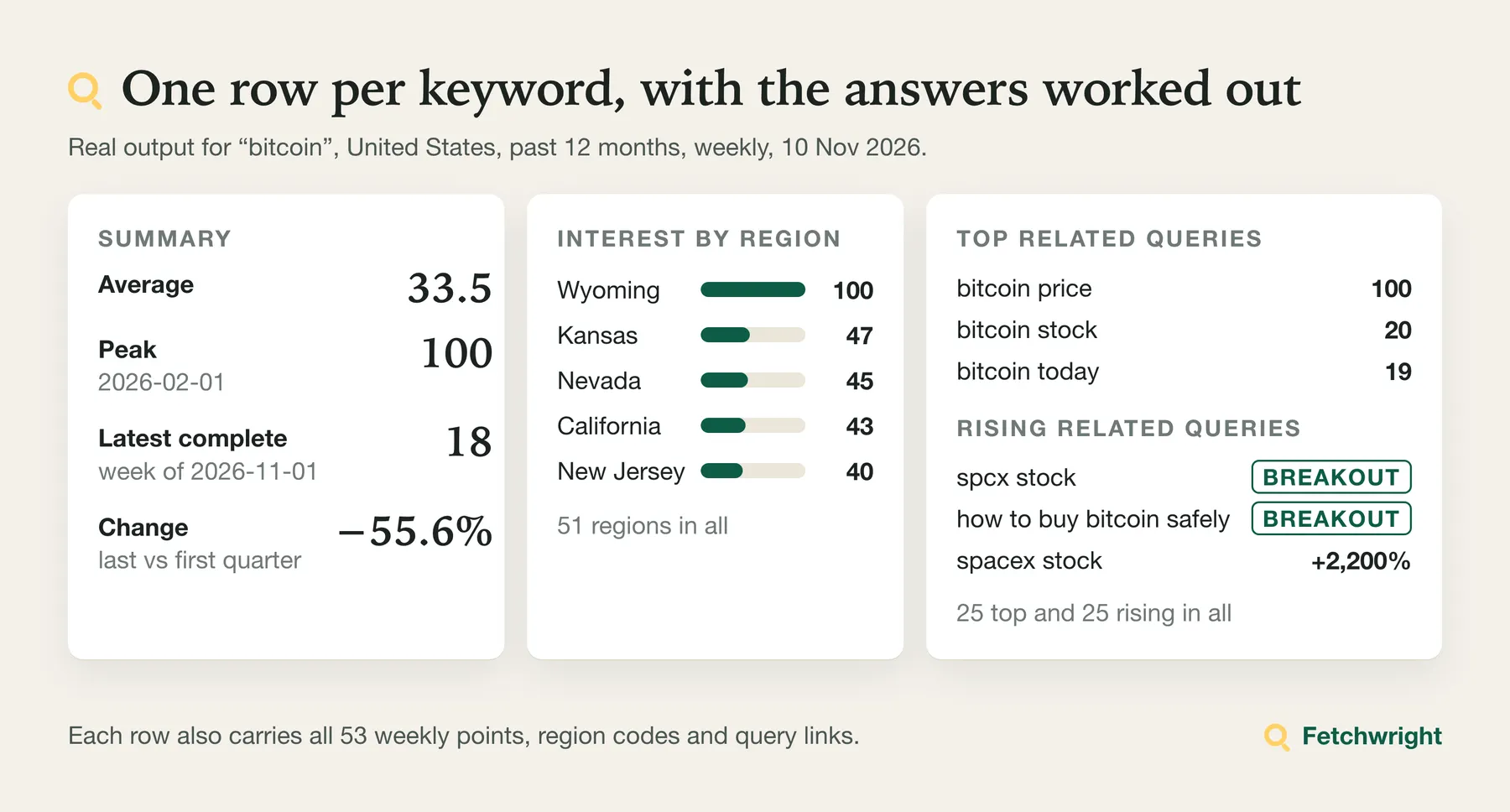
One row per keyword. A real row, produced by this version from Google's answers for bitcoin (United States, past 12 months) saved on 10 November 2026; lists shortened here:
Five sports brands compared on one scale, produced by this version from Google's answers (United States, past 12 months) saved on 10 November 2026; other fields left out:
| Keyword | Average | Google's average | Peak | Latest | Change % | Top rising query |
|---|---|---|---|---|---|---|
| nike | 53.7 | 53 | 100 | 44 | -17.2 | nike mind 002 (Breakout) |
| adidas | 23 | 23 | 54 | 16 | -4.1 | adidas hyperboost edge (Breakout) |
| new balance | 15.6 | 16 | 33 | 11 | -24.5 | new balance women's 1080v15 (Breakout) |
| puma | 7.1 | 7 | 22 | 4 | -1.7 | puma speedcat wedge (Breakout) |
| asics | 6.2 | 6 | 13 | 5 | 1.5 | asics men's gel-nimbus 28 (Breakout) |
A keyword without enough search interest is saved free, with the reason (produced by this version from Google's answer saved on 10 November 2026):
valueis Google's index from 0 to 100: 100 is the highest point of the range (or of all compared keywords), 50 is half as much. It is not a number of searches.changePercentcompares the average of the last quarter of complete periods with the first quarter;summary.changeshows both averages and the dates, so you can redo it.- Rising
valueis the growth in percent against the previous period of the same length. Google labels very large growth Breakout (breakout: true). interestByRegionvalues say where the keyword takes the largest share of all searches, not where it is searched most often in total.regionShareInComparisongives, for compared keywords, each keyword's share in percent of the compared keywords in that region. It is given when up to five keywords are compared; with more than five keywords on one scale it is null, because Google compares at most five at a time.- With more than 5 keywords compared,
comparisonhasmode: "anchored", theanchor, this keyword'sgroup, the group'sscaleFactorandfactorErrorPercent, andplaced: falsewhen the anchor had no data in that group. In a placed group every point keeps itsoriginalValue, and every point with data getslowPrecision(andbelowResolutionwhen Google reported 0 although it had data); a group that could not be placed (placed: false) keeps Google's own values for that group, withoutoriginalValue,lowPrecisionor ascaleFactor. - Rows do not say whether they were charged, because a row is saved before its charge is confirmed. The
SUMMARYrecord lists every keyword withchargedset to true, false oruncertain(withchargeUncertainexplaining each uncertain one), and the run's billing in Apify Console shows the charges. notescarries Google's own notes about its data, for example on the 5-year range for heat pumps in the United Kingdom: "An improvement to our data collection system was applied from 1/1/22."- With Compare with the previous run on, each row also has
changeSincePreviousRunwithpreviousRunAt, the latest value and the average before and now with their difference,newTopQueries,droppedTopQueries,newRisingQueries,droppedRisingQueries,newBreakoutQueries, andregionsEnteredTop10andregionsLeftTop10. It isnullon the first run of a watch. Run one run of a watch at a time: if two runs of the same watch overlap, the later one can be compared with the older of them instead of the most recent. For a schedule, turn on Apify's setting that does not start a new run while the previous one is still running. A run in which a keyword has no data keeps the earlier record, so the next run still compares with real figures. The differences are plain differences of Google's index values: Google rescales every answer so the highest point of the range is 100, so a value can also move because the peak moved. - A run summary (results,
no_data,partialand failed keywords, what was charged, any unfinished keywords, and why the run stopped) is stored under the keySUMMARYin the run's key-value store. It is also saved while the run works (runFinished: false) and as soon as Google stops a run; the final record is saved before anything else at the end, and tried once more if that save fails. If the final save still fails, the run ends as failed with a status message that says so, and the last progress record (which can be older) remains. If a run reaches your maximum charge or its timeout, it stops cleanly, keeps every saved row and lists the keywords it did not complete underunfinishedKeywords. If saving a result could not be confirmed, the keyword is listed underchargeUncertaininstead of being reported as not charged.
How much does it cost to scrape Google Trends?
$0.35 per 1,000 keywords on the Free plan, down to $0.25 on Business and above, plus $0.0005 per run. You pay per keyword result saved, platform usage is included, and there is no monthly rental.
| Your Apify plan | Price per 1,000 keywords |
|---|---|
| Free | $0.35 |
| Starter (Bronze) | $0.32 |
| Scale (Silver) | $0.28 |
| Business (Gold) and above | $0.25 |
A run also costs a one-off $0.0005 when it starts, whatever your plan.
Never charged: keywords without enough search interest (no_data), keywords only partly read (partial), keywords that could not be read (failed), keywords left unfinished at your maximum charge, at the run timeout or because Google stopped the run, the comparison with the previous run, and the keywords left over when the platform restarts a run.
What typical jobs cost:
| Job | Keyword results | Cost on Free | Cost on Gold |
|---|---|---|---|
| One keyword, past 12 months, with regions and related queries | 1 | $0.0009 | $0.0008 |
| Five brands compared on one scale | 5 | $0.0023 | $0.0018 |
| 20 brands on one scale | 20 | $0.0075 | $0.0055 |
| 100 keywords from a keyword list | 100 | $0.036 | $0.026 |
| 1,000 keywords in 10 runs of 100 | 1,000 | $0.36 | $0.26 |
| Weekly check of 50 keywords for a year (52 runs) | 2,600 | $0.94 | $0.68 |
Costs include the start fee of each run.
Apify's free plan includes $5 of credit each month, which is about 14,000 keyword results with this Actor.
Set Maximum keywords to cap a run. If you set a maximum charge for the run in Apify, the Actor stops when it is reached, keeps every saved row and never charges past it. The result that reaches your maximum is still delivered, without charge, and the SUMMARY record names it.
How does the price compare?
Price comparison with these three Google Trends actors on the Apify Store, from the 2026-11-13 snapshot in data/apify_store.sqlite (per 1,000 results):
| Actor | Free per 1,000 | Gold per 1,000 | Extras |
|---|---|---|---|
| This Actor | $0.35 | $0.25 | $0.0005 start fee per run |
| apify/google-trends-scraper | $6.00 | $3.00 | |
| data_xplorer/google-trends-fast-scraper | $2.00 | $0.50 | $0.025 start fee per run |
| agenscrape/google-trends-scraper | $25.00 | $25.00 | $0.025 start fee per run |
Prices change; check each listing before you decide. This comparison covers prices for the three named listings, not their results or the rest of the Store.
Limits of Google Trends Scraper
- Relative values, not search volumes. Google Trends gives an index from 0 to 100 for each search, scaled to its own highest point. Two keywords are comparable only when they are compared in one search (up to 5).
- Repeated reads. Whether reading the same keyword again gives the same values is not yet measured for this version.
- More than 5 keywords on one scale are rescaled, not read directly. Google compares at most 5. Larger lists are read in groups that share an anchor keyword and rescaled through it. Google rounds every value to a whole number, so small values become imprecise after rescaling: points whose rounding error may exceed 10% are marked
lowPrecision, and each group reportsfactorErrorPercent. An anchor that is tiny next to the biggest keyword gives large errors; one of middling popularity works best. - Low-volume keywords. When Google has too little data, the row is
no_dataand free. A keyword is markedno_datawhen Google has data for fewer than 5% of its points and for no region. - Related topics. In our tests on 10 November 2026 Google returned no related topics for any of the four searches, while related queries were filled. Google does not show related topics for compared keywords at all.
- The last period is incomplete. The current week, day or hour is still being counted; it is marked
isPartialand left out of the average and the change. - When Google asks for verification, the run stops. The Actor never answers verification. The keyword Google answered that way fails and is not charged, and nothing more is sent to Google in that run. Requests already sent when Google asked are let finish: a keyword they complete is saved as usual, and a keyword that still needed another request is listed under
unfinishedKeywordswith the keywords not yet started, all not completed and not charged. The status message says that Google asked for verification and the run stopped. Run the rest again later. - When Google limits or refuses a run, the run stops too. If Google asks the run to slow down, every keyword pauses as asked and the run continues more slowly, at most twice per run. A third limit, a request to wait more than 2 minutes, too little run time left to wait, a web page instead of data (also with a limit answer), or a refusal stops the run the same way: the keyword Google answered that way fails, the keywords not completed are listed under
unfinishedKeywords, and none of them is charged. When a run stops this way,refusalPagein theSUMMARYrecord and aREFUSAL_PAGErecord say what kind of answer Google sent (status, content type, length, which rule stopped the run, and fixed yes/no facts such as whether it was Google's standard error page, and the kind of page title from a fixed list: Google error, access denied, CAPTCHA, consent, other or none); no text from the page is stored. - Not every keyword comes back, so run large lists in several smaller runs. In our test on 11 November 2026 a 20-keyword run delivered all 20; how much of a longer list one run reads is not yet measured for this version. Failed, partly read and unfinished keywords are never charged.
- Dates are in UTC.
- Platform restarts. If the platform restarts a run, the run stops, reports what it saved, and the rest must be run again; nothing is charged twice.
- Long lists take time. Each keyword needs several reads at a steady pace; in our test on 11 November 2026, 20 keywords took 103 seconds; longer lists are not yet measured for this version. Keywords not finished before the run timeout are listed in the
SUMMARYrecord and are not charged. - Partly read keywords. When a part you asked for (for example interest by region) could not be read, the row has status
partial, names the part undermissingParts, keeps what was read, and is not charged.
Who uses Google Trends Scraper, and for what?
📝 SEO and content teams: pick topics and timing
Add your candidate topics, set the location and Past 5 years, and sort the Overview by changePercent to find what is growing. Rising related queries marked Breakout point to new searches around a topic: for heat pumps in the United Kingdom on 10 November 2026, the three fastest-rising queries were all Breakout terms, among them "boiler upgrade scheme".
📊 Market researchers and analysts: compare brands and products
Turn on Compare keywords on one scale and add up to 5 brands. Every row has Google's average for the keyword in the comparison, and regionShareInComparison shows which brand leads in each state or country.
🛒 E-commerce and product teams: plan for seasons and regions
Run your product terms over Past 5 years to see the seasonal peaks (peakDate), and use Interest by region to decide where to advertise. Search type set to Google Shopping or YouTube search measures shopping and video searches instead of web searches.
📅 Everyone: track keywords on a schedule
Save the input as a task, turn on Compare with the previous run and schedule it weekly. Every row then says what changed since last week: the latest value and average before and now, related queries that are new or gone, new Breakout queries, and regions that entered or left the top 10. Send the rows to Google Sheets or Slack with an Apify integration.
🧩 Developers: chain runs from a keyword list
- Run any Actor that produces keywords or search queries.
- Start this Actor and pick that run's dataset under Read keywords from a dataset.
- Every keyword in the first run's results is added to the list. No export or code is needed.
🤖 AI-agent builders: use it in Claude, ChatGPT or Cursor through MCP
Add this address as a custom connector (MCP server) in your AI app, sign in to Apify when the browser opens, and the Actor appears as a tool the assistant can call:
The input is a list of keywords and the output is one structured row per keyword, so agents such as Claude, ChatGPT and Cursor can call this Actor through the Apify MCP server. Example prompt: "Compare Google search interest in nike, adidas and puma in the US over the past 12 months and tell me which one grew."
❓ FAQ about Google Trends Scraper
How fresh is the data?
Every run reads Google Trends live, so the values are the ones Google shows at that moment, including the current, incomplete period (isPartial). scrapedAt is when the row was collected.
How much does a run cost?
$0.35 per 1,000 keyword results on the Free plan, $0.32 on Starter, $0.28 on Scale and $0.25 on Business and above, plus $0.0005 per run whatever your plan. Keywords without data, partly read keywords and failed keywords are free. See the tables above for worked examples.
Will every keyword come back?
Not always. Keywords without enough search interest come back as no_data, keywords with a part that could not be read as partial, and keywords that could not be read as failed; none of these is charged. If Google asks for verification, keeps limiting or refuses the run, the run stops early and lists the keywords it did not read under unfinishedKeywords, not charged. How much of a long list comes back is not yet measured for this version.
How fast is it?
In our test on 11 November 2026, 20 keywords with timeline, regions and related queries took 103 seconds (about 5 seconds a keyword). Each keyword needs several reads at a steady pace, 3 keywords at once by default and at most 5. Set Maximum keywords and the run timeout to fit your list; keywords not finished before the timeout are listed under unfinishedKeywords and not charged.
Are these search volumes?
No. Google Trends publishes a relative index from 0 to 100, not counts of searches. Use it to compare keywords, periods and regions with each other.
Can I compare more than 5 keywords?
Yes. Google compares at most 5 keywords on one scale. With more than 5 and Compare keywords on one scale on, the Actor reads them in groups that all include one Anchor keyword, uses the anchor's values to rescale every group onto one scale, and returns one row per keyword with comparison.mode set to anchored. How closely the shared scale matches Google's own direct comparisons is not yet measured for this version. In a group placed on the shared scale, every row reports its group's scaleFactor and factorErrorPercent, every point its originalValue, and every point with data a lowPrecision flag; a group that could not be placed (placed: false, the anchor had no data in it) keeps Google's own values without these fields. Choose an anchor of middling popularity: if it is tiny next to the biggest keyword, its own values are small whole numbers and the rescaling is less precise.
How does "Compare with the previous run" remember the last run?
It stores a few values per keyword (latest value, average, related query names and the top 10 regions) in a key-value store named google-trends-history in your own account, one record per watch name, keyword, location, time range, category, search type and language. Keywords compared together are tracked per comparison. Delete that store to start over. Run one run of a watch at a time: if two runs of the same watch overlap, the later one can be compared with the older of them instead of the most recent. For a schedule, turn on Apify's setting that does not start a new run while the previous one is still running.
Why does a keyword come back as no_data?
Google Trends shows data only for searches with enough volume in the chosen location and time. Try a wider location (worldwide), a longer range or a more common spelling. no_data rows are free.
Can I get cities or US metro areas?
Yes. Set Region detail to Cities, or to Metro areas for a location in the United States. City rows have a name and coordinates but no region code. For cities, Include low search volume regions is on by default, as on Google Trends; without it most cities show no data.
Is it legal to scrape Google Trends? Is this allowed?
The Actor collects only aggregated, public Google Trends data: relative search interest, regions and related searches, with no personal data. Apify's overview of the topic is in Is web scraping legal? You are responsible for how you use the results and for complying with Google's terms and the laws that apply to you. This is not legal advice.
Can I use it with the API or other tools?
Yes. Like every Apify Actor it can be run through the Apify API, scheduled, and connected to Zapier, Make, n8n, Slack and Google Sheets. See the API tab on this page for code samples. A Python example that compares keywords on one scale and saves the timeline as CSV: github.com/Fetchwright/google-trends-api.
Something is wrong or a field is missing. Where do I report it?
Open an issue on the Issues tab of this page.
Start tracking Google Trends
Open Google Trends Scraper and click Start on the prefilled example, then add your own keywords, a location and a time range. Apify's free plan credit covers about 14,000 keyword results a month. Missing a field you need? Ask for it on the Issues tab.
This Actor is not affiliated with, endorsed by or sponsored by Google.
More from Fetchwright
- Google Ads Transparency Scraper: the ads Google publishes for the advertisers you choose, with ad text, dates and impressions, and a new-ads-only mode for competitor monitoring.
- Google AI Overview Tracker: Brand Mentions & Citations: what Google's AI answers for a query, the pages it cites, and whether your brand is mentioned.
- Microsoft Ads Library Scraper: Bing Ads, EU DSA Repository: Bing ads shown in the EEA, with dates, impressions and the share per country.
- TED Tenders Scraper: EU Tender Monitoring and Alerts: EU public procurement notices by keyword, CPV code, country and date, with buyer, value, deadline and winners, and an only-new watch with alerts.
- Company Career Page Jobs Scraper: the open jobs of the companies you name, live from their Lever, Greenhouse, Ashby, Workable, Workday, Recruitee, Personio or Teamtailor boards.


