

TED Tenders Scraper: EU Tender Monitoring and Alerts
Pricing
from $0.70 / 1,000 notices
TED Tenders Scraper: EU Tender Monitoring and Alerts
EU tender monitoring for bid teams and public-sector sales: search TED by keyword, CPV code, country and date; a named watch (one run at a time) skips notices it returned before and alerts Slack, Discord or a webhook into your CRM. $1.00 per 1,000 notices on Free, $0.70 on Business.
Pricing
from $0.70 / 1,000 notices
Rating
0.0
(0)
Developer

Fetchwright
Maintained by CommunityActor stats
0
Bookmarked
2
Total users
1
Monthly active users
3 hours ago
Last modified
Categories
Features
Share
What does TED Tenders Scraper do?

TED Tenders Scraper returns EU tenders and other public procurement notices from TED (Tenders Electronic Daily) by keyword, CPV code, buyer country, date, value range and deadline window, at $1.00 per 1,000 notices on the Free plan ($0.70 to $0.90 on paid plans). You give it keywords, CPV codes or buyer countries (for example DE for Germany); a named watch, one run at a time, can then monitor TED for notices it has not returned before and alert Slack, Discord or a webhook. Each row gives the buying authority, value and links to the notice where TED states them, and the tender deadline with its status (open, passed, unknown or not_stated); award notices name the winners, except that names are withheld by default when TED marks a winner as a natural person.
Built for bid and proposal teams looking for tenders to answer, sales teams selling to the public sector, market analysts sizing public spend in a sector, and developers and AI agents that need EU tender data through an API. Try the prefilled example: it returns the 100 newest notices that mention "software".
| What you get | Details |
|---|---|
| 🔎 Search like a buyer | Keywords in the notice text and words to leave out, CPV codes (with or without check digit; a code includes the codes below it), buyer countries by code or name, notice types, publication dates, a value range, procedure type, works, services or supplies, place of performance by NUTS region or country, and buyer name |
| 🏛️ One row per notice | Title, buyer, country, city, CPV codes with their titles in English and the notice's language, notice and procedure type, values with currency, tender deadline, place of performance, links to the procurement documents and to where tenders are submitted, lots, contract duration, framework-agreement flag |
| 🏆 Award notices | Winner names, countries and sizes, awarded value, tenders received, the dates of the award decision and of the contract |
| 🗓️ Deadline status | open, passed, or unknown (on the day of a deadline given as a date without a time), whole days left, a switch to keep only open ones, and a window such as "closes within 14 days" or "at least 10 days left" |
| 💰 A cost you set | A hard cap on notices per run, and the run's maximum charge checked before every row |
| 🔔 Only new notices | With one run of the watch at a time, a named watch returns only notices not returned before; an alert to Slack, Discord or a webhook when it finds some |
| 🧾 A coverage verdict | complete, capped or partial against TED's own count, so a short result is never mistaken for a full one |
| 🌐 24 languages | Titles, buyer names and links in the EU language you choose, English when the notice has none in it |
| 💾 Export anywhere | JSON, CSV, Excel, or through the API and MCP |
No account, login or key is needed: the Actor reads TED's official, public search.
Why choose TED Tenders Scraper?
- You never pay for more than you set. Set Maximum notices or a maximum charge for the run in Apify: the run stops there and keeps what it saved.
- You know how complete your result is. The run summary gives TED's own count of matching notices next to what was saved, and a verdict:
complete(read to the end),capped(your maximum stopped it while TED has more) orpartial(the maximum charge, the timeout or an error stopped it). - Schedule it and get only new notices. With Only notices not returned in earlier runs, the first run of a watch returns the newest matching notices up to your maximum; every later run returns only notices published since then that it has not returned before, oldest first, so a run that stops at its maximum is continued by the next one. Older matches that the first run did not reach are not back-filled. Notices a watch returned before are skipped and not charged, also after you change the filters of a named watch, after a run is restarted, or after a run was stopped while saving. A watch is meant to run one at a time: for a schedule, turn on Apify's setting that does not start a new run while the previous one is still running. A second run that finds the watch in use stops before asking TED anything; but two runs of the same watch started within the same seconds can both proceed, and then the same notice can be returned and charged in both. With On a watch's first run set to Only remember them, the first run returns and charges nothing: it remembers the newest matching notices, so your first alert holds only notices published after you set the watch up, with one exception: the first run reads up to 40 pages of TED results (about 7,500 notices) and may stop sooner; if it does not finish the newest matching day, unread notices from that day can be returned, charged and alerted by a later run. The run status warns when this happens (the warning may be absent after a platform restart). By default the first run returns the newest matching notices up to your maximum, so you can see what the watch will track.
- Contact persons only when you ask. Contact points, e-mails and phone numbers are not even requested from TED unless you switch them on. Winner names are returned as TED publishes them, except where TED marks a winner as a natural person. See Does the output contain personal data?
- Expert queries welcome, and forgiving. Paste a query in TED's own expert-search syntax: a query TED accepts is sent as typed. Two-letter countries, CPV check digits, plain words and TED's old
CY=[..]PC=[..]PD=[..]FT=[..]syntax, which TED rejects, are rewritten so the search runs, and the run log and run summary show what you typed and what was sent.
What we checked on the platform
Runs of this Actor on Apify on 12 November 2026:
- Keyword
software: TED reported 504,223 matching notices; the run saved the newest 100 in 7 seconds, coveragecapped. - An award-notice search reported 320 by TED with a maximum of 300: 300 saved, coverage
capped. - A named watch run again after its first run returned only notices it had not returned: 0 new, 19 skipped and not charged.
- A run with a maximum charge of $0.02 stopped at 22 notices with coverage
partial. - A run of 1,500 notices that was aborted and restarted ended with 1,500 distinct rows; the 300 saved before the restart were kept and not charged again.
On 12 November 2026 an alert from a run was delivered to a webhook receiver (HTTP 200); the Slack and Discord message formats are covered by automated tests only, not by a delivery into a live channel. The filters, the expert-query repairs and the fields added in version 0.1.9 were run on Apify the same day: a search with value range, procedure type, contract nature and region returned 20 of the 1,900 notices TED counted; a search with buyer name, an excluded word and "at least 5 days left" saved 8 notices and left 3 out uncharged; an old-syntax query and a plain-words query were repaired and ran.
How much does it cost to scrape TED tenders?
$1.00 per 1,000 notices on the Free plan, $0.70 to $0.90 on paid plans. You pay per notice saved, platform usage is included, and there is no monthly rental.
| Your Apify plan | Price per 1,000 notices |
|---|---|
| Free | $1.00 |
| Starter (Bronze) | $0.90 |
| Scale (Silver) | $0.80 |
| Business (Gold) and above | $0.70 |
Every run also has Apify's start event, charged when the run starts, whatever it saves: $0.00005 for a run with up to 1 GB of memory (the default is 512 MB). Alerts, deadline status, winners and the choice of language are included in the price per notice.
Never charged (only the run's start event applies): a search that finds nothing, a query TED rejects, notices a watch returned in an earlier run (with one run of the watch at a time), a notice found twice in one run, a watch's first run set to only remember, change notices left out by Leave out change notices, notices left out by your value range, your deadline window or the open-deadline switch, and anything a run did not reach because of your maximum, your maximum charge, the timeout or an error. Words you exclude and the other search filters are applied in TED's own search, so those notices are never fetched. What was not finished is listed under unfinishedTargets and failedTargets in the SUMMARY record.
What typical jobs cost:
| Job | Notices | Cost on Free | Cost on Gold |
|---|---|---|---|
| The 100 newest notices for one keyword | 100 | $0.10 | $0.07 |
| 1,000 award notices in a sector, for market sizing | 1,000 | $1.00 | $0.70 |
| Daily watch on IT services (CPV 72000000), every country | about 6,000 a month | about $6 a month | about $4.20 a month |
| A large export | 10,000 | $10.00 | $7.00 |
The watch estimate uses TED's own count on 12 November 2026: 1,405 notices with CPV 72000000 published from 5 to 12 November. A country filter or a keyword makes it much smaller. Apify's free plan includes $5 of credit each month, which is about 5,000 notices with this Actor.
How does the price compare?
Free-plan prices of the three most-used TED actors on the Apify Store, read from their public price cards on 12 November 2026, ordered by monthly users. We compared listings, prices and published input forms; we did not run them.
| Actor | Monthly users | Free-plan price per 1,000 notices | Per run | Only-new monitoring | Alert to Slack or a webhook |
|---|---|---|---|---|---|
| This Actor | new | $1.00 | $0.00005 | Yes | Yes |
| Most-used | 23 | $4.00 | $0.00005 | Not in its input form | Not in its input form |
| Second | 19 | $1.00 | $0.005 | Not in its input form | Not in its input form |
| Third | 12 | $5.00 (AI analysis +$10.00) | none | Not in its input form | Not in its input form |
Counting each run's start fee, at these Free-plan prices of 12 November 2026 any run that saves at least one notice costs less here than with each of the three. Prices change; check each listing before you decide.
How do I scrape TED tenders?
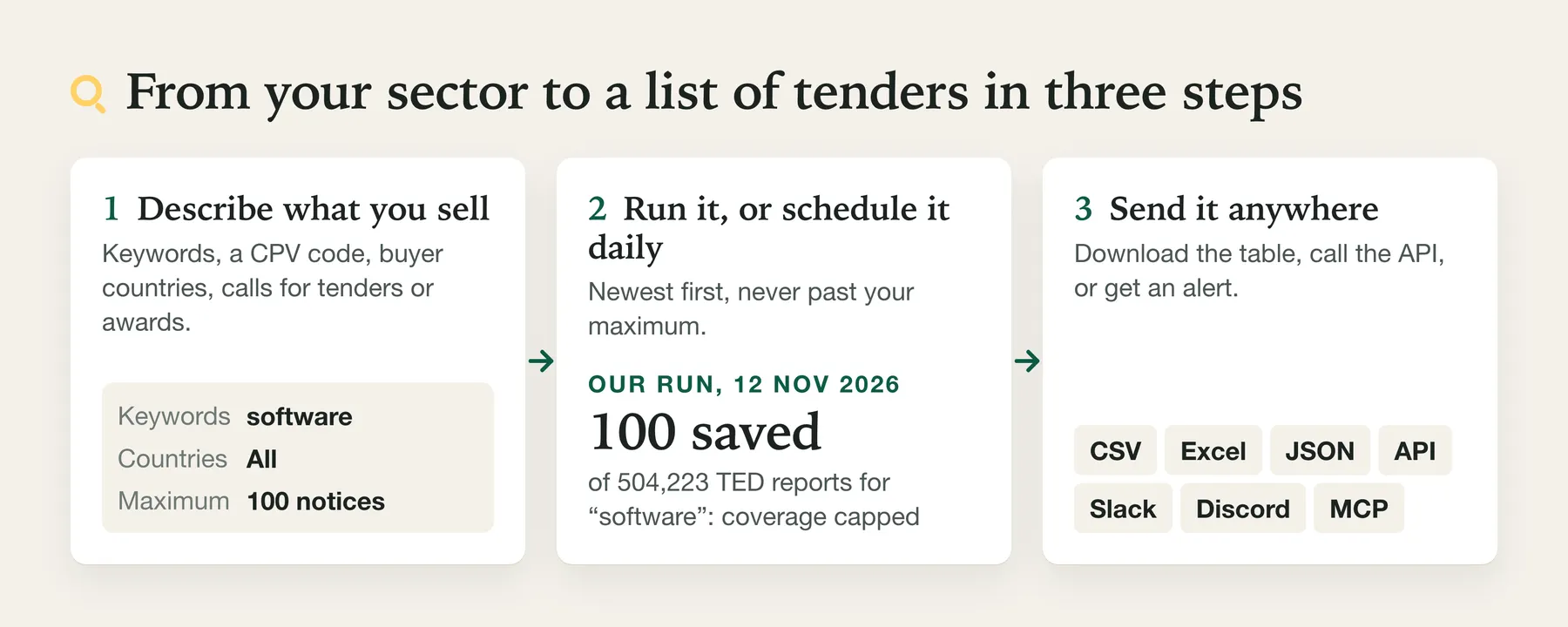
- Create a free Apify account.
- Open the Actor and enter keywords, CPV codes or buyer countries.
- Optionally choose notice types and publication dates, and set Maximum notices.
- Click Start, or save it as a task and schedule it daily with Only notices not returned in earlier runs on.
- Download the results as CSV, Excel or JSON, or fetch them through the API.
Run it on a schedule. For monitoring, run it daily, as an only-new watch. Apify's short video shows how to set up a schedule:
⬇️ Input for TED Tenders Scraper
| Field | What it does |
|---|---|
| Keywords | Words or phrases in the notice text; several lines match any of them. |
| Maximum notices | Hard cap for the run, newest first. Default 100, at most 50,000. |
| CPV codes (sector) | Common Procurement Vocabulary codes; a code also matches the codes below it, and a notice's additional CPV codes as well as its main one. 72000000-5, 72000000 and 72 all work. |
| Buyer countries | Two- or three-letter codes or English names: DE, FRA, Poland. |
| Notice types | Calls for tenders, contract award notices, prior information notices, contract modifications, voluntary ex-ante transparency notices, corrigenda (TED's older form, before 2023; later changes are change notices, see How do I see that a tender I follow has changed?). Calls for tenders also includes what TED groups with contract notices: design contests, prior information notices used as a call for competition, qualification systems and subcontracting notices. Each row's noticeTypeLabel names its own type, for example Contract notice. |
| Only notices with an open deadline | Keeps only notices whose deadline is still ahead; the others are not saved or charged. A run that leaves out many can stop at its page budget before your maximum (stoppedBy page_budget). |
| Deadline within the next days / At least this many days left | A deadline window, for example closing within 14 days, or at least 10 days left to prepare a bid. Narrowed in TED's search, then applied exactly before saving: a notice is kept only when its deadline is certainly inside the window. Notices left out are not saved or charged; as with the switch above, a run that leaves out many can stop at its page budget. |
| Exclude keywords | Words or phrases that leave a notice out, applied in TED's search. |
| Place of performance (NUTS or country) | Countries by name or code, such as Italy, DE or POL, or NUTS region codes such as DEA (with every region below it) or FR101. A country name or code is always read as the country; any other NUTS-shaped value is passed to TED, and one TED does not know stops the run with TED's message. Nothing is charged for a run stopped this way. |
| Buyer name contains | A word or phrase in the buying authority's name, such as Stadt München; one per line to match any of them. |
| Procedure types | open, restricted, negotiated (or neg-w-call, neg-wo-call), competitive dialogue, innovation partnership, and TED's other codes. |
| Contract nature | works, services or supplies. |
| Minimum value / Maximum value | A range on totalValue, TED's total value of the notice: the estimated value on calls for tenders, the total awarded on award notices. Compared in each notice's own currency, with no conversion, so 1000000 matches 1,000,000 EUR and also 1,000,000 CZK. Notices without a value are left out. |
| Published on or after / on or before | A publication date window. |
| Published in the last days | For scheduled runs: from the date this many days before the run. |
| Only notices not returned in earlier runs | Turns a scheduled task into a watch. |
| On a watch's first run | Return the newest notices (default), or only remember them so the next run starts from new notices. |
| Watch name | Gives a watch its own memory, kept when you change its filters: changing the filters of a named watch never re-returns a notice it already returned (with one run of the watch at a time). |
| Send an alert to Slack, Discord or a webhook | Posts the count, the first three titles with buyer and deadline, and a link to all rows. |
| TED expert query | A query in TED's expert-search syntax; it replaces the search fields above. A query TED accepts is sent as typed; what TED would reject is repaired where the meaning is certain (buyer-country IN (DE) becomes buyer-country IN (DEU), 72000000-5 becomes 72000000, software cloud is searched as words in the notice text, and the old CY=[DE] AND PC=[72000000] becomes buyer-country IN (DEU) AND classification-cpv IN (72000000)), and the run says what was sent. Other old-syntax fields stop the run before any notice is charged, with the rest of the query rewritten for you. The maximum, the open-deadline switch, the deadline window and the watch still apply. |
| Leave out change notices | Off by default. Leaves out notices that change an earlier notice (see How do I see that a tender I follow has changed?); not saved, not charged, counted in the run summary. |
| Language | One of TED's 24 languages for titles, buyer names, descriptions, lot titles and links. Default English. |
| Include contact persons | Adds the buyer's contact point, e-mail and phone and the winners' e-mail. Off by default: not requested. |
| Include winners marked as natural persons | Keeps winner names on notices where TED marks a winner as a natural person. Off by default. |
On 12 November 2026 TED counted 50 notices for this search (published from 1 to 12 November).
⬆️ Output from TED Tenders Scraper
One row per notice. A real notice, as recorded from TED on 12 November 2026 among the newest calls for tenders and saved by this Actor's parser (contact persons off):
On 12 November 2026 TED counted 3,025,341 contract notices of this kind, over all years.
An award notice from the same day carries its winners and the number of tenders received (selected fields):
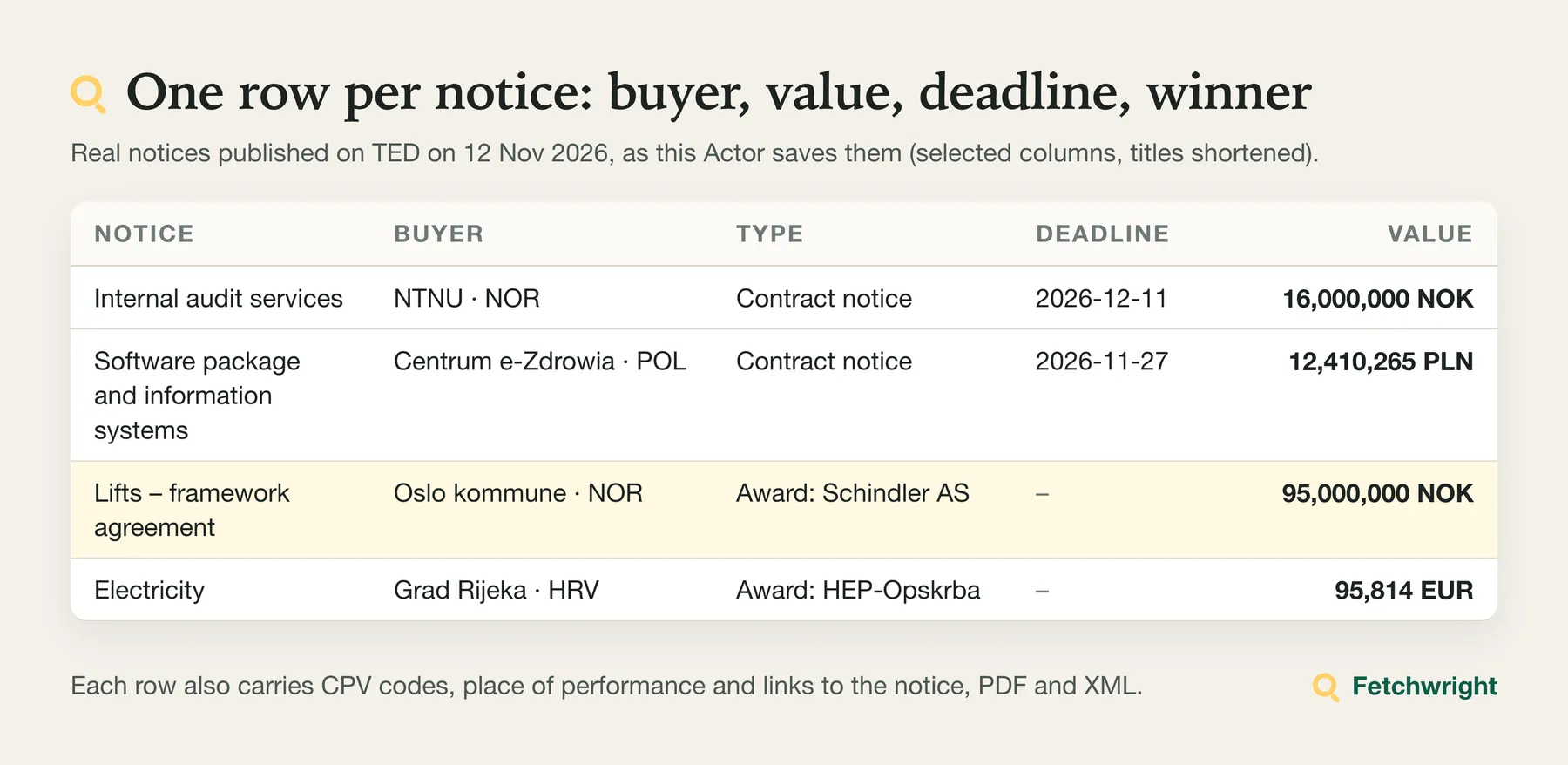
Nothing is invented. When TED gives nothing for a field: buyerNames, buyerCountries, cpvCodes, cpvTitles, placeOfPerformance, placeOfPerformanceCountries and officialLanguages are empty lists (cpvTitlesLocal too when cpvTitlesLanguage is set), and every other field is null (the winner, contact, lot, tenders-received and legal-basis lists are null, never empty). Lot fields are stated per lot by TED; on the row: documentsUrl and submissionUrl are the first link stated, contractDurationValue and contractDurationUnit are set when every lot that states a duration states the same one, contractStartDate is the earliest start and contractEndDate the latest end, winnerDecisionDate and contractConclusionDate are the earliest stated. lots lists each lot's id and title; a title is null when TED's titles cannot be paired with the lot identifiers one to one. tendersReceived gives the number of tenders received per lot result, in TED's order, or null when TED's figures cannot be paired. daysUntilDeadline is the number of whole 24-hour periods from the moment the row is saved to the deadline (0 means less than 24 hours left, -1 that it passed less than 24 hours ago); it is null when no deadline is stated, when the deadline has no time or time zone, or when another lot's date-only deadline may be earlier. procedureId is the same on a call for tenders and on its award notice, so the two can be joined. titleLanguage is the language of the title only; buyer name and description are chosen the same way but can be in another language. totalValue is TED's own total of the notice: the estimated value on calls for tenders and the total awarded on award notices. Values are as buyers state them, and some are placeholders such as 0 or 0.01. query is the search in TED's expert syntax, so you can repeat it on the TED website. The dataset has three views: Overview, Awards and winners, and Codes and links.
The run summary
The SUMMARY record in the run's key-value store holds the run's outcome (complete, partial or failed; running while the run is saving, because the record is also written after every page, so a run that is stopped from outside still leaves one) and coverage, and for the search: the query sent, noticesReportedByTed (TED's own count), notices saved, stoppedBy (max_notices, max_charge, timeout, page_budget, no_progress, lost_watch_lock, aborted or uncertain_write) and any error with its reasonCode. uncertain_write means saving one notice could not be confirmed: the run stopped there, that notice was not saved a second time, and uncertainWrite gives its publication number; when the dataset shows it was saved after all, it counts once and the run goes on. It also counts notices skipped because a watch returned them before (skippedAlreadyReturned), notices left out by the value range or deadline window (outsideFiltersSkipped), notices kept from before a restart (restoredFromRestart) and notices whose winner names were withheld (winnerNamesWithheld), lists failedTargets and unfinishedTargets, gives the watch's state for only-new runs (firstRun, readFrom, lastPublicationDate, moreNewPending, firstRunBehaviour, baseline on a first run that only remembers (whether the memory was written, the date remembered, how many notices, whether that day was read to its end, the pages read, and resumedAfterRestart when the platform restarted the run after the memory was written, in which case the restarted run asks TED nothing and saves and charges nothing), and reconciled when an earlier run was stopped while saving), inputNotes (how your input was read, including any repair of the expert query, with what you typed and what was sent; the search block keeps both as expertQuery and expertQueryAsTyped, and noFilterGiven is true when the input had no filter), and notification with the alert's delivery status (not_configured, nothing_to_send, sent or failed). The summary is saved before the alert is sent. Input that cannot run also leaves a SUMMARY with reasonCode invalid_input, unsupported_input or watch_busy.
Limits of TED Tenders Scraper
- What TED covers. TED publishes the notices EU procurement rules require, mostly contracts above the EU thresholds, plus notices buyers publish there voluntarily, from the EU and other countries that use it (Norway, Iceland, Switzerland and others appeared in our sample). Many smaller tenders are published only on national portals and are not on TED. TED keeps notices on its website for ten years, according to its legal notice.
- Languages. Titles come in TED's 24 languages. Descriptions and buyer names are usually only in the language the buyer wrote them in: in our sample, a German notice had an English title and a German description.
- What TED states. Values, deadlines and winners are present only when the buyer states them: in one recorded page of 250 notices, 164 had a total value, 116 a tender deadline and 84 named winners. Notices published before 2023 use TED's older form: they have no
noticeId, and theirprocedureTypeis TED's older code, such as4. - Search matching is TED's. Keywords, excluded words and buyer names are matched by TED's full-text search; write them in the notice's language to match more notices. Value filters compare amounts in each notice's own currency, without conversion. A CPV code also matches the codes below it and a notice's additional CPV codes, not only its main one (72000000 returned a notice coded 72313000).
- CPV titles.
mainCpvTitleandcpvTitlesname each CPV code in English ("Cleaning and sanitation services" for 90900000), andmainCpvTitleLocalandcpvTitlesLocalgive the same titles in the notice's own language (cpvTitlesLanguage, such asDEU), at no extra cost and with no extra request. They come from the official CPV list: CPV titles from the Common Procurement Vocabulary (Commission Regulation (EC) No 213/2008), © European Union, via TED/SIMAP; we drop the check digit and key the titles by the 8-digit code TED returns. That list has no Croatian titles and its Irish titles repeat the English ones, so a notice in Croatian or Irish gets English titles only; a code not in the list keeps its entry with a null title. - TED's limits. TED returns at most 250 notices per request. This Actor reads TED's results in order with no upper limit of TED's own; its own cap is 50,000 notices per run.
- When TED limits or refuses a run. If TED asks a page request to slow down and the run can wait, the run pauses as TED asks (at most two minutes, one minute when TED gives no time, and only with enough run time left) and goes on more slowly, at most twice per run; a change-notice lookup is never retried; a further request to slow down, or a refusal, stops the run cleanly: it keeps what it saved and charges nothing for what it did not read. A refusal is saved with the run at once, so a run the platform restarts asks TED nothing more. If that record cannot be saved, the run ends at once and says so (
refusalNotSavedin the run summary). The requests that read changed notices are made once each, never repeated; a slow-down request the run could not wait out ends the run's requests to TED there too. - Deadline status is computed when the row is saved, from the earliest lot deadline the notice states, with the offset TED gives. A deadline without a time is a date only:
unknownon that day, with dates compared in UTC. - Change notices are linked to the notice they change only as TED states it; a change to a notice published before 2023 (TED's older corrigendum form) is not linked.
changescovers the fields listed in the FAQ; a change elsewhere in the notice gives an empty list. - Restarts. If the platform restarts a run, the notices it already saved are kept and are not saved or charged again, and the maximum still holds.
Who uses TED Tenders Scraper, and for what?
📝 Bid teams: a daily list of tenders to answer
Set your CPV codes and countries, choose Calls for tenders, turn on only-new monitoring and schedule a daily run with a Slack alert. Filter on deadlineStatus open.
💼 Sales teams selling to the public sector
Find which authorities buy what you sell, and who won their last contracts, with award notices by CPV code.
📊 Market analysts
Export award notices with values per sector and country to size public spend, then join them across runs on publicationNumber.
🤖 AI-agent builders: use it in Claude, ChatGPT or Cursor through MCP
Add this address as a custom connector (MCP server) in your AI app, sign in to Apify when the browser opens, and the Actor appears as a tool the assistant can call:
Ask the agent "find open EU tenders for cloud services in Germany and Austria published this week" and it can call this Actor directly through the Apify MCP server.
How do I get TED tender data with Python, Node.js or the API?
Python:
Node.js:
curl, waiting for the run and returning the rows:
Use it in a pipeline: a daily tender list by e-mail with n8n
Runs are billed to your own Apify account at your plan's prices, wherever you start them. (For Slack, Discord or a webhook you need no pipeline: set Send an alert to Slack, Discord or a webhook in the input.)
- In n8n, install Apify's node (
@apify/n8n-nodes-apify) and add an Apify API credential. - Schedule Trigger once a day.
- Apify node, operation Run an Actor and get dataset, Actor
fetchwright/ted-tenders-scraper, custom input:{ "keywords": ["software"], "cpvCodes": ["72000000"], "buyerCountries": ["DE", "AT"], "onlyOpenDeadlines": true, "onlyNew": true, "watchName": "daily-it-tenders", "maxNotices": 100 } - An Aggregate step that joins the items, then a Send Email (or Gmail) node listing
title,buyerName,tenderDeadline,estimatedValueandurlfor each notice.
With onlyNew, each run returns only notices the watch has not returned before, with one run of the watch at a time and none is stopped before it saves its memory (turn on Apify's setting that does not start a run while the previous one is running if you also schedule it there). Whether the e-mail step succeeds is up to n8n. Checked on 13 November 2026 against Apify's n8n integration documentation (docs.apify.com/integrations/n8n); the input fields and output columns are this Actor's own. Not run in a live n8n account, so tell us on the Issues tab if a step fails.
❓ FAQ about TED Tenders Scraper
Why does my keyword find few tenders from my country?
Most buyers publish in their own language, so English keywords may miss notices whose text uses local terms. In a test on 15 November 2026 (buyer country Sweden, open calls for tenders, otherwise the same settings), cybersecurity returned 6 notices, 1 of them from a Swedish buyer; cybersäkerhet returned 9, 4 of them from Swedish buyers. Add keywords in the buyers' language next to the English ones (one per line), or search by CPV codes instead of keywords: CPV codes match notices in every language. When this may apply, a run that reaches TED says so in its status message and names the language per country.
Why use this instead of the TED website?
The website shows notices page by page. This Actor returns them as one table with values, deadlines and winners in columns, on a schedule, only the new ones if you like, and through an API.
How fresh is the data?
Every run reads TED at that moment, so a notice is available as soon as TED publishes it. publicationDate is the date of publication on TED, and scrapedAt is when the row was saved.
How much does a run cost?
$1.00 per 1,000 notices on the Free plan, less on paid plans, plus Apify's start event of $0.00005 per run with up to 1 GB of memory. See the tables above.
Can a run cost more than I set?
Not for the notices. Maximum notices is a hard cap, and the Actor checks the run's maximum charge in Apify before saving every row and stops there, keeping what it saved. A run that stops at your maximum charge succeeds, says so in its status message and lists what it did not finish in the SUMMARY record.
How fast is it?
TED answers up to 250 notices per request; with the fields this Actor reads, a request holds 188 (192 before 0.1.11). A page that holds change notices costs up to two more requests to read the notices they change, at no charge. In our checks on 12 November 2026 a full page of 192 came back in 0.9 and 1.1 seconds, and an earlier check of a larger page took 3.5 seconds. With the Actor's pace of at most one request a second, 1,000 notices take 6 page requests and 10,000 take 54; each page that holds change notices adds up to two lookups, so up to 18 and 162 requests: about 6 seconds to 1 minute and 1 to 10 minutes. This is an estimate from single requests, not a measured run.
How do I see that a tender I follow has changed?
TED publishes every change to a notice, such as a moved deadline, a new value or a correction, as a new notice with its own publication number that names the notice it changes. Each row says so: isChangeNotice is true, and changesNotice names the changed notice. For each page with change notices, the Actor asks TED for the notices they change by reference alone, whatever their date, and then which of them match your search without its publication dates (the last days, the date range and a watch's window: a changed notice is older than its change), at no charge and at most two requests a page. changes lists what differs from the changed notice, and changesNoticeInYourSearch says whether it matches the rest of your search (keywords, CPV codes, countries, notice types, value and deadline filters); it is null when that cannot be told: when TED's answer does not state its total or lists fewer matches than that total, and always with an expert query, which is not split into its filters (the run summary then says membershipUnknownBecause: expert query). changes covers the tender deadline, estimated and total value with currency, title, submission link and number of lots, for example [{"field": "tenderDeadline", "before": "2026-11-12", "after": "2026-11-13"}]. A change notice is a notice: it is saved and charged like any other, and an only-new watch returns it as new, so a scheduled watch tells you about changes to the tenders in your search. Measured on 12 November 2026: of 326 calls for tenders from Polish buyers published on 5 November, 43 (13%) had a change notice within seven days, and 33 of those 43 moved the deadline; on a single day, 28% to 44% of the calls for tenders TED published were change notices. The SUMMARY record counts them under changeNotices.
To pay only for new tenders, turn on Leave out change notices (off by default). It drops every notice that names a notice it changes (TED's change reference, change-notice-version-identifier, is set); they are not saved or charged and are counted under changeNotices.excluded. A moved deadline or a corrected value then reaches you only if you keep change notices. On a watch, a notice left out is not recorded as returned: if you switch the option off later, change notices published on the watch's last read day are returned then; older ones are not back-filled, as for any filter.
How do I get only tenders I can still bid on?
Choose Calls for tenders under Notice types and keep the rows whose deadlineStatus is open. When TED states a date, a time and an offset, the status is judged against the moment the row is saved. When it states a date only, tenderDeadline is that date and the status is open before it, passed after it and unknown on the day itself, with dates compared in UTC. When TED's deadline dates and times cannot be matched lot by lot, the deadline is given as a date only. When one lot states a date and time and another only a date that may be earlier, tenderDeadline is the one with a time and possiblyEarlierDateOnlyDeadline gives the other lot's date. Notices that state no deadline have not_stated. To keep tenders closing soon, or those that leave enough time to bid, set Deadline within the next days or At least this many days left; each row's daysUntilDeadline gives the whole days left.
Coming from another TED actor?
Paste your existing input: common field names of other TED actors are read as this Actor's own, and the run log and the inputNotes of the run summary say how each was read.
| Their field | Read as |
|---|---|
freeText, searchTerms | keywords |
countries, buyerCountry | buyerCountries |
noticeType | noticeTypes |
publishedAfter, publicationDateFrom | publishedFrom |
publishedBefore, publicationDateTo | publishedTo |
query | expertQuery |
nutsCodes | placeOfPerformance |
buyerNameSearch | buyerName |
procedureType | procedureTypes |
contractNature | contractNatures |
maxResults, maxItems, maxTenders | maxNotices (at the default of 100, the smaller of the two is used) |
datePreset (last_7_days and similar) | publishedInLastDays |
minValue, maxValue, buyerName, procedureTypes and contractNatures are read under the same names. Options this Actor does not offer (AI summaries, per-lot detail rows) stop the run at once with a message, before any request, so no notice is charged (the start event still applies); each row lists its lots under lots. Sent through the API with no filter at all, the Actor returns the newest notices up to Maximum notices (100 by default) and says in the run summary that no filter was given.
Is it legal to scrape TED?
TED's legal notice says: "Unless otherwise noted, the procurement notices published in the Supplement to the Official Journal of the European Union can be freely reused, for commercial or non-commercial purposes." The Actor reads TED's official search, which TED documents for reuse and which needs no key or login. Apify's overview of the topic is in Is web scraping legal? This is not legal advice.
Does the output contain personal data?
It can. Notices are public procurement documents: they name contracting authorities and the companies that won, and they can name contact persons with their e-mail and phone number, and winners who are natural persons, such as sole traders. TED's own legal notice says award notices include the "name of the tenderer or contractor (entity or physical person in specific cases)" and that contact details "in some cases contain personal data". What this Actor does: winner names are returned as TED publishes them; when TED marks a winner of a notice as a natural person, every winner name of that notice is withheld by default (winnerNamesWithheld is true) unless you turn on Include winners marked as natural persons; a winner TED does not mark is returned as published and can still be a sole trader. Contact persons are never requested (contact points, e-mails, phone numbers) unless you turn on Include contact persons. Names of people can also appear in buyer names, titles and descriptions. That TED publishes them does not end data-protection duties such as those of the GDPR: when you store or use this data, you decide why and how it is used, which usually makes you the controller for that use, and you are responsible for having a lawful basis, for how long you keep it, and for its deletion, including the copies in your datasets, exports and alert channels.
Can I get new tenders by e-mail?
Not directly from this Actor. A watch (Only notices not returned in earlier runs) can post new notices to Slack, Discord or any webhook address you give under Send an alert to Slack, Discord or a webhook. For e-mail, run it from your own automation tool: the n8n recipe in "Use it in a pipeline" above sends a daily e-mail through your own n8n and your own e-mail account. Make and Zapier can do the same with Apify's integrations.
Can I download the results as CSV, Excel or Google Sheets?
Yes. Each run's results are an Apify dataset, which you can export from the run's Storage tab or through the API as JSON, CSV, Excel (XLSX), XML, HTML or RSS. For Google Sheets, import the CSV or Excel file, or connect the run through a pipeline as described above.
Can I use it with the API or other tools?
Yes. Like every Apify Actor it can be run through the Apify API, scheduled, and connected to Zapier, Make, n8n, Slack and Google Sheets. See the examples above and the API tab on this page.
Something is wrong or a field is missing. Where do I report it?
Open an issue on the Issues tab of this page.
Start reading EU tenders from TED
Open the Actor and click Start on the prefilled example, then add your own sector and countries. Apify's free plan credit covers about 5,000 notices a month.
This Actor is not affiliated with, endorsed by or sponsored by the European Union or the Publications Office of the European Union.
More from Fetchwright
- Google Ads Transparency Scraper: the ads Google publishes for the advertisers you choose, with ad text, dates and impressions, and a new-ads-only mode for competitor monitoring.
- Microsoft Ads Library Scraper: Bing ads shown in the EEA, with dates, impressions and the share per country.
- Google AI Overview Tracker: what Google's AI answers for a query, the pages it cites, and whether your brand is mentioned.
- Telegram Channel Scraper: posts from public Telegram channels with no account, cashtags and engagement rates, and keyword alerts.


