

Microsoft Ads Library Scraper: Bing Ads, EU DSA Repository
Pricing
from $0.30 / 1,000 ads
Microsoft Ads Library Scraper: Bing Ads, EU DSA Repository
Bing ads from Microsoft's Ad Library, its EU ad repository under the DSA (EEA only), by advertiser or keyword: ad text, landing page, images where shown; optional dates, impression ranges and country shares at no extra charge. Watch for new ads. $0.40 per 1,000 ads on Free, $0.30 on Business.
Pricing
from $0.30 / 1,000 ads
Rating
0.0
(0)
Developer

Fetchwright
Maintained by CommunityActor stats
0
Bookmarked
2
Total users
1
Monthly active users
3 hours ago
Last modified
Features
Share
What does Microsoft Ads Library Scraper do?
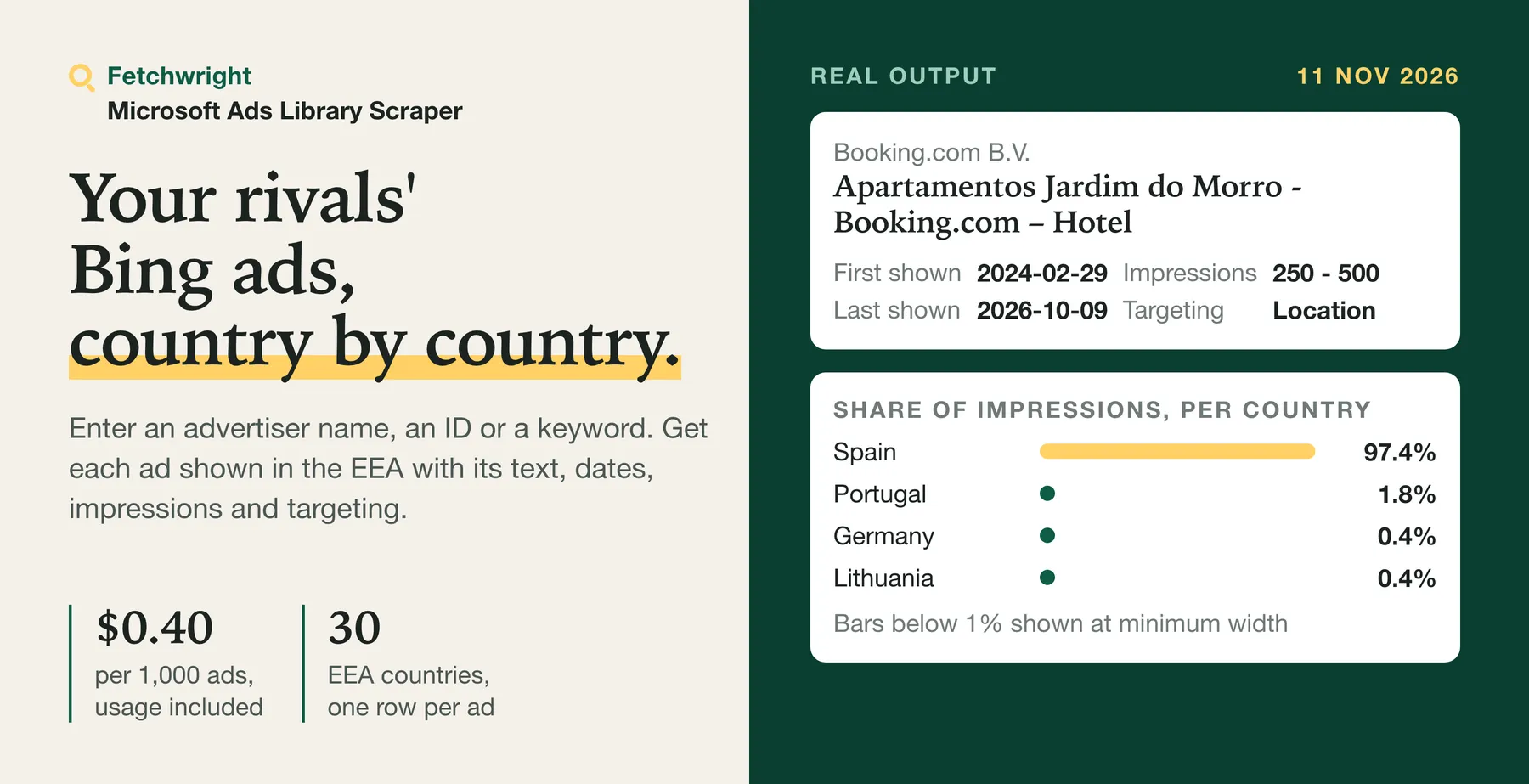
Microsoft Ads Library Scraper returns the Bing ads that Microsoft publishes in its Ad Library for the European Economic Area (the 27 EU countries, Iceland, Liechtenstein and Norway), for the advertisers or keywords you choose, at $0.40 per 1,000 ads on the Free plan ($0.30 to $0.38 on paid plans). Enter an advertiser's name as Microsoft lists it, its numeric advertiser ID or a keyword, and get one row per ad with its headline, description, landing page and images, and on request its first and last shown dates, impression range, share of impressions per country, targeting types and payer. A hard cap per advertiser keeps a run's cost under your control, and the run summary says for each advertiser whether its list was read to the end. Try the prefilled example: it returns up to 100 ads of Booking.com B.V. It can also give one row per advertiser with the number of ads Microsoft states for it, and watch the advertisers you list for new ads.
Built for competitive-intelligence and paid-search teams that watch rivals on Bing, agencies preparing pitches and audits for European clients, researchers and compliance teams studying political and commercial advertising in the EU, and developers and AI agents that need Microsoft ad data through an API.
| What you get | Details |
|---|---|
| 🔎 Find ads by advertiser | A name as Microsoft lists it (Booking.com B.V.), a numeric ID (4295086664) or an Ad Library advertiser link, in one list |
| 🔤 Search ad text | Keep an advertiser's ads that contain a word, or search a keyword such as hotel across advertisers |
| 🌍 Filter by country and date | One or several EEA countries, and a date window |
| 📊 Reach and targeting | First and last shown dates, impression range (such as 100K - 250K), share of impressions per country, targeting types, payer |
| 🏷️ Offers in the wording | Free trials, discounts, prices, price guarantees, free cancellation and other offers stated in each ad, on every row, found by word rules for English, German, French, Spanish and Dutch (price guarantees, free cancellation and price cuts also in Italian) |
| 🏢 Advertiser summary | One row per advertiser with its country, verified badge and the number of ads Microsoft states for it (up to 1,000; 1,000 means 1,000 or more), charged like one ad |
| 🆕 Only new ads | With one run of the same watch at a time and its country and keyword filters unchanged, a scheduled run returns and charges only ads it has not returned before, for the advertisers you list |
| 🧾 A coverage verdict per advertiser | complete, capped, partial or unknown, so a short result is never mistaken for a full one |
| 🔔 Alerts | A message to Slack, Discord or any webhook when a run saves ads |
| 💾 Export anywhere | JSON, CSV, Excel, or through the API and MCP |
No Microsoft account, login or developer key is needed: the Actor reads Microsoft's public Ad Library. That library is Microsoft's EU advertising repository under the Digital Services Act: Microsoft points to it from its EU Digital Services Act information page as the repository of ads served to Bing users in the EU, and its Ad Library API documentation says it "is designed to meet EU legal compliance requirements" and holds only ads served within the EEA.
Why choose Microsoft Ads Library Scraper?
- A cap that holds, and a cost you set. Maximum ads per advertiser or keyword is a hard cap: the run never saves more than that for one advertiser account or keyword, and if you set a maximum charge for the run in Apify, the Actor checks it before every row and stops there. Tested: in the offline charging test, the number of charged rows equals the number of saved rows, and a run never saves a row past the maximum charge.
- You know how complete each list is. For each advertiser or keyword the run summary says
complete(read to the end),capped(your maximum stopped it),partial(the maximum charge, the timeout or an error stopped it) orunknown(Microsoft's limit of about 1,000 ads per query was reached, so more may exist). - No ad charge for empty or failed lookups. Lookups that fail, advertisers that are not found, and advertisers or keywords with no ads give no row and no ad charge (the run's start event still applies, see below). They are listed in the run summary with the reason, and failures are counted by reason.
- Reach and targeting at the same price. Dates, impression range, share per country, targeting types and payer cost no extra event.
- Offers and alerts. Every row lists the offers its wording states, and a run can post its result to Slack, Discord or a webhook. Offers are found by fixed word rules for English, German, French, Spanish and Dutch, and for price guarantees ("Mejor precio garantizado", "Bestpreisgarantie"), free cancellation ("Kostenlose Stornierung") and price cuts stated without a figure ("Prix cassés") also Italian. An offer worded otherwise or in another language is missed, and a negated one ("No free trial", "Keine Preisgarantie") is not counted. The types are free_trial, discount, promo_code, free_shipping, demo, webinar, free_plan, price, guarantee, deadline and free_cancellation.
How much does it cost to scrape the Microsoft Ads Library?
$0.40 per 1,000 ads on the Free plan, $0.30 to $0.38 on paid plans. You pay per ad saved, platform usage is included, and there is no monthly rental.
| Your Apify plan | Price per 1,000 ads |
|---|---|
| Free | $0.40 |
| Starter (Bronze) | $0.38 |
| Scale (Silver) | $0.35 |
| Business (Gold) and above | $0.30 |
Every run also has Apify's start event, charged when the run starts, whatever it saves: $0.00005 for a run with up to 1 GB of memory (the default is 128 MB) and $0.00005 more for each further GB, so $0.0001 at this Actor's 2 GB maximum. Dates, impressions, country shares, targeting, payer and offers are included in the price per ad.
Never charged as an ad (only the run's start event applies): advertisers that are not found, advertisers or keywords with no ads when ads are listed (an advertiser summary row is charged also for an advertiser with 0 ads), a website entered instead of a name (reported with a message), failed lookups, ads already saved for another advertiser or keyword in the same run, and anything a run did not reach. They are listed under noAdsTargets, failedTargets and unfinishedTargets in the SUMMARY record.
An ad whose extra details could not be read is still a saved ad: it is charged, and its detailsStatus is failed, or unavailable when Microsoft answered without details.
If an advertiser or keyword is stopped by an error after some of its ads were saved, those saved ads were charged and the rest was not read or charged; it is listed under unfinishedTargets, and under failedTargets with adsSaved.
What typical jobs cost:
| Job | Ads | Cost on Free | Cost on Gold |
|---|---|---|---|
| One competitor's current ads | 100 | $0.04 | $0.03 |
| Ten competitors, 200 ads each | 2,000 | $0.80 | $0.60 |
| Weekly check of five competitors, 100 ads each (four runs) | 2,000 a month | $0.80 a month | $0.60 a month |
| One keyword across advertisers, up to Microsoft's limit | about 1,000 | $0.40 | $0.30 |
Apify's free plan includes $5 of credit each month, which is about 12,500 ads with this Actor.
Advertiser summary (Result type) saves one row per advertiser instead of its ads, and each advertiser row is charged like one ad, also when Microsoft states 0 ads for it: checking 100 advertisers costs $0.04 on Free. Names or IDs that match no advertiser give no row and no charge. The count on each row is Microsoft's own, capped at 1,000 (1,000 or more).
How does the price compare?
Prices of the three most-used actors that return Microsoft (Bing) Ad Library ads on the Apify Store, read from their public price cards on 15 November 2026, ordered by monthly users. We compared listings and prices; we did not run them.
| Actor | Monthly users | Price per 1,000 ads, Free plan | Gold plan | Ad details |
|---|---|---|---|---|
| This Actor | new | $0.40 | $0.30 | Included at the same price |
| Most-used (Meta, Google and Bing ads) | 10 | $0.50 | $0.40 | Not offered as a separate event |
| Second | 7 | $3.00 | $0.75 | Advertiser rows $5.00 per 1,000 on Free |
| Third | 6 | $2.00 | $1.00 | +$3.00 per 1,000 on Free |
One less-used actor (3 monthly users) charges less per ad: $0.089 per 1,000 plus $0.005 per run on the Free plan. Counting each run's start fee at Free-plan prices, this Actor costs less for runs of up to 15 ads and that one costs less from 16 ads up. Ad details (payer, run dates, impressions by country and targeting) cost extra on several rivals and are included here; they are slower to read (see "How fast is it?"). Prices change; check each listing before you decide.
How do I scrape the Microsoft Ads Library?
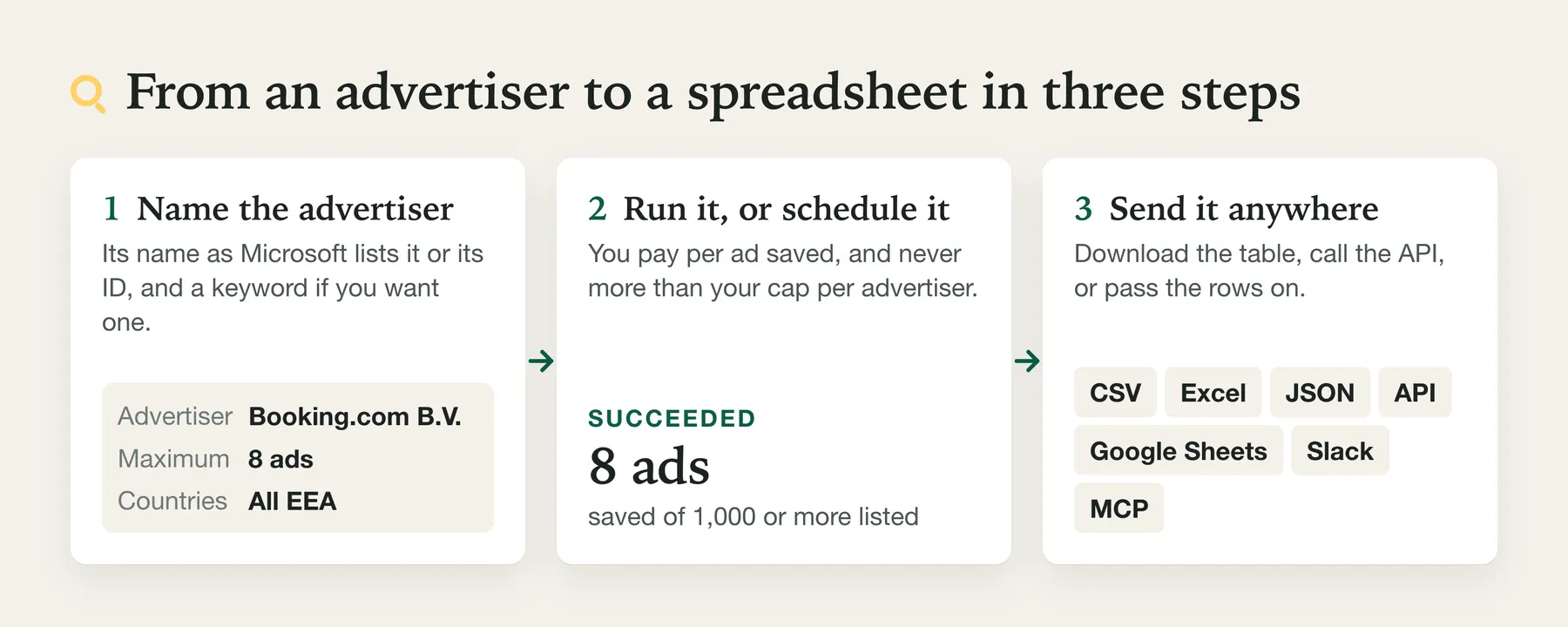
- Create a free Apify account.
- Open the Actor and add advertiser names or IDs, or a keyword.
- Optionally choose countries, a date window, a keyword filter and Include dates, impressions, countries, targeting and payer.
- Click Start.
- Download the results as CSV, Excel or JSON, or fetch them through the API.
Run it on a schedule. For monitoring, run it weekly, with only new ads. Apify's short video shows how to set up a schedule:
⬇️ Input for Microsoft Ads Library Scraper
| Field | What it does |
|---|---|
| Advertisers | Names as Microsoft lists them (often the legal name), numeric advertiser IDs or Ad Library advertiser links. To fetch one ad with all its details, paste the ad's Ad Library link (https://adlibrary.ads.microsoft.com/ad/<id>) or ad:<id>. Duplicates are removed. |
| Maximum ads per advertiser or keyword | Hard cap per advertiser account or keyword search. An advertiser entered twice (by name and by ID) is read once, so the cap holds for it. Default 100. |
| Countries | One or several EEA countries. Empty means every EEA country. |
| Keywords in ad text | With advertisers: one word or phrase their ads must contain. Without advertisers: one search per keyword across advertisers. |
| Shown on or after / on or before | A date window, applied by Microsoft. |
| Include dates, impressions, countries, targeting and payer | One extra lookup per ad (about 20 seconds per Microsoft request before source response time or any slowdown), no extra charge. |
| Advertiser accounts per name | How many accounts a name reads (exact name first). Default 1. |
| Read past the 1,000-ad limit country by country | Off by default. For an advertiser or keyword whose list reaches Microsoft's limit of about 1,000 ads, the same list is read again for each EEA country (Germany, France, Italy, Spain, the Netherlands, Poland, Sweden, Belgium, Austria, then the rest). It needs Maximum ads per advertiser or keyword above 1,000 (at most 31,000). It stops at that maximum, at the run-wide maximum, at your maximum charge and before the run timeout. While it reads country by country, any HTTP 429 or refusal ends the run's Microsoft requests at once, with no pause and no retry: what was read is kept, and the advertisers and keywords not finished are listed as unfinished and not charged. An ad found in several countries is saved and charged once, and each row says in searchRegion which country's list it came from. Slow: allow roughly 14 minutes of pacing per country read to its limit, without details, plus source response time and any slowdown. Large splits may stop early if Microsoft limits or refuses the run; the current pacing does not establish a safe quota. The run summary says how far it got. No effect with a country filter, an advertiser summary or an only-new watch (the run log says so). |
| Result type | Ads (default): one row per ad. Advertiser summary: one row per advertiser account you list, with its country, verified badge and the number of ads Microsoft states for it under your country, date and keyword filters; one lookup per advertiser, no ad rows. Needs advertisers; not with Only ads not returned in earlier runs. |
| Only ads not returned in earlier runs | For scheduled monitoring of the advertisers you list. With one run of a watch at a time, a run returns and charges only ads the watch has not returned or remembered before; see "Only new ads" below. |
| Monitor name / On a watch's first run | A name keeps several watches apart. On the first run, Return current ads returns up to your maximum and remembers the rest free; Only remember returns nothing and remembers the ads it reads. |
| Send an alert to Slack, Discord or a webhook | Posts a short message when the run saves ads. |
| Advertiser country and verification lookups (keyword searches) | For a keyword search without advertisers: how many different advertisers get advertiserCountry and advertiserVerified filled in. Each adds about 20 seconds before source response time or any slowdown; no extra charge. 0 turns it off. Default 10, at most 100. |
Explicit ad lookups share the run's per-advertiser maximum with advertiser searches. The ad must overlap your date window, have impression share in a selected country and contain your keyword in its headline or description (case-insensitive); an ad that does not match is skipped without charge. Ad targets need Result type: Ads; Advertiser summary rejects them without charge.
⬆️ Output from Microsoft Ads Library Scraper
One row per ad. A real row, saved by a run of this Actor on 11 November 2026 for Booking.com B.V. with details on:
The fields use the same names as the Microsoft rows of Google Ads Transparency Scraper, so the two can share one table. format is always null because Microsoft does not say whether an ad is a text, image or video ad. Without details, firstShown and lastShown are null and the reach fields are left out; detailsStatus says which case applies. url opens the ad's own page on Microsoft's Ad Library website (https://adlibrary.ads.microsoft.com/ad/<id>), which, when we checked an example on 12 November 2026, showed the same advertiser, dates and impression range as its row; advertiserUrl opens the advertiser's page there. displayDomain and destinationDomain are the websites shown and linked to, without www., so you can group ads by landing site. hasImages says whether Microsoft lists any image for the ad: it is the fact we report instead of a format. The four fields were added in 0.1.34; in the row above they are filled in from that row's own addresses.
Advertiser summary rows
With Result type set to Advertiser summary, each row is one advertiser account, for example (built from Microsoft's answers for advertiser 4295086664: its record as recorded on 11 November 2026, and its count, which Microsoft stated as 1,000 on 11 November 2026):
adCount is the number of ads Microsoft states for the advertiser under the run's filters. Microsoft counts up to 1,000, so 1000 with adCountAtLeast: true means 1,000 or more. First and last shown dates are not on these rows, because Microsoft gives them only in each ad's own details (one lookup per ad); run Ads with details for them. The Advertiser summary view of the dataset shows these rows.
The run summary
The SUMMARY record in the run's key-value store holds the run's outcome (complete, partial or failed), its coverage, and for each advertiser or keyword: ads saved, coverage, the count Microsoft reports (1000 or more at its limit), other accounts a name matched (otherMatches) and any error with its reasonCode. It also lists failuresByReason, failedTargets, unfinishedTargets, noAdsTargets (no advertiser found, no ads, or no ads matching your filters: not charged), the offers observed, sameAdvertiserTargets (an entry that named an advertiser already read in the run, not read again), totalLimitReached when a run-wide maximum stopped the run, inputNotes (how another actor's field names were read), and notification with the alert's delivery status (not_configured, nothing_to_send, sent or failed, with the number of tries; pending only if the run ended while sending). The summary is saved before the alert is sent.
Only new ads (watch)
With Only ads not returned in earlier runs on, the Actor keeps a memory per advertiser, countries and keyword (and Monitor name, if set) in your account. With one run of a watch at a time:
- An explicit ad lookup returns that ad if it matches your filters and has not been returned or remembered by the watch, subject to your caps. It leaves the advertiser's first read unchanged, including Return current ads or Only remember. The first-run choices below apply when you list the advertiser.
- The watch's first run reads the advertiser's whole list as Microsoft serves it. It returns up to your maximum (or nothing, with Only remember), and remembers every other ad without charge. Those ads are never returned as new later.
- Every later run returns only ads the watch has not returned or remembered. A watch run stops once it has returned your maximum; new ads it has not reached are returned by later runs (
moreNewAdsPending). Ads already seen are skipped and not charged. - An ad the watch returned is never returned or charged again. Before its row is saved, the ad is recorded as pending with the run's dataset; once the save is confirmed it counts as returned. If a run ends before that, or a save cannot be confirmed, the next run checks that run's dataset: an ad found there counts as returned, an ad not found can be returned again. If that dataset no longer exists, the ad counts as returned; if it cannot be read, the ad stays pending (never returned) and the run summary says so (
pendingNotSettled). - Two runs of the same watch at the same time can both return and charge an ad.
Microsoft's list has no stated order, so a watch run reads the advertiser's list until it has returned your maximum, and otherwise to its end (up to the about 1,000 ads Microsoft serves, at about 20 seconds of pacing per page of up to 24 ads, plus source response time and any slowdown). A first run that stops early (maximum charge, timeout, refusal) continues remembering in the next run and returns nothing older. Each advertiser's watch entry in the run summary shows firstRead, baselineComplete, skippedSeenBefore and rememberedWithoutCharge. The watch works for advertisers you list, not for a keyword search across all advertisers.
Limits of Microsoft Ads Library Scraper
- EEA only. Microsoft's Ad Library holds ads shown in the European Economic Area. Ads shown only elsewhere are not in it. A country outside the EEA sent through the API is left out, and the run log and summary say so.
- About 1,000 ads per advertiser and query. Microsoft serves at most about 1,000 ads for one query. An advertiser or keyword at that limit is reported with
coverageunknown, notcomplete. Narrow it with countries, a date window or a keyword, or turn on Read past the 1,000-ad limit country by country: measured on 12 November 2026, the Netherlands list of an advertiser at the limit held 861 ads that its plain list did not serve, and for the keywordhotelall 30 countries' lists were themselves at the limit, and their first pages were mostly different from the plain list's. Each country's list is itself limited to about 1,000, so a list staysunknownwhile any country is at its limit, and iscompleteonly when every EEA country's list was read to its end. - Names must be Microsoft's. The advertiser search matches the name Microsoft lists, often the legal name:
Booking.com B.V.works wherebookingor a brand name may not. A name that looks like a website, such asbooking.comon its own, is read as a website: enter the advertiser's full name (Booking.com B.V.) or its numeric ID instead. - No search by website. A domain such as
booking.comcannot be searched in Microsoft's library; that line is reported with a message and not charged. - Microsoft's matching. Keywords and date windows are matched by Microsoft, and its data can be 1 to 3 days behind. In our check on 11 November 2026, an advertiser whose most recent ad ran 9 to 16 October 2026 returned no ads for a 1 to 10 November window.
- Ranges, not counts. Impressions are a range for the EU and EEA together; Microsoft publishes no spend and no exact counts.
- Microsoft's pace. Microsoft limits how often its public library may be asked. Allow about 20 seconds per Microsoft request before source response time and any slowdown. Runs with details are slower because each ad adds a request. This pacing is not a promise of a quota or a completed run. When Microsoft says it is being asked too often (HTTP 429) without a block page, the run pauses for as long as Microsoft asks (a minute when it does not say), slows down and continues. If Microsoft keeps limiting the run after two pauses, asks for a pause longer than two minutes, or the run has too little time left for a pause, the run asks Microsoft nothing more. A refusal ends the Microsoft requests at once, without waiting or trying again. A refusal is any of: HTTP 403; a page asking for a CAPTCHA or to verify you are human, or saying access is denied, under any status, 429 included; a page saying the request is blocked, under any status, 429 included; any other web page under a 4xx status other than 408 and 429, a 404 included (Microsoft's library answers an unknown advertiser with data, not with a page); and an answer that is not data, such as a web page, where data was expected. The Actor never switches to another address. In both cases the advertisers and keywords not finished are listed in the run summary, under
failedTargetswhen no ad of theirs was saved and underunfinishedTargetsotherwise, and what was not read is not charged. - Country filters on large advertisers. With a country chosen, Microsoft has taken about 150 seconds and then failed (HTTP 504) for an advertiser with over 1,000 ads. The Actor waits at most 60 seconds for a country-filtered list; if Microsoft has not answered by then, the advertiser or keyword is reported as failed (
source_timeout), nothing more is charged for it (ads already saved from it stay charged), and the message says what to do: remove the country filter, or add a keyword. It does not always happen: on 11 November 2026 a Spain-filtered list for another advertiser with 1,000 or more ads came back in 33 seconds. - Keyword searches across advertisers. Rows from a keyword search without an advertiser carry the advertiser's name and ID, and
advertiserCountryandadvertiserVerifiedfor the first 10 different advertisers the run finds (set the number under "Advertiser country and verification lookups", up to 100). Rows of advertisers beyond that number, or found after the run ran short of time or Microsoft limited or refused it, keep both fields empty; the run summary counts them underadvertiserIdentitywith the reason. Search the advertiser by name or ID to get them. A country filter selects ads Microsoft lists as shown in that country, and their landing pages can belong to the advertiser's sites for other countries. - If saving a row cannot be confirmed. Each row is sent once and never sent again by itself. If saving a row reports an error, the run checks its own dataset: a row that is there counts once (and against your maximum charge); a row that is not there, or a dataset that cannot be checked, stops the run at that row, so no row is saved or charged twice. The run summary describes it under
uncertainWrite, and the advertisers and keywords not finished are listed underunfinishedTargets. - If the platform restarts a run. Apify can restart a run, for example to move it to another server. A restarted run asks Microsoft nothing more and saves nothing more, so no ad is saved or charged twice; its status message and run summary (
restartedByPlatform) say how many ads it saved before the restart. Start it again for the rest: a new run starts from the beginning. - Run timeout. No new advertiser or keyword is started in the last 40 seconds of the run's timeout, every request to Microsoft ends at least 25 seconds before it, and the alert at least 8 seconds before it; the run summary is saved before the alert is sent.
Who uses Microsoft Ads Library Scraper, and for what?
📈 Paid-search teams: see what rivals run on Bing
List your competitors, turn on details, and schedule the run weekly with an alert to Slack.
🏢 Agencies: audits and pitches for European clients
Pull a prospect's and its rivals' Bing ads by country, with dates and reach, into a spreadsheet.
🔬 Researchers and compliance teams
Search ad text for a topic across advertisers and keep the dates, payer and country shares.
🤖 AI-agent builders: use it in Claude, ChatGPT or Cursor through MCP
Add this address as a custom connector (MCP server) in your AI app, sign in to Apify when the browser opens, and the Actor appears as a tool the assistant can call:
Ask the agent "show me the Bing ads Booking.com B.V. ran in Germany this month" and it can call this Actor directly through the Apify MCP server.
How do I get Microsoft Ads Library data with Python, Node.js or the API?
Python:
Node.js:
curl, waiting for the run and returning the rows:
Use it in a pipeline: new Bing ads into Google Sheets with Zapier
Runs are billed to your own Apify account at your plan's prices, wherever you start them.
- In Apify Console, create a task for
fetchwright/microsoft-ads-library-scraper, for example:
and give it a daily schedule.{ "advertisers": ["Booking.com B.V."], "onlyNewAds": true, "monitorName": "bing-rivals", "maxAdsPerAdvertiser": 100, "includeDetails": true } - In Zapier, use Apify's trigger Finished task run on that task. (Zapier's Run Actor action waits at most 30 seconds when run synchronously, which is too short for most runs, so let Apify's schedule start the run and Zapier react when it finishes.)
- Add Apify's search Fetch dataset items with the run's default dataset ID.
- Add Google Sheets Create Spreadsheet Row(s) with
advertiserName,headline,displayUrl,firstShown,lastShownandurl(firstShownandlastShownare filled only withincludeDetailson, as in the example).
With onlyNewAds, each run returns only ads the watch has not returned before, with one run of the watch at a time and none is stopped before it saves its memory. Checked on 13 November 2026 against Apify's Zapier integration documentation (docs.apify.com/integrations/zapier); the input fields and output columns are this Actor's own. Not run in a live Zapier account, so tell us on the Issues tab if a step fails.
❓ FAQ about Microsoft Ads Library Scraper
Why use this instead of Microsoft's own Ad Library website?
The website shows ads one advertiser at a time. This Actor returns several advertisers or keywords as one table, with dates, reach and country shares in columns, on a schedule and through an API.
How fresh is the data?
Every run reads Microsoft's Ad Library at that moment. Microsoft says its data can be 1 to 3 days behind, and it records EEA impressions since June 2023. scrapedAt is when each row was collected.
How much does a run cost?
$0.40 per 1,000 ads on the Free plan, less on paid plans, plus Apify's start event of $0.00005 per run with up to 1 GB of memory ($0.0001 at 2 GB). See the tables above.
Can a run cost more than I set?
Not for the ads. Maximum ads per advertiser or keyword is a hard cap, and the Actor checks the run's maximum charge in Apify before saving every row and stops there, keeping what it saved. Failed and empty lookups give no ad charge. The start event is charged when the run starts. A run that stops at your maximum charge succeeds, says so in its status message and lists what it did not finish in the SUMMARY record.
How fast is it?
Measured on 15 November 2026 (Booking.com B.V., Germany, 100 ads): about 2 minutes without details, about 37 minutes with details. Start without details for a quick first look and turn details on for the ads you need them for; a run with details says so in its status message when it starts. Allow about 20 seconds per Microsoft request before source response time and any slowdown. A list contains up to 24 ads per request. Runs with details are slower because each ad needs another request; keyword-only searches also add a request for each advertiser whose country and verification are filled in. Actual run time depends on the number of requests, source response time and any pauses. This pacing is not a promise of a Microsoft quota or a completed run.
Can I look up one specific ad?
Yes. Paste the ad's Ad Library link (for example https://adlibrary.ads.microsoft.com/ad/79852171133216) or ad:79852171133216 under Advertisers. The run saves that one ad with its dates, impression range, impression share per country, targeting and payer, and charges one ad. An ID Microsoft does not know is listed in the run summary and not charged.
Can I see how many ads an advertiser runs without saving the ads?
Yes: set Result type to Advertiser summary. Each advertiser gives one row with the number of ads Microsoft states for it (up to 1,000; adCountAtLeast marks 1,000 or more), charged like one ad.
Does it return an advertiser's whole list?
It returns what Microsoft serves, up to your maximum and Microsoft's limit of about 1,000 per query. The coverage of each advertiser in the run summary says whether its list was read to the end. Read past the 1,000-ad limit country by country reads a capped list again per country; the run summary's countrySplit gives the countries read, the ads they added, the duplicates skipped and the countries still at their limit. A long split may end early if Microsoft returns a page saying the request is blocked, which this Actor treats as final.
Why does an advertiser return no ads?
Microsoft may list it under another name (often the legal name), it may have no ads shown in the EEA, or none matching your countries, dates or keyword. The run summary says which (no_advertiser_found, no_ads or no_ads_matching_filters), and no ad is charged for it.
Coming from another Microsoft ads scraper?
Paste your existing input: the field names of the three most-used Microsoft ad library actors are read as this Actor's own, and the run log and the inputNotes of the run summary say how each was read.
| Their field | Read as |
|---|---|
advertiserId, advertiserIds, advertiserNames, startUrls (advertiser links), targets | advertisers |
searchQueries, searchTerms, searchAdText | keywords |
maxAdsPerQuery, maxAdsPerTarget | maxAdsPerAdvertiser (a cap per advertiser or keyword) |
maxResults, maxSearchResults, maxItems | A maximum for the whole run, as in the actors that use them (the smallest, if several are given), and the cap per advertiser or keyword when no per-search cap is given |
countries, countryCodes (Microsoft's country numbers), region | countries |
startDate, endDate | dateFrom, dateTo |
includeAdDetails, fetchDetails | includeDetails |
monitorMode set to true | onlyNewAds |
splitByCountry | the same field here |
When a field is given both ways, this is the rule. Apify fills in this Actor's defaults (maxAdsPerAdvertiser 100, includeDetails off) for any field you leave out, so a default cannot be told from a value you typed:
- Advertisers, keywords, countries and dates have no default: this Actor's own field wins when it is filled in, and the other actor's field is ignored (the log says so).
maxAdsPerAdvertiser: a value other than 100 wins. At 100, the smaller of 100 and the other actor's cap is used, so the run never costs more than either cap allows, and the log says so.includeDetails: details are on when it,includeAdDetailsorfetchDetailsistrue. Details cost nothing extra, so an off value, which cannot be told from the default, does not switch them off.
Options this Actor does not offer (an advertiser directory search, single ads by ID, a format filter, importing links from a file) stop the run at once with a message, before any request, so no ad is charged (the start event still applies).
Is it legal to scrape the Microsoft Ads Library?
The Actor reads Microsoft's official, public Ad Library, which Microsoft provides for transparency and offers without sign-up; no personal account or login is used. Apify's overview of the topic is in Is web scraping legal? This is not legal advice.
Does the output contain personal data?
It can. Microsoft publishes the advertiser's name and, when someone else paid for an ad, the payer's name. Most are companies, but some are the names of natural persons, such as sole traders or individuals who run ads. These names appear in the rows (advertiserName, paidBy, searchTarget), in the run summary, and in alert messages, which name the advertisers. Ad text can contain names too. That Microsoft publishes them does not end data-protection duties such as those of the GDPR: when you store or use this data, you decide why and how it is used, which usually makes you the controller for that use, and you are responsible for having a lawful basis, for how long you keep it (retention), and for its deletion when you no longer need it, including the copies in your datasets, exports and alert channels.
Can I download the results as CSV, Excel or Google Sheets?
Yes. Each run's results are an Apify dataset, which you can export from the run's Storage tab or through the API as JSON, CSV, Excel (XLSX), XML, HTML or RSS. For Google Sheets, import the CSV or Excel file, or connect the run through a pipeline as described above.
Can I use it with the API or other tools?
Yes. Like every Apify Actor it can be run through the Apify API, scheduled, and connected to Zapier, Make, n8n, Slack and Google Sheets. See the examples above and the API tab on this page.
Something is wrong or a field is missing. Where do I report it?
Open an issue on the Issues tab of this page.
Start reading Bing ads from the Microsoft Ads Library
Open the Actor and click Start on the prefilled example, then add your own advertisers. Apify's free plan credit covers about 12,500 ads a month.
This Actor is not affiliated with, endorsed by or sponsored by Microsoft.
More from Fetchwright
- Google Ads Transparency Scraper: the ads Google publishes for the advertisers you choose, with ad text, dates and impressions, and a new-ads-only mode for competitor monitoring.
- Google AI Overview Tracker: what Google's AI answers for a query, the pages it cites, and whether your brand is mentioned.
- Telegram Channel Scraper: posts from public Telegram channels with no account, cashtags and engagement rates, and keyword alerts.


