

LinkedIn Jobs Scraper
Pricing
from $1.40 / 1,000 jobs
LinkedIn Jobs Scraper
LinkedIn job listings scraper: LinkedIn jobs with no login. Search LinkedIn jobs by title, exclude words; the LinkedIn jobs exporter adds full description, applicants and pay when shown. Only-new runs + webhooks send job alerts. LinkedIn jobs CSV/JSON export, or call it as a LinkedIn job search API.
Pricing
from $1.40 / 1,000 jobs
Rating
5.0
(1)
Developer

Flash Scrape
Maintained by CommunityActor stats
0
Bookmarked
56
Total users
19
Monthly active users
2 days ago
Last modified
Categories
Share
LinkedIn Jobs Scraper is a pay-per-event scraper that turns LinkedIn's public, logged-out job listings into clean, analysis-ready rows — title, company, location, applicant count, advertised pay when the posting shows it, and the full description. It is priced per delivered job, at the live rate on this page's Pricing tab (lower on paid plans); each delivered job is billed once per run, after dedup, and an empty run bills no results. It needs no LinkedIn login, no cookies and no API key: it reads LinkedIn's public guest endpoints directly. Every row carries the same 27 columns, exported as CSV, JSON or Excel, so it doubles as a LinkedIn jobs exporter and LinkedIn job data scraper.
Try it: Scrape LinkedIn data analyst jobs in London to CSV
✨ What you get
- 🔑 No LinkedIn account, no cookies, no API key — it reads LinkedIn's public guest endpoints directly, and it never auto-applies.
- 📋 27 columns per job, including the full description, applicant count, salary range when the posting shows one, and a 0–100 job score that sorts the freshest, best-documented, least-contested listings first.
- 🎯 Filters applied before you pay —
titleInclude/titleExclude,companyNames,excludeAgenciesand remote-only are checked on the search cards before the job pages are read, so a listing they drop is neither fetched nor billed. - 🗺️ Several cities in one run — a
locationslist (up to 25 places) runs one search per city, the way past LinkedIn's 800-results-per-search wall for a whole state or country; a posting found under two places is delivered and billed once. - 🔔 Monitoring built in:
onlyNewJobs: truedelivers and bills only postings you haven't seen;webhookUrlsends a Slack / Discord / webhook digest when new rows land. - 📤 Exports CSV, JSON or Excel — and runs from the Console, the API, Schedules, n8n / Make / Zapier, or as an MCP tool for AI agents.
It never logs in, so anything LinkedIn keeps behind a sign-in is out of reach: applyUrl is always null, applicants is LinkedIn's bucket rather than an exact count and shown on about 55% of postings, and it covers LinkedIn only — Indeed, Glassdoor and company career sites are other actors.
How to scrape LinkedIn jobs in 3 steps
- Type the job titles and a place —
searchQueries(one title or skill per line) andlocation(a city, state, country or zip; or alocationslist to search several cities in one run; or a LinkedIngeoIdfor an exact pin). - Pick the filters you want — date posted, experience level, Easy Apply only, company names or IDs, salary, title words, no agencies — and Start. No LinkedIn login, no cookie, no API key.
- Download the rows from the Output tab as CSV, JSON or Excel, or call the same input from the API, a Schedule, n8n / Make / Zapier. Set
onlyNewJobs: trueon a schedule and every later run delivers — and bills — only postings you have not seen.
Key facts:
- Price: per delivered job — the live rate is on this page's Pricing tab; each job is billed once per run, after dedup, and an empty run bills no results.
- No LinkedIn account, no cookies, no API key — it reads LinkedIn's public guest endpoints directly.
- 27 columns per job, including the full description, applicant count, salary range when the posting shows one, and a 0–100 job score.
- Exports CSV, JSON or Excel — and runs from the Console, the API, Schedules, n8n / Make / Zapier, or as an MCP tool for AI agents.
- Monitoring built in:
onlyNewJobs: truedelivers and bills only postings you haven't seen;webhookUrlsends a Slack / Discord / webhook digest when new rows land. - Free-plan friendly: Apify's monthly $5 credit covers thousands of jobs at the free-plan rate.
Keyword and location in, structured rows out: title, company, location, posting date, employment type, seniority, job function, industry, applicant count, the full job description and the direct job URL. It reads LinkedIn's public guest endpoints directly, with no LinkedIn account, no cookies and no API key.
The minimal input — copy, paste, run:
Pricing: per delivered job — the live rate is on this page's Pricing tab. Each job is billed once per run, after dedup; an empty run bills no results.
Need more than LinkedIn? The same publisher's Multi Job Board Scraper merges LinkedIn + Indeed + Glassdoor + 9 more boards in one run, deduplicated (a job on three boards bills once), with salary annualization, remote-only sweeps across 11 boards, a monitoring mode that only bills postings you haven't seen, and company careers-page watching. This actor is the fast cheap single-board tool; that one is the platform.
Scrape LinkedIn jobs into a clean, analysis-ready spreadsheet. Every row is topped with a 0–100 job score, so the freshest, best-documented, least-contested listings sort first. Built for job seekers, recruiters, job-board builders and labor-market analysts. It reads only public, logged-out listings, and it never auto-applies.
Use it from AI agents (Claude, ChatGPT, Cursor) via Apify MCP
A LinkedIn jobs API for agents: one run returns LinkedIn job postings as rows with the same 27 columns, no LinkedIn login.
- Connect: add
https://mcp.apify.comas a custom connector in Claude, or ChatGPT in Developer mode, or install the Apify plugin in Cursor; sign in with OAuth or sendAuthorization: Bearer <APIFY_TOKEN>. - Call:
call-actorwithflash_scraper/linkedin-jobs-scraper, or load this LinkedIn job listings scraper as its own tool withhttps://mcp.apify.com?tools=flash_scraper/linkedin-jobs-scraper. This input bills at most 25 jobs, $0.05 at the free-plan rate plus the $0.00005 start;callOptions.maxTotalChargeUsdcaps spend, keeping the best-scored jobs that fit:
- Wait:
call-actorwaits at most 45 s and returns the run status and storage IDs, not rows; job pages are read about one per second, so pollget-actor-rununtil it finishes. - Read:
get-dataset-itemswith the run'sdatasetIdandlimit: 25(default 20) returns the jobs, best-scored first.get-key-value-store-recordkeyRUN_SUMMARYgivesdelivered,failed_queriesandpartial; a zero-row run writes noRUN_SUMMARYand bills no results.
Payment without an Apify account and the smallest call: Use it from an AI agent (MCP).
What it does
- Searches LinkedIn's public job listings by keyword and location — read directly from LinkedIn's logged-out search pages (no third-party data provider, no account), with your date posted, Easy Apply and company-id filters applied at the source and experience level checked on each job page (LinkedIn's search stopped applying it on its own, measured 2026-09-25). Give it one
location, alocationslist (one search per city — the way past LinkedIn's 800-results-per-search wall for a whole country) or a LinkedIngeoId(the numeric place id from a LinkedIn job-search URL, for names like Paris or Cambridge that a text search leaves ambiguous). Employment type and remote/on-site/hybrid are not source filters any more: since LinkedIn's August 2026 AI search (measured 2026-08-29) workplace type and job type are not honoured at the source; the actor converts them to search keywords plus a title/location check — verify withisRemote(andemploymentType). - Filters the result cards before it spends anything on them —
titleInclude/titleExclude(title words),companyNames(company name on the card),excludeAgencies(staffing-agency company names) and remote-only are checked on the search cards before the job pages are read, so a listing they drop is neither fetched nor billed. - Then opens each posting's public job page and fills in what the search result cannot show: employment type, seniority, job function, industry, applicant count, Easy-Apply-or-external, and the whole description as plain text — or as Markdown / HTML with
descriptionFormat, rendered from the same page at no extra request. This second pass is what turns a 6-column result list into a full record, and it needs no login either. - Derives an
isRemoteflag from remote/WFH wording in the title and location only — e.g.Data Analyst (Remote),United States (Remote). The description is deliberately not scanned: postings that say "there is no option to work remotely", hybrid roles offering "flexibility to work from home when needed", and company boilerplate about "employees working remotely world wide" all read as remote to a text scan, and a wrong remote flag costs you a wasted application. If remote status matters, setremoteto["2"]— the word "remote" is added to the search and only cards whose title or location carries a remote/WFH signal are kept (the same signalisRemotereads), before any job page is fetched. LinkedIn itself no longer filters on it (measured 2026-08-29), soisRemoteis never asserted from the filter — it is derived on every row. - Parses applicant counts to integers so you can filter to low-competition roles with
maxApplicants— with the wording LinkedIn actually showed kept alongside inapplicantsText. - Normalizes and cleans: posting dates to
YYYY-MM-DD, tracking parameters stripped from job and company URLs, whitespace collapsed, duplicates removed across all your search queries before the job pages are fetched. - Scores every job 0–100 — freshness up to +28, description depth up to +28, the four job-criteria fields +5 each, low applicant count up to +14, company +5, and +5 for advertised pay — awarded only when the posting's public job page shows a base-pay range (varies by posting and state; measured 2 of 6 pages 2026-08-29), so a posting without advertised pay tops out at 95. Unknowns pay a stated default rather than a zero: unknown posting age scores +8, an unknown applicant count +5, and a posting whose job page could not be read scores +24 for the 48 description-and-criteria points — so a fresh listing whose page was blocked still outranks a month-old one whose page was read, instead of being punished for our fetch luck. The dataset is sorted best-first, ties broken by the fresher posting.
- Applies your row filters after the job pages are read:
maxApplicants,requireSalaryandminSalary(the last two act on the parsed base-pay range and drop postings that show none — see the FAQ).easyApplyOnlyis applied at the source (measured 2026-08-29 from a home IP; the post-fetch check stays as a safety net), so an Easy-Apply run asks LinkedIn for Easy Apply postings instead of reading every job page to find them.
Use cases
- Job search automation — schedule a daily run for your target titles, filter to
r86400(past 24 h) and low applicant counts, and be among the first applicants. - Recruiting intelligence — see which companies are hiring for a role, at what seniority and employment type, and how much competition each posting draws.
- Job-board aggregation — feed a niche job board with clean, deduped LinkedIn postings including the full description text, ready to render.
- Description mining —
descriptionTextis the whole posting, so you can grep it for the skills, tools, certifications, visa wording or pay figures you actually care about. - Labor-market research — track posting volume, seniority mix, industry mix and remote share over time.
Input
| Field | Type | Default | Description |
|---|---|---|---|
searchQueries | array | ["data analyst"] | Job titles, skills, or company keywords — one per line. Each is searched separately and results are deduped. |
location | string | "United States" | City, state, country, or zip — e.g. London, Remote. Ignored when locations or geoId is set. |
locations | array | [] | One search per place instead of location — e.g. ["Austin, TX", "Dallas, TX"]. LinkedIn's public search stops at 800 results per search, so a city list is how one run covers a whole state or country; a posting found under two places is delivered (and billed) once. maxItems applies to each place. Up to 25 places per run — extra entries are not searched; the status message and RUN_SUMMARY.locations_not_searched name them. |
geoId | string | — | The numeric geoId from a LinkedIn job-search URL (e.g. 103644278 = United States). When set, location / locations are ignored and LinkedIn's own place id pins the search (measured 2026-08-29 from a home IP: geoId=103644278 with no location returned the same listings as location: "United States"). A non-numeric value is ignored and the run says so. |
datePosted | string | "" | r86400 (past 24 h), r604800 (past week), r2592000 (past month), or empty for any time. |
experienceLevel | array | [] | Seniority codes: 1 Internship, 2 Entry, 3 Associate, 4 Mid-Senior, 5 Director. LinkedIn's public search stopped applying this filter (measured 2026-09-25), so the actor checks the "Seniority level" printed on each job page: a job labelled with another level, or whose page could not be read on the run, is left out and not billed; a job whose poster set no level ("Not Applicable", 50 of 60 pages measured) is judged by its title instead — Senior/Sr/Principal, Director, VP/Chief, Junior/Entry level/New grad/Graduate, Intern — and kept when the title names no level (words like Staff, Manager or Associate are ambiguous and never decide). RUN_SUMMARY.experience_level gives each count. |
contractType | array | [] | Employment type hint: F Full-time, P Part-time, C Contract, T Temporary, I Internship. Since LinkedIn's August 2026 AI search (measured 2026-08-29) workplace type and job type are not honoured at the source; the actor converts them to search keywords (part-time, contract, temporary, internship); F Full-time adds no keyword (LinkedIn's default) — verify with employmentType. |
remote | array | [] | Work arrangement hint: 1 On-site, 2 Remote, 3 Hybrid — 2 / 3 become the search keywords remote / hybrid for the same reason; 1 On-site adds no keyword (LinkedIn's default). ["2"] alone also keeps only cards whose title/location says remote (checked before the job pages are read, so the rest are not billed) — verify with isRemote. |
companyNames | array | [] | Keep only listings whose company name on the search card contains one of these (case-insensitive substring: Google keeps Google and Google Cloud, drops Alphabet). Checked before the job pages are read — dropped listings are neither fetched nor billed. A subsidiary or a differently spelled legal name is dropped; use companyId for an exact pin. |
companyId | array | [] | Filter by LinkedIn numeric company IDs (from a company page URL). |
maxItems | integer | 100 | Max jobs per search (1–1000; per query and, with locations, per place). LinkedIn's public search serves at most 800 per search; the run says so when it hits that wall and suggests splitting by city with locations. |
onlyNewJobs | boolean | false | Monitor mode: remember what this exact search (queries, location, filters — plus locations / geoId only when set) delivered and return only listings new since. First run = baseline. Quiet runs deliver nothing and bill no results. |
descriptionFormat | string | "text" | How the posting's description is written into descriptionText: text (plain text, unchanged), markdown (**bold**, - bullets, 1. numbers, [text](url) links, line breaks — from the job page's own markup) or html (the description block as LinkedIn serves it). Same page, no extra request, no price change; the column keeps its name and position and job_score is computed from the plain text in every format. Not part of the onlyNewJobs memory key. |
requireSalary | boolean | false | Keep only postings whose public job page shows a base-pay range (varies by posting and state; measured 2 of 6 pages 2026-08-29). Postings without advertised pay are dropped. |
minSalary | integer | 0 | Keep only postings whose advertised pay (salaryMax, else salaryMin) is at least this per year; hourly pay is annualized. Postings showing no pay are dropped. 0 = off. |
easyApplyOnly | boolean | false | Keep only LinkedIn Easy Apply jobs — applied at the source (measured 2026-08-29 from a home IP; the post-fetch check stays as a safety net), so the run fetches Easy Apply postings instead of reading every job page to find them. |
maxApplicants | integer | 0 | Keep only jobs with at most this many applicants (0 = off). Rows where LinkedIn showed no count are kept. |
titleInclude | array | [] | Keep only listings whose title contains at least one of these words/phrases (case-insensitive). Checked on the search cards before the job pages are read — dropped listings are neither fetched nor billed. |
titleExclude | array | [] | Drop listings whose title contains any of these words/phrases (e.g. intern, manager). Same pre-fetch, unbilled check. |
excludeAgencies | boolean | false | Drop listings whose company name looks like a staffing / recruiting agency (contains staffing, recruit, talent, headhunt, manpower, personnel, placement, consultancy, resourcing, workforce, …). Name-based heuristic — Deloitte Consulting passes. Same pre-fetch, unbilled check. |
proxyConfiguration | object | — | Optional. Leave empty to go direct (works today). Set Apify RESIDENTIAL / a country / your own proxy URLs when LinkedIn gates your region or on heavy schedules; every retry then comes from a fresh proxy session. See Proxy (optional). |
webhookUrl | string | — | Optional. Slack / Discord / n8n / Make / Zapier / any HTTPS URL that gets a digest of the delivered rows. Quiet runs send nothing. See Alerts. |
Output
One dataset row per job, deduped across queries and sorted by job_score. Export to CSV, JSON, or Excel from the Output tab. A real row, unedited apart from the trimmed description and the elided logo URL:
Which fields does LinkedIn publish, and how often is each one filled?
Every field below is in every row of every run, and the Filled column is measured on live postings rather than estimated, so you know what you are buying before you spend anything.
| Field | Filled | Where it comes from |
|---|---|---|
jobTitle, companyName, location | always | search result card |
postedDate (YYYY-MM-DD), postedTimeAgo ("2 hours ago") | always | search result card |
jobUrl, jobId, companyUrl | always | search result card |
isRemote, job_score | always | derived (see above) |
employmentType, seniority, jobFunction, sector | ~100% of job pages read | the posting's public job page |
descriptionText (plain text by default; Markdown or HTML with descriptionFormat) | ~100% of job pages read | the posting's public job page — measured 2026-08-29 on a 10-row London run with descriptionFormat: "markdown": 10 of 10 rows converted with no tag or entity left behind |
applyType — EASY_APPLY or EXTERNAL | ~98% of job pages read | the posting's public job page |
applicants, applicantsText | ~55% | LinkedIn only shows a count on some postings |
recruiterName, recruiterUrl | never (always null since 2026-10-11) | retired — the job poster's name and profile link are not collected; the two columns stay only so existing exports keep their header order |
salaryRaw, salaryMin, salaryMax, salaryPeriod | varies by posting and state (measured 2 of 6 pages 2026-08-29) | the posting's public job page, when it shows a base-pay range ($90,000.00/yr - $175,000.00/yr; hourly forms are kept with salaryPeriod: "hour") — null otherwise |
applyUrl | never | an external posting's Apply button is a sign-in prompt with no destination link |
companyLogo | every card measured (30 of 30, 2026-08-29) | search result card — the logo image URL as LinkedIn serves it (with its signature parameters), null for a company without a logo. Added 2026-08-29 as the last column, so existing CSV integrations keep their header order. |
salary_text | same as salaryMin / salaryMax | derived — the readable form of the parsed pay, "$75,000–$150,000 / year", "$45 / hour", "from €60,000 / year"; "" (never null) when the posting shows no parseable pay. Added 2026-08-29 after companyLogo, so it is the last column. |
The Output tab opens on the Overview view (11 columns); the Salary, Apply-ready, Company info and Full record views are one click away — see How to read the output below. Exporting the dataset (CSV / JSON / Excel) always gives you all 27 columns.
If you have an existing integration, three column notes. The posting body ships as
descriptionText only: the descriptionHtml column is gone, because it was a second tag-laden
copy of the same text and roughly half the size of every row (measured: enriched rows averaged
12.4 KB with it, 5.5 KB without). And the overview view was redrawn on 2026-08-29 — it now
shows salary_text (the readable pay) instead of salaryRaw / salaryMin / salaryMax /
companyUrl, which moved to the Salary and Company info views — so a pipeline that calls
/items?format=csv&view=overview sees the new headers; the raw items never changed shape
(salary_text is appended after companyLogo, nothing was renamed or removed). And since
2026-10-11 recruiterName / recruiterUrl are always null: both columns stay in every row,
in the same place, but the Apply-ready view (view=apply) no longer lists them.
Two caveats worth knowing before you run it:
applicantsis LinkedIn's bucket, not an exact count:"Over 200 applicants"becomes200(a floor),"Be among the first 25 applicants"becomes25(a ceiling), andapplicantsTextkeeps the original wording.seniorityis whatever the employer selected, and most select nothing (34 of 40 live job pages measured), so LinkedIn prints its own placeholder"Not Applicable". That is the source's real answer, so it is passed through rather than blanked; it counts as unset when scoring.
How to read the output
The Output tab has five views of the same rows (nothing is hidden from an export — every row always carries all 27 columns):
- Overview — the first look: company logo, title, company, location, salary, posted date, apply type, applicants, seniority, score, link. Best-scored postings first.
- Salary — the pay columns side by side: the readable
Salary, LinkedIn's own wording (Salary (as shown)), and the parsed min / max / period. Filled only when the posting shows a base-pay range. - Apply-ready — what you need before you apply: Easy Apply vs external, the applicant bucket and its wording, posted date, remote flag and job type.
- Company info — the company side: logo, name, LinkedIn company page, industry, job function.
- Full record — every column in the row's own order, all labelled.
One derived text column, always present, empty ("") when the posting shows no parseable
pay — never invented:
salary_text— built fromsalaryMin/salaryMax/salaryPeriod, with the currency symbolsalaryRawcarries:"$75,000–$150,000 / year","$45 / hour","from €60,000 / year","up to $90,000 / year".
No second date column is added: postedDate is already YYYY-MM-DD (the card's date, null
only if the card carries none) and postedTimeAgo keeps LinkedIn's "2 hours ago" wording.
Two derived numbers: job_score (0–100, how it is scored is under What it does; shown in
Overview and Full record) and isRemote (from the title and location only; shown in
Apply-ready and Full record).
To export just one view: in Console, pick the view in the Output tab, then click Export.
From the API, add view=<name> to the items call — view is a documented parameter of
Get dataset items — e.g. /v2/datasets/<id>/items?format=csv&view=overview (view names:
overview, salary, apply, company, full). Omit view to get all 27 columns.
How much does it cost?
Priced per delivered LinkedIn job. That is Apify pay-per-event pricing: the free plan pays the full per-job rate, paid plans pay a lower tiered rate, and the live rates are always on this page's Pricing tab. On the free Apify plan the monthly $5 credit covers thousands of jobs. Jobs are billed only when delivered, after dedup and your filters. Reading each posting's job page costs nothing extra: it adds detail to rows, never rows. No subscription, and an empty run bills no results.
How to get new LinkedIn jobs every day automatically
Schedule this actor (Apify Schedules, daily or every few hours) with onlyNewJobs: true and,
if you want to be told rather than poll, a webhookUrl. The first run is the baseline; every
later run delivers and bills only postings it has never sent you, and a quiet run bills no results.
A live, copyable setup: New LinkedIn product manager jobs alert (only new postings).
Only new jobs (monitor mode) and partial-run honesty
Set onlyNewJobs: true on a scheduled run and each run delivers only the listings that are
new since the previous one — the same search three times a day no longer costs three times.
Memory is a named key-value store in your account, one record per (queries, location,
filters — plus locations / geoId only when you set them, so an existing schedule keeps
its record), keyed on LinkedIn's own jobId, kept 90 days. If the memory cannot be read the run
stops and bills no results rather than re-deliver the whole baseline. If your schedule uses
contractType, remote or easyApplyOnly, expect one larger run after 2026-08-29: the first
two became search keywords and easyApplyOnly is now applied at the source (LinkedIn's own
Easy Apply filter), so postings the old search never surfaced arrive once as new (nothing
already delivered is re-sent — the memory key is unchanged).
A run that finishes delivering its listings also writes a RUN_SUMMARY record (key-value store) with delivered,
candidates, failed_queries, and a partial map that names any query that stopped early —
a mid-pagination HTTP refusal, LinkedIn's 800-result wall, or a sign-in page served instead of
listings — so an API caller can tell a short delivery from a small market without reading the
status message.
Alerts: get a Slack / Discord / webhook message when new rows land
Set webhookUrl and every run that delivers at least one listing POSTs a digest to it: a
Slack incoming webhook gets a text message, a Discord webhook gets a message, any other
URL (n8n / Make / Zapier catch hook, your own endpoint) gets JSON
{actor, delivered, run_url, dataset_url, rows[:20], text}. Quiet runs send nothing, so pair it
with onlyNewJobs: true on a schedule and the actor is an alert service on its own. Delivery is
best-effort: a failure is reported in the status message (and RUN_SUMMARY.webhook), never fails the run.
Watch a company's LinkedIn postings. companyNames is checked on the search cards before any
job page is read, so a scheduled run that combines it with onlyNewJobs and webhookUrl fetches
and bills only the watched company's new postings, and messages you only when there are some:
companyNames is a substring match on the name LinkedIn prints on the card (Stripe also keeps
Stripe Press; a subsidiary under another name is not kept — use companyId for an exact pin),
and it is not part of the onlyNewJobs memory key: adding it to an existing schedule narrows
what that schedule delivers without re-baselining it. Every card it drops is counted in the status
message and in RUN_SUMMARY.card_filters.dropped.company.
Tips / FAQ
How do I scrape LinkedIn jobs without an API?
Give this actor a job title and a place, and it returns LinkedIn's public job listings as rows you can export to CSV, JSON or Excel — with no LinkedIn API key, partner access or account. LinkedIn's own job APIs are partner-gated, so this actor reads the public, logged-out job search and the public job pages instead. The whole input can be three keys: searchQueries, location and maxItems.
Can I scrape LinkedIn jobs without logging in or supplying an li_at cookie?
Yes, this actor needs no LinkedIn account, no li_at cookie and no API key, because it reads only LinkedIn's public logged-out guest endpoints. No credential of any kind is sent to LinkedIn. The only token involved is your Apify token, which starts the run.
Is there a LinkedIn Jobs API?
LinkedIn's own job APIs are partner-gated, and this actor is the API-shaped substitute for the public listings: POST your search as JSON to the run-sync-get-dataset-items endpoint and the HTTP response body is the job rows. Examples in Node, Python and cURL are under API examples below. No LinkedIn key or partnership is involved, just your Apify token.
Why does my run-sync-get-dataset-items call stop at 300 seconds?
Apify's run-sync endpoints cut the HTTP response at 300 s regardless of the run's own timeout. A search reads one job page per second after the listing, so keep maxItems ≤ 150 per sync call, or start the run asynchronously (/runs) and let webhookUrl or an Apify webhook tell you when the dataset is ready.
How much does it cost to scrape 1,000 LinkedIn jobs?
Scraping 1,000 LinkedIn jobs bills 1,000 jobs at the per-job rate on this page's Pricing tab (paid plans pay less per job), plus any start fee listed there. A job is billed only when it is delivered, after dedup and your filters, and an empty run bills no results. Reading each posting's job page costs nothing extra: it adds detail to rows, never rows.
Is there a free way to scrape LinkedIn jobs?
Yes — on Apify's free plan the monthly $5 credit covers thousands of jobs at this actor's free-plan rate, whether from one run or from daily only-new-jobs alerts, and nothing is paid out of pocket. No LinkedIn account or API key is needed either.
How do I get only LinkedIn jobs that advertise a salary?
Set requireSalary: true, or set minSalary to a yearly figure (hourly pay is annualized). Both act on the base-pay range parsed from the posting's public job page and drop postings that show none. Pay is published on some postings only (measured 2 of 6 job pages on 2026-08-29), so expect a much smaller run with either switch on.
Why are salaryMin / salaryMax empty on most rows?
Most LinkedIn postings do not advertise pay, so the pay columns are null on every row whose job page shows no base-pay range. When the public job page does show one (measured 2 of 6 pages 2026-08-29), it is parsed into salaryRaw ("$90,000.00/yr - $175,000.00/yr"), salaryMin / salaryMax as numbers, and salaryPeriod (year or hour on every page measured; month, week or day if LinkedIn ever shows them). For postings that state pay only in the body, grep descriptionText.
How do I scrape only remote LinkedIn jobs?
Set remote to ["2"]: the word "remote" is added to the search, and only cards whose title or location carries a remote or work-from-home signal are kept, before any job page is fetched or billed. Verify each row with the isRemote flag. LinkedIn's own workplace-type filter is no longer honoured (see the next answer), so remote status is checked on the card rather than asserted from a filter.
Why don't LinkedIn's remote and job-type filters work any more?
Since LinkedIn's August 2026 AI search, its public job search returns the same results with or without the workplace-type and job-type parameters: measured 2026-08-29 on the keywords "python developer" and location "United States", f_WT and f_JT returned the identical 10 card ids as the unfiltered query. This actor therefore converts remote and contractType into search keywords (remote, hybrid, part-time, contract, temporary, internship) instead of sending parameters the source ignores. Date posted (f_TPR) and Easy Apply (f_AL) still change the result set (re-probed 2026-09-25), so they — and company id (f_C) — are sent. Experience level (f_E) no longer does: on 2026-09-25, f_E = 1, 2 and 4 each returned the same 10 jobs as no filter on "software engineer" and "data analyst" in the United States. experienceLevel is therefore checked on each job page's own "Seniority level" instead (see the input table). Verify the outcome on each row with isRemote and employmentType.
Is applicants an exact number?
No — applicants is the bucket LinkedIn itself shows, and it shows one on about 55% of postings. applicantsText keeps the exact wording ("Over 200 applicants", "Be among the first 25 applicants") next to the integer.
Why does seniority say "Not Applicable" so often?
"Not Applicable" is LinkedIn's own text for "the employer didn't pick one", and most don't: 34 of 40 live job pages measured carried no employer-set seniority. It is passed through unchanged rather than blanked so you can tell "unset" apart from "we failed to read it", and it counts as unset when scoring.
What's the difference between jobFunction, sector and isRemote?
jobFunction is the role area LinkedIn lists (for example "Information Technology") and sector is the employer's industry, and both come straight from the job page. Remote status is not a public field, so isRemote is derived from wording in the title and location only, never from the description, which is full of hybrid arrangements, work-from-home perks and company boilerplate that a text scan reads as "remote". Treat isRemote as a hint, unless you set remote: ["2"], in which case every delivered row was checked against that title and location signal before its job page was fetched.
Can I get the description as Markdown or HTML?
Yes, set descriptionFormat to "markdown" or "html" and the posting body ships in that format, in the same descriptionText column and the same position. The job page is fetched anyway, so the format is rendered from the same response: no extra request, no price change. Markdown keeps bold, italics, bullets, numbered lists, links and line breaks from LinkedIn's markup, which is what an LLM or a spreadsheet reads cleanly; bold or italic that LinkedIn stretches across a paragraph break is closed and reopened per line, so every ** pair renders, and nested lists and tables are flattened to text. HTML is the block as LinkedIn serves it, with only its Angular comment markers removed. job_score and isRemote are identical across all three formats (measured 2026-08-29 on a 10-row London run: 10 of 10 Markdown rows clean, no tag or entity left).
How many LinkedIn jobs can I scrape in one run?
LinkedIn's public search serves at most 800 results per search. To cover a whole state or country, pass a locations list of up to 25 places: one search per city, and a posting found under two places is delivered and billed once. maxItems (1 to 1000) applies to each query and, with locations, to each place.
How fresh are the results?
Every run reads LinkedIn's live public search at the moment it starts, so the rows are the listings LinkedIn is showing right then, not a cached index or a resold dataset. Narrow to recent postings with datePosted: r86400 (past 24 h), r604800 (past week) or r2592000 (past month). Each row carries the card's own date as postedDate (YYYY-MM-DD, null only when the card shows none) plus LinkedIn's postedTimeAgo wording.
Why does a LinkedIn scraping run take a minute or two per hundred jobs?
After the search it reads each posting's own job page, roughly one per second, because that page is the only public source for seniority, employment type, job function, industry, applicants and the description. LinkedIn throttles on concurrency rather than volume: measured on 40 postings, one request at a time enriched 40 of 40 (100%) at 0.96 rows per second, while two at a time enriched only 32 of 40 (80%) at 0.73 rows per second. So it goes one at a time on purpose. If LinkedIn blocks the job pages anyway, rows still ship with the search-card fields and the run still succeeds, and the status message tells you how many full records you got and which of the possible reasons actually applied (rate-limited, served a sign-in page, returned 4xx, or never requested because the run ran out of time), so you know whether retrying will help.
How do I turn LinkedIn job search into a daily alert of only new postings?
Schedule this actor with onlyNewJobs: true and a webhookUrl, and every run after the first delivers, bills and messages you only about postings it has never sent you. The first run is the baseline, and a run with nothing new bills no results and sends nothing. A live, copyable setup: New LinkedIn product manager jobs alert (only new postings). Details in How to get new LinkedIn jobs every day automatically above. The same mode across LinkedIn plus 11 more boards is the Multi Job Board Scraper.
Can I run it from n8n, Make, Zapier or an AI agent?
Yes, every input works identically from the API, so the actor drops into n8n, Make, Zapier, an Apify Schedule or your own pipeline unchanged. In n8n, use the Apify node with actor flash_scraper/linkedin-jobs-scraper, or an HTTP Request node on the endpoint below. In Make and Zapier, use the Apify app's "Run an Actor" module. AI agents can call it as a tool through Apify's MCP server. The input schema above is the whole interface, and nothing is Console-only.
What does this LinkedIn job scraper tool return for each job?
One row per job with the same 27 columns — among them title, company, location, posting date, employment type, seniority, job function, industry, applicant count, the full job description, the direct job URL and a 0–100 job score that sorts the freshest, best-documented, least-contested listings first. It reads LinkedIn's public guest endpoints, with no LinkedIn account, no cookies and no API key.
How do I export LinkedIn jobs to CSV or Excel?
Run the actor, then download the rows from the Output tab as CSV, JSON or Excel; every export carries all 27 columns. The same rows come out of the Dataset API for pipelines, and adding view=overview (or salary, apply, company, full) exports one named subset of the columns.
Does it scrape Indeed or Glassdoor as well?
No, this actor reads LinkedIn only. For one search across LinkedIn, Indeed, Glassdoor and 9 more boards, deduplicated so a job found on three boards bills once, use the same publisher's Multi Job Board Scraper.
What can't this actor get from LinkedIn?
It never logs in, so anything LinkedIn keeps behind a sign-in is out of reach. In detail:
applyUrlis alwaysnull: an external posting's Apply button is a sign-in prompt with no destination link in the public markup.- It does not collect the job poster's name or LinkedIn profile:
recruiterNameandrecruiterUrlstay in every row but are alwaysnull. applicantsis a bucket rather than a count, and LinkedIn shows it on about 55% of postings.- Workplace type and job type cannot be filtered at the source any more, so they are handled as search keywords and verified on the row.
- It covers LinkedIn only. Indeed, Glassdoor and company career sites are other actors.
Does it apply to jobs for me?
No, it never submits an application, including Easy Apply. It only collects public listings into a dataset, and it never logs in.
Where does the data come from, and what if the source is down?
Rows come straight from LinkedIn's public, logged-out job search and job pages, with no intermediary and no resold dataset. If one query fails it is skipped and the run continues with the rest. If every request fails or is refused, the run ends successfully with a status message that says so, tells you to retry in a few minutes, and confirms no results were billed.
Is scraping LinkedIn jobs legal?
This actor collects public job data only, from logged-out pages, and it never signs in or bypasses a gate. LinkedIn rate-limits aggressively and restricts automated access in its terms, so expect occasional partial runs. Use the data for personal, research or recruiting purposes, and follow local law.
Related actors
- Workday Jobs Scraper — live careers from any company hiring through Workday, no API key
- ATS Job Scraper — Greenhouse, Lever & Ashby company boards with only-new-jobs alerts
- Multi-Jobboard Scraper — one search across several job boards at once
- Remote Job Aggregator — RemoteOK, WeWorkRemotely + 8 more remote boards in one deduplicated feed
- Company & Domain Enricher — turn hiring companies into full firmographic records
Support: found a bug or need a feature? Open an Issue on this actor's Issues tab — typical response within 1 business day.
API examples
Run it from code exactly like the Console — same input keys.
Use it from an AI agent (MCP)
Apify's MCP server exposes this actor as a tool named after its slug, flash_scraper/linkedin-jobs-scraper, with the slash replaced — flash_scraper--linkedin-jobs-scraper, the same pattern as apify--rag-web-browser in Apify's MCP docs. Point any MCP client (Claude, Cursor, VS Code, Codex…) at https://mcp.apify.com?tools=flash_scraper/linkedin-jobs-scraper to load just this tool. A minimal call:
Measured 2026-08-29 from a home IP: 10 rows with the full record in 9 seconds. Price: per delivered job, at the live pay-per-event rate on this page's Pricing tab (paid plans get a tiered discount), so that call bills 10 jobs. With Apify's x402 agentic payments an agent pays in USDC on Base for a prepaid token (minimum $1) that each run draws from, and needs no Apify account ("No Apify account is required" — Apify's own words).
Schedules & pipelines
Every input works identically from the API, so it drops straight into an Apify Schedule
(daily exports), webhooks (push finished runs to Slack or Sheets via Zapier/Make/n8n), or
your own pipeline via the Dataset API. For a scheduled feed that never re-bills a posting it already sent you,
set onlyNewJobs: true — see How to get new LinkedIn jobs every day automatically.
Proxy (optional)
No proxy is needed: by default every request goes straight from the Apify container, and
LinkedIn's public job search answers that today. Leave proxyConfiguration empty and nothing
changes.
Reach for a proxy when LinkedIn gates your region (runs that end with "answered with a
sign-in page" or HTTP 999/403 on every request) or on heavy schedules (many queries at
maxItems: 1000, several times a day), where one exit IP gets throttled. Pass the standard
Apify proxy object —
{"useApifyProxy": true, "apifyProxyGroups": ["RESIDENTIAL"], "apifyProxyCountry": "US"}{"proxyUrls": ["http://user:pass@host:port"]}.
Each connection (the search, then the job-page pass) opens on its own proxy session, and every
retry after a 429, 403, 999, 5xx or a network error rotates to a new session (a fresh exit
IP) instead of re-hitting the address that just refused. The status message and
RUN_SUMMARY.proxy say which proxy was used and how many rotations happened; a proxy that
cannot be initialised is reported there and the run continues direct rather than failing.
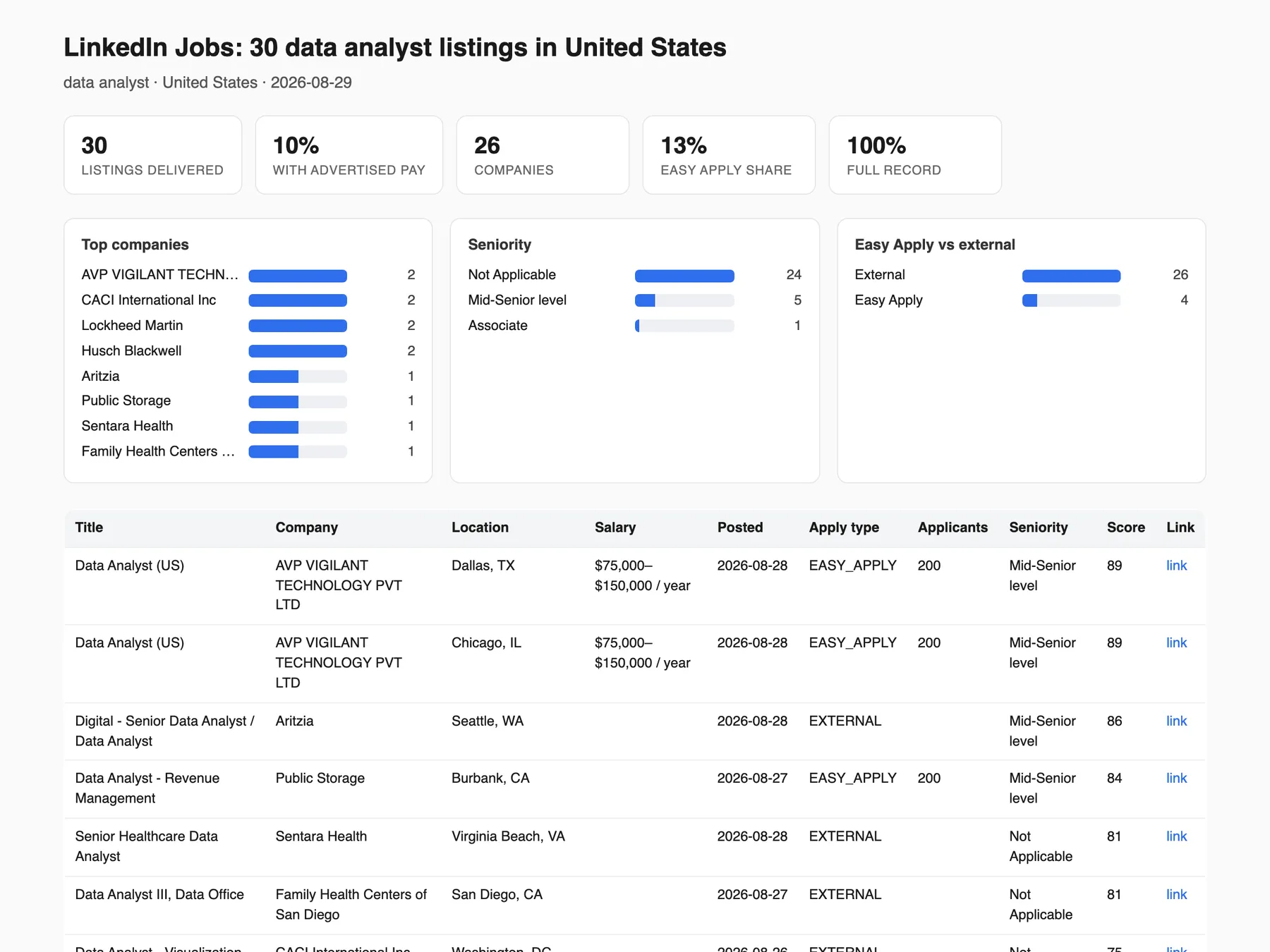
Every run comes with a report
Every run that delivers at least one listing also writes a REPORT record to its key-value
store: one self-contained HTML page with the headline numbers (listings delivered, share with
advertised pay, companies, Easy Apply share, full-record share, remote share when at least one row is
remote, and new-since-last-run on an onlyNewJobs schedule), bar charts of the top companies, the
seniority split and Easy Apply vs external, and the top rows in the Overview view's columns with
the same headers (Title, Company, Location, Salary, Posted, Apply type, Applicants, Seniority, Score,
Link; the logo is left out of the static table, and so is any column that is empty on every shown
row — on a run where no posting advertises pay there is no Salary column). Open it from the run's
Output tab → REPORT, or follow the
Report: link in the run's status message (RUN_SUMMARY.report_url for API callers).
No scripts, no external assets — safe to forward or screenshot as-is. The dataset stays the
source of truth: the report shows at most 100 rows and links back to the full dataset.
Related Flash Scrape actors
- Multi Job Board Scraper — LinkedIn, Indeed, Glassdoor + 9 more boards, deduplicated, with only-new job alerts
- Local Business Leads Scraper — any category, any city, verified emails, lead scores
- Remote Jobs Aggregator — 10 keyless remote boards in one deduplicated feed
- Creator Leads Scraper — TikTok, Instagram and YouTube creator emails in one run
- Shopify Store Scraper — any store's full public catalog, every variant, SKU and price, plus a store-intelligence row
- All Flash Scrape actors — same house rules everywhere: honest status messages, only-new monitoring, webhook alerts, and a run report on every run.


![LinkedIn Jobs API & Scraper [NO COOKIES] ✅ avatar](https://images.apifyusercontent.com/NKfvWcCujNjiTmEWKy2pbPm5S3PwlphrBPipDzNxcVk/rs:fill:76:76/cb:1/aHR0cHM6Ly9hcGlmeS1pbWFnZS11cGxvYWRzLXByb2QuczMudXMtZWFzdC0xLmFtYXpvbmF3cy5jb20vc0NDU2R3bm1LTUoxUTJzVG4tYWN0b3ItekI2UXhSRDZHalNpVGZ2MlYtdFBwamJhSFBxTi1TcGFyc2VfaW5zdHJ1bWVudGF0aW9uX19kaXJlY3RfbHlyaWNzX191cmJhbl9yZWFsaXNtX195b3V0aGZ1bF9y.webp)
