

Creator Leads Scraper: YouTube & TikTok Creator Email Finder
Pricing
from $1.60 / 1,000 creator leads
Creator Leads Scraper: YouTube & TikTok Creator Email Finder
Influencer email finder for creator outreach. YouTube influencer search by keyword: YouTube creator emails, YouTuber email, YouTube emails. TikTok emails, Instagram emails by handle. TikTok lead scraper, TikTok account scraper. Influencer emails, influencer contacts; influencer database built live.
Pricing
from $1.60 / 1,000 creator leads
Rating
5.0
(2)
Developer

Flash Scrape
Maintained by CommunityActor stats
5
Bookmarked
110
Total users
35
Monthly active users
2 days ago
Last modified
Categories
Share
Creator Leads Scraper is a pay-per-result creator email finder that scrapes TikTok, Instagram and YouTube profiles in a single run — one row per creator with 54 identical columns, an MX-verified contact email wherever the creator published one, no login and no API key, at $2 per 1,000 leads ($4 per 1,000 for Instagram leads from October 7, 2026). Type a niche keyword and it works as a YouTube influencer finder: every channel it finds has its About page and linked site read for a published address, so it doubles as a YouTuber email finder.
Try it: Find fitness YouTube creators with emails
Creator leads scraper and creator email finder — TikTok creator emails, YouTube creator emails and Instagram influencer leads in one run.
What your first run returns
The untouched form: YouTube keyword home barista plus the handle gymshark on TikTok and Instagram, 10 creators. Measured on a private test run on 2026-10-01:
| What | Result |
|---|---|
| Rows | 10: YouTube 8, TikTok 1, Instagram 1 |
| 4 of 10 (3 from the bio, 1 from the creator's own website) | |
| Website, country | 7 of 10 |
| Bio, followers, lead score | 10 of 10 (followers from 2,140 to 8.7 million, median 79,800) |
| YouTube shows a hidden business email | 6 of the 8 YouTube channels — YouTube keeps it behind its sign-in, so it is flagged in has_business_email, never read |
| Run time | 22 seconds |
| Cost | $0.02 at most (10 creators × $0.002, free-plan rate; from 2026-10-07 an Instagram creator is $0.004, so this run would be $0.022) |
A wider search, fitness coach on YouTube with 20 creators, returned 5 emails and 14 websites in 52 seconds the same day.
✨ What you get
- Ask for 30 leads, get 30 —
maxCreatorscounts creators delivered, not scraped: filters run before the count, and with an email filter set the run keeps discovering in waves (at most 3 extra) until the number you asked for is delivered or every candidate was tried. Filtered-out, blocked and nonexistent handles are never billed. - An MX-verified email wherever the creator published one —
email, its source and anemail_statuson every row, next to the bio, followers, website, six social URLs and a 0–100 lead score. - What it costs: $0.002 per creator lead delivered — $2 per 1,000 leads, 2,500 leads per $5 at the live free-plan rate (measured 2026-08-29; paid plans pay less — the Store Pricing tab is authoritative). Filtered-out, blocked and nonexistent handles are never billed. From October 7, 2026 Instagram creator leads bill at $0.004 ($4 per 1,000) because Instagram profiles need residential proxy; YouTube and TikTok leads stay at $0.002. Until then every lead is $0.002.
- Schedule it and skip every creator the watch already delivered — set
onlyNewCreators: trueand each scheduled run skips them: no second bill, and nomaxCreatorsslot spent on them. One run stops atmaxCreators, so a big search is worked through over several runs, together with creators who turn up in it later; a run that finds only creators the watch already delivered returns zero rows and charges nothing. How to set it up. - A blocked or empty platform is reported, never silently skipped — the run still succeeds, the status message names the platform and how many handles never made it into the dataset, and
RUN_SUMMARYcarries per-platform requested / returned / blocked / not-found counts. - Exports & alerts: every run downloads as CSV, JSON or Excel with five saved views, and
webhookUrlposts a digest to Slack, Discord or any webhook when new rows land.
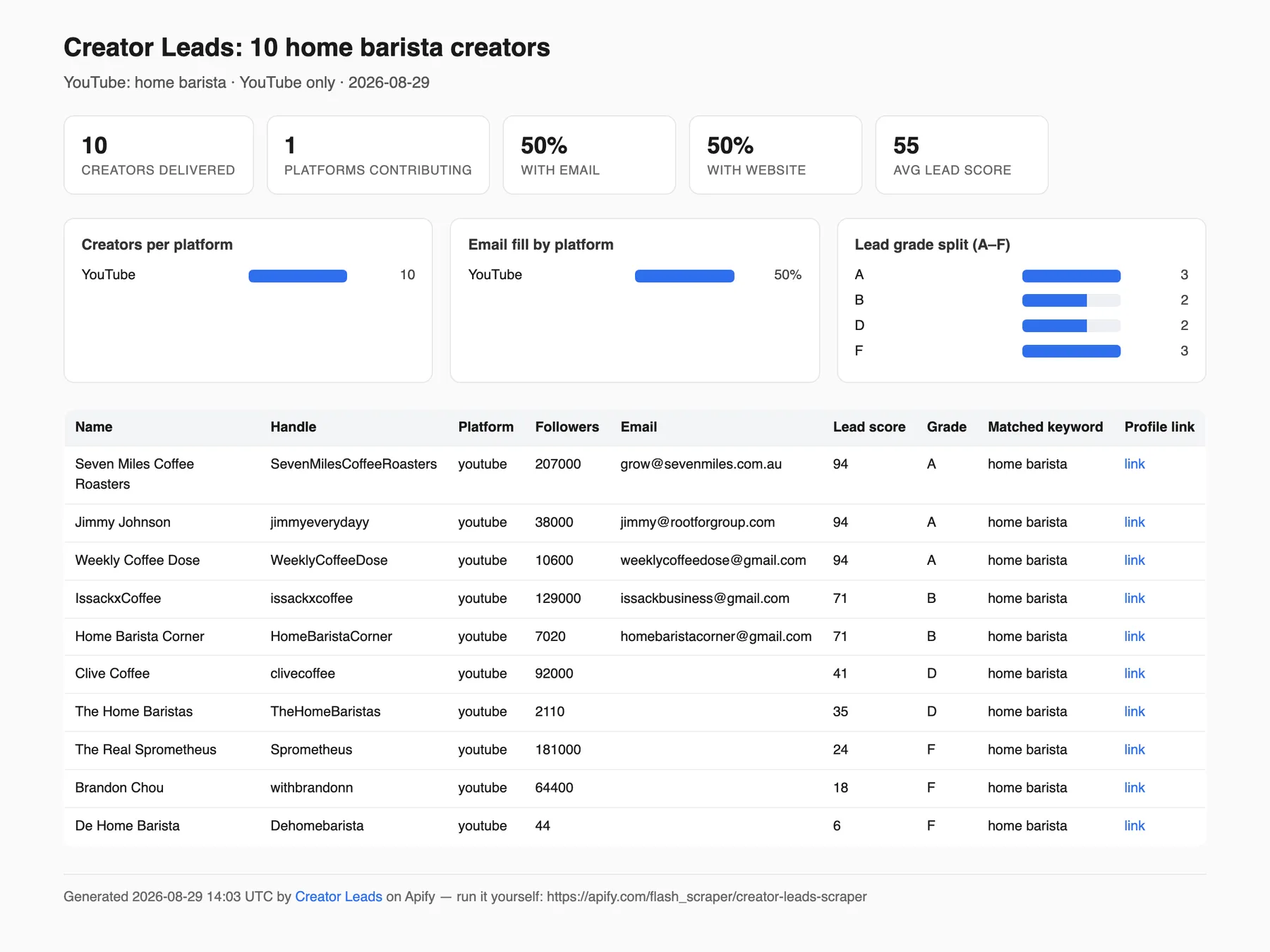
Paste and run: { "platforms": ["youtube"], "searchKeywords": ["home barista"], "maxCreators": 10 } — one row per creator, 54 identical columns (handle, bio, followers, email + source + email_status, website, six social URLs, lead score, the keyword that found it); full table below. Rows land wave by wave, so a run that hits its timeout keeps everything delivered before it.
What it does NOT do: no TikTok or Instagram keyword/hashtag search (handles only — YouTube is the discovery platform), no phone numbers, no engagement rate outside Instagram. Details in What this Actor does not do.
Every row has the same 54 columns whichever platform it came from, so a mixed list opens as one spreadsheet instead of three.
No login, no API key, no cookie, and no dependency on any other Actor. YouTube keyword search discovers new creators; TikTok and Instagram enrich the handles you supply.
Use it from AI agents (Claude, ChatGPT, Cursor) via Apify MCP
Influencer emails for agents: YouTube channels found by keyword, TikTok creators and Instagram influencers by handle, with followers, lead scores and the public creator emails they publish.
- Connect: add
https://mcp.apify.comas a custom connector in Claude or ChatGPT (Developer mode), or install the Apify plugin in Cursor; sign in with OAuth or sendAuthorization: Bearer <APIFY_TOKEN>. - Call:
call-actorwithflash_scraper/creator-leads-scraper, or load it as its own tool withhttps://mcp.apify.com?tools=flash_scraper/creator-leads-scraper. This input bills at most 10 rows, $0.02 at the free-plan rate of $0.002 per YouTube creator (Instagram: $0.004);callOptions.maxTotalChargeUsdcaps spend:
- Look up a list: paste
channels(YouTube),profiles(TikTok) orusernames(Instagram) and setmaxCreatorsto at least how many you paste; the default 10 stops at 10 creators and never looks up the rest:{"platforms": ["youtube"], "channels": ["@jameshoffmann", "@mkbhd", "@veritasium"], "maxCreators": 3}. WithonlyWithEmail: true, only rows that carry an email are delivered and billed. - Wait:
call-actorwaits at most 45 s and returns the run status and storage IDs, not rows; a 20-creator YouTube run took 52 s (2026-10-01), so pollget-actor-rununtil it ends. - Read:
get-dataset-itemswith the run'sdatasetId(20 rows by default; passlimit) returns rows with the same 54 columns; the best public email is inemail, graded inemail_status.get-key-value-store-recordwith keyRUN_SUMMARYgivesrows_billedand theper_platformcounts.
Tool name, agent payments and the smallest call: Use it from an AI agent (MCP).
Quick recipes for the three most-asked jobs
TikTok email finder by username — you have handles, you want whoever published a contact:
Emails come only from the bio or the creator's linked site — read the TikTok fill rates before expecting a full sheet.
YouTube channel email finder by keyword — discover channels in a niche and extract their About-page and website emails:
Find micro influencers with emails — keyword discovery plus a follower band:
crossPlatformDiscovery: true also pulls the Instagram and TikTok profiles those channels link to (keep all three platforms listed — the hop only scrapes platforms you selected), so one keyword builds a cross-platform micro-influencer contact list.
How do I find TikTok, Instagram and YouTube creator emails in one tool instead of three?
Run this one Actor with all three platforms listed and it returns a single merged table in which every creator has the same 54 columns, whichever platform they came from. Running three single-platform scrapers instead gives you three exports with three different column sets, three separate crawls over the same websites, and no way to see that a brand's TikTok row and its YouTube row are the same business. This Actor does the website crawl once for all three platforms and cross-links the result in also_on_platforms.
Measured in this Actor's 2026-08-09 verification runs, that shared crawl ended with an email on 3 of 9 TikTok creators, 1 of 5 Instagram creators and 6 of 9 YouTube channels on one keyword (4 of 8 on another), at $0.002 per delivered lead — filtered, blocked and nonexistent handles are never billed.
What it does, step by step
- Pick platforms and targets — a YouTube keyword, YouTube channels, TikTok usernames, Instagram usernames, or any mix.
- YouTube discovery first — each keyword returns roughly 30 channels, and every channel's About page is parsed for its description, links, counts, country, join date and verified badge.
- Optional cross-platform hop — the Instagram and TikTok profiles linked from those About pages are scraped too (off by default, because each one is an extra billed row).
- TikTok and Instagram profiles — fetched over HTTP/2. TikTok tries one Apify datacenter exit first, then the residential group; each Instagram handle tries up to three fresh datacenter exits first, then up to three fresh residential exits (every attempt a fresh session, so a burned exit IP is never retried). When Instagram's JSON endpoint answers its throttle page on an exit, the same exit is asked for the public profile page instead, so the row is still delivered — without the engagement columns.
- One shared email pass — every creator's linked site is visited (home,
/contact,/about; a Linktree-style page is resolved by brand-name match, and when the first link is a link-in-bio page or storefront the creator's own domain further down their published links is crawled too) for emails and social profiles. The crawl of a creator's own site stops as soon as it has found two addresses, so a thirdextra_emailsentry that only a deeper page carries is not fetched. A link-shortener (bit.ly,geni.us, …) is followed to its destination and only that destination's own site is crawled; if it does not resolve to a real site the creator is left with no email rather than somebody else's. - Verify, filter, score, cross-link — every best email is graded
deliverable/risky/undeliverable/unknownwith an MX lookup over DNS (see How emails are verified), your quality filters run before billing, every lead is scored 0–100 and graded A–F, and rows that resolve to the same creator on another platform are cross-linked. - Export — a sortable table with five saved views, downloadable as CSV, JSON or Excel.
What each platform can and cannot deliver
None of these three platforms publishes a contact email field. Every email in your export was either typed into a bio by the creator or found on the website they link to. Read the fill rates below before you buy.
| Capability | TikTok | YouTube | |
|---|---|---|---|
| Discovers new creators by keyword | No — you supply the handles | No — related accounts only, from a handle you already have | Yes, about 30 unique channels per keyword |
| Exact follower count | Yes, from statsV2 | Yes | No — YouTube rounds; rows carry followers_estimated: true |
| Engagement rate | No — empty video list on 28 of 28 profiles probed | Yes — avg likes, avg comments, rate and cadence from the ~12 recent posts | No — lifetime avg_views_per_video instead, plus posting cadence (last_post_at, posts_per_week, posts_sampled) from the relative ages of the 12 latest uploads, so those dates are approximate |
| Business email button | No such button | No such button | has_business_email says whether the "View email address" button is there (1 of 4 channels probed on 2026-09-06); the address behind it is not read |
| Business category and business flag | Yes | Business flag yes; category came back null even on large verified business accounts | No — YouTube publishes neither |
| Where an email can come from | Bio text or the linked website | Bio text or the linked website | About text, the channel's published links, or the linked website |
| Phone number | No | No | No |
| Proxy | Datacenter first, residential fallback | Datacenter first, residential fallback | None — fetched direct, 665 s proxied against 21 s direct for the same 8 channels |
| Measured email fill, 2026-08-09 verification runs | 3 of 9 creators | 1 of 5 creators | 6 of 9 channels on one keyword, 4 of 8 on another |
TikTok
- CAN: full public profile — nickname, bio, bio-link, exact follower / following / likes / video counts (from TikTok's precise
statsV2, not the rounded display numbers), verified badge, business-account flag and category, TikTok Shop seller flag, account creation date. - THIS ACTOR DOES NOT DISCOVER ON TIKTOK. Logged-out HTTP exposes no
/tag/data — probed 2026-08-09:/tag/<hashtag>,/search?q=and/search/user?q=render a rehydration blob containing zero usernames, and the search API answers 200 with an empty body without TikTok's signed parameters. Browser-based scrapers exist but are slower and pricier; this Actor stays HTTP-only. You must supply the handles. - NO ENGAGEMENT RATE. The profile payload's
itemListwas empty on 28 of 28 profiles probed and no play count appears anywhere in it, so a per-video engagement rate cannot be computed. Those columns are null on every TikTok row rather than fabricated. - NO PHONE. TikTok publishes none.
- Region-locked or withheld handles are not a block. When TikTok answers with its own statusCode
10231(the profile is withheld in the proxy exit's region) or10204(not available from this exit), the handle is filed underunavailable— named inRUN_SUMMARY.per_platform.tiktok.region_locked(and by name in the status message when nothing was delivered; a delivered run's status message counts them), never billed, and never counted as a refused exit, so no residential-proxy re-run is recommended for it. For a10231handle setproxyConfiguration.apifyProxyCountry(for exampleUS) and rerun. - Email fill: the standalone TikTok Actor measured an email in the bio itself on 1 of 28 profiles (3.6%) and a bio link present on 15 of 28 (54%). In this Actor's own verification runs on 2026-08-09, 3 of 9 distinct TikTok creators ended up with an email after enrichment (an earlier build-test pass measured 2 of 7). A creator who links their own domain usually yields an address; a Linktree or a link-shortener usually does not.
- Datacenter first, residential fallback: each handle tries one Apify datacenter exit first and falls back to the RESIDENTIAL group on the remaining attempts, so a handle the datacenter pool serves costs no residential bytes. Measured 2026-09-02 off-platform (a developer machine through proxy.apify.com, a fresh session per attempt): 22 of 24 TikTok fetches returned the full profile blob on the first datacenter attempt. The on-platform figure is not measured yet, which is why
RUN_SUMMARY.proxy_servedrecords which tier delivered each row. On the previous all-residential six-attempt ladder the standalone TikTok Actor measured 34 of 34 handles returning data through Apify Proxy RESIDENTIAL with a fresh session per attempt (1.4 attempts average), against 3 of 15 from one un-proxied IP once it went hot. TikTok answers a hot IP with an empty JavaScript shell and HTTP 200, not an error — which is why every retry rotates the exit IP instead of just trying again. (In this Actor's own verification runs from a fresh un-proxied laptop IP, 15 of 16 handles still came back, most of them on the second to fourth attempt, and 1 was refused on all six attempts of that ladder. An earlier build-test pass measured 8 of 9.) SetsocialProxyModetoresidential_onlyif you ever see the datacenter exit being refused.
- CAN: the public profile record — bio, follower / following / post counts, verified, private and business flags, every link in bio with Instagram's
l.instagram.comwrapper resolved, and the only engagement metrics in this Actor when Instagram's JSON endpoint answers: average likes, average comments, engagement rate and posting cadence computed from the ~12 recent posts the public endpoint returns.posts_sampledreports that denominator on every row; a row served from the profile-page fallback carries followers, following, bio, links and flags but null engagement columns andposts_sampled= 0 — the status message, the run report andRUN_SUMMARY.per_platform.instagram.page_fallbackname those handles. - CANNOT DISCOVER by keyword or hashtag. The only expansion is Instagram's own related-accounts list (
discoverRelated), which starts from a handle you already have. - NO BUSINESS EMAIL.
business_email,business_phone_numberandcategorycame back None even on large verified business accounts (checked on@gymshark). The only email sources on Instagram are the bio text and the linked website — the same two sources as the other platforms. There is no phone column in this Actor for the same reason. - PARTIAL DELIVERY AT VOLUME IS NORMAL, not a fault. Instagram rate-limits shared proxy pools hard, and which tier it refuses changes from night to night. Measured 2026-09-03 off-platform: Instagram's JSON endpoint refused every residential exit for 12 of 12 handles while the public profile page served 16 of 16 fetches on the same exits, so this Actor falls back to the page; a handle refused on both paths on every exit is reported by name and never billed. Ask for a handful of handles per run, expect some to be refused, and know that a refused handle is never billed.
- Instagram also answers HTTP 429 to every HTTP/1.1 request; this Actor speaks HTTP/2 (0/6 versus 5/6 through the same proxy in the same minute).
- Instagram answers HTTP 400 for some specific accounts, reproducible per account and never cleared by retrying: a broken business-category asset on their side (
has been deleted), or a per-account login gate (Please make sure you are logged in) that Instagram applies to a growing subset of public profiles even with no session in play. Either way the same exit is asked for the public profile page, so the row is still delivered (without the engagement columns); a handle refused on both paths on every exit is reported by name underupstream_brokenand never billed — 3 of the 16 handles in this Actor's verification runs hit the 400. - Email fill: in this Actor's own verification runs on 2026-08-09, 1 of 5 distinct Instagram creators ended up with an email after enrichment (an earlier build-test pass measured 2 of 5). Both are tiny samples; treat them as an order of magnitude, not a guarantee.
YouTube
- The only platform here that discovers. A keyword search returns about 30 unique channels — measured 28, 27 and 36 for three keywords on 2026-08-09, combining YouTube's plain results page with its channel-filtered one. More volume comes from more keywords, not from a bigger number in the box;
maxResultsis capped at 40 for that reason. Channels that recur across a keyword's result pages (several videos in the results, or listed by more than one keyword) are fetched first, so under a creator cap the recurring channels are the ones delivered rather than whichever YouTube rendered first;matched_keywordrecords which keyword(s) found each row andkeyword_in_biowhether one of your keywords appears in its About text. - CAN: About-page description, the channel's published links (website plus socials), subscriber count, exact total views, exact video count — and from those two exact numbers,
avg_views_per_video, the channel's lifetime average views per video (e.g. 433,406,980 views over 2,599 videos = 166,759), country, join date, channel id, verified badge. The same page is a Home-tab render carrying the 12 latest uploads with their relative ages ("5 days ago", "2 months ago"), which filllast_post_at,posts_per_weekandposts_sampledon YouTube rows — approximate (a month counts as 30 days, a year as 365, andlast_post_atis a date, not a timestamp), with no extra request; a channel whose Home tab has no Videos shelf getslast_post_atonly. - The email behind YouTube's "View email address" button is NOT read. That button needs a Google login, a reCAPTCHA and carries a small daily reveal quota — this Actor stays keyless and logged-out. A YouTube email comes from the About text, the channel's published links and the linked site instead, which is where the fill rates below were measured. What the row does tell you is whether the button exists:
has_business_emailistruewhen the channel's About page renders it (1 of 4 channels probed on 2026-09-06 did) andfalsewhen it does not — a channel with the button and no public email is one to reach through YouTube itself. - SUBSCRIBER COUNTS ARE ROUNDED by YouTube itself ("91.6K", "4.37M"). Every YouTube row carries
followers_estimated: trueso you can see which numbers are exact. Total views and video counts are exact. - NO CATEGORY and NO BUSINESS FLAG. YouTube publishes neither, so
category,is_businessandis_shop_sellerare null on YouTube rows — and the lead score is normalised per platform so YouTube leads are not structurally ranked below TikTok ones for a signal YouTube does not emit.has_business_email(the "View email address" button) is a different, weaker signal and is deliberately not folded intois_businessor the score. - Link and email fill varies a lot by keyword, so here are two independent samples taken on 2026-08-09, one from the build pass and one from the verification pass that followed it. Sample A (9 channels, keyword
home baristaplus one named channel): 5 of 9 had an email in the About text, rising to 6 of 9 after website enrichment; 4 of 9 published a non-social website; 7 of 9 an Instagram link; 3 of 9 a TikTok link. Sample B, re-measured independently (8 channels, keywordvegan meal prepplus two named channels): 3 of 8 in the About text, 4 of 8 after enrichment; 5 of 8 published a website; 6 of 8 an Instagram link; 3 of 8 a TikTok link. A broad keyword returns small channels that publish nothing — expect the low end. Reading the About page rather than just the channel description is what makes those link rates possible, and it is what makes cross-platform discovery work at all. - YouTube answered every About-page request it made un-proxied from a laptop — 30 of 30 across five build-test runs and 78 of 78 across eight verification runs on 2026-08-09. On-platform the Actor fetches YouTube direct from the container as well (measured: the same 8 channels took 665 s through Apify Proxy and 21 s direct, identical rows), so a YouTube-heavy run spends no proxy traffic at all; set
proxyConfigurationonly if your own network requires it.
Across all three
- One row per creator ACCOUNT. A brand that runs TikTok, Instagram and YouTube comes back as three rows and is billed as three leads, because the follower counts, the bios and often the emails differ per platform and collapsing them would destroy data you paid for. Rows that resolve to the same email or the same domain are cross-linked with
also_on_platformsso you can group them yourself in one spreadsheet step. also_on_platformsfills on single-platform runs too: it also names every platform the creator's own links point at (their published bio/About links, plus what the website crawl found), so a YouTube-only run still tells you which channels have an Instagram, a TikTok, a Facebook page, an X account or a LinkedIn — without paying for those platforms' rows.- Every row carries
discovered_via, so you can always see whether a lead came from your input, from a YouTube keyword, from a link on a YouTube channel, or from Instagram's related accounts. - Filters run before billing. Rows removed by your filters, handles that do not exist and handles that were blocked are never charged, and a run that delivers zero rows charges nothing.
- No phone column exists anywhere in the output, because none of the three platforms publishes one.
- The AI cold-opener is optional, runs on your own OpenAI or Anthropic key, is used once per run and is never stored.
What data you get
One row per creator, best leads first within each delivery wave, with the same 54 columns on every row. A column a platform cannot supply is null — never missing, never an empty string — so your CSV has stable headers whichever platforms you ran. The Platforms column below says honestly which platforms can fill each column — read it before filtering on one.
| Column | What it is | Platforms |
|---|---|---|
platform | tiktok, instagram or youtube | all |
handle, name, profile_url | Username, display name, direct profile link | all |
user_id, avatar_url | Platform user/channel id and profile picture | all |
bio | Bio text (TikTok signature, Instagram biography, YouTube About text) | all |
category | The platform's own business category | TikTok, Instagram |
country | Channel country | YouTube |
account_created_at | Account creation / channel join date | TikTok, YouTube |
followers | Followers or subscribers — the column every follower filter uses | all |
followers_estimated | true when the platform rounds the number (YouTube always does) | all |
following, posts_count | Following count; posts on Instagram, videos on TikTok/YouTube | see note |
total_likes | Lifetime likes | TikTok |
total_views | Lifetime channel views (exact) | YouTube |
avg_views_per_video | Lifetime average views per video: total_views / posts_count, both exact. Derived, so it is appended after the 48 builder columns and never shifts your existing header mapping | YouTube |
avg_likes, avg_comments, engagement_rate_pct | Engagement over the ~12 recent posts (null on profile-page fallback rows) | |
posts_per_week, posts_sampled, last_post_at | Posting cadence and the sample size behind it. Instagram: exact, from the ~12 recent posts (null / 0 on profile-page fallback rows). YouTube: from the relative ages of the 12 latest uploads on the channel page, so approximate — last_post_at is a date resolved to the day, week or month YouTube shows, and posts_per_week needs at least three dated uploads spanning a week | Instagram + YouTube |
verified, is_private, is_business, is_shop_seller | Account-type flags; is_shop_seller means a TikTok Shop seller | see note |
email, email_source, extra_emails, email_status, has_email | Best address, whether it came from bio or website, extras, and the verification grade of the best address: deliverable / risky / undeliverable / unknown when an email exists, missing when none does (see How emails are verified). has_email is presence only | all |
website, domain, has_website | The first non-social link the creator published, and its bare domain | all |
other_links | Every other published link (Patreon, Reddit, a second site) | all |
instagram_url, tiktok_url, youtube_url, facebook_url, twitter_url, linkedin_url | A complete social card, merged from the profile's own links, the crawled website, and the link-in-bio page behind it | all |
lead_score, lead_grade, lead_tier | 0–100 score, A–F grade, hot/warm/cold | all |
also_on_platforms | Every other platform this creator was found on: the platforms their own published/crawled links point at (the six social columns), plus any rows in this run that resolve to the same email or domain | all |
discovered_via | input, youtube_search, youtube_link or instagram_related | all |
icebreaker | The AI cold-opener, when writeOpeners is on | all |
scraped_at | Timestamp of the scrape | all |
matched_keyword | The searchKeywords entry (or entries, comma-joined) whose search returned this channel; null on rows you supplied by handle and on TikTok/Instagram rows. Appended derived column | YouTube |
keyword_in_bio | true when one of your search keywords appears in the row's bio text, false when none does, null when the run searched no keyword. Appended derived column | all |
has_business_email | true when the channel's About page renders YouTube's "View email address" button, false when it does not (the address behind it is never read — see the FAQ); null on TikTok/Instagram rows, which have no such button. Appended derived column | YouTube |
bio_mentions | The @handles written in the bio, lower-cased, deduped, at most 10, comma-separated; null when none. Appended derived column | all |
bio_hashtags | The #tags written in the bio, lower-cased, deduped, at most 10, comma-separated; null when none. Appended derived column, last in the CSV | all |
following is TikTok + Instagram. posts_count is all three (videos on TikTok/YouTube, posts on Instagram). is_private and is_business are TikTok + Instagram; is_shop_seller is TikTok only.
How to read the output
The Output tab opens on Overview; the other views are one click away in the same dropdown. Every view is a column selection over the same rows — nothing is hidden from the export.
- Overview — the first look: avatar, Name, Handle, Platform, Followers, Engagement (Instagram only), Email, Email status, Lead score, Grade, Matched keyword (YouTube keyword rows), Profile link. Best-scored first within each delivery wave.
- Email-ready — only what a cold-email campaign needs: Email, Email source (bio or website), Other emails, Email status, Website, Domain, Lead score, the AI opener when
writeOpenersis on, Profile link. - By platform — the per-platform detail and the columns only some platforms can fill (Total views, Avg views per video, Country and the Business email button are YouTube-only; Engagement is Instagram-only; Posts sampled and Last post are Instagram + YouTube, approximate on YouTube; Total likes and Shop seller are TikTok-only; Category and Business are TikTok + Instagram), plus Found via and Also on.
- Social card — every social profile found for the creator: Instagram, TikTok, YouTube, Facebook, X / Twitter, LinkedIn, Other links.
- All columns — all 54 columns, labeled, in CSV order.
Derived columns (computed by the Actor, appended after the 48 builder columns so an existing header-mapped import never shifts): avg_views_per_video (YouTube: exact lifetime views ÷ videos), matched_keyword (the search keyword that found a YouTube channel), keyword_in_bio (whether one of your keywords appears in the bio), has_business_email (YouTube: whether the "View email address" button is rendered), bio_mentions and bio_hashtags (the @handles and #tags in the bio, lower-cased, at most 10 each). Followers are numbers (YouTube rounds them — see followers_estimated), verified and the other flags are true/false/null, and every date column (account_created_at, last_post_at, scraped_at) is an ISO 8601 string.
Export just one view: the sure way is the API — add ?view=email_ready (or overview, by_platform, socials, all_columns) to the dataset items URL, e.g. https://api.apify.com/v2/datasets/<datasetId>/items?view=email_ready&format=csv; the view parameter applies that view's column selection to the download. In Console, select the view, then Export — Apify documents views as an Output-tab display setting, so if the file you get still has all 54 columns, pick the columns in the export dialog or use the API URL above.
How emails are verified
Every row's best email is graded by four checks, all over DNS and none over SMTP, and the grade lands in the email_status column as deliverable / risky / undeliverable / unknown (or missing when the row has no email). The four checks are:
- Syntax — the address has to be a valid mailbox shape.
- Mail server — an MX record on the domain, or the implicit-MX A record of RFC 5321, looked up over DNS-over-HTTPS (
dns.google, falling back tocloudflare-dns.com). - Role address —
info@,hello@,press@and the like graderisky. - Disposable domain — a bundled list of about 8,000 temp-mail providers grades
undeliverable.
No mailbox is ever probed. That is what keeps verification proxy-free, fast and included in the price, and it is also what it cannot see: an address on a catch-all domain, or a mailbox that was deleted while the domain kept its mail servers, can still grade deliverable. Read deliverable as "the domain accepts mail and the address is not a known-bad shape", and warm a new list with a soft first send.
When the MX lookup fails or does not fit the run's budget the row grades unknown rather than undeliverable, so a busy resolver never deletes a good lead. The status message says how many addresses that affected.
What it costs you: nothing extra. Verification never changes the row count or the bill — only onlyVerifiedEmail does, and like every filter it runs before billing. Its budget is bounded on purpose: one lookup per domain per run (cached across discovery waves), at most 2 seconds per domain, at most 600 lookups per run, and never inside the last 30 seconds of the run's time budget. Only the best address is graded; extra_emails are delivered unverified. The lead score does not yet weight email_status — an undeliverable address still earns the email points, so sort or filter on the column when deliverability matters. RUN_SUMMARY.email_verification carries the per-run counts by status and reason and the DNS lookups spent.
How the lead score works
lead_score is 0–100, computed as points earned divided by the platform's maximum — TikTok 100, Instagram 95, YouTube 85 — so a YouTube row is not ranked below a TikTok one for a business flag YouTube never publishes. An email is worth 45 points, a website 20, a 5k–500k follower band 15. Grades: A at 80, B 65, C 50, D 35, else F; tiers hot at 75, warm at 50.
Raw points, identical on every platform:
| Signal | Points |
|---|---|
| Email found | 45 |
| Website / link found | 20 |
| Business or commerce account | 10 |
| TikTok Shop seller | 5 |
| Verified | 5 |
| Follower band: 5k–500k | 15 |
| Follower band: 1k–5k or 500k–2M | 10 |
| Follower band: any other non-zero | 5 |
The three platforms cannot earn the same maximum, because YouTube publishes no business flag and no shop flag and Instagram no shop flag:
| Platform | Maximum earnable |
|---|---|
| TikTok | 100 |
| 95 | |
| YouTube | 85 |
lead_score = round(earned / platform_maximum * 100). Without that normalisation a YouTube row could never exceed 85, and anyone sorting a mixed sheet by score would see every YouTube lead below every comparable TikTok lead for a signal YouTube simply does not publish. Grades: A ≥ 80, B ≥ 65, C ≥ 50, D ≥ 35, else F. Tiers: hot ≥ 75, warm ≥ 50, else cold.
Input
| Field | Type | Description |
|---|---|---|
platforms | array | Which platforms to pull from. Default all three. A platform left out is skipped even if its handle list is filled, and the log names the ignored input. |
searchKeywords | array | YouTube keyword search — the only discovery path. One per line. Channels recurring across a keyword's result pages, or found by several keywords, are fetched first; matched_keyword says which keyword found each row. |
channels | array | Specific YouTube channels: @handles, bare UC… channel ids (routed to /channel/<id>) or channel URLs. A handle that answers HTTP 404 is reported as not found in the status message and never billed. |
profiles | array | TikTok creators: usernames, @handles or profile URLs. |
usernames | array | Instagram creators: usernames, @handles or profile URLs. |
crossPlatformDiscovery | boolean | Also scrape the Instagram/TikTok profiles linked on the YouTube channels found. Default false — it adds billed rows. |
discoverRelated | boolean | Follow Instagram's related-accounts list. Default false. |
maxRelatedPerProfile | integer | Related accounts queued per Instagram profile. Default 10. |
maxCreators | integer | How many creators you want delivered across all platforms. Default 10 (cheap first run), max 300. Creators removed by minFollowers / maxFollowers / onlyVerified / skipPrivate / onlyWithWebsite, and creators an onlyNewCreators watch already delivered, do not use up a slot. With onlyWithEmail, onlyVerifiedEmail, minScore or emailDomains set, the run keeps discovering in extra waves until this many leads are delivered (see Ask for 30 leads, get 30). Handles you supply are reserved ahead of YouTube keyword discovery. With a filter or discoverRelated set, a run-wide fetch cap of 4 × maxCreators bounds how many TikTok/Instagram creators are fetched (kept or filtered) — your supplied handles count inside it, so a filtered list longer than the cap is cut there and the status message says so; raise maxCreators (up to 300) to fetch more. Without either there is no fetch cap, but a run still stops at maxCreators creators and never looks up the rest of a longer list: set maxCreators to at least how many channels and handles you paste. YouTube discovery is not counted (fetched direct, at most 40 channels per keyword). One keyword finds about 30 channels (see maxResults for how many of them a run uses); ask for more creators than your keywords supply and the run delivers what they supplied. |
maxResults | integer | YouTube channels per keyword on the run's first search. Default 20, max 40. A later pass searches at 40 instead: each extra wave of a run with onlyWithEmail, onlyVerifiedEmail, minScore or emailDomains set, and the one refill pass a run with pasted TikTok/Instagram handles can make when it comes up short. On a run without those filters, crossPlatformDiscovery, pasted TikTok/Instagram handles or proxy URLs of your own, with maxResults at 20 or more, when maxCreators is more than maxResults × keywords and at least 30 minutes of the run's time budget are left when YouTube is searched, each keyword keeps every channel on the result page(s) it already fetched, up to 40, with no extra search request. Those extra channels are fetched after all the others, and only while the time budget left still covers the website crawl, email check and AI openers of every creator already collected, so on a slow run or a large maxCreators some or all of them are left out. The time budget is what is left of the run timeout, less a reserve of up to 90 seconds kept for the final push: a run on the default 1-hour timeout starts with about 58 minutes, and a timeout of 31 minutes or less never leaves 30. The second (channel-filtered) page is fetched only when the first lists fewer than maxResults channels. A maxResults you set below 20 is never extended this way. A run with pasted TikTok/Instagram handles, crossPlatformDiscovery on, your own proxy URLs or less than 30 minutes of time budget left is not extended by this keep; its first YouTube search is unchanged. A TikTok or Instagram handle counts as pasted whenever its platform is selected, including the example handle gymshark the Console form pre-fills in both lists (an API call without those fields has none): clear both lists, or select only YouTube, for a keyword-only run. |
delaySeconds | integer | Pause between TikTok/Instagram profiles. Default 0 — every attempt already rotates to a fresh proxy session, so a delay only adds run time; YouTube keeps a small fixed spacing of its own. Set it above 0 only to slow a long list down deliberately. |
socialProxyMode | string | How TikTok/Instagram pick an exit. datacenter_first (default): TikTok tries one Apify datacenter exit first and falls back to the proxy group (RESIDENTIAL) on the remaining attempts; Instagram tries three datacenter exits, then three RESIDENTIAL exits — your per-lead price is the same either way; a refused datacenter exit adds a few seconds to that handle. residential_only skips the datacenter rungs. Ignored when you supply your own proxy URLs under proxyConfiguration; a run with apifyProxyCountry set is residential-only. |
minFollowers / maxFollowers | integer | Follower (or subscriber) range. 0 = no filter. |
onlyVerified | boolean | Verified accounts only. Works on all three platforms. |
onlyBusiness | boolean | Business/commerce accounts only. YouTube rows are kept unfiltered — YouTube publishes no such flag — and the log says how many. |
skipPrivate | boolean | Drop private accounts (TikTok, Instagram). |
onlyWithWebsite | boolean | Drop creators with no external link. |
onlyWithEmail | boolean | Drop creators with no email found. Read the fill rates above first. |
onlyVerifiedEmail | boolean | Keep only creators whose best email graded deliverable or risky in the MX check — drops creators with no email and undeliverable addresses (no mail server, disposable domain, bad syntax) before billing. An unknown grade (the lookup could not complete) is kept, so a resolver outage never deletes a good lead; filter the email_status column yourself for the strict set. Judged after the website crawl, so it turns on wave mode like onlyWithEmail. Default false. |
emailDomains | array | Keep only creators whose best email or any extra_emails entry ends with one of these domains, case-insensitive — e.g. ["@gmail.com"] for personal inboxes, ["@yourbrand.com"] for a brand. gmail.com and @Gmail.com both mean @gmail.com. Judged after the website crawl and before billing (like onlyWithEmail), so a matching address found on the linked site counts, and the run keeps discovering in waves until maxCreators matching leads are delivered. Empty = no filtering. |
minScore | integer | Keep only leads at or above this score. |
enrichEmails | boolean | Visit each linked site for emails and socials. Default true — the main email source on all three platforms. |
writeOpeners | boolean | Write an AI cold-opener per lead. Default false. |
llmProvider, llmApiKey, llmModel | string | Your own OpenAI/Anthropic key, used once per run and never stored. |
proxyConfiguration | object | For TikTok and Instagram the Apify datacenter pool is tried first on each handle and this group (RESIDENTIAL by default) is the fallback — keep RESIDENTIAL here so a handle the datacenter pool cannot serve is still delivered. YouTube is fetched direct with no proxy, so a YouTube-heavy run spends no proxy traffic at all. See socialProxyMode to change the strategy. |
Saved tasks from the three single-platform Actors keep working. maxProfiles, minSubscribers, maxSubscribers, onlyWithContact, onlyWithLink, onlyCommerce, onlyBusinessAccounts and keywords are all accepted as aliases, and the run log names each one it used. A legacy name wins over the modern one whenever the modern one is absent or still on its default, so pasting an old input never silently drops your cap or your filters and never bills you for the rows they should have removed. alsoEmitPosts, maxPostsPerProfile, hashtags and searchQueries are retired: this Actor delivers exactly one row per creator, and it does not do TikTok hashtag/keyword discovery (see the FAQ).
Example input:
JSON output sample
A real row from a run on 2026-08-09, re-rendered with the current column set and trimmed to the filled columns (the other columns are present and null; also_on_platforms and avg_views_per_video are computed from the row's own links and exact counts, matched_keyword and keyword_in_bio from the keyword that found it; email_status is the grade the MX check gave grow@sevenmiles.com.au on 2026-08-29 — the domain's mail is on Microsoft 365 and grow is not a role alias). The three columns added on 2026-09-07 are not shown: bio_mentions and bio_hashtags are null for this bio, which carries no @handle or #tag, and has_business_email was not read when this row was scraped, so it is not invented here:
TikTok email finder and Instagram email finder
Give it handles and it works as a TikTok email finder and an Instagram email finder: each profile is read for a published contact address, the linked website is crawled once, and the address is MX-verified before it reaches your sheet. Discovery is YouTube-only, so for TikTok and Instagram you supply the usernames or let crossPlatformDiscovery follow the links from YouTube About pages. That second path is how one keyword becomes a UGC creator finder across all three platforms.
Ask for 30 leads, get 30
maxCreators counts creators delivered, not scraped. The cheap filters run inside the fetch loops, so a creator they remove never takes a slot. onlyWithEmail, onlyVerifiedEmail, minScore and emailDomains can only be judged after the website crawl, so with any of them set the run works in waves: the first pass fetches maxCreators candidates, enriches and filters them, and if fewer than you asked for survive, a further wave fetches candidates the run has not tried yet (YouTube re-searches every keyword at the 40-channel ceiling and skips channels already fetched; TikTok and Instagram continue with the untried handles and related accounts), enriches only the new rows, and appends the ones that pass. A run of {"searchKeywords": ["vegan meal prep"], "maxCreators": 30, "onlyWithEmail": true} that used to end at ~12 now keeps going until 30 are delivered or every channel the keyword found was tried. One keyword finds about 30 channels and only some carry an email, so list several keywords when you need 30 email leads.
Each wave is delivered as soon as it passes the filters (30-day run stats read on 2026-08-29: 2 TIMED-OUT and 2 ABORTED of 51 runs; before this change a run killed before its single final push delivered nothing): its rows are pushed to the dataset, billed, and only then remembered by an onlyNewCreators watch, before the next wave starts. A run that reaches its timeout in wave 3 therefore ends with waves 1 and 2 in the dataset and billed exactly once, instead of zero rows and a TIMED-OUT status. "Best leads first" holds within a wave; a later wave appends below the earlier one. A run the platform restarts mid-way reads its own DELIVERY_STATE record and never pushes or bills a row twice.
Three rails keep the cost of a low email rate bounded: at most 3 extra waves, never more than 4 × maxCreators creators scraped in the whole run, and the run's own time budget. RUN_SUMMARY records the wave count and the creators scraped per wave. You are still billed only for the rows delivered, never for the candidates a wave discarded. Without onlyWithEmail / onlyVerifiedEmail / minScore / emailDomains exactly one pass runs — plus at most one refill pass when a handle you supplied produced no row and a keyword or channel was given, so YouTube discovery can fill the slot that handle left empty.
What happens when one platform is blocked or comes back empty?
The run still succeeds, and the status message names the blocked platform and how many handles never made it into the dataset. A merged run must never hide a failure behind a short list.
Sized against real traffic: of 51 runs in the 30 days read on 2026-08-29, 2 timed out and 2 were aborted, and since wave-by-wave delivery every wave that passed its filters is already in the dataset when that happens. On 2026-09-03 Instagram's JSON endpoint refused 12 of 12 handles on residential exits while the public profile page served 16 of 16 — the fallback this section describes.
- If one platform is blocked and another delivered rows, the run succeeds and the status message names the blocked platform and how many handles never made it into the dataset.
- If zero rows were delivered and a platform was blocked or throttled, the run succeeds with a status message that names the blocked platform and why rather than handing you an empty spreadsheet that reads as "there was nothing to find" (a red run would misreport an upstream refusal as a crash).
- If the run's time budget runs low mid-platform, fetching stops there and everything already collected is delivered — and only that is billed. The status message and
RUN_SUMMARY.stopped_early_for_timename the platform that was cut short. Every earlier discovery wave was already pushed and billed when it passed the filters, so a run that hits its hard timeout keeps what it delivered before (see Ask for 30 leads, get 30). - If zero rows came from your filters or from handles that do not exist, that is a legitimate empty result: the run succeeds, says exactly which filter removed how many, and charges nothing. A YouTube handle that answers HTTP 404 is counted as not found ("check the handle or paste the /channel/UC… URL"), separately from channels YouTube failed to serve.
- Every run writes a
RUN_SUMMARYrecord to the key-value store with per-platform requested / returned / blocked / not-found counts, the filters that ran, the per-platform email fill, and the number of rows billed.
Use it from an AI agent (MCP)
The Apify MCP server exposes this Actor to Claude, ChatGPT, Cursor or any MCP client as a tool. Point the client at https://mcp.apify.com?tools=flash_scraper/creator-leads-scraper — the tools parameter takes the Actor's full name — and the tool is named after that full name with the / rewritten: flash_scraper--creator-leads-scraper, the same pattern as apify--rag-web-browser in Apify's MCP docs (checked 2026-10-17). Without tools, an agent reaches it through the default call-actor tool after fetch-actor-details. The tool's input is this Actor's input, unchanged.
A minimal call that returns rows in well under a minute and costs under $0.05 — 5 rows × $0.002 = $0.01 at the live rate read from the Actor's pricing on 2026-08-29 (the Store Pricing tab is authoritative), and the same input run locally twice on 2026-08-29 delivered 5 rows in 9 and 14 seconds, 2 of them with a deliverable email each time:
Every delivered row still carries its verified email_status. Per Apify's docs, an agent can pay without an Apify API token through Skyfire (connect to https://mcp.apify.com?payment=skyfire; pay-per-event Actors only, which this one is), or buy a prepaid Apify token through AGI with an x402 or MPP payment and send it as the Bearer token. The Store API lists this Actor with isWhiteListedForAgenticPayments: true (checked 2026-10-17).
Outside MCP, the same input runs from code (Python apify-client; the same JSON works in the Console, the REST API and n8n/Make/Zapier):
Trigger runs and pipe results into Make, n8n or Zapier to push new leads into your CRM, or sync the dataset to Google Sheets so your team works from a live list.
How do I run it on a schedule and skip creators it already delivered?
Schedule the Actor in Apify Console and set onlyNewCreators: true. That turns a one-off pull into a watch: every run skips the creators the watch has already delivered (a skipped creator does not use a maxCreators slot) and delivers up to maxCreators of the rest.
Rows are remembered by the watch only after they are pushed and billed — wave by wave, a change sized against the 51 runs of the 30 days read on 2026-08-29 (2 timed out, 2 aborted) — and the memory forgets a creator the watch has not delivered or refreshed for 90 days.
- The first run of a watch is the baseline: it delivers up to
maxCreatorsof what it finds. A run withonlyNewCreatorsoff remembers nothing, so switch it on from the first run you want remembered. - Every later run of the watch delivers - and bills - only creators the watch has not delivered yet. A run stops at
maxCreatorsand does not remember the creators it found but did not deliver, so a later run that finds them again delivers them, along with creators who turn up in the search later. A run that finds only creators the watch already delivered returns zero rows and charges nothing. - Memory is per combination of platforms, search terms / handles and follower bounds (
minFollowers/maxFollowers, plusemailDomainsandonlyVerifiedEmailwhen set), kept in a named key-value store in your own account;maxCreatorsis not part of it, so changing it keeps the memory, while changing any of the others starts a new, empty watch whose first run delivers - and bills - its baseline again. Identity is(platform, handle)- the same pair the run already dedupes on. A creator a later run skips as already delivered normally has its stamp refreshed; one the watch has not delivered or refreshed for 90 days is forgotten and can be delivered again. - A watch over pasted handles alone runs dry once every handle has been delivered; YouTube keyword search is what keeps finding creators.
Useful for working a niche: keep a weekly YouTube keyword watch running and each run brings only channels from that search the watch has not delivered yet, already enriched with emails and socials.
How do I get a Slack or Discord message when new creators land?
Set webhookUrl and every run that delivers at least one creator POSTs a digest there. A Slack incoming webhook (hooks.slack.com/...) gets a text message; a Discord webhook gets a message; any other URL (n8n / Make / Zapier catch hook, your own endpoint) gets JSON: {actor, delivered, run_url, dataset_url, rows[:20], text}. Quiet runs send nothing. Pair it with onlyNewCreators on a schedule and the Actor is an alert service on its own. Delivery is best-effort: a failed webhook is reported in the run's status message and never fails the run.
Every run comes with a report
Every run that delivers at least one creator also writes a REPORT record: a single self-contained HTML page with the headline numbers (creators, % with email, average lead score, platforms), three bar charts (creators per platform, email fill by platform, lead-grade split) and the top 100 rows, plus the same "missing from this dataset" notes the status message carries. Find it in the run's Output tab → REPORT (key-value store), or follow the Report: link in the run's status message. It has no scripts, external assets or tracking, so it is safe to forward, attach to an email or screenshot for a client. The dataset stays the source of truth: the report is a view of the delivered rows, never a substitute for them, and a run that delivers zero rows writes no report.
How much does it cost?
You are charged per creator lead delivered after filtering. At the live rate (measured 2026-08-29) that is $0.002 per lead — $2 per 1,000 creator leads, so $5 buys 2,500 leads — plus $0.002 per AI cold-opener, an event that only exists when you turn writeOpeners on with your own LLM key. A free Apify account's $5 monthly platform credit therefore covers up to 2,500 creator leads at this rate, less the run's own compute usage. The Store Pricing tab is authoritative if the rate changes. Rows removed by your filters cost nothing, handles that were blocked or do not exist cost nothing, and a run that delivers zero rows charges nothing. Keep costs down by capping maxCreators, leaving crossPlatformDiscovery off, and filtering before you buy. From October 7, 2026 (Apify applies price changes to existing users after 14 days) Instagram creator leads are the exception: $0.004 per lead ($4 per 1,000), because Instagram profiles are read through residential proxy, which costs about three times as much per row to produce as a YouTube profile (measured 2026-09-23). The same filters-before-billing rule applies to them.
How it compares
Read from Apify's public Store API on 2026-09-05. Almost every alternative is single-platform. YouTube: dataovercoffee (3,644 users, 4.40 from 30 reviews, $120/1,000 plus a $280/1,000 fresh-scrape surcharge; its listing is the only one here that claims the login-gated address), exporter24 (964, 5.0 from 3, $30/1,000), lurkapi (644, 5.0 from 3, $5 per 1,000 emails found plus $0.05 per search query), automation-lab (203, no reviews, $2.30/1,000 channels plus $23/1,000 emails found), haketa (92, 5.0 from 1, $3/1,000). Instagram discovery: afanasenko (78, no reviews, $10/1,000). TikTok discovery: funny_ground (6, no reviews, $5/1,000).
This Actor (16 users, 5.0 from 2) is $2 per 1,000 and the only one in this comparison covering all three platforms in one schema. It has no TikTok or Instagram keyword search, and does not read YouTube's login-gated email button.
What this Actor does not do
Every one of these is a platform limit, measured and documented above — not a missing feature toggle.
- No TikTok or Instagram keyword/hashtag search. This Actor does not do it — logged-out HTTP exposes no
/tag/data on TikTok and Instagram's search endpoints answer 302/401 (probed 2026-08-09); browser-based scrapers exist but are slower and pricier. You supply the handles; YouTube keyword search is the discovery path, optionally hopping to the Instagram/TikTok profiles those channels link to. - No phone numbers, on any platform — none of the three publishes one, so no phone column exists.
- No engagement rate on TikTok or YouTube rows — TikTok's public payload carries no play counts (28 of 28 profiles probed) and YouTube's About page carries no per-video likes or comments. Instagram rows carry real engagement metrics from ~12 recent posts (null on profile-page fallback rows); YouTube rows carry lifetime
avg_views_per_videoinstead, plus an approximate posting cadence (last_post_at,posts_per_week,posts_sampled) read from the relative ages of the 12 latest uploads. - No guaranteed email per row. Emails exist only where the creator published one (bio or linked site); see the per-platform fill rates above.
- No audience demographics, follower lists, post scraping or DM sending. One row per creator profile is the entire product.
Other Flash Scrape scrapers
- Multi Job Board Scraper — jobs across many boards in one run
FAQ
Can I find a TikTok or Instagram creator's email by username?
Yes, paste the usernames into profiles (TikTok) or usernames (Instagram) and the Actor fetches each public profile, then visits the site it links to for a contact address. It finds an email only when the creator published one somewhere public. In this Actor's 2026-08-09 verification runs, 3 of 9 TikTok and 1 of 5 Instagram creators ended up with an address (see the fill rates above). Set onlyWithEmail: true to pay only for the contactable ones.
Are the influencer emails verified, or guessed?
Every delivered email was found in public text — the creator's bio or About page, or the website they link to — and the best address on each row is then MX-verified over DNS before delivery. Nothing is guessed: no pattern such as firstname@domain is ever constructed, and no address is invented for a creator who published none. Verification has graded the best address on every delivered row since 2026-08-29, and it is included in the price. The result is the email_status column, and onlyVerifiedEmail: true keeps only the deliverable, risky and unknown rows — dropping the undeliverable ones and the rows with no email at all — before billing.
Four DNS checks run per address — syntax, a mail-server lookup, a role-address check and a list of about 8,000 disposable domains — with at most 600 lookups per run and never an SMTP probe; in the sample row captured 2026-08-09, grow@sevenmiles.com.au graded deliverable on 2026-08-29 because the domain's mail is on Microsoft 365 and grow is not a role alias.
What does email_status mean, and is a deliverable address guaranteed to exist?
email_status is the MX-check grade of the row's best email, and deliverable is not a guarantee that the mailbox exists. The five values are deliverable (the domain runs a mail server and the local-part is a person, not an alias), risky (a role alias such as info@), undeliverable (no mail server, disposable domain or bad syntax), unknown (the lookup did not complete) and missing (no email). No mailbox is probed, so a catch-all domain or a deleted mailbox on a live domain can still grade deliverable, as How emails are verified explains. onlyVerifiedEmail: true keeps the deliverable, risky and unknown rows and drops the rest before billing.
Grades have shipped on every delivered row since 2026-08-29 at no extra cost; the budget is one lookup per domain per run, at most 2 seconds per domain and 600 lookups per run, and RUN_SUMMARY.email_verification carries the per-run counts by status and reason plus the DNS lookups spent.
What percentage of creators actually have a public email?
Between a fifth and two thirds, depending on the platform and the keyword: in this Actor's 2026-08-09 verification runs, 3 of 9 TikTok creators, 1 of 5 Instagram creators and 6 of 9 YouTube channels on one keyword (4 of 8 on a second, independently measured keyword) ended up with an email after enrichment. Those are small samples, so read them as an order of magnitude rather than a guarantee. Most addresses come from the creator's linked website, not from the bio. onlyWithEmail will therefore remove most rows on most lists, which is the point if you only want contactable leads, but do not expect a full sheet.
How do I find micro-influencers with public emails, filtered by follower count?
Search a YouTube keyword for your niche, set the band with minFollowers and maxFollowers (for example 5,000 to 50,000), and add onlyWithEmail: true. The third quick recipe above is a paste-ready version of exactly that. Turn on crossPlatformDiscovery to add the Instagram and TikTok profiles those channels link to. There is no engagement-rate filter: Instagram engagement arrives as output columns you can sort on, and TikTok and YouTube publish no engagement data at all.
Each YouTube keyword returns about 30 unique channels (28, 27 and 36 measured for three keywords on 2026-08-09), so volume comes from more keywords rather than a bigger maxResults (capped at 40), and with onlyWithEmail set the run keeps discovering in up to 3 extra waves until maxCreators (up to 300) matching leads are delivered or the keywords' channels run out.
Can I search TikTok or Instagram by keyword or hashtag to discover creators?
No — neither TikTok nor Instagram can be searched by keyword or hashtag in this Actor; you supply those handles yourself, and YouTube keyword search is the only keyword-driven discovery path. Logged-out HTTP exposes no /tag/ data on TikTok, and Instagram's search endpoints answer 302/401. Browser-based scrapers exist but are slower and pricier, and this Actor stays keyless and HTTP-only. Two link-following expansions still add creators you did not name: crossPlatformDiscovery scrapes the Instagram and TikTok profiles that the discovered YouTube channels link to, and discoverRelated follows Instagram's own related-accounts list from a handle you already supplied.
Probed 2026-08-09: TikTok's /tag/<hashtag>, /search?q= and /search/user?q= pages render a rehydration blob containing zero usernames and its search API answers 200 with an empty body without TikTok's signed parameters, while Instagram's search endpoints answer 302/401.
Can it get the email hidden behind YouTube's "View email address" button?
No, this Actor does not read the address behind YouTube's "View email address" button. That button requires a Google login (a signed-in account), a reCAPTCHA, and a small daily reveal quota — none of which a keyless, logged-out scraper can or should do. It reads the About text, the channel's published links and the linked site instead; in the 2026-08-09 samples that gave 4-6 of 8-9 channels an email after enrichment. enrichEmails is the option that does the website part. The row does say whether the button is there: has_business_email is true on channels whose About page renders it (1 of 4 channels probed on 2026-09-06) and false otherwise, so you can see which channels keep a business address behind YouTube's own gate.
Why is engagement_rate_pct empty on my TikTok and YouTube rows?
Because neither TikTok nor YouTube publishes the data an engagement rate needs, so only Instagram rows carry one (null on profile-page fallback rows, where posts_sampled is 0). TikTok's profile payload carries an empty video list (28 of 28 profiles probed) and no play counts. YouTube's About page carries view counts and relative ages for the 12 latest uploads but no per-video likes or comments — those ages fill last_post_at, posts_per_week and posts_sampled (approximate) on YouTube rows, not an engagement rate. The column is null rather than fabricated, and posts_sampled tells you the sample size behind the Instagram numbers. YouTube rows carry avg_views_per_video instead, the channel's lifetime average computed from its exact total-views and video counts. That is an honest size signal, not a recent-engagement rate: a channel that peaked years ago can carry a high lifetime average.
Instagram's engagement comes from the ~12 recent posts its JSON endpoint returns, and on 2026-09-03 (measured off-platform) that endpoint refused every residential exit for 12 of 12 handles while the public profile page served 16 of 16 — those page-fallback rows carry followers, bio and links but null engagement columns and posts_sampled 0.
Why is a YouTube follower count rounded?
YouTube itself rounds subscriber counts to three significant figures, so this Actor reports the rounded number and flags it. Those rows carry followers_estimated: true. Total views and video counts are exact, and TikTok and Instagram follower counts are exact.
In the sample row captured 2026-08-09, followers reads 207000 with followers_estimated true while total_views is the exact 21,965,248 and posts_count 68 — which is how avg_views_per_video (323,018) is computed from exact figures only.
Do I need a proxy?
For TikTok this Actor tries one Apify datacenter exit first on each handle and falls back to the RESIDENTIAL group on the remaining attempts (measured 2026-09-02 off-platform: 22 of 24 TikTok fetches returned the full profile on the first datacenter attempt; on-platform figures pending); Instagram tries up to three datacenter exits and then up to three RESIDENTIAL exits, because which tier Instagram refuses changes from night to night (measured 2026-09-03 off-platform: every residential exit refused, the datacenter pool serving about half). Keep RESIDENTIAL as the fallback group — every attempt mints a fresh session so a burned exit IP is never retried, and a handle the datacenter pool cannot serve is still attempted there (at volume some handles are refused everywhere; a refused handle is never billed). Your per-lead price is the same whichever tier serves a row. Set socialProxyMode to residential_only to skip the datacenter rungs. YouTube needs no proxy and is fetched direct, with no proxy at all (measured: 665s proxied against 16-21s un-proxied for the same channels and the same rows), so no proxy setting changes a YouTube result unless you supply your own proxy under proxyConfiguration.
Do I need an API key or a login?
No. This Actor needs no API key, no login, no cookie and no session on any of the three platforms — profile scraping and email finding all run logged-out. You supply your own OpenAI or Anthropic key only if you turn on AI cold-openers, and that key is used once per run and never stored.
Logged-out access is measured, not assumed: YouTube answered 78 of 78 About-page requests across eight verification runs on 2026-08-09 with no proxy at all, and 22 of 24 TikTok fetches returned the full profile on the first datacenter attempt when measured on 2026-09-02.
Which platforms and sources does it cover?
This Actor covers three platforms plus one enrichment source: TikTok public profiles, Instagram public profiles, YouTube channel About pages together with YouTube keyword search, and the creator's own linked website. Every email comes from one of two places, the bio or About text, or that linked website, because none of the three platforms publishes a contact-email field. A link-in-bio page such as Linktree is resolved by brand-name match, and a link shortener is followed to its destination before that destination's own site is crawled.
Per-platform email fill in the 2026-08-09 verification runs: 3 of 9 TikTok creators, 1 of 5 Instagram creators, 6 of 9 YouTube channels on one keyword and 4 of 8 on another — most addresses coming from the linked website rather than the bio, which is why enrichEmails is on by default.
How fresh is the data?
Every row is fetched live from the platform during the run, so the data is as fresh as the moment the run starts. There is no cached index and no stored copy of a profile carried between runs. Each row carries scraped_at, the ISO 8601 UTC timestamp of its own fetch. The only thing remembered between runs is the onlyNewCreators watch list of creators already delivered.
That watch memory forgets a creator the watch has not delivered or refreshed for 90 days; the sample row above carries scraped_at 2026-08-09T16:42:10Z, the moment that channel was read, and MX lookups are cached only within a run (one per domain, across discovery waves), never across runs.
If a creator appears on two platforms, am I billed twice?
Yes — a creator found on two platforms is delivered as two rows and billed as two leads, because the follower counts, bios and often the emails differ per platform, and collapsing them would destroy data you paid for. The two rows are cross-linked with also_on_platforms so you can group them in one spreadsheet step.
At the $0.002 rate read 2026-08-29 that is $0.004 for a creator on two platforms; also_on_platforms fills on single-platform runs too, naming every platform the creator's own links point at, so a YouTube-only run still tells you who has an Instagram or TikTok without paying for those rows.
Is it legal to scrape creator profiles and emails?
This Actor collects only public profile data that anyone can see without logging in, so the collection step reads nothing gated behind a login. How you use the addresses is the regulated part: use it for legitimate outreach, and follow each platform's terms and anti-spam law (CAN-SPAM, GDPR) in how you message the leads you collect.
Can I export to CSV or Google Sheets?
Yes. Every run exports to CSV, JSON or Excel from the Output tab, and the dataset can sync to Google Sheets or flow through Make, n8n or Zapier.
Every row carries the same 54 columns whichever platform it came from — 48 builder columns plus 6 derived ones appended at the end, so a header-mapped import never shifts — and any of the five saved views (Overview, Email-ready, By platform, Social card, All columns) can be exported alone with the view parameter on the dataset items URL.
Is there a free way to scrape creator emails from TikTok, Instagram or YouTube?
Effectively yes, for small lists: at $0.002 per lead, a free Apify account's $5 monthly platform credit covers up to 2,500 creator leads, less the run's own compute usage. No API key or login is needed on any of the three platforms.
At the rate read from the Actor's pricing on 2026-08-29, the smallest useful call — platforms youtube, searchKeywords home barista, maxCreators 5, enrichEmails false — delivered 5 rows in 9 and 14 seconds on two local runs that day for $0.01, 2 of them with a deliverable email each time.
How much does it cost to scrape 1,000 creator leads?
$2 — the rate is $0.002 per creator lead delivered after filtering (the Store Pricing tab is authoritative). Rows removed by your filters, blocked or nonexistent handles cost nothing, and a run that delivers zero rows charges nothing.
Read from the live pricing record on 2026-08-29: $0.002 per creator lead on the free plan, so $5 buys 2,500 leads; the only other event is $0.002 per AI cold-opener, which exists only when writeOpeners is on with your own LLM key.
Does it scrape phone numbers?
No. None of the three platforms publishes a phone number, so no phone column exists anywhere in the output.
Instagram's business_phone_number and business_email fields came back None even on a large verified business account (checked on @gymshark), TikTok publishes none, and YouTube's About page carries none — which is why the column does not exist rather than sitting empty on every row.
Can it alert me when new creators appear in a niche?
Yes, for creators who show up in the keyword search it watches. Set onlyNewCreators: true on a scheduled run and every run delivers — and bills — only creators this watch has not delivered before. One run stops at maxCreators, so runs keep delivering the rest of a big search as well as creators who turn up in it later, and a run that finds only creators the watch already delivered returns zero rows and charges nothing. Add webhookUrl to get a digest in Slack, Discord or any webhook whenever a run delivers.
Can AI agents like ChatGPT or Claude run this scraper?
Yes. The Apify MCP server exposes it to Claude, ChatGPT, Cursor or any MCP client at https://mcp.apify.com?tools=flash_scraper/creator-leads-scraper, and agentic payments (Skyfire, or a prepaid token bought through AGI with x402 or MPP) let an agent pay for runs without an Apify account of its own.
The agent-sized call measured locally twice on 2026-08-29 — platforms youtube, searchKeywords home barista, maxCreators 5, enrichEmails false — returned 5 rows in 9 and 14 seconds for $0.01 at the rate read that day; expect the tool name flash_scraper--creator-leads-scraper.
How many creator leads can one run deliver?
Up to 300 (maxCreators; default 10). With email or score filters set, the run keeps discovering in extra waves — at most 3 — until that many leads are delivered, and handles you supply are reserved ahead of YouTube keyword discovery. Without those filters, a handle you supply that produces no row hands its slot back to YouTube discovery in one refill pass.
Three rails bound the cost of a low email rate: at most 3 extra waves, never more than 4 × maxCreators creators scraped, and the run's own time budget. Each wave is pushed and billed as soon as it passes the filters — a change sized against the 51 runs of the 30 days read on 2026-08-29, of which 2 timed out — so a run cut off in wave 3 keeps waves 1 and 2.
Is there a creator email finder that does not need an API key or a login?
Yes. Creator Leads Scraper reads TikTok, Instagram and YouTube profiles logged-out — no API key, no cookie, no session — and finds an email only where the creator published one in a bio, an About page or the site they link to. The 2026-08-09 verification runs ended with an email on 3 of 9 TikTok creators, 1 of 5 Instagram creators and 6 of 9 YouTube channels; the price read on 2026-08-29 is $0.002 per delivered lead.
How do I build a creator outreach list from one keyword?
Search the keyword on YouTube with onlyWithEmail: true, and list all three platforms with crossPlatformDiscovery: true to add the Instagram and TikTok profiles those channels link to (each one is an extra billed row); the third quick recipe is a paste-ready version with a 5,000 to 50,000 follower band (drop minFollowers and maxFollowers to keep every size). With onlyWithEmail set, every delivered row carries an email, its email_status and a 0–100 lead score, and writeOpeners adds an optional AI cold-opener per lead ($0.002 each) on your own OpenAI or Anthropic key, which is used once per run and never stored. No DMs are sent: the export is the list, and the sending is yours.
How do I find YouTube creator emails by keyword?
Set platforms to youtube, put your niche in searchKeywords and add onlyWithEmail true. Each keyword returns about 30 unique channels (28, 27 and 36 measured on 2026-08-09); every About page is parsed for links and text and the linked site is crawled: 6 of 9 channels on one keyword and 4 of 8 on another ended with an email. YouTube is fetched direct — 8 channels took 21 seconds un-proxied against 665 seconds proxied.
How do I find TikTok creator emails from a list of usernames?
Set platforms to tiktok, paste the usernames into profiles and add onlyWithEmail true to pay only for contactable creators. TikTok publishes no email field: an address comes from the bio (1 of 28 profiles, 3.6%) or the linked site (a bio link on 15 of 28, 54%), and 3 of 9 creators ended with an email in the 2026-08-09 verification runs. Each handle tries a datacenter exit first (22 of 24 succeeded on 2026-09-02), then residential.
Can I get Instagram influencer leads with engagement rate and email in one run?
Yes, from handles you supply in usernames: Instagram is the only platform here whose public JSON endpoint yields engagement — average likes, comments, rate and posting cadence over the ~12 recent posts, with posts_sampled as the denominator. Email comes only from the bio or the linked site (1 of 5 creators in the 2026-08-09 runs); when that endpoint refuses an exit (12 of 12 handles on residential exits on 2026-09-03) the row still ships from the profile page with null engagement columns.
Related Flash Scrape actors
- Multi Job Board Scraper — LinkedIn, Indeed, Glassdoor + 9 more boards, deduplicated, with only-new job alerts
- Local Business Leads Scraper — any category, any city, verified emails, lead scores
- Remote Jobs Aggregator — 10 keyless remote boards in one deduplicated feed
- LinkedIn Jobs Scraper — listings by title and location, no login, CSV/JSON
- Shopify Store Scraper — any store's full public catalog, every variant, SKU and price, plus a store-intelligence row
- All Flash Scrape actors — same house rules everywhere: pay per delivered row, honest status messages, only-new monitoring, webhook alerts, and a run report on every run.
If this run saved you time, a Store review helps others find it.


![TikTok User Search Scraper - Find Creators [NO LOGIN] ✅ avatar](https://images.apifyusercontent.com/xQN1VJN2CrdTx_ww-l8Mdp0h4WEd5eETlcN_nftk4Wc/rs:fill:76:76/cb:1/aHR0cHM6Ly9hcGlmeS1pbWFnZS11cGxvYWRzLXByb2QuczMudXMtZWFzdC0xLmFtYXpvbmF3cy5jb20vc0NDU2R3bm1LTUoxUTJzVG4tYWN0b3ItR3BOSzFGUEtBakpmYjFFVGctam5mZjh4UUMzNC1jYW52YS10aWstdG9rLWxvZ28tTUFHek5nb0lIancucG5n.webp)


