

Job Board Scraper & Jobs API: LinkedIn Jobs, Indeed, Glassdoor
Pricing
from $4.00 / 1,000 results
Job Board Scraper & Jobs API: LinkedIn Jobs, Indeed, Glassdoor
LinkedIn, Indeed, Glassdoor scraper & job board aggregator: scrape jobs on up to 12 boards incl. The Muse job board, deduped. Job scraping tool, job scraper tool, job search aggregator for new job postings data; scheduled job monitoring for LinkedIn job alerts. Multi source job scraper, no API key.
Pricing
from $4.00 / 1,000 results
Rating
5.0
(5)
Developer

Flash Scrape
Maintained by CommunityActor stats
8
Bookmarked
124
Total users
51
Monthly active users
19 minutes ago
Last modified
Categories
Share
Multi Job Board Scraper is a job board aggregator: one search runs across LinkedIn, Indeed, Glassdoor, The Muse and eight keyless job boards and comes back as one deduplicated row per role, at $0.005 per job ($5 per 1,000 on the free plan, less on paid plans), with no login, API key or proxy to bring.
Try it: New Job Alerts: Daily Job Monitor, Only New Postings
What your first run returns
The untouched form: software engineer in New York, NY, the four default boards, up to 20 rows each. Measured on a private test run on 2026-10-01, after the Glassdoor location fix:
| What | Result |
|---|---|
| Rows | 80: LinkedIn 20, Indeed 20, Glassdoor 20, The Muse 20 |
| In the city you asked for | Glassdoor 19 of 20 in the New York area (New York, Manhattan, Newark, Jersey City) |
| Title, date posted, description | 80 of 80 rows |
| Company | 79 of 80 rows |
| Salary | 49 of 80 rows: Glassdoor 20 of 20, Indeed 19, LinkedIn 10, The Muse none |
| Run time | 51 seconds |
| Cost | $0.40 at most for the rows (80 × $0.005, free-plan rate), plus the $0.00005 run start |
The same search as JSON input, ready to paste:
✨ What you get
- 🏢 12 working boards in one run: LinkedIn, Indeed, Glassdoor and The Muse by default, plus eight keyless boards: seven remote-only ones (Remotive, Jobicy, Himalayas, Hacker News "Who is hiring?", Remote OK, We Work Remotely, Working Nomads) that auto-join remote searches, and DevITjobs US, which you add yourself.
- 🔁 Dedup across boards:
found_on_sitesandduplicate_countshow the merge on every row; the same role on three boards is one row and one charge. - 💰 Salary wherever a board publishes it: min, max, currency and interval, with optional annual normalization; Glassdoor and DevITjobs carry salary on nearly every row they return.
- 🔔 New jobs alert: use it as a job scraper tool for a one-off export, or as a job search aggregator on a schedule. Tick Only new jobs and each run delivers and bills only the new job postings it has not seen before, with Slack, Discord or webhook digests.
- 📍 Says when a board searched wider than you asked: if Glassdoor cannot place your city, the run status says what it searched instead, and rows from another US state are dropped before billing.
- 📤 CSV, JSON or Excel: the same 65 columns on every row and seven saved Output views.
Pricing
| Event | Free plan | Paid plans |
|---|---|---|
| Deduplicated job delivered | $0.005 ($5 per 1,000) | less — $0.0045 on Bronze down to $0.0035 on Diamond (live pricing record read 2026-08-29; the Pricing tab on this page is always authoritative) |
| Run start | $0.00005 | $0.00005 |
Two worked costs at the free-plan rate, each plus the $0.00005 run start: an untouched form (the four default boards, up to 20 rows each — the input schema's defaults) delivers at most 80 deduplicated jobs for at most $0.40; a 500-job sweep costs $2.50. A job found on three boards bills once, rows removed by a filter bill nothing, and a failed or empty run bills only the $0.00005 start.
Use it from AI agents (Claude, ChatGPT, Cursor) via Apify MCP
A jobs API for agents: one call returns LinkedIn jobs, Indeed jobs and Glassdoor jobs as one deduplicated list.
- Connect: add
https://mcp.apify.comas a custom connector in Claude or ChatGPT (Developer mode), or install the Apify plugin in Cursor; sign in with OAuth or sendAuthorization: Bearer <APIFY_TOKEN>. - Call:
call-actorwithflash_scraper/multi-jobboard-scraper, or load this job board scraper as its own tool withhttps://mcp.apify.com?tools=flash_scraper/multi-jobboard-scraper. This input bills at most 30 rows, $0.15 at the free-plan rate plus the $0.00005 start;callOptions.maxTotalChargeUsdcaps spend:
- Wait:
call-actorwaits at most 45 s and returns the run status and storage IDs, not rows; the default form took 51 s, so pollget-actor-rununtil it finishes. - Read:
get-dataset-itemswith the run'sdatasetIdandlimit: 30(default 20) returns the rows, each with the same 65 columns;found_on_siteslists every board the job was found on.get-key-value-store-recordwith keyRUN_SUMMARYgivesstatus; anokrun addsjobs_per_board(rows per board after dedup) andper_board_status(why a board failed or found nothing).
Payment without an Apify account and the smallest call: Use it from an AI agent (MCP).
Board status — read this first
We would rather tell you than let you find out on a paid run. Checked 2026-08-07, re-measured 2026-08-11: all boards work from Apify's default datacenter pool (52 of 54 rows vs residential on the same search, and faster). Residential remains available in Proxy configuration if a board starts coming back short. Google Jobs, ZipRecruiter and Bayt are blocked at the source right now; they stay selectable, and the table below says exactly what works today. Naukri and BDJobs answer again since 2026-10-16 (measured from Apify's default pool), and each searches only a place in its own country that you name:
| Board | Status | Notes |
|---|---|---|
| Working (default) | Full job details fetched by default — descriptions on every LinkedIn row | |
| Indeed | Working (default) | Richest company data (size, revenue, addresses); since 2026-10-16 also Indeed's own employer rating and review count (8–10 of 20 rows on two New York runs) |
| Glassdoor | Working (default), intermittently blocked | Salary on ~100% of rows it returns, plus employer rating; since 2026-10-16 also the employer's industry, size, revenue, headquarters and website (15–16 of 20 rows on a New York run). Glassdoor 403s some runs entirely (upstream, comes back on its own within hours) — when that happens the run status names it and the missing board bills nothing. No per-query cap seen: in all 30 runs of 2026-10-17/18 that asked for 50 per board, Glassdoor returned all 50 in each of the 24 it answered (a 403 in the other 6), and 38–50 of them kept site glassdoor after de-duplication — the rest merged into the same job from LinkedIn or Indeed. One run at 100 per board delivered 97 Glassdoor rows |
| The Muse | Working (default since 2026-08-14) | The only extra board with real city coverage (server-side location filtering — measured 12/12 success from the standard proxy pool, 20 rows/page). Spell places its way — New York, NY, Toronto, Canada: a spelling it does not know is reported as a Muse failure naming the fix instead of billing its remote pool (measured 2026-08-29), and Remote as the location maps to that pool. Carries no salary data — 0 salary fields in 220 measured rows |
| Remotive | Working (remote-only) | Auto-joins remote searches; rows may not be re-posted to other job boards (see Licensing below) |
| Jobicy | Working (remote-only) | Auto-joins remote searches; credit Jobicy + keep the original apply links |
| Himalayas | Working (remote-only) | Auto-joins remote searches; link back to himalayas.app |
| HN "Who is hiring?" | Working (remote-only) | Startup jobs from the monthly Hacker News thread |
| Remote OK | Working (remote-only) | 100 newest remote listings, server-side tag filtering. Rows keep their remoteok.com link — required attribution, see Licensing |
| We Work Remotely | Working (remote-only) | Category RSS feeds (25-100 rows); salary parsed from listing text where published (~56% of programming posts) |
| Working Nomads | Working (remote-only) | Curated remote list (~50 rows); no salary data |
| DevITjobs US | Working (opt-in) | US/Canada tech board, salary on ~100% of rows (annual, currency as published), experience level + tech stack on nearly every row |
| DevITjobs UK | Discontinued upstream (2026-08-29) | The board's public endpoint now redirects to a signup page (re-probed 2026-09-05). It stays selectable in case it returns, is named in the run status and bills nothing |
| Google Jobs | Blocked at source | Google serves a bot-check page instead of results |
| ZipRecruiter | Blocked at source | API returns HTTP 403 |
| Bayt (MENA) | Blocked at source | HTTP 403 |
| BDJobs (Bangladesh) | Working (opt-in, since 2026-10-16) | 20 of 20 rows on each of two Dhaka searches from Apify's pool, each with a description, job type and vacancy count; salary where the employer posts one (5 and 8 of 20). Searches only a Bangladeshi district or division (Dhaka, Sylhet Division) or Bangladesh as the location; any other location, or none, is named in the run status and bills nothing on this board |
| Naukri (India) | Working (opt-in, since 2026-10-16) | 20 of 20 rows on each of two searches from Apify's pool (Bangalore, Mumbai), with an experience range on every row and employer rating + review count on most (20 and 13 of 20); salary on 0 and 6 of 20. Searches only an Indian city (Bengaluru, Pune, India) or India as the location; any other location, or none, is named in the run status and bills nothing on this board |
Company boards (atsCompanies) | Working (opt-in) | Greenhouse, Lever, Ashby, Recruitee, BambooHR, Workable — each company's own careers API, no search needed; see Can I scrape a specific company's careers page? below |
Every run writes a RUN_SUMMARY record to its key-value store with the exact per-board outcome, so you always know which board gave you what and why one was quiet. It also carries columns_per_row and the full columns list, so you can diff a run's schema without reading a single row.
Every successful run also sets a status message in the Console run header — row count, column count, and which preset fired and what it changed.
What it does
One search. Up to fourteen job boards. One deduplicated row per role — so a job posted to LinkedIn, Indeed and Glassdoor bills you once, not three times.
Presets
Pick a goal in Preset and the matching options are switched on for you. A preset only fills options you left at their default — anything you set yourself always wins — and both the run log and RUN_SUMMARY.preset_applied list exactly what it changed and what it refused to change, with your conflicting value.
| Preset | What it switches on | Effect on your bill |
|---|---|---|
| Salary research | requireSalary, enforceAnnualSalary, sortBy: salary_desc | Lower — rows carrying no pay are dropped before billing |
| Competitor hiring intel | includeCompanyDetails (a no-op since v0.1.48 — the company block ships on every run) | Unchanged — it does not narrow the run by itself: add the employers you are watching under Only these companies, or the run stays unfiltered and the log says so |
| Remote-only sweep | isRemote | Higher — with the board list left untouched this also brings in the seven remote-only boards (Remotive, Jobicy, Himalayas, HN, Remote OK, We Work Remotely, Working Nomads), and extra boards add rows |
| Fresh postings only | maxAgeDays: 7, plus a 168-hour board-side window when that cannot clash with your job type / easy-apply / remote choices | Lower — anything older is dropped before billing |
| Recruiter lead-gen | excludeAgencies (plus includeCompanyDetails, a no-op since v0.1.48) | Lower — staffing-agency reposts are dropped before billing |
Two quick-pickers sit beside it: Role (quick pick) and City (quick pick). A picker overrides the matching free-text box (and warns you in the log when it does), while the multi-value arrays override the picker.
What the Output tab looks like
Seven views ship with the Actor; pick one above the results table instead of scrolling a wall of 65 raw columns. Overview is what opens by default.
Views are column presets, not filters: Salary still lists rows whose board published no pay (those cells are simply blank) and Cross-board still lists roles seen on a single board (listings for this role = 1). To actually remove rows, use requireSalary or isRemote — rows removed by a filter are never billed.
Why use this
- Paste a search URL —
searchUrlsreplaces the search term, locations and board list only; a preset and your filters still apply on top. - Deduplicated, and it tells you — within a single board two rows are merged only when they are the same listing (same
job_url, else sameid). Readduplicate_countas how many listings in this run shared this title and company, not as a count of rows we deleted: across boards those extras really were merged into the one billed row, while on a single board they each kept their own row, so the same number can legitimately appear on several rows. - Resilient — a slow or blocked board is skipped on a timeout so the run still finishes with everything the others returned. A run that runs out of time is stopped by the actor, a safe margin before the platform's own limit: if the run had already assembled its rows for delivery they are pushed to your dataset (once — never twice, so nothing is billed twice), and the status message says what the run was doing when it stopped, instead of the run being killed at the timeout with everything thrown away (
RUN_SUMMARY.status: "stopped-at-time-limit"). A run stopped before it got that far delivers nothing, bills no results, and says so.
How to use it
The shortest complete run is a search term and a location: LinkedIn, Indeed, Glassdoor and The Muse are searched at 20 job postings per board with full LinkedIn job details on and Apify's datacenter proxy, and an untouched form measured on 2026-10-01 delivered 80 rows in 51 seconds (LinkedIn 20, Indeed 20, Glassdoor 20, The Muse 20). Everything below is optional.
- (Shortcut) Already have the search open on LinkedIn, Indeed or Glassdoor? Copy the URL into Search URLs and hit Save & start — everything below is filled in from the URL.
- Enter a search term (job title/keywords) and a location (or several under Locations, which runs every term against every location).
- Keep the default boards (LinkedIn, Indeed, Glassdoor, The Muse), and set Max job postings per board. For remote searches, turning on Remote jobs only auto-adds the seven remote-only boards; DevITjobs US is the only working board you must add yourself.
- Optionally filter: remote-only, job type, posted-within-N-hours, distance, country — plus the post-scrape filters below (salary required, title/company excludes, max posting age), which are never billed.
- Run → get a clean, deduplicated jobs table.
Input
The Console form is grouped into sections that go from loudest to quietest — Quick start, What to search, Paste a job-search URL, Filters & limits, Board-specific options, Output, and a deliberately plain Advanced (networking).
| Field | Type | Description |
|---|---|---|
preset | string | Optional goal shortcut: salary_research, competitor_intel, remote_only, fresh_postings, recruiter_leads — see Presets above. Empty (the default) is a strict no-op. |
roleSelect | string | Optional quick-pick job title. Precedence: searchTerms > roleSelect > searchTerm. Sent to the boards as plain keywords — it is not a fixed taxonomy. Empty = use searchTerm. |
citySelect | string | Optional quick-pick metro. Precedence: locations > citySelect > location. Picking a non-US metro also sets countryIndeed to the matching country unless you set that field yourself. Empty = use location. |
searchUrls | array | Paste LinkedIn / Indeed / Glassdoor search URLs and skip the form. Replaces searchTerm, locations and sites when set. See the table of honored parameters below. |
atsCompanies | array | Watch companies: each company's own careers board — see Can I scrape a specific company's careers page? below. Leave the search term at its default and you get each company's whole board; set your own term and only matching roles are delivered and billed. Capped at 20 companies per run. |
onlyNewJobs | boolean | Monitoring mode: remembers every job this exact search has already delivered (in a private named store in your own account) and delivers — and bills — only postings it has not seen before. Memory is kept per search; a posting still live is re-stamped on every run that delivers rows (the memory is only written when something new lands), and the 90-day prune runs at that same write, so it only forgets postings that disappeared — long-lived postings are never re-billed. If the memory cannot be read, the run stops and bills no results rather than re-deliver the baseline. The memory key is terms + locations + boards (+ remote / hoursOld / atsCompanies when set); post-scrape filters such as excludeTitleKeywords / requireTitleKeywords are not part of it, so toggling them never re-baselines a watch. |
webhookUrl | string | Optional alert webhook: when rows are delivered, POST a digest to this URL. Quiet runs send nothing. See Alerts below. |
searchTerm | string | Job title / keywords (e.g. software engineer). |
searchTerms | array | Multiple searches in one run (merged + deduped); overrides searchTerm. Capped at 5 — extras are reported in the run status, never dropped silently. |
location | string | City / state / country (e.g. New York, NY). Empty = anywhere. |
locations | array | Several locations in one run; every search term is run against every location. Replaces location. Capped at 10 locations and 50 term × location searches; caps are reported in RUN_SUMMARY. |
sites | array | Boards to scrape. Defaults to linkedin, indeed, glassdoor, muse; the other keyless boards (remotive, jobicy, himalayas, hn_hiring, remoteok, weworkremotely, working_nomads, devitjobs_us, devitjobs_uk) are opt-in — the seven remote-only ones auto-join when Remote jobs only is on and this list is left at its default. Unrecognised names are reported, not silently ignored. |
maxResults | integer | Job postings requested per board (1–500, clamped). 0 and negatives clamp to 1 rather than falling back to the default. |
isRemote | boolean | Asks each board for its own remote filter, then drops any row whose own is_remote is false before billing — LinkedIn accepts f_WT and ignores it, so the board-side filter alone is not enough. Rows with no description carry no evidence and are kept. With the board list left at its default it also auto-adds the seven remote-only boards, which adds rows and raises the bill. |
jobType | string | Full-time / part-time / internship / contract. Only Indeed and Glassdoor filter this board-side (LinkedIn and the keyless API boards ignore it), so rows whose own job_type contradicts your choice are dropped before billing. A posting with no job_type at all is kept. |
hoursOld | integer | Only jobs posted in the last N hours (board-side filter). Above 8760 (one year) the age limit is dropped and your other board-side filters are kept — it does not silently strip easy-apply/job-type/remote the way any other non-zero value must. Any board-side filter a board refuses to combine with it is dropped for that board only and named in RUN_SUMMARY.board_filters_dropped. |
maxAgeDays | integer | Drop postings older than N days. Applied by the actor after scraping, so it works on every board; filtered rows are never billed. |
requireSalary | boolean | Keep only rows carrying a salary figure. Filtered rows are never billed. |
excludeTitleKeywords | array | Drop jobs whose title contains any of these words/phrases (case-insensitive). Filtered rows are never billed. |
requireTitleKeywords | array | Keep only jobs whose title contains at least one of these words/phrases (case-insensitive substring, title only) — the mirror of excludeTitleKeywords, for boards that match your search term against descriptions. Filtered rows are never billed, and the onlyNewJobs memory is untouched either way. |
excludeCompanies | array | Drop these companies. Names are normalized first, so Wipro also excludes Wipro Limited. Filtered rows are never billed. |
targetCompanies | array | Keep only these employers (competitor hiring watch). Same normalization, plus a parent match: Amazon keeps Amazon Web Services but not Amazonia. Filtered rows are never billed. |
experienceLevel | array | internship / entry / associate / mid_senior / director / executive. Best-effort — see the note below. Filtered rows are never billed. |
excludeCities | array | Drop jobs whose location mentions any of these places (whole-word, case-insensitive). Filtered rows are never billed. |
excludeAgencies | boolean | Drop rows whose company name looks like a staffing agency or recruiter. Heuristic; see the note below. Filtered rows are never billed. |
excludeClosed | boolean | Drop LinkedIn postings whose job page shows No longer accepting applications (is_closed: true). Off by default — closed postings are then delivered, flagged, and counted in RUN_SUMMARY.linkedin_closed_rows. LinkedIn only, no extra request. Filtered rows are never billed. |
strictKeywordMatch | boolean | Keep only rows whose title or description contains your search words. Off by default. Use it for narrow roles — LinkedIn never answers "nothing matched" and returns loosely related postings instead. Filtered rows are never billed. |
resumeKeywords | array | Score every row against your skills instead of the default search-term scoring — matched_keywords and keyword_match_percent are filled either way. Never filters, never changes the bill. |
sortBy | string | relevance, date_desc or salary_desc. Applied before the charge cap. |
countryIndeed | string | Country for Indeed & Glassdoor (e.g. usa, uk, india). Leave it alone and a location naming a country (Berlin, Germany) points Indeed at that country's site automatically. A spelling we don't recognise falls back to usa with a note in RUN_SUMMARY — it never fails the run. |
distance | integer | Search radius in miles. LinkedIn and Indeed honor it; Glassdoor and the API boards ignore it. |
offset | integer | Skip the first N job postings per board, to page past a run you already have. LinkedIn, Indeed and Glassdoor page server-side; on the keyless API boards the Actor fetches N extra rows and hands you the tail. Boards order results their own way, so it is not a stable cursor. |
easyApply | boolean | LinkedIn/Indeed direct-apply jobs only. It cannot be combined with hoursOld: when both are set it is dropped for LinkedIn and Indeed, the run log says so and RUN_SUMMARY.board_filters_dropped records it. Unlike jobType / isRemote, which Indeed also drops under hoursOld but the actor then enforces after scraping, there is no post-scrape easy-apply check — the rows come back unfiltered. |
linkedinFetchDescription | boolean | On by default. Fetches each LinkedIn job's own page — the source of LinkedIn descriptions, job type and industry. Turn off for faster runs. |
descriptionFormat | string | markdown or html. |
descriptionHtml | boolean | Also emit description_html (the board's original HTML) alongside description. Both in one run, no extra requests. |
includeCompanyDetails | boolean | Kept for compatibility — since v0.1.48 the company block ships on every run automatically, so this toggle changes nothing. |
proxyConfiguration | object | Proxy settings. Datacenter is the default and what you want (measured 2026-08-11: 96% of the rows); switch to Residential only if a board starts coming back short. |
Example input:
Paste-a-URL input:
Can I scrape a specific company's careers page?
Yes. List the company names in Watch companies (atsCompanies) and the Actor reads each one's own careers API directly — Greenhouse, Lever, Ashby, Recruitee, BambooHR or Workable, all keyless — and merges the live openings into the same 65-column table, up to 20 companies per run.
A job board is a search; a company's careers board is an inventory. For every name in atsCompanies the actor turns it into a slug ("Stripe Inc." → stripeinc), asks each ATS below for that slug in this order, and the first one that answers with postings wins — a company lives on one ATS. A company on none of them is named in the log and RUN_SUMMARY and costs nothing. maxResults caps the rows per company, newest first.
| ATS | What is read | Posting date | Description |
|---|---|---|---|
| Greenhouse | boards-api.greenhouse.io/v1/boards/{slug}/jobs | first_published (updated_at ships separately as date_updated) | in the feed; a placeholder location label (N/A, TBD) ships as null, not as a place |
| Lever | api.lever.co/v0/postings/{slug} | createdAt | in the feed |
| Ashby | api.ashbyhq.com/posting-api/job-board/{slug} | publishedAt | in the feed; pay range where the company publishes one |
| Recruitee | {slug}.recruitee.com/api/offers/ | published_at | in the feed (description + requirements); salary only when the company publishes it |
| BambooHR | {slug}.bamboohr.com/careers/list | on each posting's detail page only | on each posting's detail page only |
| Workable | apply.workable.com/api/v3/accounts/{slug}/jobs | published | on each posting's detail page only |
The three added on 2026-08-29 (Recruitee, BambooHR, Workable) were verified from a residential IP, not from the Apify datacenter pool — if Workable's edge walls datacenter exits, that company simply reads "not found" and costs nothing. BambooHR's list carries no date and no description, and Workable's carries no description: those come from one extra request per posting, opened newest-first for up to min(40, 3 × maxResults) postings per company while Full LinkedIn job details is on (its default). Postings past that cap still ship — with date_posted null (BambooHR) or description null — and undated rows pass the freshness filters, because staleness cannot be proven. Workable boards larger than one page have not been measured; the actor reads what one call returns.
Company watch on a schedule — the input that pays for itself:
Can I paste a LinkedIn, Indeed or Glassdoor search URL instead of filling in the form?
Yes. Paste it into searchUrls and it replaces searchTerm, locations and sites for the run — LinkedIn, Indeed (any country sub-domain) and Glassdoor URL shapes are accepted, and each URL scrapes only the board it came from.
Anything the URL contains that is not in this table (geoId, tracking ids, currentJobId, saved-search ids) is ignored.
| Board | URL shapes accepted | Parameters honored |
|---|---|---|
linkedin.com/jobs/search?keywords=… | keywords → search term, location, distance (miles), f_WT=2 → remote only, f_TPR=r<seconds> → posted-within, f_JT → job type, f_E → experience level, f_C → company ids, sortBy (DD/R), start → offset. Caveat (measured): f_WT and f_JT are read and forwarded, but LinkedIn's guest search ignores both, and a pasted URL by itself does not switch on the post-scrape remote / job-type gate — set Remote jobs only / Job type in the form next to the URL and the contradicting rows are dropped before billing | |
| Indeed | indeed.com/jobs?q=… (any country sub-domain, e.g. ca., uk., de.) | q → search term, l → location, radius, fromage (days) → posted-within, sc attr(DSQF7) → remote, sc jt(…) → job type, explvl → experience level, sort=date, start → offset, and the country from the sub-domain |
| Glassdoor | glassdoor.com/Job/…-SRCH_IL.<a>,<b>_IC…_KO<c>,<d>.htm or …/Job/jobs.htm?sc.keyword=… | sc.keyword / keyword (or the KO slug offsets) → search term, locKeyword / locName (or the IL slug offsets) → location, fromAge (days), remoteWorkType=1 → remote, jobTypes, seniorityType → experience level, sortBy, and the country from the domain suffix. radius is not read — Glassdoor's scraper has no distance parameter, so a radius in the URL changes nothing (only LinkedIn and Indeed honor distance) |
A URL we cannot parse is skipped with a reason, never guessed at: the other URLs still run and RUN_SUMMARY.search_url_errors names the URL and what was missing. If none of them parse, the run scrapes nothing and bills no results.
Each URL's filters stay on that URL. A seniority filter carried in one URL (f_E, explvl, seniorityType) is applied only to the rows that URL returned — pasting an executive-only LinkedIn URL next to an unfiltered Indeed URL does not thin out the Indeed results. Those rows are removed before de-duplication and therefore before billing, and the count shows up in RUN_SUMMARY.filter_removed as experienceLevel (from search URL), with the per-URL levels in RUN_SUMMARY.search_url_experience_levels. Setting the experienceLevel input explicitly overrides every URL's own level filter.
Verified locally on 2026-08-08: an Indeed URL and the equivalent manual inputs (searchTerm + location + hoursOld: 336 + distance: 25) returned the same 10 job ids and the same output columns — the URL path is a front door onto the same pipeline, not a different one. A Glassdoor SRCH_…KO… slug URL returned 8 rows; glassdoor.com/Job/jobs.htm (no keyword anywhere) was rejected with a readable reason while the other URL still ran.
Keyword × location matrix (locations)
locations runs every search term against every location and merges the results into one deduplicated table. It is the way past a board's per-query cap: one query for a whole country returns one capped page, five city queries return five. Every pair asks each board for maxResults rows, so cost scales with the number of pairs — capped at 10 locations and 50 pairs per run, and both caps are reported (never applied silently). Rows carry matched_search_term and, whenever a run covers more than one location, matched_location.
Post-scrape filters — filtered rows are never billed
These filters run inside the actor after scraping and deduplication and before billing, so a filtered row is never charged. RUN_SUMMARY.filter_removed records how many rows each one took.
requireSalary— keep only rows carrying a salary figure (salary_minorsalary_max).jobType— also enforced here, not just board-side. Indeed and Glassdoor filter employment type themselves; LinkedIn's guest search accepts the parameter and returns the same rows anyway, and the keyless API boards have no such filter at all. So a row whose ownjob_typecontradicts your choice is dropped before billing. A posting the board published with nojob_typeis kept — silence is not a contradiction. Measured 2026-08-08:jobType: internshipon Remotive + Jobicy + Himalayas dropped all 35 mismatching rows and billed 0; on LinkedIn + Indeed it dropped LinkedIn's 10 full-time rows and billed 10 rows that all carryinternship.isRemote— also enforced here for the same reason: LinkedIn ignoresf_WT. Rows whose ownis_remoteisfalseare dropped before billing; rows with no description carry no evidence and are kept.strictKeywordMatch— opt-in, off by default. Keep only rows whose title or description contains your search words. LinkedIn never answers "nothing matched"; it degrades to loosely related cards. Measured 2026-08-08:underwater welderin Fargo, ND billed 10 rows of marine techs, trenchless engineers and welders with it off, and 0 with it on. Either wayRUN_SUMMARY.rows_not_mentioning_search_termcounts the off-topic rows per board (that run:{"linkedin": 10}), so you can see the problem before deciding to pay for it.excludeTitleKeywords— drop titles containing any listed word or phrase (case-insensitive substring match).requireTitleKeywords— the mirror: keep only titles containing at least one listed word or phrase (case-insensitive substring match, title only). Built for the Software Engineering Intern problem, where a board matches the search term against descriptions and returns full-time roles that merely mention interns;RUN_SUMMARY.filter_removed.requireTitleKeywordscounts what it removed. Neither title filter is part of theonlyNewJobsmemory key — they only remove rows before delivery, and undelivered rows are never marked seen — so adding one to a scheduled watch never re-delivers or re-bills the baseline.excludeCompanies— drop listed companies; names are normalized before matching, soWiproalso excludesWipro Limited.targetCompanies— the inverse: keep only the listed employers. Same normalization plus a parent match, soAmazonkeepsAmazon Web Serviceswhile leavingAmazoniaout. This is the competitor-hiring-watch input.maxAgeDays— drop postings older than N days. UnlikehoursOldthis is applied by the actor itself, so it works on every board.excludeCities— drop jobs whose location text mentions a listed place. Whole-word and case-insensitive, matched against the location exactly as the board published it —DallasdropsDallas, TX,Dalldrops nothing. Best-effort: boards format locations inconsistently.excludeAgencies— drop rows whose company name matches a staffing/recruiting pattern (staffing,recruit*,headhunt*,talent*,manpower,personnel,placement*,consultanc*,resourcing,workforce,temp agency,employment agency,search partners/group/associates,HR solutions,staff augmentation). It reads the name only, so a re-poster with a neutral name gets through and a genuine employer withWorkforcein its name gets dropped — useexcludeCompanieswhen you need exact control.excludeClosed— opt-in, off by default. Drop LinkedIn postings whose job page (already fetched with Full LinkedIn job details on) shows No longer accepting applications. With it off, those rows are still delivered — withis_closed: true, a log line, andRUN_SUMMARY.linkedin_closed_rows— never silently.is_closedisfalseon a fetched page with no banner and null when the page was not read (detail fetching off, or a non-LinkedIn board). A description that merely quotes the sentence would count as closed; the filter is opt-in for that reason. Not part of theonlyNewJobsmemory key.experienceLevel— best-effort, and here is exactly how. When a board publishes a seniority field we use it (LinkedIn does with detail fetching on — measured 19/19 LinkedIn rows; Jobicy, Himalayas and The Muse also publish one). Otherwise we read it off the title:Senior/Sr./Principal/Lead→ mid-senior,Junior/Jr./Graduate/Entry level→ entry,Intern→ internship,Director→ director,VP/Chief/Head of→ executive. A job whose level we cannot determine is kept, not dropped — we only remove rows we can prove don't match.Staff,ManagerandAssociatein a title are deliberately ignored: "Staff Accountant", "Project Manager" and "Sales Associate" are not mid-senior or associate-level roles (checked 2026-09-25 against LinkedIn's own seniority labels).
excludeAgencies is a heuristic rather than a measurement: across the 178 distinct employers returned by the 2026-08-08 local runs it flagged none, which tells you how few agency reposts a given search contains, not that it is precise. Its known failure mode is the workforce token — Texas Workforce Commission and Workforce Software are both flagged, and both are genuine employers posting their own jobs.
Keyword scoring (matched_keywords / keyword_match_percent) and sortBy
Every row is scored for keyword fit, at no extra request and no extra cost:
- With
resumeKeywordsset (Python,Kubernetes,SOC 2,C++,.NET,node.js— case-insensitive substring, so punctuation works as written):matched_keywordslists which of your keywords appear in the title or description, in your order, andkeyword_match_percentis the share of them matched (0–100). Measured on a 63-row live run: 8 rows at 100%, 17 at 75%, 15 at 50%, 8 at 25%, 15 at 0%. - Without it (the default), the same two columns score the row against the run's own search terms, using the same tokenizer the actor's keyword gate uses — so
keyword_match_percentandRUN_SUMMARY.rows_not_mentioning_search_termcan never disagree about what "mentions the search term" means.matched_keywordslists which words of your best-matching term the row actually mentions (empty at 0%), and a search term that is all stopwords (remote jobs) leaves both columns null, because there is nothing to score against.RUN_SUMMARY.keyword_match_scored_againstnames which set scored the run.
Scoring is annotation only: no row is removed and the bill is unchanged. sortBy: relevance ranks by match percent, then by how many boards the job was found on, then by date. sortBy: date_desc and salary_desc sort on posting date and on the annualized salary; rows with no value for the key always land last, and sorting runs before the charge cap so a truncated run keeps your top rows.
Output fields and how often they are filled
Every row has the same 65 columns
One column tuple per run — and the same tuple in every run. Every row the Actor delivers carries all 65 columns below, in the same order, whatever board it came from and whatever options you set. A field the board did not publish is null, never missing. That is what makes the CSV safe to open in a spreadsheet, pd.read_csv without dtype surprises, and parse by column position.
The column order, which is stable and safe to depend on:
id, title, company, location, job_url, job_url_direct, site, job_type, is_remote, date_posted, salary_source, salary_min, salary_max, salary_currency, salary_interval, salary_min_annual, salary_max_annual, job_level, job_function, listing_type, company_industry, company_url, company_url_direct, company_addresses, company_description, company_num_employees, company_revenue, company_rating, company_reviews_count, company_logo, description, emails, skills, experience_range, vacancy_count, work_from_home_type, found_on_sites, duplicate_count, search_term, matched_search_term, scraped_at, description_html, company_ceo, company_banner, company_addresses_all, company_details_filled, matched_keywords, keyword_match_percent, matched_location, source_search_url, date_updated, applicants, applicants_is_bound, salary_text, salary_is_estimate, work_schedule, salary_detail_text, listing_source, postal_code, street_address, first_seen_on_board, easy_apply, occupation, is_closed, company_linkedin_id.
Positions 51–54 were appended on 2026-08-29 and the last eleven on 2026-09-07 — always at the end, so the first 50 positions are exactly what they were. date_updated is Greenhouse's updated_at — the board bumps it when a posting is re-saved without changing, so it is no longer used as date_posted (that now reads first_published); null on every other board. applicants is LinkedIn's applicant caption read off the job page the run already fetches when Full LinkedIn job details is on (the default), and applicants_is_bound is true when that figure is a bound rather than a count ("Over 200 applicants", "Be among the first 25 applicants"); both null on other boards, when the page shows no caption, or with detail fetching off. No extra request for any of the three.
The eleven appended on 2026-09-07 cost no extra request: they are read out of responses the run already fetches. From Indeed's job response: salary_is_estimate (true when Indeed's figure is its own estimate rather than the employer's — those rows still carry salary_source: direct_data, unchanged for compatibility; false when the employer published the pay; null when the row has no pay or the board does not say), work_schedule (the posting's shift / schedule text, e.g. 12 hour shift, Night shift), salary_detail_text (Indeed's own pay sentence, $38 - $52 an hour), listing_source (the site Indeed indexed the posting from), postal_code, street_address, and first_seen_on_board (Indeed's dateOnIndeed as a date — older than date_posted on a reposted listing). From Glassdoor's search response: salary_is_estimate again (Glassdoor's salarySource, true unless it names the employer), easy_apply and occupation (Glassdoor's occupation label). From the LinkedIn job page the run already fetches with Full LinkedIn job details on: is_closed (true when the page shows No longer accepting applications, false when the page was read and shows no such banner, null when the page was not read) and company_linkedin_id (the numeric id you can paste straight into linkedinCompanyIds). All eleven are null on boards that do not publish them.
The last nine of the 2026-08-29 tuple are feature-driven, and since v0.1.48 most fill without any toggle. company_ceo, company_banner, company_addresses_all and company_details_filled fill automatically on the rows Indeed published them for (includeCompanyDetails is kept for compatibility and changes nothing). matched_keywords / keyword_match_percent fill on every scorable row — against your resumeKeywords when given, otherwise against the run's own search terms (null only when every search term is stopwords, e.g. remote jobs). Two columns are genuinely conditional: description_html fills only with descriptionHtml: true and source_search_url only on a searchUrls run — null there means "you did not use that feature", never "we could not get it". matched_location fills only when a run covers more than one location, for the same reason. The column is there either way. New fields are only ever appended to the end of this list, never inserted, so a positional parser keeps working.
How often is each field actually filled?
Job boards publish wildly different amounts of detail, so most fields are conditional — the column is always present, but how often it carries a value depends entirely on the board. These are measured fill rates, not aspirations — taken from live runs on 2026-08-07 (58–85 rows for the detail-off column, 67–72 rows with LinkedIn detail fetching on). Ranges span two independent runs on different queries; expect your own numbers to land inside them. Rows marked all-time were re-measured 2026-08-23 across every row this actor has ever delivered (5,936 rows, 83 non-empty runs) — for single-board fields that is the honest scope, because the per-run percentage is really just that board's share of that day's run.
LinkedIn detail fetching is now on by default, so the right-hand column is what a default run delivers — a live default run ({}) returned 60 rows with descriptions on 20 of 20 LinkedIn rows. The left column is what you fall back to if you turn it off for speed.
| Field | Detail fetch off | Detail fetch on (default) | Comes from |
|---|---|---|---|
id, title, site, job_url, is_remote, date_posted, scraped_at, search_term, matched_search_term, found_on_sites, duplicate_count | 100% | 100% | all boards |
company | 98% | 95% | all boards |
location | 98% | 100% | all boards |
company_url | 97% | 94% | all boards |
description | 64% | 100% | Indeed + Glassdoor always; LinkedIn only with detail fetching |
salary_min, salary_max, salary_interval, salary_currency, salary_source | 56–60% | 59–70% | Glassdoor 95–100%, Indeed 50–80% (varies by query), LinkedIn none without detail fetching and ~35% with it |
company_logo | 49% | 86% | Glassdoor + Indeed; LinkedIn with detail fetching |
listing_type | 11.4% all-time | 11.4% all-time | Glassdoor only — 100% of Glassdoor rows (676 of 676 ever delivered), value always sponsored or organic. The dataset-wide rate is just Glassdoor's share of a run |
job_url_direct | 31% | 33% | Indeed (the employer's own posting URL); Naukri (6–17 of 20 rows, 2026-10-16) |
company_rating | 10.1% all-time | 10.1% all-time | Glassdoor — 88.5% of Glassdoor rows (598 of 676 ever delivered; Glassdoor sends no rating for unrated employers); since 2026-10-16 also Indeed (8–10 of 20 rows, New York) and Naukri (13–20 of 20). |
job_type | 24% | 65% | Indeed ~80%; LinkedIn 100% only with detail fetching; Glassdoor since 2026-10-16 (17 of 20 rows, New York) |
company_url_direct, company_addresses, company_num_employees, company_revenue, company_description | 17–20% | 19–23% | Indeed (~55–70% of Indeed rows); Glassdoor since 2026-10-16 (14–16 of 20 rows, New York) |
job_level | 0% | 34% | LinkedIn only, and only with detail fetching (then 100%) |
company_industry | 2% | 38% | LinkedIn with detail fetching (100% of LinkedIn rows); Indeed ~10%; Glassdoor since 2026-10-16 (15 of 20 rows, New York) |
emails | 5–8% | 12–14% | scraped out of description text when a job lists one |
applicants, applicants_is_bound (appended 2026-08-29) | 0% | varies by category/board | LinkedIn only, and only with detail fetching — filled when the job page shows an applicant caption; not yet measured on a live run |
date_updated (appended 2026-08-29) | varies by category/board | varies by category/board | Greenhouse (atsCompanies) only — its updated_at; null on every other board |
salary_is_estimate (appended 2026-09-07) | not yet measured | not yet measured | Indeed + Glassdoor, only on rows that carry a salary — true = the board's own estimate, false = employer-published; null elsewhere |
work_schedule, salary_detail_text, listing_source, postal_code, street_address, first_seen_on_board (appended 2026-09-07) | not yet measured | not yet measured | Indeed only — read from the same job response; null when Indeed did not publish the value |
easy_apply, occupation (appended 2026-09-07) | not yet measured | not yet measured | Glassdoor only — read from the same search response; null elsewhere |
is_closed, company_linkedin_id (appended 2026-09-07) | 0% | not yet measured | LinkedIn only, and only with detail fetching — read from the job page the run already fetches; is_closed is false on a fetched page with no closed banner |
Two derived columns normalize pay so every row sorts on one axis: salary_min_annual / salary_max_annual convert hourly (×2080), weekly (×52) and monthly (×12) figures to annual. In a live default run they were present on 57 of 57 rows that carried a salary. Two guards keep them honest. When enforceAnnualSalary is on, the scraping library annualizes description-parsed pay itself but leaves salary_interval reading hourly/monthly — we rewrite that interval to yearly instead of multiplying a second time. And a result that cannot be a wage is left null rather than published; the raw salary_min / salary_max are never touched. That backstop is applied only to USD-scale currencies, so a real 3,000,000 KRW or 10,000,000 IDR monthly salary still annualizes normally. Measured 2026-08-08 on the salary_research preset (warehouse associate, Dallas TX, Indeed + LinkedIn): 0 of 14 billed rows carried an impossible annual figure and 0 claimed an hourly rate above $1,000/hour — the same run shape previously produced 9 of 13. The three salary qualifier columns (salary_interval, salary_currency, salary_source) are blank on any row without an actual amount — a qualifier with nothing to qualify is noise. Verified on the 2026-08-08 runs: 0 of 57 and 0 of 69 rows carried an orphan qualifier.
experience_range and vacancy_count are published only by Naukri and BDJobs, which answer again since 2026-10-16 (Naukri 20 and 18 of 20 rows, BDJobs 14–15 and 20 of 20, measured from Apify's pool); on every other board they stay blank. company_reviews_count comes from Naukri (13–20 of 20) and, since the same day, Indeed (8–10 of 20 rows, New York). skills is not in that group: Remote OK, DevITjobs US/UK and Working Nomads publish it on 100% of their rows (103 of 5,936 rows ever delivered, 1.7% — the dataset-wide rate is just those boards' share of your run; on the default boards it is blank). And work_from_home_type left the blank list on v0.1.48: Indeed publishes the work arrangement in a response the actor already fetches, so Indeed rows now carry Remote / Hybrid / Work from office where the posting was labelled — measured live on 600 Indeed listings: 27.8% carry a label (14.5% Remote, 12.7% Hybrid, 0.7% In person); unlabelled postings stay null rather than guessed.
The company block — what you actually get, per board
Since v0.1.48 this block ships on every run: includeCompanyDetails is accepted for compatibility and changes nothing (the run log says so when you set it). Nothing is invented: company_details_filled counts how many company fields the row actually got, and the three Indeed extras (company_ceo, company_banner, company_addresses_all — the full address list; company_addresses only ever held the first) are fields Indeed already sends and the underlying library discards. No extra requests, no extra cost per row.
Measured on a live 63-row run (2026-08-08, LinkedIn + Indeed + Glassdoor, LinkedIn detail fetching on):
| Field | Indeed rows | LinkedIn rows | Glassdoor rows | Dataset-wide |
|---|---|---|---|---|
company_url | 96% | 100% | 100% | 98% |
company_logo | 71% | 100% | 90% | 86% |
company_industry | 33% | 100% | 0% | 43% |
company_num_employees (size band) | 75% | 0% | 0% | 29% |
company_url_direct (employer's own site) | 75% | 0% | 0% | 29% |
company_addresses / company_addresses_all | 71% | 0% | 0% | 27% |
company_description | 67% | 0% | 0% | 25% |
company_revenue | 58% | 0% | 0% | 22% |
company_ceo (new) | 54% | 0% | 0% | 21% |
company_banner (new) | 54% | 0% | 0% | 21% |
company_rating | 0% | 0% | 95% | 30% |
Read that as: Indeed is the company-data board (size, revenue, description, corporate website, addresses, CEO), LinkedIn contributes the industry (100% of LinkedIn rows, but only with Full LinkedIn job details on — it was 0% in a run with it off), and Glassdoor contributes the employer rating — since 2026-10-16 also the employer block: on a New York default run company_industry 15, company_num_employees, company_revenue, company_addresses and company_url_direct 16, company_description 14 of 20 Glassdoor rows (0 of 20 before), with Indeed adding its own company_rating / company_reviews_count (8–10 of 20). For the five API boards, which board a row came from decides this entirely, so the per-board answer is the only one worth quoting (measured 2026-08-08 on a 34-row remote-only run across all five):
| Column | Jobicy | Himalayas | The Muse | Remotive | HN |
|---|---|---|---|---|---|
company_industry | 10/10 | 0/7 | 0/10 | 0/2 | 0/5 |
company_logo | 10/10 | 5/7 | 0/10 | 2/2 | 0/5 |
job_level | 10/10 | 7/7 | 10/10 | 0/2 | 0/5 |
job_function | 0/10 | 0/7 | 0/10 | 2/2 | 0/5 |
Everything else on these boards is null. Don't read the dataset-wide percentage as a property of the Actor — it is just each board's share of your particular run, and Jobicy is capped at 100 rows per call.
descriptionHtml — both formats in one run
With descriptionHtml: true every row carries description_html (exactly what the board published) alongside the normal description in your chosen descriptionFormat. There is no second request and no price change: the boards return HTML anyway, so the Markdown is produced from that same HTML locally. Use the HTML when you need the original links, lists and headings for your own site or ATS; use the Markdown for LLM prompts and spreadsheets. Budget for the size: description_html holds the raw HTML that the Markdown description is generated from, so it is necessarily about as large as the column beside it. On a 19-row A/B run (2026-08-08, same query with the switch off and on) description_html was filled on 19/19 rows and ran 111% of the description column, growing the whole dataset 86%. An earlier run measured +167% / +132%. Plan on roughly doubling your dataset.
JSON output sample
A complete, unedited row from a live Glassdoor scrape (2026-08-08, software engineer / New York NY / LinkedIn + Indeed + Glassdoor, description truncated for length). This is the whole row — all columns, nulls included (50 when it was captured; the four columns appended on 2026-08-29 and the eleven appended on 2026-09-07 are shown at the end as they arrive today). Every other row in that run, from every board, had exactly these keys in exactly this order:
matched_keywords / keyword_match_percent are null because this row predates v0.1.48, and the eleven columns appended on 2026-09-07 are null because it predates them; on the current build this exact row scores "software, engineer" / 100.0 against its own search term and would carry salary_is_estimate, easy_apply and occupation, and the Indeed-only and LinkedIn-only ones would stay null. description_html and source_search_url are null because this run did not set descriptionHtml: true or use searchUrls — null in those two means "you did not use that feature", never "we could not get it".
How to read the output
The Output tab opens on Overview; the other views are the same rows with a different column preset. One line each:
- Overview — the first read: logo, title, company, location,
salary_text, remote flag, posted date, source board, match % against your search terms, apply link. - Salary — for comp work: the readable salary next to the raw min / max / currency / period, the yearly-normalized pair that sorts hourly, monthly and yearly on one axis, and
salary_is_estimate/salary_detail_textso a board's estimate is never mistaken for the employer's figure. - Cross-board — the dedup evidence (
found_on_sites,duplicate_count) plus the demand signals LinkedIn and Greenhouse publish (applicants,applicants_is_bound,is_closed,date_updated). - Remote & location —
is_remotebeside the location, Indeed'swork_from_home_type(Hybrid / Remote / In person),work_schedule,postal_codeandstreet_address, so you can tell true remote from remote-ish. - Company info — the employer block (industry, size, revenue, rating, reviews, company page, website, address, logo,
company_linkedin_id); Indeed fills most of it. - Standard table — the original 16 columns, for anyone who built on the pre-2026-08-29 default view.
- All columns — all 65 columns of every row, labeled, in delivery order.
Derived columns — appended at the end of every row, always present, "" when unknown, never invented:
salary_text—salary_min/salary_max/salary_currency/salary_intervalas one string with the currency symbol, thousands separators and an en dash:$90,000–$175,000 / year,€60,000–€80,000 / year,$45 / hour;$90,000+ / yearwhen only a minimum was published,up to $175,000 / yearwhen only a maximum. Symbols are used for USD, EUR, GBP, JPY, INR, CAD, AUD and a few more; any other code is written once as a prefix (CHF 90,000–110,000 / year). Empty when the board published no amount.- Dates need no derived column:
date_postedis alreadyYYYY-MM-DD,date_updatedandscraped_atare ISO timestamps.
Exporting just a view. The Dataset API accepts the view key (documented view parameter of Get dataset items): GET https://api.apify.com/v2/datasets/<datasetId>/items?view=salary&format=csv (keys: overview, salary, dedup, remote, company, standard, all). In the Console, select the view above the table, then Export. ?fields= and ?omit= still work for any ad-hoc column pick.
The run's status line reads the same way every time: Done — 57 jobs delivered for “software engineer” in New York, NY. <any honest coverage clause — a board that returned nothing, a charge cap, a dropped term> Report: <link>. Happy with the data? A quick review on the Store page helps a lot! A board blocked at the source (Google Jobs, ZipRecruiter, Bayt) is reported as discontinued upstream; Naukri or BDJobs given a location outside its country is reported as could not place ' (or Bangladesh) and bills nothing. The REPORT record shows the Overview columns under the same labels, with the headline tiles (jobs delivered, boards contributing, cross-board duplicates merged, share with a salary, remote share, new since last run on a monitor).
Use cases
- Recruiting & staffing — pull every open role for a title/location across boards into one pipeline.
- Job boards & aggregators — backfill and keep a niche board fresh from multiple sources.
- Hiring-signal sales — a role live on three boards at once is a company hiring urgently;
duplicate_countandfound_on_sitessurface exactly that. - Labor-market research — salary ranges, remote share, and demand by title and location.
- Personal job hunt — one deduped feed instead of refreshing three sites.
Use it from an AI agent (MCP)
- The Apify MCP server at
https://mcp.apify.comexposes this actor as a tool named after its Store slug,flash_scraper/multi-jobboard-scraperwith the/rewritten —flash_scraper--multi-jobboard-scraper, the same pattern asapify--rag-web-browserin Apify's MCP docs. Add it explicitly withhttps://mcp.apify.com?tools=flash_scraper/multi-jobboard-scraper, or let the agent reach it through the defaultcall-actortool afterfetch-actor-details; either way the rows land in the run's dataset and the agent reads them withget-dataset-items. - Smallest useful call:
{"atsCompanies": ["bunq"], "sites": [], "maxResults": 5}— one keyless request to that company's own board, rows in well under 60 s (measured locally 2026-08-29), and at most 5 × $0.005 + $0.00005 ≈ $0.03. - Per Apify's docs, an agent with no Apify account can pay with a Skyfire PAY token (connect to
https://mcp.apify.com?payment=skyfire) or with a prepaid Apify token bought through x402 (stablecoins on Base or Solana). The Store API lists this Actor withallowsAgenticUsers=true(checked 2026-10-17).
Alerts: get a Slack / Discord / webhook message when new rows land
Set webhookUrl and every run that delivers at least one row POSTs a digest there — no polling, no extra automation. A Slack incoming webhook gets a text message (one line per job, first 20, plus the dataset link); a Discord webhook gets the same as a message; any other URL (n8n / Make / Zapier catch hook, your own endpoint) gets JSON: {actor, delivered, run_url, dataset_url, rows[:20], text}. Quiet runs send nothing. Pair it with onlyNewJobs on a schedule and the actor is a job-alert service on its own. Delivery is best-effort: a webhook that fails or answers non-2xx is reported in the run's status message (and in RUN_SUMMARY.webhook) and never fails the run.
Every run comes with a report
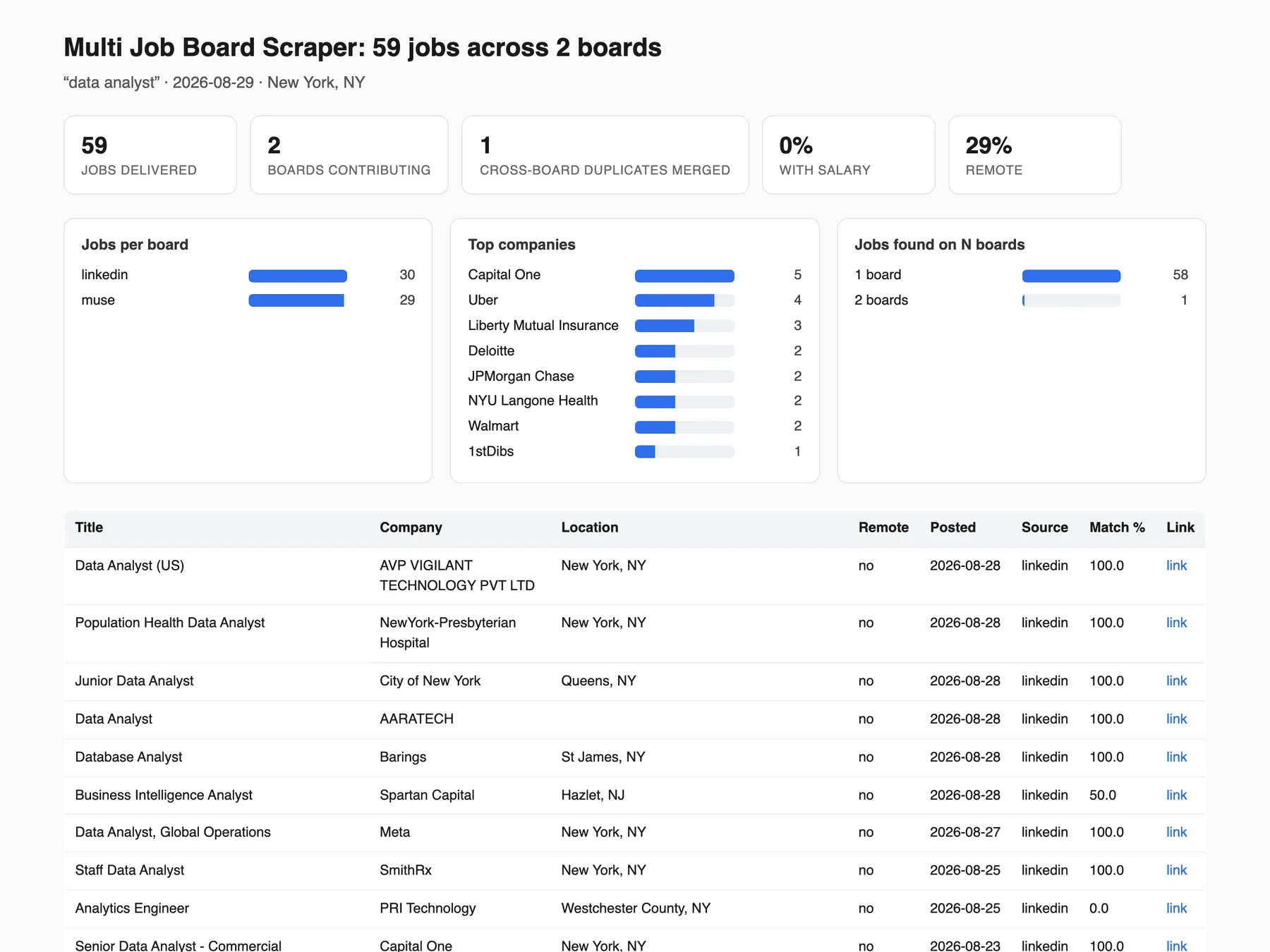
Every run that delivers at least one row also writes a REPORT record to its key-value store: one self-contained HTML page with the headline numbers (jobs, boards, cross-board duplicates merged, share with a salary), three small charts (jobs per board, top companies, how many boards each job was found on), the first 100 rows in the Overview view's columns under the same labels, and the same honest notes as the run's status message (filters applied, boards that returned nothing, time budget). Find it in the run's Output tab under REPORT, or follow the Report: link at the end of the status message. It is a single file with no scripts and no external assets, so it is safe to forward, attach to an email or screenshot for a client. The dataset stays the source of truth: the report never carries more than the dataset does, and a run that delivered nothing writes no report.
Licensing & attribution — what you may do with the rows
The API boards publish their feeds with strings attached, and those strings pass through to you:
| Board | May you re-post rows on another job board? | Required credit |
|---|---|---|
| The Muse | Yes (attribution requested) | Credit The Muse |
| Remotive | No — their ToS explicitly forbid it | Credit Remotive |
| Jobicy | Only with credit, and apply buttons must link to the original job URL | Credit Jobicy + keep the job_url links |
| HN "Who is hiring?" | User-authored HN content; link back to the HN item | Credit Hacker News / Algolia |
| Himalayas | Yes, with a link-back | Link to himalayas.app |
| Remote OK | Only with a visible, clickable (dofollow) link back to the row's job_url and "Remote OK" named as the source — their terms suspend API access otherwise. Logo use is forbidden | Dofollow link to remoteok.com + name "Remote OK" |
| We Work Remotely | Their terms carry no republication bar; a link-back is good practice | Link to the job_url |
| Working Nomads | No stated bar; link-back is good practice | Link to the job_url |
| DevITjobs US/UK | Undocumented public API — treat rows as pointers and keep the job_url links. ~99% of rows are partner-syndicated (e.g. from Indeed), so salary figures may be partner-estimated | Keep the job_url links |
In plain terms: Remotive rows are fine for lead-gen, research and your own job hunt, but must not be republished on another job board (their terms name Jooble, Google Jobs, LinkedIn and the like explicitly).
API examples
Same input keys as the Console form, from code:
Wire the finished-run webhook into n8n, Make or Zapier to land rows in Slack, Sheets or your ATS
automatically - combined with onlyNewJobs on a schedule, that is a self-maintaining job feed. In n8n, use the Apify node with actor flash_scraper/multi-jobboard-scraper (or an HTTP Request node on the run-sync-get-dataset-items endpoint above); in Make and Zapier, use the Apify app's "Run an Actor" module on a schedule.
How much does it cost?
$0.005 per delivered row on the free plan, so $5 buys 999 rows (1,000 × $0.005 minus the single $0.00005 Actor Start event) — read off the live Store pricing record on 2026-08-29 and re-read 2026-09-05; paid plans pay less ($0.0045 on Bronze down to $0.0035 on Diamond), and the Pricing tab on this page is always authoritative.
Pay-per-event. You are charged one Result event per row delivered to your dataset, plus a one-off Actor Start event. The per-result rate on this page (plus that one Actor Start event) is the whole price — no platform-usage surcharge is added to your bill (verified 2026-08-29 against the Store pricing record). Because de-duplication happens before the push, you pay once for a job found on three boards, not three times — and that holds across a keyword × location matrix too, so the same role returned by two city searches is one billed row. Boards that return nothing cost nothing, rows removed by any post-scrape filter (requireSalary, excludeTitleKeywords, requireTitleKeywords, excludeCompanies, targetCompanies, experienceLevel, excludeCities, excludeAgencies, excludeClosed, maxAgeDays) are never billed, and failed runs deliver no rows and so bill no results.
Cost note for locations: each term × location pair is a full search on every selected board, so 3 terms × 3 locations × 3 boards can bill up to 9× a single search before de-duplication. The caps (10 locations, 50 pairs) exist for exactly that reason and are reported in RUN_SUMMARY, never applied silently.
If you set a maximum total charge on the run and the scrape exceeds it, the actor delivers as many rows as the budget allows and says so in the run status — it will not spend your budget and then hand back an empty dataset.
FAQ
How do I scrape LinkedIn, Indeed and Glassdoor jobs in one run?
Type a search term and a location, leave the board list at its default, and press Save & start — LinkedIn, Indeed, Glassdoor and The Muse are searched in the same run and merged into one 65-column table. An untouched run delivered 60 rows in 27 seconds on the then-default three boards (measured 2026-08-08). Eight more keyless boards can be added under Job boards, and RUN_SUMMARY names what each board actually returned.
Will I pay twice for the same job posted on LinkedIn, Indeed and Glassdoor?
No. A role found on three boards is merged into one row before billing, so you are charged for one delivered row instead of three. The surviving row carries found_on_sites (every board it appeared on) and duplicate_count. Dedup keys on the title plus a normalized company name with legal suffixes stripped, so Wipro and Wipro Limited collapse together. Within one board, two rows merge only when they are literally the same listing — five genuinely different openings at one employer stay five rows. Since 2026-09-07 the merge also backfills the surviving row: a cell it left empty (logo, industry, job type, the employer's own apply link, rating, description…) is filled from the duplicate being dropped, and a missing salary is copied as one block — min, max, currency, period, source and salary_is_estimate from a single donor board, never a min from one board beside a max from another. Titles and company names are compared after Unicode (NFKD) folding, so Développeur and Developpeur are one key. Nothing the surviving row already had is overwritten, no row is added, and RUN_SUMMARY.dedup_backfilled counts the cells filled per column.
Measured 2026-08-08 on data analyst / New York, NY at 30 per board across LinkedIn, Indeed and Glassdoor: 90 raw listings became 89 billed rows in 39 seconds, with 1 duplicate merged across boards (Indeed 30, Glassdoor 30, LinkedIn 29).
How much does it cost to scrape 1,000 job postings?
$5 per 1,000 delivered rows — $0.005 each, read off the live Store pricing record on 2026-08-29 — plus a one-off $0.00005 per run start. Duplicates merged across boards bill once. Rows removed by a post-scrape filter bill nothing. A run that delivers nothing bills only the $0.00005 start event. The live rate is always on this page's Pricing tab.
Is there a free way to scrape LinkedIn, Indeed and Glassdoor jobs?
Yes — Apify's free plan needs no card on file, and its monthly usage credit covers several default-size searches. Beyond that the price is $0.005 per delivered row ($5 per 1,000).
Does Multi Job Board Scraper need an API key or a login?
No. The Actor never logs in to any board, and every row it delivers is public data. The extra boards are keyless public feeds and the six ATS providers are keyless too. From code you only need your Apify token.
Which job boards can I scrape without an API key?
Nine keyless public boards ship with this Actor: The Muse, Remotive, Jobicy, Himalayas, Hacker News "Who is hiring?", Remote OK, We Work Remotely, Working Nomads and DevITjobs US/UK. LinkedIn, Indeed and Glassdoor need no key either, because they are read from their public search pages. Naukri and BDJobs answer again since 2026-10-16; three other selectable boards (Google Jobs, ZipRecruiter, Bayt) are blocked at the source today — the Board status table above says which, and why.
In a verified remote-only run on 2026-08-08 (python developer, 10 requested per board) the five API boards delivered The Muse 10, Jobicy 10, Hacker News 5, Himalayas 6 and Remotive 2 rows; per-board counts track each board's live inventory for the term and move day to day.
Where does the data come from?
Public job listings on LinkedIn, Indeed and Glassdoor via the open-source JobSpy engine plus our own fixes on top of it, and the public keyless feeds of The Muse, Remotive, Jobicy, Himalayas, Hacker News (Algolia), Remote OK, We Work Remotely (its category RSS feeds), Working Nomads and DevITjobs US/UK. Company boards come straight from the employer's own ATS API.
Can I run JobSpy without hosting it myself?
Yes. LinkedIn, Indeed and Glassdoor are read through the open-source JobSpy engine, running on Apify with proxies already configured — you POST a search as JSON and get rows back, with no Python environment to maintain. Three fixes ride on top of the library: LinkedIn paging now advances by the page's own cards instead of the running total (so offsets 20-29, 40-59 are no longer skipped above 20 LinkedIn rows), Glassdoor carries patches backported from open JobSpy pull requests #347 and #350, and descriptions are converted to Markdown without the stray backslash escapes (full\-time) the library emits by default.
How fresh is the data?
Every run reads each board's current listings live, so a row is as fresh as the board was at the moment of the run — there is no cached index and no historical archive. scraped_at records when the Actor read the row and date_posted is the board's own posting date. Company boards (atsCompanies) are the freshest source here, because they are the employer's own ATS feed rather than a board's copy of it.
Two identical runs a day apart shared 47% of their rows (measured before monitoring mode existed), which is what Only new jobs removes from a schedule, and since the 2026-08-29 paging fix LinkedIn's newest-first ordering holds beyond 20 rows.
How do I run it on a schedule?
Fill in your search, tick Only new jobs (monitoring mode), press Save & start once, then on the run page choose Actions → Schedule and pick daily (or hourly for hot markets). Every later run delivers, and bills, only postings the previous runs have not seen. The first run seeds the memory and an identical rerun delivers and bills zero rows (measured: 15 rows, then 0). Point the schedule's webhookUrl at Slack, at a Google Sheet via Zapier or Make, or at your ATS.
Schedule-grade filters, Slack / Discord / JSON digests and the safe stop before the time limit shipped on 2026-08-25.
How do I get an alert for only new job postings each day?
Turn on Only new jobs (monitoring mode), set a webhookUrl, and schedule the run daily. The Actor remembers every posting this exact search has already delivered, in a private store in your own account, and delivers and bills only postings it has not seen before. A run with nothing new delivers no rows, sends no webhook, and bills only the $0.00005 run start. The memory is kept per search for 90 days.
Can I monitor a specific company's careers page for new roles?
Yes — put the company names in Watch companies (atsCompanies), turn on Only new jobs, and schedule it. The Actor reads each company's own ATS board (Greenhouse, Lever, Ashby, Recruitee, BambooHR or Workable, tried in that order) and delivers only postings that were not there last time. Set sites: [] to skip the job-board search entirely. Up to 20 companies per run, maxResults rows per company, newest first. The memory key is each posting's own URL, so a posting the company re-saves is not re-billed.
Recruitee, BambooHR and Workable joined Greenhouse, Lever and Ashby on 2026-08-29, verified from a residential IP; adding them changed nothing for schedules that already existed, because the watch's memory key is built from the company names you typed. Daily is plenty — these boards change a few times a week.
Can I paste a LinkedIn or Indeed job search URL instead of building a query?
Yes — put it in searchUrls. LinkedIn, Indeed (any country sub-domain) and Glassdoor are supported, and the exact parameters read out of each URL are listed above. A URL from another site, or one with no keyword in it, is skipped with a written reason in RUN_SUMMARY.search_url_errors rather than silently scraping something else.
Checked 2026-08-08: an Indeed URL and the equivalent manual inputs (searchTerm, location, hoursOld: 336, distance: 25) returned the same 10 job ids and the same output columns. Radius is honored by LinkedIn and Indeed only; Glassdoor's scraper has no distance parameter, so a radius in a Glassdoor URL changes nothing.
Does it scrape remote jobs?
Yes — Remote jobs only asks Indeed, Glassdoor and The Muse for their own remote filters, enforces LinkedIn's is_remote after scraping, and auto-adds seven remote-only boards (Remotive, Jobicy, Himalayas, HN "Who is hiring?", Remote OK, We Work Remotely, Working Nomads). LinkedIn's guest search accepts f_WT and ignores it, which is why the Actor gates those rows itself, before billing.
Measured 2026-08-08 on the Remote-only sweep preset: 19 rows were dropped before billing and 0 of the billed rows had is_remote false — before that gate, 10 of 10 LinkedIn rows billed under the preset were on-site jobs in Midland TX, El Paso TX and Pittsburgh PA.
Why didn't the remote boards run on my location search?
By design: the seven remote-only boards carry remote jobs only, so they add nothing to a query like nurse in Dallas and are not run for it. They join when you name them in sites, or automatically when Remote jobs only is on and the board list is at its default. RUN_SUMMARY.remote_boards_auto_added tells you when the auto-add happened.
Does it include salary data?
Yes, where the board publishes it: a measured run filled salary_min_annual on 74 of 89 rows (83%), and hourly, weekly and monthly pay is normalized into annual columns so every salaried row sorts on one axis. Glassdoor and DevITjobs US fill salary on ~100% of the rows they return. The Muse publishes none (0 salary fields in 220 measured rows) and neither does Working Nomads.
Since 2026-09-07 every salaried Indeed and Glassdoor row also carries salary_is_estimate: true when the figure is the board's own estimate (Indeed's estimated pay used to ship indistinguishable from employer-published pay under salary_source: direct_data, which is unchanged), false when the employer published it. That 74-of-89 figure is the data analyst / New York, NY run of 2026-08-08.
How many rows can one run deliver?
maxResults requests up to 500 rows per board, and a run delivers whatever the boards actually return for your search. A stress run at 120 per board delivered 258 rows in 226 seconds: 118 from LinkedIn (full descriptions on all 118), 112 from Indeed, 28 from Glassdoor. That run predates the 2026-08-29 LinkedIn paging fix, so its row count still stands but its "newest first" ordering above 20 LinkedIn rows did not, and the fixed build has not been re-measured at 120/board.
How fast is it?
A default untouched run delivered 80 rows in 51 seconds across the four default boards (measured 2026-10-01); a 120-per-board stress run delivered 258 rows in 226 seconds.
Can I search multiple titles at once?
Yes — use searchTerms (an array). Results are merged and deduplicated, and every row's matched_search_term records which term found it. Capped at 5 terms per run; extras are named in the run status message, never dropped silently.
Terms also cross with locations: a live run on 2026-08-08 of data analyst across Austin, TX and Chicago, IL at 12 per board on three boards returned 72 raw rows, 67 after cross-search dedup and 63 billed after filters (28 Austin, 35 Chicago); the matrix is capped at 10 locations and 50 term × location pairs.
Can I keep only jobs whose title contains a given word?
Yes — requireTitleKeywords: ["intern", "internship"] keeps a row only when its title contains at least one of the phrases (case-insensitive substring, title only). It is the mirror of excludeTitleKeywords, built for boards that match your search term against descriptions: an intern search on Indeed returns full-time roles that merely mention an internship programme. Rows it drops are never billed. RUN_SUMMARY.filter_removed.requireTitleKeywords counts them. It is not part of the onlyNewJobs memory key, so adding it to a running watch never re-baselines it.
Why did a job I expected not appear?
Either it was merged into another row as a duplicate, or a filter you set removed it before billing. Across boards, dedup keys on title plus normalized company name (legal suffixes stripped, so Wipro matches Wipro Limited), so the same role on LinkedIn and Indeed arrives once with duplicate_count: 2. Within one board nothing is merged unless it is literally the same listing, so same-titled but distinct openings all survive. Otherwise check RUN_SUMMARY.filter_removed — a job type, remote-only, experience-level or max-age filter may have dropped it, and you were not charged for it.
Filter removals are recorded per filter and measured: requireSalary removed 7 rows and excludeTitleKeywords 3 on 2026-08-07, excludeAgencies removed 4 and experienceLevel 1 on 2026-08-08, and a targetCompanies value matching nothing ended its run with 0 rows pushed and no results billed.
Why did experienceLevel keep a job that isn't at that level?
Because the Actor could not prove otherwise, and it only removes rows it can prove do not match. Only some boards publish a seniority field (LinkedIn does with detail fetching on); for the rest the level is read off the title, and a plain "Software Engineer" genuinely says nothing about seniority. Dropping the unknowns would hide real jobs from you. Add excludeTitleKeywords if you want a hard cut.
On the live 63-row run of 2026-08-08 the level came from a board field on 19 rows (LinkedIn publishes one with detail fetching on — measured 19 of 19 LinkedIn rows), from the title on 16, and was genuinely unknown on 28; those 28 were kept rather than hidden from you.
Why is a board returning nothing?
Check the RUN_SUMMARY record in the run's key-value store — it names each board and the actual error. Three of the eighteen selectable board feeds are blocked at the source today and DevITjobs UK is discontinued upstream; the other fourteen work, one feed per working board (DevITjobs through its US feed — see the Board status table above). Glassdoor also 403s some runs entirely and comes back on its own within hours; when that happens the run status names it and the missing board bills nothing.
If every board you selected fails to fetch, the run delivers no rows, bills no results, and RUN_SUMMARY names each board and its error.
Why does The Muse return few or no rows for long search terms?
The Muse is searched by job category and then filtered so that every word of your search term appears in the job's title or description, so short terms match and long multi-word phrases starve. Keep Muse terms to the core skill words. Spell its places its way too (New York, NY, Toronto, Canada): a spelling it does not know is reported as a Muse failure naming the fix, instead of billing its remote pool.
Why are job_type / company_industry empty on LinkedIn rows?
They should not be — Full LinkedIn job details is on by default and fills both from each posting's own page. If you turned it off, that is why: LinkedIn's search results do not include them.
Why are so many cells empty?
Because the board did not publish that value, and the Actor shows an honest blank rather than inventing one. Every row still carries all 65 columns, so your CSV lines up. The table under How often is each field actually filled? says exactly which board fills which column and how often.
experience_range and vacancy_count come only from Naukri and BDJobs (opt-in, working again since 2026-10-16), so they are blank on the default boards. The company block fills on Indeed rows (size band 75%, revenue 58% of Indeed rows on 2026-08-08) and, since 2026-10-16, on Glassdoor rows (14–16 of 20 on a New York run).
Do I need proxies?
Yes for LinkedIn, Indeed and Glassdoor, and the Actor is preconfigured with Apify's default datacenter pool, which handles all three (measured 2026-08-11: 52 rows versus residential's 54 on the same search). The keyless API boards need no special proxy at all.
Does resumeKeywords change what I pay?
No. It only changes what the two keyword columns (matched_keywords, keyword_match_percent) are scored against — your own list instead of the run's search terms — on rows you were getting anyway. Neither it nor includeCompanyDetails nor descriptionHtml adds a request or a row.
Since v0.1.48 (2026-08-22) both columns fill without it, scored against the run's own search terms; back-tested on the 5,936 rows the Actor had delivered, 89.4% scored 100, 8.9% partial and 1.8% scored 0 — the last bucket being the board drift the score exists to expose.
Is it a job posting aggregator or a single-board scraper?
A job posting aggregator. One search covers LinkedIn, Indeed, Glassdoor and The Muse by default; Remote jobs only adds seven keyless remote boards when the board list is left at its default, and DevITjobs US is opt-in. A role posted on several boards is merged into one row, with found_on_sites and duplicate_count showing the merge, so it bills once rather than once per board.
Can I use this as a job posting API?
Yes — every Console input works identically over the Apify API. POST your search as JSON to the run-sync-get-dataset-items endpoint (example above) and the HTTP response body is your job rows. There is no key to manage beyond your Apify token, and the per-row price is the same from code and from the Console.
Can I export to CSV or Google Sheets?
Yes — CSV, JSON or Excel from the Output tab, or sync to Google Sheets via Make, n8n or Zapier. Exports carry all 65 columns. The one thing that narrows them is asking for it: ?fields=, ?omit=, or clean=true on the Dataset API (a shortcut for skipHidden=true + skipEmpty=true, so it strips empty cells back out and the rows go ragged again).
Seven saved views export on their own with the Dataset API's view parameter (overview, salary, dedup, remote, company, standard, all); since 2026-08-29 overview returns the 10-column Overview, and the 16-column set that was the default before that date is addressable as standard.
What does Multi Job Board Scraper not do?
It never logs in anywhere and never auto-applies, so it cannot reach anything behind a login wall — every row is public data. It is not a historical archive: each run reads the boards' current listings. LinkedIn pay comes from the public search card, then — since 2026-10-16 — the job page's own pay block when the card shows none (LinkedIn rows with a salary: 11 → 13 of 20 on a New York run), then the posting text. Three selectable boards (Google Jobs, ZipRecruiter, Bayt) are blocked at the source. experience_range and vacancy_count come only from Naukri and BDJobs, so expect them blank on the default boards.
Is there a job board scraper that does not need an API key?
Yes. Multi Job Board Scraper needs no API key and no login on any of its 14 selectable working boards: LinkedIn, Indeed and Glassdoor are read from their public search pages, nine (The Muse, Remotive, Jobicy, Himalayas, Hacker News, Remote OK, We Work Remotely, Working Nomads, DevITjobs) are keyless public feeds, and Naukri and BDJobs (working again since 2026-10-16) are read from their public search APIs. Every board was checked from Apify's datacenter pool on 2026-08-07 and re-measured 2026-08-11. DevITjobs UK has since been discontinued upstream (2026-08-29, re-probed 2026-09-05: its public endpoint now redirects to a signup page), so DevITjobs is counted once, by its US feed — the UK feed is reported per run and never billed. The free-plan price read on 2026-08-29 and re-read 2026-09-05 is $0.005 per deduplicated job; the Pricing tab is authoritative.
Which multi source job scraper removes duplicate jobs across LinkedIn, Indeed and Glassdoor?
This one merges the same role across boards before billing: dedup keys on the title plus a normalized company name with legal suffixes stripped, so Wipro and Wipro Limited collapse into one row carrying found_on_sites and duplicate_count. Measured 2026-08-08 on data analyst / New York, NY at 30 per board: 90 raw listings became 89 billed rows in 39 seconds. Within one board only the literally same listing merges.
How do I set up a new jobs alert from LinkedIn, Indeed and Glassdoor without writing code?
Tick Only new jobs (monitoring mode), add a Slack or Discord webhook URL in webhookUrl, press Save & start once, then choose Actions → Schedule on the run page and pick daily. The first run seeds the memory and an identical rerun delivers and bills zero rows (measured: 15 rows, then 0); every later run delivers and bills only postings not seen before, for 90 days per search. Webhook digests and schedule-grade filters shipped on 2026-08-25.
Can an AI agent such as Claude, ChatGPT or Cursor scrape job boards through MCP?
Yes. Point any MCP client at https://mcp.apify.com?tools=flash_scraper/multi-jobboard-scraper and the Actor appears as a tool that takes this input unchanged. The smallest useful call, measured locally on 2026-08-29 — atsCompanies bunq, sites empty, maxResults 5 — returned rows in well under 60 seconds for at most $0.03, and per Apify's docs an agent with no Apify account can pay with a Skyfire token or with a prepaid token bought through x402.
Which job boards are blocked for scraping today: Google Jobs, ZipRecruiter, Bayt? (Naukri and BDJobs work again)
Three selectable boards are blocked at the source, checked 2026-08-07 and re-measured 2026-08-11: Google Jobs serves a bot-check page instead of results, ZipRecruiter's API returns HTTP 403 and Bayt answers HTTP 403. They stay selectable in case they recover and cost nothing when they return no rows. Naukri and BDJobs, blocked from 2026-08-07, answer again since 2026-10-16: runs from Apify's pool returned 20 of 20 rows on each of two searches per board (Naukri: Bangalore, Mumbai; BDJobs: two Dhaka searches). Each searches only a place in its own country that you name (an Indian city or India; a Bangladeshi district or division or Bangladesh) and bills nothing on any other location. The fourteen selectable working boards are what a project should be planned around.
Can I republish the rows on my own job board?
It depends on the board, and the job_url column already carries the link-back half. Six of the nine keyless boards permit republication in some form — The Muse, Jobicy and Himalayas with credit or a link back, We Work Remotely and Working Nomads with no stated bar, and Remote OK only with a visible dofollow link naming Remote OK. Remotive forbids it outright, Hacker News rows need a link to the HN item, and DevITjobs states no terms either way. Read the Licensing & attribution table above before you publish a row.
Related Flash Scrape actors
- Local Business Leads Scraper — any category, any city, verified emails, lead scores
- Remote Jobs Aggregator — 10 keyless remote boards in one deduplicated feed
- Creator Leads Scraper — TikTok, Instagram and YouTube creator emails in one run
- LinkedIn Jobs Scraper — listings by title and location, no login, CSV/JSON
- ATS Job Scraper — live openings straight from any company's Greenhouse, Lever or Ashby board
- Shopify Store Scraper — any store's full public catalog, every variant, SKU and price, plus a store-intelligence row
- All Flash Scrape actors
If this run saved you time, a Store review helps others find it.


![LinkedIn Jobs API & Scraper [NO COOKIES] ✅ avatar](https://images.apifyusercontent.com/NKfvWcCujNjiTmEWKy2pbPm5S3PwlphrBPipDzNxcVk/rs:fill:76:76/cb:1/aHR0cHM6Ly9hcGlmeS1pbWFnZS11cGxvYWRzLXByb2QuczMudXMtZWFzdC0xLmFtYXpvbmF3cy5jb20vc0NDU2R3bm1LTUoxUTJzVG4tYWN0b3ItekI2UXhSRDZHalNpVGZ2MlYtdFBwamJhSFBxTi1TcGFyc2VfaW5zdHJ1bWVudGF0aW9uX19kaXJlY3RfbHlyaWNzX191cmJhbl9yZWFsaXNtX195b3V0aGZ1bF9y.webp)


![🚀 Indeed jobs scraper [PPR] avatar](https://images.apifyusercontent.com/PEDOk9MmTf1yHtczA1A4wQEoGyAKCe5Aft1HzkhwROk/rs:fill:76:76/cb:1/aHR0cHM6Ly9hcGlmeS1pbWFnZS11cGxvYWRzLXByb2QuczMudXMtZWFzdC0xLmFtYXpvbmF3cy5jb20vTVhMcG5nbVZwRThXVEVTUXIvQjFrZ3BRS1p5dzJvVEpJUmctTG9nby1IZXJvLVN0YXRpYy1lemdpZi5jb20td2VicC10by1qcGctY29udmVydGVyLmpwZw.webp)


