

Local Business Leads
Pricing
from $3.50 / 1,000 leads
Local Business Leads
Local business leads by category and city: MX-verified business emails, phones, lead score. Dentist leads, chiropractor, med spa, salon, roofing, plumber, law firm and restaurant leads. Lead gen scraper, business email search, small business leads. Local business email scraper from website lists.
Pricing
from $3.50 / 1,000 leads
Rating
5.0
(3)
Developer

Flash Scrape
Maintained by CommunityActor stats
6
Bookmarked
81
Total users
8
Monthly active users
4 days ago
Last modified
Categories
Security
Limited permissionsShare
Local Business Leads Scraper is a pay-per-result lead-generation actor that finds local businesses in any category and any city on earth and delivers MX-verified emails, phones, social profiles, website platform and a 0-100 lead score — built on OpenStreetMap, so it needs no API key, no proxy and no login. It doubles as a business email search by trade and city, and pasting your own domains into websiteList turns it into an email scraper from website lists, with map discovery skipped.
Try it: Find local business leads with emails by category
Local business leads scraper and business email finder — verified business emails, phones and socials for any category in any city; a local business email scraper built for agencies.
What your first run returns
The untouched form: dentist in Austin, Texas, 25 leads, with the form's own filters (only businesses with a website, at least one contact, not marked closed, one row per business). Measured on a private test run, 2026-11-01:
| What | Result |
|---|---|
| Rows | 25 distinct businesses (3 more branches of the same practices were folded, not billed) |
| Phone | 25 of 25 |
| Website | 25 of 25, platform detected on 20 |
| 8 of 25 (5 graded deliverable, 3 of them on the business's own domain) | |
| Facebook, Instagram | 18 and 13 of 25 |
| Lead grade A or B | 8 of 25 |
| Run time | 162 seconds |
| Cost | $0.12505 at most (25 leads × $0.005 free-plan rate + $0.00005 start) |
Need emails only? Add "onlyWithEmail": true and every billed row carries one.
✨ What you get
- 💰 $5 per 1,000 delivered leads ($0.005 per lead) on the free plan; paid plans pay less (Pricing tab). MX verification, mailbox classification and lead scoring are included in that price, every filter runs before a lead is billed, and a run that finds nothing bills no leads.
- 📧 An MX-verified email and whose mailbox it is —
emailgradeddeliverable/risky/undeliverable, andemail_typesays own domain, free inbox or the business's marketing agency; filled on 32% of rows for Austin dentists, 48% for Dallas roofers and 96% for London restaurants on 2026-10-01/02 test runs of the form (25 leads each) — many US small businesses publish only a phone or a contact form. - 📞 A phone on 96% of rows with
onlyWithWebsiteon (a call with no input got 49 of 100) — the OpenStreetMap number inphone, plus everytel:number the business's own site publishes inphones. - 🔗 Social profiles, website platform and tech — the Facebook, Instagram, YouTube and LinkedIn URLs the site links; WordPress, Wix, Shopify, Squarespace and more, with Meta-pixel and Google-Ads-tag flags.
- 🎯 A 0-100 lead score and an A-F grade on every row, plus a Google Maps link and OpenStreetMap provenance — 73 stable columns, exported as CSV, JSON or Excel.
- 🔑 No API key, no proxy, no login — discovery runs on OpenStreetMap and enrichment crawls each business's own public website.
It does not scrape Google Maps, so there are no Google star ratings or review counts; every fill rate above is measured on a dated test run, and the full table from the 2026-08-08 reference run is in How complete is the data?.
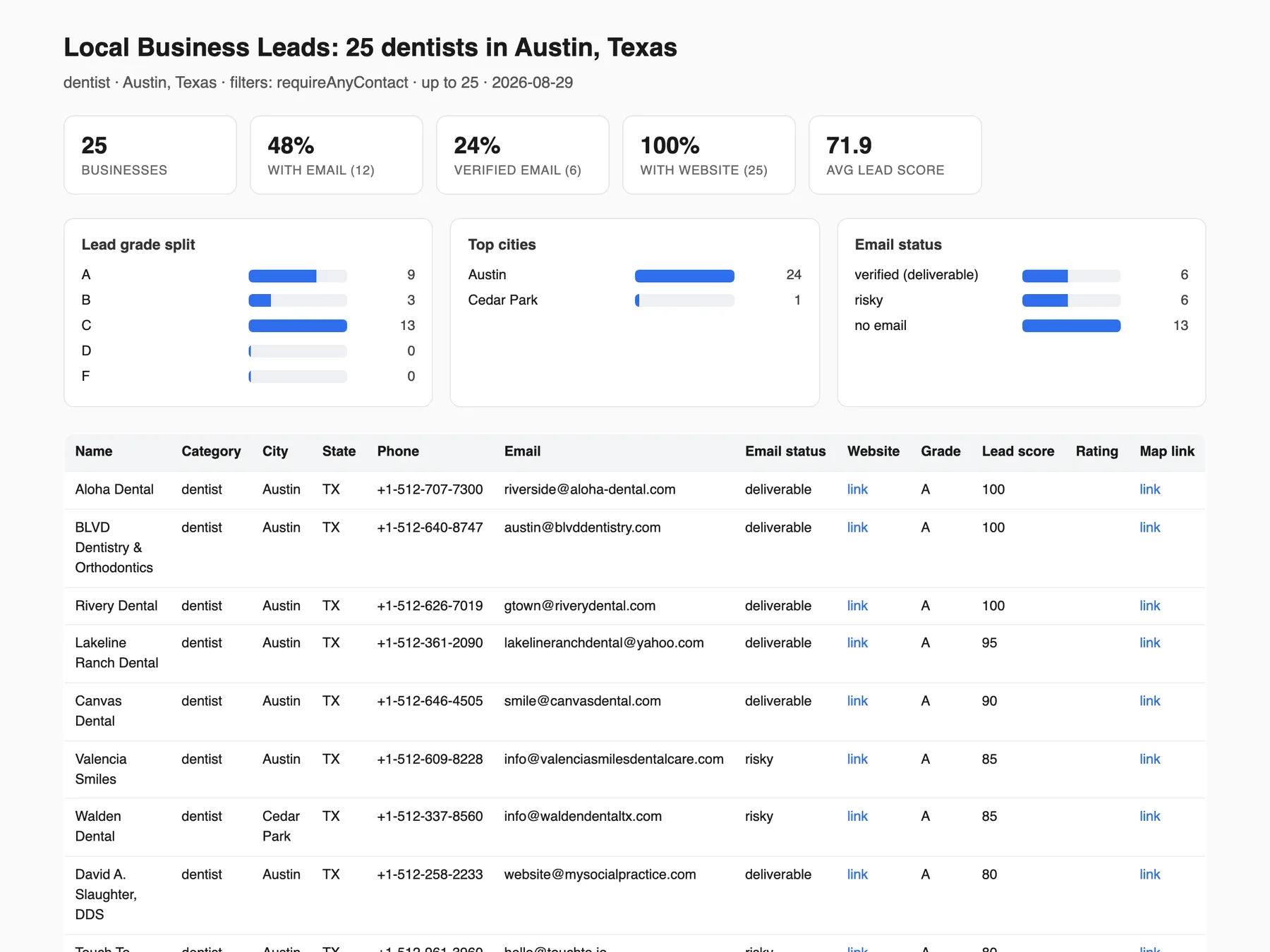
This Actor takes a business category and a city and returns one row per local business, 73 stable columns wide and every row scored 0-100 — with an MX-verified email, whose mailbox that email is, the phone, the social profiles and the website platform wherever the business's own site exposes them (measured fill rates below). It costs $5 per 1,000 delivered leads ($0.005 per lead on the free plan; the Pricing tab always carries the current rate), and email verification is part of that price rather than an add-on.
Dentists, gyms, lawyers, plumbers, roofers, salons, real estate agencies, restaurants and 50+ more curated categories, plus any term you type. No API key, no proxy, no separate scraper per niche.
Key facts:
- $5 per 1,000 delivered leads ($0.005 per lead) — MX email verification, mailbox-ownership classification and lead scoring are included in the single per-lead rate; filtered rows are dropped before billing, and a run that finds nothing bills no leads.
- No API key, no proxy, no login — discovery runs on OpenStreetMap and enrichment crawls each business's own public website, from datacenter IPs.
- 95 curated categories (220+ terms), any city on earth — plus a radius search around a coordinate, or bring your own website list and skip discovery entirely.
- 73 stable columns on every row — export as CSV, JSON or Excel, or connect the dataset to your CRM via API/webhook; column headers never shift mid-export.
- Built-in monitoring and alerts —
onlyNewBusinessesturns a schedule into a new-business alert, andwebhookUrlposts a Slack / Discord / JSON digest whenever a run delivers rows.
What it does not do, stated up front so nothing here is a surprise after you have paid:
- It does not scrape Google Maps. Listings come from OpenStreetMap, so there are no Google star ratings and no Google review counts. Pair it with our Google Maps Places Scraper when you need those.
- The
ratingandreview_countcolumns are sparse. They exist only when a business publishes a rating in its own website markup, measured at about 7% of rows (4 of 55 on the 2026-08-08 reference run), and they are never a Google rating. - Van-based trades are thinly mapped. OpenStreetMap held 171 dentists in the Austin bounding box but 9 plumbers and 5 electricians. The coverage section below names which categories are dense.
- A guessed email is never sold as a verified one. A pattern-guessed address stays in
email_guessand is never promoted intoemail.
Use it from AI agents (Claude, ChatGPT, Cursor) via Apify MCP
A business leads API for agents: one call returns local businesses with MX-checked business emails, phones and a lead score, for B2B leads and lead generation in any city.
- Connect: add
https://mcp.apify.comas a custom connector in Claude or ChatGPT (Developer mode), or install the Apify plugin in Cursor; sign in with OAuth or sendAuthorization: Bearer <APIFY_TOKEN>. - Call:
call-actorwithflash_scraper/local-business-leads, or load it as its own tool withhttps://mcp.apify.com?tools=flash_scraper/local-business-leads. This input bills at most 10 leads, $0.05 at the free-plan rate plus the $0.00005 start at the default 512 MB;callOptions.maxTotalChargeUsdcaps spend:
- Wait:
call-actorwaits at most 45 s and returns the run status and storage IDs, not rows; the 25-lead default form took 162 s, so pollget-actor-run. - Read:
get-dataset-itemswith the run'sdatasetIdreturns the rows, 73 columns each (default limit 20; passlimitfor more); withonlyWithEmailevery row has anemail, graded inemail_status.get-key-value-store-recordwith keyRUN_SUMMARYgivesone_per_business.folded(branches folded, never billed).
Tool name, paying without an Apify account: Use it from an AI agent (MCP).
Is there a Google Maps scraper alternative that does not scrape Google Maps?
Yes: this Actor discovers businesses on OpenStreetMap and then crawls each business's own public website, so no listing, rating or review is ever taken from Google Maps and no Google page is ever scraped. That is the whole design, not a setting you have to switch on.
- No Google Maps terms-of-service exposure. What you receive is open-licensed map data plus pages the businesses publish themselves.
Is this a small business leads scraper with MX verified emails?
Yes. It is a small business leads scraper for any category and any city: every row is a real local business found on OpenStreetMap, and every email is MX verified against the domain's mail servers before delivery, so what you get is verified email leads rather than guessed addresses. Local leads with emails, phones and social profiles arrive in one table, and rows removed by a filter are never billed.
Measured, not promised
Every number below is from a real run of this Actor on dentist / Austin, Texas. Inputs and dates are given so you can reproduce them.
| Run | Result |
|---|---|
Console form as it opened on 2026-08-08 (it then pre-filled excludeKeywords: ["Aspen Dental", "Walmart"], which today's form does not), Max businesses raised to 100, pressed Save & start | 55 businesses, 100% contactable — 96% with a phone, 55% with an MX-verified email. Under the 100 asked for, and the run says why: OpenStreetMap holds 171 dentist records in Austin and 55 of them are crawlable with a website inside the search area. That is the whole city, not a truncation |
Bare {} from the API (no filters at all then) — 2026-08-08 | 100 businesses, 50% contactable — the honest filter-off case, see the fill-rate table below |
| Cold-email list preset — 2026-08-08 | 31 rows (every emailable dentist Austin has — the exact count varies by city and over time), 100% with an MX-verified email, 94% with a phone |
| Call list preset, cap 100 — 2026-08-08 | 56 rows, 100% with a phone — the same number on two independent runs, and the run reports it as the whole of Austin rather than a truncation |
| Web-design prospects preset, cap 100 — 2026-08-08 | 7 rows, every one scored ≤45 and reachable on at least one channel. The score ceiling alone matches 68 businesses in Austin, but only 7 of those publish a phone, email or social profile — the preset drops the other 61 rather than bill you for map pins you cannot contact |
| Full enrichment preset — 2026-08-08 | 100 rows plus 23 email_guess addresses, kept out of email and never billed as verified |
| Column stability across every run above | one identical column tuple on every row (61 columns on those runs; 73 on the current build — the 12 additions of 2026-08-29 are appended at the END, so existing CSV column positions are unchanged) — CSV headers never shift mid-export |
Every 2026-08-08 row that was started from the Console form (the preset rows included) ran with the two-chain excludeKeywords list the form pre-filled at the time and no longer does; the bare {} row did not. The counts stay as historical figures.
Quick start
The shortest complete input is a business category and a location. Everything else has a working default:
That is a complete run, and it is also exactly what the form already contains. Open the Actor, press Save & start without touching anything, and you get businesses. The defaults behind it: Max businesses starts at 25 in the form (raise it once the first run looks right; an API call that sends no maxItems gets 100), website crawling on, email verification on, 3 pages per website.
The input form at a glance
Seven sections, in the order the form shows them. A first run only ever touches the first one; the rest are already tuned and safe to ignore.
| Section | What it is for |
|---|---|
| What to search | The category and the city as free text (or the locations list for several cities), maxItems — how many businesses this run may deliver, i.e. your lead-cost ceiling — three quick toggles (onlyWithEmail, requireAnyContact pre-ticked, and onlyNewBusinesses: on a schedule, only businesses not delivered before), websiteList to bring your own domains and skip OpenStreetMap discovery, an optional countryCode and keyword (matched against the name and the cuisine / healthcare:speciality tags), and expandNearby, pre-ticked, which widens the search when the city runs out (widened rows labelled in query_location) |
| Filters — businesses are dropped BEFORE they are billed | Website / verified-email / phone / social floors, excludeKeywords (arrives empty — nothing is excluded until you type a keyword), skipClosed (pre-ticked), and the score and rating floors |
| Enrichment | What gets read from each business website: emails, social profiles, phones, optional pattern-guessed addresses, plus the maxPagesPerSite and concurrency crawl knobs |
| Other ways to search | A radius around a coordinate (searchRadiusKm + centerLat / centerLon) instead of a city, or startUrls, an alias of websiteList |
| Output | outputFields — which columns you get, and in what order — and sortBy |
| 🔔 Alerts | webhookUrl — a Slack / Discord / JSON digest whenever a run delivers rows |
| Quick-start pickers (Console form) | preset (see below; Custom changes nothing), the category and city dropdowns and the categories list. API and agent calls can leave them empty |
Presets
The Use-case preset dropdown in the form's last section configures the rest of the form for one specific outreach job. It is optional — leave it on Custom and nothing at all changes.
| Preset | What it sets | Measured on the default search (Austin dentists) |
|---|---|---|
| Cold-email list | onlyWithEmail, onlyVerifiedEmail | 31 leads (the whole of Austin; the count varies by city and over time), 100% with an MX-verified email, 94% with a phone |
| Web-design prospects | maxScore: 45, requireAnyContact | 7 leads, all in the thin/neglected half — no published email, no marketing tech, often no mobile viewport — and all reachable. maxScore: 45 on its own matches 68 businesses; the contact floor is what removes the 61 you could not pitch to |
| Call list | requirePhone | 56 leads, 100% with a phone number |
| Full enrichment | emailPatternGuess, maxPagesPerSite: 6 (every crawl toggle is already on by default) | 100 leads plus 23 guessed email_guess addresses, kept out of email |
The three guarantees are spelled out — and tested — under Presets: the three guarantees below.
What the Output tab looks like
Six curated views ship with the Actor. Pick one above the results table; the CSV / JSON / Excel export is unaffected and always carries every column you asked for.
| View | Columns | Use it for |
|---|---|---|
| Overview (default tab) | name, category, city, state, phone, email, email_status, website, rating, lead_grade, lead_score, google_maps_url | The twelve columns that answer "is this a lead?" — plus one click to the live Google Maps listing |
| Email-ready | name, email, email_status, email_type, phone, website, contact_page_url, lead_score | Loading a cold-email sequence — deliverability grade and mailbox owner side by side |
| Business details | name, category, speciality, cuisine, brand, is_chain, opening_hours, price_range, rating, review_count, wheelchair, operator, city | What the business actually is: speciality / cuisine / brand tags, chain or independent, hours, price range, and the sparse rating / review count |
| Web-agency targets | name, website, website_platform, mobile_viewport, copyright_year_stale, has_meta_pixel, has_google_ads_tag, phone, email, website_platform_status | Building a redesign pitch list from the neglect signals |
| Map & source | name, address, google_maps_url, osm_url, latitude, longitude, osm_last_edited, osm_check_date, attribution | Verifying a row in one click, territory mapping, row freshness, keeping the ODbL attribution with the data |
| All columns | all 73, in CSV order | Everything, when you want the full table |
Three deliberate choices in those views. website, contact_page_url, google_maps_url (labelled Map link) and osm_url render as clickable links; rating, review_count, lead_score, latitude and longitude render as numbers (sortable). The tri-state flags — mobile_viewport, copyright_year_stale, has_meta_pixel, has_google_ads_tag — render as text, not as a checkbox, because they are null when the site was never crawled and a checkbox cannot tell "no mobile viewport" apart from "we never looked". has_email / has_phone / has_website / is_chain are never null, so those do get the real boolean widget.
How do I find local businesses whose website is neglected enough to pitch a redesign?
Set maxScore: 45 with requireAnyContact (the Web-design prospects preset), then read the neglect columns on the rows that come back. The score cap keeps both kinds of prospect — a business with a neglected site and a business with no site at all — so add onlyWithWebsite: true if you only want the ones that already have a site to replace. Four columns carry the pitch:
website_platform— WordPress, Wix, Squarespace, GoDaddy, Shopify, Webflow, Weebly, Duda and more. A builder-tier platform usually means a self-built site.mobile_viewport—falsemeans the homepage declares no mobile viewport tag, so the site predates responsive design.copyright_year_stale— a visibly out-of-date footer copyright year.has_meta_pixel—falsemeans nobody is measuring anything on the site.
A builder-tier site with no mobile viewport, a stale copyright year and no tracking pixel is the strongest redesign signal this Actor can give you. The Web-agency targets output view shows exactly those columns and nothing else.
How do I find local businesses that have no website, for a web-design pitch list?
Type the trade and the city and tick Businesses with no website (onlyWithoutWebsite: true), and every delivered row is a business that lists no site at all. That is the first-website pitch list for web designers and local SEO agencies, verified at 15 of 15 rows without websites on a 15-row run.
Expect name, address, coordinates and the phone, email or social profile the map lists: requireAnyContact (on unless you send false) keeps only businesses you can reach. With no site to crawl, no email, platform or tech enrichment is possible on these rows, which is also what keeps them uncrowded: nobody else can cold-email them either. Every row still carries google_maps_url, one click to a Google Maps search for the business's name and address.
The filter is mutually exclusive with onlyWithWebsite. Setting both stops the run with an explanatory status message before any lead is billed. Like every other filter it runs before billing, and a thin city can be widened with expandNearby.
What does it do?
It turns a business category and a city into one row per local business — 73 stable columns with an MX-verified email, whose mailbox it is, phone, socials, website platform and a 0-100 lead score — at $5 per 1,000 delivered leads. Measured 2026-08-08 on dentist / Austin, Texas with the website filter on: 55 businesses, 96% with a phone, 55% with an MX-verified email (free-plan rate read 2026-09-14 — the Pricing tab is authoritative).
Why use it / who's it for
- Web design & marketing agencies — filter for a builder-tier platform (Wix, GoDaddy, Weebly) and
has_meta_pixel: falseto find businesses with a dated site and no tracking: the highest-intent redesign pitch there is. TheCustom / Next.jsvalue is the inverse signal — don't pitch a DIY-site rebuild to someone who already paid a developer. - Freelancers on Fiverr/Upwork — generate a "100 dentists in Austin with verified emails" list on demand for any client vertical without building a new scraper per niche.
- SaaS sales teams — any B2B tool sold to local businesses (booking software, payment processors, review management) can target by category and city, and
has_booking_widgettells you who already has a competitor installed. - B2B lead-gen resellers — one actor covers any category, replacing dozens of niche scrapers.
- Franchise & market researchers — count and map competitor density for a category in a target city (set
onlyWithWebsite,requireAnyContactandonePerBusinesstofalseto keep every mapped location, including ones with no contact details).
How to use it
The form is ready to run as it opens: hit Save & start without touching anything and you get Austin dentists that all list a website, at a cap of 25 (raise it once the first run looks right) with Website required, Skip closed and Widen to nearby areas pre-ticked and no keyword exclusions — at $5 per 1,000 that is at most $0.125 of leads.
Max businesses is still a ceiling, not a promise — a thin area really can run out. When that happens the run now says so in its status message with the counts behind it, instead of returning fewer rows without comment. A live example, dentist in Laramie, Wyoming at cap 25: "you asked for up to 25 and 1 could be delivered. That is the whole of Laramie, Albany County, Wyoming, United States, not a silent truncation: OpenStreetMap returned 4 'dentist' record(s) there, 1 became crawlable candidate(s), and 1 survived your filter(s) (onlyWithWebsite)." The run only claims an area is exhausted when no search came back at its row ceiling and every candidate was actually checked; otherwise it says which limit it hit and what to change.
- Pick a Business category from the dropdown, or leave it on Custom and type one in plain English (e.g.
medspa,HVAC contractor,funeral home). - Pick a City from the dropdown, or leave it on Custom and type any city on earth — city and region/country (e.g.
Austin, Texas). Capitalisation and the comma are optional:RABAT MAROCandcasablanca moroccoresolve too. - Leave Website required on unless you are doing density research — see the honest note below. (Web-design agencies can flip Businesses with no website instead to get the no-site prospect list; the two filters are mutually exclusive, and setting both stops the run with an explanatory status message (no leads are billed).)
- Run the actor. It geocodes the location, pulls matching places from OpenStreetMap, then crawls each business website for contact details, tech and reviews.
- Export as CSV, JSON, or Excel — or connect the dataset to your CRM/outreach tool via API/webhook.
Presets: the three guarantees
The preset table is at the top of this page. Behind it sit three guarantees, each of them tested:
- Anything you set yourself wins. A preset only fills in a field you left at its default. Set
maxScore: 100alongside the web-design preset and you keep 100 — the run log says so explicitly (left as you set them: maxScore (you chose 100)). - A preset never widens your bill. Every preset either adds a filter (fewer rows delivered, so fewer rows charged) or turns on enrichment that adds columns to rows you were already getting. None of them clears a filter you set or raises
maxItems. - It tells you what it did. One log line names the preset and lists exactly which settings it applied and which it left alone, and the run summary names the preset too.
Presets are Console and API: send "preset": "cold_email" from the API and you get the same behaviour. Existing API callers, tasks and schedules that send no preset are completely unaffected.
Which field wins: the precedence chain
Category and location each accept three inputs. Precedence is the same for both, highest first:
| Rank | Category | Location | Why |
|---|---|---|---|
| 1 | categories (list) | locations (list) | The plural list is an explicit multi-search request — it beats everything when non-empty. |
| 2 | categorySelect (dropdown) | citySelect (dropdown) | 20 categories with hand-verified OpenStreetMap tags; 25 metros verified against the live geocoder. |
| 3 | category (free text) | location (free text) | Anything else — over a hundred more category aliases are mapped, and any city on earth geocodes. category: a comma-, semicolon- or newline-separated string ("tour operator, travel agency, safari company") is read as that many categories, and the status message says so. location: a string with three or more comma- or slash-separated parts is geocoded as one place first, and only if that finds nothing is it searched as the separate places listed, skipping any part that resolves to a whole state or country such as TX or USA (the status message says so; "Austin, Travis County, Texas" geocodes as one place and is never split) — use locations when you mean a list. |
Both dropdowns default to "" ("Custom"), which is why every input that worked before this option existed still resolves to exactly the same search.
Three search modes
| Mode | Set | What happens |
|---|---|---|
| City (default) | location (or locations) + category (or categories) | The location is geocoded and every matching business inside its bounding box is returned. Several categories x several cities run as a matrix in one run. |
| Radius | searchRadiusKm + centerLat + centerLon | Searches a circle around a coordinate instead of a city box — sales territories, franchise catchment areas, "everything within 5 km of this address". Replaces the bounding box entirely; no geocoding happens, so country stays empty. |
| Bring your own list | websiteList (or startUrls) | OpenStreetMap discovery is skipped entirely. The actor runs only the crawl + email verification + scoring pipeline over the websites you supply. Enrich a CRM export, a conference exhibitor list, or a list you bought elsewhere. |
What happens when the city runs out of businesses?
Set expandNearby: true and the same search is widened in growing rings around the city centre until your maxItems is met or the region is genuinely exhausted. It is needed because a single city often holds fewer businesses than you asked for: measured live, "dentist" in Austin, Texas tops out near 119 rows, and Round Rock, Texas holds 21.
- The rings are sized to the city and reach up to about 150 km.
- Every widened row is labelled: its
query_locationreadswithin ~16 km of Round Rock, Williamson County, Texas, United Statesinstead of the city name, so you can always tell expansion rows apart — or filter them out afterwards. - The same dedup and every pre-charge filter apply to ring rows, and the status message reports exactly how many delivered rows came from outside the city.
- Measured (2026-08-15, discovery-only):
dentist/Round Rock, Texas/maxItems: 100delivered 21 rows without the flag, 100 with it — 79 labelled ring rows, 0 duplicates.
It is off by default for API callers and pre-ticked in the Console form. It never fires when you set your own radius (searchRadiusKm) or bring your own list, when the city pull was truncated (deepening, not widening, is the fix there — the status message tells you), or during a mirror outage.
Searching several categories and cities at once
categories and locations are the plural versions of category and location, and they cross into a matrix — ["dentist","orthodontist"] x ["Austin, Texas","Dallas, Texas"] is four searches in one run. The single fields keep working exactly as before; the plural ones take precedence when non-empty.
Three things make the matrix safe rather than a footgun:
maxItemsis the whole run's budget, not a per-search one. The budget is split between the searches and results are interleaved, so the first city cannot eat the entire quota.- The same business found by two categories is delivered — and billed — once. Deduplication is on the OpenStreetMap object identity (
osm_type+osm_id), so a clinic tagged bothdentistandorthodontistappears one time. - 25 category x location combinations is the ceiling for one run. Above it the run stops with a message naming the numbers, and no leads are billed — OpenStreetMap's public mirrors are a free shared resource.
Every row carries query_category and query_location, so you always know which search produced it.
Bring your own list (skip discovery)
Already have the businesses and only need the emails, socials, platform and score? Put the domains in websiteList (bare domains and full URLs both work; startUrls is accepted as an alias):
No map data is fetched at all. Those rows differ from discovered rows in exactly three honest ways:
sourceisuser_supplied, notOpenStreetMap;attributionis null — the rows are not OSM-derived, so stamping the ODbL notice on them would be a false licence claim. The column is still present, so a mixed export keeps one stable header row;namecomes from the site's own<title>, falling back to the bare domain when the site does not answer. Nothing is invented;latitude,longitude,osm_idandosm_urlstay empty.
Everything else — the contact crawl, MX verification, mailbox-owner classification, tech fingerprinting, scoring and every filter — behaves identically, so a domain with no phone, email or social profile is dropped before billing unless you send requireAnyContact: false.
How complete is the data? (measured, not estimated)
On the reference run of dentist in Austin, Texas with onlyWithWebsite: true (n=55), 96% of rows carried a phone, 55% an MX-verified email, 71% a detected website platform and 100% a website. With every filter off (n=100) the same city measured 48% phone, 26% email and 34% platform, because roughly half of mapped businesses list no website to crawl.
Both reference runs were taken on 2026-08-08 (the website-filtered run and the bare API run in the Measured, not promised table above), and a roofing contractor / Denver run delivered emails on 6 of 8 rows (75%) — roughly three-quarters on website-verified trade categories.
onlyWithWebsite: true (n=55) | every filter off (n=100) | |
|---|---|---|
phone | 96% | 48% |
website | 100% | 48% |
email | 55% | 26% |
website_platform | 71% | 34% |
opening_hours | 80% | 44% |
facebook | 73% | 33% |
| rows graded F | 0% | 51% |
On that same filter-off n=100 run, the crawl-derived fields measured: contact_page_url 18%, website_title 40%, website_description 35%, mobile_viewport 40%, copyright_year_stale flagged on 3 rows; google_maps_url, osm_url and attribution sat at 100%.
Read that second column before you run. OpenStreetMap has no website for a large share of businesses, and — measured on the filter-off run — 50 of the 52 rows with no website had no phone, no email and no social profile either (the other 2 carried only an OSM phone): name, coordinates and usually an address, nothing contactable. With every filter off you pay for those rows. onlyWithWebsite and onlyWithEmail drop non-matching rows before they are billed, so they cut your bill rather than just tidying the output. Every run's status message now reports the contactable ratio it actually delivered.
Every filter now goes further: the actor over-fetches, deepening the candidate pool and — for filters that need the site crawled — crawling extra candidates in batches (up to 24× maxItems, hard-capped at 30,000 candidates — the ceiling that makes a thin area terminate) until it has maxItems surviving rows or the pool is spent. Where the pool genuinely runs out first, the status message reports the counts instead of leaving you to guess.
onlyWithWebsite defaults to false (not true); the Apify console pre-fills it to true.
Which business categories does OpenStreetMap cover well, and which are sparse?
OpenStreetMap covers businesses with premises a mapper walks past, and is thin on trades run from a van or a home office: the Austin bounding box held 171 dentist records but 9 plumbers, 5 electricians, 0 chiropractors and about 12 roofers. This is the honest limit of an OSM-based source, and it matters more than any field:
- Dense: businesses with premises a mapper walks past — restaurants, cafés, dentists, pharmacies, hairdressers, gyms, hotels, shops, banks, clinics.
- Sparse: trades run from a van or a home office — plumbers, electricians, chiropractors, roofers. A metro of a million people can return single digits. That is what is mapped, not a bug.
95 categories (220+ terms with aliases) are curated and mapped to exact OSM tags — build 0.1.21 added pest control, photographer, moving company, self storage, funeral home and dry cleaner. Any other term is attempted as an OSM tag directly, and common phrasings are handled (auto repair shop → shop=car_repair, landscaping company → craft=gardener, insurance agency → office=insurance). Terms with no OSM tag now fall back to a business-name keyword search of OSM, and a mapped category that returns zero tagged places in the area is rescued by the same name-keyword query. Rows found only by name are labelled category_match: "name_keyword" (tag-matched rows say category) so you can filter them out if you only trust tag-confirmed rows. Measured: pest control in Denver returned 1 labelled row on 0.1.21 where the previous build returned 0 — sparse trades stay sparse, but no longer invisible. A term matching nothing at all still returns 0 rows with a suggestion, and no leads are billed.
Can I use this as a business email finder for local businesses?
Yes. For any category and city it crawls each business's own website and returns the MX-verified business email wherever the site exposes one, plus the mailbox it belongs to (info@, owner name, etc.). The fill rate is measured, not promised — see "How complete is the data?" above.
Local business contacts, B2B email finder and local SEO leads
The output is a local business contacts table: one row per business with an MX-verified email, phone, socials and the site's platform. Used as a B2B email finder it answers the question "who do I email at businesses of this type in this city", and because every row carries the website, the platform and whether the copyright year is stale, it doubles as a local SEO leads list for agencies pitching redesigns. As a company email scraper it reads each business's own site rather than a purchased database, so the addresses are current and checkable. Good for SMB leads in any category OpenStreetMap covers.
Filters — every one of them runs before a row is billed
Filters here are not a tidying step applied to an invoice you have already run up: a filtered row is dropped before it is pushed to the dataset and before the charge, so filtering cuts your bill.
Filtering does not shrink your delivery. Every filter in this table deepens the candidate pool to compensate, so maxItems means "this many rows I can use", not "this many businesses considered". Filters decidable from the map data alone — onlyWithWebsite, onlyWithoutWebsite, excludeKeywords, excludeChains, skipClosed — are applied before any website is crawled, so no crawl budget is spent on a row that was never going to ship. The rest are applied batch by batch as sites are crawled, stopping the moment enough rows survive. The pool is bounded at 6x maxItems candidates so a thin area terminates instead of crawling forever; when that bound or the map itself is what stopped the run, the status message says so and gives you the counts. onePerBusiness folds the extra branches of a business that lists one website for all of them into its first location before any crawl, and the pool deepens to keep maxItems filled with distinct businesses where the area holds enough (measured 2026-10-01: roofers in Dallas, TX returned 25 rows for 19 businesses before the fold, 6 of them branches of one firm).
| Filter | Keeps only |
|---|---|
onlyWithWebsite | businesses that list a website (recommended, see the fill-rate table) |
onlyWithoutWebsite | businesses with no site — the first-website pitch list. Mutually exclusive with the above |
onlyWithEmail | rows where an email was found |
onlyVerifiedEmail | rows whose email passed MX verification (deliverable / risky) |
requirePhone | rows with a phone number in phone (the OSM number) or in phones (the tel: numbers the site publishes) — either one passes |
requireSocial | rows with at least one Facebook / Instagram / LinkedIn / X / YouTube profile |
requireAnyContact | rows reachable on at least one channel — phone or email or a social profile. The loosest contactability floor there is, and the one to reach for when you do not care which channel. On unless you send false: pre-ticked on the Console form since 2026-08-29, and an API, agent, task or schedule input that leaves it out gets contact-only rows too. Existing scheduled watches keep their memory (no re-baseline, no re-billing) |
excludeKeywords | drops businesses whose name contains any of your keywords (case-insensitive). The form arrives with the list empty. Only the name is matched, so clinic cannot knock out a business on Clinic Street. Use it to strip chains, franchises or your existing customers |
excludeChains | drops every business the map marks as a chain outlet — a brand or brand:wikidata tag, i.e. is_chain: true — leaving the independents. Decided from the map data alone, so a dropped outlet is never crawled or billed, and the status line says how many were removed. Off by default; rows you supply yourself have is_chain: null and are never dropped by it. |
onePerBusiness | one location of a business whose branches share one website: the first mapped one, or, when your filters drop it after the crawl, the next branch that passes them (keyed on the registrable domain, country second levels such as .com.my or .nhs.uk included; on site-builder, social, directory and booking hosts such as wixsite.com, facebook.com or yelp.com in any country the key is the page, and an address that names no business on its own is never folded). Folded branches are never billed, and the status line counts the ones folded into a business you received. On unless you send false: pre-ticked on the Console form, and an input that leaves it out gets one row per business too; existing scheduled watches keep their memory (no re-baseline, no re-billing). Not applied to websiteList / startUrls, which already merge duplicate domains |
skipClosed | drops permanently-closed premises (see below) |
minScore / maxScore | A score ceiling is the web-design agency filter: a low score means a thin online presence, which is exactly the redesign pitch list |
minRating / minReviewCount | Read the warning below before using these |
skipClosed: what it actually removes
OpenStreetMap mappers retire a business without deleting it: the primary tag moves from amenity=restaurant to disused:amenity=restaurant, so the object keeps its name and address but no longer describes an operating business. skipClosed drops elements carrying a lifecycle-prefixed primary tag (disused:, abandoned:, was:, removed:, demolished:, razed:), a disused=yes / abandoned=yes flag, opening_hours=closed, or shop=vacant. A disused: tag alongside a live tag of the same kind (a former bank that is now a café) is not treated as closed.
Measured live on 2026-08-08 in the Austin bounding box: 199 such elements, 43 of them still carrying a business name — e.g. Chago's with disused:amenity=restaurant, Corner Store with abandoned:shop=fuel. These cannot reach a normal tagged search (["amenity"="restaurant"] cannot match disused:amenity), but they do reach the business-name fallback used for unmapped categories, which is where dead businesses were being delivered as fresh leads. Verified end to end: with skipClosed: false that closed restaurant is delivered and billed; with it true it is dropped before billing.
It is off by default for API callers. The Apify console pre-fills it to true.
Honest warning about
minRating/minReviewCount: OpenStreetMap carries no review data at all. A rating only exists when the business publishes schema.orgaggregateRatingon its own website — measured at roughly 3-8% of rows. So when you set a rating or review floor, rows with no rating are DROPPED, not kept: an unknown rating is not a passing rating, and nothing is ever invented to save a row. Setting either filter will cut your result count to a small fraction — an Austin restaurant run asking for 15 rows withminRating: 4.0crawled 86 candidates looking for them and delivered 0 rows, billing no leads (re-measured 2026-08-08 after the over-fetch was generalised, so this is the deep-search result, not a shallow one).
How do I run this on a schedule and get only the new businesses?
Create an Apify schedule for the run and set onlyNewBusinesses: true: the first run is the baseline, every later run delivers only businesses that were not delivered before, and a run with nothing new delivers 0 rows and bills no leads. Point a weekly schedule at "dentists in Austin" and you get the practices that appeared since the last run, and only those.
How it behaves
| Run | What happens |
|---|---|
| First run of a watch | Baseline. Everything the search finds is delivered, and the status message says so in those words. |
| Later runs | Only businesses that were not delivered before. Already-delivered ones are dropped before the crawl, so they cost nothing and are never billed. |
| Nothing is new | 0 rows, SUCCEEDED, no leads billed. The status message reads Nothing new: all N business(es) this search found were already delivered by earlier runs of this watch ... No leads were billed. |
What counts as the same business. The memory key is the business's OpenStreetMap object identity (node/2135639605, way/198109528) — the same identity the run already uses to dedupe in-run, so a business that renames itself or changes domain does not come back as "new". Bring-your-own-list rows have no OSM object, so they are remembered by their registered domain — the same key websiteList is already deduped on.
A row is remembered only after it has actually been delivered. Marking happens after push_data succeeds, so a row that a filter, the maxItems trim or the maxTotalChargeUsd budget trim removes is never recorded as delivered and skipped by every future run.
What identifies a watch. Your search plus the filters that shape which businesses can survive it:
categories/category,locations/location,countryCode,keywordsearchRadiusKm,centerLat,centerLon,expandNearbywebsiteList/startUrls- every filter option (
onlyWithWebsite,onlyWithoutWebsite,onlyWithEmail,verifyEmails,onlyVerifiedEmail,requirePhone,requireSocial,requireAnyContact,skipClosed,excludeKeywords,minScore,maxScore,minRating,minReviewCount) — andexcludeChains, which joins the key only when you set it, so a schedule created before 2026-08-29 keeps the memory it already has requireAnyContactandonePerBusinessas you send them: left out counts asfalsehere (a schedule that never sent them keeps its memory), and switching one between left out andtruecan start a new watch, though the run filters the same
Change any of those and you are running a different watch, with its own independent memory — the two never share state, and the new one starts from its own baseline. Category and location lists are compared case-insensitively and order-independently, so ["gym","dentist"] and ["Dentist","GYM"] are one watch, not two.
Deliberately not part of a watch: maxItems, sortBy, outputFields, concurrency, maxPagesPerSite. Those change how many rows you get, in what order and with which columns — not which businesses exist in the search — so tuning them never resets the memory and never re-bills you for businesses you already have.
Where the memory lives. A named key-value store called local-business-leads-monitor in your own Apify account (runs execute there), one record per watch, keyed sig-<hash>. Entries older than 90 days are pruned on every write and each record is capped at 50,000 keys, so a long-running schedule cannot grow it without bound. The timestamp stored is last seen, refreshed on every run for businesses still returned by the search, so the 90-day prune drops businesses that have genuinely disappeared from OpenStreetMap, not long-mapped ones (those would otherwise age out and be re-delivered, and re-billed, as "new"). If the store cannot be read the run treats itself as a first run and says so; monitoring never fails a run.
Two honest caveats.
- Runs take longer with it on. Already-delivered businesses have to be skipped over, so the run searches a deeper candidate pool to still fill your
maxItemswith genuinely new rows. - New businesses appear at the speed of OpenStreetMap. This is a mapping database, not a live business registry — a new dentist shows up here when a mapper adds it. A weekly or monthly schedule matches that cadence; an hourly one will mostly report "Nothing new".
How do I get a Slack or Discord alert when new leads land?
Put your Slack or Discord incoming-webhook URL in webhookUrl, and every run that delivers at least one row POSTs a digest to it; a run that delivers nothing sends nothing.
A Slack incoming webhook and a Discord webhook each get a text message. Any other URL, such as an n8n, Make or Zapier catch hook or your own endpoint, gets JSON: {actor, delivered, run_url, dataset_url, rows[:20], text}.
Pair it with onlyNewBusinesses on a schedule and the Actor is a new-business alert service on its own, with no extra automation needed just to see the rows. Delivery is best-effort: a webhook that fails is reported in the run's status message and never fails the run.
Every run comes with a report
Every run that delivers at least one row also stores a one-page HTML report: the headline numbers (businesses, % with email, % verified (when email verification ran), % with website, average lead score), the A–F lead-grade split, the top categories or cities, the email-status split and the first 100 rows (the Overview columns, up to 10: the sparse rating and the Map link are the first left out when the table is full), plus the same notes the status message carries. It is saved as the REPORT record of the run's key-value store — open it from the run's Output tab (record REPORT) or through the Report: link at the end of the run's one-line status (Done — N leads delivered for <what>. <coverage / filter notes> Report: <link>.). It is a single self-contained HTML file (no scripts, no external assets), so it is safe to forward, attach to an email or screenshot for a client. The dataset stays the source of truth: the report summarises what was delivered and never replaces the rows, and a run that delivers nothing writes no report.
Choosing your columns and sort order
outputFields— pick the columns you want (e.g.["name","email","phone","website","lead_grade"]) and the dataset carries only those. Every row still shares one identical column tuple, so CSV headers never shift mid-export, and the columns keep the documented ROW order regardless of the order you listed them in.nameandattributionare always included whatever you choose —attributionbecause the OpenStreetMap licence (ODbL) has to travel with the data into your CSV. Column names are matched case-insensitively (and-/space count as_, soLead Gradeworks). A single unknown name is logged and ignored; if none of the names you list exists, the run stops before any lead is billed rather than charging you full price for a name-only export.sortBy—score_desc(default, what every previous build did),name_asc,review_count_descorrating_desc. Sorting never removes a row; all filtering already happened. Rows missing the sort value (no rating, no review count) are placed last, because a missing value is unknown rather than zero.
Output fields
73 columns on every row (61 before 2026-08-29; the twelve new ones — has_google_ads_tag, speciality, cuisine, wheelchair, operator, osm_description, brand, brand_wikidata, is_chain, city_source, osm_last_edited, osm_check_date — are appended at the END of the column order, so an existing CSV import keeps its positions). Fill rates are from the onlyWithWebsite: true reference run above; anything conditional says so. Fields marked New (0.1.21) show fill rates from the 100-row filter-off benchmark instead — read them accordingly, since roughly half of those rows had no website to crawl.
Identity & location — from OpenStreetMap
| Field | Fill | Description |
|---|---|---|
name | 100% | Business name |
category | 100% | OSM category tag (e.g. dentist, hairdresser, lawyer) |
category_match | 100% | New (0.1.21). How the row matched your category: category = matched the mapped OpenStreetMap tag; name_keyword = found by the business-name fallback search (used for unmapped terms, and as a rescue when a mapped tag returns zero places in the area). Filter on category if you only want tag-confirmed rows |
address | 96% | Street address assembled from OSM address tags |
city / state / postal_code | 93% / 93% / 93% | Address components from the OSM addr:* tags. Since 2026-08-29 a row that sits inside the searched city's outline but carries no addr:city tag gets city (and a null state) filled from the geocoder's breakdown of the searched location — zero extra requests, and city_source says which happened. For US locations the filled state is the postal abbreviation (TX, not Texas), the same form mappers write in addr:state, so one run never splits a state into two spellings. Rows admitted by expandNearby rings and radius searches (no outline) keep their nulls |
city_source | 100% when city is set | osm_tag = the mapper wrote addr:city; search_area = filled from the searched location because the row is inside its administrative outline; null when city is null. |
country | 100% | From the geocode. Empty in radius mode and on user-supplied rows (no geocode happens there) |
query_category | 100% | Which of your input categories produced this row — the column that makes a multi-category run readable. Null on user-supplied rows |
query_location | 100% | Which of your input locations produced this row (the geocoder's resolved name, or the radius description). Null on user-supplied rows |
latitude / longitude | 100% | Coordinates |
osm_type / osm_id | 100% | OpenStreetMap source identifiers |
google_maps_url | 100% | A Google Maps listing search for the business — ?api=1&query=<name>, <address>, URL-encoded — so one click opens Google's search for that business rather than a bare coordinate pin (a discovered row with coordinates but no address falls back to the pin). The link carries none of this actor's data and nothing is scraped from Google: whatever rating you see there is Google's, not the rating column (see the warning below). |
osm_url | 100% | New (0.1.21). Link to the row's source OpenStreetMap element — instant provenance, and the place to fix bad map data |
speciality | varies by category | The OSM healthcare:speciality tag as a list (["orthodontics"], ["general", "paediatric"]; first 10 values) — dentists, doctors and clinics; empty for every other trade. The keyword input matches it too |
cuisine | varies by category | The OSM cuisine tag as a list (["pizza", "italian"]; first 10 values) — restaurants, cafes, fast food; empty elsewhere. The keyword input matches it too |
wheelchair | varies by category | The OSM wheelchair tag as written (yes, no, limited) |
operator | varies by category | The OSM operator tag — the company running the premises, where the mapper recorded one |
osm_description | varies by category | The mapper's free-text description tag, clamped to 150 characters |
brand / brand_wikidata | varies by category | The OSM brand and brand:wikidata tags (Aspen Dental / Q4807808) — dense on pharmacies, banks and fast food, sparse on independents |
is_chain | 100% on OSM rows | true when either brand tag is present, false otherwise — the one-column chain flag; set excludeChains: true to drop those rows before billing (excludeKeywords still works by name). Null on user-supplied rows |
Contact
| Field | Fill | Description |
|---|---|---|
phone | 96% | Primary phone — the OSM tag, and only the OSM tag; never filled from the site (see the licence note below) |
phones | 73% | All tel: numbers found on the site. May include a call-tracking number — phone stays the trusted value. requirePhone, requireAnyContact, has_phone and the 20 phone points count a row that has either phone or phones |
website | 100% | Business website URL. A social page in OSM's website tag is routed to that social column instead, so this is always a real site |
domain | 100% | Bare registered domain — the field CRMs dedup on |
email | 55% | Primary contact email, chosen by mailbox ownership then deliverability |
emails | 55% | All emails for the row, primary first (previously excluded a primary that came from OSM) |
contact_page_url | 42% | The exact page the primary email was found on, so you can spot-check it. Null when the email came from OpenStreetMap rather than from a crawled page |
email_guess | 0% unless opted in | Opt-in, and deliberately not an email. With emailPatternGuess: true, a business that has a website but publishes no address anywhere we crawled gets a pattern-guessed info@<domain> here. It is never promoted into email, never counts as has_email, never earns a lead-score point and never satisfies onlyWithEmail / onlyVerifiedEmail. Nobody checked that this mailbox exists — treat it as a lead, not an address |
email_guess_confidence | same | A statement about the domain, never the mailbox: mx_ok (the domain does run mail servers), no_mx (it does not — the guess is almost certainly dead), unchecked (no lookup completed — email verification is off, the DNS lookup itself failed, or the run's time budget stopped it) |
Email quality — verification is included, not an add-on
| Field | Fill | Description |
|---|---|---|
email_status | 100% | deliverable / risky / undeliverable when verification is on and a candidate exists; missing when no email was found; found / missing when verifyEmails is off. Turning verification off changes the vocabulary |
email_provider | 55% | Mailbox host where identifiable (Google Workspace, Microsoft 365...). Only when verifyEmails is on and an email was found |
email_domain_match | 55% | Whether the email's domain matches the website's |
email_type | 55% | own_domain / free_mail / third_party / unknown. third_party means the address belongs to the business's marketing agency or web designer — it is deliverable but does not reach the business, and it is scored at half weight. Measured on the reference run: 12% of all harvested addresses were third-party, but only 10% of primary emails, because candidates are ranked by mailbox ownership before one is promoted |
email_types | 55% | The same classification for every entry in emails |
Socials
| Field | Fill | Description |
|---|---|---|
facebook | 73% | Facebook profile URL |
instagram | 55% | Instagram profile URL |
youtube | 25% | YouTube channel URL |
linkedin | 22% | LinkedIn company/profile URL |
twitter | 18% | X/Twitter profile URL |
Share buttons, tracking pixels and embedded posts are filtered out, so these are profile URLs rather than facebook.com/tr or instagram.com/p/....
Website & marketing tech
| Field | Fill | Description |
|---|---|---|
website_platform | 71% | CMS / site builder: WordPress, Wix, Shopify, Squarespace, Webflow, GoDaddy, Weebly, Duda, Jimdo, Site123, Framer, HubSpot CMS, BigCommerce, Joomla, Drupal, Custom / Next.js, Custom / React. WordPress plugins (Elementor, WP Rocket, Divi) report as WordPress, not as their own platform. Detected from the site's own meta generator first, then the page markup, and — when both are silent — from the first response's headers and cookie names (Server, X-Powered-By, x-shopify-stage, wordpress_* / wp-settings-* cookies and the like); a WooCommerce store with no other WordPress marker reports WordPress |
website_platform_status | 100% | Why website_platform is what it is — and what actually happened to the site: detected, unknown (a page loaded, nothing recognisable on it), site_blocked (the site answered but refused us — a 403, a bot-check page or a login wall), not_found (every URL that answered came back 404 or 410 — the address in the listing is dead, the host serving it is not), site_error (the site answered with a server error), no_page (it answered, but never with a readable web page), site_unreachable (nothing answered at all — DNS failure, refused connection, broken TLS or a timeout), no_website, not_crawled (crawling was off), crawl_error (our own crawler failed on that site — worth reporting). Only site_unreachable means the business has no reachable website (a refused connection is retried on the other spelling of the host — with or without www. — and on plain http:// first, and a server error on the first page is retried on the other spelling before site_error is reported), and only crawl_error says nothing about the site; every other value tells you the site exists and why we could not read it, so a blocked or 404 site is still a live prospect. A null platform is explained rather than unexplained |
platform_version | 27% | Only when the site's own meta generator names the platform and a version — never a plugin's version passed off as the platform's |
site_generator | 42% | The raw meta name="generator" string |
tech | 84% | Marketing/booking/commerce tech found on the page (Meta Pixel, Google Analytics, GTM, Calendly, NexHealth, Booksy, Fresha, Vagaro, Setmore, Zocdoc, Housecall Pro, Podium, Birdeye, Trustpilot, Klaviyo, WooCommerce, Yelp Reviews, live chat...). Read from the page markup and, for the first page, from the response headers and cookie names too |
has_meta_pixel / has_google_analytics / has_booking_widget / has_google_ads_tag | see note | Booleans derived from tech. Tri-state: true/false when the site was read, null whenever no page was read — unreachable, blocked, a bot-check interstitial, or not crawled at all. false never means "we could not check", so a no-pixel filter cannot fill up with sites nobody ever saw. has_google_ads_tag is true when the Google Ads conversion tag (googleadservices.com / gtag AW-…) is on the page — a wiring signal, not proof of live spend (see the FAQ) |
website_title | 40% | New (0.1.21). The crawled homepage's <title> — a drop-in mail-merge personalization field. Also a data tripwire: a title that clearly names a different business means OSM's website tag is wrong, and this column lets you catch that before you hit send |
website_description | 35% | New (0.1.21). The homepage's meta description — the other personalization field, and the same tripwire |
mobile_viewport | 40% | New (0.1.21). Whether the homepage declares a mobile viewport tag. A site without one predates responsive design — a concrete web-agency pitch signal |
copyright_year_stale | 3% | New (0.1.21). Flags a visibly out-of-date copyright year in the footer — a small but unambiguous neglected-site signal (flagged on 3 of the 100 benchmark rows) |
Business detail & reviews
| Field | Fill | Description |
|---|---|---|
opening_hours | 80% | From OSM only; never filled from the site (see the licence note below) |
rating | 7% | Sparse — see the warning below. Star rating (1-5) the business publishes in its own schema.org markup |
review_count | 7% | Sparse. Review count from the same markup |
price_range | 24% | schema.org priceRange (e.g. $$) |
Honest warning about
rating/review_count: these are not Google Maps ratings. They are only present when a business publishesaggregateRatingin its own JSON-LD, and most do not. Measured on-platform: 7% of website-bearing rows for dentists in Austin (4/55) and 13% for roofing contractors in Denver (1/8); the filter-off benchmark (n=100) measured 4%. An earlier 12-row roofer sample hit 33%, so the rate swings wildly with category, city and sample size — assume under 10% and treat anything higher as luck. OpenStreetMap carries no review data at all, and this actor never invents a substitute:lead_scoreis a data-completeness score, not a customer rating.
Lead scoring
| Field | Fill | Description |
|---|---|---|
lead_score | 100% | 0-100 completeness/reachability score |
lead_grade | 100% | A ≥80, B ≥65, C ≥50, D ≥35, else F |
lead_tier | 100% | hot ≥75, warm ≥50, else cold |
score_breakdown | 100% | Per-component points, plus signals_from — the list of extra signals that actually scored — so the score is auditable |
has_email / has_phone / has_website | 100% | Booleans for quick filtering |
Scoring rubric (sums to a true 100, so grade A is reachable — the filter-off benchmark's top row scored the full 100): email deliverable 40 / risky 25 / present-but-unverified 15 — halved when email_type is third_party; phone 20 (phone or phones); website 15; socials 5 each capped at 10; extra signals 5 each capped at 15, drawn from website platform detected, opening hours, marketing tech found, and a published star rating — score_breakdown.signals_from names the ones that counted.
Provenance
| Field | Fill | Description |
|---|---|---|
source | 100% | OpenStreetMap for discovered rows, user_supplied for rows that came from your own websiteList |
attribution | 100% on OSM rows | The ODbL attribution string, so the licence travels with an exported CSV. Null on user_supplied rows — they are not OpenStreetMap data, so attaching the notice would be a false licence claim. The column is always present either way |
osm_last_edited | 100% of OSM rows (measured 2026-08-29 on three runs: 25/25 dentists in Austin, 20/20 restaurants in Chicago) | ISO date of the element's last edit by any mapper, read from OpenStreetMap's own edit metadata (out meta) on the same request as before. Sort or filter on it to skip rows nobody has touched in years; the last column but one |
osm_check_date | varies by category (measured 2026-08-29: 4/25 dentists in Austin, 3/20 restaurants in Chicago) | The mapper's check_date tag — the day someone confirmed the business on the ground (used mostly for opening hours); present on a minority of rows. The last column |
enriched_from_website | 33% | Lists only the fields where an OSM-overlapping value was taken from the site instead — rating, review_count, price_range (OSM carries none of these) plus email where OSM was empty and the site's schema.org data filled the gap; phone and opening_hours are never gap-filled, so they never appear here. It is not a full provenance map: emails, the five socials, website_platform, platform_version, site_generator and tech are always crawled from the site and are deliberately not repeated here |
Example output
Real rows from a run with onlyWithWebsite: true. This is a best-case slice, not a typical one — see the measured fill rates above; on the website-filtered reference run roughly half of rows carry an email.
| Name | Phone | Status | Type | Platform | Tech | Score | |
|---|---|---|---|---|---|---|---|
| Aloha Dental | +1-512-707-7300 | riverside@aloha-dental.com | deliverable | own_domain | WordPress | Meta Pixel, GTM, Yelp | 95 (A) |
| Avery Ranch Dental | +1-512-246-7645 | smile@averyranchdental.com | deliverable | own_domain | WordPress | GTM, reCAPTCHA | 95 (A) |
| Aviva Dental Care | +1 512 852 8528 | dr.apurva@avivadentalcare.com | deliverable | own_domain | WordPress | Google Analytics | 90 (A) |
How to read the output
Column labels follow one vocabulary across every Flash Scrape actor: Name, Category, City, State, Phone, Email, Email status, Website, Lead score, Grade, Map link. Booleans (has_email, has_phone, has_website, is_chain) are real true/false values; numbers (rating, review_count, lead_score, latitude, longitude) are real numbers, never strings; the two OSM dates are YYYY-MM-DD.
There are no derived or duplicated columns: address is already the full one-line postal address next to its city / state / postal_code / country parts, and google_maps_url is a ready-made link, so nothing needs assembling on your side.
Exporting just one view. Views change what the Console shows, not what its Export button downloads — a Console export always carries every stored column (Apify's dataset-schema docs: views only affect the Console display). To download only a view's columns use the view parameter of the dataset-items API, e.g. https://api.apify.com/v2/datasets/<datasetId>/items?view=email_ready&format=csv (view keys: overview, email_ready, business_details, web_agency, map_source, all_columns). Leave view off, or use all_columns, for the full table; outputFields in the input narrows what is stored in the first place.
Input examples
A preset plus the two dropdowns — the shortest useful input there is:
The preset sets onlyWithEmail and onlyVerifiedEmail; everything else stays at its default. Add any field you want and yours wins — {"preset": "web_design", "maxScore": 100} keeps maxScore: 100 and the log says which setting the preset stood down on.
One category, one city — the classic run, unchanged:
Several categories across several cities, contactable rows only, narrow columns:
A 5 km sales territory around one address:
Web-design prospect list — businesses with a site, but a weak one:
From Python (apify-client; the same JSON works in the Console, the REST API and n8n/Make/Zapier):
How much does it cost?
This Actor is pay-per-result and costs $5 per 1,000 delivered leads, which is $0.005 per lead on the free plan and less on paid plans (the Pricing tab always carries the current rate). Leads are charged per delivered business, not per API call. From 2026-10-14 18:10 UTC each run also carries an Actor Start charge of $0.00005 per GB of run memory, minimum one ($0.00005 at the default 512 MB). There is no subscription, and new Apify users get platform free credits to test with.
Read from the live pricing on 2026-10-10: $0.005 per delivered lead on the free plan, $0.0045 on Bronze, $0.004 on Silver and $0.0035 on Gold, so 1,000 delivered leads cost $5 on the free plan; Platinum and Diamond rates are on the Pricing tab, which is authoritative.
A run's lead charge is simply rows delivered x the per-lead rate. Be aware what the rows contain: on 2026-10-01 test runs 28-36% of US dentist and roofer rows carried an email (92% for London restaurants), so 500 US rows ≈ 140-180 emailable leads — add onlyWithEmail: true so every billed row has an email (without it, an emailable US lead costs roughly 3x the per-lead rate). With the website filter off, 26% carried an email on the filter-off benchmark. Filters run before billing, so onlyWithEmail: true is the cheapest way to buy emails specifically — and the adaptive over-fetch delivers as close to maxItems email rows as the city allows (measured 2026-08-08: asked 25, delivered 25 in Austin; the same input delivered 19 before the pool-depth fix, and the whole city tops out at 31, which the run tells you when you ask for more).
How it compares
Read from Apify's public Store API on 2026-09-05. Nearly every alternative is a Google Maps scraper: lukaskrivka/google-maps-with-contact-details (4.63 from 221 reviews, $5 per 1,000 places, with contact enrichment at $2.50/1,000 and email verification at $100/1,000 on Apify's free plan, falling to $4/1,000 on Bronze), s-r/google-maps-contact-details (no reviews, $4/1,000 plus $2/1,000 enrichment), leadharbor (no reviews, $3/1,000 MX-checked), code-node-tools (no reviews, $1.10/1,000) and jurassic_jove (no reviews, $20/1,000). Paid Apify plans get tiered discounts on several of these, this Actor included, so read every figure off the Pricing tab for the plan you are on.
This Actor (5.0 from 3) is $5 per 1,000 with MX verification included, but discovery runs on OpenStreetMap, not Google Maps, so there are no Google star ratings and van-based trades are thinly mapped.
Where does the data come from, and what licence is it under?
Business listings come from OpenStreetMap under the Open Database License (ODbL) v1.0, and every contact detail comes from the business's own public website, which ODbL does not cover. © OpenStreetMap contributors — https://www.openstreetmap.org/copyright. Every row carries source and attribution fields; keep them if you redistribute or publish the data, as ODbL requires attribution. The columns added on 2026-08-29 from OSM tags — speciality, cuisine, wheelchair, operator, osm_description, brand, brand_wikidata, is_chain, osm_last_edited, osm_check_date — are OSM data under the same licence (city_source and has_google_ads_tag are ours).
The website-crawled fields — email, emails, socials, website_platform, tech, rating, review_count, price_range, phones — are not OSM-derived. They come from each business's own public website and are not covered by ODbL. Those fields are site-derived on every row.
Frequently asked questions
How do I find local business leads with verified email addresses?
Run this Actor with a category, a city and onlyWithEmail: true, and every delivered row carries an email address; with verification left on (the default) each one is MX-checked over DNS-over-HTTPS and graded deliverable, risky or undeliverable in email_status. Measured on dentist / Austin, Texas with onlyWithWebsite: true, 55% of the 55 delivered rows carried an MX-verified email and 96% carried a phone; a roofing contractor / Denver run delivered emails on 6 of 8 rows.
Two things make those addresses usable rather than just present. email_type says whether the mailbox is the business's own_domain, a free inbox, or its marketing agency (mail to an agency mailbox never reaches the business). And onlyWithEmail and onlyVerifiedEmail run before billing, so a row without an email is dropped rather than charged, which makes them the cheapest way to buy emails specifically.
Is it legal to scrape local business data?
This Actor reads only publicly available data: OpenStreetMap records, which are an open-data project licensed under ODbL, and each business's own public website, which is the same information anyone could read by visiting the site. There is no login, no private data, no anti-bot circumvention and no Google Maps terms-of-service exposure. Keep the attribution column with the data if you republish it, because ODbL requires attribution.
Does it work outside the US? How should I type the location?
Yes, it works anywhere OpenStreetMap covers, and you can type the location however you like. The raw string is tried first, and only if that finds nothing is it automatically re-spelled (Title Case, and a comma inserted before the trailing country word) before the run is given up on. RABAT MAROC, Rabat Maroc, casablanca morocco and Rabat, Morocco all resolve to the same place. If the run still cannot geocode, the status message lists every spelling it tried instead of a generic failure.
If your city name exists in more than one country — Rabat is a city in both Morocco and Malta, Cambridge in both the UK and the US — set countryCode to an ISO 3166-1 alpha-2 code (ma, mt, us, fr, gb) to pin the geocoder. Verified: location: "Rabat" with countryCode: "mt" resolves to Rabat, Western Region, Malta; without it, Morocco wins. The pin is enforced: the fallback geocoder (Photon) has no country filter, so it is skipped whenever countryCode is set. A city that does not exist inside that country ends the run with a clear message and no leads billed, instead of quietly returning the same-named city elsewhere (location: "Austin" + countryCode: "ma" used to deliver Austin, Texas).
One non-US bug is fixed as of this build: the geocoder is now asked for English place names. It previously answered in the local language(s), and since the row's country column is derived from the geocoder's answer, every Moroccan row used to ship country: "Maroc ⵍⵎⵖⵔⵉⴱ المغرب" — a three-script run-on where Morocco belonged. Measured and fixed on 2026-08-08; Austin, Texas and Lyon, France are unaffected. Note that city and address still come straight from the OpenStreetMap tags a local mapper wrote, so a Moroccan row can legitimately read Témara تمارة — that is the map's own data and it is not rewritten.
How fresh is the data?
Every email, social profile, website platform and tech signal is crawled live from the business's website during the run, so that half of the row is current at run time; the OpenStreetMap half — the name, the address and the phone where the map supplies it — is only as fresh as the last mapper edit, which each row states in osm_last_edited.
That makes freshness something you can filter on rather than trust:
osm_last_edited— the day any mapper last changed the element, read from the map's own edit metadata. On a 163-element sample of nameddentistelements in the Austin bounding box (measured 2026-08-29), 12% had not been edited since before 2020.osm_check_date— the mapper'scheck_datetag, set when someone confirmed the business on the ground. It was present on 13% of that same sample, and the share varies by category and city.
Sort or filter on osm_last_edited to skip rows nobody has touched in years, and keep skipClosed on to drop premises mappers have retired.
How do I know whether a business email will bounce before I send to it?
Read the email_status column: with verification on (the default) every address is checked over DNS before delivery and graded deliverable, risky or undeliverable, and that verification is included in the per-lead price rather than sold as an add-on ($0.005 per lead). Set onlyVerifiedEmail: true to keep only the rows that passed — deliverable and risky — and drop the ones proved dead. Turn verifyEmails off and the column falls back to found / missing; an address the run ran out of time to check also ships as found, unverified, and the status message says so.
Four checks run, all over DNS and none over SMTP: syntax, a mail-server (MX, or implicit-MX A record) lookup on the domain, a role-address check (info@, sales@ and the like grade risky), and a disposable-domain list (grades undeliverable). The MX lookup goes over DNS-over-HTTPS to the public Google and Cloudflare resolvers, so no mail server is ever contacted and no proxy is needed. No mailbox is ever probed — that is what keeps verification proxy-free, fast and included in the price, and it is also what it cannot see: an address on a catch-all domain, or a mailbox that was deleted while the domain kept its mail servers, can still grade deliverable. Read deliverable as "the domain accepts mail and the address is not a known-bad shape", and warm a new list with a soft first send. When the MX lookup itself fails the row grades risky rather than undeliverable, so a busy resolver never deletes a good lead.
Can it tell me whether a business is running ads?
Partly: has_google_ads_tag and has_meta_pixel tell you whether the ads or conversion tag is present on the crawled page, which is a wiring signal rather than proof of live ad spend. Each is true, false, or null when no page was read. Sites keep the tag long after a campaign ends, and a business can run ads with no on-site tag at all. For actual live creatives, feed each row's domain into our Competitor Google Ads Scraper (its queries input takes domains), which lists what a domain is currently running from Google's Ads Transparency Center.
Why is email empty on some rows?
Three distinct reasons, and email_status plus website_platform_status tell you which: the business has no website in OSM (no_website), no page could be read from the site it does have (site_blocked, not_found, site_error, no_page, or site_unreachable — and only that last one means there is nothing there to reach), or the site simply does not publish an address anywhere on the pages crawled (missing). Cloudflare-obfuscated addresses are decoded, and since 0.1.21 the crawler follows the site's own contact/about/team links — including Shopify /pages/contact and non-English slugs, ranked so contact, legal-notice and about/team pages win the crawl slots over shop and blog links — within the maxPagesPerSite budget. Raising maxPagesPerSite finds a few more.
Does it get star ratings and review counts?
Only when a business publishes them in its own website markup, and these are never Google Maps ratings: measured at 7-33% of website-bearing rows depending on the category, and 4% on the latest filter-off benchmark. Do not build a workflow that needs a rating on every row; see the warning in the output section. OpenStreetMap has no review data, so if ratings are essential for every row, pair this with our Google Maps Places Scraper — every row's google_maps_url opens a Google Maps search for the business in one click.
How do I build a list of businesses running WordPress, Wix, Squarespace or Shopify in one city?
Run the category and city with onlyWithWebsite: true and read the website_platform column, which names the CMS or site builder behind each site (WordPress, Wix, Shopify, Squarespace, Webflow, GoDaddy, Weebly, Duda, Jimdo, Site123, Framer, HubSpot CMS, BigCommerce, Joomla, Drupal, and Custom / Next.js or Custom / React for hand-built sites). It was filled on 71% of rows on the website-filtered reference run, and website_platform_status explains every row where it is empty.
There is no platform input to filter on, so the pattern is: pull the city, then filter the CSV on website_platform. Knowing a business runs on Wix, GoDaddy or Weebly rather than WordPress or a custom build lets you pre-qualify before picking up the phone, and combining it with has_meta_pixel: false and has_booking_widget: false narrows the list to businesses visibly under-invested in their web presence.
Only independents? How do I leave the chains out?
Set excludeChains: true. OpenStreetMap marks a chain outlet with a brand tag (and usually brand:wikidata, both seeded from the name-suggestion-index — brand=Aspen Dental, brand:wikidata=Q4807808); that is exactly what sets the is_chain column, so the filter is the column applied before billing: a brand-tagged outlet is dropped before it is crawled, pushed or charged, and the status line and run report say how many were removed. It is a mapper-written tag, so an outlet nobody has branded on the map still comes through — pair it with excludeKeywords (["Aspen Dental"]) for a name you know. Rows you supply yourself (websiteList / startUrls) carry no brand tag (is_chain: null) and are never dropped by it.
Added 2026-08-29 and measured the same day: 38 of the 60 pharmacies OpenStreetMap returned for Austin, Texas were brand-tagged, so a maxItems: 10 run with excludeChains delivered 6 independents and said why — raise maxItems to deepen the 6x candidate pool in chain-dense categories.
How much does it cost to scrape 1,000 local business leads?
$5 per 1,000 delivered leads ($0.005 per lead) on the free plan; paid plans pay less ($0.0045 per lead on Bronze), and the Pricing tab always carries every tier's current rate. MX verification, mailbox-ownership classification and lead scoring are included in that number, not sold as add-ons. Every filter runs before billing, so a filtered row is never charged, and a run that finds nothing bills no leads (from 2026-10-14 18:10 UTC every run also carries a $0.00005 Actor Start charge at the default 512 MB).
Does it scrape Yellow Pages, Yelp or Google Maps?
No. Business discovery runs on OpenStreetMap and enrichment reads each business's own website, so no directory site and no Google page is scraped at any point. That is why no API key or proxy is needed and why every discovered row carries the ODbL attribution. (Email verification does resolve MX records through the public Google and Cloudflare DNS resolvers — that returns DNS records, not listings.)
For live Google Maps star ratings and review counts, pair it with our Google Maps Places Scraper; every row's google_maps_url already links the two.
Do I need an API key, a login or a proxy?
No API key, no login and no proxy are needed: discovery runs on OpenStreetMap's public Nominatim and Overpass endpoints, and enrichment crawls each business's own public website directly from datacenter IPs. Nothing beyond an Apify account is required to run it.
Running proxy-free has one honest cost: a small share of business websites refuse datacenter requests. Measured at 8 of the 55 website-bearing rows in the reference run. The row tells you which of two things happened, because they mean opposite things for a salesperson:
site_blocked— the site answered and refused us (a 403, a bot-check page, a login wall). The business is live and worth pitching.site_unreachable— nothing answered at all. The domain may be dead.
That distinction was measured on 100 real websites taken from this Actor's own past runs: the old code wrote 36 of them off as site_unreachable, and 12 of those 36 were live. Six answered 403 on every URL, three answered a server error and three answered 404 on every URL, leaving 24 that genuinely never answered. One write-off in three was a contactable business.
How do I get local business leads as a CSV?
Export any run's dataset as CSV, JSON or Excel from the Apify Console, or connect it to your CRM or outreach tool via API/webhook. Every row shares one identical column tuple, so CSV headers never shift mid-export.
Can I get alerted when a new business opens in my city?
Yes: set onlyNewBusinesses: true on a weekly Apify schedule and add webhookUrl, and you get a Slack, Discord or JSON message only when a business appears that earlier runs did not deliver. The first run is the baseline, later runs deliver only what is new, and a run with nothing new delivers 0 rows and bills no leads.
New businesses appear at the speed of OpenStreetMap, not in real time, because a new business shows up here when a mapper adds it. A weekly or monthly schedule matches that cadence.
Can I enrich my own list of business websites?
Yes: put domains or URLs in websiteList (or startUrls) and OpenStreetMap discovery is skipped entirely, so the Actor runs only the contact crawl, MX email verification, tech fingerprinting and lead scoring over the sites you supply. Those rows carry source: "user_supplied" and a null attribution, because they are not OpenStreetMap data.
Is there a free way to scrape local business leads?
Yes, within Apify's monthly free credit: the form as it opens delivers up to 25 leads for at most $0.125 in lead charges, so you can download the CSV and judge every column before paying anything out of pocket. New Apify users also get platform free credits to test with.
The form's cap has started at 25 since 2026-08-29 (it was 100 before) and the Try it example was capped at 25 on 2026-09-01, so a first run finishes in a couple of minutes; the API default stays at 100.
Is there a local business scraper that does not need an API key or a proxy?
Yes. Local Business Leads Scraper discovers businesses on OpenStreetMap's public Nominatim and Overpass endpoints and crawls each business's own public website from datacenter IPs, so there is no API key, no login and no proxy input at all.
How do I build local SEO leads for a web-design or SEO agency?
Run the trade and the city with the Web-design prospects preset (maxScore: 45 with requireAnyContact) and read the neglect columns: website_platform, mobile_viewport, copyright_year_stale and has_meta_pixel. For a first-website pitch list tick Businesses with no website (onlyWithoutWebsite: true) and untick Website required instead, verified at 15 of 15 rows without websites on a 15-row run. Both run before billing, so a row they remove is never charged.
How do I get verified business emails for dentists, lawyers or plumbers in one city?
Pick the category and the city, choose the Cold-email list preset (onlyWithEmail plus onlyVerifiedEmail) and run: every delivered row then carries an email graded deliverable or risky by an MX check over DNS-over-HTTPS. Measured 2026-08-08 on Austin dentists it delivered 31 leads — the whole city — 100% with an MX-verified email and 94% with a phone. Expect van-based trades to be thin: the Austin bounding box held 171 dentist records but 9 plumbers.
Can an AI agent such as Claude, ChatGPT or Cursor pull local business leads through MCP?
Yes. Add https://mcp.apify.com?tools=flash_scraper/local-business-leads to the Apify MCP server URL and the Actor appears as the tool flash_scraper--local-business-leads, taking this input unchanged. A minimal call — dentist, Austin, Texas, maxItems 10, crawlEmails false — returned 10 rows in 17 seconds when measured locally on 2026-08-29, and per Apify's docs an agent with no Apify account can pay with a Skyfire token or with a prepaid token bought through x402 or MPP.
What does the 0-100 lead score measure, and is it a customer rating?
It is a data-completeness and reachability score, never a customer rating: a deliverable email is worth 40 points (25 for risky, halved when the mailbox belongs to a marketing agency), a phone 20, a website 15, social profiles 5 each up to 10, extra signals 5 each up to 15. Grade A starts at 80 and F is below 35; the top row of the 2026-08-08 filter-off benchmark scored the full 100, and score_breakdown shows the arithmetic.
How does the price compare with a Google Maps lead scraper that charges extra for email verification?
$5 per 1,000 delivered leads here includes MX email verification, mailbox-ownership classification and lead scoring, so 500 delivered rows cost $2.50. For comparison, lukaskrivka/google-maps-with-contact-details charges $0.005 per place, $0.0025 per contact enrichment and $0.10 per verified email on Apify's free plan (Store pricing read 2026-09-05) — the verification event alone is $100 per 1,000 there, falling to $4 per 1,000 on Bronze.
Use it from an AI agent (MCP)
The Apify MCP server at https://mcp.apify.com exposes Apify Actors as tools. Add this Actor to the server URL — https://mcp.apify.com?tools=flash_scraper/local-business-leads — and it appears in your MCP client as a tool named after its slug with the / rewritten, flash_scraper--local-business-leads (the same pattern as apify--rag-web-browser in Apify's MCP docs); the generic call-actor tool reaches it by name with no pre-configuration, and get-dataset-items reads the rows from the run's dataset. Running an Actor through the server needs an Apify API token (OAuth or Bearer) unless the agent pays another way — see agentic payments below.
A minimal input that returns rows in well under a minute (measured locally 2026-08-29 with crawlEmails: false: 10 rows in 17 s):
Per Apify's docs, an agent with no Apify account can pay with a Skyfire PAY token (connect to https://mcp.apify.com?payment=skyfire) or with a prepaid Apify token bought through x402 or MPP (stablecoins). The Store API lists this Actor with allowsAgenticUsers=true (checked 2026-10-17).
Changelog
- 2026-09-25 — "tour operator", "tours", "safari" and "travel agent" now search OpenStreetMap's travel-agency tag (tour and safari operators are mapped there), and categories that map to the same tag are searched once instead of repeatedly.
- 2026-09-24 — a comma-separated list typed into the single
categoryfield is read as a category list; a multi-placelocationstring that does not geocode as one place is searched as the places listed; and a zero-row run on anonlyNewBusinesseswatch now says first that the businesses already delivered were skipped, before naming the filters that removed the new ones. - 2026-08-25 — Slack / Discord / JSON digests (
webhookUrl), hardened only-new monitoring, a shareable HTML run report on every run, and per-row time budgeting so a long city crawl still delivers — and bills — only what it actually found.
Other Flash Scrape lead tools
- Google Maps Places Scraper — live Google Maps rating, review count, phone and website per place: the honest companion for the review data this actor deliberately does not invent. Every row's
google_maps_urllinks the two. - Google Ads Transparency Scraper — see every Google ad a local competitor runs, with first/last shown dates: the other half of a local-market picture.
Related Flash Scrape actors
- Multi Job Board Scraper — LinkedIn, Indeed, Glassdoor and more boards, deduplicated, with only-new job alerts
- Remote Jobs Aggregator — keyless remote boards in one deduplicated feed
- Creator Leads Scraper — TikTok, Instagram and YouTube creator emails in one run
- LinkedIn Jobs Scraper — listings by title and location, no login, CSV/JSON
- Shopify Store Scraper — any store's full public catalog, every variant, SKU and price, plus a store-intelligence row
- All Flash Scrape actors — same house rules everywhere: pay per delivered row, honest status messages, only-new monitoring, webhook alerts, and a run report on every run.
If this run saved you time, a Store review helps others find it.


