

B2B Competitor Monitor — Website Change Tracking (AI)
Pricing
from $44.00 / 1,000 page checkeds
B2B Competitor Monitor — Website Change Tracking (AI)
Watch competitor pages (pricing, product, homepage, blog) and get an AI summary of exactly what changed and why it matters between runs. Schedule it for always-on competitive intelligence.
Pricing
from $44.00 / 1,000 page checkeds
Rating
0.0
(0)
Developer

Fredrik Hansson
Maintained by CommunityActor stats
0
Bookmarked
2
Total users
1
Monthly active users
4 hours ago
Last modified
Categories
Share
Know the moment a competitor changes their pricing, launches a feature, or rewrites their pitch. This Actor watches a list of competitor pages — pricing, product, homepage, blog — and on every run it fetches each page, compares it to the last stored snapshot, and uses OpenAI to tell you exactly what changed and why it matters. Point it at your rivals, put it on a schedule, and turn "did something change?" into a ready-to-read competitive-intelligence feed.
You bring the URLs. It hands back a changelog of your competition.
🔗 Chain it after your scraper
Already building company lists with Google Maps Scraper (compass/crawler-google-places), LinkedIn Company Details Scraper (harvestapi/linkedin-company) or Shopify Store Leads Scraper (clearpath/shopify-store-leads)? Pipe the dataset straight in — paste its dataset ID (via the Integrations tab) and put the whole list on a schedule to get an AI "what changed & why it matters" feed. Works with any Maps, LinkedIn or company scraper's output.
Quick start
- Fill in the input — set the fields in the input tab (prefilled with a working example).
- Click Start — the Actor runs and writes one record per item to the dataset.
- Get your data — export to JSON, CSV or Excel, or pull it via the API.
The flow
- Give it competitor page URLs — the ones you actually care about watching (pricing pages are gold).
- It fetches and cleans each page to text, then compares it to the snapshot it stored the last time it ran.
- If nothing changed, it says so — and skips the AI call, so you don't pay for a summary of "no change".
- If the page changed, AI reads the old and new text side by side and writes a concrete summary of what moved.
Snapshots live in a named key-value store that persists between runs — that's what makes change tracking possible. The first run captures a baseline; every run after that is a real diff.
What you get per page
For every URL checked, the Actor returns:
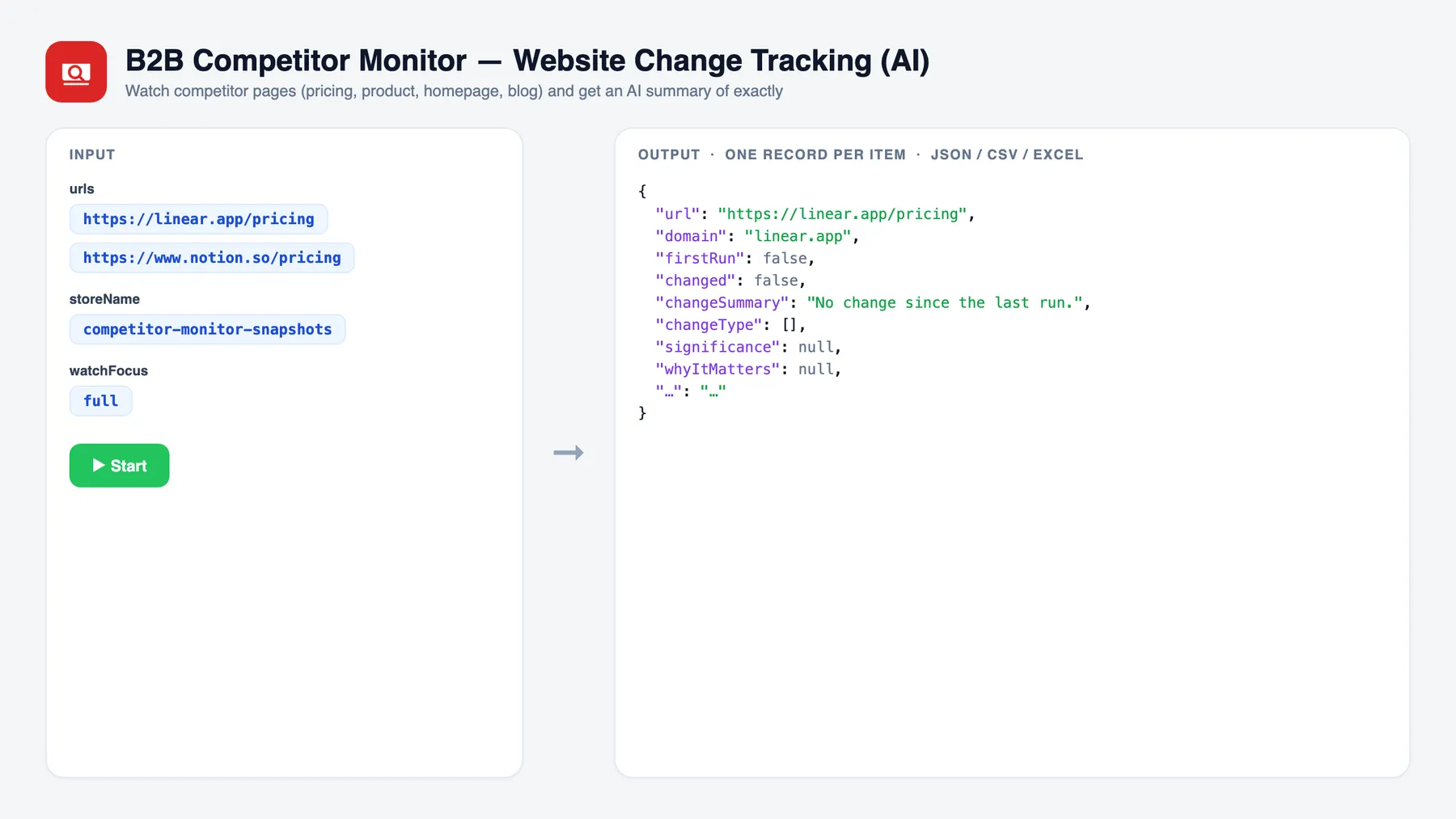
changed—true/false. Did the page's visible content materially change since the last run?firstRun—trueon the very first check of a URL (baseline captured, nothing to compare against yet).changeSummary— a concrete description of what changed, quoting specific prices, plan names, features or wording where possible.changeType— one or more ofpricing,product,feature,messaging,pricing-page,team,legal,other.significance—low/medium/high, how much this change should matter to you.whyItMatters— one sentence of so-what.recommendedAction— one sentence on what to do about it.previousCheckedAt/checkedAt— when the last snapshot and this one were taken.
The AI layer (OpenAI gpt-4o-mini, a fast and low-cost model) is only called when a change is actually detected, so an unchanged page costs you the fetch, not a token.
Three ways people use it
- Competitive intelligence monitoring — keep a standing watch on every rival's key pages and get a plain-English changelog instead of eyeballing sites by hand. The fastest way to track competitor website changes without a full-time analyst.
- Competitor pricing change alerts — watch pricing pages specifically (
watchFocus: "pricing"). The moment a competitor raises prices, adds a tier, drops a discount or changes limits, you'll have the exact before/after and a note on why it matters. - Product launch detection — watch product, changelog and homepage pages (
watchFocus: "product") to catch new features, integrations and repositioning the day they ship — before your prospects start asking about them.
Run it on a schedule
Change tracking only works if you run it repeatedly. A single run just captures a baseline — the value is in the diff between runs.
- Snapshots are stored in the named key-value store set by
storeName(defaultcompetitor-monitor-snapshots). That store survives between runs, so each run compares today's page to the last time the Actor saw it. - Set up a recurring run with Apify Schedules — daily or weekly is typical for pricing and product pages.
- Keep
storeNameidentical across scheduled runs. If you change it, the Actor starts a fresh baseline. Use different store names only when you want to track separate, independent watch lists.
Baseline on day one → real "what changed" reports every run after that.
Input
| Field | Type | Notes |
|---|---|---|
urls | array | Competitor page URLs to watch (pricing, product, homepage, blog). One per line. |
storeName | string | Named key-value store that persists snapshots across runs. Default competitor-monitor-snapshots. Keep it the same between scheduled runs. |
watchFocus | string | Focus the AI summary: full (default), pricing, product, or messaging. |
maxResults | integer | Cap how many URLs to check per run. Default 100. |
maxConcurrency | integer | URLs fetched in parallel. Default 5. |
model | string | Override the OpenAI model. Default gpt-4o-mini. |
Minimal input example
Output example
A first run captures baselines; later runs report real changes. A dataset might look like this:
When a page is unchanged, you get changed: false with changeSummary: "No change since the last run." and no AI call is made.
Pay-per-event pricing
This Actor uses pay-per-event billing with a single event:
| Event | Charged when |
|---|---|
page-checked | Once per URL fetched and compared against its previous snapshot — whether it changed or not. The AI change summary is included when the page changed. |
Price: $0.10 per page checked. The fetch + fingerprint comparison is the unit of work, so you're charged once per URL per run. The Actor logs its OpenAI token usage and estimated AI cost at the end of every run, so the event price stays safely above the model cost.
Setup
The AI change summary calls the OpenAI API. Set the environment variable / secret OPENAI_API_KEY on the Actor. The AI is only called when a change is detected — baseline and unchanged pages never touch OpenAI. Without a key, changes are still flagged (changed: true) but left without an AI summary.
Use it from an AI agent (Apify MCP server)
This Actor is available through the Apify MCP server, so AI agents (Claude, ChatGPT, or anything that speaks MCP) can call it as a tool — hand it a list of urls and a storeName, and read back a structured changelog of what moved on your competitors' pages — with no custom integration code.
Run it locally
Run it twice in a row to see the baseline → diff behaviour: the first run stores snapshots, the second compares against them.
Related actors
- B2B Pricing Extractor — Pull structured pricing plans, tiers and features off any SaaS pricing page.
- B2B Competitor Teardown — A full AI teardown of a competitor's site: positioning, product, pricing and gaps.
- B2B Tech Stack Detector — Detect the technologies, frameworks and tools a company's website is built on.
- Signal Radar — Monitor the web for buying signals and market-moving events around companies you track.


