

Booking.com Hotel Search Scraper | Prices by Dates
Pricing
from $1.91 / 1,000 properties
Booking.com Hotel Search Scraper | Prices by Dates
Get booking.com hotels and other properties for any destination and dates: total stay price, price per night, taxes and fees, rating, stars, address, coordinates, room, free cancellation and meal plan. Many destinations or search URLs per run, filters, currency of your choice, no login.
Pricing
from $1.91 / 1,000 properties
Rating
0.0
(0)
Developer

Flowo
Maintained by CommunityActor stats
0
Bookmarked
2
Total users
1
Monthly active users
5 days ago
Last modified
Categories
Features
Share
Search booking.com by destination, dates and guests and get one row per hotel, apartment or other property. Each row has the live total price for the stay and the price per night in the currency you choose, plus taxes and fees, guest rating, star class, address and coordinates. It also returns the cheapest matching room, free cancellation, meal plan and deal badge.
What does Booking.com Hotel Search Scraper do?
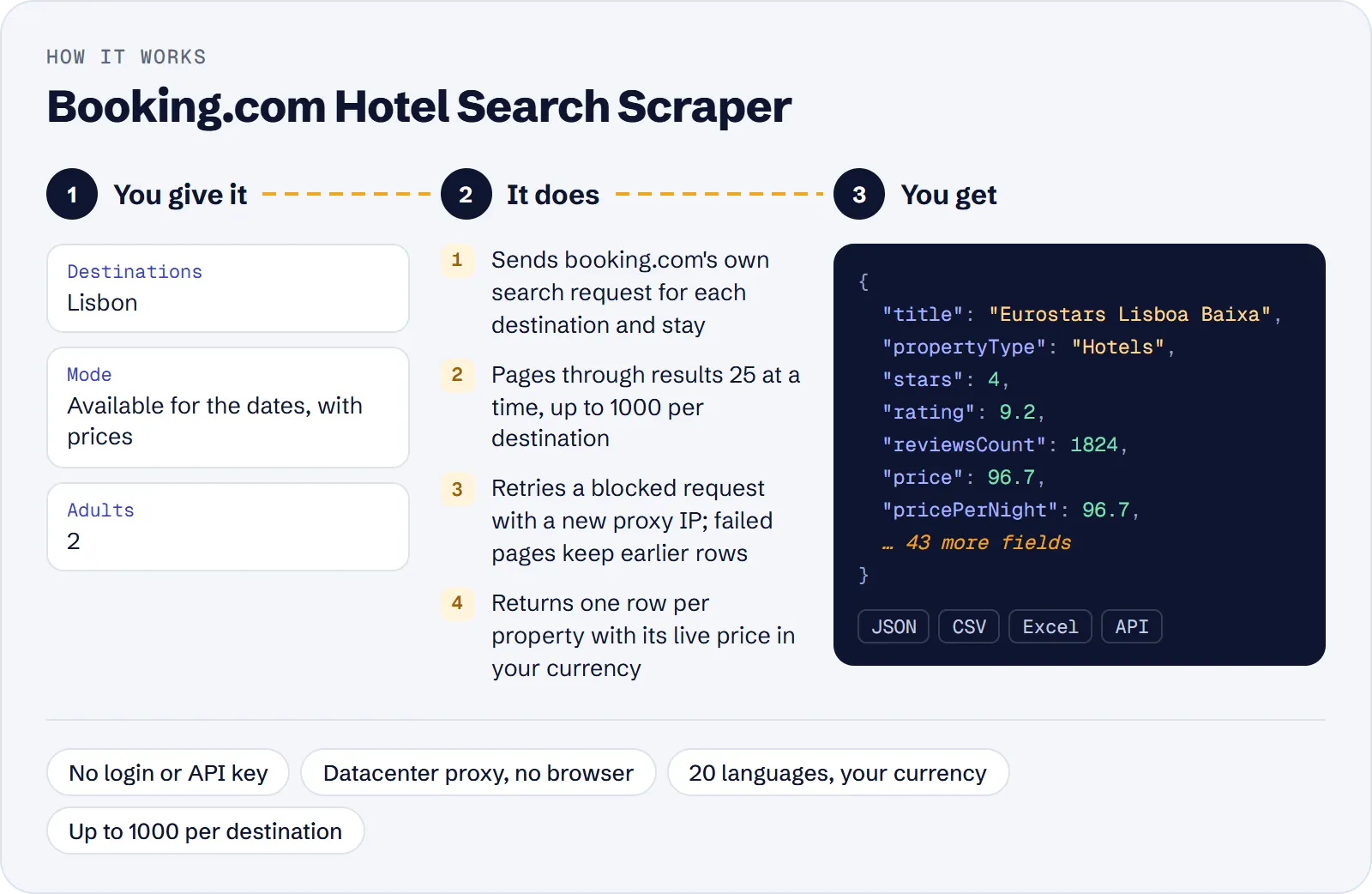
You give it destinations: a city, region, district, landmark, country or hotel name, a numeric booking.com city id, or a booking.com search URL. You also set check-in and check-out dates, adults, rooms and children ages. It runs the same search booking.com runs for a traveller and returns the properties in booking.com's order. You can use booking.com's filters: stars, minimum rating, property type, free cancellation, meal plan and price per night.
Revenue managers use it to track competitor rates. Travel and price-comparison sites use it to collect offers, and analysts use it to map supply and price levels of a market. Without dates (mode: "all") it returns the full list of a destination's properties, with ratings and locations but no prices.
How to scrape Booking.com hotel prices
Price per event by Apify plan:
| Event | Free | Bronze | Silver | Gold and above |
|---|---|---|---|---|
| Property | $2.25 per 1,000 | $2.137 per 1,000 | $2.025 per 1,000 | $1.912 per 1,000 |
| Actor start | $0.00005 | $0.00005 | $0.00005 | $0.00005 |
A test run with the API example input below returned 46 rows in 6 s.
- Open the actor in Apify Console and click Try for free.
- Under Destinations, add one or more places, e.g.
Lisbon,AlgarveorEiffel Tower, one per line. Or paste booking.com search URLs under Booking.com search URLs. - Set Check-in date and Check-out date, Adults, Rooms and, if needed, Children ages. If you leave the dates empty, the stay is 1 night starting 30 days from today.
- Choose a Currency (e.g.
EUR) and, optionally, filters and Sort by. - Set Max results per destination (default 100, up to 1000) and click Start.
- When the run finishes, download the results from the Output tab as JSON, CSV or Excel, or read them through the API.
How much does it cost to scrape Booking.com?
You pay for each property row in the dataset. One property event is one booking.com property from one destination's search. Each run also has an Actor start event, charged once per GB of memory. The actor runs on 256 MB, so that is one start event per run.
You pay nothing for unknown destinations or searches that find no properties. No other events or add-ons are charged.
Example costs on the Free plan, start fee included:
| Scenario | Events | Cost |
|---|---|---|
| One page of Lisbon hotels for your dates | 25 properties + 1 start | $0.05630 |
| One destination, default limit | 100 properties + 1 start | $0.22505 |
| One big city, maximum limit | 1,000 properties + 1 start | $2.25005 |
| Five destinations × 1,000 properties | 5,000 properties + 1 start | $11.25005 |
Input
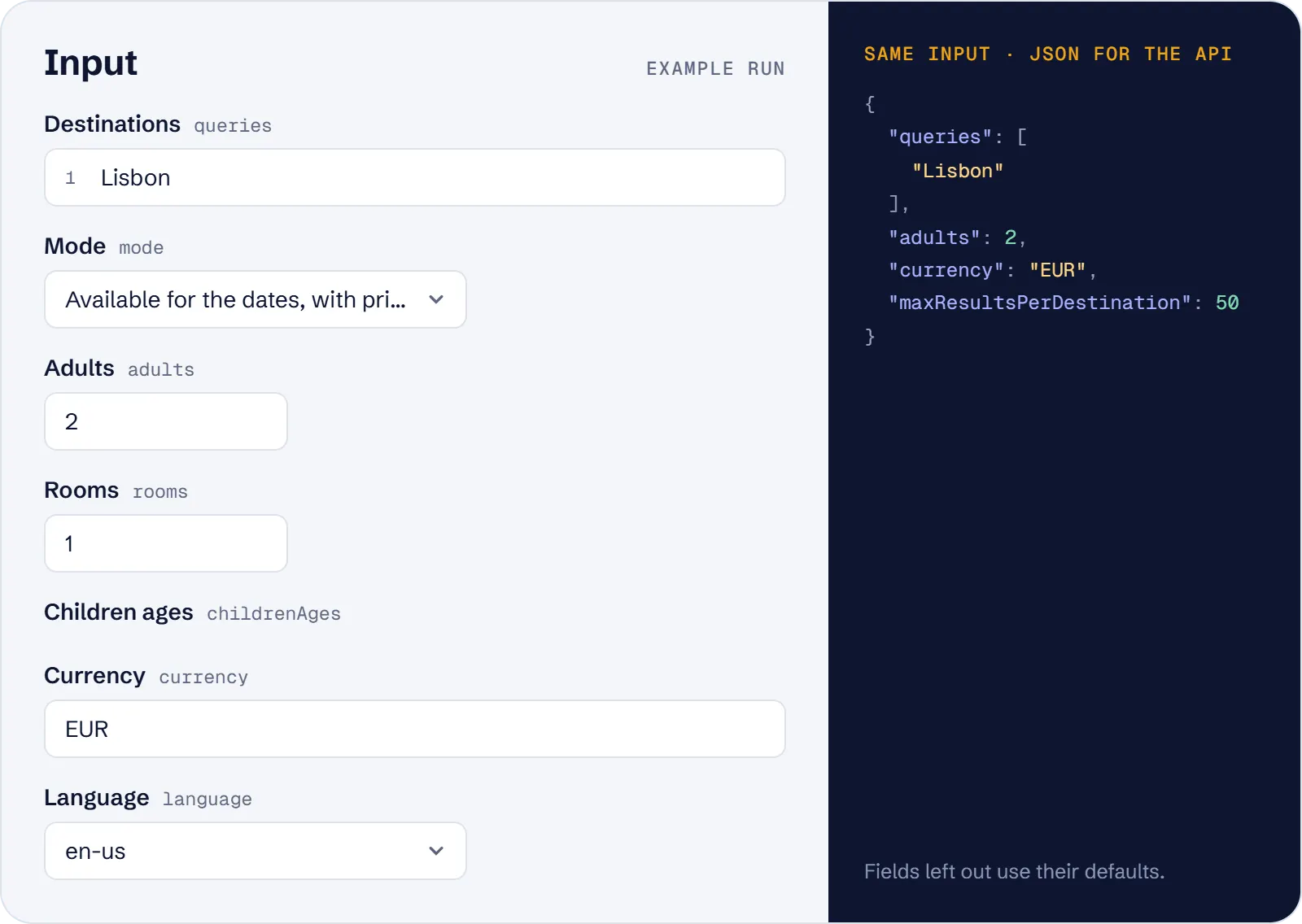
Nothing is required by the form, but a run needs at least one destination in queries or one URL in startUrls.
queries: destinations, one per line. Use free text as you would type it on booking.com, or a numeric booking.com city id such as-2167973(Lisbon). Each destination is a separate search.startUrls: booking.com search result URLs (www.booking.com/searchresults*.html). The destination, dates, guests, children ages, filters (nflt) and sort order in the URL override the form for that URL. Currency, language, mode and limits still come from the form. Hotel page URLs are skipped with a warning.checkIn,checkOut:YYYY-MM-DD. Check-in must be today or later and at most 500 days ahead. The stay can be at most 90 nights. Empty check-in = 30 days from today. Empty check-out = check-in + 1 night. A check-out without a check-in is an error.mode:available(default; bookable for your dates, with prices) orall(every listed property, no dates and no prices).adults(1–30, default 2),rooms(1–30, default 1, not more than adults),childrenAges(one age 0–17 per child, e.g.[4, 9]).currency: ISO 4217 code, defaultUSD. It is always sent to booking.com and is also the currency of the price filters.language: one of 20 booking.com languages (defaulten-us) for names, rating words and distances.sortBy:popularity(booking.com default),price,price_from_high_to_low,review_score_and_price,bayesian_review_score,class,class_asc,distance_from_searchorupsort_bh(homes and apartments first).stars(any of1–5) andpropertyTypes(hotels,apartments,vacationHomes,villas,guesthouses,bedAndBreakfasts,hostels,homestays,chalets,campgrounds,boats,capsuleHotels) work in both modes. Property types follow booking.com's own grouping, so apartments also include aparthotels.minRating(6,7,8,9),freeCancellation,mealPlan(breakfast,breakfastAndDinner,allInclusive),minPriceandmaxPrice(per night, whole units of the currency) work only inavailablemode.filters: an advanced raw booking.com filter string (thenfltparameter),key=valuepairs joined by;. It is added to the filters above.maxResultsPerDestination(1–1000, default 100) andmaxItems(optional cap for the whole run).proxyConfiguration: the default Apify datacenter proxy works.
Example input:
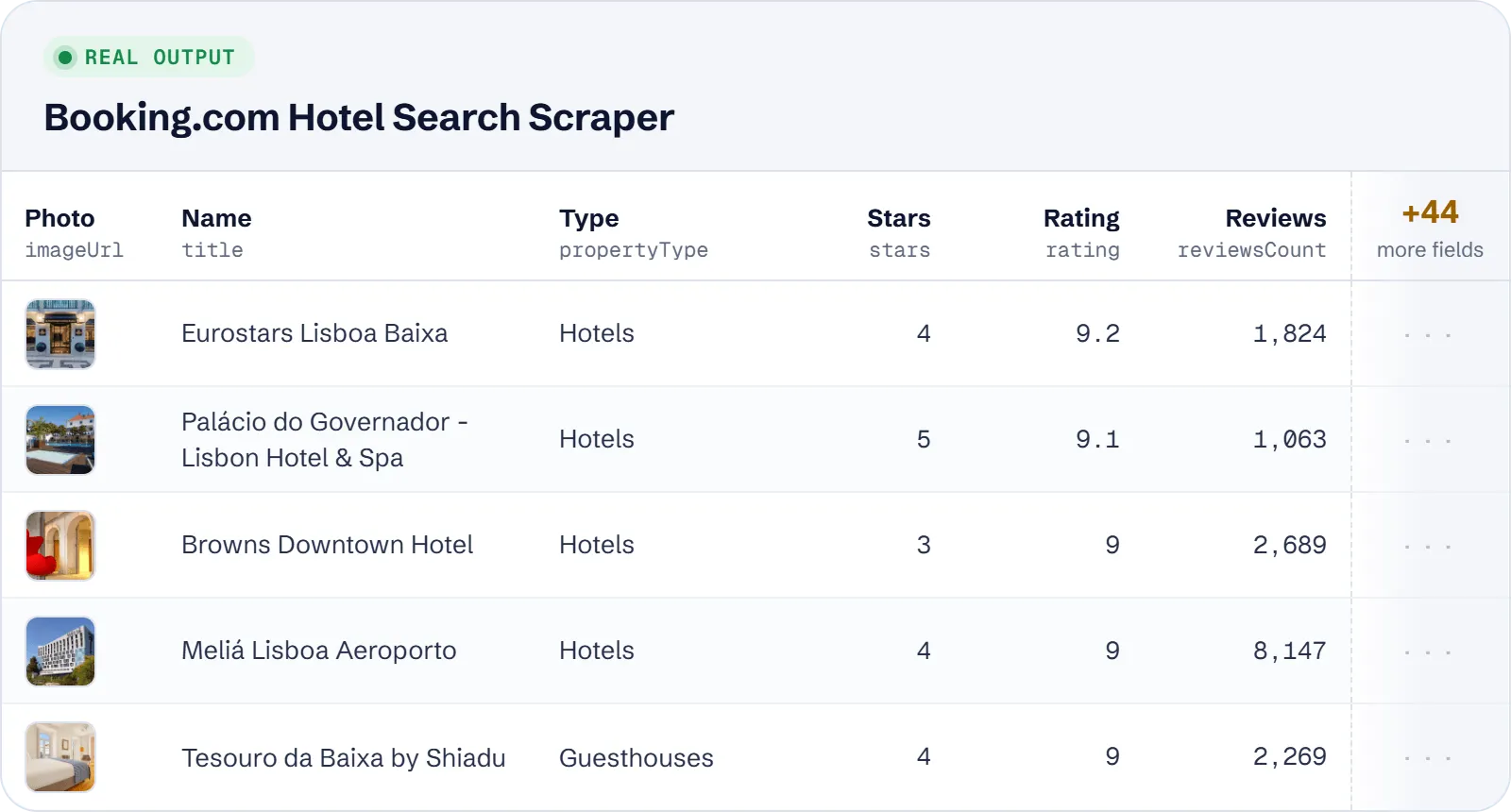
What data can you extract from Booking.com?
| Field | What it is |
|---|---|
id, title, url | booking.com property id, name and property page link with your dates, guests and currency |
query, position | the destination or URL from your input and the 1-based rank in the results |
destination, destinationType, destinationId | the destination as booking.com resolved it (CITY, REGION, DISTRICT, LANDMARK, COUNTRY or HOTEL) |
propertyType, accommodationTypeId | type name (e.g. Hotels, Apartments) and booking.com type id |
stars, starsType | star class 1–5 and whether it is official stars or a booking.com quality rating |
rating, ratingText, reviewsCount | guest score 0–10, its word (e.g. Wonderful) and the number of reviews |
address, city, country, latitude, longitude, location | street address, city, ISO country code, coordinates and district |
distanceFromCenter, publicTransportDistance, beachDistance | distance texts as booking.com shows them |
checkIn, checkOut, nights, adults, rooms, childrenAges | the stay that was searched |
price, pricePerNight, priceBeforeDiscount, taxesAndFees, currency | total for the stay (before taxes and fees not included), per night, crossed-out price, extra taxes and charges, currency code |
dealBadge, roomsLeftMessage | deal name and scarcity text, e.g. "We have 7 left at this price" |
roomName, bedrooms, bathrooms, unitArea | the cheapest matching room or unit |
freeCancellation, freeCancellationUntil, noPrepayment, mealPlan | offer conditions |
isSoldOut, preferred, hostType | sold out flag, booking.com Preferred Partner, PROFESSIONAL or PRIVATE host |
imageUrl, scrapedAt | main photo (600×600 JPG) and extraction time |
A real row from a Lisbon search (1 night, 2 adults, EUR):
Use cases
- Competitor rate tracking: hoteliers and revenue managers check the prices of nearby hotels for given dates, e.g. Lisbon, January 15–17, 2 adults, in EUR.
- Filtered shortlists: 4-star hotels in Paris rated 8+ with free cancellation under 200 per night, cheapest first.
- Family trips: prices and availability for 2 adults and children aged 4 and 9 in Ubud, with breakfast included.
- Market catalogues: every listed apartment and vacation home in the Algarve or the Alfama district, with ratings and coordinates (
mode: "all"). - Replaying a browser search: paste a booking.com search URL to get the same search as on the site, as data.
Limitations
- booking.com shows at most 1,000 properties per search. To get more from a big destination, split it into districts, star classes or property types.
- The data comes from the search results only. Facilities, descriptions, per-room rate tables and review texts are not included.
- Prices are the public rates booking.com shows to a visitor who is not logged in (no Genius discounts).
- In
mode: "all", the price and offer fields (price…roomsLeftMessage) andcheckIn,checkOut,nightsare null. Only the stars and property type filters work there. - Many fields can be empty when booking.com does not show them. Examples:
starsfor unrated properties,ratingwith no reviews,priceBeforeDiscountwithout a deal,mealPlanandfreeCancellationUntilfor offers without them,beachDistanceaway from beaches,unitAreaoutside apartment-type units. - booking.com sometimes reshuffles results between pages, so a destination can return a few rows fewer than the limit. Duplicates are dropped.
- If booking.com does not offer the currency you asked for, the rows keep the currency it actually returned and the log shows a warning.
Tips and troubleshooting
- 0 rows for a destination? Check the log. It says whether booking.com did not recognise the destination or found no properties for these dates and filters. Try a more specific name (e.g.
Alfama, Lisbon) or relax the filters. - Input errors stop the run before any request: dates in the past or more than 500 days ahead, a stay over 90 nights, more rooms than adults, a child age outside 0–17, an invalid currency code, a minimum price above the maximum, or available-only filters used in
mode: "all". - Filters of different kinds combine with AND. Several values of one filter (e.g. stars
4and5) combine with OR. - A filter string in a start URL (
nflt) replaces all form filters for that URL. - Unknown keys in the raw
filtersstring are ignored by booking.com without an error, so check the result count after adding one. - The default datacenter proxy and 256 MB memory are enough. Prices do not depend on the proxy country, because the currency is always sent.
API, MCP and integrations
Run the actor from your code with the same JSON input as in Console. Your API token is in Console → Settings → API & Integrations.
Python (pip install apify-client):
Node.js (npm install apify-client):
HTTP — one request runs the actor and returns the results (runs up to 5 minutes; longer ones: run asynchronously):
AI agents (MCP). Add the actor as a tool of the Apify MCP server. Claude Code:
Claude Desktop, Cursor or VS Code: {"mcpServers": {"apify": {"url": "https://mcp.apify.com?tools=genial_candlestand/booking-com-hotel-search-scraper"}}}. Then ask, for example:
- "Find 4-star hotels in Lisbon under 150 EUR per night with free cancellation for Jan 15-17, 2027"
- "List hotel prices in Paris for 2 adults, Jan 15-17 2027, rated 8 or higher, cheapest first"
- "Get all apartments and vacation homes listed in the Algarve with ratings and coordinates"
Integrations. Run it on a schedule with Apify Schedules and send the results to Google Sheets, Slack, Zapier, Make, n8n or your webhook — see Apify integrations.
FAQ
Can I search by booking.com URL instead of a destination name?
Yes. Paste booking.com search result URLs into startUrls. The destination, dates, guests, children ages, filters and sort order from the URL are used. Hotel page URLs are not supported.
Are the prices per night or for the whole stay?
Both. price is the total for the stay for your guests and rooms, before the taxes and charges in taxesAndFees. pricePerNight is price divided by nights.
Can I get properties without choosing dates?
Yes, with mode: "all". You get every listed property of the destination with ratings and locations, but no prices.
How is it different from other Booking.com actors?
It always sends your currency, so prices do not depend on the proxy's country. Prices come as plain numbers: total, per night, before discount, plus taxes and fees. It has filters for stars, rating, 12 property types, free cancellation, meal plan and price per night, and it takes children ages. Every row also shows the destination booking.com resolved, with its type and id. The price is $2.25 per 1,000 properties; the most used Booking.com actor in the Store charges $5.
Is it legal to scrape Booking.com?
The actor reads public search results that booking.com shows to any visitor without a login. It does not collect guests' personal data. You are responsible for how you use the data and for following booking.com's terms and the laws that apply to you.
Also useful
- Google Hotels Scraper — compare the same hotels on Google Hotels: nightly price, total with taxes, rating and amenities
- Airbnb Scraper — add Airbnb listings for the same destination and dates: stay price, per night and rating
- Google Flights Scraper — price the flights for the same trip: fares, airlines, times and stops by route and dates
- Yelp Business Scraper — list restaurants and businesses of the same destination: rating, phone, website and hours


