

Sofascore Scraper | Live Scores, Fixtures & Standings
Pricing
from $0.64 / 1,000 match or table rows
Sofascore Scraper | Live Scores, Fixtures & Standings
Get Sofascore matches for 20 sports as flat rows: home and away team, score, period scores, status, start time, league and season. Fixtures and results of any date, live scores, season matches, league tables, optional venue, referee and match statistics (xG, possession). IDs or URLs, no login.
Pricing
from $0.64 / 1,000 match or table rows
Rating
0.0
(0)
Developer

Flowo
Maintained by CommunityActor stats
0
Bookmarked
2
Total users
1
Monthly active users
5 days ago
Last modified
Categories
Features
Share
Get Sofascore match data as flat rows: home and away team, final score and period scores, match status, start time, league, round and season for 20 sports. Switch modes to get live scores, the matches of a league season, league tables with points, wins and losses, or single matches with venue, referee and full-match statistics such as possession, expected goals (xG) and corner kicks.
What does Sofascore Scraper do?
You pick a mode and the actor returns one row per match or one row per league-table position from Sofascore. A day schedule covers every country and league of the chosen sports, and the day is read in your timezone, so "today in New York" means exactly that. Competitions and matches can be given as Sofascore IDs or as sofascore.com URLs. It is built for sports analysts, bettors, fantasy and media sites, and developers who need scores, fixtures and tables without learning Sofascore's IDs and endpoints. No login or API key is needed.
How to scrape Sofascore scores and fixtures
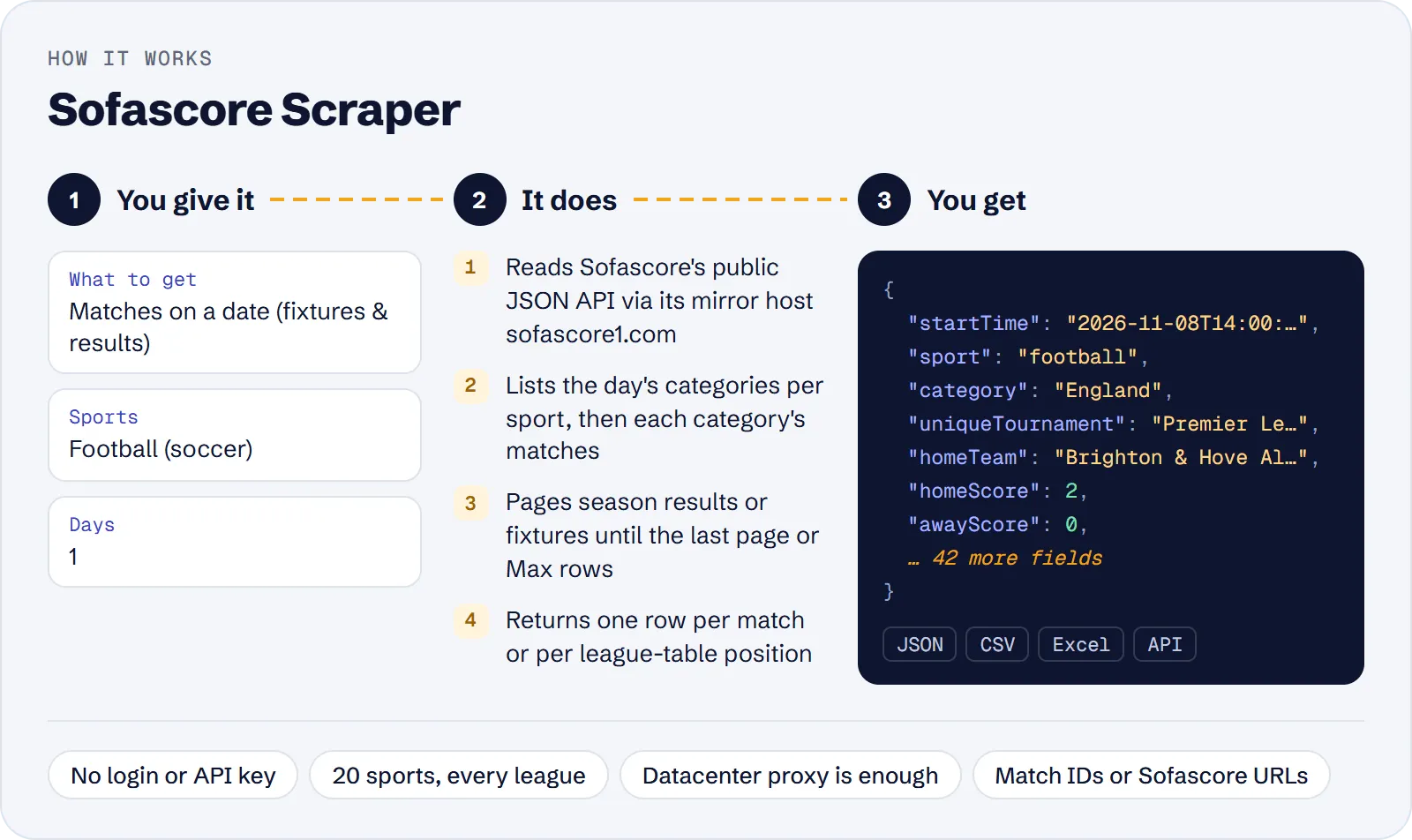
- Open the actor in Apify Console and choose What to get: matches on a date, live matches now, league season matches, league standings or specific matches.
- For a date schedule or live scores, pick the Sports (football, tennis, basketball, ice hockey and 16 more) and, for a date, the Date, Days and Timezone.
- For season matches or standings, add Tournaments: an ID such as
17(Premier League) or a Sofascore tournament URL. Optionally set the Season, e.g.25/26. - For single matches, add Matches: match IDs or Sofascore match URLs.
- Optionally switch on Include match details (venue, referee) and Include match statistics, and set Max rows.
- Click Start and download the rows as JSON, CSV or Excel, or read them through the API.
How much does it cost to scrape Sofascore?
Price per event by Apify plan:
| Event | Free | Bronze | Silver | Gold and above |
|---|---|---|---|---|
| Match or table row | $0.75 per 1,000 | $0.713 per 1,000 | $0.675 per 1,000 | $0.638 per 1,000 |
| Match statistics | $1.00 per 1,000 | $0.95 per 1,000 | $0.90 per 1,000 | $0.85 per 1,000 |
| Actor start | $0.00005 | $0.00005 | $0.00005 | $0.00005 |
A test run with the API example input below returned 30 rows in 7 s.
One paid result event is one row in the dataset: one match or one league-table position. Match statistics are an add-on: one match-statistics event per match row that actually received statistics. Venue and referee details are not charged extra. Matches for which Sofascore has no statistics are not charged the add-on, and a run that finds nothing produces no result events.
| Scenario | Events | Cost on the Free plan |
|---|---|---|
| Default run: 100 football matches of today | 100 result + start | about $0.075 |
| Premier League table (20 positions) | 20 result + start | about $0.015 |
| 1,000 matches of a weekend schedule | 1,000 result + start | about $0.75 |
| 500 matches with statistics, 200 of them have statistics | 500 result + 200 match-statistics + start | about $0.575 |
The start fee is $0.00005 per GB of run memory, a tiny fraction of a cent.
Input
| Field | What it does |
|---|---|
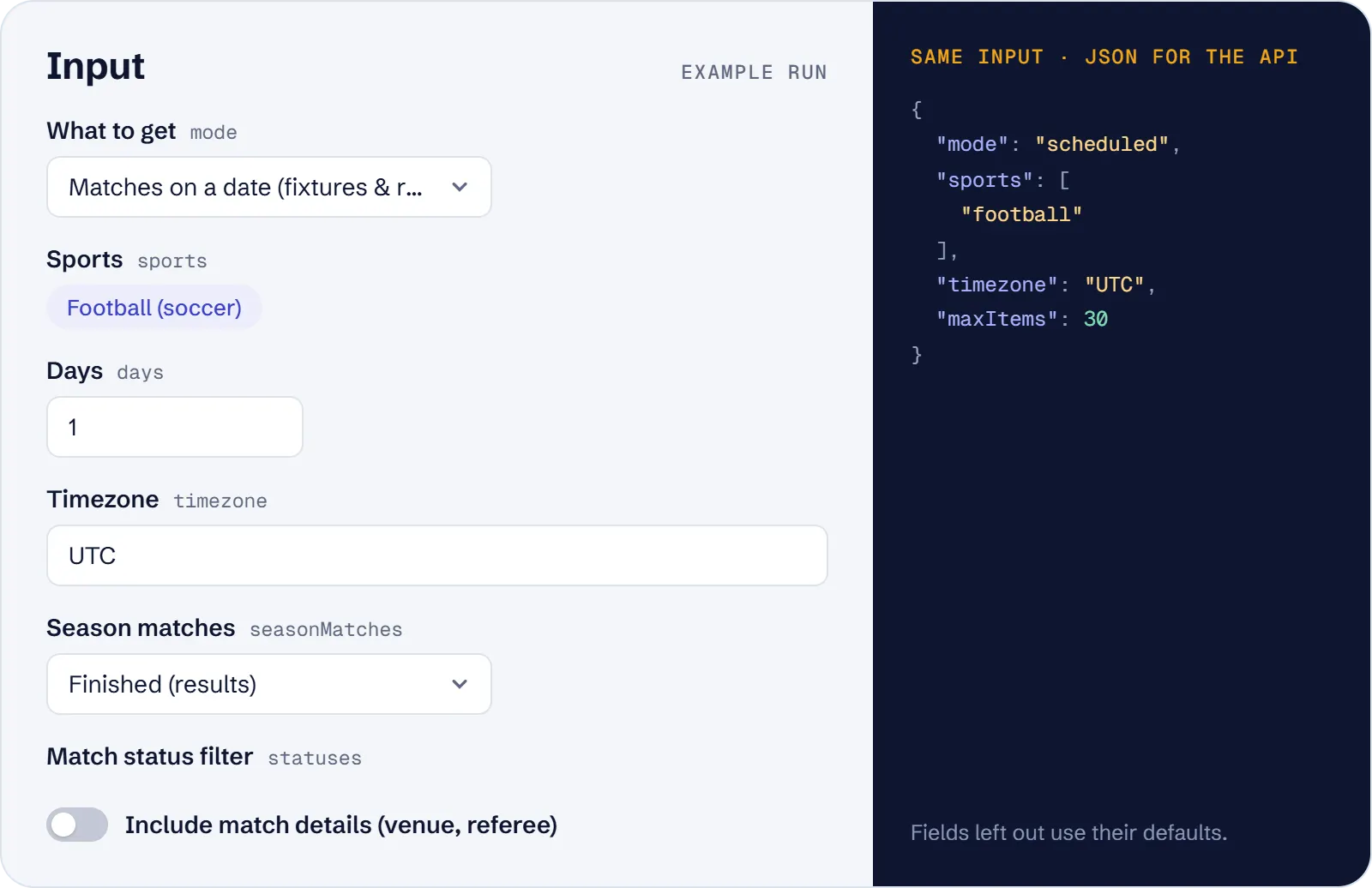
mode | scheduled (matches on a date, default), live, tournament (league season matches), standings (league tables) or matches (specific matches) |
sports | For scheduled and live: one or more of 20 sports — football, tennis, basketball, ice-hockey, american-football, baseball, volleyball, handball, cricket, rugby, esports, futsal, table-tennis, darts, badminton, padel, aussie-rules, floorball, waterpolo, minifootball. Default football |
date | For scheduled: first day, YYYY-MM-DD. Empty = today in timezone. Past dates give results, future dates give fixtures |
days | For scheduled: consecutive days from date, 1–14 (default 1) |
timezone | IANA timezone (e.g. Europe/London) that defines the day in scheduled mode and the matchDate column. Default UTC |
tournaments | Competition IDs or tournament URLs. Required for tournament and standings; in scheduled and live it keeps only matches of these competitions |
season | For tournament and standings: season label (25/26, 2025) or season ID. Empty = current season |
seasonMatches | For tournament: finished (latest results first, default), upcoming (next fixtures first) or all |
matches | Required for matches mode: match IDs or Sofascore match URLs |
statuses | For scheduled and tournament: keep only notstarted, inprogress, finished, postponed and/or canceled matches. Empty = all |
includeDetails | Adds venue, city, country, capacity and referee (no extra charge). Always on in matches mode; not used for standings |
includeStatistics | Adds full-match stat*Home / stat*Away columns, charged per match that has statistics; not used for standings |
maxItems | Stop after this many rows (default 100) |
proxyConfiguration | Apify Proxy; the datacenter proxy (default) is enough |
Example — every football match of 8 November 2026, London time:
Example — Premier League and LaLiga tables of the current season:
What data can you extract from Sofascore?
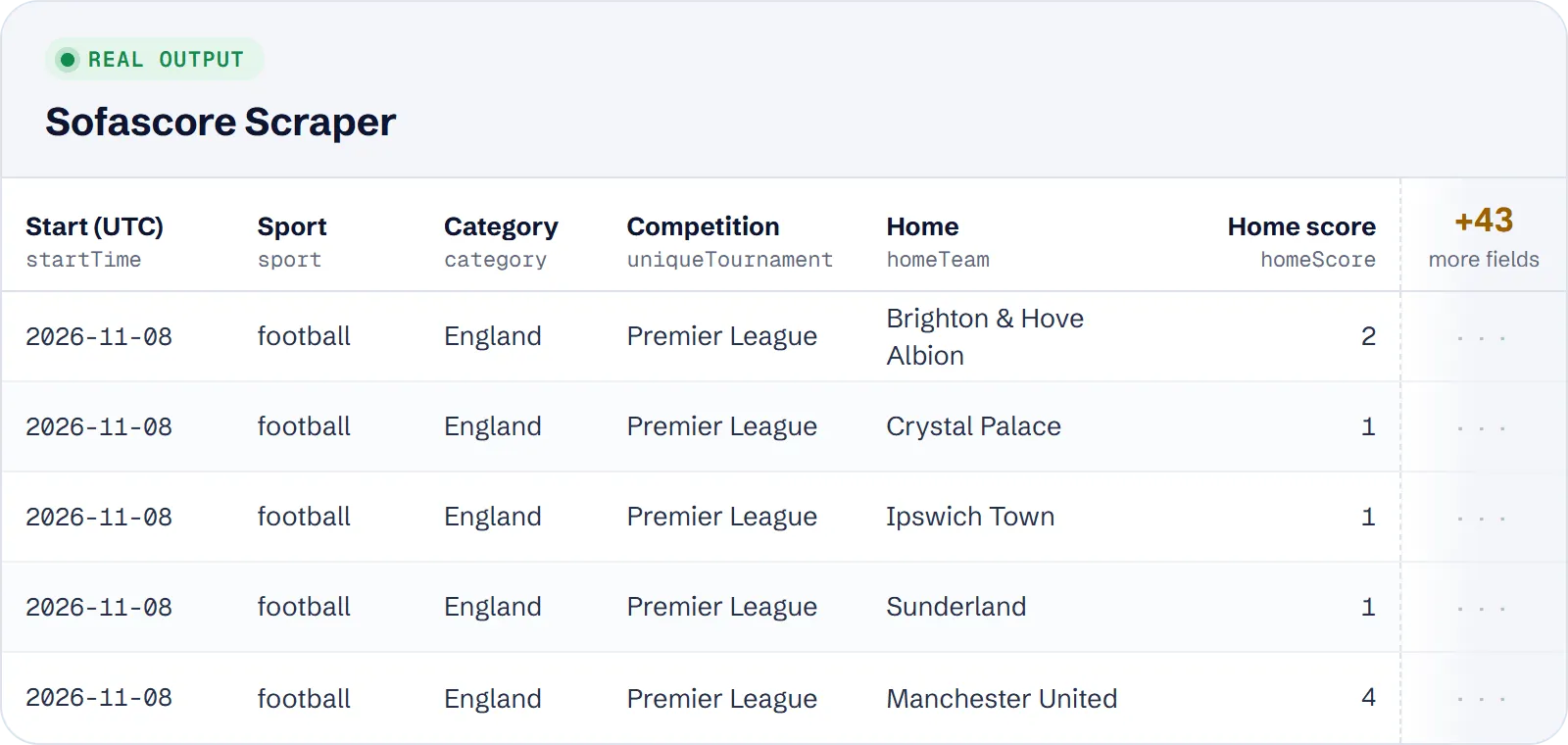
Each run has one row shape: match rows (recordType: "match") in the scheduled, live, tournament and matches modes, or table rows (recordType: "standing") in standings mode. Every row has url and scrapedAt.
| Group | Fields |
|---|---|
| Match identity | recordType, url, title, matchId, customId, sport |
| Competition | category, categoryId, tournament, uniqueTournament, uniqueTournamentId, seasonId, season, round, roundName |
| Status and time | status, statusDescription, statusCode, startTime (UTC), matchDate (in your timezone) |
| Teams | homeTeam, homeTeamId, homeTeamShortName, homeTeamCode, awayTeam, awayTeamId, awayTeamShortName, awayTeamCode |
| Scores | homeScore, awayScore, homeScorePeriod1…homeScorePeriod5, awayScorePeriod1…awayScorePeriod5, homeScoreOvertime, awayScoreOvertime, homeScorePenalties, awayScorePenalties, winner (home, away or draw) |
| Coverage flags | hasXg, hasPlayerStatistics, finalResultOnly |
| Details (optional) | venue, venueCity, venueCountry, venueCapacity, referee |
| Statistics (optional) | statisticsAvailable and full-match pairs such as statBallPossessionHome/Away, statExpectedGoalsHome/Away, statTotalShotsOnGoal…, statShotsOnGoal…, statBigChanceCreated…, statCornerKicks…, statFouls…, statOffsides…, statYellowCards…, statRedCards…, statPasses…, statAccuratePasses…, statGoalkeeperSaves…; basketball, tennis and other sports add their own stat<Key>Home / stat<Key>Away columns |
| Table rows | standingsName, position, team, teamId, matches, wins, draws, losses, scoresFor, scoresAgainst, scoreDiff, points, winPercentage, promotion, plus category, uniqueTournament, uniqueTournamentId, seasonId, season |
A real match row (Premier League, 8 November 2026, shortened — null period columns removed):
Use cases
- Daily results and fixtures feeds: pull every match of a day (or up to 14 days) for one or more sports into a sheet or database on a schedule.
- Live score widgets: poll
livemode for basketball, ice hockey or tennis matches in play, with period and set scores. - Betting and analytics models: collect a league season's finished matches with xG, shots, possession and cards from the statistics columns.
- League tables for media and fantasy sites: fetch the current or a past season's table, including conferences, divisions and groups.
- AI agents: answer "the Premier League table" or "today's NBA scores" from documented columns instead of raw JSON.
Limitations
- The actor reads Sofascore's public JSON through Sofascore's own mirror host
sofascore1.com. If Sofascore closes that host or puts a captcha on it, runs fail with a clear "blocked" error; captchas are never solved. - Coverage varies by league: lower leagues often have no venue, referee, statistics or xG. Such rows have empty detail columns and
statisticsAvailable: false. - Scores are empty before kick-off, and
winneris empty until the match is finished.pointsis empty in tables ranked by win percentage (e.g. NBA), wherewinPercentageis filled instead. - Cups and tennis tournaments have no league table; the actor logs a warning and continues with the next tournament.
- Player data, lineups, incidents and odds are not returned.
- One mode per run.
daysis limited to 14. A full football day has about 9,000 matches, so raisemaxItemswhen you need all of them.
Tips and troubleshooting
- A day schedule stops at 100 rows: that is the default
maxItems. Matches come in Sofascore's category order (England, Spain … first), so a low limit returns the top countries only. - Only some leagues: add their IDs to
tournamentsinscheduledorlivemode; only matches of those competitions are kept. The ID is the last number of the tournament URL (…/premier-league/17). - Only results or only upcoming fixtures: use
statusesinscheduledandtournamentmode, orseasonMatchesintournamentmode.statusesis ignored inlive,standingsandmatchesmodes. - 0 rows: in
livemode nothing may be in play for that sport right now; withseasonset, check that the label matches Sofascore's (e.g.25/26for football,2025for single-year seasons) — an unknown season is skipped with a warning. - Input error before the run starts:
tournamentandstandingsneedtournaments,matchesmode needsmatches, andmatchesmust not be set in other modes. - Proxy: the default Apify datacenter proxy is enough; residential is not needed.
API, MCP and integrations
Run the actor from your code with the same JSON input as in Console. Your API token is in Console → Settings → API & Integrations.
Python (pip install apify-client):
Node.js (npm install apify-client):
HTTP — one request runs the actor and returns the results (runs up to 5 minutes; longer ones: run asynchronously):
AI agents (MCP). Add the actor as a tool of the Apify MCP server. Claude Code:
Claude Desktop, Cursor or VS Code: {"mcpServers": {"apify": {"url": "https://mcp.apify.com?tools=genial_candlestand/sofascore-scraper"}}}. Then ask, for example:
- "Get today's NBA scores and period scores from Sofascore"
- "Show the current Premier League table with points, wins and losses"
- "List all football matches on 2026-11-08 in Europe/London time with xG and possession"
Integrations. Run it on a schedule with Apify Schedules and send the results to Google Sheets, Slack, Zapier, Make, n8n or your webhook — see Apify integrations.
FAQ
Is it legal to scrape Sofascore?
The actor collects public match data that Sofascore shows without a login. It returns team, competition and score data, plus the referee's name when details are requested, as Sofascore publishes them. You are responsible for how you use the data, including Sofascore's terms and the laws that apply to you.
Can I get historical results?
Yes. Any past date works in scheduled mode, and tournament mode with a season returns a past season's matches; standings with season returns a past table.
Do I need to know Sofascore IDs?
No. You can paste sofascore.com tournament and match URLs; the actor reads the ID from them. The matchId and uniqueTournamentId columns give you IDs for later runs.
How is it different from other Sofascore actors?
It returns one flat, documented row shape per mode with statistics as separate columns, accepts both IDs and URLs, reads dates in your timezone and works on the datacenter proxy. A row costs $0.75 per 1,000, while the Sofascore actor with the most monthly users in our comparison charges $4.80 per 1,000 rows.
How fresh are live scores?
Each run reads the scores at the moment of the request; the source caches them for only a few seconds. Schedule repeated runs for continuous updates.
Also useful
- Flashscore Scraper — cross-check results and fixtures from Flashscore: match scores, schedules and stats
- Google News Scraper — follow news articles about the teams and leagues you track
- Google Trends Scraper — measure search interest in clubs, players and tournaments by region
- YouTube Search Scraper — find match highlight videos with views and channels


